堆叠式流程图编辑器(html 开源)1. 属性面板(右侧)
可编辑节点文本、类型、颜色、大小
实时预览更改效果
提供删除节点按钮
2. 节点交互
单击选中:点击节点选中,高亮显示
双击编辑:双击节点直接聚焦到文本输入框
拖拽移动:可拖拽节点,连线自动更新
右键菜单:提供创建、删除、置顶、置底功能
3. 编辑功能
文本编辑:实时修改节点文字
类型切换:主节点 ↔ 分支节点
颜色自定义:提供粉色系颜色选择
大小调整:可自定义节点宽高
节点删除:删除节点及关联连线
4. 历史记录
撤销/重做(Ctrl+Z / Ctrl+Y)
工具栏按钮状态管理
支持最多50步历史记录
5. 其他增强
键盘快捷键:Delete删除选中节点
自适应视图:优化显示所有节点
右键创建:在任意位置创建新节点
提示消息:操作反馈
6. 保持原有功能
Markdown导入生成堆叠式流程图
主节点之间的自动连线
粉色系视觉设计
滚轮缩放和画布拖拽
使用说明:
导入Markdown:点击工具栏"导入Markdown"按钮
编辑节点:单击选中节点,在右侧属性面板修改
创建节点:双击空白处或右键菜单
删除节点:选中节点后按Delete键或使用属性面板按钮
移动节点:直接拖拽节点
撤销/重做:使用工具栏按钮或Ctrl+Z/Ctrl+Y
调整视图:使用自适应视图按钮
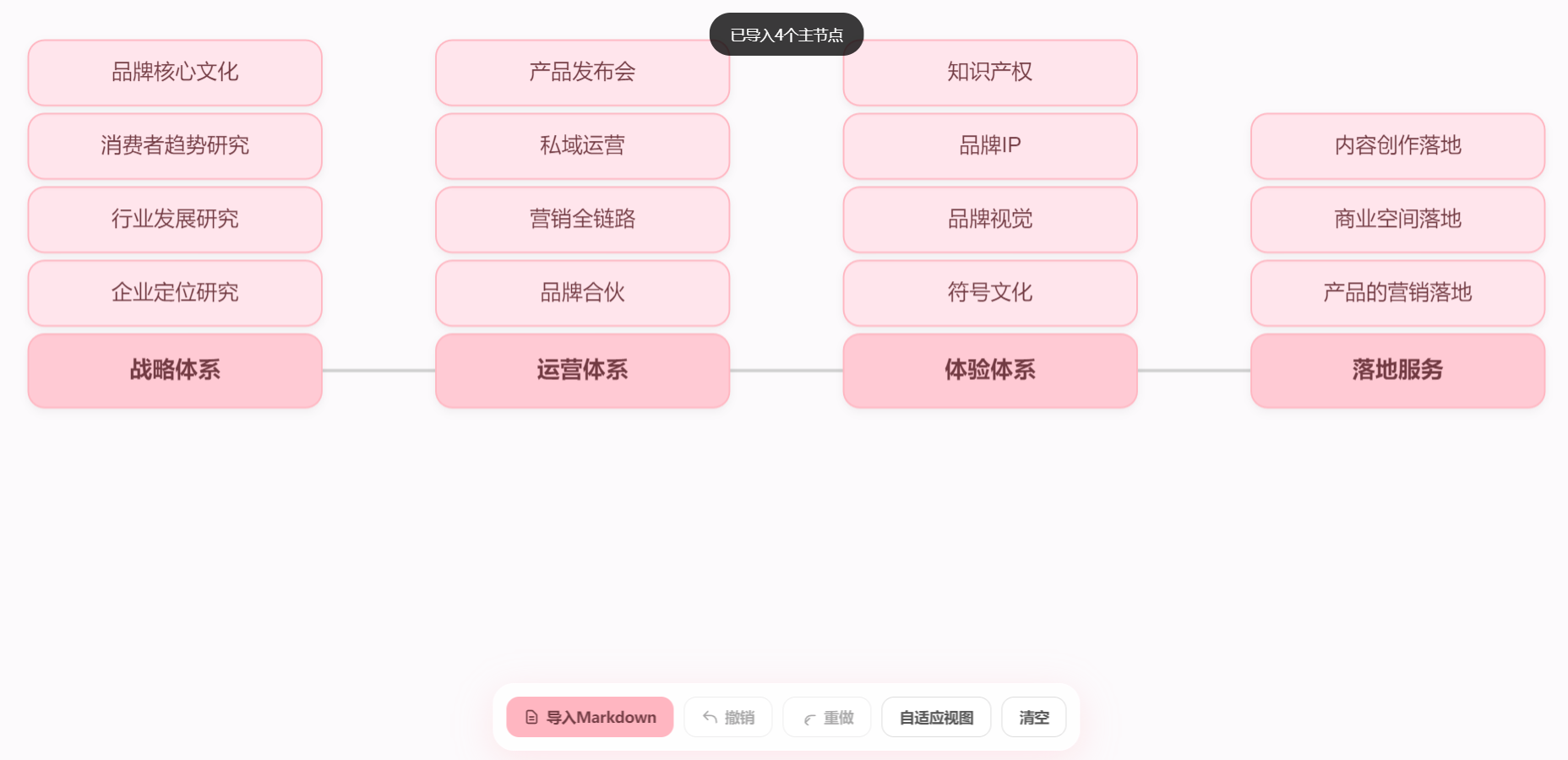
✨ 特性
🎨 核心功能
Markdown导入:通过简单的Markdown语法快速生成堆叠式流程图
堆叠布局:主节点在底部,分支节点向上堆叠,形成层次结构
自动连线:主节点之间自动创建横向连接线
响应式设计:自适应不同屏幕尺寸,支持触摸操作
🛠️ 编辑功能
属性面板:右侧属性面板实时编辑节点属性
多种颜色主题:内置粉色系颜色方案,支持自定义
节点类型切换:主节点与分支节点一键切换
尺寸调整:可自定义节点的宽度和高度
双击编辑:双击节点快速编辑文本
右键菜单:提供创建、删除、置顶、置底等操作
拖拽移动:支持节点自由拖拽,连线自动更新
⚡ 高级功能
撤销/重做:支持历史记录管理(最多50步)
快捷键支持:
Delete/Backspace:删除选中节点
Ctrl+Z:撤销操作
Ctrl+Y/Ctrl+Shift+Z:重做操作自适应视图:一键调整画布显示所有节点
滚轮缩放:支持鼠标滚轮缩放画布
画布拖拽:可拖动画布背景移动视图
🚀 快速开始
在线使用
直接将HTML文件在浏览器中打开即可使用,无需服务器环境。
本地运行
下载项目文件
用浏览器打开
index.html开始创建流程图
📋 使用方法
1. 导入Markdown
使用简单的Markdown语法定义流程图结构:
# 主节点标题
- 分支节点1
- 分支节点2
- 分支节点3

# 第二个主节点
- 子项1
- 子项2
语法说明:
#开头:主节点标题
-或*开头:分支节点支持中文和特殊字符
2. 编辑节点
选中节点:单击节点
修改文本:在属性面板中输入新文本
更改颜色:从颜色选择器中选择
调整大小:输入宽度和高度值
切换类型:点击"主节点"或"分支节点"按钮
3. 创建新节点
双击画布:在双击位置创建新节点
右键菜单:在画布上右键选择"新建节点"
4. 视图控制
缩放:使用鼠标滚轮
移动:拖动画布背景
适应视图:点击工具栏"自适应视图"按钮
清空:点击"清空"按钮重置画布
🎨 设计特色
视觉风格
粉色系配色:柔和的主色调,舒适的视觉体验
胶囊形状:圆角矩形节点,现代感设计
阴影效果:微妙的阴影增强层次感
毛玻璃效果:工具栏和属性面板的半透明背景
交互反馈
选中高亮:蓝色边框标识当前选中节点
实时预览:属性修改即时生效
操作提示:顶部Toast消息反馈操作结果
悬停效果:按钮和颜色选项的悬停动画
html
<!DOCTYPE html>
<html lang="zh-CN">
<head>
<meta charset="UTF-8">
<meta name="viewport" content="width=device-width, initial-scale=1.0">
<title>FlowChart Pro - 堆叠式流程图编辑器</title>
<script src="https://cdn.tailwindcss.com"></script>
<script src="https://unpkg.com/konva@9.2.0/konva.min.js"></script>
<style>
:root {
--bg-color: #fcfafc;
--primary-pink: #ffb6c1;
}
body {
width: 100vw; height: 100vh;
overflow: hidden; background: var(--bg-color);
font-family: "PingFang SC", "Microsoft YaHei", sans-serif;
}
#container {
width: 100%;
height: 100%;
position: relative;
cursor: default;
}
.toolbar {
position: fixed;
bottom: 24px;
left: 50%;
transform: translateX(-50%);
z-index: 1000;
display: flex;
gap: 10px;
background: rgba(255, 255, 255, 0.8);
padding: 12px;
border-radius: 20px;
backdrop-filter: blur(10px);
box-shadow: 0 8px 32px rgba(255, 182, 193, 0.3);
border: 1px solid rgba(255, 255, 255, 0.5);
}
.btn {
padding: 8px 16px;
border-radius: 12px;
font-size: 14px;
font-weight: 600;
transition: all 0.2s;
display: flex;
align-items: center;
gap: 6px;
cursor: pointer;
border: none;
}
.btn-pink {
background: #ffb6c1;
color: #723b43;
}
.btn-pink:hover {
background: #ffa2b0;
transform: translateY(-2px);
}
.btn-secondary {
background: #fff;
border: 1px solid #ddd;
color: #555;
}
.btn-secondary:hover {
background: #f0f0f0;
}
.btn:disabled {
opacity: 0.5;
cursor: not-allowed;
}
.btn:disabled:hover {
transform: none;
background: inherit;
}
/* 属性面板 */
#property-panel {
position: fixed;
top: 24px;
right: 24px;
width: 280px;
background: rgba(255, 255, 255, 0.95);
border-radius: 20px;
box-shadow: 0 8px 32px rgba(255, 182, 193, 0.3);
z-index: 1000;
padding: 20px;
backdrop-filter: blur(10px);
border: 1px solid rgba(255, 255, 255, 0.5);
display: none;
}
.panel-header {
font-size: 16px;
font-weight: 600;
color: #ff6b9d;
margin-bottom: 20px;
display: flex;
align-items: center;
gap: 8px;
}
.property-group {
margin-bottom: 16px;
}
.property-label {
font-size: 12px;
color: #666;
margin-bottom: 6px;
display: block;
}
.property-input {
width: 100%;
padding: 8px 12px;
border: 1px solid #e5e7eb;
border-radius: 8px;
font-size: 13px;
background: transparent;
color: #333;
}
.property-input:focus {
outline: none;
border-color: #ffb6c1;
}
.color-picker-wrapper {
display: flex;
gap: 8px;
flex-wrap: wrap;
}
.color-btn {
width: 28px;
height: 28px;
border-radius: 8px;
border: 2px solid transparent;
cursor: pointer;
transition: all 0.2s;
}
.color-btn:hover {
transform: scale(1.1);
}
.color-btn.active {
border-color: #ff6b9d;
box-shadow: 0 0 0 2px rgba(255, 107, 157, 0.3);
}
/* 右键菜单 */
.context-menu {
position: fixed;
display: none;
background: rgba(255, 255, 255, 0.95);
border: 1px solid #e5e7eb;
box-shadow: 0 8px 32px rgba(0,0,0,0.15);
padding: 6px;
border-radius: 12px;
z-index: 2000;
min-width: 180px;
backdrop-filter: blur(10px);
}
.menu-item {
padding: 8px 12px;
font-size: 13px;
cursor: pointer;
color: #333;
border-radius: 6px;
display: flex;
align-items: center;
justify-content: space-between;
transition: all 0.15s;
}
.menu-item:hover {
background: rgba(255, 182, 193, 0.1);
color: #ff6b9d;
}
.menu-divider {
height: 1px;
background: #e5e7eb;
margin: 6px 0;
}
/* 弹窗 */
#modal {
position: fixed;
inset: 0;
background: rgba(0,0,0,0.4);
display: none;
justify-content: center;
align-items: center;
z-index: 2000;
backdrop-filter: blur(4px);
}
.modal-content {
background: white;
width: 90%;
max-width: 600px;
border-radius: 24px;
padding: 30px;
}
textarea {
width: 100%;
height: 250px;
border: 2px solid #f0f0f0;
border-radius: 15px;
padding: 15px;
margin: 15px 0;
outline: none;
}
#toast {
position: fixed;
top: 24px;
left: 50%;
transform: translateX(-50%);
background: rgba(0,0,0,0.8);
color: white;
padding: 10px 20px;
border-radius: 20px;
font-size: 14px;
z-index: 3000;
opacity: 0;
transition: 0.3s;
}
#toast.show { opacity: 1; }
</style>
</head>
<body>
<div id="container"></div>
<div class="toolbar">
<button class="btn btn-pink" onclick="app.openMarkdownModal()">
<svg width="16" height="16" fill="none" stroke="currentColor" viewBox="0 0 24 24">
<path stroke-linecap="round" stroke-linejoin="round" stroke-width="2" d="M9 12h6m-6 4h6m2 5H7a2 2 0 01-2-2V5a2 2 0 012-2h5.586a1 1 0 01.707.293l5.414 5.414a1 1 0 01.293.707V19a2 2 0 01-2 2z"/>
</svg>
导入Markdown
</button>
<button class="btn btn-secondary" onclick="app.undo()" id="undo-btn" disabled>
<svg width="16" height="16" fill="none" stroke="currentColor" viewBox="0 0 24 24">
<path stroke-linecap="round" stroke-linejoin="round" stroke-width="2" d="M3 10h10a8 8 0 018 8v2M3 10l6 6m-6-6l6-6"/>
</svg>
撤销
</button>
<button class="btn btn-secondary" onclick="app.redo()" id="redo-btn" disabled>
<svg width="16" height="16" fill="none" stroke="currentColor" viewBox="0 0 24 24">
<path stroke-linecap="round" stroke-linejoin="round" stroke-width="2" d="M21 10h-6a8 8 0 00-8 8v2m0 0l6-6m-6 6l6 6"/>
</svg>
重做
</button>
<button class="btn btn-secondary" onclick="app.zoomToFit()">自适应视图</button>
<button class="btn btn-secondary" onclick="app.clearAll()">清空</button>
</div>
<!-- 属性面板 -->
<div id="property-panel">
<div class="panel-header">🎨 节点属性</div>
<div class="property-group">
<label class="property-label">节点文本</label>
<input type="text" class="property-input" id="prop-text" placeholder="输入文本...">
</div>
<div class="property-group">
<label class="property-label">节点类型</label>
<div style="display: flex; gap: 8px;">
<button class="btn btn-secondary" id="set-main-type" style="flex: 1;">主节点</button>
<button class="btn btn-secondary" id="set-branch-type" style="flex: 1;">分支节点</button>
</div>
</div>
<div class="property-group">
<label class="property-label">填充色</label>
<div class="color-picker-wrapper" id="fill-colors">
<div class="color-btn active" style="background: #ffcad4" data-color="#ffcad4"></div>
<div class="color-btn" style="background: #ffe5ec" data-color="#ffe5ec"></div>
<div class="color-btn" style="background: #ffb6c1" data-color="#ffb6c1"></div>
<div class="color-btn" style="background: #ffa2b0" data-color="#ffa2b0"></div>
<div class="color-btn" style="background: #ff8fa3" data-color="#ff8fa3"></div>
<div class="color-btn" style="background: #ff6b9d" data-color="#ff6b9d"></div>
<div class="color-btn" style="background: #dbeafe" data-color="#dbeafe"></div>
<div class="color-btn" style="background: #d1fae5" data-color="#d1fae5"></div>
<div class="color-btn" style="background: #fef3c7" data-color="#fef3c7"></div>
</div>
</div>
<div class="property-group">
<label class="property-label">边框色</label>
<div class="color-picker-wrapper" id="stroke-colors">
<div class="color-btn active" style="background: #ffb6c1" data-color="#ffb6c1"></div>
<div class="color-btn" style="background: #ff6b9d" data-color="#ff6b9d"></div>
<div class="color-btn" style="background: #723b43" data-color="#723b43"></div>
<div class="color-btn" style="background: #64748b" data-color="#64748b"></div>
<div class="color-btn" style="background: #3b82f6" data-color="#3b82f6"></div>
<div class="color-btn" style="background: #10b981" data-color="#10b981"></div>
</div>
</div>
<div class="property-group">
<label class="property-label">文字颜色</label>
<div class="color-picker-wrapper" id="text-colors">
<div class="color-btn active" style="background: #723b43" data-color="#723b43"></div>
<div class="color-btn" style="background: #333" data-color="#333"></div>
<div class="color-btn" style="background: #666" data-color="#666"></div>
<div class="color-btn" style="background: #fff; border: 1px solid #e5e7eb;" data-color="#fff"></div>
<div class="color-btn" style="background: #3b82f6" data-color="#3b82f6"></div>
</div>
</div>
<div class="property-group">
<label class="property-label">节点大小</label>
<div style="display: flex; gap: 8px;">
<input type="number" class="property-input" id="prop-width" placeholder="宽" min="50" max="400" style="flex: 1;">
<input type="number" class="property-input" id="prop-height" placeholder="高" min="30" max="200" style="flex: 1;">
</div>
</div>
<div class="property-group">
<button class="btn btn-pink" style="width: 100%;" onclick="app.deleteSelectedNode()">删除节点</button>
</div>
</div>
<!-- Markdown导入弹窗 -->
<div id="modal">
<div class="modal-content">
<h2 class="text-xl font-bold mb-2">生成堆叠流程图</h2>
<p class="text-gray-500 text-sm"># 为底部主标题,- 为上方堆叠子项</p>
<textarea id="md-input"># 战略体系
- 企业定位研究
- 行业发展研究
- 消费者趋势研究
- 品牌核心文化
# 运营体系
- 品牌合伙
- 营销全链路
- 私域运营
- 产品发布会
# 体验体系
- 符号文化
- 品牌视觉
- 品牌IP
- 知识产权
# 落地服务
- 产品的营销落地
- 商业空间落地
- 内容创作落地</textarea>
<div class="flex justify-end gap-3">
<button class="px-6 py-2 rounded-xl bg-gray-100" onclick="app.closeMarkdownModal()">取消</button>
<button class="px-6 py-2 rounded-xl btn-pink" onclick="app.importMarkdown()">立即生成</button>
</div>
</div>
</div>
<!-- 右键菜单 -->
<div class="context-menu" id="contextMenu">
<div class="menu-item" onclick="app.createNodeAtMenu()">
<span>✨ 新建节点</span>
</div>
<div class="menu-divider"></div>
<div class="menu-item" onclick="app.deleteSelectedNode()">
<span>🗑 删除节点</span>
</div>
<div class="menu-item" onclick="app.bringNodeToFront()">
<span>⬆️ 置顶</span>
</div>
<div class="menu-item" onclick="app.sendNodeToBack()">
<span>⬇️ 置底</span>
</div>
</div>
<div id="toast"></div>
<script>
class FlowApp {
constructor() {
this.stage = new Konva.Stage({
container: 'container',
width: window.innerWidth,
height: window.innerHeight,
draggable: true
});
this.layer = new Konva.Layer();
this.lineLayer = new Konva.Layer();
this.stage.add(this.lineLayer, this.layer);
this.nodes = [];
this.connections = [];
this.selectedNode = null;
// 历史记录
this.history = [];
this.historyIndex = -1;
this.maxHistory = 50;
// 右键菜单位置
this.menuX = 0;
this.menuY = 0;
this.initEvents();
this.initPropertyPanel();
this.saveState(); // 初始状态
}
initEvents() {
// 滚轮缩放
this.stage.on('wheel', (e) => {
e.evt.preventDefault();
const oldScale = this.stage.scaleX();
const pointer = this.stage.getPointerPosition();
const mousePointTo = {
x: (pointer.x - this.stage.x()) / oldScale,
y: (pointer.y - this.stage.y()) / oldScale,
};
const newScale = e.evt.deltaY > 0 ? oldScale * 0.9 : oldScale * 1.1;
this.stage.scale({ x: newScale, y: newScale });
this.stage.position({
x: pointer.x - mousePointTo.x * newScale,
y: pointer.y - mousePointTo.y * newScale,
});
});
// 点击画布空白处取消选中
this.stage.on('click', (e) => {
if (e.target === this.stage) {
this.clearSelection();
}
});
// 右键菜单
this.stage.on('contextmenu', (e) => {
e.evt.preventDefault();
this.menuX = e.evt.clientX;
this.menuY = e.evt.clientY;
this.showContextMenu();
});
// 双击创建节点
this.stage.on('dblclick', (e) => {
if (e.target === this.stage) {
const pos = this.stage.getPointerPosition();
this.createNodeAtPosition(pos.x, pos.y, '新节点', 'branch');
}
});
// 键盘快捷键
document.addEventListener('keydown', (e) => {
// 删除键
if (e.key === 'Delete' || e.key === 'Backspace') {
if (this.selectedNode) {
this.deleteSelectedNode();
}
}
// Ctrl+Z 撤销
if (e.ctrlKey && e.key === 'z' && !e.shiftKey) {
e.preventDefault();
this.undo();
}
// Ctrl+Y 或 Ctrl+Shift+Z 重做
if ((e.ctrlKey && e.key === 'y') || (e.ctrlKey && e.shiftKey && e.key === 'Z')) {
e.preventDefault();
this.redo();
}
});
}
initPropertyPanel() {
// 文本输入
document.getElementById('prop-text').addEventListener('input', (e) => {
if (this.selectedNode) {
this.selectedNode.group.findOne('Text').text(e.target.value);
this.layer.batchDraw();
this.saveState();
}
});
// 节点类型切换
document.getElementById('set-main-type').addEventListener('click', () => {
if (this.selectedNode) {
this.changeNodeType('main');
}
});
document.getElementById('set-branch-type').addEventListener('click', () => {
if (this.selectedNode) {
this.changeNodeType('branch');
}
});
// 宽度和高度
document.getElementById('prop-width').addEventListener('change', (e) => {
if (this.selectedNode && e.target.value) {
const width = parseInt(e.target.value);
this.selectedNode.width = width;
this.selectedNode.group.findOne('Rect').width(width);
this.selectedNode.group.findOne('Text').width(width);
this.layer.batchDraw();
this.drawLines();
this.saveState();
}
});
document.getElementById('prop-height').addEventListener('change', (e) => {
if (this.selectedNode && e.target.value) {
const height = parseInt(e.target.value);
this.selectedNode.height = height;
this.selectedNode.group.findOne('Rect').height(height);
this.selectedNode.group.findOne('Text').height(height);
this.layer.batchDraw();
this.drawLines();
this.saveState();
}
});
// 颜色选择器
['fill-colors', 'stroke-colors', 'text-colors'].forEach((id) => {
const container = document.getElementById(id);
container.querySelectorAll('.color-btn').forEach((btn) => {
btn.addEventListener('click', () => {
container.querySelectorAll('.color-btn').forEach(b => b.classList.remove('active'));
btn.classList.add('active');
if (this.selectedNode) {
const color = btn.dataset.color;
switch(id) {
case 'fill-colors':
this.selectedNode.group.findOne('Rect').fill(color);
break;
case 'stroke-colors':
this.selectedNode.group.findOne('Rect').stroke(color);
break;
case 'text-colors':
this.selectedNode.group.findOne('Text').fill(color);
break;
}
this.layer.batchDraw();
this.saveState();
}
});
});
});
}
// 创建胶囊节点
createNode(x, y, text, type = 'branch') {
const isMain = type === 'main';
const group = new Konva.Group({
x,
y,
draggable: true
});
const width = 180;
const height = isMain ? 45 : 40;
const rect = new Konva.Rect({
width: width,
height: height,
fill: isMain ? '#ffcad4' : '#ffe5ec',
cornerRadius: 10,
stroke: '#ffb6c1',
strokeWidth: 1,
shadowColor: '#000',
shadowBlur: 5,
shadowOffset: { x: 0, y: 2 },
shadowOpacity: 0.05
});
const label = new Konva.Text({
text: text,
width: width,
height: height,
align: 'center',
verticalAlign: 'middle',
fontSize: isMain ? 14 : 13,
fontStyle: isMain ? 'bold' : 'normal',
fill: '#723b43',
padding: 5
});
group.add(rect, label);
this.layer.add(group);
const nodeObj = {
id: Math.random().toString(36).substr(2, 9),
group,
width,
height,
type
};
this.nodes.push(nodeObj);
// 拖拽事件
let isDragging = false;
let startPos = null;
group.on('dragstart', () => {
isDragging = true;
startPos = { x: group.x(), y: group.y() };
});
group.on('dragend', () => {
if (isDragging) {
isDragging = false;
if (startPos.x !== group.x() || startPos.y !== group.y()) {
this.saveState();
}
}
});
group.on('dragmove', () => {
this.drawLines();
});
// 点击选中
group.on('click tap', (e) => {
e.cancelBubble = true;
this.selectNode(nodeObj);
});
// 双击编辑文本
group.on('dblclick dbltap', (e) => {
e.cancelBubble = true;
this.selectNode(nodeObj);
setTimeout(() => {
document.getElementById('prop-text').focus();
document.getElementById('prop-text').select();
}, 0);
});
return nodeObj;
}
// 在指定位置创建节点
createNodeAtPosition(x, y, text = '新节点', type = 'branch') {
const stagePos = this.stage.getPointerPosition();
const node = this.createNode(stagePos.x, stagePos.y, text, type);
this.selectNode(node);
this.saveState();
this.showToast('节点已创建');
return node;
}
// 右键菜单创建节点
createNodeAtMenu() {
const stagePos = this.stage.getPointerPosition();
const transform = this.stage.getAbsoluteTransform().invert();
const pos = transform.point({ x: this.menuX, y: this.menuY });
const node = this.createNode(pos.x, pos.y, '新节点', 'branch');
this.selectNode(node);
this.saveState();
this.showToast('节点已创建');
this.hideContextMenu();
}
// 选择节点
selectNode(node) {
// 清除之前的选择
this.clearSelection();
// 设置新的选择
this.selectedNode = node;
node.group.findOne('Rect').stroke('#3b82f6');
node.group.findOne('Rect').strokeWidth(2);
// 更新属性面板
this.updatePropertyPanel();
// 显示属性面板
document.getElementById('property-panel').style.display = 'block';
this.layer.batchDraw();
}
// 清除选择
clearSelection() {
if (this.selectedNode) {
this.selectedNode.group.findOne('Rect').stroke('#ffb6c1');
this.selectedNode.group.findOne('Rect').strokeWidth(1);
this.selectedNode = null;
}
// 隐藏属性面板
document.getElementById('property-panel').style.display = 'none';
this.layer.batchDraw();
}
// 更新属性面板
updatePropertyPanel() {
if (!this.selectedNode) return;
const rect = this.selectedNode.group.findOne('Rect');
const text = this.selectedNode.group.findOne('Text');
// 文本
document.getElementById('prop-text').value = text.text();
// 类型按钮
document.getElementById('set-main-type').classList.toggle('btn-pink', this.selectedNode.type === 'main');
document.getElementById('set-main-type').classList.toggle('btn-secondary', this.selectedNode.type !== 'main');
document.getElementById('set-branch-type').classList.toggle('btn-pink', this.selectedNode.type === 'branch');
document.getElementById('set-branch-type').classList.toggle('btn-secondary', this.selectedNode.type !== 'branch');
// 大小
document.getElementById('prop-width').value = this.selectedNode.width;
document.getElementById('prop-height').value = this.selectedNode.height;
// 颜色
this.updateColorButton('fill-colors', rect.fill());
this.updateColorButton('stroke-colors', rect.stroke());
this.updateColorButton('text-colors', text.fill());
}
// 更新颜色按钮状态
updateColorButton(containerId, color) {
const container = document.getElementById(containerId);
container.querySelectorAll('.color-btn').forEach(btn => {
btn.classList.remove('active');
if (btn.dataset.color === color) {
btn.classList.add('active');
}
});
}
// 更改节点类型
changeNodeType(type) {
if (!this.selectedNode || this.selectedNode.type === type) return;
this.selectedNode.type = type;
const isMain = type === 'main';
const rect = this.selectedNode.group.findOne('Rect');
const text = this.selectedNode.group.findOne('Text');
// 更新样式
rect.fill(isMain ? '#ffcad4' : '#ffe5ec');
text.fontSize(isMain ? 14 : 13);
text.fontStyle(isMain ? 'bold' : 'normal');
// 更新高度
const newHeight = isMain ? 45 : 40;
this.selectedNode.height = newHeight;
rect.height(newHeight);
text.height(newHeight);
this.updatePropertyPanel();
this.layer.batchDraw();
this.drawLines();
this.saveState();
this.showToast(`节点已改为${isMain ? '主节点' : '分支节点'}`);
}
// 删除选中节点
deleteSelectedNode() {
if (!this.selectedNode) return;
const nodeId = this.selectedNode.id;
// 删除与此节点相关的连接
this.connections = this.connections.filter(conn =>
conn.from !== nodeId && conn.to !== nodeId
);
// 从节点列表中删除
const index = this.nodes.findIndex(n => n.id === nodeId);
if (index !== -1) {
this.nodes.splice(index, 1);
}
// 销毁Konva对象
this.selectedNode.group.destroy();
this.clearSelection();
this.drawLines();
this.saveState();
this.showToast('节点已删除');
}
// 节点置顶
bringNodeToFront() {
if (!this.selectedNode) return;
this.selectedNode.group.moveToTop();
this.layer.batchDraw();
this.saveState();
this.hideContextMenu();
this.showToast('节点已置顶');
}
// 节点置底
sendNodeToBack() {
if (!this.selectedNode) return;
this.selectedNode.group.moveToBottom();
this.layer.batchDraw();
this.saveState();
this.hideContextMenu();
this.showToast('节点已置底');
}
drawLines() {
this.lineLayer.destroyChildren();
this.connections.forEach(conn => {
const from = this.nodes.find(n => n.id === conn.from);
const to = this.nodes.find(n => n.id === conn.to);
if (!from || !to) return;
// 只画主节点之间的横向连线
const line = new Konva.Line({
points: [
from.group.x() + from.width, from.group.y() + from.height/2,
to.group.x(), to.group.y() + to.height/2
],
stroke: '#d0d0d0',
strokeWidth: 2,
lineCap: 'round'
});
this.lineLayer.add(line);
});
this.lineLayer.batchDraw();
}
clearAll() {
this.layer.destroyChildren();
this.lineLayer.destroyChildren();
this.nodes = [];
this.connections = [];
this.selectedNode = null;
this.stage.position({x:0, y:0});
this.stage.scale({x:1, y:1});
this.history = [];
this.historyIndex = -1;
this.updateUndoRedoButtons();
// 隐藏属性面板
document.getElementById('property-panel').style.display = 'none';
this.showToast('已清空所有内容');
}
zoomToFit() {
if (this.nodes.length === 0) return;
let minX = Infinity, minY = Infinity, maxX = -Infinity, maxY = -Infinity;
this.nodes.forEach(node => {
minX = Math.min(minX, node.group.x());
minY = Math.min(minY, node.group.y());
maxX = Math.max(maxX, node.group.x() + node.width);
maxY = Math.max(maxY, node.group.y() + node.height);
});
const padding = 100;
const scale = Math.min(
(window.innerWidth - padding) / (maxX - minX),
(window.innerHeight - padding) / (maxY - minY)
);
this.stage.scale({ x: scale, y: scale });
this.stage.position({
x: -minX * scale + padding/2,
y: -minY * scale + padding/2
});
this.showToast('已调整到合适视图');
}
// Markdown导入相关
openMarkdownModal() {
document.getElementById('modal').style.display = 'flex';
}
closeMarkdownModal() {
document.getElementById('modal').style.display = 'none';
}
importMarkdown() {
const text = document.getElementById('md-input').value;
this.clearAll();
const lines = text.split('\n');
let categories = [];
let currentCat = null;
lines.forEach(line => {
const trimmed = line.trim();
if (trimmed.startsWith('#')) {
currentCat = {
title: trimmed.replace(/^#+\s*/, ''),
children: []
};
categories.push(currentCat);
} else if ((trimmed.startsWith('-') || trimmed.startsWith('*')) && currentCat) {
currentCat.children.push(trimmed.replace(/^[-*]\s*/, ''));
}
});
const startX = 100;
const baseY = window.innerHeight * 0.7;
const colGap = 250;
const stackGap = 45;
let lastMainNode = null;
categories.forEach((cat, index) => {
const x = startX + index * colGap;
// 创建底部主节点
const mainNode = this.createNode(x, baseY, cat.title, 'main');
// 依次向上堆叠子节点
cat.children.forEach((childText, cIndex) => {
const childY = baseY - (cIndex + 1) * stackGap;
this.createNode(x, childY, childText, 'branch');
});
// 连接主节点之间的逻辑
if (lastMainNode) {
this.connections.push({ from: lastMainNode.id, to: mainNode.id });
}
lastMainNode = mainNode;
});
this.drawLines();
this.zoomToFit();
this.closeMarkdownModal();
this.saveState();
this.showToast(`已导入${categories.length}个主节点`);
}
// 右键菜单
showContextMenu() {
const menu = document.getElementById('contextMenu');
menu.style.display = 'block';
menu.style.left = this.menuX + 'px';
menu.style.top = this.menuY + 'px';
}
hideContextMenu() {
document.getElementById('contextMenu').style.display = 'none';
}
// 历史记录
saveState() {
// 保存当前状态
const state = {
nodes: this.nodes.map(node => ({
id: node.id,
x: node.group.x(),
y: node.group.y(),
width: node.width,
height: node.height,
text: node.group.findOne('Text').text(),
type: node.type,
fill: node.group.findOne('Rect').fill(),
stroke: node.group.findOne('Rect').stroke(),
textColor: node.group.findOne('Text').fill()
})),
connections: [...this.connections]
};
// 截断历史
this.history = this.history.slice(0, this.historyIndex + 1);
this.history.push(JSON.stringify(state));
// 限制历史记录数量
if (this.history.length > this.maxHistory) {
this.history.shift();
}
this.historyIndex = this.history.length - 1;
this.updateUndoRedoButtons();
}
undo() {
if (this.historyIndex <= 0) return;
this.historyIndex--;
this.restoreState(this.history[this.historyIndex]);
this.updateUndoRedoButtons();
this.showToast('已撤销');
}
redo() {
if (this.historyIndex >= this.history.length - 1) return;
this.historyIndex++;
this.restoreState(this.history[this.historyIndex]);
this.updateUndoRedoButtons();
this.showToast('已重做');
}
restoreState(stateStr) {
const state = JSON.parse(stateStr);
// 清空当前
this.layer.destroyChildren();
this.lineLayer.destroyChildren();
this.nodes = [];
this.connections = state.connections;
this.selectedNode = null;
// 恢复节点
state.nodes.forEach(nodeData => {
const group = new Konva.Group({
x: nodeData.x,
y: nodeData.y,
draggable: true
});
const rect = new Konva.Rect({
width: nodeData.width,
height: nodeData.height,
fill: nodeData.fill,
cornerRadius: 10,
stroke: nodeData.stroke,
strokeWidth: 1,
shadowColor: '#000',
shadowBlur: 5,
shadowOffset: { x: 0, y: 2 },
shadowOpacity: 0.05
});
const label = new Konva.Text({
text: nodeData.text,
width: nodeData.width,
height: nodeData.height,
align: 'center',
verticalAlign: 'middle',
fontSize: nodeData.type === 'main' ? 14 : 13,
fontStyle: nodeData.type === 'main' ? 'bold' : 'normal',
fill: nodeData.textColor,
padding: 5
});
group.add(rect, label);
this.layer.add(group);
const nodeObj = {
id: nodeData.id,
group,
width: nodeData.width,
height: nodeData.height,
type: nodeData.type
};
this.nodes.push(nodeObj);
// 重新绑定事件
group.on('dragmove', () => this.drawLines());
group.on('click tap', (e) => {
e.cancelBubble = true;
this.selectNode(nodeObj);
});
group.on('dblclick dbltap', (e) => {
e.cancelBubble = true;
this.selectNode(nodeObj);
setTimeout(() => {
document.getElementById('prop-text').focus();
document.getElementById('prop-text').select();
}, 0);
});
});
this.drawLines();
this.layer.batchDraw();
// 隐藏属性面板
document.getElementById('property-panel').style.display = 'none';
}
updateUndoRedoButtons() {
document.getElementById('undo-btn').disabled = this.historyIndex <= 0;
document.getElementById('redo-btn').disabled = this.historyIndex >= this.history.length - 1;
}
// 提示消息
showToast(message) {
const toast = document.getElementById('toast');
toast.textContent = message;
toast.classList.add('show');
setTimeout(() => {
toast.classList.remove('show');
}, 2000);
}
}
// 全局变量
const app = new FlowApp();
// 初始化生成流程图
app.importMarkdown();
// 关闭右键菜单当点击其他地方时
document.addEventListener('click', () => {
app.hideContextMenu();
});
// 窗口大小变化时重新调整
window.addEventListener('resize', () => {
app.stage.width(window.innerWidth);
app.stage.height(window.innerHeight);
});
</script>
</body>
</html>