【声明】本博客所有内容均为个人业余时间创作,所述技术案例均来自公开开源项目(如Github,Apache基金会),不涉及任何企业机密或未公开技术,如有侵权请联系删除
背景
上篇 blog
【AI】【Agent】联网使用大模型(ModelStudio)
分析了阿里云 DashScope(灵积)和百炼(Model Studio)两个大模型平台的收费对比,然后接着引出了尴尬一幕:DashScope 已经停止开通了,只能用 ModelStutdio 平台,百炼平台开通后,有 90 天的免费额度可以使用(100 万 token),需要先创建 API Key,然后根据 Key 凭证去连接大模型,接着在本地 Linux 服务器上安装 dashscope SDK,这个 SDK 包兼容百炼平台,可以直接使用,然后给出了测试连接脚本,下面继续分析
Agent
上篇 blog 给出了测试脚本,这个是基于 dashscope SDK 的
python
import os
from dashscope import Generation
import dashscope

messages = [
    {'role': 'system', 'content': 'You are a helpful assistant.'},
    {'role': 'user', 'content': '你是谁?'}
]
response = Generation.call(
    # 若没有配置环境变量,请用阿里云百炼API Key将下行替换为:api_key = "sk-xxx",
    api_key="sk-xxx",
    model="qwen-plus",   # 模型列表:https://help.aliyun.com/model-studio/getting-started/models
    messages=messages,
    result_format="message"
)

if response.status_code == 200:
    print(response.output.choices[0].message.content)
else:
    print(f"HTTP返回码:{response.status_code}")
    print(f"错误码:{response.code}")
    print(f"错误信息:{response.message}")
    print("请参考文档:https://help.aliyun.com/model-studio/developer-reference/error-code")
其中,里面的 api_key 换成上篇 blog 创建的 API Key,运行脚本后,可以看到欢迎信息

除了使用 dashscope SDK,还可以使用 OpenAI SDK,和上篇 blog 的命令类似,在终端输入
bash
pip install --user openai -i https://pypi.tuna.tsinghua.edu.cn/simple --break-system-packages这里指定了清华 PyPI 镜像源,可以提高下载速度
然后测试脚本 hello_qwen 改成
python
import os
from openai import OpenAI

try:
    client = OpenAI(
        # 若没有配置环境变量,请用阿里云百炼API Key将下行替换为: api_key="sk-xxx",
        api_key="sk-xxx",
        base_url="https://dashscope.aliyuncs.com/compatible-mode/v1",
    )

    completion = client.chat.completions.create(
        model="qwen-plus",  # 模型列表: https://help.aliyun.com/model-studio/getting-started/models
        messages=[
            {'role': 'system', 'content': 'You are a helpful assistant.'},
            {'role': 'user', 'content': '你是谁?'}
        ]
    )
    print(completion.choices[0].message.content)
except Exception as e:
    print(f"错误信息:{e}")
    print("请参考文档:https://help.aliyun.com/model-studio/developer-reference/error-code")
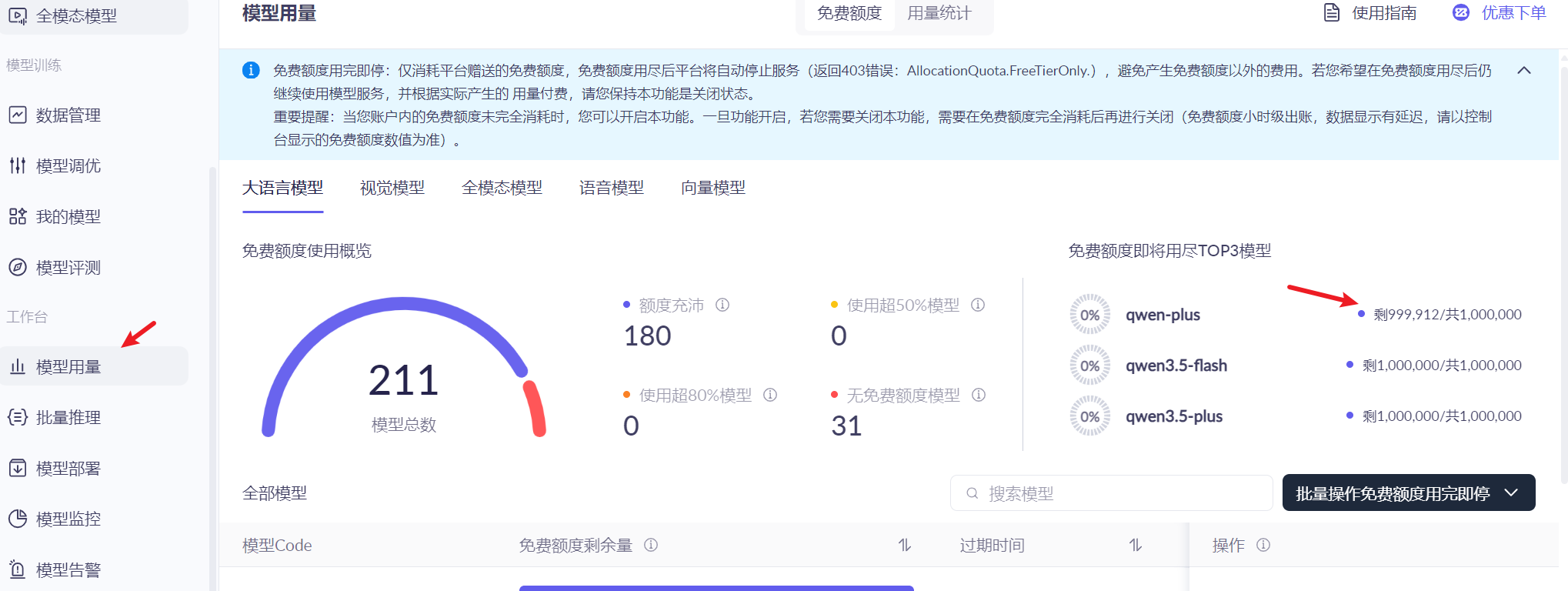
然后左侧菜单的模型用量中,可以看到当前的 token 剩余额度
上面提到了 DashScope 和 OpenAI 两个 SDK,都可以提供大模型 API,下面对比下两个 SDK 的区别(主要是模型区别)
| 维度 | DashScope | OpenAI |
|---|---|---|
| 所属公司 | 阿里巴巴(中国) | OpenAI(美国,微软控股) |
| 主要模型 | 通义千问(Qwen-Max / Plus / Turbo),通义万相,语音等 | GPT-3.5 / GPT-4 / GPT-4o / o1 等 |
| API 兼容性 | 兼容 OpenAI 协议 | 不兼容 DashScope |
| 国内访问 | 极快(北京节点) | 需代理 |
| 实名认证 | 必须(法规要求) | 无需(国际版) |
| 免费额度 | 新用户有 100 万 tokens 额度 | 免费试用(需要绑卡) |
| 价格(Qwen-Max ≈ GPT-4) | 输入 ¥2.4 / 百万 tokens | 输入 $10 / 百万 tokens(≈¥72) |
另外,从 DashScope 和 OpenAI 两个测试脚本中,可以看到两者都使用了 messages 这种消息来表示对话,这种 messages 是对话历史的结构化表示,模型可以从中知道当前会话已经发生了什么,从而让模型能上下文连贯地回复,比如
python
messages = [
    {'role': 'system', 'content': 'You are a helpful assistant.'},
    {'role': 'user', 'content': '你是谁?'}
]可以看到,messages 结构上是一个消息列表,每条消息包含两个字段:
| 字段 | 可选值 | 说明 |
|---|---|---|
role |
system,user,assistant |
消息是谁说的(大模型,或者用户) |
content |
字符串 | 具体内容 |
这里解释下各角色的含义
system:系统指令,用来设定 AI 的行为,身份,规则,通常放在最前面,只出现一次user:用户输入,包含问题,指令和数据assistant:AI 的回复,在多轮对话中,用来记忆历史
这种消息格式是 OpenAI 首创的对话格式,现在已经成为行业标准,像 DashScope,百炼,Claude 等都支持
OK,本篇先到这里,如有疑问,欢迎评论区留言讨论,祝各位功力大涨,技术更上一层楼!!!更多内容见下篇 blog
【AI】【Agent】联网使用大模型(role 角色)