是什么?
在数据从源头到用户的访问路径上,设置多个不同速度、不同层次的存储介质(缓存层)来暂存数据
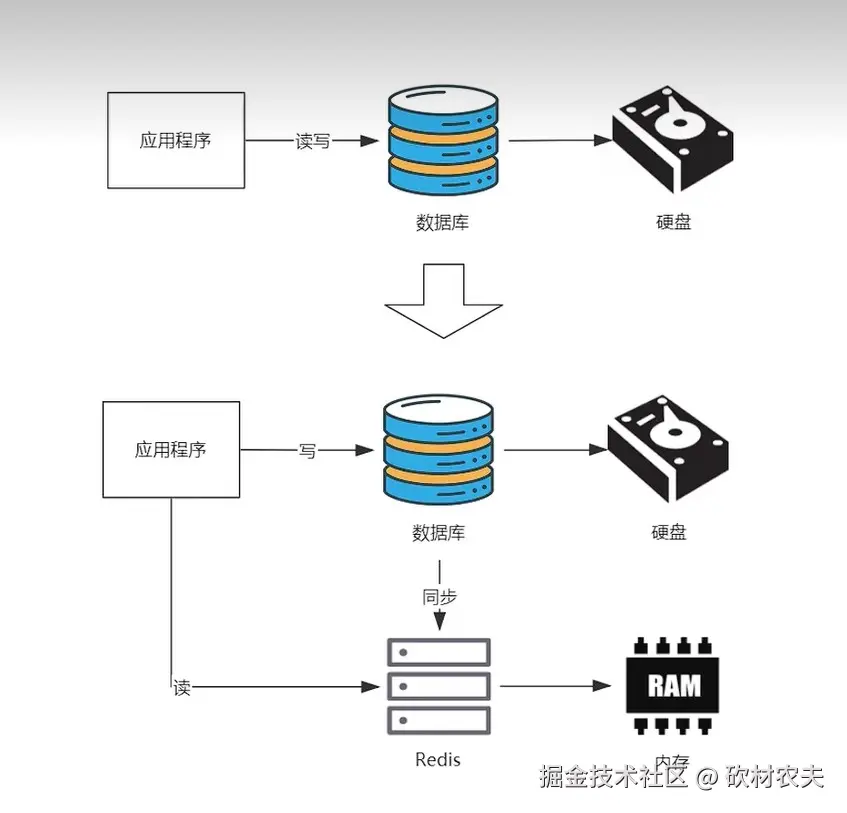
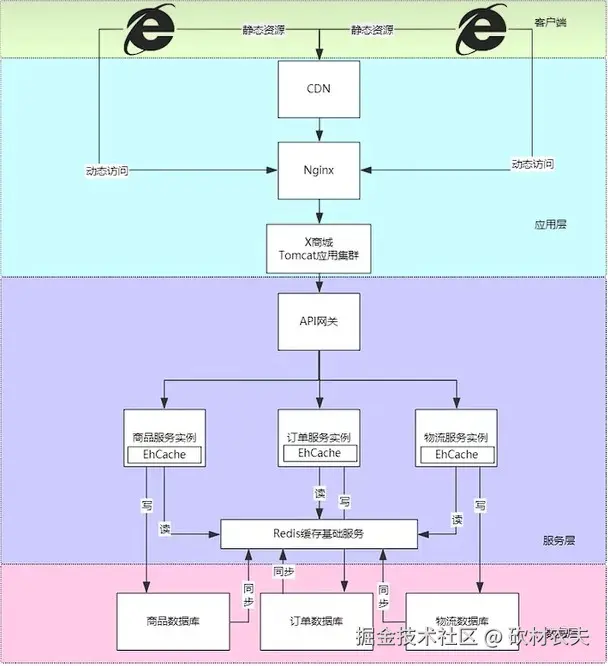
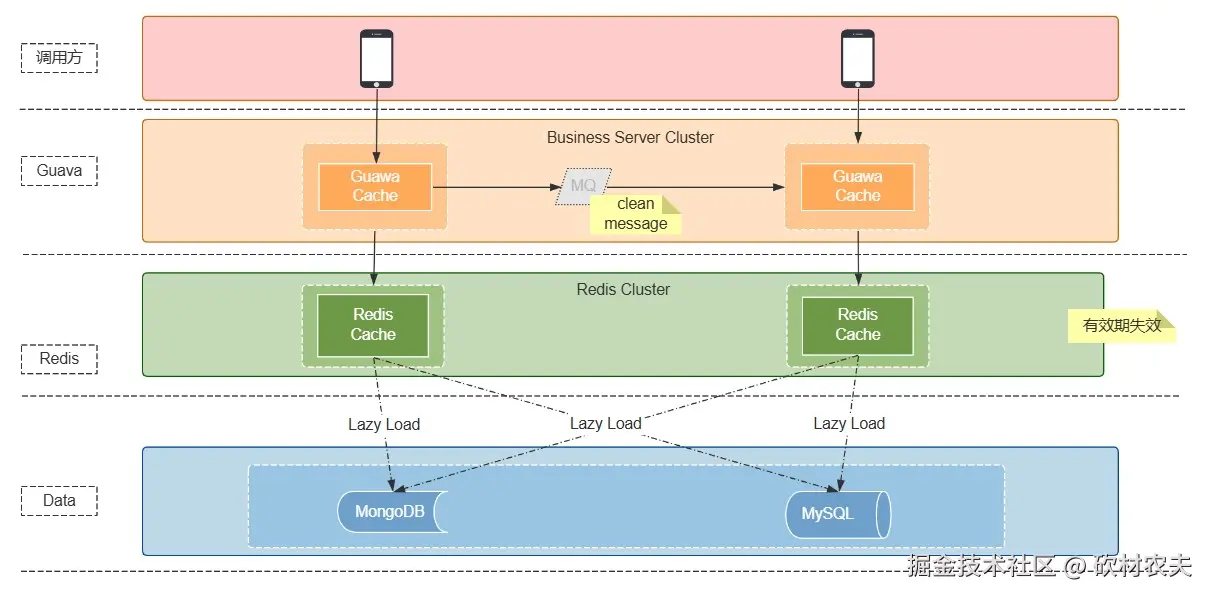
多级缓存
缓存层级策略
- 本地缓存
热点数据、配置信息、用户会话等
- 分布式缓存
共享数据、大容量数据、需要持久化的数据
- 数据库
完整的业务数据、需要事务保证的数据
面临的问题
- 时间差
更新分布式缓存后,本地缓存还是旧数据
- 网络延迟
通知消息可能延迟或丢失
- 节点故障
某些节点可能收不到更新通知
- 并发更新
多个节点同时更新可能导致数据不一致
解决方式
- 主动失效策略
主动更新通知删除缓存
- TTL过期策略
配置缓存失效时间
- 版本号机制
每次更新递增版本号
多级缓存解决什么问题
- 追求极致速度
通过将数据放在离用户最近、速度最快的地方(内存/本地),大幅提升访问速度。
- 保护后端系统
层层拦截请求,有效减少对数据库和后端服务的压力,避免系统被高流量冲垮。
- 平衡成本与性能
用少量昂贵的快设备(内存)配合大量便宜的慢设备(磁盘),在有限成本下实现高性能和高吞吐。
涉及的技术
本地缓存技术
Caffeine demo
typescript
<?xml version="1.0" encoding="UTF-8"?>
<project xmlns="http://maven.apache.org/POM/4.0.0"
         xmlns:xsi="http://www.w3.org/2001/XMLSchema-instance"
         xsi:schemaLocation="http://maven.apache.org/POM/4.0.0 http://maven.apache.org/xsd/maven-4.0.0.xsd">
    <modelVersion>4.0.0</modelVersion>
    <parent>
        <groupId>com.jysemel</groupId>
        <artifactId>cache</artifactId>
        <version>1.0-SNAPSHOT</version>
    </parent>

    <artifactId>cache-caffeine</artifactId>

    <dependencies>
        <dependency>
            <groupId>com.github.ben-manes.caffeine</groupId>
            <artifactId>caffeine</artifactId>
            <version>3.1.8</version>
        </dependency>
    </dependencies>

</project>


package com.jysemel.cache;

import com.github.benmanes.caffeine.cache.Cache;
import com.github.benmanes.caffeine.cache.Caffeine;

import java.util.concurrent.TimeUnit;

public class CaffeineDemo {
    public static void main(String[] args) {
        // 1. 创建缓存,配置最大条目数100,写入后10分钟过期
        Cache<String, String> cache = Caffeine.newBuilder()
                .maximumSize(100)                     // 最多缓存100个条目
                .expireAfterWrite(10, TimeUnit.MINUTES) // 写入后10分钟过期
                .recordStats()                          // 开启统计信息(可选)
                .build();

        // 2. 存入数据
        cache.put("key1", "value1");
        cache.put("key2", "value2");

        // 3. 查询数据
        String value1 = cache.getIfPresent("key1");
        System.out.println("key1 -> " + value1); // 输出:key1 -> value1

        // 4. 使用get方法,如果key不存在则通过函数加载(自动存入缓存)
        String value3 = cache.get("key3", CaffeineDemo::computeValue);
        System.out.println("key3 -> " + value3); // 输出:key3 -> computed:key3

        // 5. 再次获取key3(直接从缓存返回,不会调用computeValue)
        String value3Again = cache.getIfPresent("key3");
        System.out.println("key3 again -> " + value3Again);

        // 6. 查看统计信息
        System.out.println("缓存统计:" + cache.stats());
    }

    // 模拟一个较慢的数据加载方法
    private static String computeValue(String key) {
        System.out.println("计算 " + key + " 的值...");
        return "computed:" + key;
    }
}
GuavaCache demo
typescript
<?xml version="1.0" encoding="UTF-8"?>
<project xmlns="http://maven.apache.org/POM/4.0.0"
         xmlns:xsi="http://www.w3.org/2001/XMLSchema-instance"
         xsi:schemaLocation="http://maven.apache.org/POM/4.0.0 http://maven.apache.org/xsd/maven-4.0.0.xsd">
    <modelVersion>4.0.0</modelVersion>
    <parent>
        <groupId>com.jysemel</groupId>
        <artifactId>cache</artifactId>
        <version>1.0-SNAPSHOT</version>
    </parent>

    <artifactId>cache-guava-cache</artifactId>

    <dependencies>
        <dependency>
            <groupId>com.google.guava</groupId>
            <artifactId>guava</artifactId>
            <version>33.2.0-jre</version> <!-- 使用最新稳定版 -->
        </dependency>
    </dependencies>

</project>


package com.jysemel.cache;

import com.google.common.cache.Cache;
import com.google.common.cache.CacheBuilder;

import java.util.concurrent.TimeUnit;

public class GuavaCacheDemo {

    public static void main(String[] args) throws Exception {
        // 1. 创建缓存:最大容量100,写入后10分钟过期,开启统计信息
        Cache<String, String> cache = CacheBuilder.newBuilder()
                .maximumSize(100)                       // 最多缓存100个条目
                .expireAfterWrite(10, TimeUnit.MINUTES) // 写入后10分钟过期
                .recordStats()                           // 开启命中率统计
                .build();

        // 2. 存入数据
        cache.put("key1", "value1");
        cache.put("key2", "value2");

        // 3. 查询数据
        String value1 = cache.getIfPresent("key1");
        System.out.println("key1 -> " + value1); // 输出:key1 -> value1

        // 4. 使用Callable方式:如果key不存在,则通过给定的Callable加载并自动存入缓存
        String value3 = cache.get("key3", () -> {
            System.out.println("执行加载逻辑...");
            return "computed:" + "key3";
        });
        System.out.println("key3 -> " + value3); // 输出:key3 -> computed:key3

        // 5. 再次获取key3(直接从缓存返回,不会再次执行Callable)
        String value3Again = cache.getIfPresent("key3");
        System.out.println("key3 again -> " + value3Again);

        // 6. 查看统计信息
        System.out.println("缓存统计:" + cache.stats());
    }
}
Ehcache demo
typescript
<?xml version="1.0" encoding="UTF-8"?>
<project xmlns="http://maven.apache.org/POM/4.0.0"
         xmlns:xsi="http://www.w3.org/2001/XMLSchema-instance"
         xsi:schemaLocation="http://maven.apache.org/POM/4.0.0 http://maven.apache.org/xsd/maven-4.0.0.xsd">
    <modelVersion>4.0.0</modelVersion>
    <parent>
        <groupId>com.jysemel</groupId>
        <artifactId>cache</artifactId>
        <version>1.0-SNAPSHOT</version>
    </parent>

    <artifactId>cache-ehcache</artifactId>

    <dependencies>
        <dependency>
            <groupId>org.ehcache</groupId>
            <artifactId>ehcache</artifactId>
            <version>3.10.8</version> <!-- 使用最新稳定版 -->
        </dependency>
    </dependencies>

</project>


package com.jysemel.cache;

import org.ehcache.Cache;
import org.ehcache.CacheManager;
import org.ehcache.config.builders.CacheConfigurationBuilder;
import org.ehcache.config.builders.CacheManagerBuilder;
import org.ehcache.config.builders.ResourcePoolsBuilder;
import org.ehcache.config.units.EntryUnit;
import org.ehcache.config.units.MemoryUnit;

public class EhcacheDemo {
    public static void main(String[] args) {
        // 1. 创建 CacheManager,并预定义名为 "demoCache" 的缓存配置
        //    使用堆内存,最多存储 100 个条目,并设置存活时间(TTL)为 10 秒
        CacheManager cacheManager = CacheManagerBuilder.newCacheManagerBuilder()
                .withCache("demoCache",
                        CacheConfigurationBuilder.newCacheConfigurationBuilder(
                                        Long.class,                      // Key 类型
                                        String.class,                    // Value 类型
                                        ResourcePoolsBuilder.newResourcePoolsBuilder()
                                                .heap(100, EntryUnit.ENTRIES) // 堆内存中最多 100 个条目
                                                .offheap(10, MemoryUnit.MB)   // 可选的堆外内存
                                )
                                .withSizeOfMaxObjectSize(1, MemoryUnit.MB) // 对象大小限制
                        // .withExpiry(ExpiryPolicyBuilder.timeToLiveExpiration(Duration.ofSeconds(10))) // 设置过期策略
                )
                .build(true); // true 表示初始化 CacheManager

        // 2. 获取缓存实例
        Cache<Long, String> demoCache = cacheManager.getCache("demoCache", Long.class, String.class);

        // 3. 存入数据
        System.out.println("存入数据: key=1L, value=Hello Ehcache");
        demoCache.put(1L, "Hello Ehcache");

        // 4. 查询数据
        String value = demoCache.get(1L);
        System.out.println("查询 key=1L -> " + value);

        // 5. 查询不存在的数据
        String nonExist = demoCache.get(99L);
        System.out.println("查询 key=99L -> " + nonExist); // 输出 null

        // 6. 移除数据
        demoCache.remove(1L);
        System.out.println("移除后查询 key=1L -> " + demoCache.get(1L));

        // 7. 关闭 CacheManager(通常在应用关闭时执行)
        cacheManager.close();
    }
}
分布式缓存技术
Redis demo
Memcached demo
typescript
<?xml version="1.0" encoding="UTF-8"?>
<project xmlns="http://maven.apache.org/POM/4.0.0"
         xmlns:xsi="http://www.w3.org/2001/XMLSchema-instance"
         xsi:schemaLocation="http://maven.apache.org/POM/4.0.0 http://maven.apache.org/xsd/maven-4.0.0.xsd">
    <modelVersion>4.0.0</modelVersion>
    <parent>
        <groupId>com.jysemel</groupId>
        <artifactId>cache</artifactId>
        <version>1.0-SNAPSHOT</version>
    </parent>

    <artifactId>cache-memcached</artifactId>

    <dependencies>
        <dependency>
            <groupId>net.spy</groupId>
            <artifactId>spymemcached</artifactId>
            <version>2.12.0</version> <!-- 使用最新稳定版 -->
        </dependency>
    </dependencies>

</project>


package com.jysemel.cache;

import lombok.SneakyThrows;
import net.spy.memcached.AddrUtil;
import net.spy.memcached.MemcachedClient;
import net.spy.memcached.internal.OperationFuture;

public class MemcachedDemo {

    @SneakyThrows
    public static void main(String[] args) {
        // 1. 创建 Memcached 客户端,连接到本地服务器(默认端口 11211)
        //    支持连接多个服务器:new MemcachedClient(AddrUtil.getAddresses("server1:11211 server2:11211"));
        MemcachedClient client = new MemcachedClient(AddrUtil.getAddresses("localhost:11211"));


        System.out.println("✅ 成功连接到 Memcached");

        // 2. 缓存数据 - set 操作(无论是否存在都会写入)
        String key = "user:1001";
        String value = "Alice";
        int expiry = 3600; // 过期时间(秒),0 表示永不过期

        OperationFuture<Boolean> setFuture = client.set(key, expiry, value);
        System.out.println("set 结果: " + (setFuture.get() ? "成功" : "失败"));

        // 3. 获取数据 - get 操作
        Object cachedValue = client.get(key);
        System.out.println("get 结果: " + cachedValue);

        // 4. add 操作:仅在 key 不存在时添加(相当于 INSERT)
        OperationFuture<Boolean> addFuture = client.add("new:key", expiry, "new value");
        System.out.println("add 结果(首次): " + (addFuture.get() ? "成功" : "失败"));

        // 再次 add 同一个 key 会失败
        OperationFuture<Boolean> addAgainFuture = client.add("new:key", expiry, "another");
        System.out.println("add 结果(再次): " + (addAgainFuture.get() ? "成功" : "失败"));

        // 5. replace 操作:仅在 key 存在时替换(相当于 UPDATE)
        OperationFuture<Boolean> replaceFuture = client.replace("new:key", expiry, "updated value");
        System.out.println("replace 结果: " + (replaceFuture.get() ? "成功" : "失败"));
        System.out.println("replace 后 get: " + client.get("new:key"));

        // 6. delete 操作:删除 key
        OperationFuture<Boolean> deleteFuture = client.delete("new:key");
        System.out.println("delete 结果: " + (deleteFuture.get() ? "成功" : "失败"));

        // 7. 批量获取 - getBulk
        client.set("key1", expiry, "value1");
        client.set("key2", expiry, "value2");
        java.util.Map<String, Object> bulkResult = client.getBulk("key1", "key2");
        System.out.println("批量获取: " + bulkResult);

        // 8. 数值操作(incr/decr)- 需要存储数字类型
        client.set("counter", expiry, "10");
        long newValue = client.incr("counter", 5); // 增加 5
        System.out.println("incr 后: " + newValue);
        newValue = client.decr("counter", 3); // 减少 3
        System.out.println("decr 后: " + newValue);
    }
}
总结
多级缓存是用可控的复杂度,换取极致的性能和系统高可用