Java + Selenium实现浏览器打印功能
Java调用浏览器打印功能
本文主要介绍如果通过Java实现浏览器的PDF打印功能
环境配置以及依赖导入
selenium的Java依赖
xml
      <dependency>
          <groupId>org.seleniumhq.selenium</groupId>
          <artifactId>selenium-java</artifactId>
          <version>4.41.0</version>
          <scope>compile</scope>
</dependency>- 浏览器的Driver配置(手动配置)
- 下载不同浏览器的driver, 这里以
chrome为例:https://googlechromelabs.github.io/chrome-for-testing/具体下载什么版本还需要看本地安装的Chrome的版本, 一定要版本相同, 如果没有自己对应的版本,随便选择一个下载链接,然后把版本改成自己的浏览器就行了。
txt
### 随便选择一个
https://storage.googleapis.com/chrome-for-testing-public/146.0.7680.66/win64/chromedriver-win64.zip

### 假设我的版本为1111111.11111
https://storage.googleapis.com/chrome-for-testing-public/1111111.11111/win64/chromedriver-win64.zip- 导入配置
java
// 设置Chrome浏览器的driver
System.setProperty("webdriver.chrome.driver", "C:\\PerfLogs\\chromedriver-win64\\chromedriver.exe");- 通过
webdrivermanager自动管理 (推荐☆☆☆☆)
- 引入依赖:
xml
<dependency>
    <groupId>io.github.bonigarcia</groupId>
    <artifactId>webdrivermanager</artifactId>
    <version>6.3.3</version>
    <scope>compile</scope>
</dependency>- 在代码中启用
java
// 6.3.3版本只支持以下类型的浏览器
		// chrome
        WebDriverManager.chromedriver().setup();
        // 其他使用chrome内核的浏览器
        WebDriverManager.chromiumdriver().setup();
        // firefox
        WebDriverManager.firefoxdriver().setup();
        // edge
        WebDriverManager.edgedriver().setup();
        // opera
        WebDriverManager.operadriver().setup();
        // safari
        WebDriverManager.safaridriver().setup();
设置Selenium
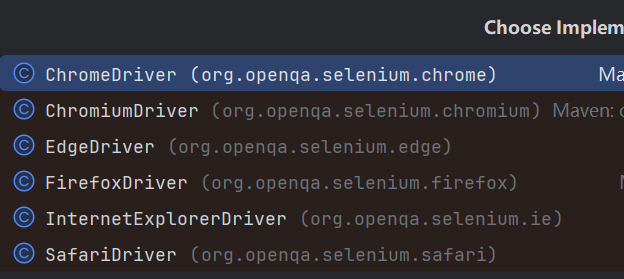
4.41.0版本支持的浏览器类型以及不同浏览器的配置如图所示
- 浏览器驱动:
- 浏览器配置:
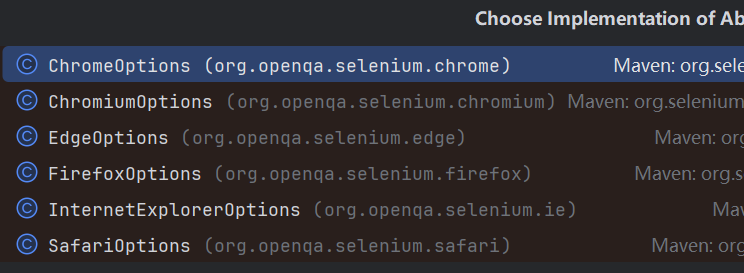
这里以Chrome为例
java
import org.openqa.selenium.JavascriptExecutor;
import org.openqa.selenium.Pdf;
import org.openqa.selenium.chrome.ChromeDriver;
import org.openqa.selenium.chrome.ChromeOptions;
import org.openqa.selenium.print.PageMargin;
import org.openqa.selenium.print.PageSize;
import org.openqa.selenium.print.PrintOptions;
import org.openqa.selenium.support.ui.WebDriverWait;

import java.io.IOException;
import java.nio.file.Files;
import java.nio.file.Paths;
import java.time.Duration;
import java.util.Base64;
import java.util.UUID;

public class PdfDownload {

    public static void main(String[] args) throws IOException {
        PdfDownload pdfDownload = new PdfDownload();
        String fileName = UUID.randomUUID().toString();
        pdfDownload.generatePdfFromUrl("http://localhost:8080/doc/xxxxxxx", "C:\\opt\\" + fileName + ".pdf");
    }

    public void generatePdfFromUrl(String url, String outputPath) throws IOException {
        // 加载chrome浏览器驱动
        System.setProperty("webdriver.chrome.driver", "C:\\PerfLogs\\chromedriver-win64\\chromedriver.exe");

        ChromeOptions options = new ChromeOptions();
        // 运行无头模式-不弹窗(服务器中必须, 本地开发可以不用)
        options.addArguments("--headless");
        // 跳过打印预览
        options.addArguments("--kiosk-printing");

        ChromeDriver driver = new ChromeDriver(options);
        try {
            driver.get(url);

            // 等待页面加载, 根据需要设置时间
            WebDriverWait wait = new WebDriverWait(driver, Duration.ofSeconds(10));
            wait.until(d -> (Boolean) ((JavascriptExecutor) d)
                    .executeScript("return window.jQuery ? jQuery.active == 0 : true"));
            // 等待数据渲染(1.5s), 根据需要设置时间
            Thread.sleep(1500);
            // 配置打印选项
            PrintOptions printOptions = new PrintOptions();
            printOptions.setPageSize(PageSize.ISO_A4); // A4尺寸(cm)
            printOptions.setPageMargin(new PageMargin(1.0, 1.0, 1.0, 1.0));
            printOptions.setScale(1.0);
            printOptions.setBackground(true);
            printOptions.setShrinkToFit(true);

            // 调用浏览器打印功能
            Pdf pdf = driver.print(printOptions);

            // 解码并保存文件
            byte[] pdfContent = Base64.getDecoder().decode(pdf.getContent());
            Files.write(Paths.get(outputPath), pdfContent);
        } catch (InterruptedException e) {
            throw new RuntimeException(e);
        } finally {
            driver.quit(); // 必须关闭浏览器进程
        }
    }
}