背景
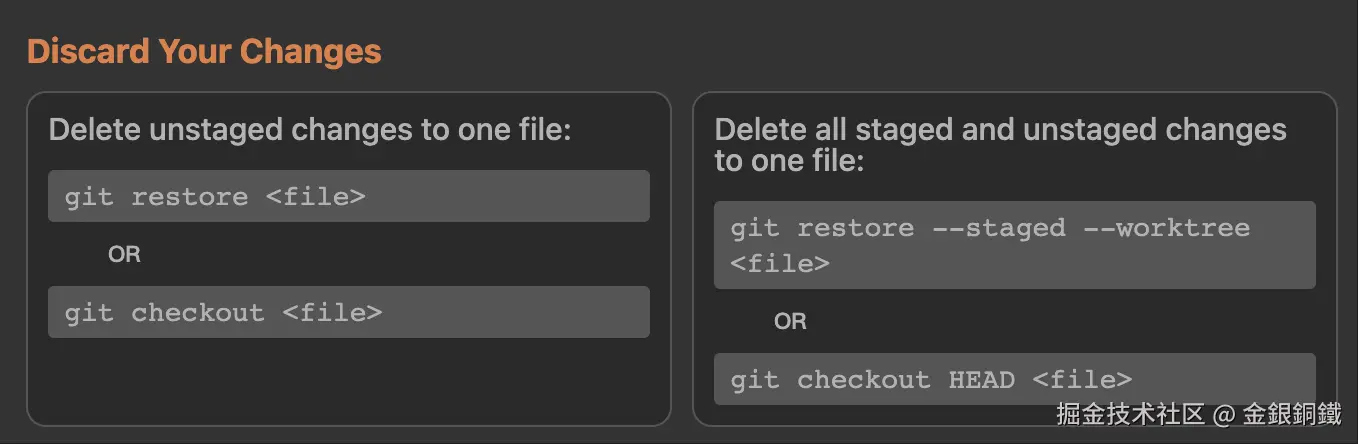
当我们进行日常开发时,有时候需要丢弃对一个文件的改动。为了便于描述,我们假设这个文件是 <math xmlns="http://www.w3.org/1998/Math/MathML"> f.txt \text{f.txt} </math>f.txt。会有两种情况 ⬇️
- 仅丢弃 <math xmlns="http://www.w3.org/1998/Math/MathML"> f.txt \text{f.txt} </math>f.txt 尚未暂存 的改动
- 丢弃 <math xmlns="http://www.w3.org/1998/Math/MathML"> f.txt \text{f.txt} </math>f.txt 已暂存 的改动 + 尚未暂存 的改动
本文会对这两种情况分别进行介绍
要点
仅丢弃尚未暂存的改动
执行以下两个命令中的 任何一个 都可以丢弃 尚未暂存 的改动
bash
git restore <file>
## 或者
git checkout <file>
注意事项
- 执行命令时,需要将
<file>替换为您想指定的文件(例如 <math xmlns="http://www.w3.org/1998/Math/MathML"> f.txt \text{f.txt} </math>f.txt) - 如果您是第一次使用它们,请不要用重要的项目来进行试验,以防误操作(尚未暂存 的改动被丢弃之后就找不回来了)
丢弃 已暂存 的改动 + 尚未暂存 的改动
执行以下两个命令中的 任何一个 都可以丢弃 已暂存 的改动 + 尚未暂存 的改动
bash
git restore --staged --worktree <file>
## 或者
git checkout HEAD <file>
注意事项
- 执行命令时,需要将
<file>替换为您想指定的文件(例如 <math xmlns="http://www.w3.org/1998/Math/MathML"> f.txt \text{f.txt} </math>f.txt) - 如果您是第一次使用它们,请不要用重要的项目来进行试验,以防误操作(已暂存/尚未暂存 的改动被丢弃之后就找不回来了)
正文
示例
准备工作
请将以下代码保存为 main.sh (具体的名称并不重要)
bash
## Prepare a temp dir for our test
mkdir temp
cd temp
## Prepare for the initial commit
git init
echo "Content commited" >> f.txt
git add f.txt
git commit -m "initial commit"
## Stage some content in f.txt
echo "Staged content in f.txt" >> f.txt
git add f.txt
## Add some content to be staged in f.txt
echo "Content to be staged ..." >> f.txt
通过执行下方的命令就可以运行 main.sh ⬇️
bash
bash main.sh
运行完 main.sh 之后,当前目录中会多出一个 temp 目录。在当前目录执行 tree temp 命令后,应该可以看到如下的内容
text
temp
└── f.txt
1 directory, 1 file
通过执行如下命令,可以切换到 temp 目录中 ⬇️
bash
cd temp
在 temp 目录中,我们执行如下命令就可以看到 <math xmlns="http://www.w3.org/1998/Math/MathML"> f.txt \text{f.txt} </math>f.txt 的状态
bash
git status
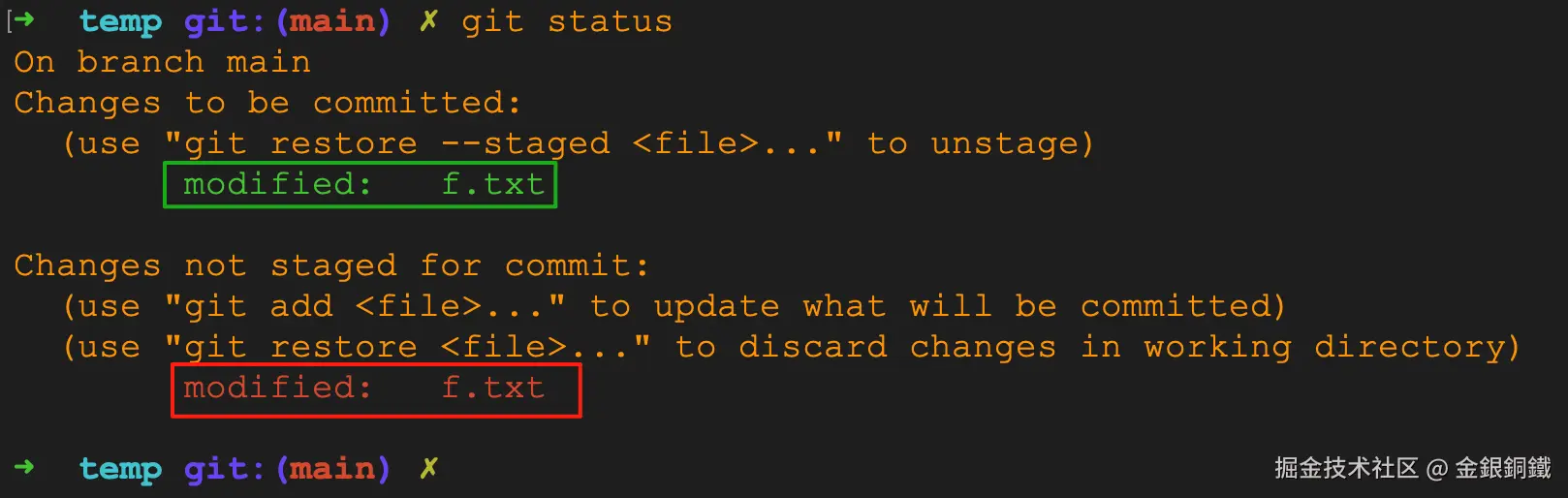
执行该命令后,可以看到 <math xmlns="http://www.w3.org/1998/Math/MathML"> f.txt \text{f.txt} </math>f.txt 中既有 已暂存 的改动(如下图绿色框所示),也有 尚未暂存 的改动(如下图红色框所示) 
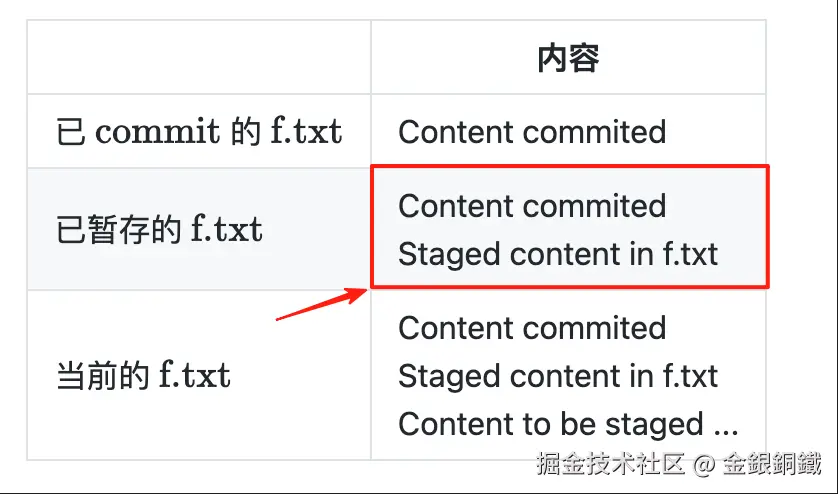
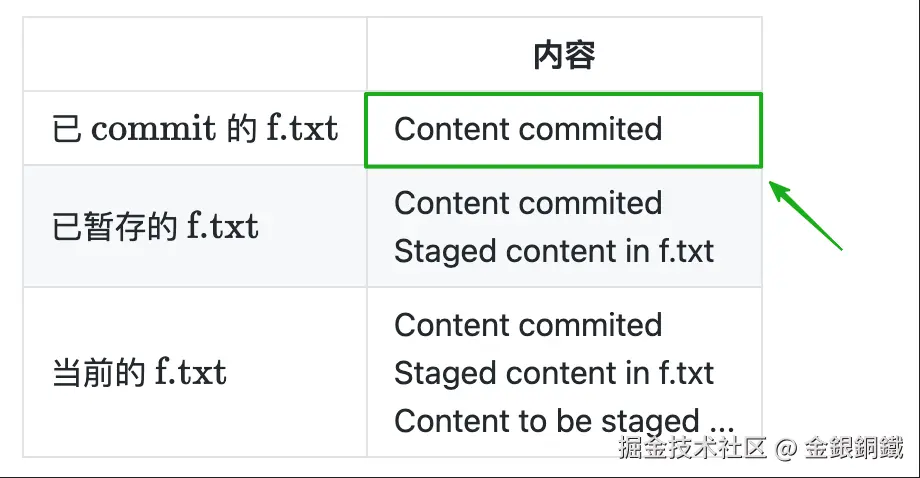
各个状态的 <math xmlns="http://www.w3.org/1998/Math/MathML"> f.txt \text{f.txt} </math>f.txt 的内容列举如下 ⬇️
| 内容 | |
|---|---|
| 已 <math xmlns="http://www.w3.org/1998/Math/MathML"> commit \text{commit} </math>commit 的 <math xmlns="http://www.w3.org/1998/Math/MathML"> f.txt \text{f.txt} </math>f.txt | Content commited |
| 已暂存的 <math xmlns="http://www.w3.org/1998/Math/MathML"> f.txt \text{f.txt} </math>f.txt | Content commited Staged content in f.txt |
| 当前的 <math xmlns="http://www.w3.org/1998/Math/MathML"> f.txt \text{f.txt} </math>f.txt | Content commited Staged content in f.txt Content to be staged ... |
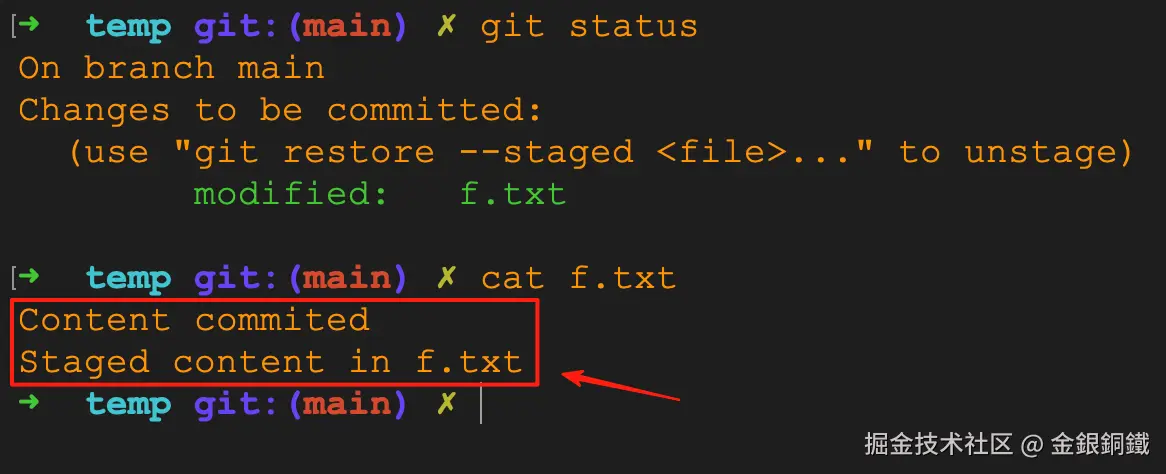
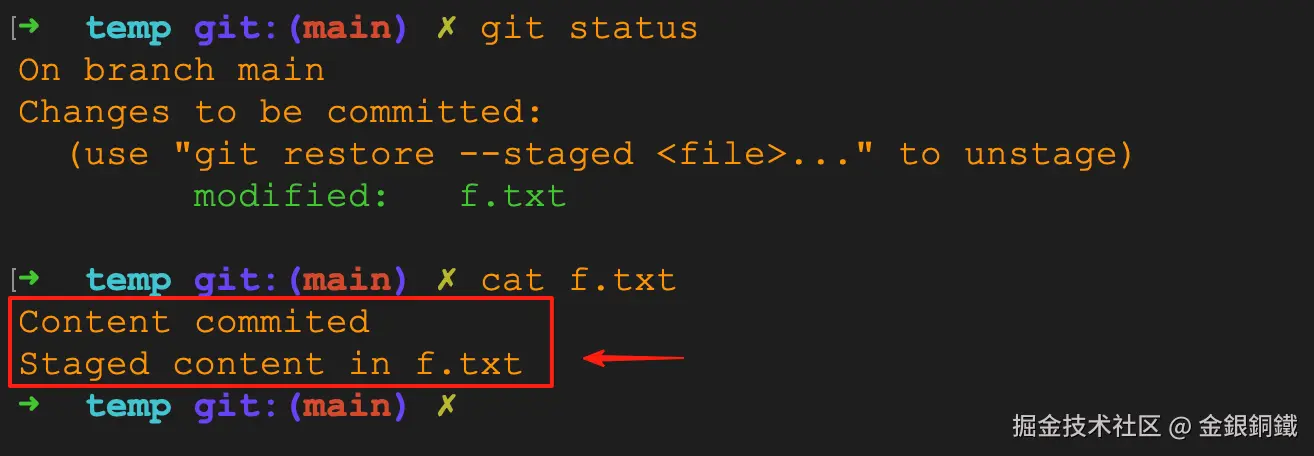
如果我们想让 <math xmlns="http://www.w3.org/1998/Math/MathML"> f.txt \text{f.txt} </math>f.txt 变回下图红框里的这个样子,那么只需要丢弃 尚未暂存 的改动

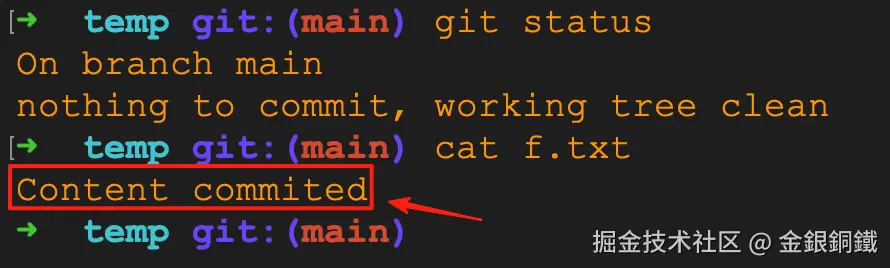
如果我们想让 <math xmlns="http://www.w3.org/1998/Math/MathML"> f.txt \text{f.txt} </math>f.txt 变回下图绿框里的这个样子,那么需要丢弃 已暂存 的改动 + 尚未暂存 的改动
我们分别来看
情形一:仅丢弃尚未暂存的改动
请注意:尚未暂存 的改动被丢弃之后就找不回来了
第一种方式:基于 <math xmlns="http://www.w3.org/1998/Math/MathML"> git restore \text{git restore} </math>git restore 命令
我们可以用 <math xmlns="http://www.w3.org/1998/Math/MathML"> git restore \text{git restore} </math>git restore 命令来丢弃 <math xmlns="http://www.w3.org/1998/Math/MathML"> f.txt \text{f.txt} </math>f.txt 中尚未暂存的改动 ⬇️
bash
git restore f.txt
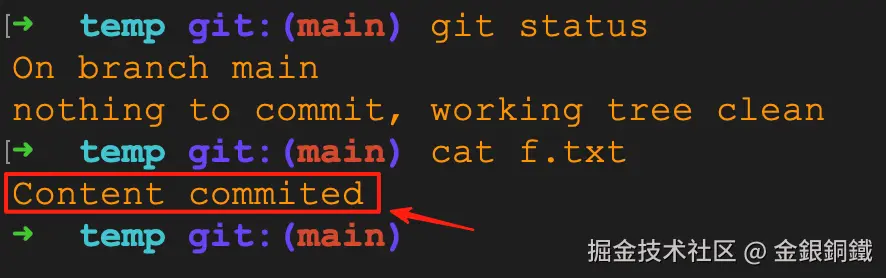
执行该命令后,我们再用 <math xmlns="http://www.w3.org/1998/Math/MathML"> git status \text{git status} </math>git status 命令和 <math xmlns="http://www.w3.org/1998/Math/MathML"> cat f.txt \text{cat f.txt} </math>cat f.txt 命令验证一下 ⬇️

从红色框的内容可以看出, <math xmlns="http://www.w3.org/1998/Math/MathML"> f.txt \text{f.txt} </math>f.txt 的变化符合预期。
第二种方式:基于 <math xmlns="http://www.w3.org/1998/Math/MathML"> git checkout \text{git checkout} </math>git checkout 命令
我们也可以用 <math xmlns="http://www.w3.org/1998/Math/MathML"> git checkout \text{git checkout} </math>git checkout 命令来丢弃 <math xmlns="http://www.w3.org/1998/Math/MathML"> f.txt \text{f.txt} </math>f.txt 中尚未暂存的改动 ⬇️
bash
git checkout f.txt
执行该命令后,可以再用 <math xmlns="http://www.w3.org/1998/Math/MathML"> git status \text{git status} </math>git status 命令和 <math xmlns="http://www.w3.org/1998/Math/MathML"> cat f.txt \text{cat f.txt} </math>cat f.txt 命令验证一下 ⬇️

从红色框的内容可以看出, <math xmlns="http://www.w3.org/1998/Math/MathML"> f.txt \text{f.txt} </math>f.txt 的变化符合预期。
情形二:丢弃 已暂存 与 尚未暂存 的改动
请注意:已暂存/尚未暂存 的改动被丢弃之后就找不回来了
第一种方式:基于 <math xmlns="http://www.w3.org/1998/Math/MathML"> git restore \text{git restore} </math>git restore 命令
我们可以用 <math xmlns="http://www.w3.org/1998/Math/MathML"> git restore \text{git restore} </math>git restore 命令来丢弃 <math xmlns="http://www.w3.org/1998/Math/MathML"> f.txt \text{f.txt} </math>f.txt 中 已暂存 的改动 + 尚未暂存 的改动 ⬇️
bash
git restore --staged --worktree f.txt
执行该命令后,我们再用 <math xmlns="http://www.w3.org/1998/Math/MathML"> git status \text{git status} </math>git status 命令和 <math xmlns="http://www.w3.org/1998/Math/MathML"> cat f.txt \text{cat f.txt} </math>cat f.txt 命令验证一下 ⬇️

从红色框的内容可以看出, <math xmlns="http://www.w3.org/1998/Math/MathML"> f.txt \text{f.txt} </math>f.txt 的变化符合预期。
第二种方式:基于 <math xmlns="http://www.w3.org/1998/Math/MathML"> git checkout \text{git checkout} </math>git checkout 命令
我们也可以用 <math xmlns="http://www.w3.org/1998/Math/MathML"> git checkout \text{git checkout} </math>git checkout 命令来丢弃 <math xmlns="http://www.w3.org/1998/Math/MathML"> f.txt \text{f.txt} </math>f.txt 中 已暂存 的改动 + 尚未暂存 的改动 ⬇️
bash
git checkout HEAD f.txt
执行该命令后,我们再用 <math xmlns="http://www.w3.org/1998/Math/MathML"> git status \text{git status} </math>git status 命令和 <math xmlns="http://www.w3.org/1998/Math/MathML"> cat f.txt \text{cat f.txt} </math>cat f.txt 命令验证一下 ⬇️

从红色框的内容可以看出, <math xmlns="http://www.w3.org/1998/Math/MathML"> f.txt \text{f.txt} </math>f.txt 的变化符合预期。
参考资料
Git Cheat Sheet 中的以下内容