
🫧个人主页:小年糕是糕手
🎨你不能左右天气,但你可以改变心情;你不能改变过去,但你可以决定未来!
目录
string(重点)
我们前面介绍了字符数组来处理字符串,但是在C++中我们常用的还是string,而C++中将字符串直接作为一种类型,也就是string类型,使用string类型创建的对象就是C++的字符串,使用前要包含头文件<string>
1°初识string
我们首先来看string怎么创建字符串的:

cpp
#include<iostream>
#include<string>
using namespace std;
int main()
{
	string s1;
	string s2("hello world");
	return 0;
}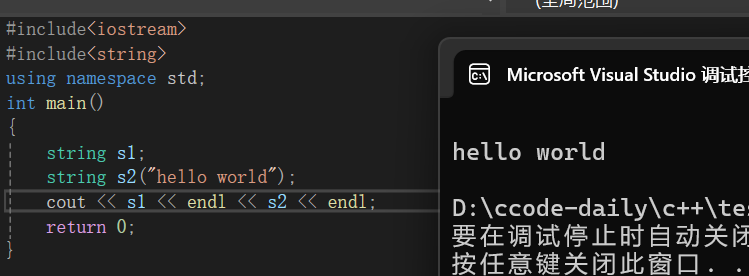
string s1表示创建空字符串,相当于创建整型int a,但未给a一个初始值。string s2 = "hello world"表示创建一个字符串s2,它的内容是"hello world",要注意s2中的字符串不再以\0作为结束标志了。(C 语言中的字符串是以\0作为结束标志的)。
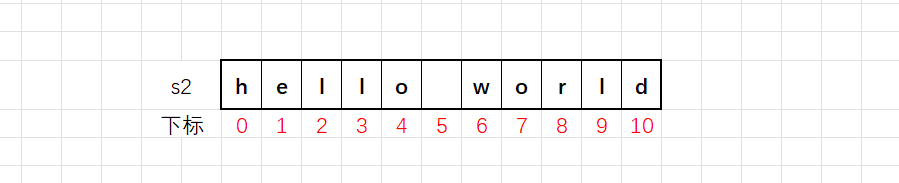
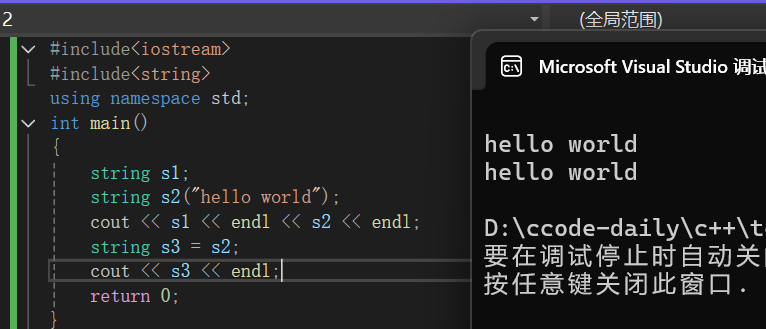
如果只是这样的话string貌似并没有存在的价值,其实string创建的字符串有一个最大的特点就是可以直接赋值:
2°string输入(getline)
string也是C++的一部分当然可以直接使用我们之前说过cin直接输入:
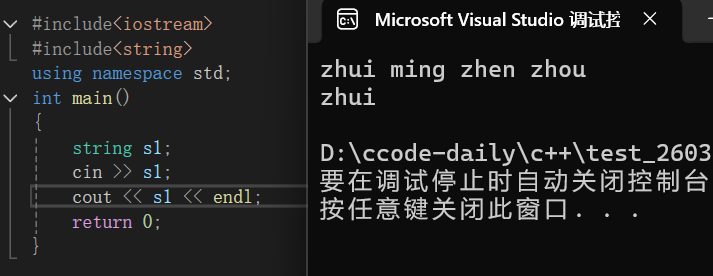
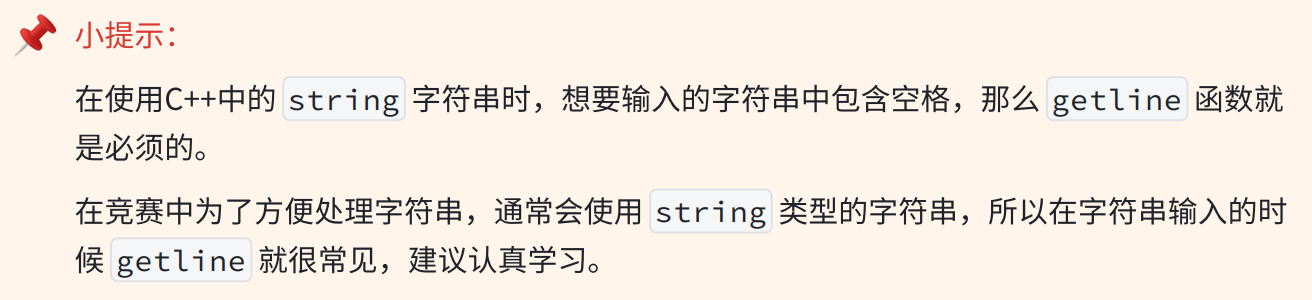
我们从这段代码不难看出虽然string类型的字符串可以用cin直接输入,但是他遇到空格字符也会停止,所以我们采取另一种方式:getline
getline是C++标准库中的一个函数,用于从输入流中读取一行文本,并将其存储为字符串。getline 函数有两种不同的形式,分别对应着字符串的结束方式:
cpp
istream& getline(istream& is, string& str);
istream& getline(istream& is, string& str, char delim);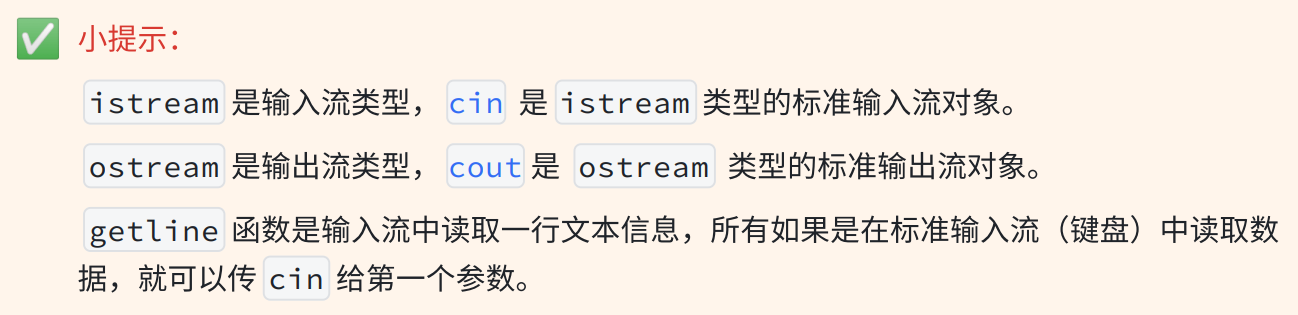
我们首先来看第一种:getline函数以换行符('\n')作为字符串的结束标志,它的一般格式是:
cpp
getline(cin, string str)
//cin -- 表⽰从输⼊流中读取信息
//str 是存放读取到的信息的字符串
这种形式的getline函数从输入流(例如cin)中读取文本,直到遇到换行符('\n')为止,然后将读取到的文本(不包括换行符)存储到指定的strin类型的变量str中:
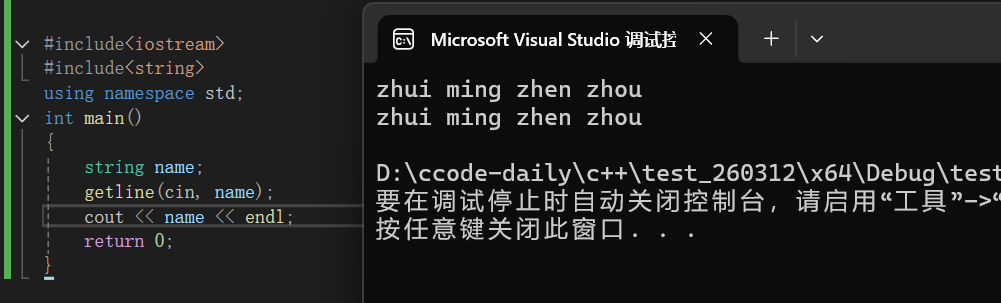
这第一种非常简单用起来也十分方便,接下来我们来看第二种:getline函数允许用户自定义结束标志,它的一般格式是:
cpp
getline(cin, string str, char delim)
//cin -- 表⽰从输⼊流中读取信息
//str 是存放读取到的信息的字符串
//delim 是⾃定义的结束标志
这种形式的getline函数从输入流中读取文本,直到遇到用户指定的结束标志字符(delim)为止,然后将读取到的文本(不包括结束标志字符)存储到指定的string类型的变量str中:
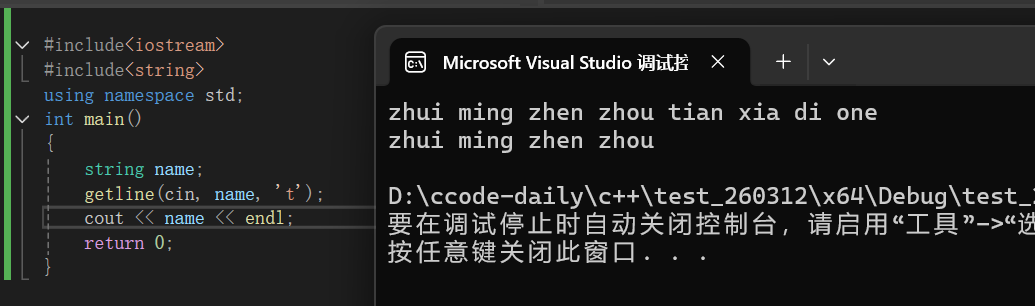
我们可以很直观的看到这里't'就是一个停止字符,我们输出的是t之前的字符串的内容
3°size()
string中提供了size()函数用于获取字符串长度。在C++中关于字符串的操作函数都是包含在string 中的,所以需要调用这些函数时,通常用点(.)运算符,下面我们来举个例子:
cpp
#include<iostream>
#include<string>
using namespace std;
int main()
{
	string s1("zhui ming zhen zhou");
	string s2("  416");
	string s3("%#*(   12  zmzz");
	cout << s1.size() << endl;
	cout << s2.size() << endl;
	cout << s3.size() << endl;
	return 0;
}
大家可以自己先去思考一下打印的值是多少,下面给出答案:
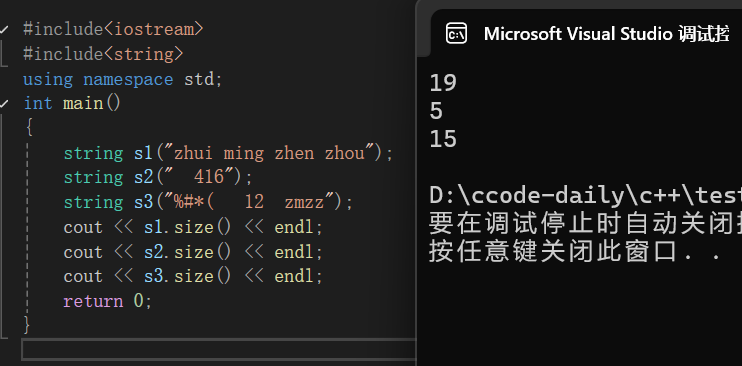
注意:如果这里还有一个string s4,并没有进行赋值这类的任何操作,我们使用size()去计算时,答案就是0
前面我们学到的像
char、int、double等内置类型的数据在操作的时候,不会使用.操作符的。
string是 C++ 提供的一种更加复杂的封装类型 ,在string类型的变量中加入了操作这个字符串的各种方法(函数),比如求字符串长度、字符串末尾插入一个字符等操作。所以要对string类型的变量进行各种操作,就可以使用.操作符来使用这些函数。
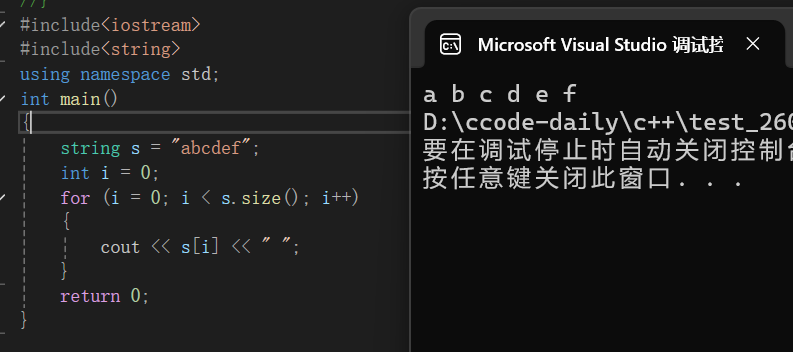
通过size()能获得字符串的长度,顺便就可以使用这个长度遍历字符串的,注意string类型的字符串是可以通过下标访问的:
4°迭代器(iterator)
迭代器是一种对象,它可以用来遍历容器(比如我们现在学习的string)中的元素,迭代器的作用类似于指针,或者数组下标(这里如果大家不知道指针就将迭代器的作用类比为数组下标,不过迭代器指向的值,需要解引用(*)),C++中的string提供了多种迭代器,用于遍历和操作字符串中的内容。这里给大家介绍一种最常用的迭代器:
1)begin()和end()
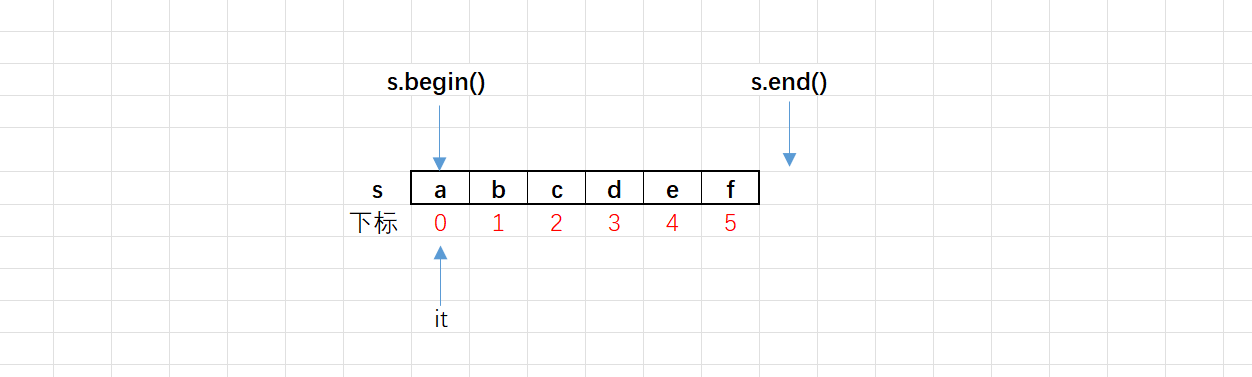
begin():返回指向字符串第一个字符的迭代器,需要一个迭代器的变量来接收。end():返回指向字符串最后一个字符的下一个位置的迭代器(该位置不属于字符串)。string中begin()和end()返回的迭代器的类型是string::iterator。
假设我们现在有一个string s = "abcdef",begin指向的位置就是a,end指向的位置就是f的下一个位置:
- 迭代器是可以进行大小比较,也可以进行
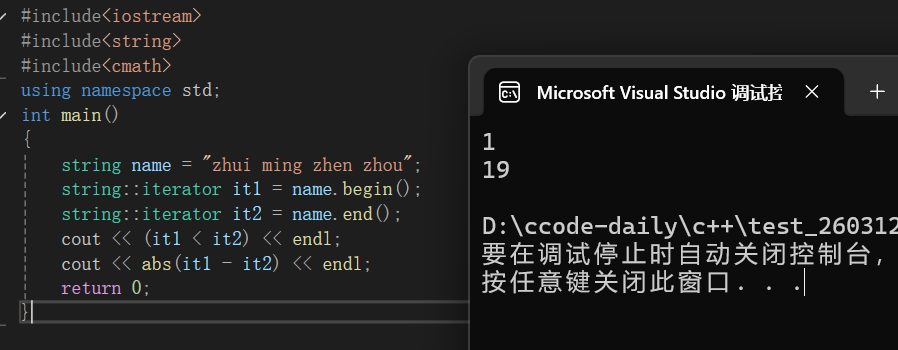
+或者-整数运算的。比如:it++,就是让迭代器前进一步,it--就是让迭代器退后一步。- 同一个容器的两个迭代器也可以相减,相减结果的绝对值,是两个迭代器中间元素的个数。
大家如果觉得抽象我觉得可以把迭代器想象成"看书时的书签"------能比较书签位置、移动书签、算两个书签之间有几行字!
cpp
#include<iostream>
#include<string>
#include<cmath>
using namespace std;
int main()
{
	string name = "zhui ming zhen zhou";
	string::iterator it1 = name.begin();
	string::iterator it2 = name.end();
	cout << (it1 < it2) << endl;
	cout << abs(it1 - it2) << endl;
	return 0;
}
2)正序遍历和逆序遍历
我们知道了可以使用迭代器进行遍历,下面我们来进行尝试:
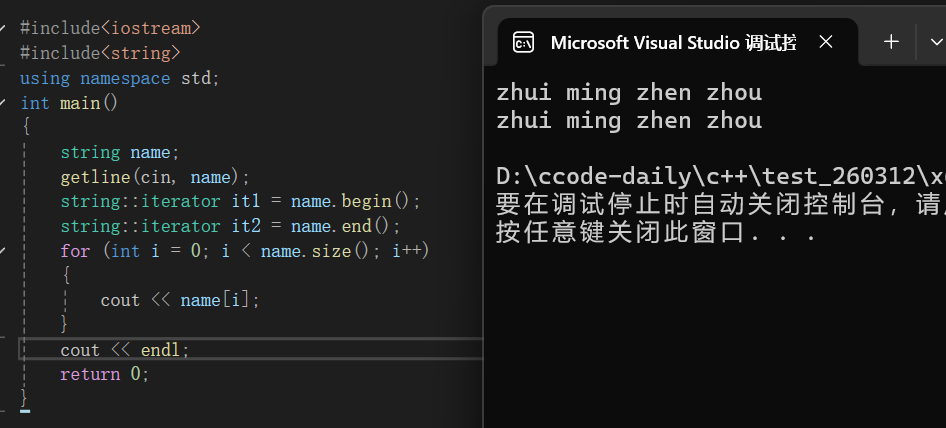
上面这种方式大家应该还是很好理解的,我们首先给name赋值,然后使用迭代器标记了这个字符串的起始位置与最后一个字符的后面一个位置,下面我们采取循环遍历的方式,用size算出这个字符串的大小,然后打印namei,相信大家也看出来了,我们使用string就可以将字符串'数组化',变得更加直观了,其实这里面的标记没什么用处,主要是带大家熟悉熟悉,下面我们来看另一种方式:
cpp
#include<iostream>
#include<string>
using namespace std;
int main()
{
	string name;
	getline(cin, name);
	//auto it 是让编译器⾃动推到it的类型
	for (auto it = name.begin(); it != name.end(); it++)
	{
		cout << *it;
	}
	cout << endl;
	//string::iterator 是正向迭代器类型
	//string::iterator it,是直接创建迭代器,it是针对字符串的迭代器
	for (string::iterator it = name.begin(); it != name.end(); it++)
	{
		cout << *it;
	}
	return 0;
}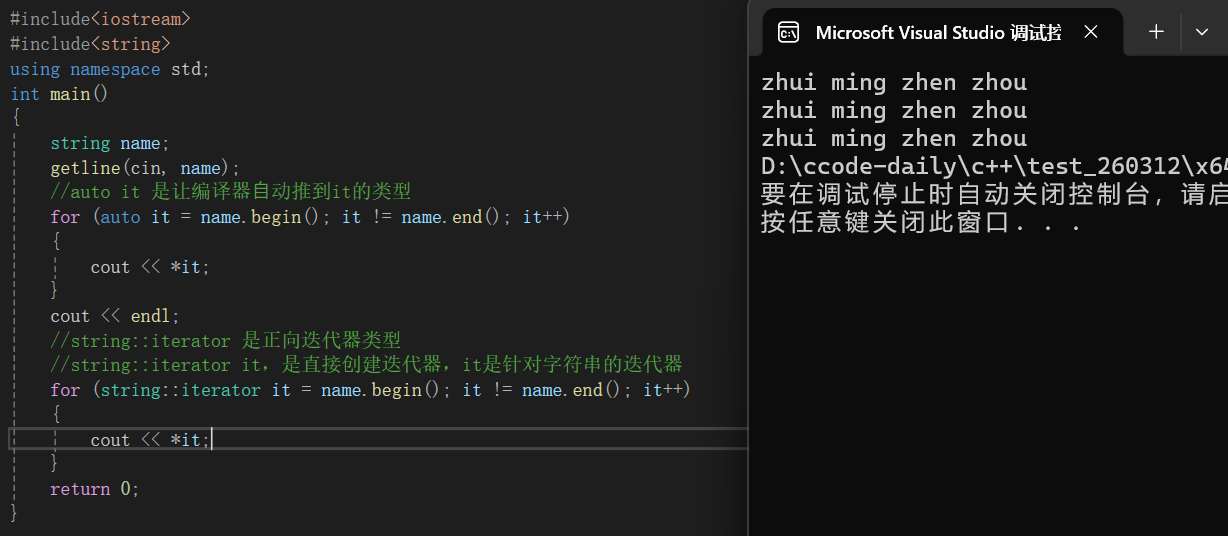
我们来解释一下这段代码:首先我们依旧从键盘上输入一个字符串,然后我们跳过循环遍历的方式来遍历字符串,这里我们重点来看循环遍历,auto it = name.begin(),相信这个还是很好理解的,我们从第一个位置开始遍历,遍历到最后一个,所以是it!=name.end(),it++就是我们之前说的数组下标++,我们打印的时候为什么要用解引用呢?这是因为it我们就将他看成数组的下标,也就是我们之前所说的书签,现在我们想要找到我们需要的值是不是就是要通过书签去定位页数,所以我们这里使用解引用就是通过下标去找到元素,string::iterator是正向迭代器类型,下面我们来看逆序遍历:
cpp
#include <iostream>
#include <string>
using namespace std;
int main()
{
	string name = "zhui ming zhen zhou";
	for (string::iterator it = name.end() - 1; it >= name.begin(); it--)
	{
		cout << *it;
	}
	return 0;
}
相信大家都很聪明一眼就看到了,逆序遍历我们直接从后向前遍历就好了,也是很easy难不倒大家
3)修改
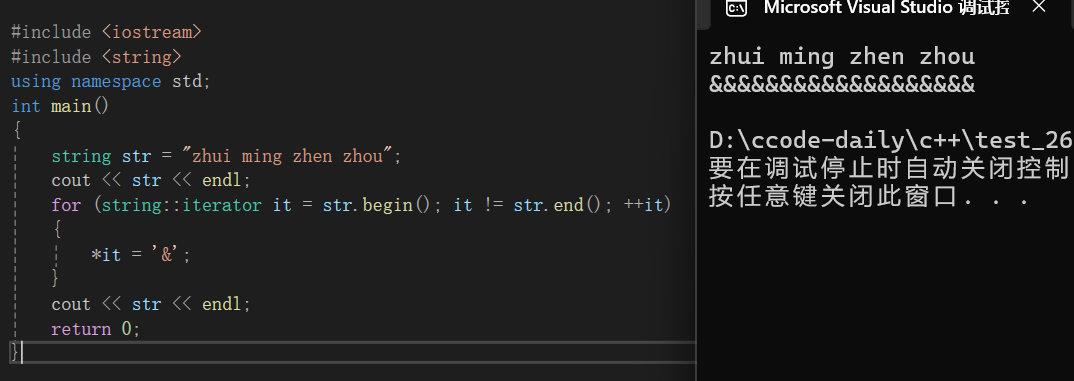
通过迭代器找到元素后,改变迭代器指向的元素,是可以直接改变字符串内容的,下面给大家举个例子:
cpp
#include <iostream>
#include <string>
using namespace std;
int main()
{
	string str = "zhui ming zhen zhou";
	cout << str << endl;
	for (string::iterator it = str.begin(); it != str.end(); ++it)
	{
		*it = '&';
	}
	cout << str << endl;
	return 0;
}
5°push_back()
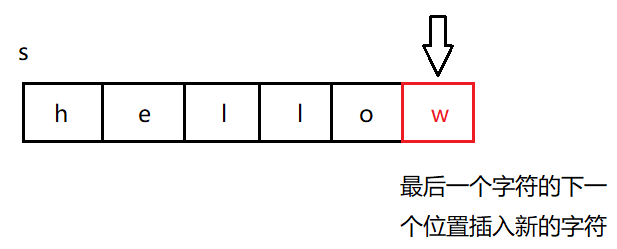
push_back()用于在字符串尾部插入一个字符:
cpp
#include<iostream>
#include<string>
using namespace std;
int main()
{
	string name1;
	name1.push_back('z');
	name1.push_back('h');
	name1.push_back('u');
	name1.push_back('i');
	cout << name1 << ' ';

	string name2 = name1;
	name2.push_back('m');
	name2.push_back('i');
	name2.push_back('n');
	name2.push_back('g');

	string name3 = name2;
	name3.push_back('z');
	name3.push_back('h');
	name3.push_back('e');
	name3.push_back('n');

	string name4 = name3;
	name4.push_back('z');
	name4.push_back('h');
	name4.push_back('o');
	name4.push_back('u');
	cout << name4 << endl;

	return 0;
}
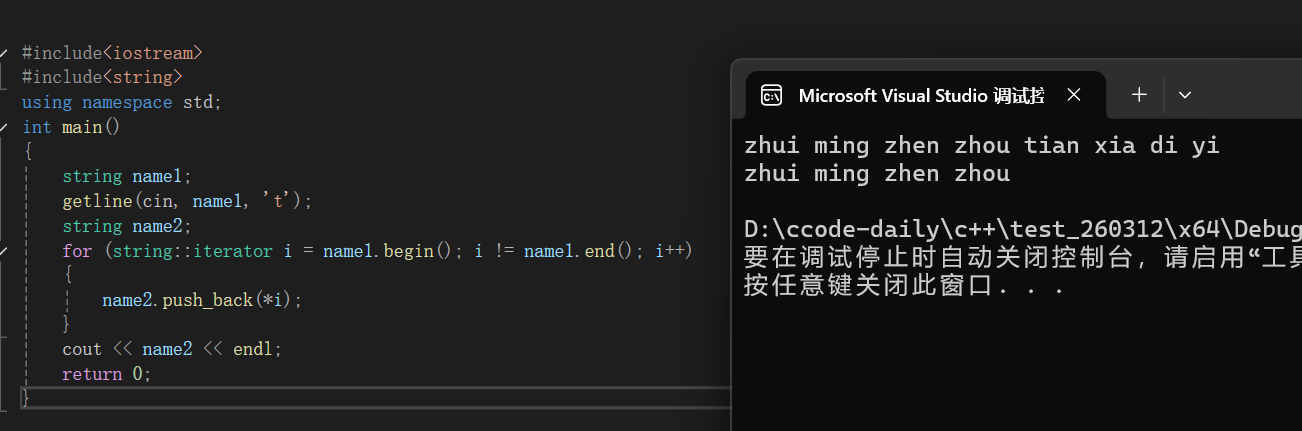
大家可以自己去运行看看结果,但是我们要记住一点就是push_back是不可以插入字符串的,但是我们可以采用迭代器于循环遍历的方式去插入一个字符串:
cpp
#include<iostream>
#include<string>
using namespace std;
int main()
{
	string name1;
	getline(cin, name1, 't');
	string name2;
	for (string::iterator i = name1.begin(); i != name1.end(); i++)
	{
		name2.push_back(*i);
	}
	cout << name2 << endl;
	return 0;
}
6°字符串的+=和+运算
push_back() 是用于在字符串后添加一个字符,然而部分情况下我们需要向原有的字符串后继续添 加字符串。其实string类型的字符串是支持+和+=运算的。这里的本质是string中重载了operator+= 这个操作符,但是+并没有被重载成成员函数,而是全局函数,大家想详细了解可以参考这篇博客:【C++】string类(三)_std::string sourcestrerror: "for each"语句不能操作"std::-CSDN博客 https://blog.csdn.net/2501_91731683/article/details/158543222

cpp
#include<iostream>
#include<string>
using namespace std;
int main()
{
	string s = "hello";
	s += " world"; //字符串⽤双引号,等价于 s = s + " world"
	cout << s << endl;

	//除了+=操作,也可以使⽤'+'灵活进⾏字符串拼接
	//1.尾部拼接
	string s1 = "hello";
	cout << s1 + " world" << endl; //s1仍然是"hello"

	s1 = s1 + " world";
	cout << s1 << endl; //s1是"hello world"


	//2.头部拼接
	string s2 = "hello";
	s2 = "world " + s2;
	cout << s2 << endl; //s2为:"world hello"

	return 0;
}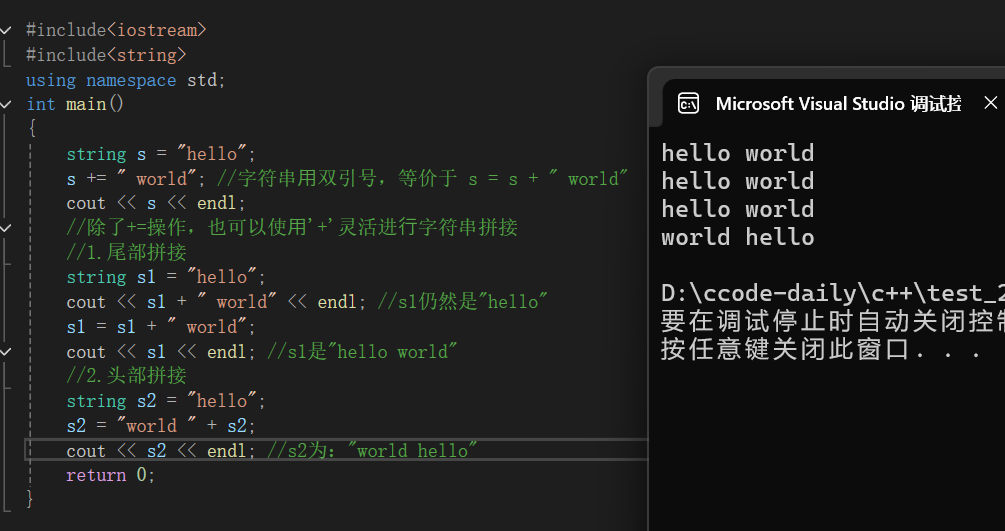
我们根据打印结果就不难发现,+不会直接改变原来的字符串,+=会直接改变原来的字符串
7°pop_back()
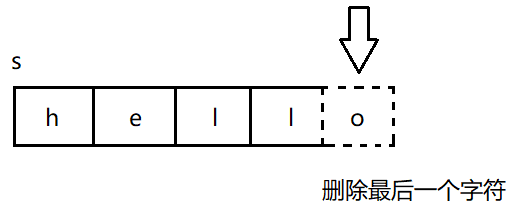
pop_back()用于删除字符串中尾部的一个字符。这个成员函数是在C++11标准中引入的,有的编 译器可能不支持:
cpp
#include <iostream>
#include<string>
using namespace std;
int main()
{
	string s = "hello";
	cout << "s:" << s << endl;
	//尾删
	s.pop_back();
	cout << "s:" << s << endl;
	//尾删
	s.pop_back();
	cout << "s:" << s << endl;
	return 0;
}
但是当字符串中没有字符的时候,再调用pop_back()时,程序会出现异常。这种行为也是未定义 行为,要避免这么使用。
8°insert
如果我们需要在字符串中间的某个位置插入一个字符串,怎么办呢?这时候我们得掌握一个函数就是insert,函数原型如下:
cpp
string& insert(size_t pos, const string& str); //pos位置前⾯插⼊⼀个string字符串
string& insert(size_t pos, const char* s); //pos位置前⾯插⼊⼀个C⻛格的字符串
string& insert(size_t pos, size_t n, char c);//pos位置前⾯插⼊n个字符c
下面我们来看insert的三种形式:
第一种:
cpp
#include <iostream>
#include <string>
using namespace std;
int main()
{
	string s = "abcdefghi";
	string str = "xxx";
	cout << s << endl;
	s.insert(3, str);
	cout << s << endl;
	return 0;
}
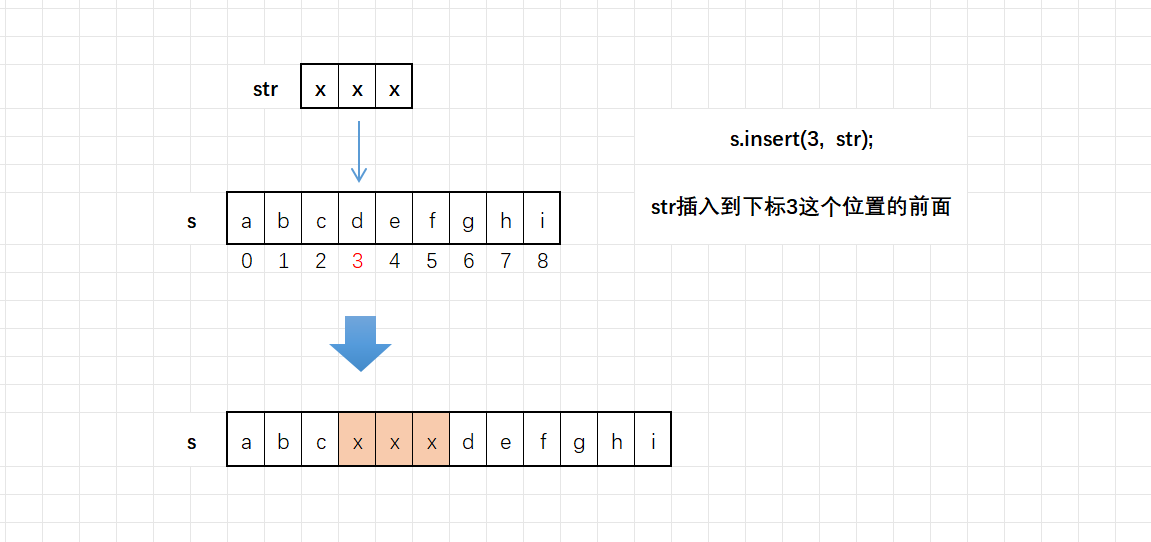
这串代码的意思是在字符串s下标为3的位置插入str,图解如下:
第二种:
cpp
#include <iostream>
#include <string>
using namespace std;
int main()
{
	string s = "Shiina Mahiru";
	cout << s << endl;
	s.insert(3, "&&&&&&");
	cout << s << endl;
	return 0;
}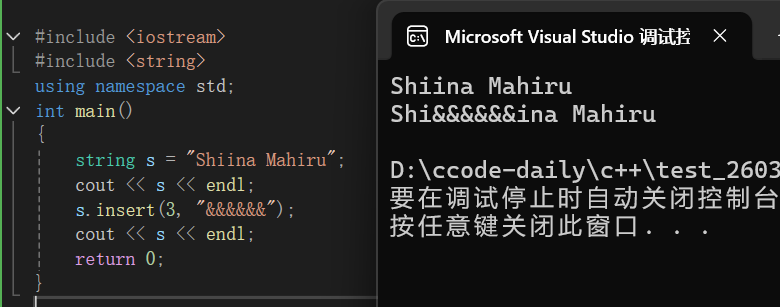
其实与第一种是类似的,只不过是将string定义的字符串换成了一个直接的字符串
第三种:
cpp
#include<iostream>
#include <string>
using namespace std;
int main()
{
	string s = "Shiina Mahiru";
	cout << s << endl;
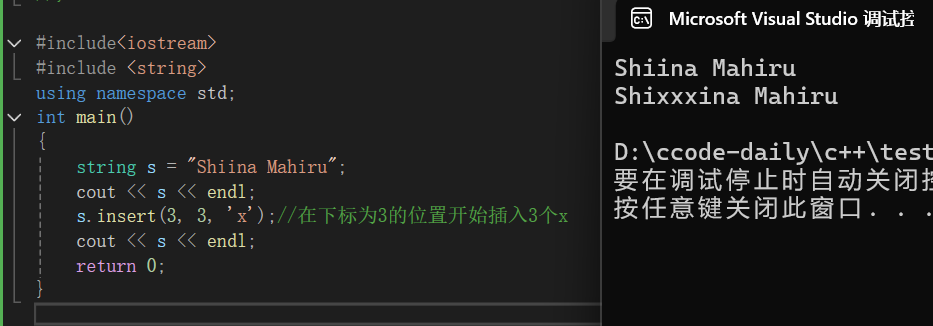
	s.insert(3, 3, 'x');//在下标为3的位置开始插入3个x
	cout << s << endl;
	return 0;
}
9°find()
1)概述
find()函数用于查找字符串中指定子串 / 字符,并返回子串 / 字符在字符串中第一次出现的位置:
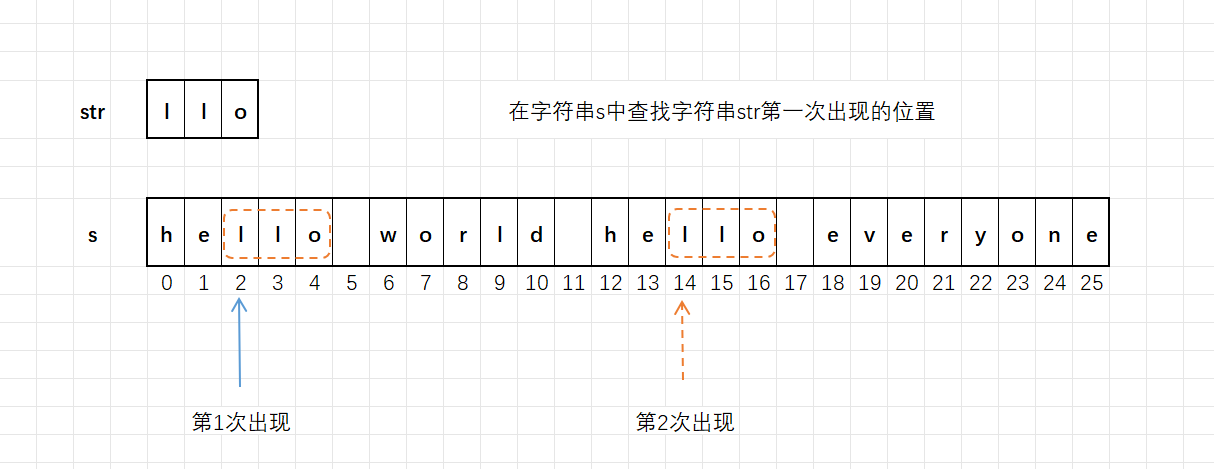
函数原型如下:
cpp
size_t find(const string& str, size_t pos = 0) const;
//查找string类型的字符串str,默认是从头开始查找,pos可以指定位置开始
size_t find(const char* s, size_t pos = 0) const;
//查找C⻛格的字符串s,默认是从头开始查找,pos可以指定位置开始
size_t find(const char* s, size_t pos, size_t n) const;
//在字符串的pos这个位置开始查找C⻛格的字符串s中的前n个字符,
size_t find(char c, size_t pos = 0) const;
//查找字符c,默认是从头开始,pos可以指定位置开始
返回值:
- 若找到,返回子串 / 字符在字符串中第一次出现的起始下标位置。
- 若未找到,返回一个整数值
npos(针对npos的介绍会在下面给出)。通常判断find()函数的返回值是否等于npos就能知道是否查找到子串或者字符。
2)用法一、二
我们将前两个看为一组来进行解释:
cpp
#include<iostream>
#include<string>
using namespace std;
int main()
{
	string s = "hello world hello everyone";
	string str = "llo";
	//查找string类型的字符串
	size_t n = s.find(str);
	cout << n << endl;

	n = s.find(str, n + 1); //从n+1这个指定位置开始查找
	cout << n << endl;

	//查找C⻛格的字符串
	n = s.find("llo");
	cout << n << endl;

	n = s.find("llo", n + 1); //从n+1这个指定位置开始查找
	cout << n << endl;

	return 0;
}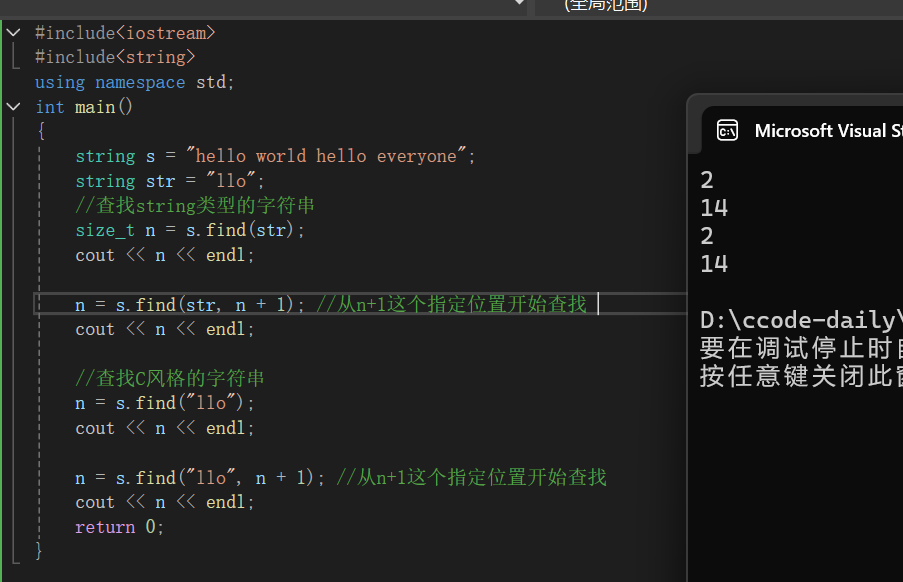
我们来解释一下这段代码:首先我们通过string去定义了两个字符串,使用find去在s中查找str,并且返回第一次查找到的下标,随后我们进行第二次查找的时候再上一次的基础上跳过一个位置继续进行查找,第三次和第四次查找我们选择直接查找C风格的字符串,方面以及思想与上述类似只是进行了将string定义的字符串直接换成C风格的字符串的操作。
3)用法三
我们接着来看第三种用法:
cpp
#include<iostream>
#include<string>
using namespace std;
int main()
{
	string s = "hello world hello everyone";
	//在s中,0这个指定位置开始查找"word"中的前3个字符
	size_t n = s.find("word", 0, 3);
	cout << n << endl;

	n = s.find("everyday", n + 1, 5);
	cout << n << endl;


	string name("zhui ming zhen zhou");
	size_t me = name.find("zhen zhou", 0, 4);
	cout << me << endl;
	return 0;
}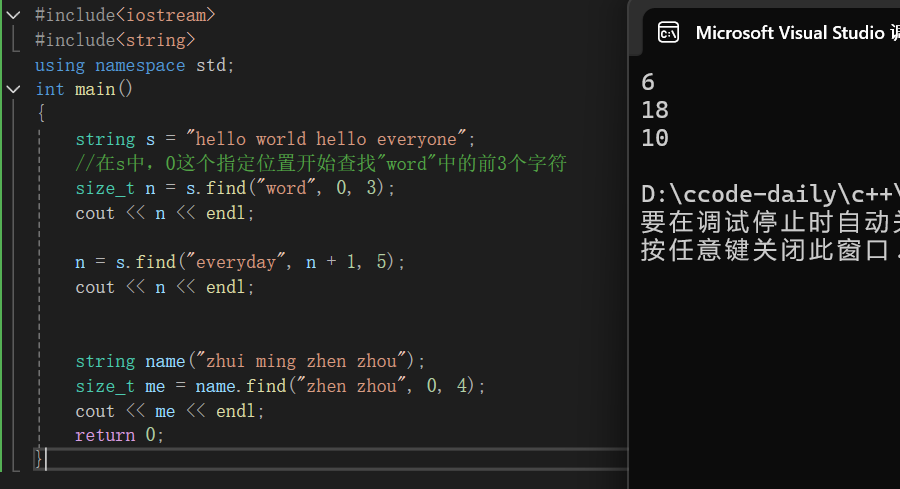
我们来解释一下上述代码:首先我们定义了string类型的字符串s,我们用find去找到在s中,从0这个指定位置开始查找"word"中的前三个字符,并且返回第一个字符的下标存到n中,下面我们进行下一步查找,继续在s中从n+1个位置开始在s中查找"everyone"的前五个字符,返回第一个字符的下标重新覆盖上一个n,最后一个与上述的类似不过多阐述,大家可以自己尝试去解释。
4)用法四
下面我们来看这最后一种用法:
cpp
#include <iostream>
#include <string> //添加string头⽂件
using namespace std;
int main()
{
	string name = "zhui ming zhen zhou";
	size_t me = name.find('z');
	cout << me << endl;

	me = name.find('z', me + 1);
	cout << me << endl;
	return 0;
}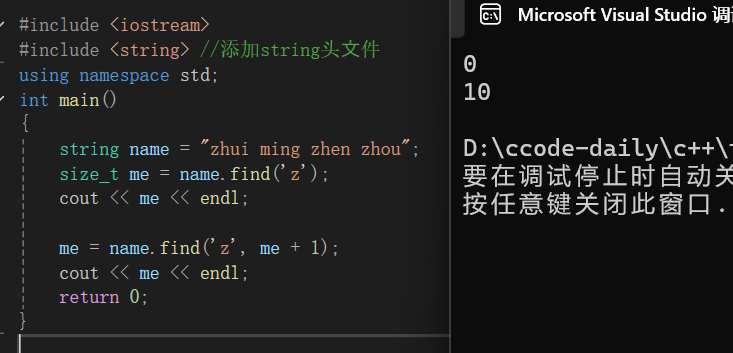
相信通过前面几次的解释大家这次都可以自行解释,希望大家去尝试一下,下面我给出我的解释:
我们依旧先定义了一个string类型的字符串name,在这个字符串中我们去查找字符'z',并且返回他的下标存在me中,下面我们从me后面一个位置开始查找字符'z',并且覆盖上次的me,继续打印
5)找不到
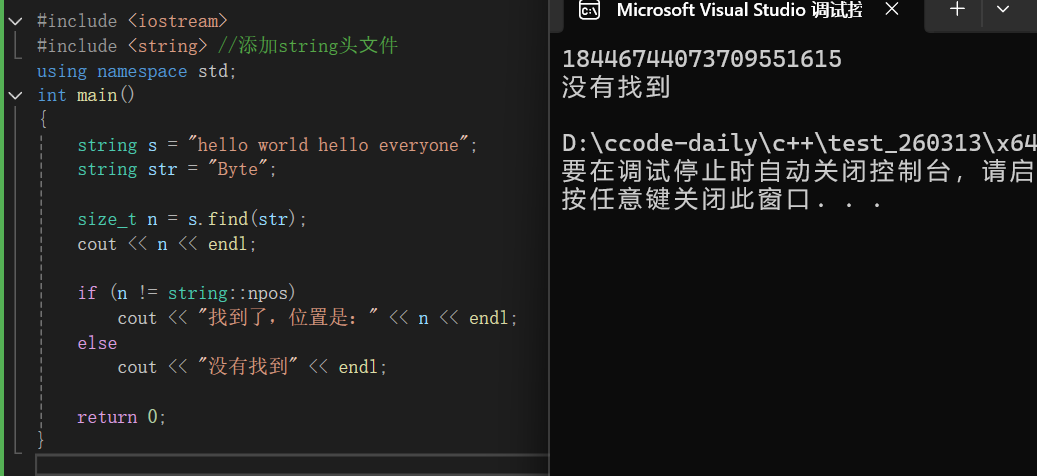
在字符串中查找字符或者字符串时,有可能查找不到,这时候 find 函数会返回 npos 这个值,该数字并不是一个随机的数字,而是 string 中定义的一个静态常量 npos。我们通常会判断 find 函数的返回值是否等于 npos 来判断,查找是否成功。
最后我们来上述说过的找不到的情况:
cpp
#include <iostream>
#include <string> //添加string头⽂件
using namespace std;
int main()
{
	string s = "hello world hello everyone";
	string str = "Byte";

	size_t n = s.find(str);
	cout << n << endl;

	if (n != string::npos)
		cout << "找到了,位置是:" << n << endl;
	else
		cout << "没有找到" << endl;

	return 0;
}
string s = "hello world hello everyone";定义一个字符串s,内容是:hello world hello everyone。
string str = "Byte";定义要查找的目标子串 :Byte。
size_t n = s.find(str);
- 调用字符串的
find函数- 在
s里面查找子串 str- 如果找到 ,返回子串第一次出现的下标
- 如果没找到 ,返回 string::npos(一个特殊值,表示 "没找到")
cout << n << endl;把 find 返回的结果打印出来。因为找不到,所以会输出一个很大的数字 (就是string::npos)。
if (n != string::npos)
- 如果返回值 不是 npos → 找到了
- 如果返回值 是 npos → 没找到
运行结果:一定是一串数字,没有找到
1. 它是干嘛的?
当你用
find()查找东西:
- 找到了 → 返回下标(0、1、2、3......)
- 没找到 → 返回
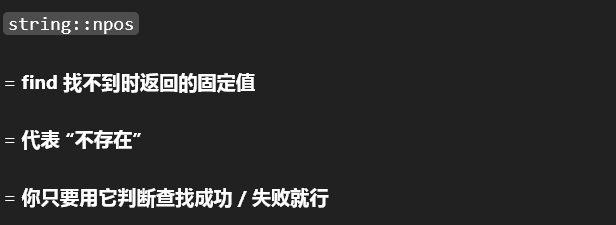
string::npos它就是 **"找不到" 的信号 **。
2. 它本质是什么?
它是一个巨大的正数 ,通常等于 18446744073709551615(无符号整数的最大值)。
你不用记这个数,你只需要记住:只要 find 返回的结果等于 string::npos → 就是没找到!
我们可以尝试去给npos的值打印出来看看:
cpp
#include <iostream>
#include <string> //添加string头⽂件
using namespace std;
int main()
{
	//注意:npos是string中定义的,使⽤npos需要带上string::指明是string类中的
	cout << "npos:" << string::npos << endl;
	return 0;
}
10°substr()
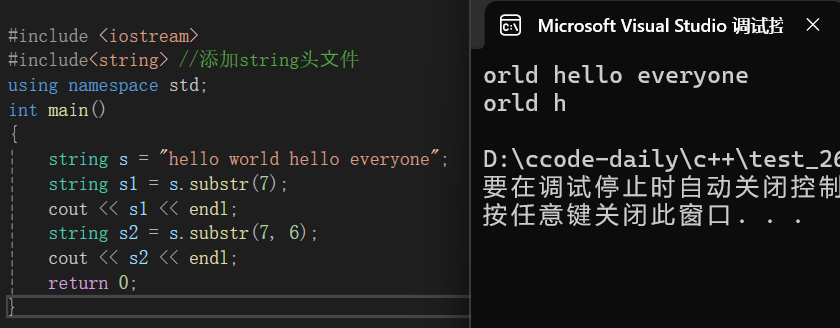
substr()函数用于截取字符串中指定位置指定长度的子串。函数原型如下:
cpp
string substr(size_t pos = 0, size_t len = npos) const;
//pos 的默认值是0,也就是从下标为0的位置开始截取
//len 的默认值是npos,意思是⼀直截取到字符串的末尾 
下面我们来看代码:
cpp
#include <iostream>
#include<string> //添加string头⽂件
using namespace std;
int main()
{
	string s = "hello world hello everyone";
	string s1 = s.substr(7);
	cout << s1 << endl;
	string s2 = s.substr(7, 6);
	cout << s2 << endl;
	return 0;
}
图解如下:
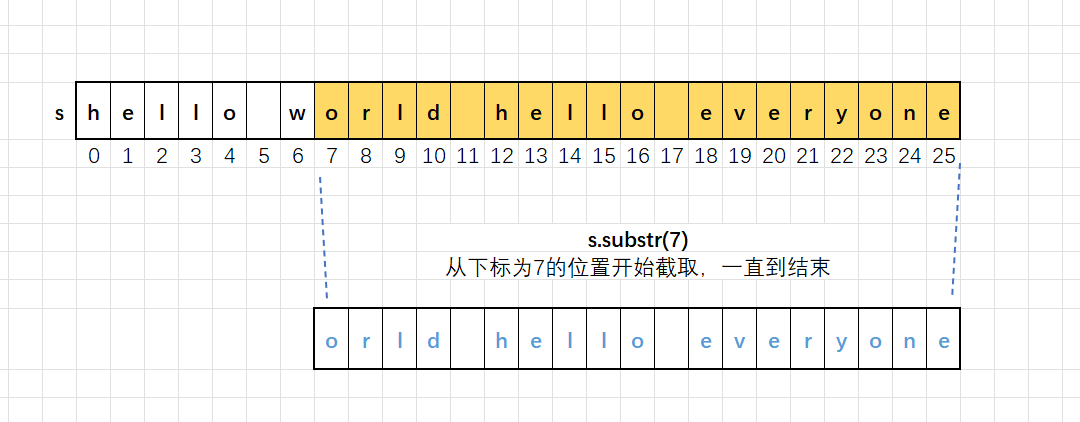
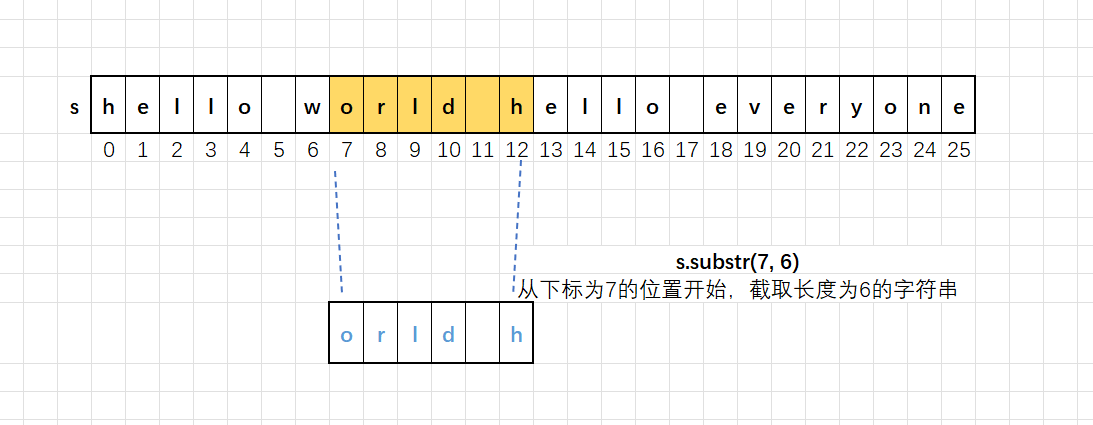
返回值类型:string,返回的是截取到的字符串,可以使用string类型的字符串接收
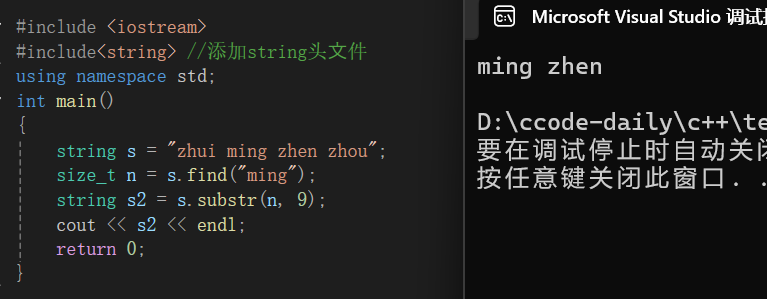
substr()和find()经常是配合使用的,find负责找到位置,substr从这个位置向后获得字符串:
cpp
#include <iostream>
#include<string> //添加string头⽂件
using namespace std;
int main()
{
	string s = "zhui ming zhen zhou";
	size_t n = s.find("ming");
	string s2 = s.substr(n, 9);
	cout << s2 << endl;
	return 0;
}
11°string的关系运算
在实际写代码的过程中经常会涉及到两个字符串比较大小,比如:判断你输入的密码是否正确,就得将输入的密码和数据库中正确的密码比较。
那么两个string类型字符串是否可以比较大小呢?其实是可以的,C++ 中为string提供了一系列的关系运算。
cpp
string s1 = "abc";
string s2 = "abcd";
char s3[] = "abcdef"; //C⻛格的字符串
(1) s1 == s2
bool operator== (const string & lhs, const string & rhs);//使用⽅式:s1 == s2
bool operator== (const char* lhs, const string& rhs);//使用⽅式:s3 == s1
bool operator== (const string& lhs, const char* rhs);//使用⽅式:s1 == s3
(2) s1 != s2
bool operator!= (const string & lhs, const string & rhs);//使用⽅式:s1 != s2
bool operator!= (const char* lhs, const string& rhs);//使用⽅式:s3 != s1
bool operator!= (const string& lhs, const char* rhs);//使用⽅式:s1 != s3
(3) s1 < s2
bool operator< (const string& lhs, const string& rhs);//使用⽅式:s1 < s2
bool operator< (const char* lhs, const string& rhs);//使用⽅式:s3 < s1
bool operator< (const string& lhs, const char* rhs);//用⽅式:s1 < s3
(4) s1 <= s2
bool operator<= (const string & lhs, const string & rhs);//使用⽅式:s1 <= s2
bool operator<= (const char* lhs, const string& rhs);//使用⽅式:s3 <= s1
bool operator<= (const string& lhs, const char* rhs);//使用⽅式:s1 <= s3
(5) s1 > s2
bool operator> (const string& lhs, const string& rhs);//使用⽅式:s1 > s2
bool operator> (const char* lhs, const string& rhs);//使用⽅式:s3 > s1
bool operator> (const string& lhs, const char* rhs);//使用⽅式:s1 > s3
(6) s1 >= s2
bool operator>= (const string & lhs, const string & rhs);//使用⽅式:s1 >= s2
bool operator>= (const char* lhs, const string& rhs);//使用⽅式:s3 >= s1
bool operator>= (const string& lhs, const char* rhs);//使用⽅式:s1 >= s3
大家乍一看肯定会被吓到,但其实他的用法是非常简单的,这里我们还需要关注的一点是字符串的比较是基于字典序进行的,比较是对应位置上字符的ASCII值的大小;比较的不是字符串的长度:
cpp
"abc" < "aq" //'b'的ascii码值是⼩于'q'的
"abcdef" < "ff" //'a'的ASCII码值是⼩于'f'的
"100" < "9" //'1'的ASCII码值是⼩于'9'的,不是100和9比
cpp
#include <iostream>
#include<string>
using namespace std;
int main()
{
	string s1 = "hello world";
	string s2 = "hello";
	if (s1 == (s2 + "world"))
	{
		cout << "s1 == s2" << endl;
	}
	else
	{
		cout << "s1 != s2" << endl;
	}
	return 0;
}
大家看这段代码乍一看肯定以为会打印s1 == s2,但是要注意s2的hello与world之间没有空格,少了一个字符,我们就给上述的按照我们需求直接用可以了,多去熟悉,就比如这里的加就是在一串字符后面衔接一段字符。
cpp
#include <iostream>
#include <string>
using namespace std;
int main()
{
	string s1 = "abcd";
	string s2 = "abbcdef";
	char s3[] = "bbc";

	if (s1 > s2)
		cout << "s1 > s2" << endl;
	else
		cout << "s1 <= s2" << endl;

	if (s1 == s2)
		cout << "s1 == s2" << endl;
	else
		cout << "s1 != s2" << endl;

	if (s1 <= s3)
		cout << "s1 <= s3" << endl;
	else
		cout << "s1 > s3" << endl;

	 return 0;
}
大家可以自己去推一下运行结果然后放到自己电脑上的编译器看看结果
练习
https://www.luogu.com.cn/problem/P5015
https://www.luogu.com.cn/problem/B2112
https://www.luogu.com.cn/problem/B2115
https://www.luogu.com.cn/problem/P5734
https://www.luogu.com.cn/problem/B2120
https://www.luogu.com.cn/problem/B2122
https://www.luogu.com.cn/problem/B2124
https://www.luogu.com.cn/problem/P1765
https://www.luogu.com.cn/problem/P1957