今天针对了JDBC封装以及PreparedStatement的使用以及MySQL中数据类型和Java中数据类型对应的关系:
1.昨天说了针对于JDBC中的连接数据库以及进行简单DDL,DML,DQL操作的方法,但是实际用起来的话,有些语句过于固定,因此在每次使用时都需要重复在main里面写,我们如果把他封装一下使用起来会更方便:
java
package TestDB;

import java.sql.*;

/**
 * @author djw
 */
public class DBUtil {
    public static Driver DRIVER;
    public static String URL;
    public static String USERNAME;
    public static String PASSWORD;
    static {
        try {
            DRIVER = new com.mysql.cj.jdbc.Driver();
        } catch (SQLException e) {
            throw new RuntimeException(e);
        }
        URL = "jdbc:mysql://localhost:3306/jdbcdb?serverTimezone = Asia/Shanghai&useSSL=false";
        USERNAME = "root";
        PASSWORD = "dzx123123";
    }
    public static Connection getConnection(){
        try {
            Class.forName("com.mysql.cj.jdbc.Driver");
        } catch (ClassNotFoundException e) {
            throw new RuntimeException(e);
        }
        Connection conn = null;
        try {
            return DriverManager.getConnection(URL,USERNAME,PASSWORD);
        }catch (SQLException e){
            throw new RuntimeException(e);
        }
    }
    public static Statement getStatement(Connection conn){
        try {
            return conn.createStatement();
        } catch (SQLException e) {
            throw new RuntimeException(e);
        }
    }
    public static int executeUpdate(String sql){
        Connection conn = getConnection();
        Statement stmt = getStatement(conn);
        try {
             int  r = stmt.executeUpdate(sql);
             return 4;
        } catch (SQLException e) {
            throw new RuntimeException(e);
        }finally {
            close(conn,stmt);
        }
    }
    public static void close(Connection conn, Statement stmt){
        try {
            conn.close();
            stmt.close();
        } catch (SQLException e) {
            throw new RuntimeException(e);
        }
    }
    public static DBObject executeQuery(String sql){
        Connection conn = getConnection();
        Statement stmt = getStatement(conn);
        try {
            return new DBObject(conn,stmt,stmt.executeQuery(sql));
        } catch (SQLException e) {
            throw new RuntimeException(e);
        }
    }
    public static void close(DBObject obj){
        close(obj.getConn(),obj.getStmt());
    }
    public static  int executeUpdatePrepared(String sql,Object ... args){
        Connection conn = getConnection();
        PreparedStatement pstmt = null;
        try{
            pstmt = conn.prepareStatement(sql);
            int i = 1;
            for(Object arg : args){
                pstmt.setObject(i++,arg);
            }
            int m = pstmt.executeUpdate();
            return m;
        }catch (SQLException e){
            throw new RuntimeException(e);
        }finally {
            close(conn,pstmt);
        }
    }
    public static DBObject executeQueryPrepared(String sql,Object ... args){
        Connection conn = getConnection();
        PreparedStatement pstmt = null;
        DBObject obj = null;
        try{
            pstmt = conn.prepareStatement(sql);
            int i = 1;
            for(Object arg : args){
                pstmt.setObject(i++,arg);
            }
            obj = new DBObject(conn,pstmt,pstmt.executeQuery());
        }catch (SQLException e){
            throw new RuntimeException(e);
        }
        return obj;
    }
}
java
public class DBObject {
    Connection conn;
    Statement stmt;
    ResultSet rs;
    public DBObject() {}
    public DBObject(Connection conn, Statement stmt, ResultSet rs) {
        this.conn = conn;
        this.stmt = stmt;
        this.rs = rs;
    }

    public Connection getConn() {
        return conn;
    }

    public void setConn(Connection conn) {
        this.conn = conn;
    }

    public Statement getStmt() {
        return stmt;
    }

    public void setStmt(Statement stmt) {
        this.stmt = stmt;
    }

    public ResultSet getRs() {
        return rs;
    }

    public void setRs(ResultSet rs) {
        this.rs = rs;
    }

}
代码如上,可以看到我使用了静态变量存储了url地址,密码,账号等固定的信息,并在静态代码块进行初始化,这里要注意了在执行DQL操作的时候,如果想要查看的结果需要用到返回的ResultSet,但是我们如果在方法内使用了close方法的话,那么还没来得及返回的ResultSet就会被删除,导致我们查不到结果,所以我又定义了一个DBObject类来存储ResultSet,并设置了响应的关闭方法;
2.如果我们使用的是普通的Statement的话那么会有SQL注入攻击的风险,比如:
sql
select * from admin where name='1212' or ' and pwd='='aaa' or '1'='1'
select * from admin where name='x' or 'z'='z' and pwd='x' or 'z'='z'
用户利用漏洞输入OR TRUE类型的语句会导致结果必然成功,从而影响安全,所以我们需要用到PreparedStatement;
3.PreparedStatement在初始化时,就需要注入sql语句,并且是类似于这种的形式
sql
select * from employees where id = ?其中的?就是用来占位的,先预编译,在调用excuteUpdate或者是excuteQuery时就会直接进行运行SQL语句
4.UUID
UUID可以用做主键,以提高数据的安全性,因为它的重复率低,并且较为复杂,因此当作主键的话安全系数比较高;
5.MySQL的数据类型和Java中数据类型的对应
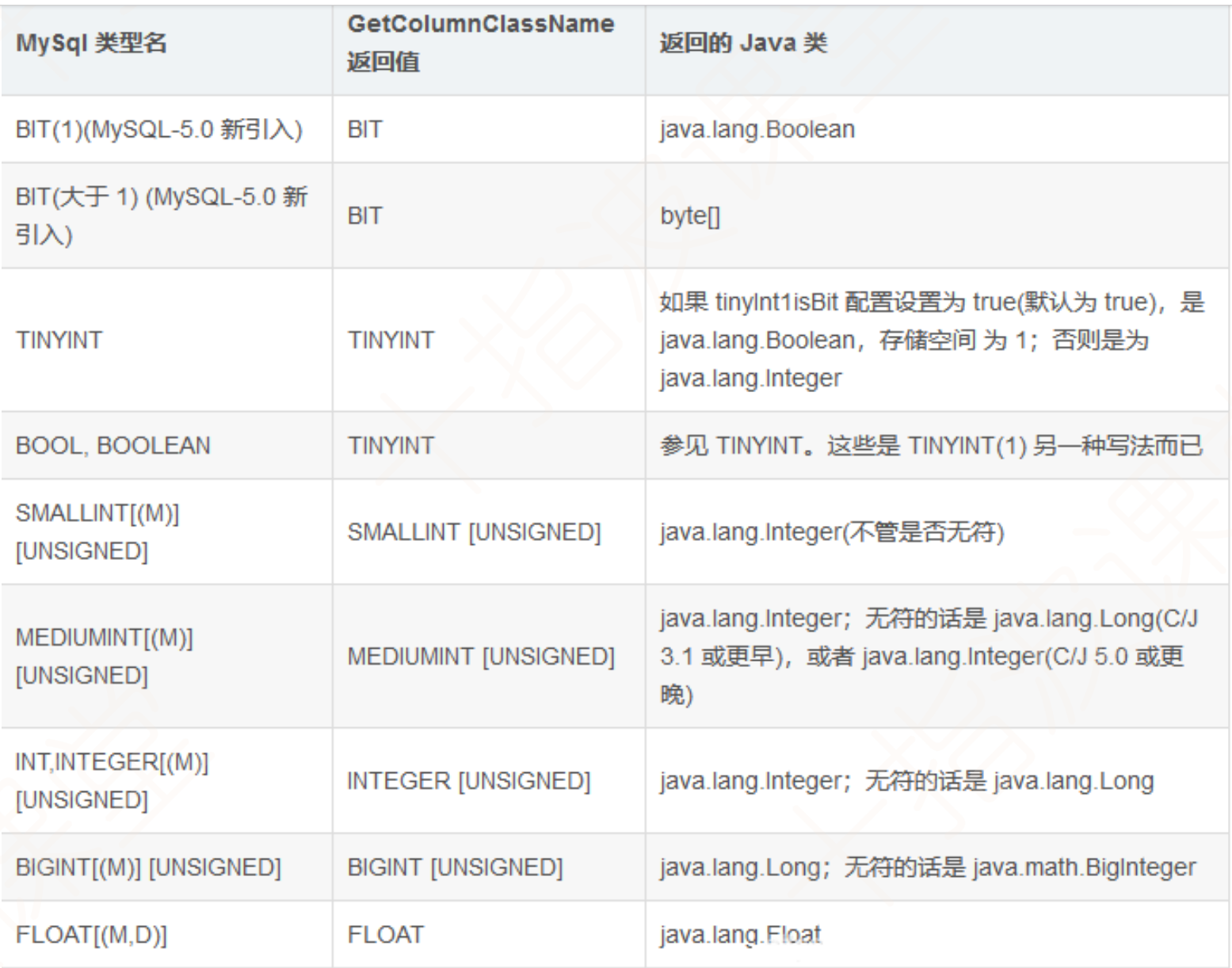
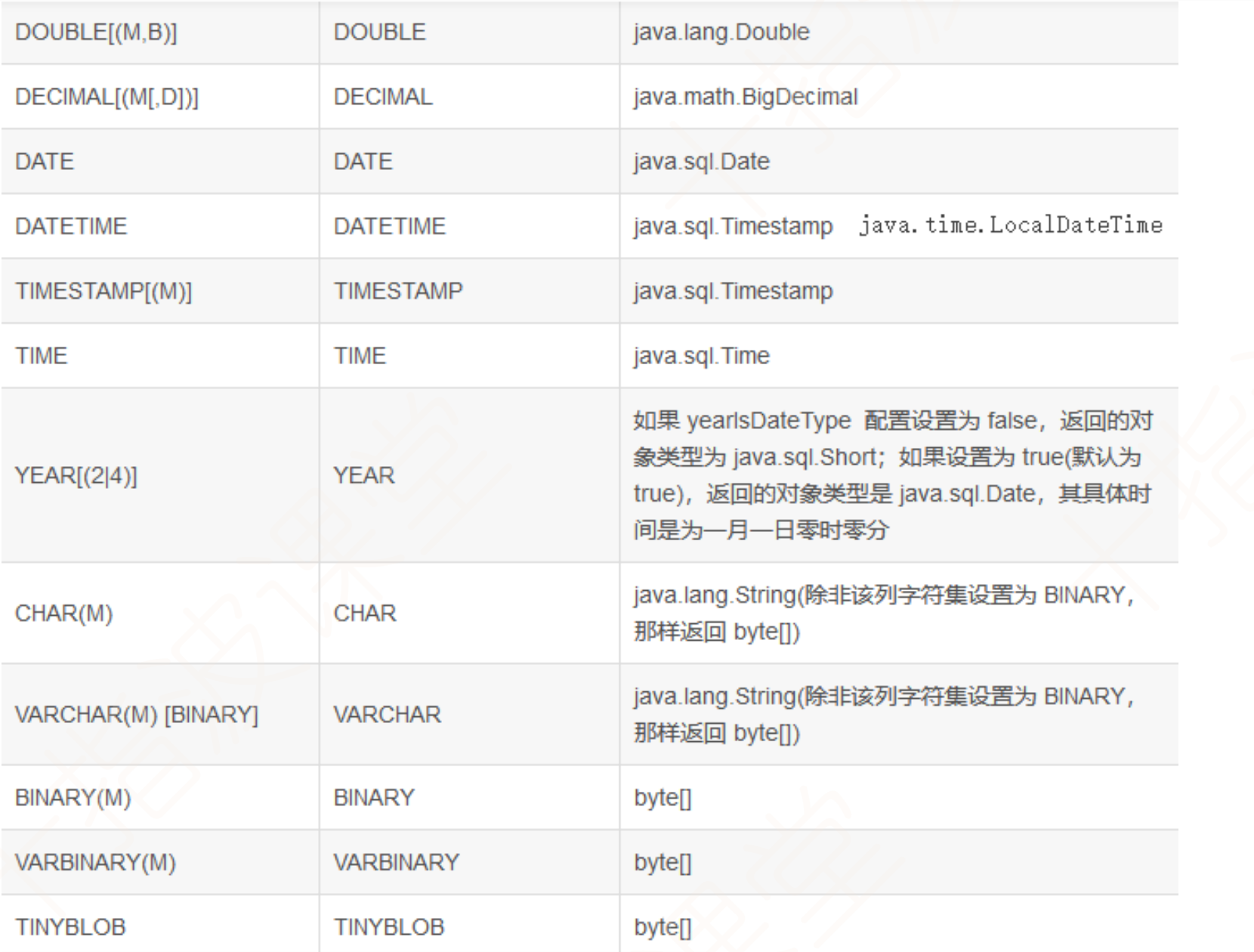
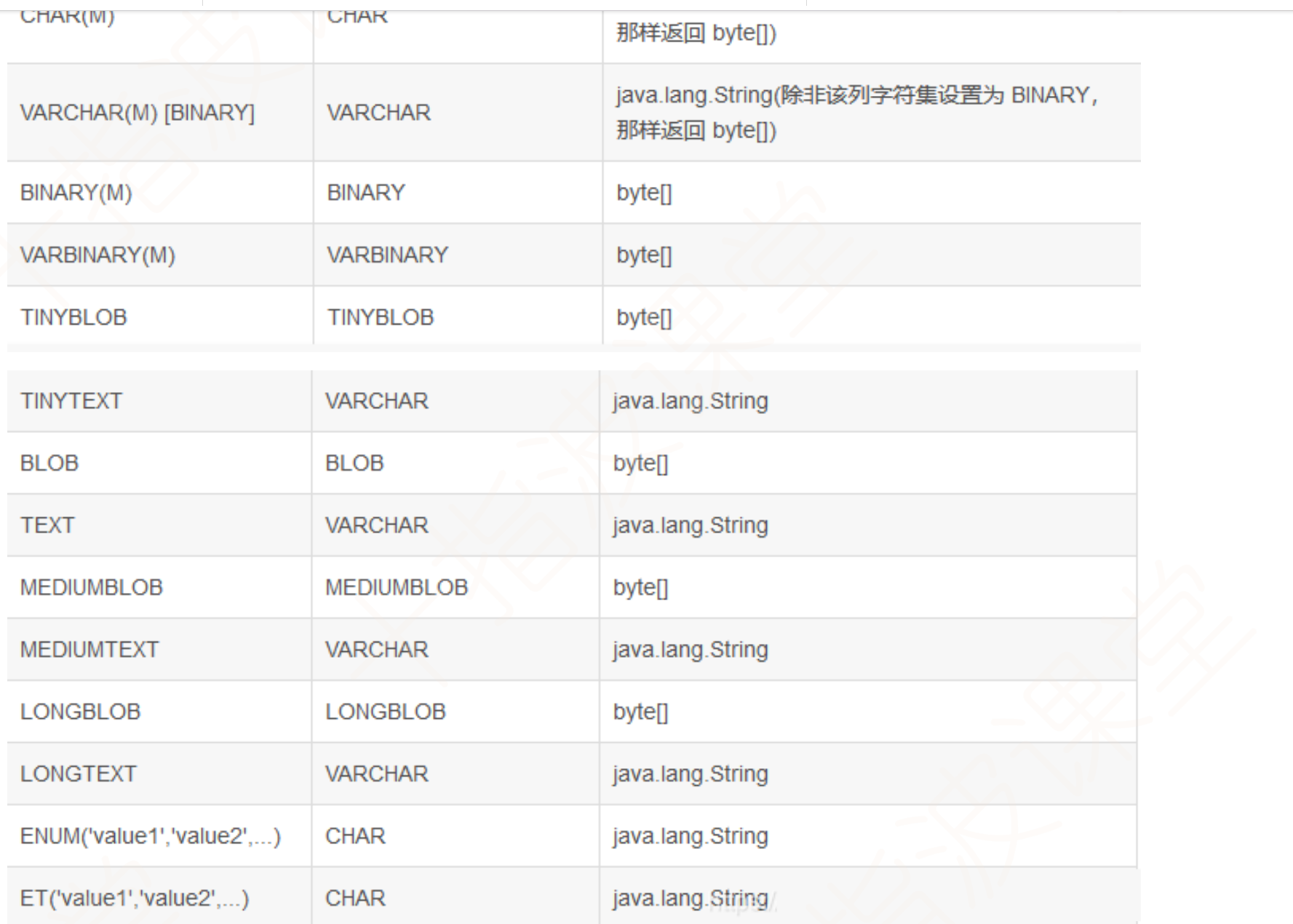
6.可以使用ResultSet的方法getMetaData方法获得对应的结果集元数据来获得比如说有多少列,字段名都是什么,字段的数据类型都是什么;
java
public class Test {
public static void main(String[] args) throws SQLException {
String sql="select * from types";
DBObject dbObject = DBUtil.executeQueryPrepared(sql);
ResultSet resultSet=dbObject.getResultSet();
ResultSetMetaData metaData = resultSet.getMetaData();
//获取结果集查询到的列的长度
int columnCount = metaData.getColumnCount();
System.out.println("列名\t类型\tjava类");
7.查看结果时对于结果集来说,它的getString方法可以获得所有类型的数据,但是仅限于打印了,不能对其进行算数运算;