1. 项目简介 / Project Introduction
本项目是基于MCP框架的MySQL查询服务器,支持通过SSE协议进行实时数据库操作,具备完善的安全、日志、配置和敏感信息保护机制,适用于开发、测试和生产环境下的安全MySQL数据访问。
This project is a MySQL query server based on the MCP framework, supporting real-time database operations via SSE protocol. It features comprehensive security, logging, configuration, and sensitive information protection mechanisms, suitable for secure MySQL data access in development, testing, and production environments.
2. 主要特性 / Key Features
-
基于FastMCP框架,异步高性能
-
支持高并发的数据库连接池,参数灵活可调
-
支持SSE实时推送
-
丰富的MySQL元数据与结构查询API
-
自动事务管理与回滚
-
多级SQL风险控制与注入防护
-
数据库隔离安全:防止跨数据库访问,支持三级访问控制
-
敏感信息自动隐藏与自定义
-
灵活的环境变量配置
-
完善的日志与错误处理
-
Docker支持,快速部署
-
Built on FastMCP framework, high-performance async
-
Connection pool for high concurrency, with flexible parameter tuning
-
SSE real-time push support
-
Rich MySQL metadata & schema query APIs
-
Automatic transaction management & rollback
-
Multi-level SQL risk control & injection protection
-
Database Isolation Security: Prevents cross-database access with 3-level access control
-
Automatic and customizable sensitive info masking
-
Flexible environment variable configuration
-
Robust logging & error handling
-
Docker support for quick deployment
3. 快速开始 / Quick Start
Docker 方式 / Docker Method
# 拉取镜像
docker pull mangooer/mysql-mcp-server-sse:latest

# 运行容器
docker run -d \
  --name mysql-mcp-server-sse \
  -e HOST=0.0.0.0 \
  -e PORT=3000 \
  -e MYSQL_HOST=your_mysql_host \
  -e MYSQL_PORT=3306 \
  -e MYSQL_USER=your_mysql_user \
  -e MYSQL_PASSWORD=your_mysql_password \
  -e MYSQL_DATABASE=your_database \
  -p 3000:3000 \
  mangooer/mysql-mcp-server-sse:latest
Windows PowerShell 格式:
docker run -d `
  --name mysql-mcp-server-sse `
  -e HOST=0.0.0.0 `
  -e PORT=3000 `
  -e MYSQL_HOST=your_mysql_host `
  -e MYSQL_PORT=3306 `
  -e MYSQL_USER=your_mysql_user `
  -e MYSQL_PASSWORD=your_mysql_password `
  -e MYSQL_DATABASE=your_database `
  -p 3000:3000 `
  mangooer/mysql-mcp-server-sse:latest
源码方式 / Source Code Method
安装依赖 / Install Dependencies
pip install -r requirements.txt配置环境变量 / Configure Environment Variables
复制.env.example为.env,并根据实际情况修改。 Copy .env.example to .env and modify as needed.
启动服务 / Start the Server
python -m src.server默认监听:http://127.0.0.1:3000/sse Default endpoint: http://127.0.0.1:3000/sse
4. 目录结构 / Project Structure
.
├── src/
│   ├── server.py           # 主服务器入口 / Main server entry
│   ├── config.py           # 配置项定义 / Config definitions
│   ├── validators.py       # 参数校验 / Parameter validation
│   ├── db/
│   │   └── mysql_operations.py # 数据库操作 / DB operations
│   ├── security/
│   │   ├── interceptor.py      # SQL拦截 / SQL interception
│   │   ├── query_limiter.py    # 风险控制 / Risk control
│   │   └── sql_analyzer.py     # SQL分析 / SQL analysis
│   └── tools/
│       ├── mysql_tool.py           # 基础查询 / Basic query
│       ├── mysql_metadata_tool.py  # 元数据查询 / Metadata query
│       ├── mysql_info_tool.py      # 信息查询 / Info query
│       ├── mysql_schema_tool.py    # 结构查询 / Schema query
│       └── metadata_base_tool.py   # 工具基类 / Tool base class
├── tests/                  # 测试 / Tests
├── .env.example            # 环境变量示例 / Env example
└── requirements.txt        # 依赖 / Requirements
5. 环境变量与配置 / Environment Variables & Configuration
| 变量名 / Variable | 说明 / Description | 默认值 / Default |
|---|---|---|
| HOST | 服务器监听地址 / Server listen address | 127.0.0.1 |
| PORT | 服务器监听端口 / Server listen port | 3000 |
| MYSQL_HOST | MySQL服务器地址 / MySQL server host | localhost |
| MYSQL_PORT | MySQL服务器端口 / MySQL server port | 3306 |
| MYSQL_USER | MySQL用户名 / MySQL username | root |
| MYSQL_PASSWORD | MySQL密码 / MySQL password | (空/empty) |
| MYSQL_DATABASE | 要连接的数据库名 / Database name | (空/empty) |
| DB_CONNECTION_TIMEOUT | 连接超时时间(秒) / Connection timeout (seconds) | 5 |
| DB_AUTH_PLUGIN | 认证插件类型 / Auth plugin type | mysql_native_password |
| DB_POOL_ENABLED | 是否启用连接池 / Enable connection pool (true/false) | true |
| DB_POOL_MIN_SIZE | 连接池最小连接数 / Pool min size | 5 |
| DB_POOL_MAX_SIZE | 连接池最大连接数 / Pool max size | 20 |
| DB_POOL_RECYCLE | 连接回收时间(秒) / Pool recycle time (seconds) | 300 |
| DB_POOL_MAX_LIFETIME | 连接最大存活时间(秒, 0=不限制) / Max lifetime (sec) | 0 |
| DB_POOL_ACQUIRE_TIMEOUT | 获取连接超时时间(秒) / Acquire timeout (seconds) | 10.0 |
| ENV_TYPE | 环境类型(development/production) / Env type | development |
| ALLOWED_RISK_LEVELS | 允许的风险等级(逗号分隔) / Allowed risk levels | LOW,MEDIUM |
| ALLOW_SENSITIVE_INFO | 允许查询敏感字段 / Allow sensitive info (true/false) | false |
| SENSITIVE_INFO_FIELDS | 自定义敏感字段模式(逗号分隔) / Custom sensitive fields | (空/empty) |
| MAX_SQL_LENGTH | 最大SQL语句长度 / Max SQL length | 5000 |
| BLOCKED_PATTERNS | 阻止的SQL模式(逗号分隔) / Blocked SQL patterns | (空/empty) |
| ENABLE_QUERY_CHECK | 启用查询安全检查 / Enable query check (true/false) | true |
| ENABLE_DATABASE_ISOLATION | 启用数据库隔离 / Enable database isolation (true/false) | false |
| DATABASE_ACCESS_LEVEL | 数据库访问级别 / Database access level (strict/restricted/permissive) | permissive |
| LOG_LEVEL | 日志级别(DEBUG/INFO/...) / Log level | DEBUG |
注/Note: 部分云MySQL需指定
DB_AUTH_PLUGIN为mysql_native_password。
MySQL 8.0 认证支持 / MySQL 8.0 Authentication Support
本系统完全支持 MySQL 8.0 的认证机制。MySQL 8.0 默认使用 caching_sha2_password 认证插件,提供更高的安全性。
This system fully supports MySQL 8.0 authentication mechanisms. MySQL 8.0 uses caching_sha2_password by default for enhanced security.
认证插件对比 / Authentication Plugin Comparison
| 认证插件 / Plugin | 安全性 / Security | 兼容性 / Compatibility | 依赖要求 / Dependencies |
|---|---|---|---|
mysql_native_password |
中等 / Medium | 高 / High | 无 / None |
caching_sha2_password |
高 / High | 中等 / Medium | cryptography |
配置建议 / Configuration Recommendations
生产环境 / Production(推荐 / Recommended):
DB_AUTH_PLUGIN=caching_sha2_password开发环境 / Development(简化配置 / Simplified):
DB_AUTH_PLUGIN=mysql_native_password依赖安装 / Dependency Installation
使用 caching_sha2_password 时需要安装 cryptography 包(已包含在 requirements.txt 中):
When using caching_sha2_password, the cryptography package is required (already included in requirements.txt):
pip install cryptography数据库隔离安全 / Database Isolation Security
本系统提供强大的数据库隔离功能,防止跨数据库访问,确保数据安全。
This system provides robust database isolation features to prevent cross-database access and ensure data security.
访问级别 / Access Levels
| 级别 / Level | 允许访问 / Allowed Access | 适用场景 / Use Case |
|---|---|---|
| strict | 仅指定数据库 / Only specified database | 生产环境 / Production |
| restricted | 指定数据库 + 系统库 / Specified + system databases | 开发环境 / Development |
| permissive | 所有数据库 / All databases | 测试环境 / Testing |
启用数据库隔离 / Enable Database Isolation
# Docker 启用严格模式 / Docker with strict mode
docker run -d \
  -e MYSQL_DATABASE=your_database \
  -e ENABLE_DATABASE_ISOLATION=true \
  -e DATABASE_ACCESS_LEVEL=strict \
  mangooer/mysql-mcp-server-sse:latest

# 生产环境自动启用 / Auto-enable in production
docker run -d \
  -e ENV_TYPE=production \
  -e MYSQL_DATABASE=your_database \
  mangooer/mysql-mcp-server-sse:latest
安全效果 / Security Effects:
- ✅ 阻止
SHOW DATABASES/ BlocksSHOW DATABASES - ✅ 阻止
SELECT * FROM mysql.user/ BlocksSELECT * FROM mysql.user - ✅ 阻止
SHOW TABLES FROM other_db/ BlocksSHOW TABLES FROM other_db - ✅ 允许当前数据库操作 / Allows current database operations
🔒 重要 :生产环境(
ENV_TYPE=production)会自动启用数据库隔离,使用restricted模式。🔒 Important : Production environment (
ENV_TYPE=production) automatically enables database isolation withrestrictedmode.
6. 自动化与资源管理优化 / Automation & Resource Management Enhancements
自动化工具注册 / Automated Tool Registration
- 所有MySQL相关API工具均采用自动注册机制:
- 无需手动在主入口维护注册代码,新增/删除工具只需在
src/tools/目录下实现register_xxx_tool(s)函数即可。 - 系统启动时自动扫描并注册,极大提升可维护性和扩展性。
- 无需手动在主入口维护注册代码,新增/删除工具只需在
- All MySQL-related API tools are registered automatically:
- No need to manually maintain registration code in the main entry. To add or remove a tool, simply implement a
register_xxx_tool(s)function in thesrc/tools/directory. - The system scans and registers tools automatically at startup, greatly improving maintainability and extensibility.
- No need to manually maintain registration code in the main entry. To add or remove a tool, simply implement a
连接池自动回收与资源管理 / Connection Pool Auto-Recycling & Resource Management
- 连接池采用事件循环隔离与自动回收机制:
- 每个事件循环独立池,支持高并发与多环境。
- 定期(默认每5分钟)自动回收无效或失效的连接池,防止资源泄漏。
- 事件循环关闭时自动关闭对应连接池,确保资源彻底释放。
- 支持多数据库/多租户场景扩展。
- 所有资源管理操作均有详细日志,便于追踪和排查。
- The connection pool uses event loop isolation and auto-recycling:
- Each event loop has its own pool, supporting high concurrency and multi-environment deployment.
- Unused or invalid pools are automatically recycled every 5 minutes (by default), preventing resource leaks.
- When an event loop is closed, its pool is automatically closed to ensure complete resource release.
- Ready for multi-database/multi-tenant scenarios.
- All resource management operations are logged in detail for easy tracking and troubleshooting.
7. 安全机制 / Security Mechanisms
-
多级SQL风险等级(LOW/MEDIUM/HIGH/CRITICAL)
-
SQL注入与危险操作拦截
-
WHERE子句强制检查
-
数据库隔离安全:三级访问控制(strict/restricted/permissive)
-
跨数据库访问防护:阻止未授权的数据库访问
-
敏感信息自动隐藏(支持自定义字段)
-
生产环境默认只允许低风险操作
-
生产环境自动启用数据库隔离
-
Multi-level SQL risk levels (LOW/MEDIUM/HIGH/CRITICAL)
-
SQL injection & dangerous operation interception
-
Mandatory WHERE clause check
-
Database Isolation Security: 3-level access control (strict/restricted/permissive)
-
Cross-database Access Protection: Blocks unauthorized database access
-
Automatic sensitive info masking (customizable fields)
-
Production allows only low-risk operations by default
-
Auto-enable database isolation in production
8. 日志与错误处理 / Logging & Error Handling
-
日志级别可配置(LOG_LEVEL)
-
控制台与文件日志输出
-
详细记录运行状态与错误
-
完善的异常捕获与事务回滚
-
Configurable log level (LOG_LEVEL)
-
Console & file log output
-
Detailed running status & error logs
-
Robust exception capture & transaction rollback
9. 常见问题 / FAQ
Q: DELETE操作未执行成功?
A: 检查是否有WHERE条件,无WHERE为高风险,需在ALLOWED_RISK_LEVELS中允许CRITICAL。
Q: Why does DELETE not work? A: Check for WHERE clause. DELETE without WHERE is high risk (CRITICAL), must be allowed in ALLOWED_RISK_LEVELS.
Q: 如何自定义敏感字段?
A: 设置SENSITIVE_INFO_FIELDS,如SENSITIVE_INFO_FIELDS=password,token
Q: How to customize sensitive fields? A: Set SENSITIVE_INFO_FIELDS, e.g. SENSITIVE_INFO_FIELDS=password,token
Q: 如何启用数据库隔离?
A: 设置ENABLE_DATABASE_ISOLATION=true和DATABASE_ACCESS_LEVEL=strict,或使用ENV_TYPE=production自动启用。
Q: How to enable database isolation? A: Set ENABLE_DATABASE_ISOLATION=true and DATABASE_ACCESS_LEVEL=strict, or use ENV_TYPE=production for auto-enable.
Q: 数据库隔离后无法查询系统表?
A: strict模式禁止系统表访问,可改为restricted模式,或检查是否确实需要系统表访问权限。
Q: Cannot query system tables after enabling database isolation? A: strict mode blocks system table access. Use restricted mode or verify if system table access is actually needed.
Q: limit参数报错?
A: limit必须为非负整数。
Q: limit parameter error? A: limit must be a non-negative integer.
参考:https://github.com/mangooer/mysql-mcp-server-sse
8.实战
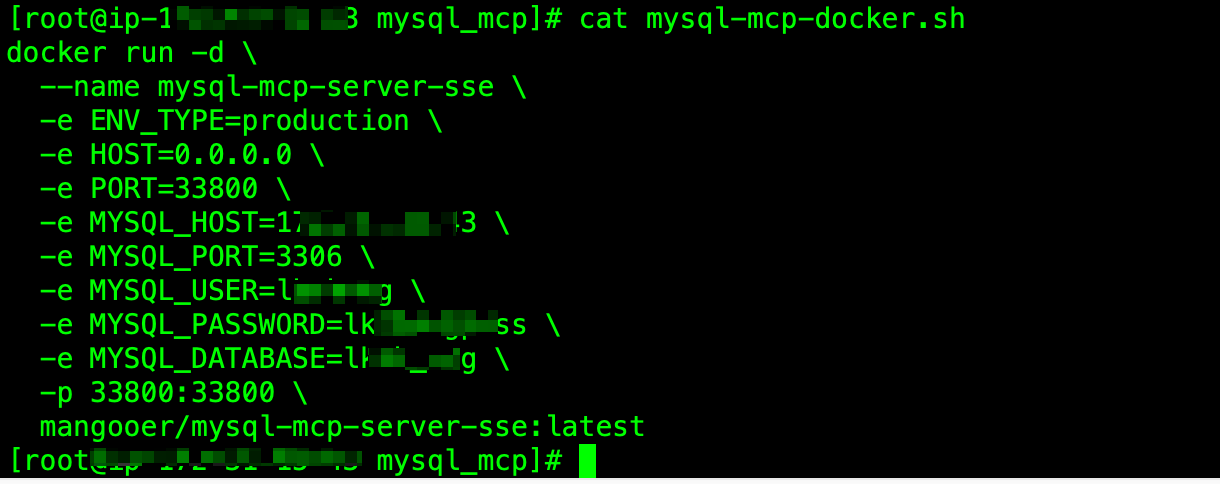
8.1启动mysql-mcp-server
8.2在codebuddy中添加mcp
bash
{
  "mcpServers": {
    "mysql-mcp": {
      "url": "http://IP地址:33800/sse",
      "disabled": false
    }
  }
}
3.查看mysql mcp server的技能

4.使用codebuddy告诉AI,你要做什么
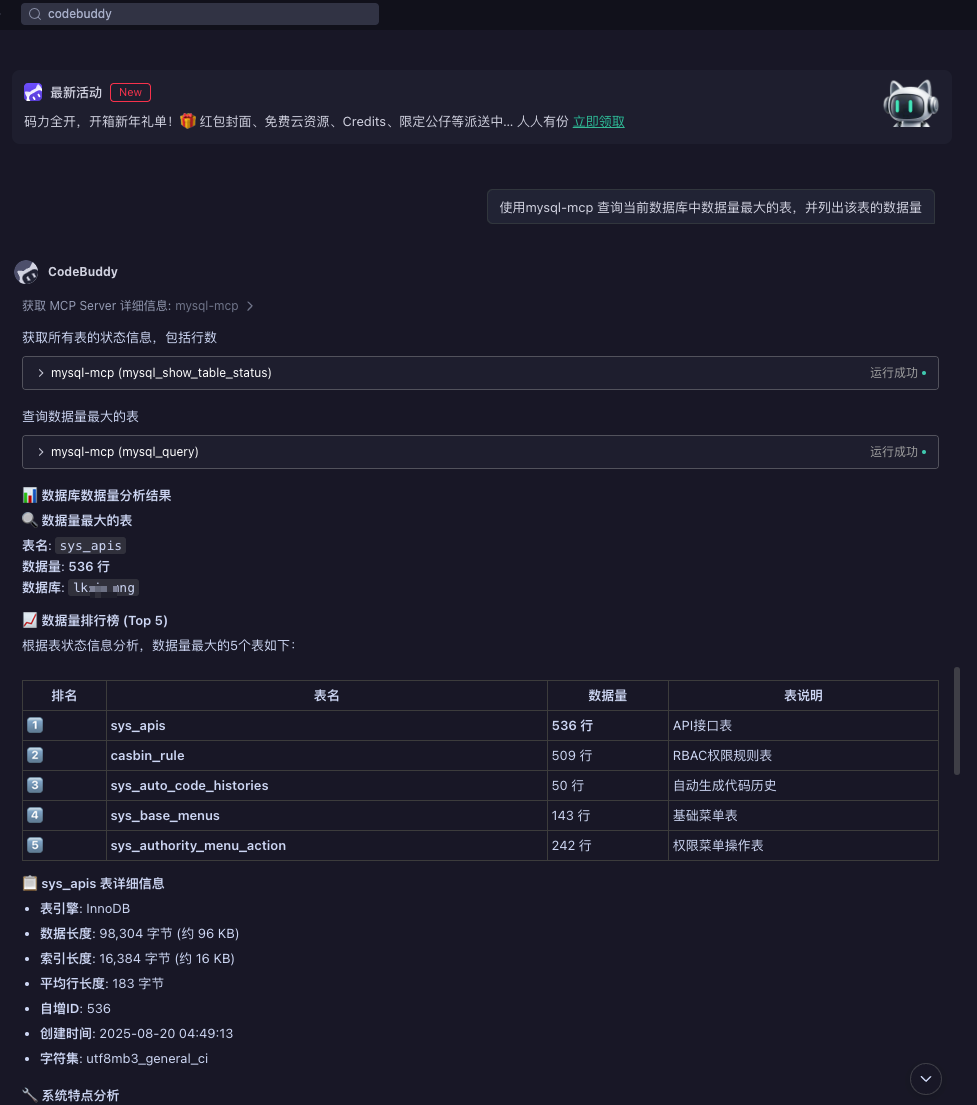
使用mysql-mcp 查询当前数据库中数据量最大的表,并列出该表的数据量