系统性学习Linux-第八讲-进程间通信
- [1. 进程间通信介绍](#1. 进程间通信介绍)
-
- [1-1 进程间通信目的](#1-1 进程间通信目的)
- [1-2 进程间通信发展](#1-2 进程间通信发展)
- [1-3 进程间通信分类](#1-3 进程间通信分类)
- [2. 管道](#2. 管道)
- [3. 匿名管道](#3. 匿名管道)
-
- [3-1 实例代码](#3-1 实例代码)
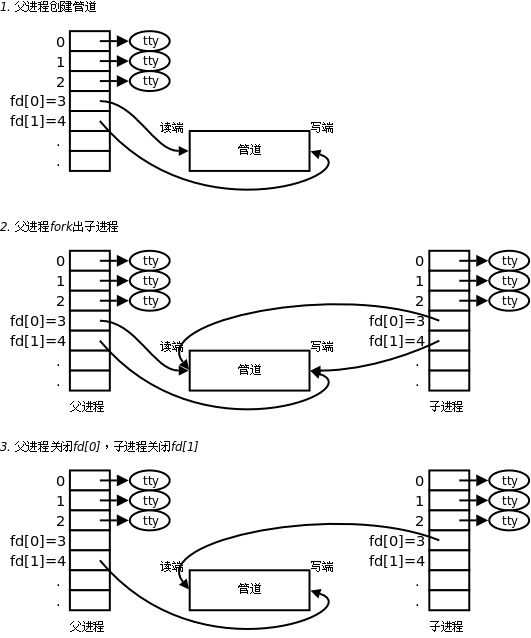
- [3-2 用 fork 来共享管道原理](#3-2 用 fork 来共享管道原理)
- [3-3 站在文件描述符角度-深度理解管道](#3-3 站在文件描述符角度-深度理解管道)
- [3-4 站在内核角度-管道本质](#3-4 站在内核角度-管道本质)
- [3-5 管道样例](#3-5 管道样例)
-
- [3-5-1 测试管道读写](#3-5-1 测试管道读写)
- [3-5-2 创建进程池处理任务](#3-5-2 创建进程池处理任务)
- [3-6 管道读写规则](#3-6 管道读写规则)
- [3-7 管道特点](#3-7 管道特点)
- [3-8 验证管道通信的4种情况](#3-8 验证管道通信的4种情况)
- [4. 命名管道](#4. 命名管道)
-
- [4-1 创建⼀个命名管道](#4-1 创建⼀个命名管道)
- [4-2 匿名管道与命名管道的区别](#4-2 匿名管道与命名管道的区别)
- [4-3 命名管道的打开规则](#4-3 命名管道的打开规则)
- [5. system V 共享内存](#5. system V 共享内存)
-
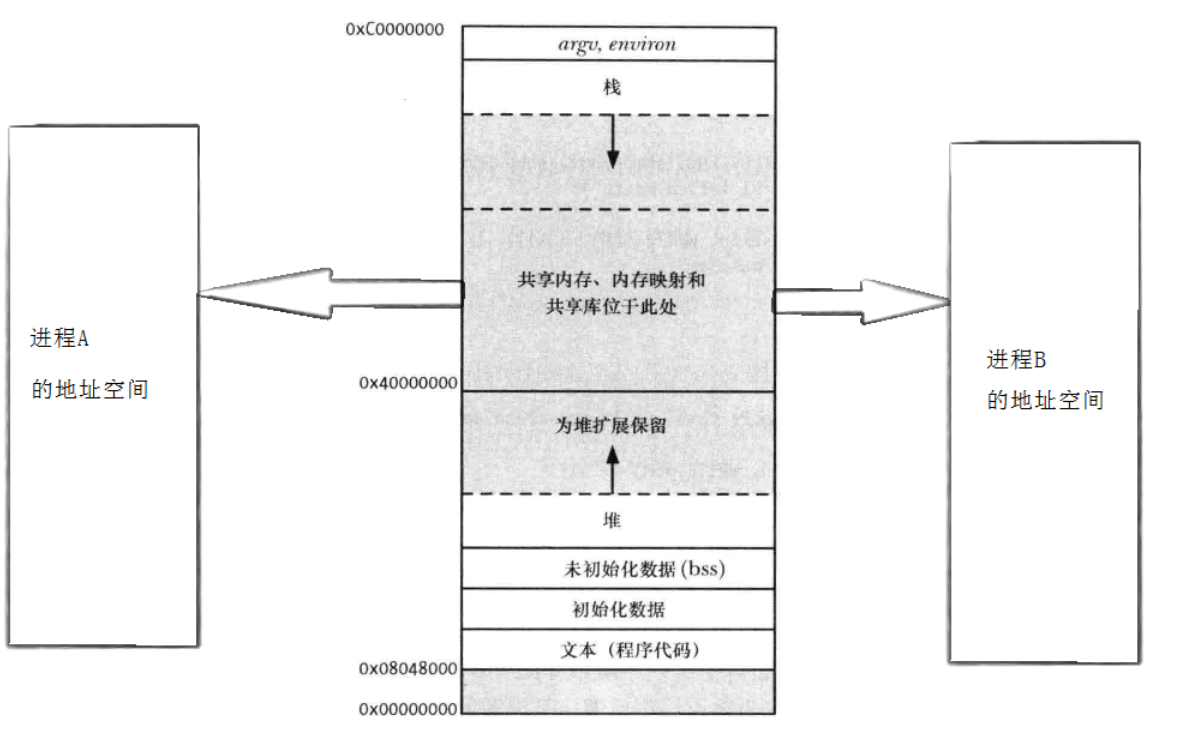
- [5-1 共享内存示意图](#5-1 共享内存示意图)
- [5-2 共享内存数据结构](#5-2 共享内存数据结构)
- [5-3 共享内存函数](#5-3 共享内存函数)
- [6. system V 消息队列](#6. system V 消息队列)
- [7. system V 信号量](#7. system V 信号量)
-
- [7-1 并发编程,概念铺垫](#7-1 并发编程,概念铺垫)
- [7-2 信号量](#7-2 信号量)
- [8. 内核是如何组织管理 IPC 资源的](#8. 内核是如何组织管理 IPC 资源的)
- 附录:
本节重点
-
进程间通信介绍
-
掌握匿名命名管道原理操作
-
编写进程池
-
掌握共享内存
-
了解消息队列
-
了解信号量
-
理解内核管理 IPC 资源的方式,了解 C 实现多态
1. 进程间通信介绍
1-1 进程间通信目的
-
数据传输:一个进程需要将它的数据发送给另一个进程
-
资源共享:多个进程之间共享同样的资源。
-
通知事件:一个进程需要向另一个或一组进程发送消息,通知它(它们)发生了某种事件(如进程终止时要通知父进程)。
-
进程控制:有些进程希望完全控制另⼀个进程的执行(如 Debug 进程),此时控制进程希望能够拦截另一个进程的所有陷入和异常,并能够及时知道它的状态改变。
1-2 进程间通信发展
-
管道
-
System V进程间通信
-
POSIX进程间通信
1-3 进程间通信分类
管道
-
匿名管道pipe
-
命名管道
System V IPC
-
System V 消息队列
-
System V 共享内存
-
System V 信号量
POSIX IPC
- 消息队列
- 共享内存
- 信号量
- 互斥量
- 条件变量
- 读写锁
2. 管道
什么是管道
-
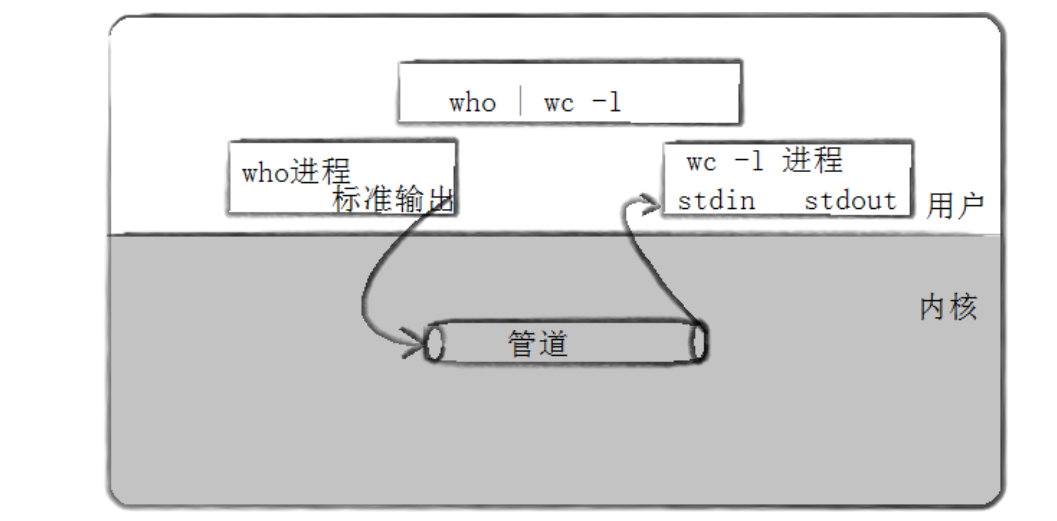
管道是 Unix 中最古老的进程间通信的形式。
-
我们把从一个进程连接到另一个进程的一个数据流称为一个 "管道"
3. 匿名管道
cpp
#include <unistd.h>
功能:创建一无名管道
原型
int pipe(int fd[2]);
参数
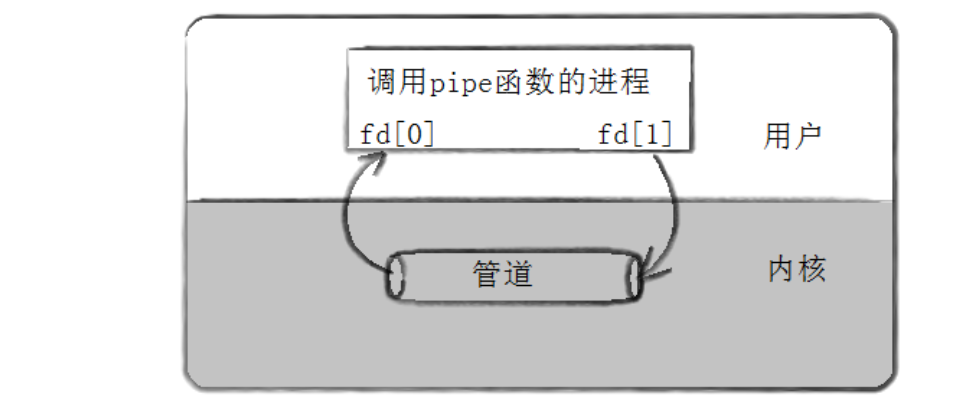
fd:⽂件描述符数组,其中 fd[0] 表⽰读端, fd[1] 表⽰写端
返回值:成功返回 0 ,失败返回错误代码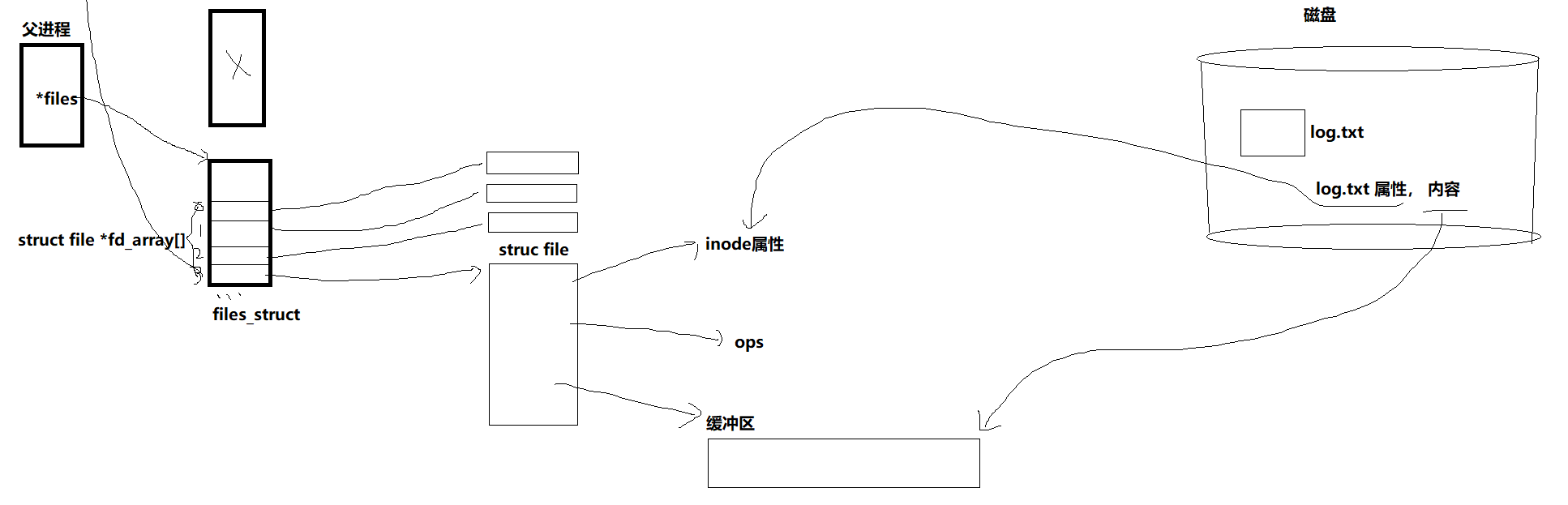
本质上就是两个进程通过本地文件进行数据交换,将管道文件的 fd 写入各自进程的文件符描述表中,从而进行读或写操作。
3-1 实例代码
cpp
// 例⼦:从键盘读取数据,写⼊管道,读取管道,写到屏幕
#include <stdio.h>
#include <stdlib.h>
#include <string.h>
#include <unistd.h>
int main(void)
{
    int fds[2];
    char buf[100];
    int len;
    if (pipe(fds) == -1)
        perror("make pipe"), exit(1);
    // read from stdin
    while (fgets(buf, 100, stdin))
    {
        len = strlen(buf);
        // write into pipe
        if (write(fds[1], buf, len) != len)
        {
            perror("write to pipe");
            break;
        }
        memset(buf, 0x00, sizeof(buf));
        // read from pipe
        if ((len = read(fds[0], buf, 100)) == -1)
        {
            perror("read from pipe");
            break;
        }
        // write to stdout
        if (write(1, buf, len) != len)
        {
            perror("write to stdout");
            break;
        }
    }
}
3-2 用 fork 来共享管道原理
3-3 站在文件描述符角度-深度理解管道
3-4 站在内核角度-管道本质
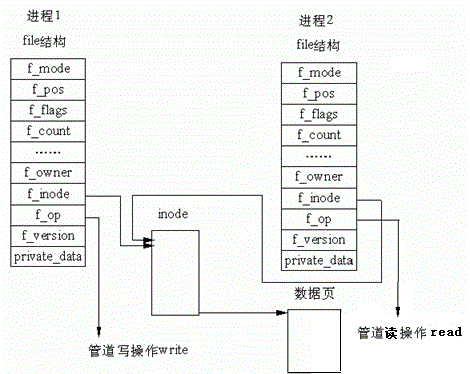
- 所以,看待管道,就如同看待文件一样!管道的使用和文件一致,迎合了"Linux一切皆文件思想。
3-5 管道样例
3-5-1 测试管道读写
cpp
#include <unistd.h>
#include <stdlib.h>
#include <stdio.h>
#include <errno.h>
#include <string.h>
#define ERR_EXIT(m)         \
    do                      \
    {                       \
        perror(m);          \
        exit(EXIT_FAILURE); \
    } while (0)

int main(int argc, char *argv[])
{
    int pipefd[2];
    if (pipe(pipefd) == -1)
        ERR_EXIT("pipe error");
    pid_t pid;
    pid = fork();
    if (pid == -1)
        ERR_EXIT("fork error");
    if (pid == 0)
    {
        close(pipefd[0]);
        write(pipefd[1], "hello", 5);
        close(pipefd[1]);
        exit(EXIT_SUCCESS);
    }
    close(pipefd[1]);
    char buf[10] = {0};
    read(pipefd[0], buf, 10);
    printf("buf=%s\n", buf);
    return 0;
}
3-5-2 创建进程池处理任务
Channel.hpp
cpp
#ifndef __CHANNEL_HPP__
#define __CHANNEL_HPP__
#include <iostream>
#include <string>
#include <unistd.h>
// 先描述
class Channel
{
public:
    Channel(int wfd, pid_t who) : _wfd(wfd), _who(who)
    {
        // Channel-3-1234
        _name = "Channel-" + std::to_string(wfd) + "-" + std::to_string(who);
    }
    std::string Name()
    {
        return _name;
    }
    void Send(int cmd)
    {
        ::write(_wfd, &cmd, sizeof(cmd));
    }
    void Close()
    {
        ::close(_wfd);
    }
    pid_t Id()
    {
        return _who;
    }
    int wFd()
    {
        return _wfd;
    }
    ~Channel()
    {
    }

private:
    int _wfd;
    std::string _name;
    pid_t _who;
};
#endif
ProcessPool.hpp
cpp
#ifndef __PROCESS_POOL_HPP__
#define __PROCESS_POOL_HPP__
#include <iostream>
#include <string>
#include <vector>
#include <cstdlib>
#include <unistd.h>
#include <sys/types.h>
#include <sys/wait.h>
#include <functional>
#include "Task.hpp"
#include "Channel.hpp"
// typedef std::function<void()> work_t;
using work_t = std::function<void()>;
enum
{
    OK = 0,
    UsageError,
    PipeError,
    ForkError
};
class ProcessPool
{
public:
    ProcessPool(int n, work_t w)
        : processnum(n), work(w)
    {
    }
    // channels : 输出型参数
    // work_t work: 回调
    int InitProcessPool()
    {
        // 2. 创建指定个数个进程
        for (int i = 0; i < processnum; i++)
        {
            // 1. 先有管道
            int pipefd[2] = {0};
            int n = pipe(pipefd);
            if (n < 0)
                return PipeError;
            // 2. 创建进程
            pid_t id = fork();
            if (id < 0)
                return ForkError;
            // 3. 建⽴通信信道
            if (id == 0)
            {
                // 关闭历史wfd
                std::cout << getpid() << ", child close history fd: ";
                for (auto &c : channels)
                {
                    std::cout << c.wFd() << " ";
                    c.Close();
                }
                std::cout << " over" << std::endl;
                ::close(pipefd[1]); // read
                // child
                std::cout << "debug: " << pipefd[0] << std::endl;
                dup2(pipefd[0], 0);
                work();
                ::exit(0);
            }
            // ⽗进程执⾏
            ::close(pipefd[0]); // write
            channels.emplace_back(pipefd[1], id);
            // Channel ch(pipefd[1], id);
            // channels.push_back(ch);
        }
        return OK;
    }
    void DispatchTask()
    {
        int who = 0;
        // 2. 派发任务
        int num = 20;
        while (num--)
        {
            // a. 选择⼀个任务, 整数
            int task = tm.SelectTask();
            // b. 选择⼀个⼦进程channel
            Channel &curr = channels[who++];
            who %= channels.size();
            std::cout << "######################" << std::endl;
            std::cout << "send " << task << " to " << curr.Name() << ", 任务还
                剩 : " << num << std::endl;
                     std::cout
                      << "######################"
                      << std::endl;
            // c. 派发任务
            curr.Send(task);
            sleep(1);
        }
    }
    void CleanProcessPool()
    {
        // version 3
        for (auto &c : channels)
        {
            c.Close();
            pid_t rid = ::waitpid(c.Id(), nullptr, 0);
            if (rid > 0)
            {
                std::cout << "child " << rid << " wait ... success" << std::endl;
            }
        }
        // version 2
        // for (auto &c : channels)
        // for(int i = channels.size()-1; i >= 0; i--)
        // {
        // channels[i].Close();
        // pid_t rid = ::waitpid(channels[i].Id(), nullptr, 0); // 阻塞了!
        // if (rid > 0)
        // {
        // std::cout << "child " << rid << " wait ... success" <<
        std::endl;
        // }
        // }
        // version 1
        // for (auto &c : channels)
        // {
        // c.Close();
        // }
        //?
        // for (auto &c : channels)
        // {
        // pid_t rid = ::waitpid(c.Id(), nullptr, 0);
        // if (rid > 0)
        // {
        // std::cout << "child " << rid << " wait ... success" <<
        std::endl;
        // }
        // }
    }
    void DebugPrint()
    {
        for (auto &c : channels)
        {
            std::cout << c.Name() << std::endl;
        }
    }

private:
    std::vector<Channel> channels;
    int processnum;
    work_t work;
};
#endif
Task.hpp
cpp
#pragma once
#include <iostream>
#include <unordered_map>
#include <functional>
#include <ctime>
#include <sys/types.h>
#include <unistd.h>
using task_t = std::function<void()>;
class TaskManger
{
public:
    TaskManger()
    {
        srand(time(nullptr));
        tasks.push_back([]()
                        { std::cout << "sub process[" << getpid() << " ] 执⾏访问数据库的任务\n"
                                    << std::endl; });
        tasks.push_back([]()
                        { std::cout << "sub process[" << getpid() << " ] 执⾏url解析\n"
                                    << std::endl; });
        tasks.push_back([]()
                        { std::cout << "sub process[" << getpid() << " ] 执⾏加密任务\n"
                                    << std::endl; });
        tasks.push_back([]()
                        { std::cout << "sub process[" << getpid() << " ] 执⾏数据持久化任务\n"
                                    << std::endl; });
    }
    int SelectTask()
    {
        return rand() % tasks.size();
    }
    void Excute(unsigned long number)
    {
        if (number > tasks.size() || number < 0)
            return;
        tasks[number]();
    }
    ~TaskManger()
    {
    }

private:
    std::vector<task_t> tasks;
};
TaskManger tm;
void Worker()
{
    while (true)
    {
        int cmd = 0;
        int n = ::read(0, &cmd, sizeof(cmd));
        if (n == sizeof(cmd))
        {
            tm.Excute(cmd);
        }
        else if (n == 0)
        {
            std::cout << "pid: " << getpid() << " quit..." << std::endl;
            break;
        }
        else
        {
        }
    }
}
Main.cc
cpp
#include "ProcessPool.hpp"
#include "Task.hpp"
void Usage(std::string proc)
{
    std::cout << "Usage: " << proc << " process-num" << std::endl;
}
// 我们⾃⼰就是master
int main(int argc, char *argv[])
{
    if (argc != 2)
    {
        Usage(argv[0]);
        return UsageError;
    }
    int num = std::stoi(argv[1]);
    ProcessPool *pp = new ProcessPool(num, Worker);
    // 1. 初始化进程池
    pp->InitProcessPool();
    // 2. 派发任务
    pp->DispatchTask();
    // 3. 退出进程池
    pp->CleanProcessPool();
    // std::vector<Channel> channels;
    // // 1. 初始化进程池
    // InitProcessPool(num, channels, Worker);
    // // 2. 派发任务
    // DispatchTask(channels);
    // // 3. 退出进程池
    // CleanProcessPool(channels);
    delete pp;
    return 0;
}
Makefile
BIN=processpool
CC=g++
FLAGS=-c -Wall -std=c++11
LDFLAGS=-o
# SRC=$(shell ls *.cc)
SRC=$(wildcard *.cc)
OBJ=$(SRC:.cc=.o)

$(BIN):$(OBJ)
	$(CC) $(LDFLAGS) $@ $^

%.o:%.cc
	$(CC) $(FLAGS) $<

.PHONY:clean
clean:
	rm -f $(BIN) $(OBJ)

.PHONY:test
test:
	@echo $(SRC)
	@echo $(OBJ)
3-6 管道读写规则
-
当没有数据可读时
-
O_NONBLOCK disable:read 调用阻塞,即进程暂停执行,一直等到有数据来到为止。
-
O_NONBLOCK enable:read 调用返回 -1 ,errno 值为 EAGAIN 。
-
-
当管道满的时候
-
O_NONBLOCK disable: write 调用阻塞,直到有进程读走数据
-
O_NONBLOCK enable:调用返回 -1 ,errno 值为 EAGAIN
-
-
如果所有管道写端对应的文件描述符被关闭,则 read 返回 0
-
如果所有管道读端对应的文件描述符被关闭,则 write 操作会产生信号 SIGPIPE ,进而可能导致 write 进程退出
-
当要写入的数据量不大于 PIPE_BUF 时,linux 将保证写入的原子性。
-
当要写⼊的数据量大于 PIPE_BUF 时,linux 将不再保证写入的原子性。
3-7 管道特点
-
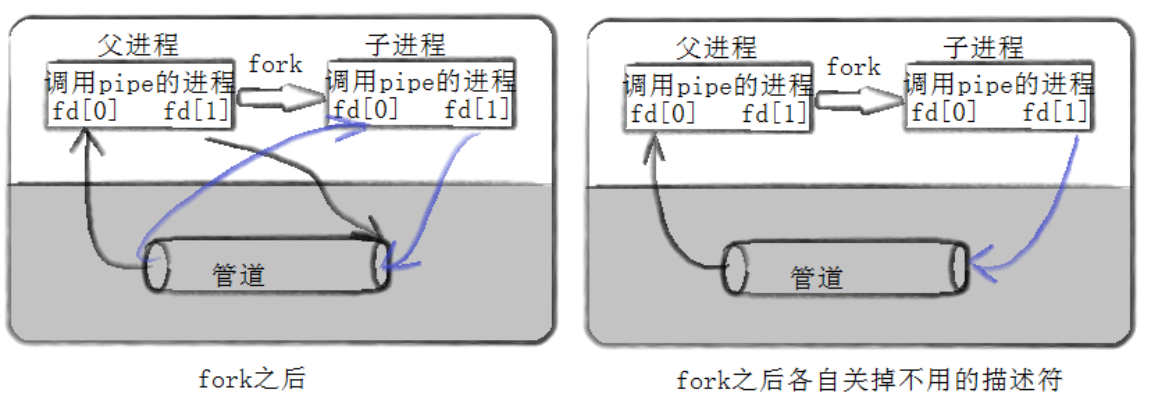
只能用于具有共同祖先的进程(具有亲缘关系的进程)之间进行通信;通常,一个管道由一个进程创建,然后该进程调用fork,此后父、子进程之间就可应用该管道。
-
管道提供流式服务
-
⼀般而言,进程退出,管道释放,所以管道的⽣命周期随进程
-
⼀般而言,内核会对管道操作进行同步与互斥
-
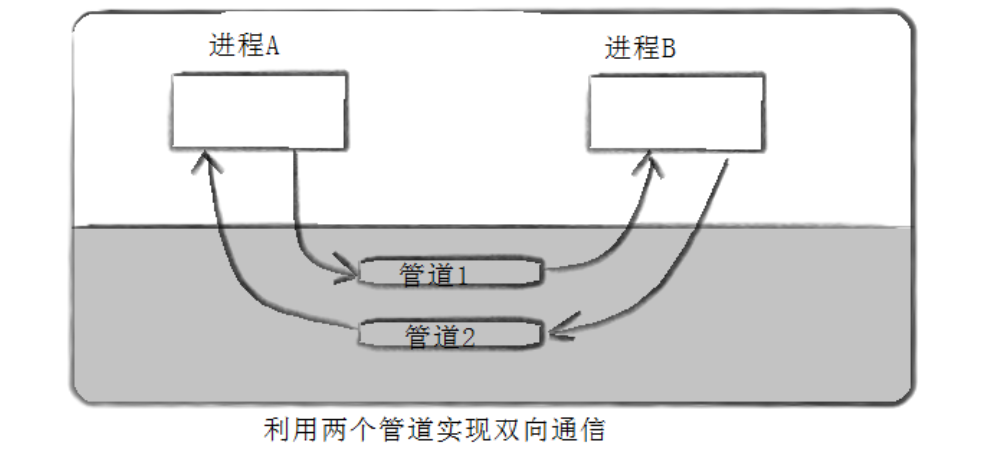
管道是半双工的,数据只能向⼀个方向流动;需要双方通信时,需要建立起两个管道
3-8 验证管道通信的4种情况
-
读正常 && 写满
-
写正常 && 读空
-
写关闭 && 读正常
-
读关闭 && 写正常
4. 命名管道
-
管道应用的一个限制就是只能在具有共同祖先(具有亲缘关系)的进程间通信。
-
如果我们想在不相关的进程之间交换数据,可以使用 FIFO 文件来做这项工作,它经常被称为命名管道。
-
命名管道是一种特殊类型的文件
4-1 创建⼀个命名管道
- 命名管道可以从命令行上创建,命令行方法是使用下面这个命令:
bash
$ mkfifo filename - 命名管道也可以从程序里创建,相关函数有:
cpp
int mkfifo(const char *filename,mode_t mode);创建命名管道:
cpp
int main(int argc, char *argv[])
{
	mkfifo("p2", 0644);
	return 0;
}
4-2 匿名管道与命名管道的区别
-
匿名管道由 pipe 函数创建并打开。
-
命名管道由 mkfifo 函数创建,打开用 open
-
FIFO(命名管道)与 pipe(匿名管道)之间唯一的区别在它们创建与打开的方式不同,一但这些工作完成之后,它们具有相同的语义。
4-3 命名管道的打开规则
-
如果当前打开操作是为读而打开 FIFO 时
-
O_NONBLOCK disable:阻塞直到有相应进程为写而打开该 FIFO
-
O_NONBLOCK enable:立刻返回成功
-
-
如果当前打开操作是为写而打开FIFO时
-
O_NONBLOCK disable:阻塞直到有相应进程为读而打开该FIFO
-
O_NONBLOCK enable:立刻返回失败,错误码为ENXIO
-
实例1 :用命名管道实现文件拷贝
读取文件,写入命名管道:
cpp
#include <unistd.h>
#include <stdlib.h>
#include <stdio.h>
#include <errno.h>
#include <string.h>
#define ERR_EXIT(m)         \
	do                      \
	{                       \
		perror(m);          \
		exit(EXIT_FAILURE); \
	} while (0)

	int main(int argc, char *argv[])
{
	mkfifo("tp", 0644);
	int infd;
	infd = open("abc", O_RDONLY);
	if (infd == -1)
		ERR_EXIT("open");
	int outfd;`在这里插入代码片`
	outfd = open("tp", O_WRONLY);
	if (outfd == -1)
		ERR_EXIT("open");
	char buf[1024];
	int n;
	while ((n = read(infd, buf, 1024)) > 0)
	{
		write(outfd, buf, n);
	}
	close(infd);
	close(outfd);
	return 0;
}
读取管道,写入目标文件:
cpp
#include <unistd.h>
#include <stdlib.h>
#include <stdio.h>
#include <errno.h>
#include <string.h>
#define ERR_EXIT(m)         \
	do                      \
	{                       \
		perror(m);          \
		exit(EXIT_FAILURE); \
	} while (0)

int main(int argc, char *argv[])
{
	int outfd;
	outfd = open("abc.bak", O_WRONLY | O_CREAT | O_TRUNC, 0644);
	if (outfd == -1)
		ERR_EXIT("open");
	int infd;
	infd = open("tp", O_RDONLY);
	if (outfd == -1)
		ERR_EXIT("open");
	char buf[1024];
	int n;
	while ((n = read(infd, buf, 1024)) > 0)
	{
		write(outfd, buf, n);
	}
	close(infd);
	close(outfd);
	unlink("tp");
	return 0;
}
实例 2:用命名管道实现 server & client 通信
bash
# ll
total 12
-rw-r--r--. 1 root root 46 Sep 18 22:37 clientPipe.c
-rw-r--r--. 1 root root 164 Sep 18 22:37 Makefile
-rw-r--r--. 1 root root 46 Sep 18 22:38 serverPipe.c

# cat Makefile
.PHONY:all
all:clientPipe serverPipe

clientPipe:clientPipe.c
	gcc -o $@ $^
serverPipe:serverPipe.c
	gcc -o $@ $^

.PHONY:clean
clean:
	rm -f clientPipe serverPipe
serverPipe.c
cpp
#include <stdio.h>
#include <sys/types.h>
#include <sys/stat.h>
#include <fcntl.h>
#include <unistd.h>
#include <stdlib.h>
#define ERR_EXIT(m)         \
	do                      \
	{                       \
		perror(m);          \
		exit(EXIT_FAILURE); \
	} while (0)

int main()
{
	umask(0);
	if (mkfifo("mypipe", 0644) < 0)
	{
		ERR_EXIT("mkfifo");
	}
	int rfd = open("mypipe", O_RDONLY);
	if (rfd < 0)
	{
		ERR_EXIT("open");
	}
	char buf[1024];
	while (1)
	{
		buf[0] = 0;
		printf("Please wait...\n");
		ssize_t s = read(rfd, buf, sizeof(buf) - 1);
		if (s > 0)
		{
			buf[s - 1] = 0;
			printf("client say# %s\n", buf);
		}
		else if (s == 0)
		{
			printf("client quit, exit now!\n");
			exit(EXIT_SUCCESS);
		}
		else
		{
			ERR_EXIT("read");
		}
	}
	close(rfd);
	return 0;
}
clientPipe.c
cpp
#include <stdio.h>
#include <sys/types.h>
#include <sys/stat.h>
#include <fcntl.h>
#include <unistd.h>
#include <stdlib.h>
#include <string.h>
#define ERR_EXIT(m)         \
	do                      \
	{                       \
		perror(m);          \
		exit(EXIT_FAILURE); \
	} while (0)

int main()
{
	int wfd = open("mypipe", O_WRONLY);
	if (wfd < 0)
	{
		ERR_EXIT("open");
	}
	char buf[1024];
	while (1)
	{
		buf[0] = 0;
		printf("Please Enter# ");
		fflush(stdout);
		ssize_t s = read(0, buf, sizeof(buf) - 1);
		if (s > 0)
		{
			buf[s] = 0;
			write(wfd, buf, strlen(buf));
		}
		else if (s <= 0)
		{
			ERR_EXIT("read");
		}
	}
	close(wfd);
	return 0;
}
5. system V 共享内存
共享内存区是最快的IPC形式。⼀旦这样的内存映射到共享它的进程的地址空间,这些进程间数据传递不再涉及到内核,
换句话说是进程不再通过执行进入内核的系统调用来传递彼此的数据
5-1 共享内存示意图
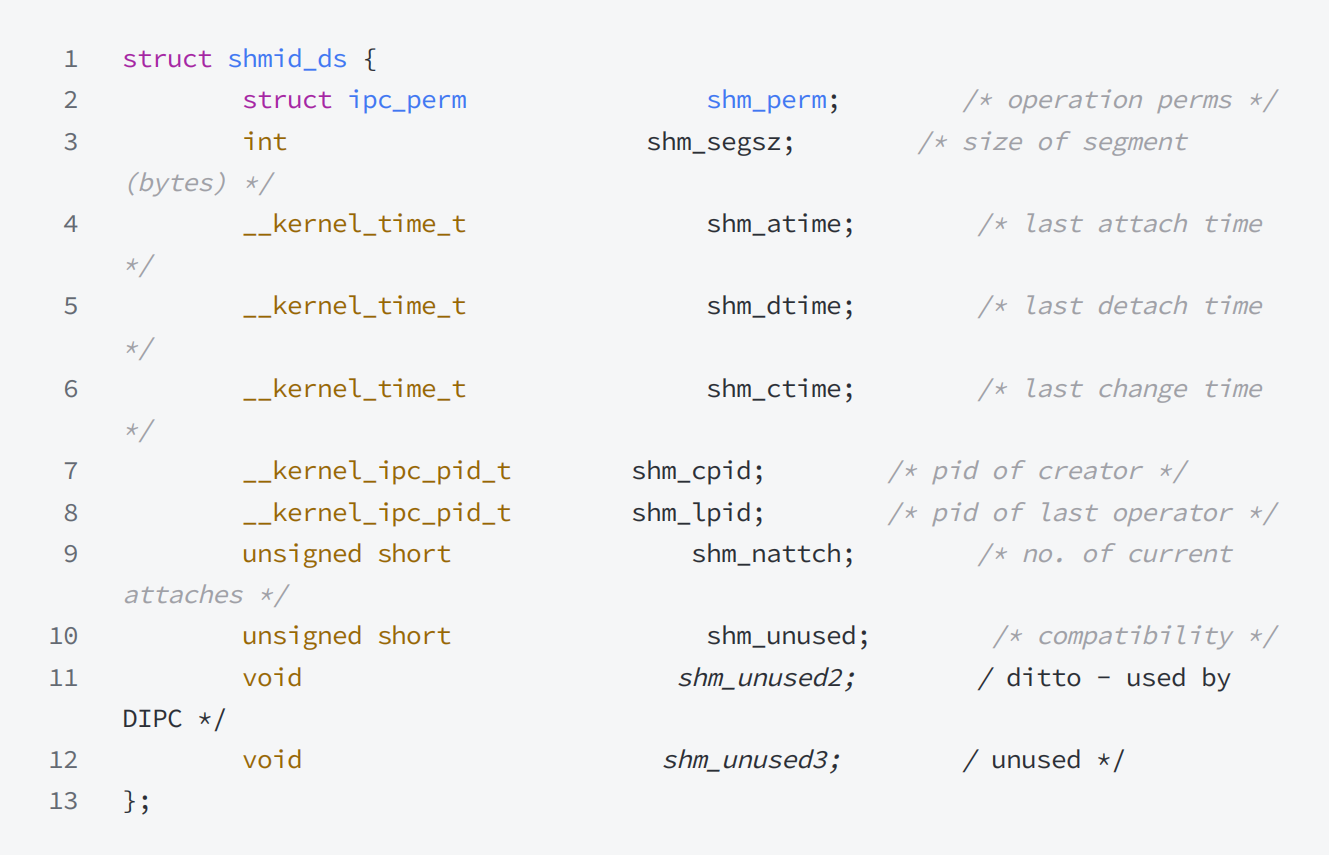
5-2 共享内存数据结构
5-3 共享内存函数
shmget 函数
cpp
功能:⽤来创建共享内存
原型
	int shmget(key_t key, size_t size, int shmflg);

参数
	key:这个共享内存段名字
	size:共享内存⼤⼩
	shmflg:由九个权限标志构成,它们的⽤法和创建⽂件时使⽤的mode模式标志是⼀样的
				取值为IPC_CREAT:共享内存不存在,创建并返回;共享内存已存在,获取并返回。
				取值为IPC_CREAT | IPC_EXCL:共享内存不存在,创建并返回;共享内存已存在,
				出错返回。

返回值:成功返回⼀个⾮负整数,即该共享内存段的标识码;失败返回-1
shmat 函数
cpp
功能:将共享内存段连接到进程地址空间
原型
	void *shmat(int shmid, const void *shmaddr, int shmflg);

参数
	shmid: 共享内存标识
	shmaddr:指定连接的地址
	shmflg:它的两个可能取值是SHM_RND和SHM_RDONLY

返回值:成功返回⼀个指针,指向共享内存第⼀个节;失败返回-1
说明:
cpp
shmaddr为NULL,核⼼⾃动选择⼀个地址

shmaddr不为NULL且shmflg⽆SHM_RND标记,则以shmaddr为连接地址。

shmaddr不为NULL且shmflg设置了SHM_RND标记,则连接的地址会⾃动向下调整为SHMLBA的整数倍。公式:shmaddr - (shmaddr % SHMLBA)

shmflg=SHM_RDONLY,表⽰连接操作⽤来只读共享内存
shmdt 函数
cpp
功能:将共享内存段与当前进程脱离

原型
	int shmdt(const void *shmaddr);

参数
	shmaddr: 由shmat所返回的指针

返回值:成功返回0;失败返回-1
注意:将共享内存段与当前进程脱离不等于删除共享内存段
shmctl 函数
cpp
功能:⽤于控制共享内存

原型
	int shmctl(int shmid, int cmd, struct shmid_ds *buf);

参数
	shmid:由shmget返回的共享内存标识码
	cmd:将要采取的动作(有三个可取值)
	buf:指向⼀个保存着共享内存的模式状态和访问权限的数据结构

返回值:成功返回0;失败返回-1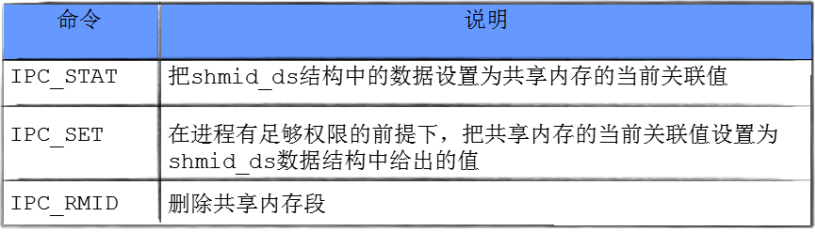
实例1:共享内存实现通信
测试代码结构
bash
# ls
client.c comm.c comm.h Makefile server.c

# cat Makefile
.PHONY:all
all:server client

client:client.c comm.c
	gcc -o $@ $^
server:server.c comm.c
	gcc -o $@ $^

.PHONY:clean
clean:
	rm -f client server
comm.h
cpp
#ifndef _COMM_H_
#define _COMM_H_
# include <stdio.h>
# include <sys/types.h>
# include <sys/ipc.h>
# include <sys/shm.h>
# define PATHNAME "."
# define PROJ_ID 0x6666

int createShm(int size);
int destroyShm(int shmid);
int getShm(int size);

# endif
comm.c
cpp
#include "comm.h"
static int commShm(int size, int flags)
{
	key_t key = ftok(PATHNAME, PROJ_ID);
	if (key < 0)
	{
		perror("ftok");
		return -1;
	}
	int shmid = 0;
	if ((shmid = shmget(key, size, flags)) < 0)
	{
		perror("shmget");
		return -2;
	}
	return shmid;
}
int destroyShm(int shmid)
{
	if (shmctl(shmid, IPC_RMID, NULL) < 0)
	{
		perror("shmctl");
		return -1;
	}
	return 0;
}
int createShm(int size)
{
	return commShm(size, IPC_CREAT | IPC_EXCL | 0666);
}
int getShm(int size)
{
	return commShm(size, IPC_CREAT);
}
server.c
cpp
#include "comm.h"
int main()
{
	int shmid = createShm(4096);
	char *addr = shmat(shmid, NULL, 0);
	sleep(2);
	int i = 0;
	while (i++ < 26)
	{
		printf("client# %s\n", addr);
		sleep(1);
	}
	shmdt(addr);
	sleep(2);
	destroyShm(shmid);
	return 0;
}
client.c
cpp
#include "comm.h"
int main()
{
	int shmid = getShm(4096);
	sleep(1);
	char *addr = shmat(shmid, NULL, 0)
		sleep(2);
	int i = 0;
	while (i < 26)
	{
		addr[i] = 'A' + i;
		i++;
		addr[i] = 0;
		sleep(1);
	}
	shmdt(addr);
	sleep(2);
	return 0;
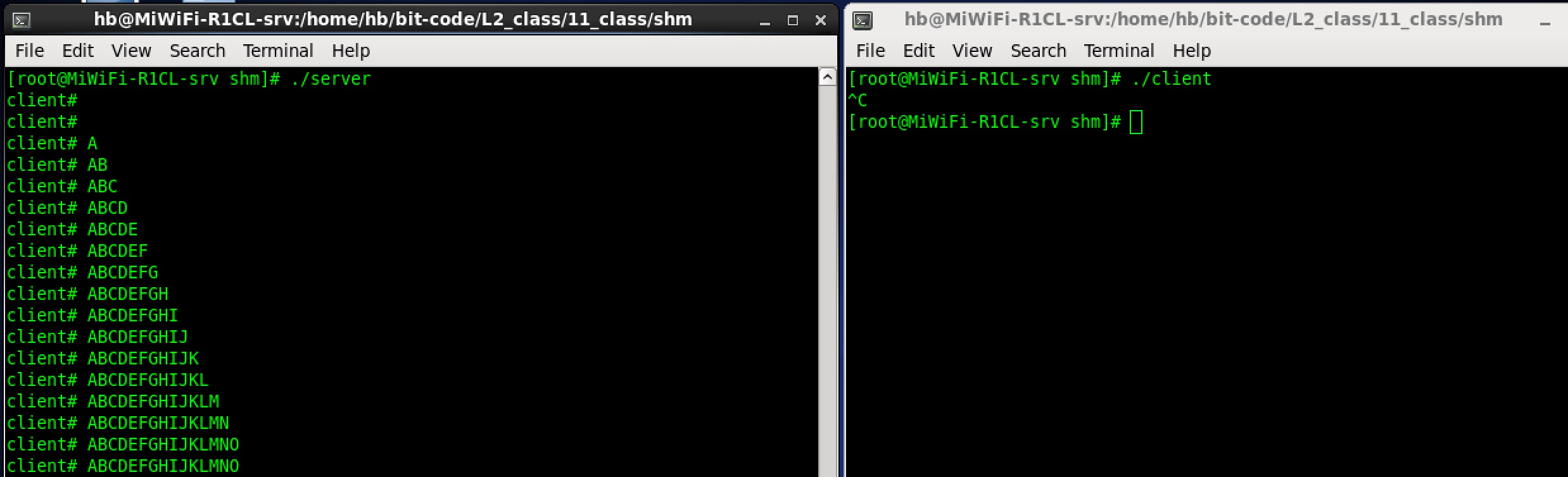
}
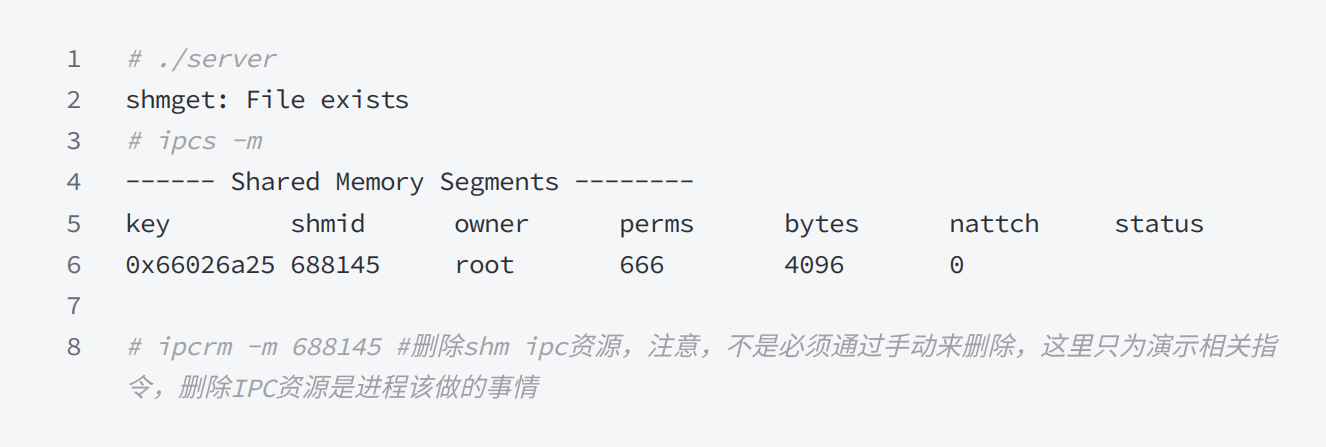
ctrl + c 终止进程,再次重启
实例2. 借助管道实现访问控制版的共享内存
❗️注意:以下代码依然存在一些BUG,仅仅作为演示用例使用,让读者们对进程执行有一定的顺序性有概念
Comm.hpp
cpp
#pragma once
#include <fcntl.h>
#include <sys/ipc.h>
#include <sys/shm.h>
#include <sys/stat.h>
#include <sys/types.h>
#include <unistd.h>
#include <cassert>
#include <cstdio>
#include <ctime>
#include <cstring>
#include <iostream>
using namespace std;
#define Debug 0
#define Notice 1
#define Warning 2
#define Error 3
const std::string msg[] = {
	"Debug",
	"Notice",
	"Warning",
	"Error"};
std::ostream &Log(std::string message, int level)
{
	std::cout << " | " << (unsigned)time(nullptr) << " | " << msg[level] << "
		| " << message;
		return std::cout;
}
#define PATH_NAME "/home/hyb"
#define PROJ_ID 0x66
#define SHM_SIZE 4096 // 共享内存的⼤⼩,最好是⻚(PAGE: 4096)的整数倍
#define FIFO_NAME "./fifo"
class Init
{
public:
	Init()
	{
		umask(0);
		int n = mkfifo(FIFO_NAME, 0666);
		assert(n == 0);
		(void)n;
		Log("create fifo success", Notice) << "\n";
	}
	~Init()
	{
		unlink(FIFO_NAME);
		Log("remove fifo success", Notice) << "\n";
	}
};

#define READ O_RDONLY
#define WRITE O_WRONLY
int OpenFIFO(std::string pathname, int flags)
{
	int fd = open(pathname.c_str(), flags);
	assert(fd >= 0);
	return fd;
}
void CloseFifo(int fd)
{
	close(fd);
}
void Wait(int fd)
{
	Log("等待中....", Notice) << "\n";
	uint32_t temp = 0;
	ssize_t s = read(fd, &temp, sizeof(uint32_t));
	assert(s == sizeof(uint32_t));
	(void)s;
}
void Signal(int fd)
{
	uint32_t temp = 1;
	ssize_t s = write(fd, &temp, sizeof(uint32_t));
	assert(s == sizeof(uint32_t));
	(void)s;
	Log("唤醒中....", Notice) << "\n";
}
string TransToHex(key_t k)
{
	char buffer[32];
	snprintf(buffer, sizeof buffer, "0x%x", k);
	return buffer;
}
ShmServer.cc
cpp
#include "Comm.hpp"
Init init;
int main()
{
	// 1. 创建公共的Key值
	key_t k = ftok(PATH_NAME, PROJ_ID);
	assert(k != -1);
	Log("create key done", Debug) << " server key : " << TransToHex(k) << endl;

	// 2. 创建共享内存 -- 建议要创建⼀个全新的共享内存 -- 通信的发起者
	int shmid = shmget(k, SHM_SIZE, IPC_CREAT | IPC_EXCL | 0666);
	if (shmid == -1)
	{
		perror("shmget");
		exit(1);
	}
	Log("create shm done", Debug) << " shmid : " << shmid << endl;

	// 3. 将指定的共享内存,挂接到⾃⼰的地址空间
	char *shmaddr = (char *)shmat(shmid, nullptr, 0);
	Log("attach shm done", Debug) << " shmid : " << shmid << endl;

	// 4. 访问控制
	int fd = OpenFIFO(FIFO_NAME, O_RDONLY);
	while (true)
	{
		// 阻塞
		Wait(fd);
		// 临界区
		printf("%s\n", shmaddr);
		if (strcmp(shmaddr, "quit") == 0)
			break;
	}
	CloseFifo(fd);

	// 5. 将指定的共享内存,从⾃⼰的地址空间中去关联
	int n = shmdt(shmaddr);
	assert(n != -1);
	(void)n;
	Log("detach shm done", Debug) << " shmid : " << shmid << endl;

	// 6. 删除共享内存,IPC_RMID即便是有进程和当下的shm挂接,依旧删除共享内存
	n = shmctl(shmid, IPC_RMID, nullptr);
	assert(n != -1);
	(void)n;
	Log("delete shm done", Debug) << " shmid : " << shmid << endl;
	return 0;
}
ShmClient.cc
cpp
#include "Comm.hpp"
int main()
{
	// 1. 创建公共的Key值
	key_t k = ftok(PATH_NAME, PROJ_ID);
	if (k < 0)
	{
		Log("create key failed", Error) << " client key : " << TransToHex(k)
										<< endl;
		exit(1);
	}
	Log("create key done", Debug) << " client key : " << TransToHex(k) << endl;
	// 2. 获取共享内存
	int shmid = shmget(k, SHM_SIZE, 0);
	if (shmid < 0)
	{
		Log("create shm failed", Error) << " client key : " << TransToHex(k)
										<< endl;
		exit(2);
	}
	Log("create shm success", Error) << " client key : " << TransToHex(k) << endl;
	// 3. 挂接共享内存
	char *shmaddr = (char *)shmat(shmid, nullptr, 0);
	if (shmaddr == nullptr)
	{
		Log("attach shm failed", Error) << " client key : " << TransToHex(k)
										<< endl;
		exit(3);
	}
	Log("attach shm success", Error) << " client key : " << TransToHex(k) << endl;
	// 4. 写
	int fd = OpenFIFO(FIFO_NAME, O_WRONLY);
	while (true)
	{
		ssize_t s = read(0, shmaddr, SHM_SIZE - 1);
		if (s > 0)
		{
			shmaddr[s - 1] = 0;
			Signal(fd);
			if (strcmp(shmaddr, "quit") == 0)
				break;
		}
	}
	CloseFifo(fd);
	// 5. 去关联
	int n = shmdt(shmaddr);
	assert(n != -1);
	Log("detach shm success", Error) << " client key : " << TransToHex(k) << endl;
	return 0;
}
6. system V 消息队列
-
消息队列提供了一个从一个进程向另外一个进程发送一块数据的方法
-
每个数据块都被认为是有一个类型,接收者进程接收的数据块可以有不同的类型值
-
特性方面
- IPC资源必须删除,否则不会自动清除,除非重启,所以 system V IPC 资源的生命周期随内核
7. system V 信号量
信号量主要用于同步和互斥的,下面先来看看什么是同步和互斥。
7-1 并发编程,概念铺垫
-
多个执行流(进程), 能看到的同一份公共资源:共享资源
-
被保护起来的共享资源叫做临界资源
-
保护的方式常见:互斥与同步
-
任何时刻,只允许一个执行流访问资源,叫做互斥
-
多个执行流,访问临界资源的时候,具有⼀定的顺序性,叫做同步
-
系统中某些资源一次只允许一个进程使用,称这样的资源为临界资源或互斥资源。
-
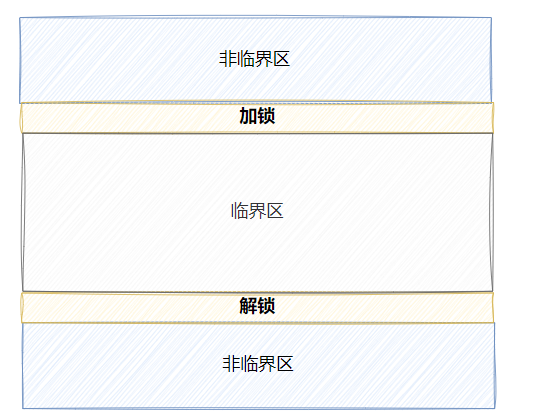
在进程中涉及到互斥资源的程序段叫临界区。你写的代码 = 访问临界资源的代码(临界区) + 不访问临界资源的代码(非临界区)
-
所谓的对共享资源进行保护,本质是对访问共享资源的代码进行保护
7-2 信号量
特性方面
- IPC资源必须删除,否则不会⾃动清除,除⾮重启,所以system V IPC资源的⽣命周期随内核
理解方面
- 信号量是⼀个计数器
作用方面
- 保护临界区
本质方面
- 信号量本质是对资源的预订机制
操作方面
-
申请资源,计数器 -- ,P 操作
-
释放资源,计数器 ++ ,V 操作
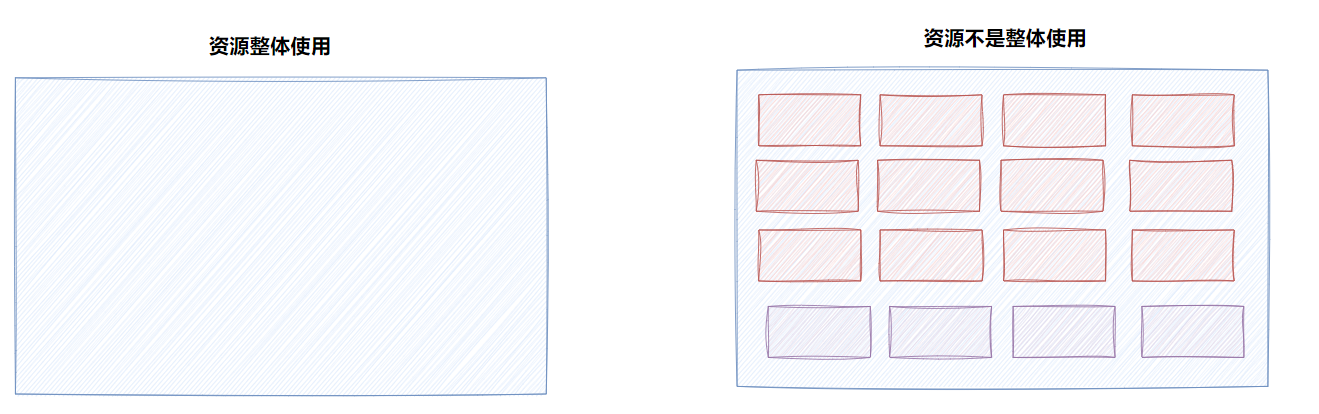
对信号量的本质理解可以理解为对资源的预定,申请信号量就像是买一张电影票,本质上是对于电影院座位这个资源的预定,这个座位(资源)只能整体使用,不能卖半个座,也不能卖 0.75 个,只能整个卖。
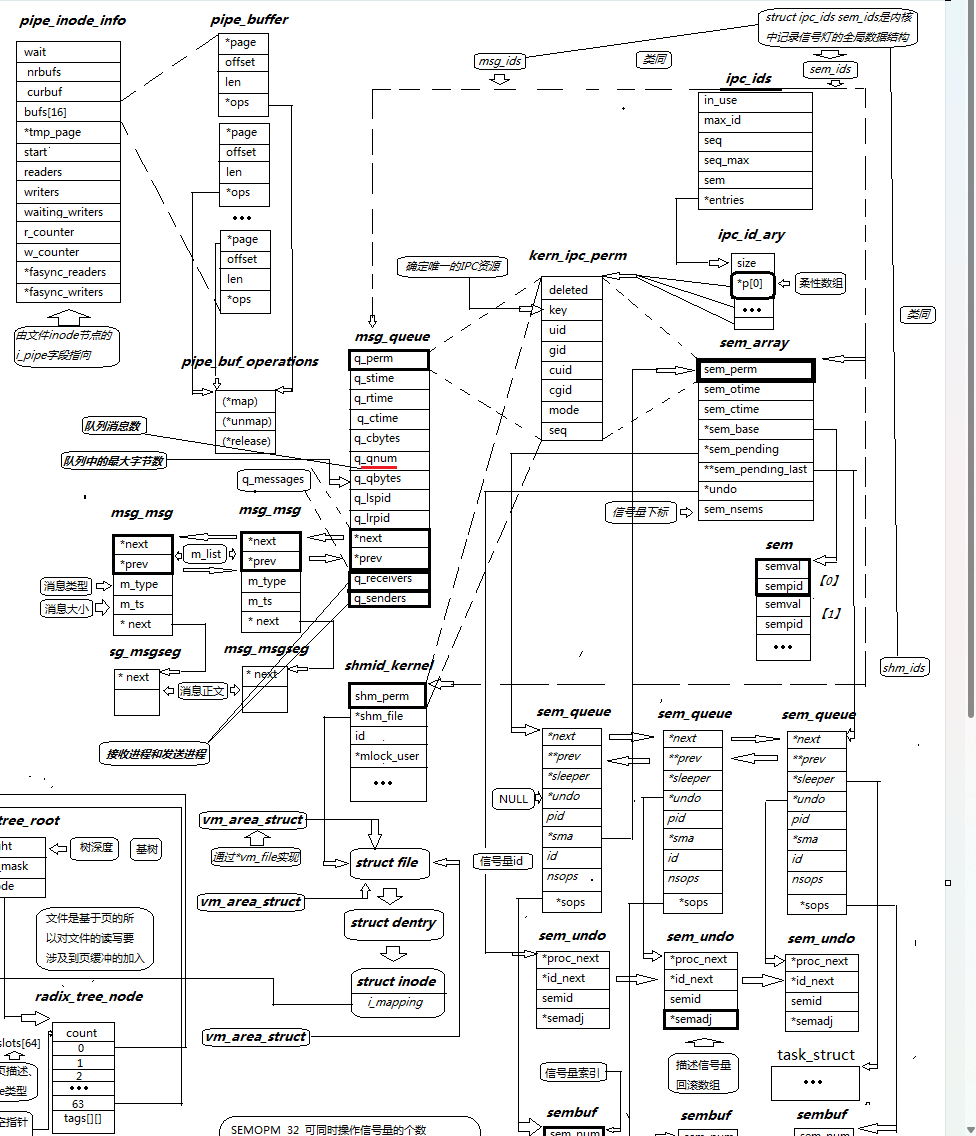
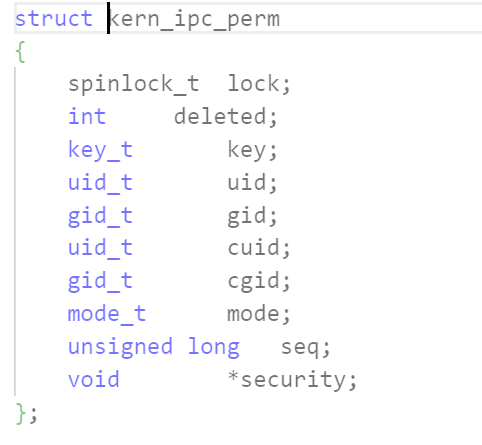
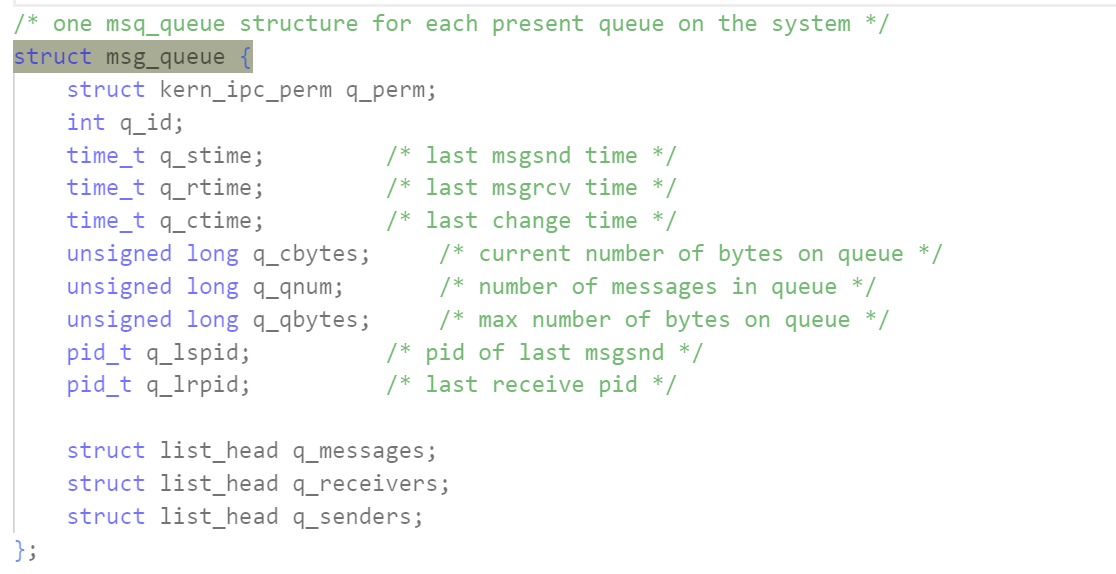
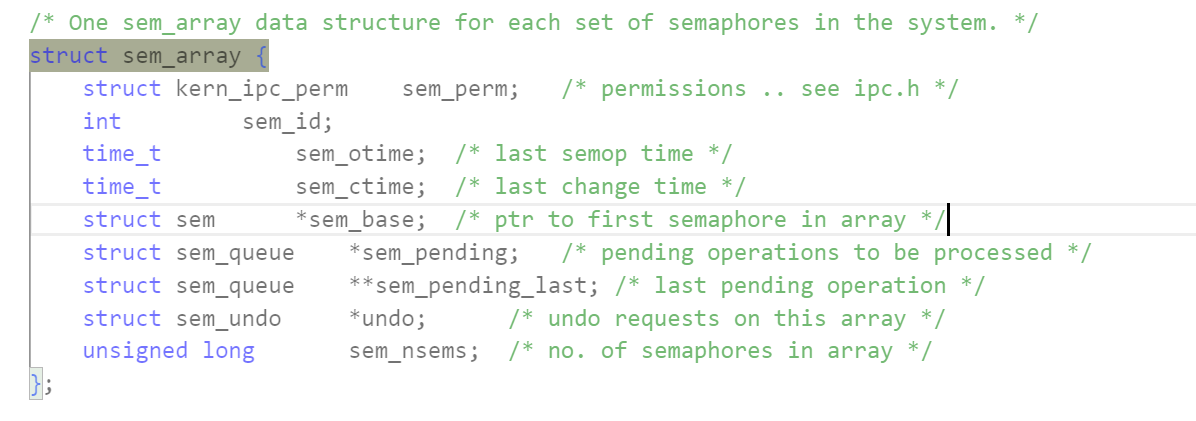
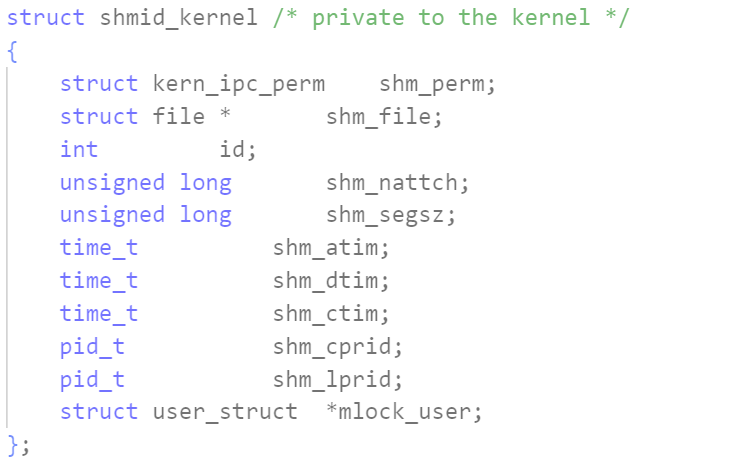
8. 内核是如何组织管理 IPC 资源的
-
参考 Linux 内核 2.6.11 源码,其他源码实现可能有差别
-
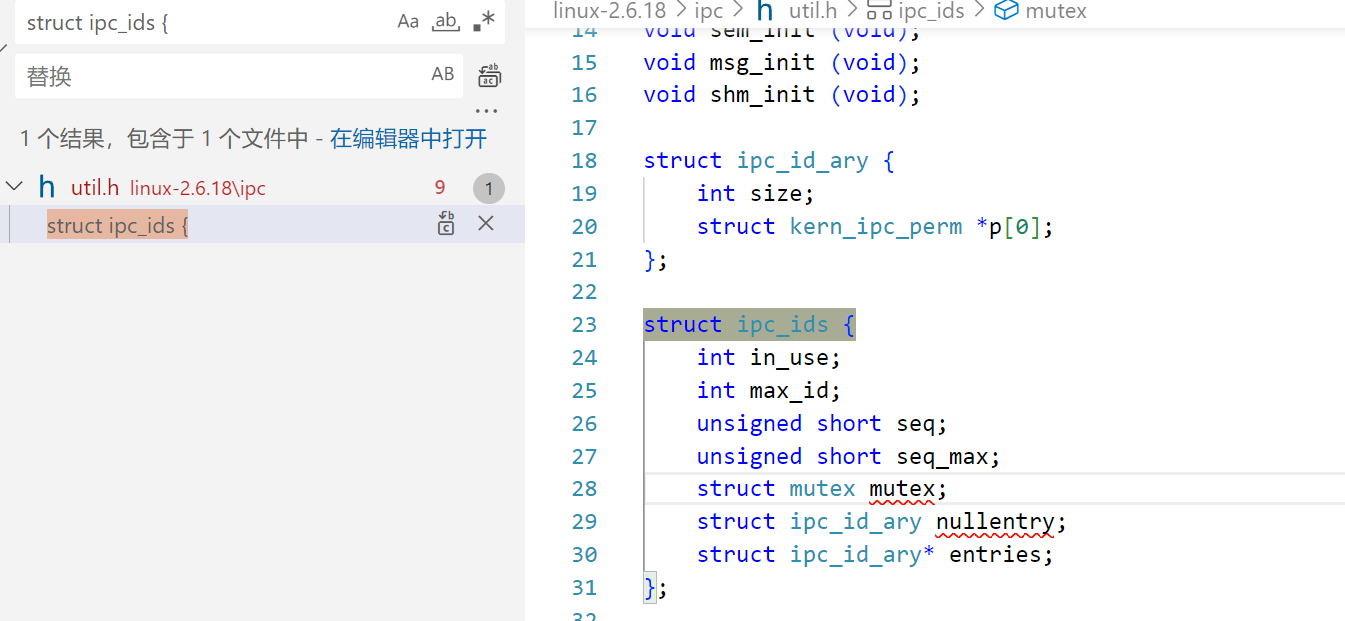
课堂看源码可以看 2.6.18 ,这块从 11 到 18 变化不大
附录:
- 在 minishell 中添加管道的实现,下面代码供有兴趣的读者参考,不做说明
cpp
#include <stdio.h>
#include <stdlib.h>
#include <unistd.h>
#include <string.h>
#include <fcntl.h>
#define MAX_CMD 1024
char command[MAX_CMD];
int do_face()
{
	memset(command, 0x00, MAX_CMD);
	printf("minishell$ ");
	fflush(stdout);
	if (scanf("%[^\n]%*c", command) == 0)
	{
		getchar();
		return -1;
	}
	return 0;
}
char **do_parse(char *buff)
{
	int argc = 0;
	static char *argv[32];
	char *ptr = buff;
	while (*ptr != '\0')
	{
		if (!isspace(*ptr))
		{
			argv[argc++] = ptr;
			while ((!isspace(*ptr)) && (*ptr) != '\0')
			{
				ptr++;
			}
			continue;
		}
		*ptr = '\0';
		ptr++;
	}
	argv[argc] = NULL;
	return argv;
}
int do_redirect(char *buff)
{
	char *ptr = buff, *file = NULL;
	int type = 0, fd, redirect_type = -1;
	while (*ptr != '\0')
	{
		if (*ptr == '>')
		{
			*ptr++ = '\0';
			redirect_type++;
			if (*ptr == '>')
			{
				*ptr++ = '\0';
				redirect_type++;
			}
			while (isspace(*ptr))
			{
				ptr++;
			}
			file = ptr;
			while ((!isspace(*ptr)) && *ptr != '\0')
			{
				ptr++;
			}
			*ptr = '\0';
			if (redirect_type == 0)
			{
				fd = open(file, O_CREAT | O_TRUNC | O_WRONLY, 0664);
			}
			else
			{
				fd = open(file, O_CREAT | O_APPEND | O_WRONLY, 0664);
			}
			dup2(fd, 1);
		}
		ptr++;
	}
	return 0;
}
int do_command(char *buff)
{
	int pipe_num = 0, i;
	char *ptr = buff;
	int pipefd[32][2] = {{-1}};
	int pid = -1;
	pipe_command[pipe_num] = ptr;
	while (*ptr != '\0')
	{
		if (*ptr == '|')
		{
			pipe_num++;
			*ptr++ = '\0';
			pipe_command[pipe_num] = ptr;
			continue;
		}
		ptr++;
	}
	pipe_command[pipe_num + 1] = NULL;
	return pipe_num;
}
int do_pipe(int pipe_num)
{
	int pid = 0, i;
	int pipefd[10][2] = {{0}};
	char **argv = {NULL};
	for (i = 0; i <= pipe_num; i++)
	{
		pipe(pipefd[i]);
	}
	for (i = 0; i <= pipe_num; i++)
	{
		pid = fork();
		if (pid == 0)
		{
			do_redirect(pipe_command[i]);
			argv = do_parse(pipe_command[i]);
			if (i != 0)
			{
				close(pipefd[i][1]);
				dup2(pipefd[i][0], 0);
			}
			if (i != pipe_num)
			{
				close(pipefd[i + 1][0]);
				dup2(pipefd[i + 1][1], 1);
			}
			execvp(argv[0], argv);
		}
		else
		{
			close(pipefd[i][0]);
			close(pipefd[i][1]);
			waitpid(pid, NULL, 0);
		}
	}
	return 0;
}
int main(int argc, char *argv[])
{
	int num = 0;
	while (1)
	{
		if (do_face() < 0)
			continue;
		num = do_command(command);
		do_pipe(num);
	}
	return 0;
}