现在政企项目、国产化项目 常用到:Nest.js + 达梦 DM8。但 90% 的人一上手就崩:连不上库、表找不到、插入报错、服务 500...这篇是能直接复制跑通的实战教程,看完你能独立搞定一套企业级接口。
一、环境准备
1.1 基础环境要求
表格
| 软件 / 工具 | 版本要求 | 备注 |
|---|---|---|
| Node.js | v16/v18/v20 | v17+ 需配置 OpenSSL 兼容环境变量 |
| Nest.js CLI | v9+ | 全局安装:npm i -g @nestjs/cli |
| 达梦数据库 | DM8 及以上 | 需安装并启动达梦服务 |
| 达梦管理工具 | 配套 DM8 | 用于建表、验证数据库连接 |
1.2 依赖安装
1)node版本
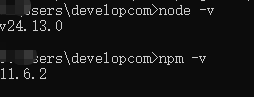
2)项目创建与依赖安装
运行
# 1. 创建 Nest.js 项目
nest new nest-dm8-demo
cd nest-dm8-demo

# 2. 安装核心依赖
npm install dmdb --save --legacy-peer-deps
npm install @nestjs/mapped-types --save
二、达梦环境
2.1 达梦版本
SELECT * FROM V$VERSION;
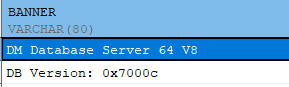
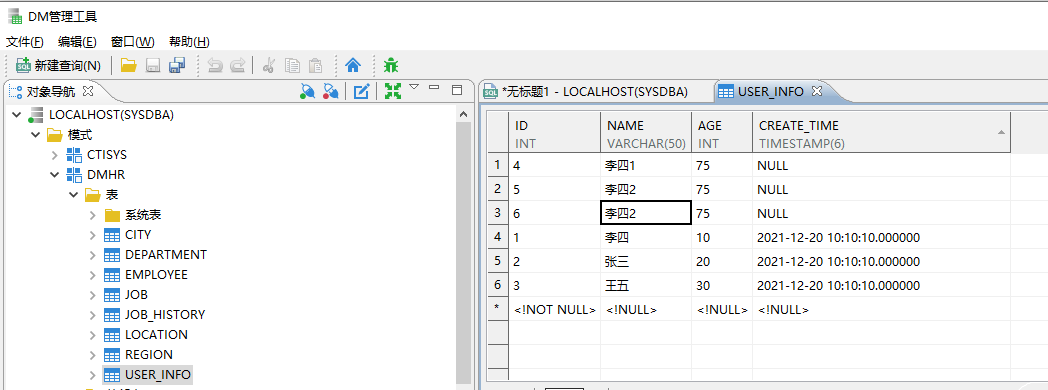
2.2 创建用户表
登录达梦管理工具,执行以下 SQL 建表(务必执行):
sql
-- 创建用户信息表(SYSDBA 模式下)
CREATE TABLE SYSDBA.USER_INFO (
  ID INT PRIMARY KEY AUTO_INCREMENT,
  NAME VARCHAR(50) NOT NULL,
  AGE INT NOT NULL,
  CREATE_TIME TIMESTAMP DEFAULT CURRENT_TIMESTAMP
);

-- 添加表/字段注释
COMMENT ON TABLE SYSDBA.USER_INFO IS '用户信息表';
COMMENT ON COLUMN SYSDBA.USER_INFO.ID IS '主键ID';
COMMENT ON COLUMN SYSDBA.USER_INFO.NAME IS '姓名';
COMMENT ON COLUMN SYSDBA.USER_INFO.AGE IS '年龄';
COMMENT ON COLUMN SYSDBA.USER_INFO.CREATE_TIME IS '创建时间';
2.3 验证数据库连接
通过达梦管理工具验证登录:
- 主机名:
localhost - 端口:
5236 - 用户名:
SYSDBA - 密码:自定义(示例为 aaaa
123456)确保能正常登录并看到创建的USER_INFO表。
三、项目配置
3.1 修复 package.json(关键)
package.json 必须为标准 JSON 格式(无注释、双引号),修改启动脚本添加 OpenSSL 兼容配置:
json
{
  "name": "nest-dm8-demo",
  "version": "0.0.1",
  "private": true,
  "scripts": {
    "start": "set NODE_OPTIONS=--openssl-legacy-provider && nest start",
    "start:dev": "set NODE_OPTIONS=--openssl-legacy-provider && nest start --watch",
    "start:prod": "set NODE_OPTIONS=--openssl-legacy-provider && node dist/main"
  },
  "dependencies": {
    "@nestjs/common": "^10.0.0",
    "@nestjs/core": "^10.0.0",
    "@nestjs/mapped-types": "^2.0.2",
    "@nestjs/platform-express": "^10.0.0",
    "dmdb": "^1.0.46190",
    "reflect-metadata": "^0.2.0",
    "rxjs": "^7.8.1"
  },
  "devDependencies": {
    "@nestjs/cli": "^10.0.0",
    "@nestjs/schematics": "^10.0.0",
    "@nestjs/testing": "^10.0.0",
    "@types/express": "^4.17.17",
    "@types/node": "^20.3.1",
    "typescript": "^5.1.3"
  }
}
备注:Mac/Linux 系统将
set替换为export。
3.2 创建类型声明文件(解决爆红)
在 src 目录下新建 types/dmdb.d.ts:
typescript
运行
declare module 'dmdb' {
  export interface Pool {
    getConnection(): Promise<Connection>;
    close(): Promise<void>;
  }

  export interface Connection {
    execute(sql: string, params?: any[]): Promise<{
      rows: any[];
      rowsAffected?: number;
      metaData?: any[];
    }>;
    release(): void;
    close(): Promise<void>;
  }

  export interface PoolConfig {
    connectionString: string;
    poolMax?: number;
    poolMin?: number;
    poolTimeout?: number;
  }

  export function createPool(config: PoolConfig): Promise<Pool>;
  export function getConnection(connectionString: string): Promise<Connection>;
}
修改 tsconfig.json 识别类型文件:
json
{
  "compilerOptions": {
    "module": "commonjs",
    "declaration": true,
    "removeComments": true,
    "emitDecoratorMetadata": true,
    "experimentalDecorators": true,
    "allowSyntheticDefaultImports": true,
    "target": "ES2021",
    "sourceMap": true,
    "outDir": "./dist",
    "baseUrl": "./",
    "incremental": true,
    "skipLibCheck": true,
    "strictNullChecks": false,
    "noImplicitAny": false,
    "strictBindCallApply": false,
    "forceConsistentCasingInFileNames": false,
    "noFallthroughCasesInSwitch": false,
    "typeRoots": ["node_modules/@types", "src/types"] // 新增这行
  }
}
四、核心代码实现
4.1 数据库连接模块
4.1.1 src/db/db.service.ts(连接池管理)
typescript
运行
import { Injectable, OnModuleInit, OnModuleDestroy, Logger } from '@nestjs/common';

// 关键:用 require 代替 import,完全避开 TypeScript 类型检查
const dmdb = require('dmdb');

@Injectable()
export class DbService implements OnModuleInit, OnModuleDestroy {
  private readonly logger = new Logger(DbService.name);
  private pool: any; // 先用 any,彻底消除类型报错

  async onModuleInit() {
    try {
      // 双保险:兼容 OpenSSL 旧算法
      process.env.NODE_OPTIONS = '--openssl-legacy-provider';

      // 创建连接池(直接写,不纠结类型)
      this.pool = await dmdb.createPool({
        connectionString: 'dm://SYSDBA:aaaa123456@localhost:5236/DAMENG?schema=DMHR',
        poolMax: 10,
        poolMin: 1,
        poolTimeout: 60,
      });

      // 测试连接(保证释放)
      let testConn: any;
      try {
        testConn = await this.pool.getConnection();
        this.logger.log('✅ 达梦数据库连接成功');
      } finally {
        if (testConn) testConn.release();
      }
    } catch (error) {
      this.logger.error('❌ 达梦数据库连接失败:', error);
      throw error;
    }
  }

  async getConnection() {
    return await this.pool.getConnection();
  }

  async onModuleDestroy() {
    if (this.pool) await this.pool.close();
  }
}
4.1.2 src/db/db.module.ts(全局模块)
typescript
运行
import { Module, Global } from '@nestjs/common';
import { DbService } from './db.service';

@Global() // 全局模块,其他模块无需重复导入
@Module({
  providers: [DbService],
  exports: [DbService],
})
export class DbModule {}
4.2 用户模块(CRUD 实现)
4.2.1 src/user/entities/user.entity.ts(类型定义)
typescript
运行
export interface User {
  id: number;
  name: string;
  age: number;
  createTime: Date;
}
4.2.2 src/user/dto/create-user.dto.ts
typescript
运行
export class CreateUserDto {
  name: string;
  age: number;
}
4.2.3 src/user/dto/update-user.dto.ts
typescript
运行
import { PartialType } from '@nestjs/mapped-types';
import { CreateUserDto } from './create-user.dto';

export class UpdateUserDto extends PartialType(CreateUserDto) {}
4.2.4 src/user/user.service.ts(核心业务逻辑)
typescript
运行
import { Injectable, Logger } from '@nestjs/common';
import { DbService } from '../db/db.service';
import { CreateUserDto } from './dto/create-user.dto';
import { UpdateUserDto } from './dto/update-user.dto';
import { User } from './entities/user.entity';

@Injectable()
export class UserService {
  private readonly logger = new Logger(UserService.name);

  constructor(private readonly dbService: DbService) {}


// 1. 新增用户
async create(createUserDto: CreateUserDto): Promise<User> {
  const conn = await this.dbService.getConnection();
  try {
    // 插入数据
    const insertSql = 'INSERT INTO USER_INFO (NAME, AGE) VALUES (?, ?)';
    await conn.execute(insertSql, [createUserDto.name, createUserDto.age]);

    // 获取刚插入的自增ID
    const idResult = await conn.execute('SELECT @@IDENTITY AS ID FROM DUAL');
    const id = idResult.rows[0][0];

    // 关键:用 as User 告诉 TypeScript 这里一定有值
    return this.findOne(id) as Promise<User>;
  } catch (error) {
    this.logger.error('创建用户失败:', error);
    throw error;
  } finally {
    conn.release();
  }
}

  // 2. 查询所有用户
  async findAll(): Promise<User[]> {
    const conn = await this.dbService.getConnection();
    try {
      const sql = 'SELECT ID, NAME, AGE, CREATE_TIME FROM USER_INFO ORDER BY ID DESC';
      const result = await conn.execute(sql);

      // 转换结果格式
      return result.rows.map((row: any[]) => ({
        id: row[0],
        name: row[1],
        age: row[2],
        createTime: row[3],
      }));
    } catch (error) {
      this.logger.error('查询所有用户失败:', error);
      throw error;
    } finally {
      conn.release();
    }
  }

  // 3. 根据ID查询单个用户
  async findOne(id: number): Promise<User | null> {
    const conn = await this.dbService.getConnection();
    try {
      const sql = 'SELECT ID, NAME, AGE, CREATE_TIME FROM USER_INFO WHERE ID = ?';
      const result = await conn.execute(sql, [id]);

      if (result.rows.length === 0) {
        return null;
      }

      const row = result.rows[0];
      return {
        id: row[0],
        name: row[1],
        age: row[2],
        createTime: row[3],
      };
    } catch (error) {
      this.logger.error(`查询用户ID=${id}失败:`, error);
      throw error;
    } finally {
      conn.release();
    }
  }

  // 4. 更新用户
  async update(id: number, updateUserDto: UpdateUserDto): Promise<User | null> {
    const conn = await this.dbService.getConnection();
    try {
      // 先检查用户是否存在
      const existingUser = await this.findOne(id);
      if (!existingUser) {
        return null;
      }

      // 构建动态更新SQL
      const updateFields: string[] = [];
      const updateValues: any[] = [];

      if (updateUserDto.name !== undefined) {
        updateFields.push('NAME = ?');
        updateValues.push(updateUserDto.name);
      }
      if (updateUserDto.age !== undefined) {
        updateFields.push('AGE = ?');
        updateValues.push(updateUserDto.age);
      }

      if (updateFields.length > 0) {
        updateValues.push(id);
        const sql = `UPDATE USER_INFO SET ${updateFields.join(', ')} WHERE ID = ?`;
        await conn.execute(sql, updateValues);
      }

      // 返回更新后的用户
      return this.findOne(id);
    } catch (error) {
      this.logger.error(`更新用户ID=${id}失败:`, error);
      throw error;
    } finally {
      conn.release();
    }
  }

  // 5. 删除用户
  async remove(id: number): Promise<{ deleted: boolean; id: number }> {
    const conn = await this.dbService.getConnection();
    try {
      // 先检查用户是否存在
      const existingUser = await this.findOne(id);
      if (!existingUser) {
        return { deleted: false, id };
      }

      const sql = 'DELETE FROM USER_INFO WHERE ID = ?';
      const result = await conn.execute(sql, [id]);

      return { deleted: result.rowsAffected > 0, id };
    } catch (error) {
      this.logger.error(`删除用户ID=${id}失败:`, error);
      throw error;
    } finally {
      conn.release();
    }
  }
}
4.2.5 src/user/user.controller.ts(接口层)
typescript
运行
import { Controller, Get, Post, Body, Patch, Param, Delete, HttpException, HttpStatus } from '@nestjs/common';
import { UserService } from './user.service';
import { CreateUserDto } from './dto/create-user.dto';
import { UpdateUserDto } from './dto/update-user.dto';

@Controller('user')
export class UserController {
  constructor(private readonly userService: UserService) {}

  @Post()
  async create(@Body() createUserDto: CreateUserDto) {
    return await this.userService.create(createUserDto);
  }

  @Get()
  async findAll() {
    return await this.userService.findAll();
  }

  @Get(':id')
  async findOne(@Param('id') id: string) {
    const user = await this.userService.findOne(+id);
    if (!user) {
      throw new HttpException('用户不存在', HttpStatus.NOT_FOUND);
    }
    return user;
  }

  @Patch(':id')
  async update(@Param('id') id: string, @Body() updateUserDto: UpdateUserDto) {
    const user = await this.userService.update(+id, updateUserDto);
    if (!user) {
      throw new HttpException('用户不存在', HttpStatus.NOT_FOUND);
    }
    return user;
  }

  @Delete(':id')
  async remove(@Param('id') id: string) {
    const result = await this.userService.remove(+id);
    if (!result.deleted) {
      throw new HttpException('用户不存在', HttpStatus.NOT_FOUND);
    }
    return { message: '删除成功', id: result.id };
  }
}
4.2.6 src/user/user.module.ts
typescript
运行
import { Module } from '@nestjs/common';
import { UserService } from './user.service';
import { UserController } from './user.controller';

@Module({
  controllers: [UserController],
  providers: [UserService],
})
export class UserModule {}
4.3 根模块配置
修改 src/app.module.ts:
typescript
运行
import { Module } from '@nestjs/common';
import { DbModule } from './db/db.module';
import { UserModule } from './user/user.module';

@Module({
  imports: [DbModule, UserModule],
})
export class AppModule {}
五、启动与接口测试
5.1 启动项目
bash
运行
npm run start:dev启动成功标志:
plaintext
✅ 达梦数据库连接池初始化成功
Nest application successfully started
5.2 接口测试
表格
| 接口功能 | 请求方法 | 接口地址 | 请求参数示例 | 响应示例 |
|---|---|---|---|---|
| 新增用户 | POST | http://localhost:3000/user |
{"name":"张三","age":25} |
{"id":1,"name":"张三","age":25,"createTime":"2026-03-17T10:00:00.000Z"} |
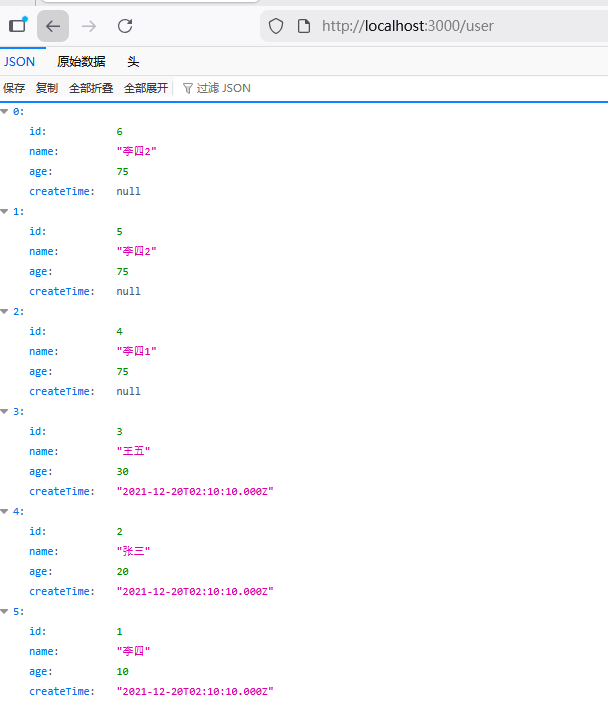
| 查询所有用户 | GET | http://localhost:3000/user |
无 | [{"id":1,"name":"张三","age":25,"createTime":"2026-03-17T10:00:00.000Z"}] |
| 查询单个用户 | GET | http://localhost:3000/user/1 |
路径参数 id=1 |
{"id":1,"name":"张三","age":25,"createTime":"2026-03-17T10:00:00.000Z"} |
| 更新用户 | PATCH | http://localhost:3000/user/1 |
{"age":26} |
{"id":1,"name":"张三","age":26,"createTime":"2026-03-17T10:00:00.000Z"} |
| 删除用户 | DELETE | http://localhost:3000/user/1 |
路径参数 id=1 |
{"message":"删除成功","id":1} |
测试工具推荐:Postman、Apifox、curl 命令。
1.查询所有的用户
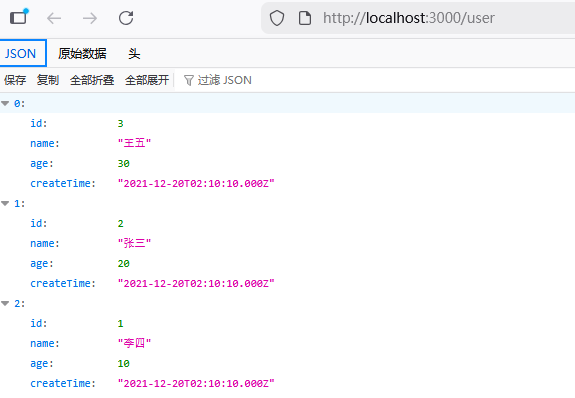
2.查询某个用户
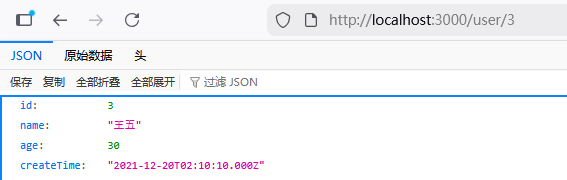
3.新增用户

六、常见问题与避坑指南
6.1 核心避坑点
-
OpenSSL 兼容问题
- 错误表现:
[6071] 消息加密失败/digital envelope routines::unsupported - 解决方案:启动脚本添加
NODE_OPTIONS=--openssl-legacy-provider(已配置在 package.json)。
- 错误表现:
-
连接字符串必须指定库名 / 模式名
- 错误表现:
无效的表或视图名[USER_INFO] - 解决方案:格式
dm://账号:密码@主机:端口/库名?schema=模式名,默认库名 DAMENG,模式名 SYSDBA。
- 错误表现:
-
dmdb 驱动类型爆红
- 解决方案:创建
src/types/dmdb.d.ts类型声明文件,并配置 tsconfig.json。
- 解决方案:创建
-
package.json 语法错误
- 错误表现:
EJSONPARSE/Expected double-quoted property name - 解决方案:JSON 无注释、全用双引号、无尾逗号(参考本文 package.json 配置)。
- 错误表现:
-
连接未释放导致池耗尽
- 后果:应用卡死、连接超时
- 解决方案:所有连接操作在
finally块执行conn.release()。
-
驱动版本不匹配
- 错误表现:
[20001] 无效的参数 - 解决方案:驱动版本需与达梦服务器版本一致,执行
npm list dmdb核对。
- 错误表现:
-
自增 ID 获取语法错误
- 错误:用 MySQL 的
LAST_INSERT_ID() - 解决方案:达梦用
SELECT @@IDENTITY AS ID FROM DUAL。
- 错误:用 MySQL 的
-
达梦服务未启动
- 错误表现:
[6001] 连接超时 - 解决方案:在服务管理器启动
DmServiceDMSERVER。
- 错误表现:
-
账号密码错误
- 错误表现:
[20002] 用户名或密码错误 - 解决方案:确认 SYSDBA 密码,达梦默认密码 SYSDBA(区分大小写)。
- 错误表现:
-
@nestjs/mapped-types 未安装
- 错误表现:
PartialType爆红 - 解决方案:执行
npm install @nestjs/mapped-types --save。
- 错误表现:
-
表名 / 字段名大小写问题
- 达梦默认转大写,建表和查询保持统一(本文全用大写)。
-
连接池配置不合理
- 建议:poolMax=10、poolMin=1、poolTimeout=60,避免过度占用连接。
6.2 快速排查流程
- 确认达梦服务启动 → 2. 验证账号密码能登录管理工具 → 3. 确认表已创建且模式正确 → 4. 检查连接字符串格式 → 5. 查看 Nest.js 终端报错日志 → 6. 验证接口请求参数格式。
七、总结
本文完整实现了 Nest.js 连接达梦 DM8 数据库的全流程,核心要点:
- 解决了 Node.js v17+ 与达梦驱动的 OpenSSL 兼容问题;
- 规范了达梦连接字符串格式(必须指定库名 / 模式名);
- 实现了用户表完整 CRUD,规避了连接泄漏、类型报错等常见问题;
- 提供了 10+ 核心避坑点,覆盖环境、配置、代码全维度。
按本文步骤操作,可快速实现 Nest.js 与达梦 DM8 的稳定对接,适配生产环境基本需求。
点赞收藏关注获取完整代码。