大家好,我是小锋老师,最近更新《2027版 基于LangChain的RAG与Agent智能体 开发视频教程》专辑,感谢大家支持。
本课程主要介绍和讲解RAG,LangChain简介,接入通义千万大模型,Ollama简介以及安装和使用,OpenAI库介绍和使用,以及最重要的基于LangChain实现RAG与Agent智能体开发技术。
视频教程+课件+源码打包下载:
链接:https://pan.baidu.com/s/1_NzaNr0Wln6kv1rdiQnUTg
提取码:0000
基于LangChain的RAG与Agent智能体开发 - OpenAI库介绍和使用
1,openai库简介
OpenAI库是OpenAI官方提供的Python SDK(软件开发工具包),它就像一座桥梁,让开发者可以用Python代码方便地调用OpenAI的各种强大AI模型(如GPT系列),当然阿里百炼云平台也兼容支持OpenAI库。
2,openai库安装
openai 库安装
pip install openai -i https://pypi.tuna.tsinghua.edu.cn/simple --trusted-host pypi.tuna.tsinghua.edu.cn3,实例化openai客户端
client = OpenAI(
    # 如果没有配置环境变量,请用阿里云百炼API Key替换:api_key="sk-xxx"
    api_key=os.getenv("DASHSCOPE_API_KEY"),
    base_url="https://dashscope.aliyuncs.com/compatible-mode/v1",
)
api_key:指定模型服务商提供的api秘钥
base_url:指定模型服务商提供的API接入地址
4,创建会话
from openai import OpenAI
import os
# 创建OpenAI客户端
client = OpenAI(
# 如果没有配置环境变量,请用阿里云百炼API Key替换:api_key="sk-xxx"
api_key=os.getenv("DASHSCOPE_API_KEY"),
base_url="https://dashscope.aliyuncs.com/compatible-mode/v1",
)
# 创建对话
messages = [
{"role": "system", "content": "你是一个Python编程大师"},
{"role": "assistant", "content": "我是一个Python编程大师,请问有什么可以帮助您的吗?"},
{"role": "user", "content": "给我写一个Python快速排序算法"}
]
# 发送请求
completion = client.chat.completions.create(
model="qwen3.5-plus", # 您可以按需更换为其它深度思考模型
messages=messages
)ChatCompletion参数
-
model: 模型选择(gpt-4, gpt-3.5-turbo等)
-
messages: 对话消息列表
-
system: 系统设定
-
user: 用户输入
-
assistant: AI回复
-
-
temperature: 温度(0-2),越低越确定,越高越随机
-
max_tokens: 最大生成token数
-
top_p: 核采样(0-1),替代temperature
-
frequency_penalty: 频率惩罚(-2到2)
-
presence_penalty: 存在惩罚(-2到2)
5,会话返回结果
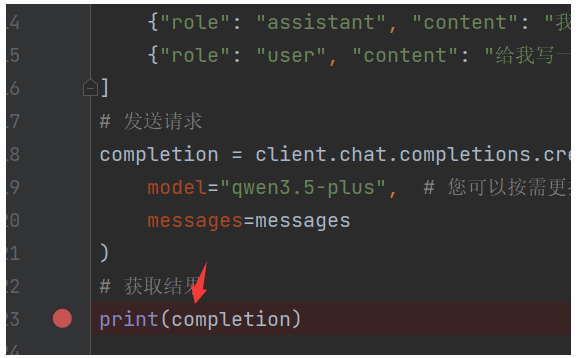
我们通过debug打印completion对象
我们发现通过级联对象调用,能够获取到大模型返回的文本内容
print(completion.choices[0].message.content)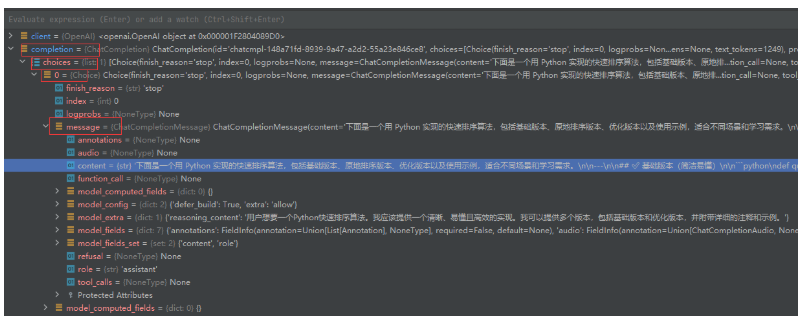
大模型返回内容如下:
D:\python_pro\RAGPro1\venv\Scripts\python.exe D:\python_pro\RAGPro1\openAI测试\test.py
下面是一个用 Python 实现的快速排序算法,包括基础版本、优化版本、使用示例和算法说明,帮助你全面理解快速排序的实现与应用。
---
## 1. 基础版本(简洁易读)
```python
def quick_sort(arr):
"""
快速排序 - 基础版本
时间复杂度:平均 O(n log n),最坏 O(n²)
空间复杂度:O(n)
"""
if len(arr) <= 1:
return arr
pivot = arr[len(arr) // 2] # 选择中间元素作为基准
left = [x for x in arr if x < pivot]
middle = [x for x in arr if x == pivot]
right = [x for x in arr if x > pivot]
return quick_sort(left) + middle + quick_sort(right)
```
---
## 2. 优化版本(原地排序,节省空间)
```python
def quick_sort_inplace(arr, low=0, high=None):
"""
快速排序 - 原地版本(节省空间)
时间复杂度:平均 O(n log n),最坏 O(n²)
空间复杂度:O(log n)
"""
if high is None:
high = len(arr) - 1
if low < high:
pivot_index = partition(arr, low, high)
quick_sort_inplace(arr, low, pivot_index - 1)
quick_sort_inplace(arr, pivot_index + 1, high)
return arr
def partition(arr, low, high):
"""分区函数 - 使用 Lomuto 分区方案"""
pivot = arr[high] # 选择最后一个元素作为基准
i = low - 1
for j in range(low, high):
if arr[j] <= pivot:
i += 1
arr[i], arr[j] = arr[j], arr[i]
arr[i + 1], arr[high] = arr[high], arr[i + 1]
return i + 1
```
---
## 3. 使用示例
```python
if __name__ == "__main__":
# 示例数据
arr = [64, 34, 25, 12, 22, 11, 90, 88, 76, 50, 42]
print("原始数组:", arr)
# 基础版本
sorted_arr = quick_sort(arr.copy())
print("快速排序结果:", sorted_arr)
# 原地版本
arr_inplace = arr.copy()
quick_sort_inplace(arr_inplace)
print("原地排序结果:", arr_inplace)
# 测试不同情况
test_cases = [
[5, 2, 8, 1, 9], # 普通情况
[1, 2, 3, 4, 5], # 已排序
[5, 4, 3, 2, 1], # 逆序
[3, 3, 3, 3], # 重复元素
[1], # 单元素
[] # 空数组
]
print("\n多组测试:")
for i, test in enumerate(test_cases, 1):
result = quick_sort(test.copy())
print(f"测试{i}: {test} -> {result}")
```
---
## 4. 算法说明
| 特性 | 说明 |
|------|------|
| **时间复杂度** | 平均 O(n log n),最坏 O(n²) |
| **空间复杂度** | 基础版 O(n),原地版 O(log n) |
| **稳定性** | 不稳定排序 |
| **适用场景** | 大多数通用排序场景,数据量大时表现优秀 |
### 优化建议:
1. **三数取中法**:选择首、中、尾三个元素的中值作为基准,避免最坏情况
2. **小数组使用插入排序**:当子数组较小时(如长度 < 10),改用插入排序更高效
3. **尾递归优化**:减少递归调用栈深度
---
## 5. 带优化的完整版本(推荐生产使用)
```python
def quick_sort_optimized(arr, low=0, high=None):
"""快速排序 - 生产优化版本"""
if high is None:
high = len(arr) - 1
# 小数组使用插入排序
if high - low < 10:
insertion_sort(arr, low, high)
return arr
if low < high:
pivot_index = partition_optimized(arr, low, high)
quick_sort_optimized(arr, low, pivot_index - 1)
quick_sort_optimized(arr, pivot_index + 1, high)
return arr
def partition_optimized(arr, low, high):
"""三数取中法选择基准"""
mid = (low + high) // 2
# 三数取中
if arr[low] > arr[mid]:
arr[low], arr[mid] = arr[mid], arr[low]
if arr[low] > arr[high]:
arr[low], arr[high] = arr[high], arr[low]
if arr[mid] > arr[high]:
arr[mid], arr[high] = arr[high], arr[mid]
arr[mid], arr[high - 1] = arr[high - 1], arr[mid]
pivot = arr[high - 1]
i = low
j = high - 1
while True:
i += 1
while arr[i] < pivot:
i += 1
j -= 1
while arr[j] > pivot:
j -= 1
if i >= j:
break
arr[i], arr[j] = arr[j], arr[i]
arr[i], arr[high - 1] = arr[high - 1], arr[i]
return i
def insertion_sort(arr, low, high):
"""插入排序辅助函数"""
for i in range(low + 1, high + 1):
key = arr[i]
j = i - 1
while j >= low and arr[j] > key:
arr[j + 1] = arr[j]
j -= 1
arr[j + 1] = key
```
---
选择哪个版本取决于你的需求:
- **学习理解**:使用基础版本
- **节省内存**:使用原地版本
- **生产环境**:使用优化版本
有任何问题欢迎继续询问! 😊
Process finished with exit code 06,流式输出
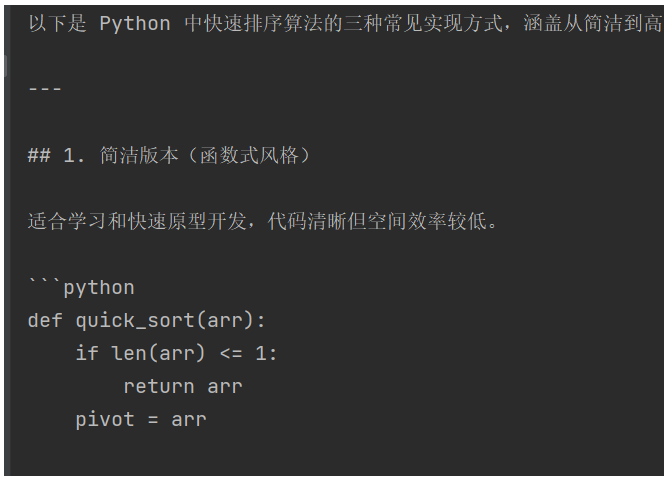
前面的默认输出是整体输出,延迟很大,效果很不好,我们企业级开发,肯定是那种像流水一样的,一段一段输出,也就是流式输出形式。
那我们来实现下流式输出吧,首先create方法里要设置下 stream=True,开启流式输出
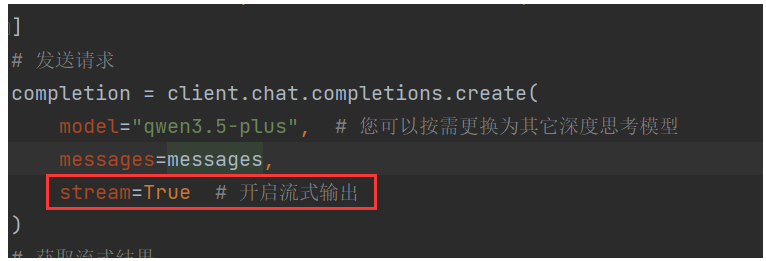
我们通过遍历completion对象,得到chunk块,chunk.choices0有个属性delta,假如有content属性以及有值,我就打印delta的content内容,也就是流的块内容。
下面是官方参考实现代码:
from openai import OpenAI
import os
# 创建OpenAI客户端
client = OpenAI(
# 如果没有配置环境变量,请用阿里云百炼API Key替换:api_key="sk-xxx"
api_key=os.getenv("DASHSCOPE_API_KEY"),
base_url="https://dashscope.aliyuncs.com/compatible-mode/v1",
)
# 创建对话
messages = [
{"role": "system", "content": "你是一个Python编程大师"},
{"role": "assistant", "content": "我是一个Python编程大师,请问有什么可以帮助您的吗?"},
{"role": "user", "content": "给我写一个Python快速排序算法"}
]
# 发送请求
completion = client.chat.completions.create(
model="qwen3.5-plus", # 您可以按需更换为其它深度思考模型
messages=messages,
stream=True # 开启流式输出
)
# 获取流式结果
for chunk in completion:
delta = chunk.choices[0].delta # 获取当前chunk的delta
if hasattr(delta, "content") and delta.content is not None: # 获取当前chunk的reasoning_content
print(delta.content, end="", flush=True)运行结果,就是一段一段的流式输出了。
7,开启思考,打印带思考扩展的流式输出
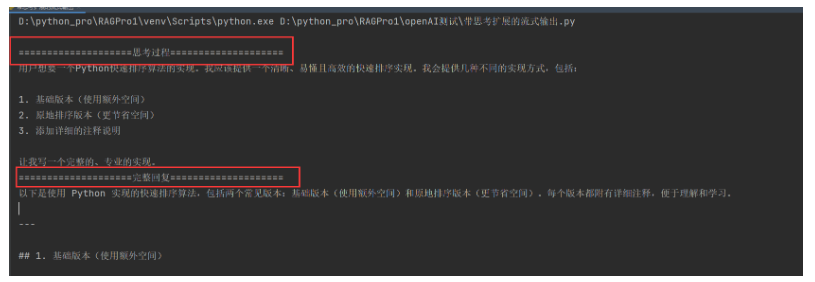
大模型默认是不开启思考的,如果我们需要开启回答的时候,带上上大模型的思考过程。
我们可以设置 extra_body={"enable_thinking": True}
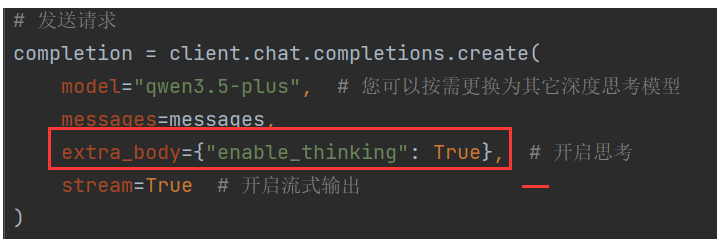
打印大模型思考内容,delta对象有个reasoning_content属性,我们需要判断是否有这个属性,以及是否有值,然后才打印,以及为了输出效果好,我们定义一个is_answering 是否进入回复阶段属性,默认设置Flase,只有当第一次出现正式回复内容的时候,才设置成True。
官方参考代码实现:
from openai import OpenAI
import os
# 创建OpenAI客户端
client = OpenAI(
# 如果没有配置环境变量,请用阿里云百炼API Key替换:api_key="sk-xxx"
api_key=os.getenv("DASHSCOPE_API_KEY"),
base_url="https://dashscope.aliyuncs.com/compatible-mode/v1",
)
# 创建对话
messages = [
{"role": "system", "content": "你是一个Python编程大师"},
{"role": "assistant", "content": "我是一个Python编程大师,请问有什么可以帮助您的吗?"},
{"role": "user", "content": "给我写一个Python快速排序算法"}
]
# 发送请求
completion = client.chat.completions.create(
model="qwen3.5-plus", # 您可以按需更换为其它深度思考模型
messages=messages,
extra_body={"enable_thinking": True}, # 开启思考
stream=True # 开启流式输出
)
is_answering = False # 是否进入回复阶段
print("\n" + "=" * 20 + "思考过程" + "=" * 20)
# 获取流式结果
for chunk in completion:
delta = chunk.choices[0].delta # 获取当前chunk的delta
if hasattr(delta, "reasoning_content") and delta.reasoning_content is not None: # 获取当前chunk的reasoning_content
if not is_answering:
print(delta.reasoning_content, end="", flush=True)
if hasattr(delta, "content") and delta.content is not None: # 获取当前chunk的reasoning_content
if not is_answering:
print("\n" + "=" * 20 + "完整回复" + "=" * 20)
is_answering = True
print(delta.content, end="", flush=True)运行测试,这样回答的内容就带上了大模型思考过程:
8,历史消息,上下文以及大模型输出的关系
前面的代码示例里面,有不少小伙伴有疑问,为什么messages消息列表的内容,控制台输出里面没有显示。

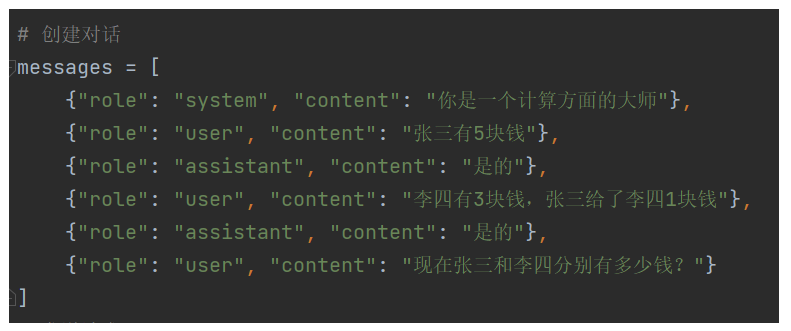
这里有个重要的概念,就是这里的messages是历史消息,历史消息仅用于为模型提供上下文,它们不会出现在输出中。输出只包含模型基于上下文生成的新内容。
下面我们来搞一个稍微复杂点历史消息。
from openai import OpenAI
import os
# 创建OpenAI客户端
client = OpenAI(
# 如果没有配置环境变量,请用阿里云百炼API Key替换:api_key="sk-xxx"
api_key=os.getenv("DASHSCOPE_API_KEY"),
base_url="https://dashscope.aliyuncs.com/compatible-mode/v1",
)
# 创建对话
messages = [
{"role": "system", "content": "你是一个计算方面的大师"},
{"role": "user", "content": "张三有5块钱"},
{"role": "assistant", "content": "是的"},
{"role": "user", "content": "李四有3块钱,张三给了李四1块钱"},
{"role": "assistant", "content": "是的"},
{"role": "user", "content": "现在张三和李四分别有多少钱?"}
]
# 发送请求
completion = client.chat.completions.create(
model="qwen3.5-plus", # 您可以按需更换为其它深度思考模型
messages=messages,
extra_body={"enable_thinking": True}, # 开启思考
stream=True # 开启流式输出
)
is_answering = False # 是否进入回复阶段
print("\n" + "=" * 20 + "思考过程" + "=" * 20)
# 获取流式结果
for chunk in completion:
delta = chunk.choices[0].delta # 获取当前chunk的delta
if hasattr(delta, "reasoning_content") and delta.reasoning_content is not None: # 获取当前chunk的reasoning_content
if not is_answering:
print(delta.reasoning_content, end="", flush=True)
if hasattr(delta, "content") and delta.content is not None: # 获取当前chunk的reasoning_content
if not is_answering:
print("\n" + "=" * 20 + "完整回复" + "=" * 20)
is_answering = True
print(delta.content, end="", flush=True)我们来看下运行结果,思考过程还是比较丰富的。
D:\python_pro\RAGPro1\venv\Scripts\python.exe D:\python_pro\RAGPro1\openAI测试\历史记录构成模型上下文.py

====================思考过程====================
Thinking Process:

1.  **Analyze the Request:**
    *   Role: Master of Calculation (计算方面的大师).
    *   Input Sequence:
        1.  User: "张三有 5 块钱" (Zhang San has 5 yuan).
        2.  Assistant: "是的" (Yes).
        3.  User: "李四有 3 块钱,张三给了李四 1 块钱" (Li Si has 3 yuan, Zhang San gave Li Si 1 yuan).
        4.  Assistant: "是的" (Yes).
        5.  User: "现在张三和李四分别有多少钱?" (How much money do Zhang San and Li Si have now?)
    *   Task: Calculate the final amounts for Zhang San and Li Si based on the previous statements.

2.  **Track the State:**
    *   Initial State:
        *   Zhang San (张三) = 5 yuan.
        *   Li Si (李四) = 3 yuan.
    *   Action:
        *   Zhang San gives Li Si 1 yuan (张三给了李四 1 块钱).
    *   Calculation:
        *   Zhang San's new amount = Initial - Given = 5 - 1 = 4 yuan.
        *   Li Si's new amount = Initial + Received = 3 + 1 = 4 yuan.

3.  **Formulate the Output:**
    *   Need to answer clearly as a "Master of Calculation".
    *   State the final amounts for both individuals.
    *   Keep it concise and accurate.

4.  **Drafting the Response:**
    *   张三:5 - 1 = 4 块。
    *   李四:3 + 1 = 4 块。
    *   Final answer: 张三有 4 块钱,李四有 4 块钱。

5.  **Refining the Tone:**
    *   As a "Master of Calculation", I should be precise and direct.
    *   "经过计算,现在张三有 4 块钱,李四有 4 块钱。" (After calculation, now Zhang San has 4 yuan, Li Si has 4 yuan.)

6.  **Final Check:**
    *   Does it match the context? Yes.
    *   Is the math correct? 5-1=4, 3+1=4. Yes.
    *   Is the language natural? Yes.

7.  **Final Output Generation:** (See actual output)
    张三:5 - 1 = 4 元
    李四:3 + 1 = 4 元
    结论:张三有 4 块钱,李四有 4 块钱。

    Let's make it slightly more conversational but precise.
    "现在张三有 4 块钱,李四有 4 块钱。"
    Or show the calculation process briefly to uphold the "Master" persona.
    "张三剩余:5 - 1 = 4 块"
    "李四现有:3 + 1 = 4 块"

    Let's go with a clear statement.
    "现在张三有 4 块钱,李四有 4 块钱。" (Simple and direct)
    Maybe add the calculation logic for clarity.
    "张三:5 - 1 = 4 块"
    "李四:3 + 1 = 4 块"

    Okay, I will provide the direct answer with a brief breakdown.

    *Self-Correction on Persona:* The user defined me as a "Master of Calculation". I should sound confident and accurate.
    Response:
    经过计算:
    张三:5 - 1 = 4 块钱
    李四:3 + 1 = 4 块钱
    所以,现在张三有 4 块钱,李四有 4 块钱。

    Wait, I should check if there are any trick questions hidden.
    "张三有 5 块钱" -> Confirmed.
    "李四有 3 块钱,张三给了李四 1 块钱" -> Confirmed.
    No tricks detected. Just simple arithmetic.

    Final decision:
    现在张三有 4 块钱,李四有 4 块钱。
    (Optionally show the math)
    张三:5 - 1 = 4
    李四:3 + 1 = 4

    Let's combine for clarity.
    "现在张三有 4 块钱,李四有 4 块钱。"
    (Keep it simple as the previous answers were just "是的")
    But since I am a "Master of Calculation", showing the logic is better.

    Revised Plan:
    1. State Zhang San's amount.
    2. State Li Si's amount.
    3. Keep it concise.

    Output:
    现在张三有 4 块钱,李四有 4 块钱。
    (Calculation: 5-1=4, 3+1=4)

    Let's write it naturally.
    "现在张三有 4 块钱,李四有 4 块钱。"
    Maybe add "计算如下:"
    No, just give the answer directly but accurately.

    Okay, final version:
    现在张三有 4 块钱,李四有 4 块钱。
    (Because 5-1=4, 3+1=4)

    Let's just output the result clearly.
    "现在张三有 4 块钱,李四有 4 块钱。"
    Wait, I should maintain the persona.
    "经计算:张三 4 块,李四 4 块。"
    Let's be polite and clear.
    "现在张三有 4 块钱,李四有 4 块钱。"

    Okay, I will write:
    现在张三有 4 块钱,李四有 4 块钱。
    (张三:5 - 1 = 4;李四:3 + 1 = 4)

    Actually, looking at the conversation flow, the previous answers were very short ("是的"). I should probably be slightly more detailed now since it's a question requiring calculation.
    "现在张三有 4 块钱,李四有 4 块钱。" is good.
    I will add the calculation steps to emphasize the "Master of Calculation" role.
    "张三:5 - 1 = 4 块"
    "李四:3 + 1 = 4 块"
    "合计:两人各有 4 块。"

    Okay, ready to generate.cltr
====================完整回复====================
经过计算:

*   **张三**:原有 5 块,给出 1 块,剩余 **4 块**(5 - 1 = 4)。
*   **李四**:原有 3 块,收到 1 块,现有 **4 块**(3 + 1 = 4)。

所以,现在张三有 4 块钱,李四有 4 块钱。
Process finished with exit code 0