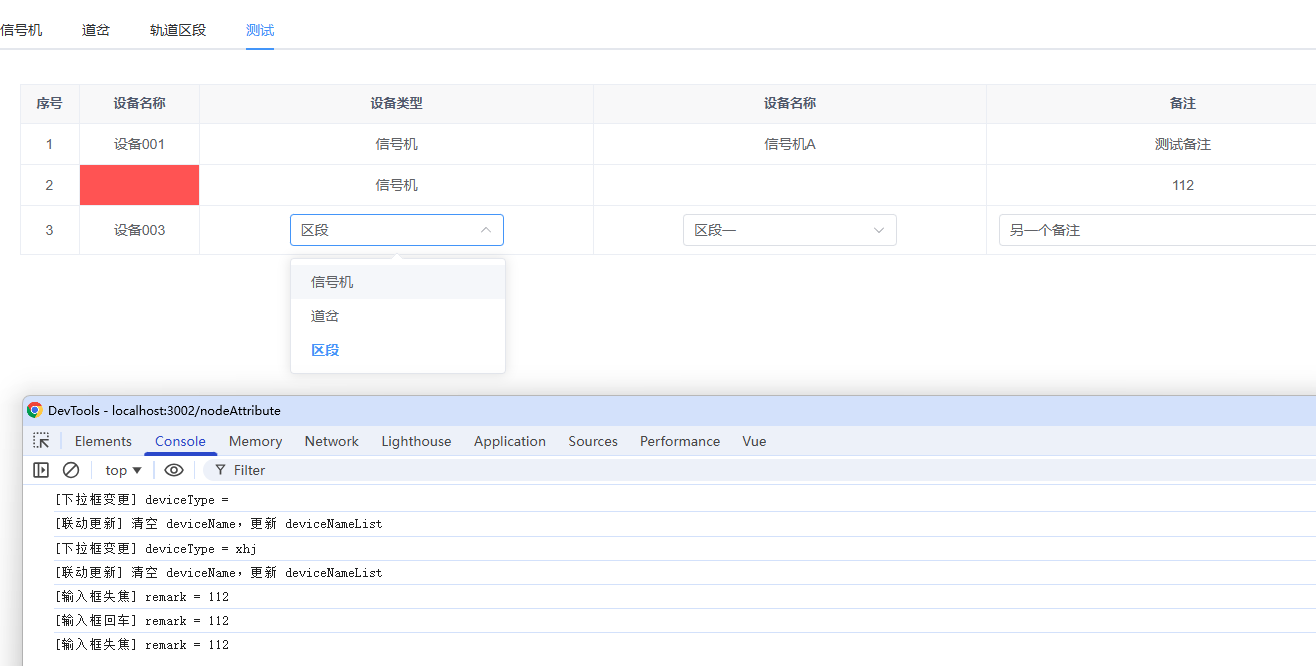
SimpleTable.vue通用单元格组件
<template>
  <el-table
    :data="dataList"
    border
    style="width: 100%"
    :cell-style="handleCellStyle"
  >
    <el-table-column
        v-for="col in columns"
        :key="col.key"
        :label="col.label"
        :prop="col.field"
        :width="col.width"
        align="center"
    >
      <template #default="{ row, $index }">
        <!-- ==================== 序号类型 ==================== -->
        <template v-if="col.type === 'index'">
          {{ $index + 1 }}
        </template>

        <!-- ==================== 普通文本类型 ==================== -->
        <template v-else-if="col.type === 'text'">
          {{ row[col.field] }}
        </template>

        <!-- ==================== 下拉框类型 ==================== -->
        <template v-else-if="col.type === 'select'">
          <!-- 编辑状态:显示下拉框 -->
          <el-select
              v-if="row._editing"
              v-model="row[col.field]"
              placeholder="请选择"
              clearable
              @change="onSelectChange(row, col)"
          >
            <el-option
                v-for="(item, idx) in getOptions(row, col)"
                :key="idx"
                :value="getOptionValue(item, col)"
                :label="getOptionLabel(item, col)"
            />
          </el-select>
          <!-- 非编辑状态:显示文本,点击进入编辑 -->
          <div
              v-else
              @click="onCellClick(row)"
              style="min-height: 24px; cursor: pointer; line-height: 24px"
          >
            {{ getSelectLabel(row, col) }}
          </div>
        </template>

        <!-- ==================== 输入框类型 ==================== -->
        <template v-else-if="col.type === 'input'">
          <!-- 编辑状态:显示输入框 -->
          <el-input
              v-if="row._editing"
              v-model="row[col.field]"
              :placeholder="col.placeholder || '请输入'"
              clearable
              @blur="onInputBlur(row, col)"
              @keyup.enter="onInputEnter(row, col)"
          />
          <!-- 非编辑状态:显示文本,点击进入编辑 -->
          <div
              v-else
              @click="onCellClick(row)"
              style="min-height: 24px; cursor: pointer; line-height: 24px"
          >
            {{ row[col.field] || col.emptyText || '-' }}
          </div>
        </template>
      </template>
    </el-table-column>
  </el-table>
</template>

<script setup>
/**
 * SimpleTable - 简易通用表格组件
 *
 * 支持四种列类型:index(序号)、text(文本)、select(下拉框)、input(输入框)
 *
 * 列配置字段说明:
 * @param {string} key - 唯一标识(必填)
 * @param {string} label - 列标题(必填)
 * @param {string} type - 列类型:index/text/select/input(必填)
 * @param {string} field - 数据字段名(text/select/input 必填)
 * @param {number} width - 列宽度(可选)
 *
 * select 类型额外字段:
 * @param {Array} options - 静态选项数组,支持对象数组或字符串数组
 * @param {string} optionsField - 动态选项字段名,从 row 中获取
 * @param {string} valueKey - 对象数组时的值字段名,默认 'value'
 * @param {string} labelKey - 对象数组时的标签字段名,默认 'label'
 * @param {string} dependField - 依赖的字段名,用于联动
 *
 * input 类型额外字段:
 * @param {string} placeholder - 输入框占位符
 * @param {string} emptyText - 空值时显示的文本
 *
 * 单元格样式:
 * @param {Function|Object} cellStyle - 单元格样式,可以是函数或对象
 *   - 函数签名: ({ row, column, rowIndex, columnIndex }) => Object
 *   - 返回对象示例: { 'background-color': '#ff4d4f', 'color': '#fff' }
 */

const props = defineProps({
  dataList: {type: Array, default: () => []},
  columns: {type: Array, required: true},
  dependencyMap: {type: Object, default: () => ({})},
});

const emit = defineEmits(['cell-click', 'select-change', 'input-blur', 'input-enter']);

/**
 * 处理单元格样式
 * @param {Object} args - { row, column, rowIndex, columnIndex }
 * @returns {Object} 样式对象
 */
const handleCellStyle = ({ row, column, rowIndex, columnIndex }) => {
  // 通过 column.property 找到对应的列配置
  const col = props.columns.find(c => c.field === column.property);

  if (col?.cellStyle) {
    if (typeof col.cellStyle === 'function') {
      return col.cellStyle({ row, column, rowIndex, columnIndex });
    } else if (typeof col.cellStyle === 'object') {
      return col.cellStyle;
    }
  }

  return {};
};

/**
 * 获取下拉框选项列表
 * @param {Object} row - 行数据
 * @param {Object} col - 列配置
 * @returns {Array} 选项列表
 */
const getOptions = (row, col) => {
  // 优先使用动态选项(从 row 中获取),其次使用静态选项
  if (col.optionsField && row[col.optionsField]) {
    return row[col.optionsField];
  }
  return col.options || [];
};

/**
 * 判断选项是否为对象(非字符串)
 * @param {Object} col - 列配置
 * @returns {boolean}
 */
const isObjectOption = (col) => {
  return col.valueKey || col.labelKey;
};

/**
 * 获取选项的值
 * @param {*} item - 选项项
 * @param {Object} col - 列配置
 * @returns {*} 选项值
 */
const getOptionValue = (item, col) => {
  if (isObjectOption(col) && typeof item === 'object') {
    return item[col.valueKey || 'value'];
  }
  return item; // 字符串数组,值就是字符串本身
};

/**
 * 获取选项的标签
 * @param {*} item - 选项项
 * @param {Object} col - 列配置
 * @returns {string} 选项标签
 */
const getOptionLabel = (item, col) => {
  if (isObjectOption(col) && typeof item === 'object') {
    return item[col.labelKey || 'label'];
  }
  return item; // 字符串数组,标签就是字符串本身
};

/**
 * 获取下拉框当前选中值的显示文本
 * @param {Object} row - 行数据
 * @param {Object} col - 列配置
 * @returns {string} 显示文本
 */
const getSelectLabel = (row, col) => {
  const value = row[col.field];
  if (!value) return '';
  const options = getOptions(row, col);
  const option = options.find((item) => getOptionValue(item, col) === value);
  return option ? getOptionLabel(option, col) : '';
};

// 事件:单元格点击
const onCellClick = (row) => emit('cell-click', row);

// 事件:下拉框选择变更
const onSelectChange = (row, col) => emit('select-change', row, col);

// 事件:输入框失焦
const onInputBlur = (row, col) => emit('input-blur', row, col);

// 事件:输入框回车
const onInputEnter = (row, col) => emit('input-enter', row, col);
</script>

<style scoped>
</style>
ExamplePage.vue使用示例组件
<template>
  <div style="padding: 20px">
    <SimpleTable
        :data-list="dataList"
        :columns="columns"
        :dependency-map="dependencyMap"
        @cell-click="onCellClick"
        @select-change="onSelectChange"
        @input-blur="onInputBlur"
        @input-enter="onInputEnter"
    />
  </div>
</template>

<script setup>
import { ref, computed } from 'vue';
import SimpleTable from './SimpleTable.vue';

// ==================== 静态选项数据 ====================

// 设备类型选项(对象数组示例,需要指定 valueKey/labelKey)
const DEVICE_TYPE_OPTIONS = [
  { value: 'xhj', label: '信号机' },
  { value: 'dc', label: '道岔' },
  { value: 'qd', label: '区段' },
];

// 设备名称数据(字符串数组示例,无需指定 valueKey/labelKey)
const DEVICE_NAME_MAP = {
  xhj: ['信号机A', '信号机B', '信号机C'],
  dc: ['道岔1号', '道岔2号', '道岔3号'],
  qd: ['区段一', '区段二', '区段三'],
};

// ==================== 单元格样式函数 ====================

/**
 * 获取名称列的单元格样式
 * 当 name 为空时,背景为红色
 * @param {Object} param0 - { row, column, rowIndex, columnIndex }
 * @returns {Object} 样式对象
 */
const getNameCellStyle = ({ row }) => {
  if (!row.name || row.name === '') {
    return {
      'background-color': '#ff4d4f',
      'color': '#fff',
    };
  }
  return {};
};

/**
 * 获取备注列的单元格样式
 * 当 remark 为空时,背景为黄色
 * @param {Object} param0 - { row, column, rowIndex, columnIndex }
 * @returns {Object} 样式对象
 */
const getRemarkCellStyle = ({ row }) => {
  if (!row.remark || row.remark === '') {
    return {
      'background-color': '#faad14',
      'color': '#fff',
    };
  }
  return {};
};

// ==================== 列配置 ====================

const columns = [
  // 【类型1】序号列 - 自动显示行号
  { key: 'index', label: '序号', type: 'index', width: 60 },

  // 【类型2】普通文本列 - 只读展示
  {
    key: 'name',
    label: '设备名称',
    type: 'text',
    field: 'name',
    width: 120,
    cellStyle: getNameCellStyle,  // 添加单元格样式函数
  },

  // 【类型3】下拉框列 - 设备类型(对象数组选项)
  {
    key: 'deviceType',
    label: '设备类型',
    type: 'select',
    field: 'deviceType',
    options: DEVICE_TYPE_OPTIONS,  // 对象数组
    valueKey: 'value',              // 值字段
    labelKey: 'label',              // 标签字段
  },

  // 【类型3】下拉框列 - 设备名称(字符串数组选项 + 联动)
  {
    key: 'deviceName',
    label: '设备名称',
    type: 'select',
    field: 'deviceName',
    optionsField: 'deviceNameList', // 动态选项字段(从 row 获取)
    // 注意:字符串数组不需要 valueKey/labelKey
    dependField: 'deviceType',       // 依赖字段(联动)
  },

  // 【类型4】输入框列
  {
    key: 'remark',
    label: '备注',
    type: 'input',
    field: 'remark',
    placeholder: '请输入备注',
    emptyText: '-',
    cellStyle: getRemarkCellStyle,  // 添加单元格样式函数
  },
];

// ==================== 依赖关系映射 ====================

/**
 * 结构:{ 被依赖的字段: [依赖它的列配置数组] }
 * 示例结果: { deviceType: [deviceName列配置] }
 */
const dependencyMap = computed(() => {
  const map = {};
  columns.forEach((col) => {
    if (col.dependField) {
      if (!map[col.dependField]) map[col.dependField] = [];
      map[col.dependField].push(col);
    }
  });
  return map;
});

// ==================== 表格数据 ====================

const dataList = ref([
  {
    name: '设备001',
    deviceType: 'xhj',
    deviceName: '信号机A',
    deviceNameList: DEVICE_NAME_MAP['xhj'],
    remark: '测试备注',
    _editing: false,
  },
  {
    name: '',  // 空名称,将显示红色背景
    deviceType: 'dc',
    deviceName: '道岔1号',
    deviceNameList: DEVICE_NAME_MAP['dc'],
    remark: '',  // 空备注,将显示黄色背景
    _editing: false,
  },
  {
    name: '设备003',
    deviceType: 'qd',
    deviceName: '区段一',
    deviceNameList: DEVICE_NAME_MAP['qd'],
    remark: '另一个备注',
    _editing: false,
  },
]);

// ==================== 事件处理 ====================

/**
 * 单元格点击 - 进入编辑模式
 * @param {Object} row - 行数据
 */
const onCellClick = (row) => {
  dataList.value.forEach((r) => (r._editing = false));
  row._editing = true;
};

/**
 * 下拉框选择变更 - 处理联动
 * @param {Object} row - 行数据
 * @param {Object} col - 列配置
 */
const onSelectChange = (row, col) => {
  console.log(`[下拉框变更] ${col.field} = ${row[col.field]}`);

  // 查找依赖当前列的其他列
  const dependentColumns = dependencyMap.value[col.field];
  if (dependentColumns) {
    dependentColumns.forEach((depCol) => {
      console.log(`[联动更新] 清空 ${depCol.field},更新 ${depCol.optionsField}`);
      row[depCol.field] = '';
      row[depCol.optionsField] = DEVICE_NAME_MAP[row[col.field]] || [];
    });
  }

  row._editing = false;
};

/**
 * 输入框失焦
 * @param {Object} row - 行数据
 * @param {Object} col - 列配置
 */
const onInputBlur = (row, col) => {
  console.log(`[输入框失焦] ${col.field} = ${row[col.field]}`);
  row._editing = false;
};

/**
 * 输入框回车
 * @param {Object} row - 行数据
 * @param {Object} col - 列配置
 */
const onInputEnter = (row, col) => {
  console.log(`[输入框回车] ${col.field} = ${row[col.field]}`);
  row._editing = false;
};
</script>

<style scoped>
</style>