🚗 Travel-Map:一款基于 Electron + Vue 3 的本地旅行地图相册桌面应用
📖 一、项目背景与产品定位
1.1 为什么做这个项目?
在这个数字化时代,几乎每个人都会用手机拍摄大量的旅行照片。据统计,一个热爱旅行的用户每年可能会拍摄数千张照片。然而,随着照片数量的不断增长,如何有效地管理和回顾这些珍贵的旅行回忆,成为了一个令人头疼的问题。
市面上的照片管理应用主要有以下几类:
- 云存储类(如 iCloud、Google Photos):方便但存在隐私风险,存储空间有限
- 社交平台类(如小红书、微博):分享方便但不适合本地管理
- 传统相册类(如 Lightroom):专业但操作复杂,缺少地图展示功能
基于以上痛点,我决定开发一款本地优先的旅行照片管理应用------Travel-Map。
1.2 项目愿景
Travel-Map 的核心理念是:"你的旅行足迹,一目了然"。
我们希望用户能够:
- 📍 在地图上直观地看到自己去过的地方
- 📁 轻松整理和分类旅行照片
- ✈️ 记录每次旅行的起点和终点
- 🎬 用轮播的方式回顾美好瞬间
- 🔒 所有数据完全存储在本地,隐私安全有保障
1.3 目标用户
| 用户类型 | 典型场景 | 核心需求 |
|---|---|---|
| 旅行爱好者 | 整理多年积累的旅行照片 | 按城市分类,快速定位 |
| 摄影玩家 | 管理大量高清原图 | 高效浏览,不压缩画质 |
| 家庭用户 | 记录家庭出游点滴 | 简单易用,温馨回忆 |
| 驴友群体 | 记录户外探险路线 | 轨迹展示,分享足迹 |
🛠️ 二、技术选型与理由
2.1 桌面端框架选型
在选择桌面端框架时,我对比了主流的几个方案:
| 框架 | 优势 | 劣势 | 选择理由 |
|---|---|---|---|
| Electron | 生态丰富,跨平台,入门简单 | 打包体积大 | ✅ 优先选择,Vue生态完善 |
| Tauri | 体积小,性能好 | 生态较新,周边库少 | 备选方案 |
| NW.js | 支持直接打开HTML | 文档较少 | 不考虑 |
| Flutter Desktop | 原生性能,UI美观 | 学习曲线陡峭 | 生态不成熟 |
最终选择 Electron,原因如下:
- Vue 3 的桌面端支持成熟(electron-vite、electron-builder)
- Node.js 生态系统完善,文件操作、数据库等实现简单
- 社区活跃,遇到问题容易找到解决方案
- 开发效率高,可以快速迭代
2.2 前端技术栈详解
┌─────────────────────────────────────────────────┐
│                   Vue 3 Composition API           │
│  ┌─────────────────────────────────────────┐   │
│  │         <script setup> + TypeScript      │   │
│  └─────────────────────────────────────────┘   │
└─────────────────────────────────────────────────┘
                         │
        ┌────────────────┼────────────────┐
        ▼                ▼                 ▼
   ┌─────────┐     ┌──────────┐     ┌──────────┐
   │ Pinia   │     │ Vue Router│     │TailwindCSS│
   │状态管理  │     │路由管理   │     │ 样式框架  │
   └─────────┘     └──────────┘     └──────────┘
Vue 3 Composition API
我们全面采用 Vue 3 的 Composition API(<script setup> 语法),这带来了以下优势:
typescript
// 传统 Options API
export default {
  data() { return { count: 0 } },
  methods: { increment() { this.count++ } }
}

// Composition API (<script setup>)
const count = ref(0)
const increment = () => count.value++优势分析:
- 更好的逻辑复用:通过 composables 函数抽离逻辑
- 更灵活的代码组织:相关逻辑放在一起
- 更好的类型推断:TypeScript 支持更完善
- 更小的打包体积:更好的 tree-shaking
TypeScript 类型安全
整个项目使用 TypeScript 开发,带来了以下好处:
- 编译时检查:很多错误在编译阶段就能发现
- 智能提示:IDE 提供准确的代码补全
- 代码文档:类型定义即文档
- 重构安全:修改类型后,编译器帮助检查影响范围
typescript
// 定义城市数据结构
interface City {
  id: number
  name: string
  code: string
  province: string
  latitude?: number
  longitude?: number
  photoCount: number
  videoCount: number
  hasDirectory: boolean
}

// 定义行程数据结构
interface Trip {
  id: number
  cityId: number
  dirname: string
  departureCity: string  // 新增:出发城市
  tripDate: string
  description?: string
  folderName: string
  fullPath: string
  photoCount: number
  videoCount: number
}
Pinia 状态管理
使用 Pinia 作为状态管理解决方案,它是 Vue 官方推荐的新一代状态管理库:
typescript
// stores/map.ts
export const useMapStore = defineStore('map', () => {
  const cities = ref<City[]>([])
  const selectedCity = ref<City | null>(null)
  const cityData = ref<any[]>([])
  const loading = ref(false)

  async function loadCities() {
    loading.value = true
    try {
      cities.value = await window.electronAPI.getCities()
    } catch (e) {
      console.error('Failed to load cities:', e)
    } finally {
      loading.value = false
    }
  }

  return { cities, selectedCity, cityData, loading, loadCities }
})
Pinia 的优势:
- 完整的 TypeScript 支持
- 极简的 API,没有 mutation、modules 等概念
- 可组合式(Composable)的 store 设计
- 支持 Vue DevTools 调试
Tailwind CSS 原子化样式
选择 Tailwind CSS 作为样式框架:
html
<!-- 传统 CSS -->
<div class="card">
  <style>
    .card {
      padding: 16px;
      background: white;
      border-radius: 12px;
      box-shadow: 0 2px 8px rgba(0,0,0,0.1);
    }
  </style>
</div>

<!-- Tailwind CSS -->
<div class="p-4 bg-white rounded-xl shadow-sm">优势:
- 开发效率高,无需切换文件
- 一致性好,复用设计系统
- 更好的性能(原子类不重复)
- 响应式设计简单
2.3 地图技术方案
地图是本应用的核心功能之一,我们选择 Leaflet 作为地图引擎:
Leaflet vs Mapbox GL vs 高德/百度
| 方案 | 优点 | 缺点 | 选择理由 |
|---|---|---|---|
| Leaflet | 轻量、灵活、插件丰富 | 默认样式简单 | ✅ 优先选择 |
| Mapbox GL | 样式丰富、3D效果好 | 需要API Key、有使用限制 | 备选 |
| 高德/百度 Web API | 国内数据准确 | 需要申请Key、API调用限制 | 不考虑 |
Leaflet 的优势:
- 轻量级:核心库仅约 40KB
- 高度可定制:可以加载任意地图瓦片源
- 插件生态:有大量优秀的插件可用
- 移动端友好:触摸操作流畅
地图瓦片源
我们使用高德地图瓦片,原因如下:
- 国内数据准确
- 无需申请 Key
- 支持 HTTPS
- 访问稳定
javascript
L.tileLayer('https://webrd0{s}.is.autonavi.com/appmaptile?lang=zh_cn&size=1&scale=1&style=8&x={x}&y={y}&z={z}', {
  subdomains: '1234'
}).addTo(map)
2.4 数据存储方案
SQLite 数据库
使用 sql.js(WebAssembly SQLite)在 Electron 中存储数据:
javascript
import initSqlJs, { Database } from 'sql.js'

async function initDatabase() {
  const SQL = await initSqlJs()
  const db = new SQL.Database()

  db.run(`
    CREATE TABLE IF NOT EXISTS cities (
      id INTEGER PRIMARY KEY AUTOINCREMENT,
      name TEXT NOT NULL,
      province TEXT NOT NULL
    )
  `)

  return db
}
SQLite 的优势:
- 零配置,无需安装数据库服务
- 文件型数据库,易于备份和迁移
- 性能优秀,支持索引优化
- 跨平台,Electron 无缝支持
🏗️ 三、系统架构设计
3.1 整体架构
┌─────────────────────────────────────────────────────────────────────┐
│                         Travel-Map Architecture                        │
├─────────────────────────────────────────────────────────────────────┤
│                                                                      │
│   ┌─────────────────────────────────────────────────────────────┐    │
│   │                    Electron Main Process                    │    │
│   │  ┌────────────┐  ┌────────────┐  ┌────────────────────┐  │    │
│   │  │  IPC Main  │  │  Database  │  │  FileSystem        │  │    │
│   │  │  Handler   │  │  Service   │  │  Service           │  │    │
│   │  └────────────┘  └────────────┘  └────────────────────┘  │    │
│   │        ▲               ▲                  ▲             │    │
│   └────────┼───────────────┼──────────────────┼─────────────┘    │
│            │               │                  │                  │
│            │         IPC Bridge (contextBridge)                │
│            │               │                  │                  │
│   ┌────────┴───────────────┴──────────────────┴─────────────┐    │
│   │                   Renderer Process (Vue 3)                │    │
│   │  ┌─────────────┐  ┌─────────────┐  ┌─────────────────┐  │    │
│   │  │  Pinia      │  │ Vue Router  │  │  Views/Components│  │    │
│   │  │  Stores     │  │             │  │                 │  │    │
│   │  └─────────────┘  └─────────────┘  └─────────────────┘  │    │
│   └─────────────────────────────────────────────────────────────┘    │
│                                                                      │
└─────────────────────────────────────────────────────────────────────┘
3.2 主进程职责
Electron 主进程是整个应用的"超级管理员",负责:
| 模块 | 职责 | 实现方式 |
|---|---|---|
| 窗口管理 | 创建、管理应用窗口 | BrowserWindow API |
| IPC 通信 | 前后端数据交互 | ipcMain.handle |
| 文件系统 | 目录扫描、文件操作 | Node.js fs 模块 |
| 数据库 | SQLite CRUD 操作 | sql.js |
| 文件监听 | 监控目录变化 | chokidar |
3.3 渲染进程职责
Vue 3 应用运行在渲染进程中,负责:
| 模块 | 职责 |
|---|---|
| UI 渲染 | 页面展示、用户交互 |
| 状态管理 | Pinia store 管理应用状态 |
| 路由控制 | Vue Router 处理页面跳转 |
| 地图渲染 | Leaflet 加载地图、GeoJSON |
| 组件通信 | Props、Emits、Provide/Inject |
3.4 IPC 通信设计
为了安全性和稳定性,我们采用 contextBridge 暴露 API:
typescript
// preload/index.ts
contextBridge.exposeInMainWorld('electronAPI', {
  getCities: () => ipcRenderer.invoke('get-cities'),
  getTrips: (cityId) => ipcRenderer.invoke('get-trips', cityId),
  scanDirectory: () => ipcRenderer.invoke('scan-resource-directory'),
  syncData: () => ipcRenderer.invoke('sync-data'),
  createTripByName: (cityName, dirname, tripDate, description, departureCity) =>
    ipcRenderer.invoke('create-trip-by-name', cityName, dirname, tripDate, description, departureCity)
})安全优势:
- 隔离主进程和渲染进程
- 只暴露必要的 API
- 防止 XSS 攻击
✨ 四、核心功能实现详解
4.1 地图模块
4.1.1 地图初始化
typescript
function initMap() {
  map.value = L.map('map', {
    center: [35, 105],  // 中国中心点
    zoom: 4,
    minZoom: 2,        // 支持缩放至全球视图
    maxZoom: 10,
    zoomControl: false,  // 自定义缩放控件位置
    attributionControl: false
  })

  // 加载高德地图瓦片
  L.tileLayer('https://webrd0{s}.is.autonavi.com/appmaptile?', {
    subdomains: '1234',
    lang: 'zh_cn',
    style: 8  // 高德清新风格
  }).addTo(map.value)

  // 添加缩放控件
  L.control.zoom({ position: 'bottomright' }).addTo(map.value)
}
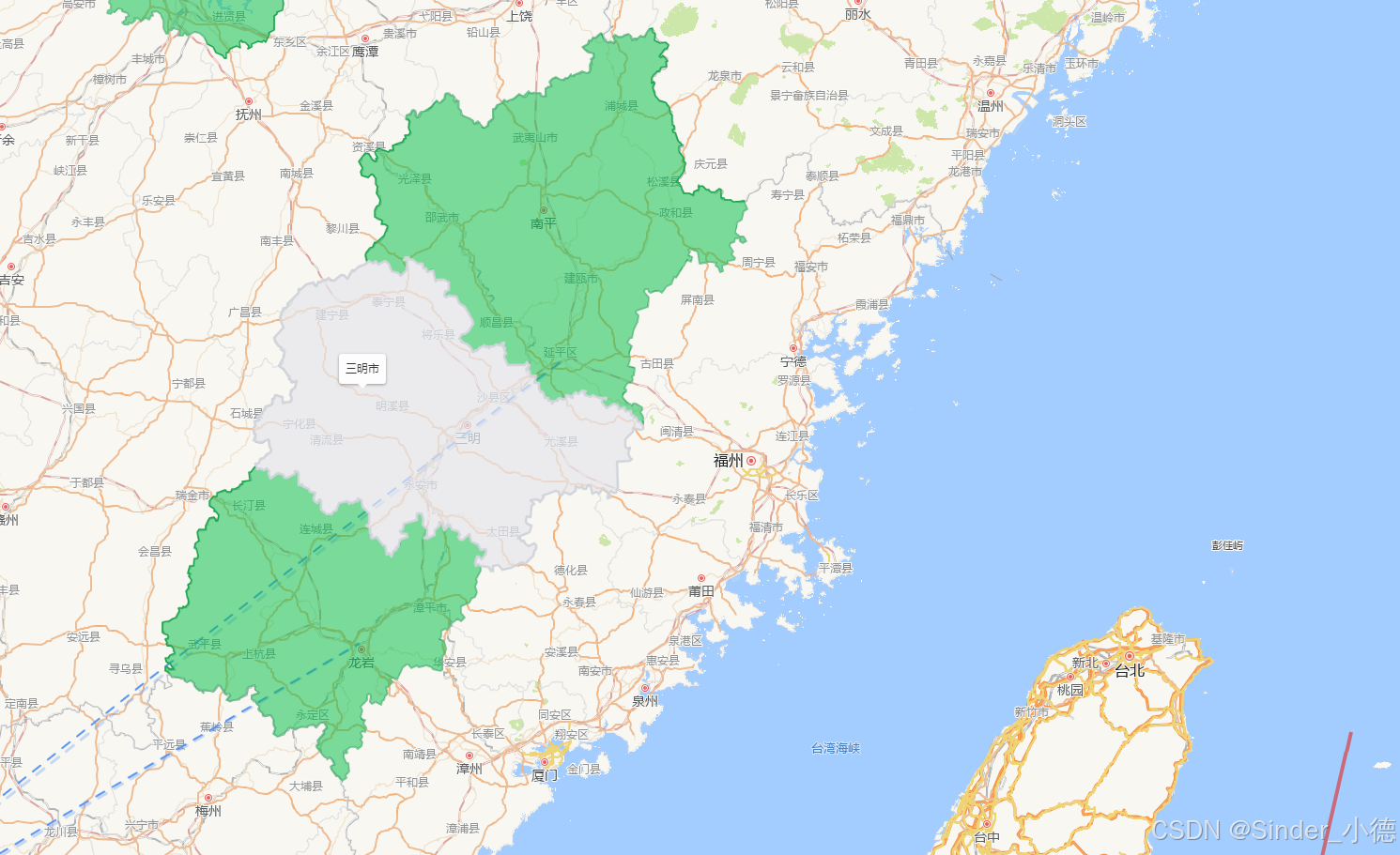
4.1.2 地级市边界加载
使用 cn-atlas 提供的地级市 GeoJSON 数据:
typescript
async function loadPrefectureBoundaries() {
  const response = await fetch('https://unpkg.com/cn-atlas/prefectures.json')
  const geojson = await response.json()

  // 匹配已记录的城市
  const recordedCityNames = new Set(recordedCities.value.map(c => c.name))

  L.geoJSON(geojson, {
    style: (feature) => {
      const cityName = feature.properties['地名'] || ''
      const hasData = recordedCityNames.has(cityName.replace('市', ''))

      return {
        fillColor: hasData ? '#22C55E' : '#E5E7EB',  // 有数据=绿色,无数据=灰色
        fillOpacity: hasData ? 0.6 : 0.15,
        color: hasData ? '#16A34A' : '#D1D5DB',
        weight: hasData ? 1.5 : 0.5
      }
    },
    onEachFeature: (feature, layer) => {
      // 鼠标悬停效果
      layer.on({
        mouseover: (e) => {
          e.target.setStyle({ weight: 2.5, fillOpacity: 0.75 })
        },
        mouseout: (e) => {
          // 恢复原始样式
          e.target.setStyle(/* ... */)
        },
        click: () => {
          // 点击跳转城市详情
          handleCityClick(cityName)
        }
      })
    }
  }).addTo(map.value)
}
4.1.3 城市坐标系统
内置全国 300+ 地级市坐标,支持国内和海外城市:
typescript
function getCityCoords(cityName: string): [number, number] | null {
  const coords: Record<string, [number, number]> = {
    // 中国城市
    '北京': [39.9, 116.4],
    '上海': [31.2, 121.5],
    '广州': [23.1, 113.3],
    '深圳': [22.5, 114.1],
    // ... 300+ 城市

    // 海外城市
    '东京': [35.6762, 139.6503],
    '纽约': [40.7128, -74.0060],
    '伦敦': [51.5074, -0.1278],
    // ...
  }

  return coords[cityName.replace('市', '')] || null
}
4.2 旅行轨迹动画
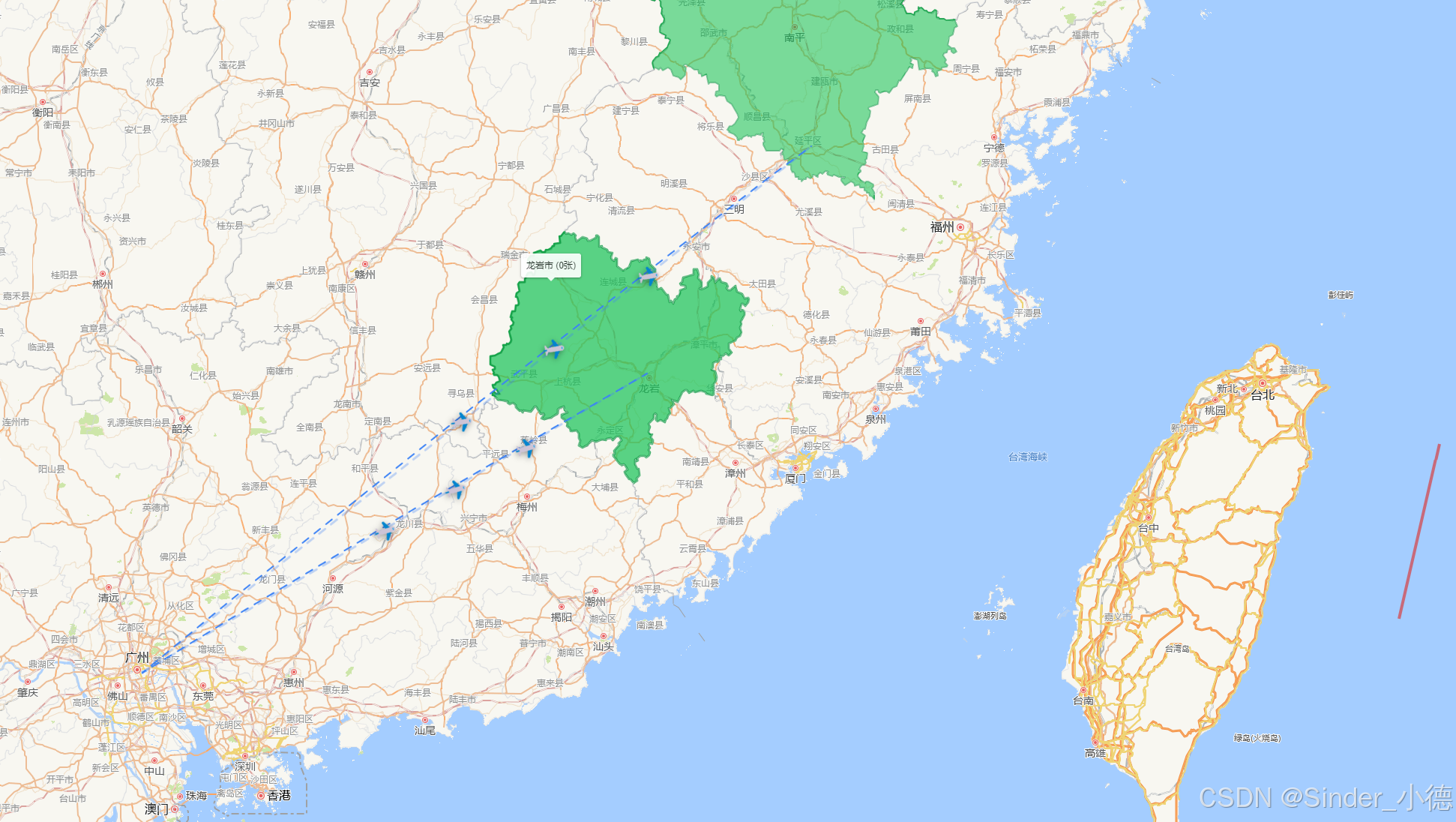
这是本应用的一个亮点功能,实现了精美的旅行轨迹可视化。
4.2.1 大圆航线算法
为了真实模拟飞机飞行路径,我们实现了大圆航线(Great Circle Route)算法:
typescript
function getCurvedPath(
  start: [number, number],
  end: [number, number],
  numPoints: number = 50
): [number, number][] {
  const points: [number, number][] = []

  // 转换为弧度
  const lat1 = start[0] * Math.PI / 180
  const lng1 = start[1] * Math.PI / 180
  const lat2 = end[0] * Math.PI / 180
  const lng2 = end[1] * Math.PI / 180

  for (let i = 0; i <= numPoints; i++) {
    const f = i / numPoints

    // 球面线性插值
    const A = Math.sin((1 - f) * lat1) / Math.sin(lat2 - lat1)
    const B = Math.sin(f * lat1) / Math.sin(lat2 - lat1)

    const x = A * Math.cos(lat1) * Math.cos(lng1) + B * Math.cos(lat2) * Math.cos(lng2)
    const y = A * Math.cos(lat1) * Math.sin(lng1) + B * Math.cos(lat2) * Math.sin(lng2)
    const z = A * Math.sin(lat1) + B * Math.sin(lat2)

    // 转换回经纬度
    const lat = Math.atan2(z, Math.sqrt(x * x + y * y)) * 180 / Math.PI
    const lng = Math.atan2(y, x) * 180 / Math.PI

    points.push([lat, lng])
  }

  return points
}算法原理:
- 大圆航线是地球表面两点间最短路径
- 适合展示国际航线,更加真实
- 国内短途航线差异不大
4.2.2 动画元素设计
支持三种动画元素,满足不同用户审美:
1. 箭头动画
typescript
const arrowIcon = L.divIcon({
  html: `
    <div style="
      width: 0;
      height: 0;
      border-left: 14px solid transparent;
      border-right: 14px solid transparent;
      border-bottom: 24px solid #3B82F6;
      filter: drop-shadow(0 3px 4px rgba(0,0,0,0.4));
    "></div>
  `,
  className: 'arrow-marker',
  iconSize: [28, 28],
  iconAnchor: [14, 14]
})
2. 飞机动画 ✈️
typescript
const planeIcon = L.divIcon({
  html: `<div style="font-size: 24px; filter: drop-shadow(0 2px 4px rgba(0,0,0,0.4));">✈️</div>`,
  className: 'vehicle-marker',
  iconSize: [28, 28]
})
3. 高铁动画 🚄
typescript
const trainIcon = L.divIcon({
  html: `<div style="font-size: 24px; filter: drop-shadow(0 2px 4px rgba(0,0,0,0.4));">🚄</div>`,
  className: 'vehicle-marker',
  iconSize: [28, 28]
})
4.2.3 运动动画实现
使用 requestAnimationFrame 实现流畅动画:
typescript
function animateVehicle(marker, curvedPath, vehicleCount) {
  let progress = 0

  const animate = () => {
    progress += 0.003  // 速度控制
    if (progress > 1) progress = 0  // 循环

    // 获取当前位置
    const idx = Math.floor(progress * (curvedPath.length - 1))
    const lat = curvedPath[idx][0]
    const lng = curvedPath[idx][1]

    marker.setLatLng([lat, lng])

    // 计算方向角,旋转图标
    if (idx < curvedPath.length - 1) {
      const nextLat = curvedPath[idx + 1][0]
      const nextLng = curvedPath[idx + 1][1]
      const angle = Math.atan2(nextLat - lat, nextLng - lng) * 180 / Math.PI

      const iconEl = marker.getElement()?.querySelector('div')
      if (iconEl) {
        iconEl.style.transform = `rotate(${angle}deg)`
      }
    }

    requestAnimationFrame(animate)
  }

  animate()
}
4.2.4 多车辆间隔动画
支持多个动画元素沿同一路径间隔移动:
typescript
for (let i = 0; i < vehicleCount; i++) {
  const offset = i / vehicleCount  // 均匀分布起始位置
  const marker = L.marker(curvedPath[0], { icon: vehicleIcon })

  // 每个动画延迟启动,形成间隔效果
  setTimeout(() => animateVehicle(marker, curvedPath, vehicleCount),
             i * (1500 / vehicleCount))
}
4.3 目录管理模块
4.3.1 目录结构设计
资源根目录 (用户自定义,如 D:\travel-map-resource)
│
├── 湛江市/
│   ├── 霞山一日游_2024-03-15_探索古城/
│   │   ├── IMG_001.jpg
│   │   ├── IMG_002.png
│   │   └── VIDEO_001.mp4
│   └── 东海岛_2024-07-20_海滩度假/
│       └── ...
├── 广州市/
│   └── ...
└── 南昌市/
    └── 测试_2026-03-16/
        ├── 林木木正脸.png
        └── 林木木正面.png
目录命名规则 :{用户备注}_{日期}
4.3.2 创建行程流程
用户在前端填写信息,后端自动创建目录:
typescript
// 前端表单
const newTrip = ref({
  dirname: '霞山一日游',
  tripDate: '2024-03-15',
  description: '探索古城',
  departureCity: '广州'  // 新增:出发城市
})

// 点击创建
const handleCreateTrip = async () => {
  const folderName = `${newTrip.value.dirname}_${newTrip.value.tripDate}`

  const result = await window.electronAPI.createTripByName(
    targetCity,           // 目标城市
    newTrip.value.dirname,
    newTrip.value.tripDate,
    newTrip.value.description,
    newTrip.value.departureCity  // 出发城市
  )

  if (result.folderName) {
    // 创建成功,跳转或刷新
  }
}
typescript
// 后端处理
ipcMain.handle('create-trip-by-name', async (_, cityName, dirname, tripDate, description, departureCity) => {
  const folderName = `${dirname}_${tripDate}`
  const cityPath = join(resourcePath, cityName)
  const tripPath = join(cityPath, folderName)

  // 创建目录
  if (!existsSync(cityPath)) {
    mkdirSync(cityPath, { recursive: true })
  }
  mkdirSync(tripPath, { recursive: true })

  // 保存到数据库
  runSql(`
    INSERT INTO trips (city_id, dirname, departure_city, folder_name, full_path)
    VALUES (?, ?, ?, ?, ?)
  `, [city.id, dirname, departureCity || '', folderName, tripPath])

  return { folderName, tripPath }
})
4.3.3 数据同步机制
当用户手动添加照片到目录后,需要同步到数据库:
typescript
ipcMain.handle('sync-data', async () => {
  const syncResult = {
    removedTrips: [],
    addedTrips: [],
    removedCities: [],
    errors: []
  }

  // 1. 扫描文件系统,获取实际目录
  const fileSystemData = scanDirectory(resourcePath)

  // 2. 遍历文件系统,检查是否需要新增到数据库
  for (const cityData of fileSystemData) {
    let city = queryOne('SELECT * FROM cities WHERE name = ?', [cityData.name])

    if (!city) {
      // 新城市,创建记录
      runSql('INSERT INTO cities (name, province, code) VALUES (?, ?, ?)',
             [cityData.name, getProvinceByCity(cityData.name), generateCode()])
    }

    // 3. 遍历行程目录
    for (const tripData of cityData.trips) {
      const existingTrip = queryOne('SELECT id FROM trips WHERE folder_name = ?',
                                    [tripData.folderName])
      if (!existingTrip) {
        // 新行程,添加到数据库
        // ...
      }
    }
  }

  // 4. 清理不存在的记录
  // ...

  return syncResult
})
4.4 城市选择器
4.4.1 城市搜索实现
支持全国及海外城市搜索:
typescript
const allCities = [
  // 中国城市
  '北京', '上海', '天津', '重庆',
  '广州', '深圳', '珠海', '佛山',
  // ... 300+ 城市

  // 海外城市
  '东京', '大阪', '首尔',
  '曼谷', '新加坡', '巴黎',
  '纽约', '洛杉矶', '伦敦'
]

const filteredCities = computed(() => {
  if (!searchQuery.value) return allCities.slice(0, 20)  // 默认显示前20个
  const search = searchQuery.value.toLowerCase()
  return allCities.filter(city =>
    city.toLowerCase().includes(search)
  ).slice(0, 20)
})
4.4.2 UI 交互
html
<div class="relative">
  <input
    v-model="departureSearch"
    @focus="showList = true"
    @blur="handleBlur"
    placeholder="搜索城市..."
    class="w-full h-11 px-3 border rounded-lg"
  />

  <!-- 下拉列表 -->
  <div v-if="showList && filteredCities.length > 0"
       class="absolute z-10 w-full mt-1 bg-white rounded-lg shadow-lg max-h-48 overflow-y-auto">
    <div v-for="city in filteredCities"
         @mousedown="selectCity(city)"
         class="px-3 py-2 hover:bg-gray-100 cursor-pointer">
      {{ city }}
    </div>
  </div>
</div>
4.5 数据库设计
4.5.1 表结构
sql
-- 设置表
CREATE TABLE settings (
  key TEXT PRIMARY KEY,
  value TEXT
);

-- 城市表
CREATE TABLE cities (
  id INTEGER PRIMARY KEY AUTOINCREMENT,
  code TEXT UNIQUE NOT NULL,
  name TEXT NOT NULL,
  province TEXT NOT NULL,
  latitude REAL,
  longitude REAL,
  photo_count INTEGER DEFAULT 0,
  video_count INTEGER DEFAULT 0,
  has_directory INTEGER DEFAULT 0,
  created_at DATETIME DEFAULT CURRENT_TIMESTAMP,
  updated_at DATETIME DEFAULT CURRENT_TIMESTAMP
);

-- 行程表(核心!)
CREATE TABLE trips (
  id INTEGER PRIMARY KEY AUTOINCREMENT,
  city_id INTEGER NOT NULL,
  dirname TEXT NOT NULL,
  trip_date DATE,
  description TEXT,
  departure_city TEXT,          -- ⭐ 新增:出发城市
  folder_name TEXT NOT NULL,
  full_path TEXT NOT NULL,
  photo_count INTEGER DEFAULT 0,
  video_count INTEGER DEFAULT 0,
  total_size INTEGER DEFAULT 0,
  created_at DATETIME DEFAULT CURRENT_TIMESTAMP,
  updated_at DATETIME DEFAULT CURRENT_TIMESTAMP,
  FOREIGN KEY (city_id) REFERENCES cities(id)
);

-- 媒体文件表
CREATE TABLE media (
  id INTEGER PRIMARY KEY AUTOINCREMENT,
  trip_id INTEGER,
  city_id INTEGER NOT NULL,
  filename TEXT NOT NULL,
  filepath TEXT NOT NULL,
  type TEXT NOT NULL,           -- 'image' 或 'video'
  format TEXT,
  width INTEGER,
  height INTEGER,
  size INTEGER,
  duration REAL,
  thumbnail_path TEXT,
  created_at DATETIME DEFAULT CURRENT_TIMESTAMP,
  FOREIGN KEY (trip_id) REFERENCES trips(id),
  FOREIGN KEY (city_id) REFERENCES cities(id)
);

-- BGM表
CREATE TABLE bgm (
  id INTEGER PRIMARY KEY AUTOINCREMENT,
  filename TEXT NOT NULL,
  filepath TEXT NOT NULL,
  title TEXT,
  artist TEXT,
  duration REAL,
  is_default INTEGER DEFAULT 0,
  created_at DATETIME DEFAULT CURRENT_TIMESTAMP
);
4.5.2 数据库迁移
为了支持已有数据库的升级,我们实现了迁移机制:
typescript
// 数据库初始化时执行
db.run(`
  CREATE TABLE IF NOT EXISTS trips (
    id INTEGER PRIMARY KEY AUTOINCREMENT,
    city_id INTEGER NOT NULL,
    -- ... 其他字段
  )
`)

// 迁移:添加新列(如果不存在)
try {
  db.run('ALTER TABLE trips ADD COLUMN departure_city TEXT')
} catch (e) {
  // 列已存在,忽略错误
}
🎨 五、UI/UX 设计
5.1 设计理念
"简洁而不简单" 是我们的设计原则:
- 功能性优先:每个元素都有其存在的意义
- 视觉层次清晰:重要信息突出,次要信息弱化
- 交互反馈及时:每个操作都有明确的视觉反馈
- 适配多种场景:深色/浅色主题切换
5.2 布局结构
┌────────────────────────────────────────────────────────────┐
│  Header (56px)                                              │
│  [Logo] [导航链接...]                    [同步] [设置]      │
├────────────────────────────────────────────────────────────┤
│                                                            │
│   ┌─────────────────────────────────────┐  ┌────────────┐ │
│   │                                     │  │ 侧边栏     │ │
│   │                                     │  │            │ │
│   │             地图区域                │  │ 已记录城市 │ │
│   │           (Leaflet Map)             │  │ 列表       │ │
│   │                                     │  │            │ │
│   │                                     │  │            │ │
│   │                                     │  └────────────┘ │
│   └─────────────────────────────────────┘                  │
│                                                            │
├────────────────────────────────────────────────────────────┤
│  Control Bar                                               │
│  [动画类型▼] [数量▼] [线条样式▼]     [刷新线路] [同步数据] │
└────────────────────────────────────────────────────────────┘
5.3 组件设计
城市卡片
html
<div class="bg-white/40 backdrop-blur-sm rounded-xl shadow-lg
            hover:shadow-xl transition-all cursor-pointer
            border border-transparent hover:border-[var(--primary)]">
  <div class="p-4">
    <h3 class="font-semibold text-lg">{{ city.name }}</h3>
    <p class="text-sm text-gray-500">{{ city.tripCount }} 个行程</p>
  </div>
</div>
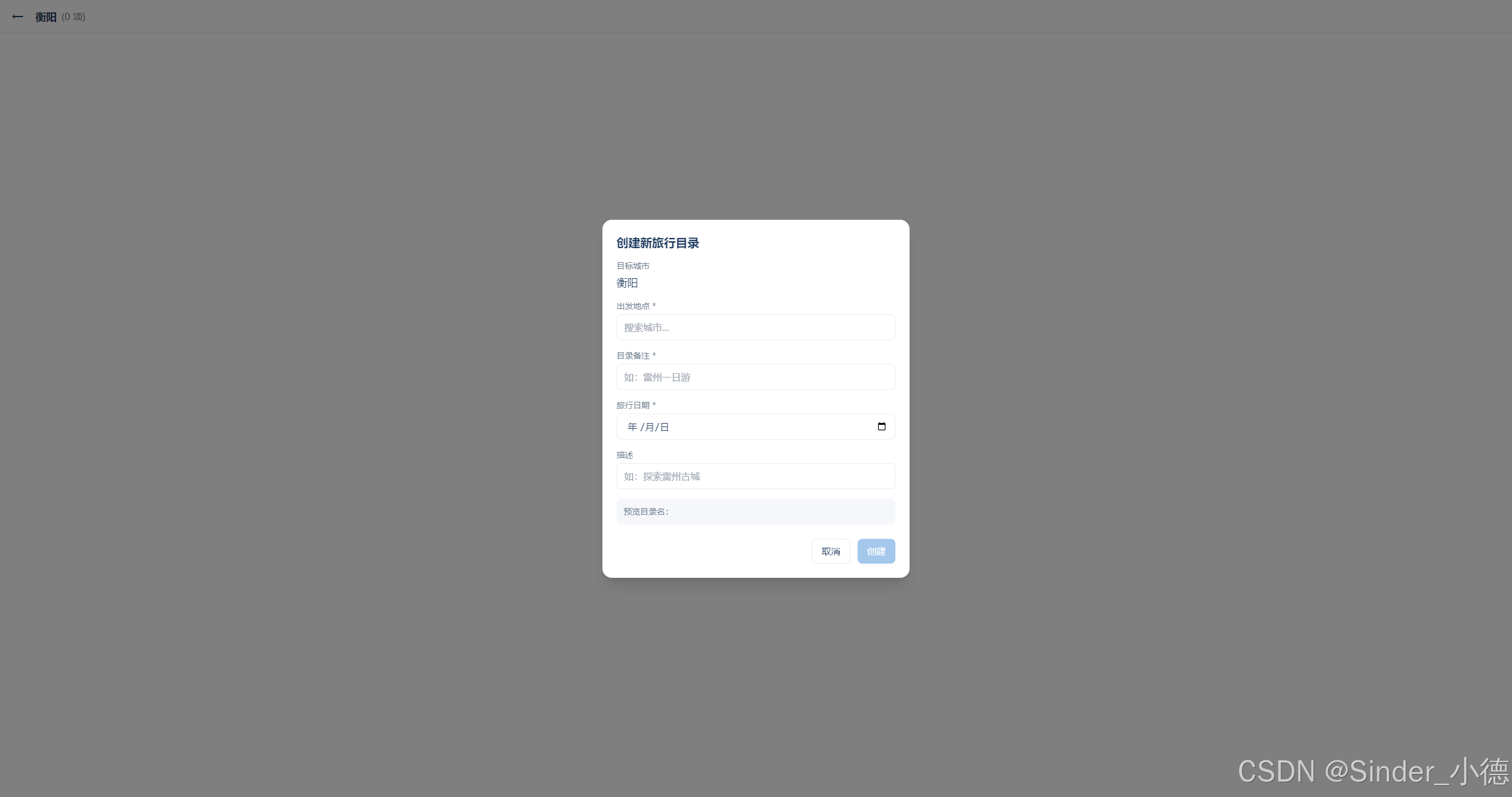
创建行程对话框
html
<div class="fixed inset-0 bg-black/50 flex items-center justify-center z-50">
  <div class="bg-white dark:bg-[#1B2838] rounded-2xl w-[520px] p-6 shadow-xl">
    <h2 class="text-xl font-semibold mb-4">创建新旅行目录</h2>

    <div class="space-y-4">
      <!-- 目标城市 -->
      <div>
        <label class="block text-sm text-gray-500 mb-1">目标城市</label>
        <p class="font-medium text-lg">{{ targetCity }}</p>
      </div>

      <!-- 出发地点(新增) -->
      <div>
        <label class="block text-sm text-gray-500 mb-1">出发地点 *</label>
        <input v-model="departureSearch"
               @focus="showDepartureList = true"
               placeholder="搜索城市..." />
        <!-- 城市列表下拉 -->
      </div>

      <!-- 目录备注 -->
      <div>
        <label class="block text-sm text-gray-500 mb-1">目录备注 *</label>
        <input v-model="newTrip.dirname" placeholder="如:雷州一日游" />
      </div>

      <!-- 日期选择 -->
      <div>
        <label class="block text-sm text-gray-500 mb-1">旅行日期 *</label>
        <input type="date" v-model="newTrip.tripDate" />
      </div>
    </div>

    <!-- 操作按钮 -->
    <div class="flex justify-end gap-3 mt-6">
      <button @click="showDialog = false">取消</button>
      <button class="bg-primary text-white" :disabled="!canSubmit">创建</button>
    </div>
  </div>
</div>
5.4 响应式设计
css
/* 移动端适配 */
@media (max-width: 768px) {
  .sidebar {
    display: none;  /* 移动端隐藏侧边栏 */
  }

  .map-controls {
    flex-direction: column;
    bottom: 1rem;
    left: 1rem;
    right: 1rem;
  }
}
🚀 六、性能优化
6.1 图片加载优化
typescript
// 使用懒加载
const ImageCard = defineComponent({
  setup() {
    const imgRef = ref<HTMLImageElement>()
    const isLoaded = ref(false)

    onMounted(() => {
      const observer = new IntersectionObserver((entries) => {
        if (entries[0].isIntersecting) {
          // 进入视口,开始加载
          loadImage()
          observer.disconnect()
        }
      })

      if (imgRef.value) {
        observer.observe(imgRef.value)
      }
    })

    return { imgRef, isLoaded }
  }
})
6.2 地图渲染优化
- GeoJSON 简化:使用简化版本的地级市边界
- 分级加载:低缩放级别使用简化数据
- Canvas 渲染:对大量标记使用 Canvas 渲染
typescript
// 只在需要时加载详情
if (zoomLevel > 6) {
  loadDetailedBoundaries()
} else {
  loadSimpleBoundaries()
}
6.3 数据库优化
sql
-- 添加索引提升查询性能
CREATE INDEX idx_trips_city_id ON trips(city_id);
CREATE INDEX idx_media_trip_id ON media(trip_id);
CREATE INDEX idx_trips_date ON trips(trip_date DESC);

-- 使用分页查询
SELECT * FROM media WHERE trip_id = ? ORDER BY filename LIMIT 50 OFFSET 0;
6.4 内存管理
typescript
// 组件卸载时清理资源
onUnmounted(() => {
  // 清除动画
  animationFrameId && cancelAnimationFrame(animationFrameId)

  // 移除地图图层
  map.value && map.value.remove()

  // 清除定时器
  timer && clearInterval(timer)
})
🔧 七、开发挑战与解决方案
7.1 Leaflet 初始化时机问题
问题:Leaflet 在地图容器未完全渲染时初始化会报错。
解决:
typescript
onMounted(async () => {
  await nextTick()  // 等待 DOM 完全渲染
  setTimeout(initMap, 100)  // 延迟 100ms 确保渲染完成
})
7.2 数据库字段兼容
问题:已有用户数据库缺少新增字段。
解决:实现数据库迁移逻辑:
typescript
try {
  db.run('ALTER TABLE trips ADD COLUMN departure_city TEXT')
} catch (e) {
  // 列已存在
}
7.3 城市名称匹配
问题:用户输入"南昌"但目录可能是"南昌市"。
解决:多匹配策略:
typescript
function normalizeCityName(name) {
  return name.replace(/市|地区|自治州|盟$/, '')  // 去除后缀
}

// 匹配时尝试多种组合
if (cityName === target ||
    normalizeCityName(cityName) === normalizeCityName(target)) {
  // 匹配成功
}
7.4 大圆航线计算
问题:简单的直线无法准确表示国际航线。
解决:实现球面线性插值算法(详见 4.2.1)。
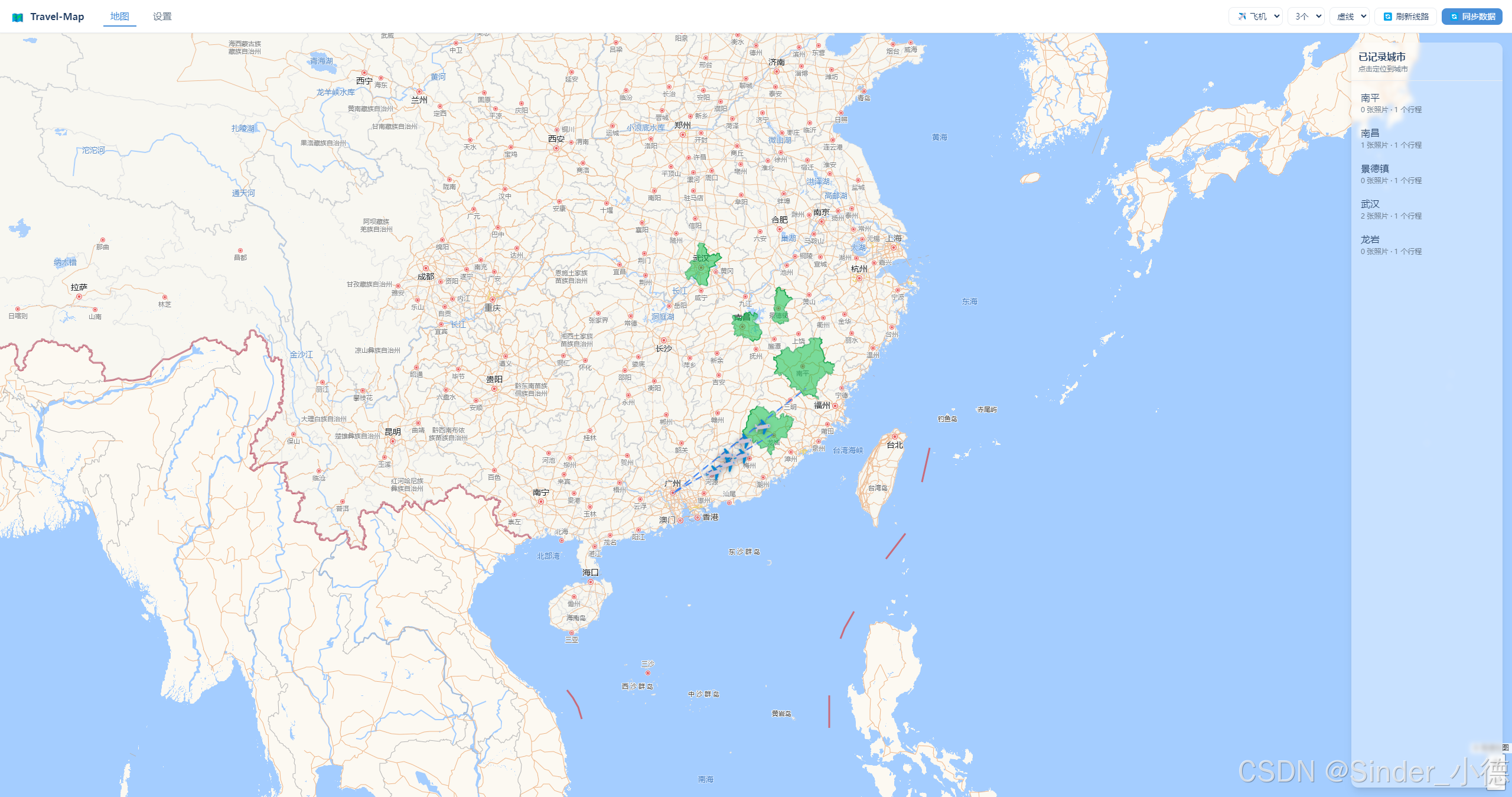
📊 八、应用效果展示
8.1 主界面
8.2 创建行程
8.3 城市相册

📦 九、打包与分发
9.1 使用 electron-builder
json
// electron-builder.json
{
  "appId": "com.travelmap.app",
  "productName": "Travel-Map",
  "directories": {
    "output": "release"
  },
  "win": {
    "target": [
      {
        "target": "nsis",
        "arch": ["x64"]
      }
    ],
    "artifactName": "${productName}-${version}-Setup.${ext}"
  },
  "nsis": {
    "oneClick": false,
    "allowToChangeInstallationDirectory": true
  }
}
9.2 构建命令
bash
# 开发模式
npm run dev

# 构建生产版本
npm run build

# 打包 Electron 应用
npm run electron:build
9.3 构建产物
release/
├── Travel-Map-1.0.0-Setup.exe    # Windows 安装包 (约 80MB)
├── Travel-Map-1.0.0-Setup.exe.blockmap
└── win-unpacked/                 # 便携版(无需安装)
    └── Travel-Map.exe
🔮 十、未来规划
10.1 近期功能
- 照片 EXIF 信息读取和展示
- 照片元数据编辑(标签、描述)
- 缩略图生成和缓存管理
- 数据备份和恢复
10.2 中期规划
- 云服务版本(Web 在线版)
- 多设备同步
- AI 智能分类
- 旅行报告自动生成
10.3 长期愿景
- 社交功能(分享旅行足迹)
- 地图编辑器(自定义标注)
- AR 照片展示
- 3D 地球展示模式
📜 十一、总结
11.1 技术收获
通过这个项目,我深入学习了:
- Electron 桌面应用开发:IPC 通信、窗口管理、系统集成
- Vue 3 高级特性:Composition API、Pinia、TypeScript 集成
- GIS 应用开发:Leaflet、GeoJSON、大圆航线算法
- 性能优化:懒加载、虚拟滚动、内存管理
- 用户体验设计:响应式布局、动画交互、深浅主题
11.2 产品思考
一个好的工具应该:
- 简单易用:用户无需学习就能上手
- 功能实用:解决真实问题,不是炫技
- 性能流畅:不卡顿,响应及时
- 隐私安全:数据完全由用户掌控
11.3 开源精神
Travel-Map 是一个开源项目,我们欢迎:
- 🌟 Star 支持
- 🐛 Bug 反馈
- 💡 功能建议
- 📝 代码贡献
📚 附录
A. 技术参考
安装使用:https://download.csdn.net/download/weixin_42009068/92744148?spm=1001.2014.3001.5503
源码可联系
关注我,获取更多开源项目和技术分享!