第13次:教程数据内容编写
教程内容是应用的核心价值所在。本次课程将学习如何组织和编写教程数据,包括模块结构设计、课程内容格式、以及数据分离的最佳实践。
效果
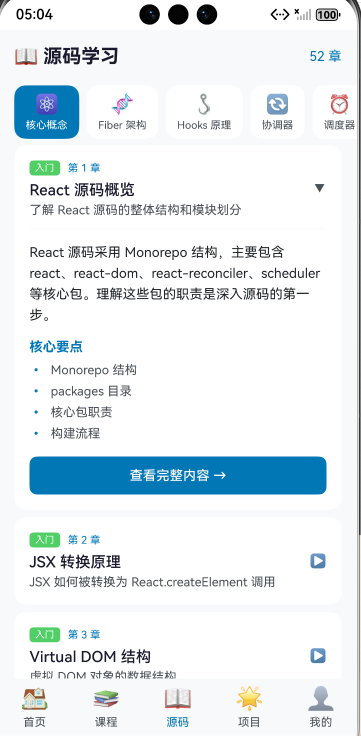
学习目标
- 掌握教程数据的组织结构
- 学会设计课程内容格式
- 理解数据分离的设计模式
- 实现 TutorialData 的核心功能
- 完成各难度模块的内容编写
13.1 数据组织结构
整体架构
教程数据按难度分层组织:
TutorialData
├── getBeginnerModules()    // 入门模块
├── getBasicModules()       // 基础模块
├── getIntermediateModules() // 进阶模块
├── getAdvancedModules()    // 高级模块
├── getEcosystemModules()   // 生态模块
└── getProjectModules()     // 项目实战模块
数据分离设计
为了保持代码可维护性,将大量内容数据分离到独立文件:
data/
├── TutorialData.ets        // 主数据文件,模块结构
├── HooksContent.ets        // Hooks 相关内容
├── AdvancedContent.ets     // 高级内容
├── CoreConceptsContent.ets // 核心概念内容
├── ProjectContent.ets      // 项目实战内容
├── EcosystemContent.ets    // 生态系统内容
└── ...
导入内容模块
typescript
import { HooksContent } from './HooksContent';
import { AdvancedContent } from './AdvancedContent';
import { CoreConceptsContent } from './CoreConceptsContent';
import { ProjectContent } from './ProjectContent';
import { EcosystemContent } from './EcosystemContent';
13.2 模块数据结构
LearningModule 结构
typescript
interface LearningModule {
  id: string;           // 唯一标识
  title: string;        // 模块标题
  description: string;  // 模块描述
  difficulty: string;   // 难度等级
  icon: string;         // 图标(emoji)
  color: string;        // 主题色
  lessonCount: number;  // 课程数量
  estimatedTime: string; // 预计学习时长
  prerequisites: string[]; // 前置模块
  lessons: Lesson[];    // 课程列表
}
模块定义示例
typescript
{
  id: 'beginner-01',
  title: 'React 简介',
  description: '了解 React 是什么及其核心理念',
  difficulty: 'beginner',
  icon: '⚛️',
  color: '#61DAFB',
  lessonCount: 3,
  estimatedTime: '30分钟',
  prerequisites: [],
  lessons: [
    // 课程列表...
  ]
}
难度等级设计
| 难度 | 标识 | 颜色 | 说明 |
|---|---|---|---|
| 入门 | beginner | 绿色 | 零基础入门 |
| 基础 | basic | 蓝色 | 基础概念 |
| 进阶 | intermediate | 橙色 | 深入学习 |
| 高级 | advanced | 红色 | 高级技巧 |
| 生态 | ecosystem | 紫色 | 周边生态 |
13.3 课程数据结构
Lesson 结构
typescript
interface Lesson {
  id: string;           // 唯一标识
  moduleId: string;     // 所属模块 ID
  title: string;        // 课程标题
  description: string;  // 课程描述
  order: number;        // 排序序号
  hasPlayground: boolean; // 是否有代码练习
  hasQuiz: boolean;     // 是否有测验
  content: LessonContent; // 课程内容
}
LessonContent 结构
typescript
interface LessonContent {
  sections: ContentSection[];  // 内容段落
  keyPoints: string[];         // 关键要点
  codeExample?: string;        // 代码示例
  tips?: string[];             // 提示信息
  warnings?: string[];         // 警告信息
}
ContentSection 结构
typescript
interface ContentSection {
  type: 'text' | 'code' | 'tip' | 'warning' | 'heading';
  content: string;
  language?: string;  // 代码语言(type 为 code 时)
}
13.4 入门模块内容设计
模块一:React 简介
typescript
static getBeginnerModules(): LearningModule[] {
  return [
    {
      id: 'beginner-01',
      title: 'React 简介',
      description: '了解 React 是什么及其核心理念',
      difficulty: 'beginner',
      icon: '⚛️',
      color: '#61DAFB',
      lessonCount: 3,
      estimatedTime: '30分钟',
      prerequisites: [],
      lessons: [
        {
          id: 'b01-l01',
          moduleId: 'beginner-01',
          title: '什么是 React',
          description: '认识 React 库及其设计哲学',
          order: 1,
          hasPlayground: true,
          hasQuiz: true,
          content: TutorialData.getWhatIsReactContent()
        },
        {
          id: 'b01-l02',
          moduleId: 'beginner-01',
          title: 'React 的优势',
          description: '了解 React 的核心优势',
          order: 2,
          hasPlayground: false,
          hasQuiz: false,
          content: TutorialData.getReactAdvantagesContent()
        },
        {
          id: 'b01-l03',
          moduleId: 'beginner-01',
          title: 'JSX 语法入门',
          description: '学习 JSX 基础语法',
          order: 3,
          hasPlayground: true,
          hasQuiz: true,
          content: TutorialData.getJSXBasicsContent()
        }
      ]
    }
  ];
}
课程内容示例
typescript
private static getWhatIsReactContent(): LessonContent {
  return {
    sections: [
      {
        type: 'heading',
        content: 'React 是什么?'
      },
      {
        type: 'text',
        content: 'React 是一个用于构建用户界面的 JavaScript 库,由 Facebook(现 Meta)开发和维护。它采用组件化和声明式编程的方式,让开发者能够高效地构建复杂的 UI。'
      },
      {
        type: 'heading',
        content: '核心特点'
      },
      {
        type: 'text',
        content: '1. **组件化**:将 UI 拆分为独立、可复用的组件\n2. **声明式**:描述 UI 应该是什么样子,而不是如何变化\n3. **Virtual DOM**:通过虚拟 DOM 提高更新效率'
      },
      {
        type: 'code',
        content: `// 一个简单的 React 组件
function Welcome() {
  return <h1>Hello, React!</h1>;
}`,
        language: 'jsx'
      },
      {
        type: 'tip',
        content: 'React 只关注视图层,可以与其他库配合使用'
      }
    ],
    keyPoints: [
      'React 是一个 JavaScript UI 库',
      '采用组件化开发方式',
      '使用 Virtual DOM 提高性能',
      '声明式编程让代码更易理解'
    ],
    codeExample: `function App() {
  return (
    <div>
      <h1>我的第一个 React 应用</h1>
      <p>欢迎学习 React!</p>
    </div>
  );
}`
  };
}
13.5 基础模块内容设计
模块结构
typescript
static getBasicModules(): LearningModule[] {
  return [
    {
      id: 'basic-01',
      title: '组件基础',
      description: '学习 React 组件开发',
      difficulty: 'basic',
      icon: '🧩',
      color: '#007bff',
      lessonCount: 3,
      estimatedTime: '60分钟',
      prerequisites: ['beginner-02'],
      lessons: [
        {
          id: 'bs01-l01',
          moduleId: 'basic-01',
          title: '函数组件',
          description: '创建函数式组件',
          order: 1,
          hasPlayground: true,
          hasQuiz: true,
          content: TutorialData.getFunctionComponentContent()
        },
        {
          id: 'bs01-l02',
          moduleId: 'basic-01',
          title: 'Props 属性',
          description: '组件间数据传递',
          order: 2,
          hasPlayground: true,
          hasQuiz: true,
          content: TutorialData.getPropsContent()
        },
        {
          id: 'bs01-l03',
          moduleId: 'basic-01',
          title: 'State 状态',
          description: '组件内部状态管理',
          order: 3,
          hasPlayground: true,
          hasQuiz: true,
          content: TutorialData.getStateContent()
        }
      ]
    }
  ];
}
内容分离到独立文件
对于内容较多的模块,将内容分离到独立文件:
typescript
// CoreConceptsContent.ets
export class CoreConceptsContent {
  static getLifecycleContent(): LessonContent {
    return {
      sections: [
        {
          type: 'heading',
          content: '组件生命周期'
        },
        {
          type: 'text',
          content: 'React 组件从创建到销毁会经历一系列的生命周期阶段...'
        }
        // 更多内容...
      ],
      keyPoints: [
        '挂载阶段:组件被创建并插入 DOM',
        '更新阶段:组件状态或属性变化',
        '卸载阶段:组件从 DOM 中移除'
      ]
    };
  }
}
13.6 进阶模块内容设计
Hooks 内容模块
typescript
// HooksContent.ets
export class HooksContent {
  /**
   * useState 完全指南
   */
  static getUseStateComplete(): LessonContent {
    return {
      sections: [
        {
          type: 'heading',
          content: 'useState 基础'
        },
        {
          type: 'text',
          content: 'useState 是 React 最基础的 Hook,用于在函数组件中添加状态。'
        },
        {
          type: 'code',
          content: `import { useState } from 'react';

function Counter() {
  const [count, setCount] = useState(0);

  return (
    <button onClick={() => setCount(count + 1)}>
      点击次数: {count}
    </button>
  );
}`,
          language: 'jsx'
        },
        {
          type: 'heading',
          content: '函数式更新'
        },
        {
          type: 'text',
          content: '当新状态依赖于旧状态时,应使用函数式更新:'
        },
        {
          type: 'code',
          content: `// ❌ 可能出问题
setCount(count + 1);

// ✅ 推荐方式
setCount(prevCount => prevCount + 1);`,
          language: 'jsx'
        },
        {
          type: 'warning',
          content: '状态更新是异步的,不要依赖更新后立即读取新值'
        }
      ],
      keyPoints: [
        'useState 返回 [状态值, 更新函数]',
        '状态更新会触发组件重新渲染',
        '使用函数式更新处理依赖旧状态的情况',
        '状态更新是异步的'
      ]
    };
  }

  /**
   * useEffect 完全指南
   */
  static getUseEffectComplete(): LessonContent {
    return {
      sections: [
        {
          type: 'heading',
          content: 'useEffect 基础'
        },
        {
          type: 'text',
          content: 'useEffect 用于处理副作用,如数据获取、订阅、DOM 操作等。'
        },
        {
          type: 'code',
          content: `import { useEffect, useState } from 'react';

function UserProfile({ userId }) {
  const [user, setUser] = useState(null);

  useEffect(() => {
    // 获取用户数据
    fetchUser(userId).then(setUser);

    // 清理函数
    return () => {
      // 取消请求或清理订阅
    };
  }, [userId]); // 依赖数组

  return <div>{user?.name}</div>;
}`,
          language: 'jsx'
        },
        {
          type: 'tip',
          content: '依赖数组为空 [] 时,effect 只在挂载时执行一次'
        }
      ],
      keyPoints: [
        'useEffect 在渲染后执行',
        '返回清理函数处理卸载逻辑',
        '依赖数组控制 effect 执行时机',
        '空依赖数组 = componentDidMount'
      ]
    };
  }
}
13.7 测验数据设计
Quiz 结构
typescript
interface Quiz {
  id: string;
  moduleId: string;
  lessonId: string;
  title: string;
  passingScore: number;
  questions: QuizItem[];
}

interface QuizItem {
  id: string;
  question: string;
  options: string[];
  correctAnswer: number;
  explanation: string;
}
测验数据示例
typescript
static getAllQuizzes(): Quiz[] {
  return [
    {
      id: 'quiz-b01-l01',
      moduleId: 'beginner-01',
      lessonId: 'b01-l01',
      title: 'React 简介测验',
      passingScore: 60,
      questions: [
        {
          id: 'q1',
          question: 'React 是什么?',
          options: [
            '一个完整的框架',
            '一个用于构建用户界面的 JavaScript 库',
            '一个后端框架',
            '一个数据库'
          ],
          correctAnswer: 1,
          explanation: 'React 是一个用于构建用户界面的 JavaScript 库,由 Facebook 开发和维护。'
        },
        {
          id: 'q2',
          question: 'React 使用什么来提高 UI 更新效率?',
          options: [
            '直接操作 DOM',
            'Virtual DOM',
            'Shadow DOM',
            'Real DOM'
          ],
          correctAnswer: 1,
          explanation: 'React 使用 Virtual DOM 来提高 UI 更新效率,通过比较虚拟 DOM 的差异来最小化实际 DOM 操作。'
        }
      ]
    }
  ];
}
13.8 实操:完成 TutorialData.ets
步骤一:创建数据文件
在 entry/src/main/ets/data/ 目录下创建 TutorialData.ets 文件。
步骤二:编写基础结构
typescript
/**
 * React 教程数据
 * 提供完整的 React 学习内容
 */
import { LearningModule, Lesson, LessonContent, Quiz, QuizItem, DailyQuestion } from '../models/Models';

export class TutorialData {
  /**
   * 获取所有模块
   */
  static getAllModules(): LearningModule[] {
    return [
      ...TutorialData.getBeginnerModules(),
      ...TutorialData.getBasicModules(),
      ...TutorialData.getIntermediateModules(),
      ...TutorialData.getAdvancedModules(),
      ...TutorialData.getEcosystemModules()
    ];
  }

  /**
   * 根据 ID 获取模块
   */
  static getModuleById(id: string): LearningModule | undefined {
    return TutorialData.getAllModules().find(m => m.id === id);
  }

  /**
   * 获取每日一题
   */
  static getDailyQuestion(): DailyQuestion {
    const today = new Date().toISOString().split('T')[0];
    const questions = TutorialData.getAllQuizQuestions();
    const index = Math.abs(
      today.split('-').reduce((a, b) => a + parseInt(b), 0)
    ) % questions.length;

    const q = questions[index];
    return {
      date: today,
      question: q.question,
      moduleId: q.moduleId,
      lessonId: q.lessonId,
      answered: false
    };
  }

  // ==================== 入门模块 ====================
  static getBeginnerModules(): LearningModule[] {
    return [
      // 模块定义...
    ];
  }

  // ==================== 基础模块 ====================
  static getBasicModules(): LearningModule[] {
    return [
      // 模块定义...
    ];
  }

  // ==================== 进阶模块 ====================
  static getIntermediateModules(): LearningModule[] {
    return [
      // 模块定义...
    ];
  }

  // ==================== 高级模块 ====================
  static getAdvancedModules(): LearningModule[] {
    return [
      // 模块定义...
    ];
  }

  // ==================== 生态模块 ====================
  static getEcosystemModules(): LearningModule[] {
    return [
      // 模块定义...
    ];
  }

  // ==================== 测验数据 ====================
  static getAllQuizzes(): Quiz[] {
    return [
      // 测验定义...
    ];
  }
}
步骤三:创建内容分离文件
创建 HooksContent.ets、AdvancedContent.ets 等文件,将大量内容分离出去。
数据设计最佳实践
1. ID 命名规范
typescript
// 模块 ID:难度-序号
'beginner-01', 'basic-02', 'intermediate-01'

// 课程 ID:模块缩写+序号-课程序号
'b01-l01', 'bs02-l03', 'int01-l02'

// 测验 ID:quiz-课程ID
'quiz-b01-l01', 'quiz-int01-l01'
2. 内容格式化
使用 Markdown 风格的文本格式:
typescript
{
  type: 'text',
  content: '1. **组件化**:将 UI 拆分为独立组件\n2. **声明式**:描述 UI 应该是什么样子'
}
3. 代码示例规范
typescript
{
  type: 'code',
  content: `// 添加注释说明
function Example() {
  // 代码内容
}`,
  language: 'jsx'  // 指定语言
}
本次课程小结
通过本次课程,你已经:
✅ 掌握了教程数据的组织结构
✅ 学会了设计课程内容格式
✅ 理解了数据分离的设计模式
✅ 实现了 TutorialData 的核心功能
✅ 完成了各难度模块的内容编写
课后练习
-
添加新模块:为"项目实战"难度添加一个新模块
-
丰富内容:为现有课程添加更多代码示例
-
添加测验:为没有测验的课程添加测验题目
下次预告
第14次:进度管理服务
我们将开发 ProgressService 服务:
- 课程完成标记
- 模块完成检测
- 连续学习天数计算
- 徽章奖励机制
实现学习进度追踪功能!