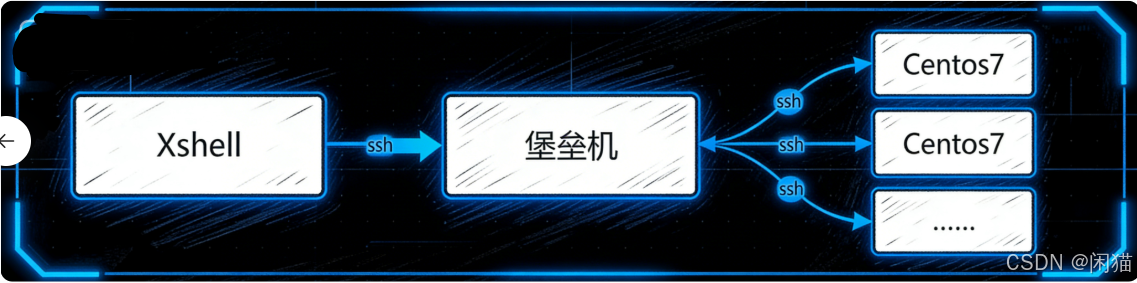
SSH 协议代理 为核心,对外提供标准 SSH 服务入口,对内作为 Linux 服务器集群的统一跳板网关。通过双向流转发技术,实现用户终端与目标 Linux 系统的透明交互,同时集成认证、鉴权、会话审计等安全能力,为企业提供 "安全、可控、可审计" 的 Linux 远程运维解决方案。
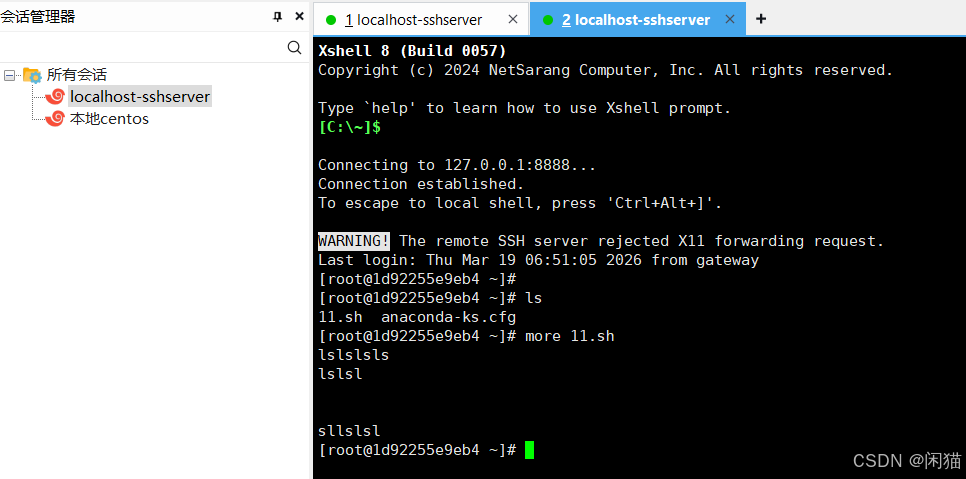
效果图
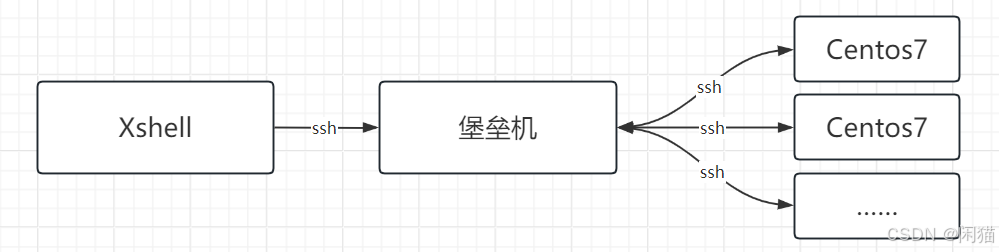
流程图
外层还是通过Xshell连接,堡垒机对SSH数据流进行了转发。
代码详细
POM添加
<dependency>
    <groupId>org.apache.sshd</groupId>
    <artifactId>sshd-core</artifactId>
    <version>2.13.1</version>
</dependency>

<!-- 工具包 -->
<dependency>
    <groupId>cn.hutool</groupId>
    <artifactId>hutool-all</artifactId>
    <version>5.8.25</version>
</dependency>
代码 JavaSshServer
java
import org.apache.sshd.client.SshClient;
import org.apache.sshd.client.channel.ChannelShell;
import org.apache.sshd.client.session.ClientSession;
import org.apache.sshd.server.*;
import org.apache.sshd.server.auth.AsyncAuthException;
import org.apache.sshd.server.auth.password.PasswordAuthenticator;
import org.apache.sshd.server.auth.password.PasswordChangeRequiredException;
import org.apache.sshd.server.channel.ChannelSession;
import org.apache.sshd.server.command.Command;
import org.apache.sshd.server.keyprovider.SimpleGeneratorHostKeyProvider;
import org.apache.sshd.server.session.ServerSession;
import org.apache.sshd.server.shell.ShellFactory;

import java.io.IOException;
import java.io.InputStream;
import java.io.OutputStream;

public class JavaSshServer {
    private static final String LINUX_HOST = "127.0.0.1";
    private static final int LINUX_PORT = 2222;
    private static final String LINUX_USER = "root";
    private static final String LINUX_PWD = "123456";

    public static void main(String[] args) {
        try {
            // 1. 创建 SSH 服务
            SshServer sshd = SshServer.setUpDefaultServer();
            sshd.setPort(8888);

            sshd.setKeyPairProvider(new SimpleGeneratorHostKeyProvider());

            sshd.setPasswordAuthenticator(new PasswordAuthenticator() {
                @Override
                public boolean authenticate(String username, String password, ServerSession serverSession) throws PasswordChangeRequiredException, AsyncAuthException {
                    // 判断逻辑
                   return  "admin".equals(username) && "123456".equals(password);
                }
            });

            sshd.setShellFactory(new ShellFactory() {
                @Override
                public Command createShell(ChannelSession channelSession) {
                    return new LinuxShellCommand(); // 返回自定义 Command
                }
            });

            // ===================== 启动
            sshd.start();

            System.out.println("==================================");
            System.out.println("✅ SSH 服务启动成功");
            System.out.println("✅ 地址:localhost:8888");
            System.out.println("✅ 账号:admin  密码:123456");
            System.out.println("==================================");

            Thread.sleep(1000 * 200000);
        } catch (Exception e) {
            throw new RuntimeException(e);
        }
    }

    public static class LinuxShellCommand implements Command {
        private InputStream in;
        private OutputStream out;
        private OutputStream err;
        private ExitCallback callback;

        @Override
        public void setInputStream(InputStream in) {
            this.in = in;
        }

        @Override
        public void setOutputStream(OutputStream out) {
            this.out = out;
        }

        @Override
        public void setErrorStream(OutputStream err) {
            this.err = err;
        }

        @Override
        public void setExitCallback(ExitCallback callback) {
            this.callback = callback;
        }

        @Override
        public void start(ChannelSession channelSession, Environment env) throws IOException {
            // 1. 连接 Linux
            SshClient client = SshClient.setUpDefaultClient();
            client.start();

            ClientSession session = client.connect(LINUX_USER, LINUX_HOST, LINUX_PORT)
                    .verify(60000).getSession();
            session.addPasswordIdentity(LINUX_PWD);
            session.auth().verify(60000);

            // 2. 打开 Linux Shell
            ChannelShell channel = session.createShellChannel();
            channel.open().verify(60000);

            // 3. 流对接:Xshell ↔ Linux
            transfer(in, channel.getInvertedIn());    // 输入
            transfer(channel.getInvertedOut(), out);   // 输出
            transfer(channel.getInvertedErr(), err);   // 错误
        }

        // 流转发
        private void transfer(InputStream from, OutputStream to) {
            new Thread(() -> {
                try {
                    byte[] buf = new byte[1024];
                    int len;
                    while ((len = from.read(buf)) != -1) {
                        to.write(buf, 0, len);
                        to.flush();
                    }
                } catch (Exception ignored) {
                }
            }).start();
        }

        @Override
        public void destroy(ChannelSession channelSession) throws Exception {
        }
    }
}