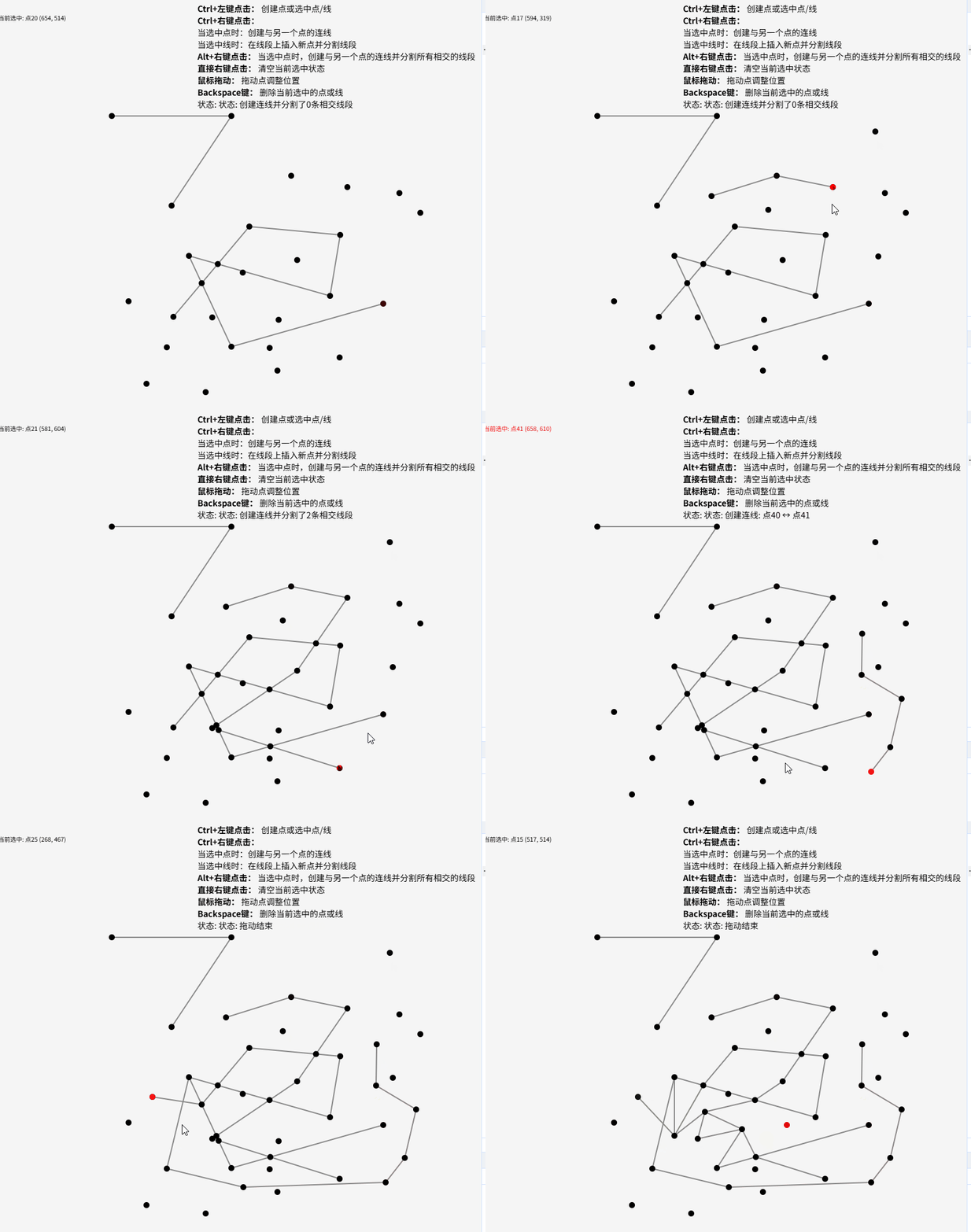
效果
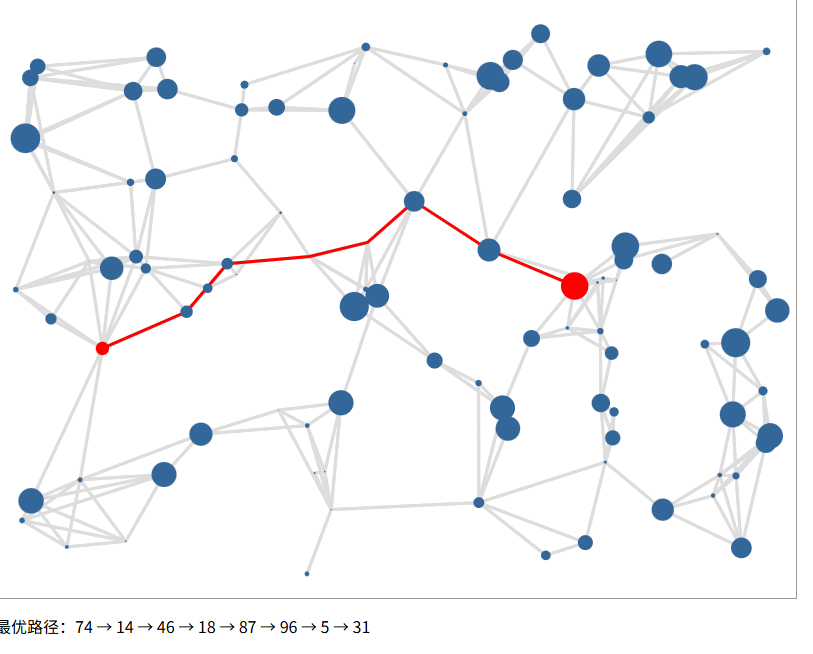
扩展
结合cesium 加上节点状态控制和路径损失设计,可以做多层场景路网规划。
代码
html
<!DOCTYPE html>
<html lang="en">
<head>
    <meta charset="UTF-8">
    <title>Title</title>
    <style>
        * {
            box-sizing: border-box;
        }

        body {
            margin: 0;
            padding: 0;
            background-color: #f5f5f5;
        }

        .container {
            position: absolute;
            right: 0;
            top: 0;
            padding: 10px;
            font-size: 14px;
        }

        canvas {
            display: block;
            width: 100vw;
            height: 100vh;
        }

    </style>
</head>
<body>
<div class="container">
    <div><strong>Ctrl+左键点击:</strong> 创建点或选中点/线</div>
    <div><strong>Ctrl+右键点击:</strong>
        <div>当选中点时:创建与另一个点的连线</div>
        <div>当选中线时:在线段上插入新点并分割线段</div>
    </div>
    <div><strong>Alt+右键点击:</strong> 当选中点时,创建与另一个点的连线并分割所有相交的线段</div>
    <div><strong>直接右键点击:</strong> 清空当前选中状态</div>
    <div><strong>鼠标拖动:</strong> 拖动点调整位置</div>
    <div><strong>Backspace键:</strong> 删除当前选中的点或线</div>
    <div class="status-bar">
        状态: <span id="status">就绪 - 按住Ctrl点击左键创建点或选择点/线</span>
    </div>
</div>
<canvas id="canvas"></canvas>
<script>
// 获取Canvas元素和上下文
const canvas = document.getElementById('canvas');
const ctx = canvas.getContext('2d');
const statusText = document.getElementById('status');
canvas.width = canvas.clientWidth
canvas.height = canvas.clientHeight

// 定义全局变量
let pointArr = []; // 点数组 {id:'', position:[x,y]}
let linkArr = []; // 线数组 {id:'', data:[pointA, pointB]}
let focus = null; // 焦点对象 {m: pointId/linkId, t: 'point'/'link'}

// 常量定义
const R = 10; // 点检测半径
const H = 5; // 线检测宽度

// 生成唯一ID
const generateId = () => crypto.randomUUID()
// 计算两点间距离
const distance = (x1, y1, x2, y2) => Math.sqrt((x2 - x1) ** 2 + (y2 - y1) ** 2)

// 判断点是否在线段附近
function isPointNearLine(px, py, x1, y1, x2, y2) {
    // 计算点到线段的最短距离
    const A = px - x1, B = py - y1, C = x2 - x1, D = y2 - y1;

    const dot = A * C + B * D;
    const lenSq = C * C + D * D;
    let param = -1;

    if (lenSq !== 0) {
        param = dot / lenSq;
    }

    let xx, yy;

    if (param < 0) {
        xx = x1;
        yy = y1;
    } else if (param > 1) {
        xx = x2;
        yy = y2;
    } else {
        xx = x1 + param * C;
        yy = y1 + param * D;
    }

    const dx = px - xx, dy = py - yy;

    return Math.sqrt(dx * dx + dy * dy) <= H;
}

// 判断两线段是否相交,并返回交点
function getLineIntersection(x1, y1, x2, y2, x3, y3, x4, y4) {
    const denominator = (x1 - x2) * (y3 - y4) - (y1 - y2) * (x3 - x4);
    // 平行或共线
    if (Math.abs(denominator) < 0.0001) {
        return null;
    }
    const t = ((x1 - x3) * (y3 - y4) - (y1 - y3) * (x3 - x4)) / denominator;
    const u = -((x1 - x2) * (y1 - y3) - (y1 - y2) * (x1 - x3)) / denominator;
    // 检查交点是否在两线段上
    if (t >= 0 && t <= 1 && u >= 0 && u <= 1) {
        const intersectionX = x1 + t * (x2 - x1);
        const intersectionY = y1 + t * (y2 - y1);
        // 排除端点相交的情况
        const isEndpoint =
            (Math.abs(intersectionX - x1) < 0.1 && Math.abs(intersectionY - y1) < 0.1) ||
            (Math.abs(intersectionX - x2) < 0.1 && Math.abs(intersectionY - y2) < 0.1) ||
            (Math.abs(intersectionX - x3) < 0.1 && Math.abs(intersectionY - y3) < 0.1) ||
            (Math.abs(intersectionX - x4) < 0.1 && Math.abs(intersectionY - y4) < 0.1);

        if (isEndpoint) {
            return null;
        }
        return {x: intersectionX, y: intersectionY};
    }
    return null;
}

// 找到距离某个点最近的点
function findNearestPoint(x, y, excludeId = null) {
    let minDist = Infinity;
    let nearestPoint = null;
    for (const point of pointArr) {
        if (excludeId && point.id === excludeId) continue;

        const dist = distance(x, y, point.position[0], point.position[1]);
        if (dist < R && dist < minDist) {
            minDist = dist;
            nearestPoint = point;
        }
    }
    return nearestPoint;
}

// 找到包含某个点的线
function findLineAtPoint(x, y) {
    for (const link of linkArr) {
        const pointA = pointArr.find(p => p.id === link.data[0]);
        const pointB = pointArr.find(p => p.id === link.data[1]);

        if (pointA && pointB) {
            if (isPointNearLine(x, y, pointA.position[0], pointA.position[1], pointB.position[0], pointB.position[1])) {
                return link;
            }
        }
    }
    return null;
}

// 创建点
function createPoint(x, y) {
    const newPoint = {id: generateId(), position: [x, y]};
    pointArr.push(newPoint);
    updateStatus(`创建点 (${Math.round(x)}, ${Math.round(y)})`);
    return newPoint;
}

// 创建线
function createLink(pointAId, pointBId) {
    // 检查是否已存在相同的连线
    const existingLink = linkArr.find(link =>
        (link.data[0] === pointAId && link.data[1] === pointBId) ||
        (link.data[0] === pointBId && link.data[1] === pointAId)
    );

    if (existingLink) {
        updateStatus("连线已存在");
        return existingLink;
    }

    const newLink = {id: generateId(), data: [pointAId, pointBId]};

    linkArr.push(newLink);

    const pointA = pointArr.find(p => p.id === pointAId);
    const pointB = pointArr.find(p => p.id === pointBId);
    updateStatus(`创建连线: 点${pointArr.indexOf(pointA) + 1} ↔ 点${pointArr.indexOf(pointB) + 1}`);
    return newLink;
}

// 删除点
function deletePoint(pointId) {
    // 删除与该点相关的所有连线
    linkArr = linkArr.filter(link => !link.data.includes(pointId));

    // 删除点
    const index = pointArr.findIndex(p => p.id === pointId);
    if (index !== -1) {
        pointArr.splice(index, 1);
    }

    // 如果焦点在该点上,清空焦点
    if (focus && focus.t === 'point' && focus.m === pointId) {
        focus = null;
    }

    updateStatus(`删除点${index + 1}`);
}

// 删除线
function deleteLink(linkId) {
    const index = linkArr.findIndex(l => l.id === linkId);
    if (index !== -1) {
        linkArr.splice(index, 1);
    }

    // 如果焦点在该线上,清空焦点
    if (focus && focus.t === 'link' && focus.m === linkId) {
        focus = null;
    }

    updateStatus(`删除连线${index + 1}`);
}

// 更新状态文本
function updateStatus(text) {
    statusText.textContent = "状态: " + text;
}

// 绘制所有点和线
function draw() {
    // 清空画布
    ctx.clearRect(0, 0, canvas.width, canvas.height);

    // 绘制所有线
    for (const link of linkArr) {
        const pointA = pointArr.find(p => p.id === link.data[0]);
        const pointB = pointArr.find(p => p.id === link.data[1]);

        if (!pointA || !pointB) continue;

        // 设置线条颜色
        if (focus && focus.t === 'link' && focus.m === link.id) {
            ctx.strokeStyle = '#ff0000'; // 红色
            ctx.lineWidth = 3;
        } else {
            ctx.strokeStyle = '#888888'; // 灰色
            ctx.lineWidth = 2;
        }

        ctx.beginPath();
        ctx.moveTo(pointA.position[0], pointA.position[1]);
        ctx.lineTo(pointB.position[0], pointB.position[1]);
        ctx.stroke();
    }

    // 绘制所有点
    for (let i = 0; i < pointArr.length; i++) {
        const point = pointArr[i];
        // 设置点颜色
        if (focus && focus.t === 'point' && focus.m === point.id) {
            ctx.fillStyle = '#ff0000'; // 红色
        } else {
            ctx.fillStyle = '#000000'; // 黑色
        }
        ctx.beginPath();
        ctx.arc(point.position[0], point.position[1], 5, 0, Math.PI * 2);
        ctx.fill();
    }
    let focusT = focus?.t;
    if (focusT === 'point') {
        const point = pointArr.find(p => p.id === focus.m);
        if (point) {
            const index = pointArr.indexOf(point);
            ctx.fillText(`当前选中: 点${index + 1} (${Math.round(point.position[0])}, ${Math.round(point.position[1])})`, 10, 40);
        }
    } else if (focusT === 'link') {
        const link = linkArr.find(l => l.id === focus.m);
        if (link) {
            const pointA = pointArr.find(p => p.id === link.data[0]);
            const pointB = pointArr.find(p => p.id === link.data[1]);
            if (pointA && pointB) {
                const indexA = pointArr.indexOf(pointA);
                const indexB = pointArr.indexOf(pointB);
                ctx.fillText(`当前选中: 连线${indexA + 1}↔${indexB + 1}`, 10, 40);
            }
        }
    }
}

let isDragging = false;
let dragPoint = null;
let mouseX = 0;
let mouseY = 0;

canvas.addEventListener('click', (e) => {
    const ctrlPressed = e.ctrlKey;
    if (ctrlPressed) {
        e.preventDefault();

        mouseX = e.offsetX;
        mouseY = e.offsetY;

        // 1) 根据R判断是否有选中点
        const point = findNearestPoint(mouseX, mouseY);

        if (point) {
            // 有点则设置focus
            focus = {m: point.id, t: 'point'};
            updateStatus(`选中点${pointArr.indexOf(point) + 1}`);
        } else {
            // 2) 没有点就根据H判断是否选中线
            const link = findLineAtPoint(mouseX, mouseY);

            if (link) {
                // 有线则设置focus
                focus = {m: link.id, t: 'link'};
                updateStatus("选中连线");
            } else {
                // 3) 如果也没有线,则创建一个点P,并设置focus
                const newPoint = createPoint(mouseX, mouseY);
                focus = {m: newPoint.id, t: 'point'};
            }
        }
    }
    draw();
});

canvas.addEventListener('contextmenu', (e) => {
    e.preventDefault();

    mouseX = e.offsetX;
    mouseY = e.offsetY;

    const ctrlPressed = e.ctrlKey;
    const altPressed = e.altKey;

    if (!ctrlPressed && !altPressed) {
        // 直接鼠标右键会清空focus
        focus = null;
        updateStatus("已清空选中状态");
    } else if (ctrlPressed) {
        if (focus !== null && focus.t === 'point') {
            // 根据R判断右键是否有选中点
            const rightClickPoint = findNearestPoint(mouseX, mouseY, focus.m);

            if (rightClickPoint) {
                // 如果有则创建两点的link
                createLink(focus.m, rightClickPoint.id);
                // 将focus设置为右键选中的点
                focus = {m: rightClickPoint.id, t: 'point'};
            } else {
                // 如果右键没有选中点,则在右键处创建一个点
                const newPoint = createPoint(mouseX, mouseY);
                // 创建和focus的link
                createLink(focus.m, newPoint.id);
                // 将focus设置为新创建的点
                focus = {m: newPoint.id, t: 'point'};
            }
        } else if (focus !== null && focus.t === 'link') {
            // 根据H判断右键是否在focus指代的link上
            const link = linkArr.find(l => l.id === focus.m);
            if (link) {
                const pointA = pointArr.find(p => p.id === link.data[0]);
                const pointB = pointArr.find(p => p.id === link.data[1]);

                if (pointA && pointB && isPointNearLine(mouseX, mouseY, pointA.position[0], pointA.position[1], pointB.position[0], pointB.position[1])) {
                    // 在线段上创建新点
                    const newPoint = createPoint(mouseX, mouseY);

                    // 删除原来的link
                    deleteLink(link.id);

                    // 创建两个新link
                    createLink(pointA.id, newPoint.id);
                    createLink(newPoint.id, pointB.id);

                    // 设置焦点为新点
                    focus = {m: newPoint.id, t: 'point'};
                }
            }
        }
    } else if (altPressed) {
        if (focus !== null && focus.t === 'point') {
            const focusPoint = pointArr.find(p => p.id === focus.m);
            if (!focusPoint) return;

            // 1. 根据R判断右键是否有选中点N
            const rightClickPoint = findNearestPoint(mouseX, mouseY, focus.m);
            let pointN = null;

            if (rightClickPoint) {
                // 1) 如果有则记录M = focusPoint, 然后设置focus为N
                pointN = rightClickPoint;
                focus = {m: pointN.id, t: 'point'};
            } else {
                // 2) 如果右键没有选中点,则在右键处创建一个点N
                pointN = createPoint(mouseX, mouseY);
                // 记录M = focusPoint, 然后设置focus为N
                focus = {m: pointN.id, t: 'point'};
            }

            // 2. 遍历linkArr中所有link,检查与线段[M,N]是否有交叉点
            const M = focusPoint;
            const N = pointN;
            const crossPoints = [];

            // 记录需要删除和添加的link
            const linksToRemove = [];
            const linksToAdd = [];

            for (const link of linkArr) {
                const pointA = pointArr.find(p => p.id === link.data[0]);
                const pointB = pointArr.find(p => p.id === link.data[1]);

                if (!pointA || !pointB) continue;

                // 检查当前link是否与线段M-N相交
                const intersection = getLineIntersection(
                    M.position[0], M.position[1],
                    N.position[0], N.position[1],
                    pointA.position[0], pointA.position[1],
                    pointB.position[0], pointB.position[1]
                );

                if (intersection) {
                    // 添加交点
                    const crossPoint = {
                        id: generateId(),
                        position: [intersection.x, intersection.y]
                    };
                    pointArr.push(crossPoint);
                    crossPoints.push({
                        point: crossPoint,
                        distance: distance(M.position[0], M.position[1], intersection.x, intersection.y)
                    });

                    // 标记原link需要删除
                    linksToRemove.push(link.id);

                    // 添加两个新link
                    linksToAdd.push({data: [pointA.id, crossPoint.id]});
                    linksToAdd.push({data: [crossPoint.id, pointB.id]});
                }
            }

            // 执行删除操作
            for (const linkId of linksToRemove) {
                const index = linkArr.findIndex(l => l.id === linkId);
                if (index !== -1) {
                    linkArr.splice(index, 1);
                }
            }

            // 执行添加操作
            for (const linkData of linksToAdd) {
                createLink(linkData.data[0], linkData.data[1]);
            }

            // 3. 收集所有的crossPoint
            const allPoints = [
                {point: M, distance: 0},
                ...crossPoints,
                {point: N, distance: distance(M.position[0], M.position[1], N.position[0], N.position[1])}
            ];

            // 按距离排序
            allPoints.sort((a, b) => a.distance - b.distance);

            // 从M开始每相邻两个点创建一个新的link
            for (let i = 0; i < allPoints.length - 1; i++) {
                createLink(allPoints[i].point.id, allPoints[i + 1].point.id);
            }
            updateStatus(`创建连线并分割了${crossPoints.length}条相交线段`);
        }
    }
    draw();
})

// 鼠标移动事件
canvas.addEventListener('mousedown', (e) => {
    e.preventDefault();

    mouseX = e.offsetX;
    mouseY = e.offsetY;

    // 检查是否按住了Ctrl键
    const ctrlPressed = e.ctrlKey;
    const altPressed = e.altKey;
    if (!ctrlPressed && !altPressed) {
        // 普通左键:检查是否在点上,开始拖动
        const point = findNearestPoint(mouseX, mouseY);
        if (point) {
            isDragging = true;
            dragPoint = point;
            focus = {m: point.id, t: 'point'};
            updateStatus(`开始拖动点${pointArr.indexOf(point) + 1}`);
        }
    }
});
// 鼠标移动事件
canvas.addEventListener('mousemove', (e) => {
    mouseX = e.offsetX;
    mouseY = e.offsetY;

    if (isDragging && dragPoint) {
        dragPoint.position[0] = mouseX;
        dragPoint.position[1] = mouseY;
        draw();
    }
});

// 鼠标释放事件
canvas.addEventListener('mouseup', () => {
    if (isDragging) {
        isDragging = false;
        dragPoint = null;
        updateStatus("拖动结束");
    }
});

// 键盘事件
document.addEventListener('keydown', (e) => {
    if (e.key === 'Backspace' && focus) {
        if (focus.t === 'point') {
            deletePoint(focus.m);
        } else if (focus.t === 'link') {
            deleteLink(focus.m);
        }
        draw();
    }
});


// 初始绘制
draw();
updateStatus("就绪 - 按住Ctrl点击左键创建点或选择点/线");

function addExamplePoints() {
    // 示例点
    const p1 = createPoint(200, 200);
    const p2 = createPoint(400, 200);
    const p3 = createPoint(300, 350);
    const p4 = createPoint(500, 300);

    // 示例连线
    createLink(p1.id, p2.id);
    createLink(p2.id, p3.id);

    draw();
}

addExamplePoints();

</script>
</body>
</html>
思路
已知canvas
定义全局变量
let pointArr = \[\]; // 点数组 {id:'', position:x,y}
let linkArr = \[\]; // 线数组 {id:'', data:pointA, pointB}
let focus = null; // 焦点对象 {m: pointId/linkId, t: 'point'/'link'}
// 常量定义
const R = 10; // 点检测半径
const H = 5; // 线检测宽度
按住ctrl 点击鼠标左键,
1)根据R判断是否有选中点P,有点则设置focus={m:P,t:'point'}
2)没有点就根据H判断是否选中线D,有线则设置focus={m:D,t:'link'}
3)如果也没有线,则创建一个点P,并设置focus={m:P,t:'point'}
也就是说按住ctrl的鼠标左键用来创建点和选中点或link
按住ctrl 点击鼠标右键,如果focus不为空且t === 'point',
根据R判断右键否有选中点,如果有则创建两点的link,并将focus设置为右键选中的点
如果右键没有选中点,则在右键处创建一个点,并创建和focus的link,并将focus设置为新创建的点
按住ctrl 点击鼠标右键,如果focus不为空且t === 'link',循根据H判断右键是否在focus指代的link上,找到第一个符合的link,
假如link的两端点为M,N,创建一个右键位置的点P,删除M,N的link,创建MP,PN的link
按住alt 点击鼠标右键,如果focus不为空且t === 'point',
1.根据R判断右键否有选中点N,
1)如果有则记录M = focusPoint,然后设置focus为N
2)如果右键没有选中点,则在右键处创建一个点N,记录M = focusPoint,然后设置focus为N
2.然后需要依次判断linkArr中所有link:a,b和线段M,N是否有交叉点 crossPoint,注意是判断所有的link;
如果有crossPoint
则添加crossPoint到pointArr中,并且
linkArr中对应的link:{id,data:a,b}删除,并创建两个新的link加入到linkArr中,分别为:{id,data:a,crossPoint}、{id,data:crossPoint,b}
3.遍历完link并收集所有的 crossPoint
可以根据到M的距离由近到远排序得到 M, crossPoint0,crossPoint1,crossPoint2,... N,即使一个crossPoint也没有也得到M,N。
从M开始每相邻两个点创建一个新的link并加入linkArr中
直接鼠标右键会 清空focus
按下鼠标拖动可以调整点的位置
如果focus不为空,按下backspace 可以删除对应的link 或者 point
默认用黑色绘制点,用灰色绘制线
如果focus.t ==='link' 对应的线和点用红色绘制
如果focus.t ==='point' 对应的点用红色绘制