一.配置软件仓库并安装docker-ce
利用阿里云部署软件仓库
cpp
[root@docker1 ~]# cat > /etc/yum.repos.d/docker.repo << EOF
> [docker]
> name = docker
> baseurl = https://mirrors.aliyun.com/docker-ce/linux/rhel/9.6/x86_64/stable/
> gpgcheck = 0
> EOF


[root@docker1 ~]# dnf makecache
正在更新 Subscription Management 软件仓库。
无法读取客户身份

本系统尚未在权利服务器中注册。可使用 "rhc" 或 "subscription-manager" 进行注册。

docker                                                              7.3 kB/s |  46 kB     00:06
AppStream                                                           3.1 MB/s | 3.2 kB     00:00
BaseOS                                                              2.7 MB/s | 2.7 kB     00:00
元数据缓存已建立。
下载docker安装包
cpp
[root@docker1 ~]# dnf install docker-ce -y进入/lib/systemd/system/docker.service文件修改其内容
cpp
[root@docker1 ~]# vim /lib/systemd/system/docker.service
#找到这段在其后面添加--iptables=true
ExecStart=/usr/bin/dockerd -H fd:// --containerd=/run/containerd/containerd.sock --iptables=true


[root@docker1 ~]# echo br_netfilter > /etc/modules-load.d/docker_mod.conf


cat  > /etc/sysctl.d/docker.conf <<EOF
> net.bridge.bridge-nf-call-iptables = 1
> net.bridge.bridge-nf-call-ip6tables = 1
> net.ipv4.ip_forward = 1
> EOF

[root@docker1 ~]# sysctl --system

#开启docker服务
[root@docker1 ~]# systemctl enable --now docker.service
Created symlink /etc/systemd/system/multi-user.target.wants/docker.service → /usr/lib/systemd/system/docker.service.
二.配置docker加速器
cpp
[root@docker1 ~]# cat > /etc/docker/daemon.json <<EOF
> {
>    "registry-mirrors": ["https://docker.1ms.run"]
> }
> EOF

[root@docker1 ~]# systemctl restart docker.service

[root@docker1 ~]# docker info
#在其后出现的内容末尾有这段文字的出现即可配置成功
 Registry Mirrors:
  https://docker.1ms.run/
三.docker常用命令
资料链接:
博主我这里导入了两个资源,都是一样的,兄弟们根据名字替换修改就行,可跟着博主照做
导入镜像
cpp
[root@docker1 ~]# ls
 anaconda-ks.cfg       Documents                 mario-latest.tar   Pictures    Videos
'busy-latest(1).tar'   Downloads                 Music              Public
 Desktop              'game2048-latest(1).tar'   nginx-1.26.tar     Templates
[root@docker1 ~]# docker load  -i 'busy-latest(1).tar'
Loaded image: busybox:latest
[root@docker1 ~]# docker load  -i 'game2048-latest(1).tar'
Loaded image: timinglee/game2048:latest
[root@docker1 ~]# docker load  -i mario-latest.tar
Loaded image: timinglee/mario:latest
[root@docker1 ~]# docker load  -i nginx-1.26.tar
Loaded image: nginx:1.26
导出镜像
cpp
[root@docker1 ~]# docker save -o game2048-latest.tar timinglee/game2048:latest删除镜像
cpp
[root@docker1 ~]# docker rmi timinglee/mario:latest
Untagged: timinglee/mario:latest
Deleted: sha256:7758988210dfc2c26d17376171ed8c8e0cb68cb44d9cda06f3382b06304788d9
运行镜像
cpp
[root@docker1 ~]# docker run -d --name web nginx:1.26
00703c23c1b0051ba7cab720c9f02ff67a6f09a300587718b2d4e60456483e06
下载镜像
cpp
[root@docker1 ~]# docker pull busybox
Using default tag: latest
latest: Pulling from library/busybox
Digest: sha256:b3255e7dfbcd10cb367af0d409747d511aeb66dfac98cf30e97e87e4207dd76f
Status: Image is up to date for busybox:latest
docker.io/library/busybox:latest

[root@docker1 ~]# docker pull nginx
Using default tag: latest
latest: Pulling from library/nginx
4174e33a2c9e: Pull complete
f0b77348d9b0: Pull complete
0289d65812c3: Pull complete
ec781dee3f47: Pull complete
980067d12da2: Pull complete
6b40784e4837: Pull complete
9baba07a35b6: Pull complete
c96ca1f4ddf7: Download complete
00238b7dc6b2: Download complete
查看镜像提交历史
cpp
[root@docker1 ~]# docker images
                                                                                               i Info →   U  In Use
IMAGE                       ID             DISK USAGE   CONTENT SIZE   EXTRA
busybox:latest              b3255e7dfbcd        6.7MB         2.22MB
nginx:1.26                  41b194461e4b        279MB         75.2MB    U
nginx:latest                dec7a90bd097        237MB         65.8MB
timinglee/game2048:latest   8a34fb9cb168       77.2MB         17.8MB
timinglee/mario:latest      7758988210df        298MB         73.7MB

[root@docker1 ~]# docker history busybox:latest
IMAGE          CREATED         CREATED BY                          SIZE      COMMENT
b3255e7dfbcd   18 months ago   BusyBox 1.37.0 (glibc), Debian 13   4.49MB
查看运行容器
cpp
#之前运行镜像创建的
[root@docker1 ~]# docker ps
CONTAINER ID   IMAGE        COMMAND                  CREATED          STATUS          PORTS     NAMES
00703c23c1b0   nginx:1.26   "/docker-entrypoint...."   19 minutes ago   Up 19 minutes   80/tcp    web
查看所有容器
cpp
[root@docker1 ~]# docker ps -a交互模式运行容器
cpp
[root@docker1 ~]docker run  -it --name busybox busybox:latestst
/ # touch file1
/ # ls
bin    dev    etc    file1  home   lib    lib64  proc   root   sys    tmp    usr    var
/ #
交互运行容器默认退出后会停止
cpp
[root@docker1 ~]# docker ps -a
CONTAINER ID   IMAGE            COMMAND                  CREATED          STATUS                          PORTS     NAMES
ece01e1e3254   busybox:latest   "sh"                     4 minutes ago    Exited (0) About a minute ago             busybox
00703c23c1b0   nginx:1.26       "/docker-entrypoint...."   28 minutes ago   Up 28 minutes                   80/tcp    web
运行停止的容器
cpp
[root@docker1 ~]# docker start busybox
busybox
[root@docker1 ~]# docker ps -a
CONTAINER ID   IMAGE            COMMAND                  CREATED          STATUS          PORTS     NAMES
ece01e1e3254   busybox:latest   "sh"                     9 minutes ago    Up 6 seconds              busybox
00703c23c1b0   nginx:1.26       "/docker-entrypoint...."   33 minutes ago   Up 33 minutes   80/tcp    web
退出交互容器不对其停止
cpp
[root@docker1 ~]# docker attach busybox
/ # read escape sequence     点击[ctrl]+[p]+[q]按键
[root@docker1 ~]# docker ps -a
CONTAINER ID   IMAGE            COMMAND                  CREATED          STATUS          PORTS     NAMES
ece01e1e3254   busybox:latest   "sh"                     9 minutes ago    Up 36 seconds             busybox
00703c23c1b0   nginx:1.26       "/docker-entrypoint...."   33 minutes ago   Up 33 minutes   80/tcp    web
查看容器信息和容器控制
cpp
 #查看容器信息
[root@docker1 ~]# docker inspect busybox

#容器控制
[root@docker1 ~]# docker stop busybox    #停止容器

[root@docker1 ~]# docker start busybox   #开启停止的容器

[root@docker1 ~]# docker kill busybox    #杀死容器,可以使用信号
在已经运行的容器中执行指定命令
cpp
#交互的
[root@docker1 ~]# docker exec busybox touch /root/haha
[root@docker1 ~]# docker exec  busybox  ls /root
haha

#非交互的
[root@docker1 ~]# docker exec -it web /bin/bash
root@00703c23c1b0:/# touch file2
root@00703c23c1b0:/# ls
bin   dev                  docker-entrypoint.sh  file2  lib    media  opt   root  sbin  sys  usr
boot  docker-entrypoint.d  etc                   home   lib64  mnt    proc  run   srv   tmp  var
root@00703c23c1b0:/# exit
exit
容器删除
cpp
#强制删除指定的容器
[root@docker1 ~]# docker rm -f busybox
busybox

[root@docker1 ~]# docker stop web
web

#删除已经停止指定的容器
[root@docker1 ~]# docker rm web
web

[root@docker1 ~]# docker ps -a
CONTAINER ID   IMAGE     COMMAND   CREATED   STATUS    PORTS     NAMES
内容提交
cpp
[root@docker1 ~]# docker run  -it --name test busybox:latest
/ # touch /root/file
/ # ls /root/
file

[root@docker1 ~]# docker commit -m 'add file' test busybox-file:latest
sha256:585bd873fdd2fe269c269871f3a5e2119dce541955fc128bfd3ef5a22c8801e6
[root@docker1 ~]# docker images
                                                                                               i Info →   U  In Use
IMAGE                       ID             DISK USAGE   CONTENT SIZE   EXTRA
busybox-file:latest         585bd873fdd2       6.71MB         2.21MB

[root@docker1 ~]# docker ps -a
CONTAINER ID   IMAGE            COMMAND   CREATED         STATUS         PORTS     NAMES
a019badbe7b0   busybox:latest   "sh"      3 minutes ago   Up 3 minutes             test
文件在镜像中的复制
cpp
[root@docker1 ~]# docker cp  test:/root/file  /mnt
Successfully copied 1.54kB to /mnt
[root@docker1 ~]# ls /mnt/
file  hgfs


[root@docker1 ~]# docker exec test ls /root
passwd
四.docker容器外部访问
查看你本机上 已经下载 / 制作好的 Docker 镜像列表。
cpp
[root@docker1 ~]# docker images;
                                                                                                                   i Info →   U  In Use
IMAGE                       ID             DISK USAGE   CONTENT SIZE   EXTRA
busybox-file:latest         585bd873fdd2       6.71MB         2.21MB
busybox:latest              b3255e7dfbcd        6.7MB         2.22MB    U
nginx:1.26                  41b194461e4b        279MB         75.2MB
nginx:latest                dec7a90bd097        237MB         65.8MB
timinglee/game2048:latest   8a34fb9cb168       77.2MB         17.8MB
timinglee/mario:latest      7758988210df        298MB         73.7MB
查看你想查找的这个镜像的 "简历 / 制造过程"
cpp
[root@docker1 ~]# docker history nginx:1.26
IMAGE          CREATED         CREATED BY                                      SIZE      COMMENT
41b194461e4b   13 months ago   CMD ["nginx" "-g" "daemon off;"]                0B        buildkit.dockerfile.v0
<missing>      13 months ago   STOPSIGNAL SIGQUIT                              0B        buildkit.dockerfile.v0
<missing>      13 months ago   EXPOSE map[80/tcp:{}]                           0B        buildkit.dockerfile.v0
<missing>      13 months ago   ENTRYPOINT ["/docker-entrypoint.sh"]            0B        buildkit.dockerfile.v0
<missing>      13 months ago   COPY 30-tune-worker-processes.sh /docker-ent...   8.19kB    buildkit.dockerfile.v0
<missing>      13 months ago   COPY 20-envsubst-on-templates.sh /docker-ent...   4.1kB     buildkit.dockerfile.v0
<missing>      13 months ago   COPY 15-local-resolvers.envsh /docker-entryp...   4.1kB     buildkit.dockerfile.v0
<missing>      13 months ago   COPY 10-listen-on-ipv6-by-default.sh /docker...   4.1kB     buildkit.dockerfile.v0
<missing>      13 months ago   COPY docker-entrypoint.sh / # buildkit          4.1kB     buildkit.dockerfile.v0
<missing>      13 months ago   RUN /bin/sh -c set -x     && groupadd --syst...   120MB     buildkit.dockerfile.v0
<missing>      13 months ago   ENV DYNPKG_RELEASE=2~bookworm                   0B        buildkit.dockerfile.v0
<missing>      13 months ago   ENV PKG_RELEASE=1~bookworm                      0B        buildkit.dockerfile.v0
<missing>      13 months ago   ENV NJS_RELEASE=1~bookworm                      0B        buildkit.dockerfile.v0
<missing>      13 months ago   ENV NJS_VERSION=0.8.9                           0B        buildkit.dockerfile.v0
<missing>      13 months ago   ENV NGINX_VERSION=1.26.3                        0B        buildkit.dockerfile.v0
<missing>      13 months ago   LABEL maintainer=NGINX Docker Maintainers <d...   0B        buildkit.dockerfile.v0
<missing>      13 months ago   # debian.sh --arch 'amd64' out/ 'bookworm' '...   83.7MB    debuerreotype 0.15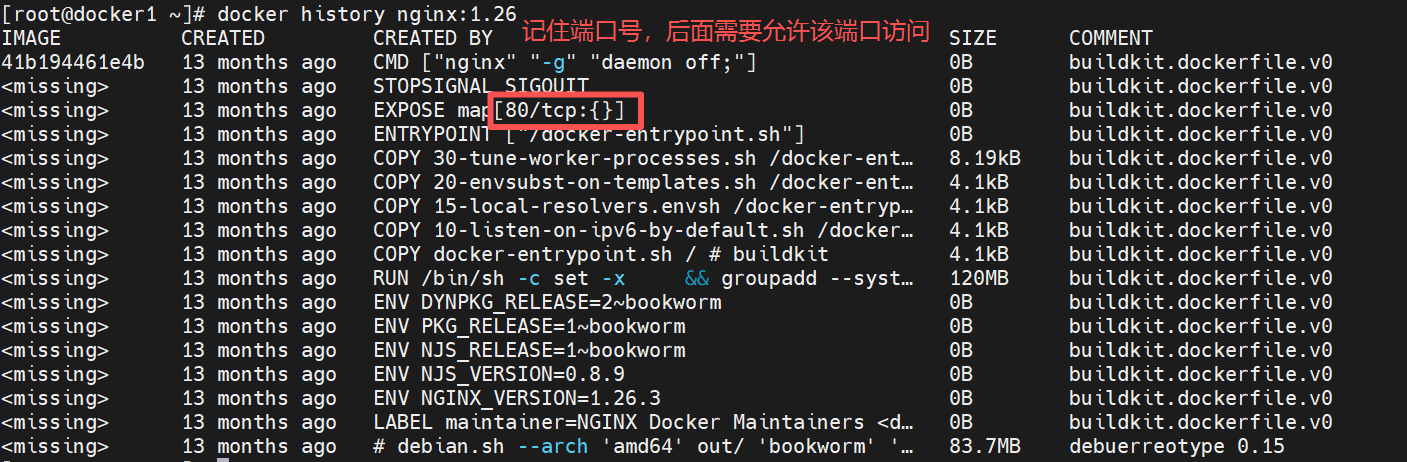
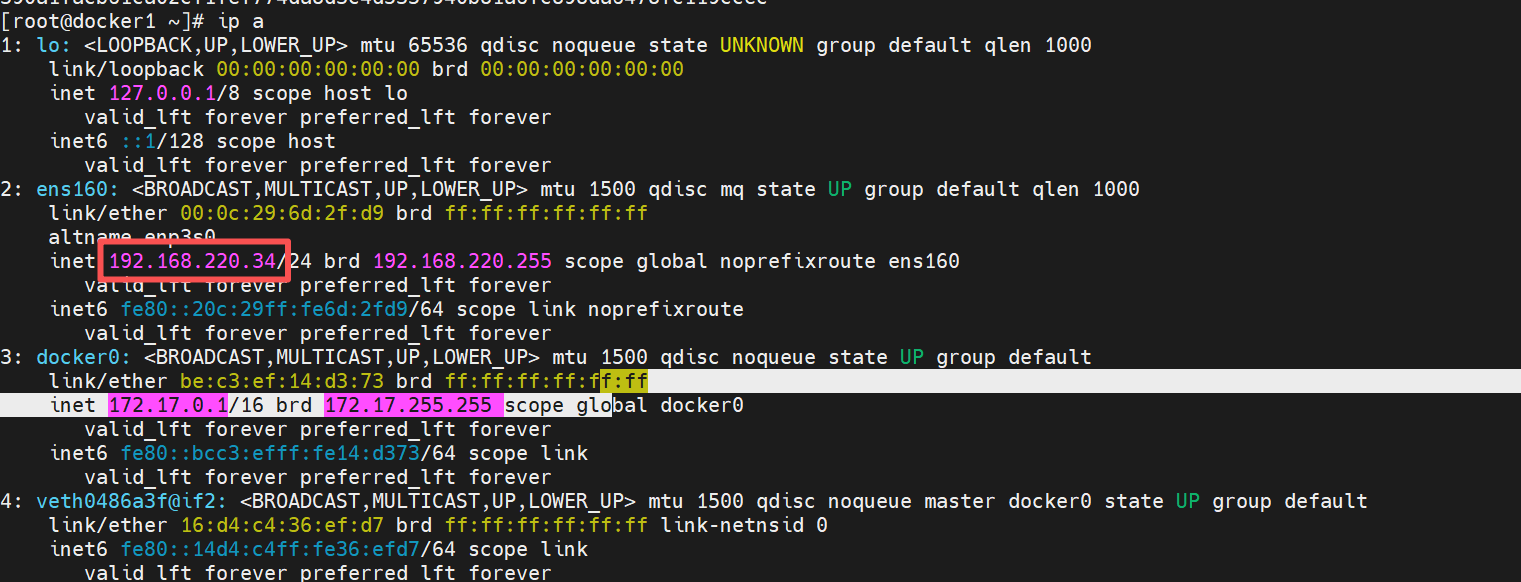
查看本机ip
外部访问容器
cpp
第一个 80(左边)
宿主机端口(你的服务器端口)
默认就是 80 端口
第二个 80(右边)
容器内部端口(nginx 自己用的端口),就是我们用docker history访问的端口

[root@docker1 ~]# docker run -d --name web -p 80:80 nginx:1.26
698e729c5fc15aac53456cf5a8232ef737b157e7d1775f9a7212fac184849abb
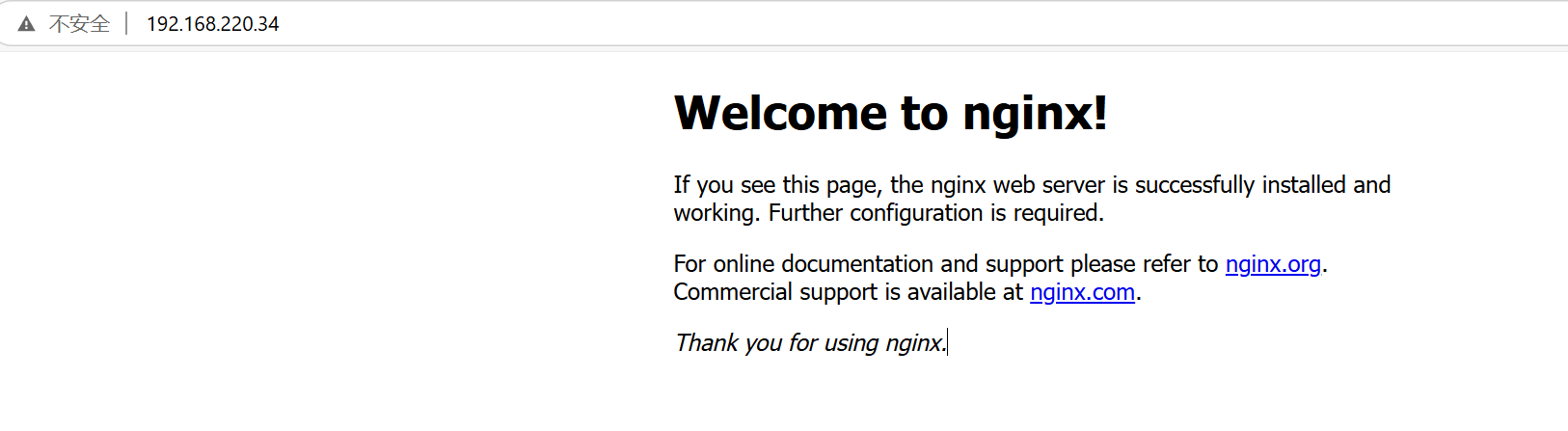
测试