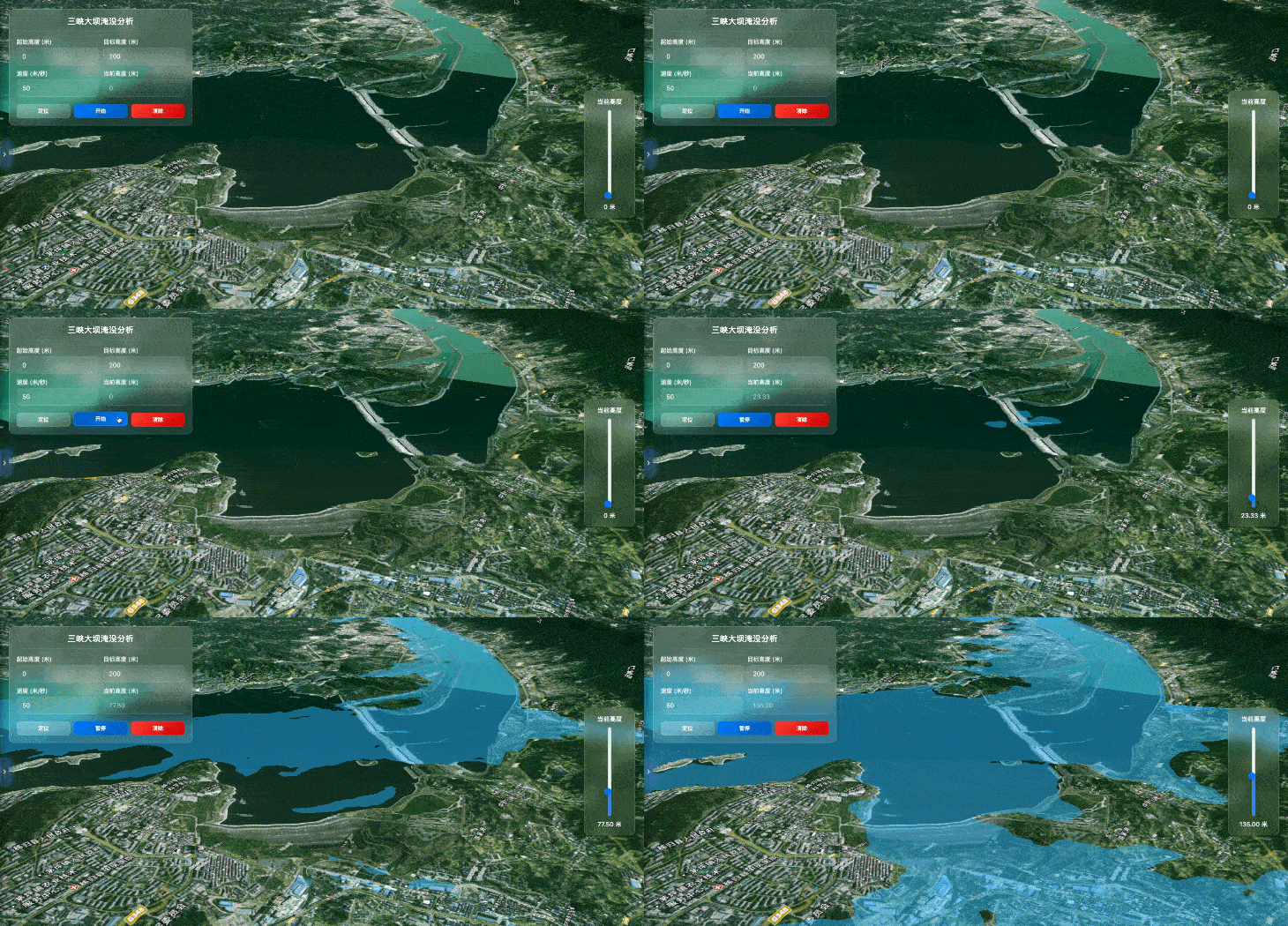
前言
在水利工程、应急减灾、三维 GIS 可视化 领域,淹没 / 水淹分析是核心刚需功能。通过 WebGL 三维引擎实现大坝、水库、江河、湖泊的水淹决堤模拟,能够直观还原水位上涨、淹没范围变化,为工程推演、应急决策、防汛调度提供可视化支撑。
本篇基于 Vue3 + CesiumJS 实现三峡大坝区域高精度淹没分析 ,封装通用化淹没分析核心类,支持自定义水位参数、实时动画控制、手动拖拽调参,结合天地图高清影像 + 高精度地形,打造极致真实的三维水淹效果。方案通用适配江河、湖泊、水库、大坝决堤、城市内涝等全场景淹没分析需求。
技术栈
- 前端框架:
Vue3 (Composition API / <script setup>) - 三维 GIS 引擎:
CesiumJS - 底图服务:天地图卫星影像 + 注记图层
- 地形服务:火星地形服务 //data.mars3d.cn/terrain
- UI 风格:liquid
(毛玻璃)现代化界面 - 交互:响应式布局 + 垂直高度滑块实时控制
应用场景
- 水利工程:大坝、水库水位调度模拟
- 应急减灾:洪水淹没、大坝决堤推演
- 城市规划:内涝风险区域可视化分析
- 地理教学:江河湖泊水文变化三维演示
- 防灾预警:淹没范围与水位高度联动展示
核心技术原理
本方案的核心思路是基于 Cesium 多边形拉伸实体 + 动态高度回调 + 地形匹配实现淹没效果:
- 区域定义:通过经纬度坐标圈定淹没范围(三峡大坝核心区域);
- 实体创建 :使用 Cesium 多边形实体,开启
perPositionHeight贴合地形; - 动态水位 :通过
CallbackProperty实时更新拉伸高度,模拟水位上涨; - 平滑动画:60fps 帧动画优化,实现流畅的水位升降效果;
- 交互联动:UI 参数与三维场景双向绑定,支持自动 / 手动控制水位。
核心模块技术解析
一、通用淹没分析核心类(SubmergenceAnalysis)
这是整个功能的灵魂模块 ,采用面向对象封装,将水体创建、动画控制、坐标转换、回调联动全部封装,支持高度复用、参数自定义,是适配全场景淹没分析的核心。
核心能力:
- 自动适配经纬度坐标(一维 / 二维数组)
- 支持水位上升 / 下降双模式动画
- 60fps 平滑动画,无卡顿
- 实时高度回调、结束回调
- 实体销毁、暂停、重置
二、Cesium 场景高性能优化
为了保证淹没效果的真实性和流畅度,对 Cesium 场景做了专项优化:
- 地形加载 :接入高精度地形,开启
requestVertexNormals让地形更立体; - 深度检测 :
globe.depthTestAgainstTerrain = true,让水体贴合地形,不穿透地表; - 雾化效果:开启场景雾化,提升三维空间层次感;
- 底图优化:天地图卫星 + 注记双层叠加,无密钥自动兜底离线影像;
- 控件精简:隐藏冗余 Cesium 默认控件,提升界面整洁度。
三、水位动态动画实现
摒弃传统生硬的高度修改,采用浏览器 16ms 帧定时器(60fps) + Cesium 回调属性实现平滑动画:
- 定时器拆分速度参数,让水位上涨更自然;
CallbackProperty动态绑定拉伸高度,实时响应数据变化;- 自动判断水位目标值,到达后自动停止并触发回调。
四、双向交互控制逻辑
- 自动模式:输入起始高度、目标高度、速度,一键启动动画;
- 手动模式:垂直滑块拖拽,实时修改水位高度,自动暂停动画;
- 状态管理:防重复点击、开始 / 暂停 / 清除状态无缝切换;
- 数据联动:UI 实时显示当前水位,滑块与场景高度双向同步。
五、现代化毛玻璃 UI 设计
采用backdrop-filter: blur实现毛玻璃效果,搭配渐变按钮、响应式布局,PC / 移动端自适应,垂直滑块采用电闸风格,贴合水位控制的交互逻辑。
关键代码片段
1. 淹没分析核心类(核心方法)
javascript
运行
javascript
// 淹没分析核心类
class SubmergenceAnalysis {
    constructor(option) {
        this.viewer = option.viewer
        this.waterHeight = option.startHeight || 0
        this.speed = option.speed || 1
        // 动态回调属性,实时更新水位高度
        this.extrudedHeight = new Cesium.CallbackProperty(() => this.waterHeight, false)
        this.createWaterEntity() // 创建水体实体
    }

    // 创建水体多边形实体
    createWaterEntity() {
        this.entity = this.viewer.entities.add({
            polygon: {
                hierarchy: this.coordsTransform(), // 坐标转换
                material: new Cesium.Color.fromBytes(40, 180, 255, 120),
                perPositionHeight: true, // 贴合地形
                extrudedHeight: this.extrudedHeight // 动态拉伸高度
            }
        })
    }

    // 启动平滑水位动画
    startAnimation() {
        this.timer = setInterval(() => {
            this.waterHeight += this.speed / 60
            // 到达目标高度停止
            if (this.waterHeight >= this.targetHeight) {
                this.stopAnimation()
                this.endCallback?.()
            }
            this.speedCallback?.(this.waterHeight)
        }, 16) // 60fps 流畅渲染
    }

    // 坐标转换:经纬度 => Cartesian3
    coordsTransform(coords) {
        return coords.map(([lng, lat]) => Cesium.Cartesian3.fromDegrees(lng, lat))
    }
}
2. Cesium 场景初始化(地形 + 底图)
javascript
运行
javascript
// 初始化Cesium场景
const initCesium = async () => {
  viewer = new Cesium.Viewer('mapContainer', {
    imageryProvider: undefined,
    contextOptions: { webgl: { antialias: true } } // 抗锯齿优化
  })
  // 加载天地图卫星+注记图层
  createTDLayer(viewer, 'satellite')
  createTDLayer(viewer, 'label')
  // 加载高精度地形
  await AddTerrain(viewer)
  // 开启地形深度检测,水体不穿透地面
  viewer.scene.globe.depthTestAgainstTerrain = true
  // 相机自动飞行到三峡大坝区域
  flyToSanxia()
}
3. 交互控制逻辑
javascript
运行
javascript
// 切换模拟状态:开始/暂停
const toggleSimulation = () => {
  if (!submergenceAnalysis) {
    startAnalysis() // 新建实例并启动
  } else {
    isRunning.value ? submergenceAnalysis.pause() : submergenceAnalysis.start()
    isRunning.value = !isRunning.value
  }
}

// 滑块手动控制水位
const updateHeightFromSlider = () => {
  submergenceAnalysis.pause()
  submergenceAnalysis.setHeight(sliderValue.value) // 直接设置高度
  isRunning.value = false
}
功能效果展示
- 场景加载:自动加载天地图高清影像 + 三峡地形,相机定位核心区域;
- 参数配置:毛玻璃面板配置起始水位、目标水位、上涨速度;
- 自动模拟:一键启动,水位平滑上涨,实时显示当前高度;
- 手动控制:右侧垂直滑块拖拽,精准调整水位高度;
- 状态控制:支持暂停、继续、清除重置;
- 视觉效果:水体半透明贴合地形,边界清晰,三维立体感拉满。
拓展适配(全场景通用)
本方案不局限于三峡大坝 ,仅需修改淹没区域坐标,即可快速适配:
- 江河淹没:替换河道经纬度坐标;
- 水库模拟:输入水库范围坐标;
- 城市内涝:圈定城市低洼区域;
- 决堤模拟:调整动画速度,模拟决堤洪水上涨。
同时支持自定义:
- 水体颜色、透明度
- 水位上升 / 下降模式
- 动画速度、最大高度
- 多区域同步淹没分析
技术亮点总结
- 通用化封装:淹没分析类独立封装,零修改适配全场景;
- 高性能动画:60fps 帧动画 + Cesium 回调属性,流畅无卡顿;
- 真实感渲染:高精度地形 + 深度检测 + 雾化效果,贴合真实地理环境;
- 极致交互:自动 + 手动双模式控制,毛玻璃 UI,响应式适配;
- 工程化价值:可直接集成到水利、应急、GIS 项目中,开箱即用。
结语
基于 Cesium 的三维淹没分析,是 WebGIS 在水利防灾领域的典型应用。本文实现的三峡大坝水淹模拟,不仅是单一案例,更是一套通用化、可扩展、高性能的淹没分析解决方案。
后续可拓展:实时雨量数据联动、淹没区域面积计算、受影响人口分析等功能,打造完整的防汛减灾可视化系统。
完整代码
html
<template>
    <div class="water-analysis-container">
        <div id="mapContainer"></div>
        <!-- 毛玻璃风格控制面板 -->
        <div class="glass-panel">
            <div class="panel-header">
                <h3>三峡大坝淹没分析</h3>
            </div>
            <div class="glass-form">
                <div class="form-grid">
                    <div class="input-group">
                        <label>起始高度 (米)</label>
                        <input v-model="startHeight" type="number" min="0" class="glass-input">
                    </div>
                    <div class="input-group">
                        <label>目标高度 (米)</label>
                        <input v-model="targetHeight" type="number" min="0" class="glass-input">
                    </div>
                    <div class="input-group">
                        <label>速度 (米/秒)</label>
                        <input v-model="speed" type="number" min="1" class="glass-input">
                    </div>
                    <div class="input-group">
                        <label>当前高度 (米)</label>
                        <input v-model="currentHeight" type="text" disabled class="glass-input disabled">
                    </div>
                </div>
            </div>
            <div class="btn-wrapper">
                <button @click="fly()" class="glass-btn">
                    定位
                </button>
                <button @click="toggleSimulation()" class="glass-btn primary">
                    {{ isRunning ? '暂停' : '开始' }}
                </button>
                <button @click="clear()" class="glass-btn secondary">
                    清除
                </button>
            </div>
        </div>

        <!-- 垂直进度条 -->
        <div class="vertical-slider-container">
            <div class="slider-label">当前高度</div>
            <input
                type="range"
                class="vertical-slider"
                min="0"
                :max="maxHeight"
                v-model.number="sliderValue"
                @input="updateHeightFromSlider"
            >
            <div class="slider-value">{{ currentHeight }} 米</div>
        </div>
    </div>
</template>

<script setup>
import { onMounted, onUnmounted, ref } from "vue";
import { TD_MAP_KEY } from '../config.js';

let viewer = undefined;
let submergenceAnalysis = null;

// 响应式数据
const startHeight = ref('0'); // 默认贴地开始
const targetHeight = ref('200'); // 模拟洪水淹没高度
const speed = ref('50');          // 适中的速度
const currentHeight = ref('0');
const isRunning = ref(false);    // 防连点状态
const maxHeight = ref('300');   // 进度条最大值
const sliderValue = ref('0');     // 滑块值

// 淹没分析类
class SubmergenceAnalysis {
    constructor(option) {
        this.viewer = option.viewer;
        this.targetHeight = option.targetHeight || 10;
        this.startHeight = option.startHeight || 0;
        this.waterHeight = option.waterHeight || this.startHeight;
        this.adapCoordi = option.adapCoordi || [];
        this.speed = option.speed || 1;
        // 液态蓝色调,更贴合水的主题
        this.color = option.color || new Cesium.Color.fromBytes(40, 180, 255, 120);
        this.changetype = option.changetype || 'up';
        this.speedCallback = option.speedCallback || (h => {});
        this.endCallback = option.endCallback || (() => {});
        this.polygonEntity = null;
        this.timer = null;

        if (this.viewer) {
            this.createEntity();
            this.updatePoly(this.adapCoordi);
        }
    }

    // 创建淹没实体
    createEntity() {
        if (this.polygonEntity && this.polygonEntity.length > 0) {
            this.polygonEntity.forEach(entity => this.viewer.entities.remove(entity));
        }
        this.polygonEntity = [];

        const nEntity = this.viewer.entities.add({
            polygon: {
                hierarchy: new Cesium.PolygonHierarchy([]),
                material: this.color,
                outline: true,
                outlineColor: Cesium.Color.fromBytes(100, 200, 255, 200),
                outlineWidth: 3,
                // 液态效果:增加透明度渐变
                perPositionHeight: true
            }
        });

        nEntity.polygon.extrudedHeight = new Cesium.CallbackProperty(() => this.waterHeight, false);
        this.polygonEntity.push(nEntity);
    }

    // 更新polygon
    updatePoly(adapCoordi) {
        this.adapCoordi = this.coordsTransformation(adapCoordi);
        if (this.polygonEntity?.length) {
            this.polygonEntity[0].polygon.hierarchy = new Cesium.PolygonHierarchy(this.adapCoordi);
        }
    }

    // 坐标转换(适配二维数组)
    coordsTransformation(coords) {
        const c = [];
        // 处理二维数组 [[lng,lat], ...]
        if (Array.isArray(coords[0]) && coords[0].length === 2) {
            coords.forEach(([lng, lat]) => {
                c.push(Cesium.Cartesian3.fromDegrees(lng, lat));
            });
            return c;
        }
        // 兼容一维数组
        if (typeof coords[0] === "number" && typeof coords[1] === "number") {
            return Cesium.Cartesian3.fromDegreesArray(coords);
        }
        return c;
    }

    // 开始淹没
    start() {
        if (this.timer) {
            window.clearInterval(this.timer);
            this.timer = null;
        }

        this.timer = window.setInterval(() => {
            const sp = this.speed / 60; // 更平滑的速度
            if (this.changetype === "up") {
                this.waterHeight += sp;
                if (this.waterHeight >= this.targetHeight) {
                    this.waterHeight = this.targetHeight;
                    window.clearInterval(this.timer);
                    this.timer = null;
                    this.endCallback();
                }
            } else {
                this.waterHeight -= sp;
                if (this.waterHeight <= this.targetHeight) {
                    this.waterHeight = this.targetHeight;
                    window.clearInterval(this.timer);
                    this.timer = null;
                    this.endCallback();
                }
            }
            this.speedCallback(this.waterHeight);
        }, 16); // 60fps 更流畅
    }

    // 清除淹没
    clear() {
        if (this.timer) {
            window.clearInterval(this.timer);
            this.timer = null;
        }
        this.waterHeight = this.startHeight;

        if (this.polygonEntity) {
            this.polygonEntity.forEach(entity => this.viewer.entities.remove(entity));
            this.polygonEntity = null;
        }
    }

    // 设置高度
    setHeight(height) {
        this.waterHeight = height;
        this.speedCallback(this.waterHeight);
    }

    // 暂停淹没
    pause() {
        if (this.timer) {
            window.clearInterval(this.timer);
            this.timer = null;
        }
    }
}

/**
 * 创建天地图图层
 */
const createTDLayer = (viewer, layerType) => {
  if (!TD_MAP_KEY || typeof TD_MAP_KEY !== 'string' || !TD_MAP_KEY.length) {
    console.warn('天地图密钥无效,使用兜底图层');
    if (layerType === 'satellite') {
      const xyz = new Cesium.UrlTemplateImageryProvider({
        url: '//data.mars3d.cn/tile/img/{z}/{x}/{y}.jpg'
      });
      const layer = viewer.imageryLayers.addImageryProvider(xyz);
      layer.zIndex = 0;
      return layer;
    }
    return null;
  }

  const layerConfigs = {
    satellite: {
      url: `https://t{s}.tianditu.gov.cn/DataServer?T=img_w&x={x}&y={y}&l={z}&tk=${TD_MAP_KEY}`,
      zIndex: 0
    },
    label: {
      url: `https://t{s}.tianditu.gov.cn/DataServer?T=cia_w&x={x}&y={y}&l={z}&tk=${TD_MAP_KEY}`,
      zIndex: 1
    }
  };

  try {
    const layer = viewer.imageryLayers.addImageryProvider(new Cesium.UrlTemplateImageryProvider({
      url: layerConfigs[layerType].url,
      subdomains: ['0', '1', '2', '3', '4', '5', '6', '7'],
      credit: '天地图',
      maximumLevel: 18,
      minimumLevel: 0
    }));
    layer.zIndex = layerConfigs[layerType].zIndex;
    return layer;
  } catch (error) {
    console.error(`创建${layerType}图层失败:`, error);
    return null;
  }
};

/**
 * 添加地形服务
 */
const AddTerrain = async (viewer) => {
  try {
    viewer.terrainProvider = await Cesium.CesiumTerrainProvider.fromUrl('//data.mars3d.cn/terrain', {
      requestWaterMask: false,
      requestVertexNormals: true // 开启法线,地形更真实
    });
    console.log('地形加载成功');
  } catch (e) {
    console.error("加载地形失败", e);
  }
};

/**
 * 计算坐标数组的中心点
 * @param {Array<Array<number>>} coordinates 坐标数组,格式:[[lon, lat], [lon, lat], ...]
 * @returns {Array<number>} 中心点坐标,格式:[lon, lat]
 */
const calculateCenterPoint = (coordinates) => {
  if (!coordinates || coordinates.length === 0) {
    return [0, 0];
  }

  let lonSum = 0;
  let latSum = 0;

  for (const coord of coordinates) {
    lonSum += coord[0];
    latSum += coord[1];
  }

  return [lonSum / coordinates.length, latSum / coordinates.length];
};

/**
 * 初始化Cesium
 */
const initCesium = async () => {
  try {
    if (window.cesiumViewer) {
      window.cesiumViewer.destroy();
      window.cesiumViewer = null;
    }

    viewer = new Cesium.Viewer('mapContainer', {
      timeline: false,
      animation: false,
      homeButton: false,
      sceneModePicker: false,
      navigationHelpButton: false,
      baseLayerPicker: false,
      infoBox: false,
      selectionIndicator: false,
      fullscreenButton: false,
      imageryProvider: undefined,
      geocoder: false,
      // 抗锯齿,画面更清晰
      contextOptions: {
        webgl: {
          antialias: true,
          alpha: true
        }
      }
    });

    window.cesiumViewer = viewer;

    // 创建天地图图层
    createTDLayer(viewer, 'satellite');
    createTDLayer(viewer, 'label');

    // 隐藏默认控件
    const bottomContainer = document.getElementsByClassName("cesium-viewer-bottom")[0];
    if (bottomContainer) bottomContainer.style.display = "none";

    // 添加地形
    await AddTerrain(viewer);

    // 深度监测 + 雾化效果,更真实
    viewer.scene.globe.depthTestAgainstTerrain = true;
    viewer.scene.fog.enabled = true;
    viewer.scene.fog.density = 0.00005; // 轻微雾化,增加层次感

    // 三峡围城区域绝美初始视角
    // 使用sanxiaCoords计算围城区域中心
    const sanxiaCoords = [
      [111.02086418959858,30.814999676777077],
      [111.03345242496542,30.818319913619924],
      [111.0616814517163,30.83065471232016],
      [111.08196286058784,30.847010459254708],
      [111.09032690713384,30.851358571533403],
      [111.08941451523727,30.859097354922586],
      [111.08985128751604,30.86489194836355],
      [111.07754926471307,30.865906642553313],
      [111.07071726302274,30.87056522934034],
      [111.07374030334265,30.87730594475594],
      [111.05997088365923,30.88205195945251],
      [111.04691618687175,30.8786735678159],
      [111.03135648516805,30.87499845663705],
      [111.00790506454733,30.87628121332698],
      [110.99226820449012,30.8795963545915],
      [110.98210272331553,30.872616157823035],
      [110.95788211720846,30.866535305774985],
      [110.94746745074589,30.862559502013564],
      [110.94015076406508,30.863352191524285],
      [110.92528302666359,30.863440693611718],
      [110.91693796249807,30.851410448406487],
      [110.93297591794753,30.822318912958256],
      [110.94587133848161,30.806478009762124],
      [110.96210609017544,30.791237671320218],
      [110.9924568432671,30.79416243932549],
      [111.02813564063163,30.797039077081255],
      [111.02122137941903,30.812951980562904]
    ];

    // 计算中心点
    const centerPoint = calculateCenterPoint(sanxiaCoords);

    setTimeout(() => {
        viewer.camera.flyTo({
            // 斜侧视角,高度12000米,能完整看到整个围城区域
            destination: Cesium.Cartesian3.fromDegrees(centerPoint[0], centerPoint[1], 12000),
            orientation: {
                heading: Cesium.Math.toRadians(45),    // 45度航向,斜侧视角
                pitch: Cesium.Math.toRadians(-50),     // 向下50度,能看到地形起伏
                roll: Cesium.Math.toRadians(0)
            },
            duration: 4, // 缓慢飞行,体验更好
            easingFunction: Cesium.EasingFunction.QUADRATIC_IN_OUT // 平滑缓动
        });
    }, 500);
  } catch (error) {
    console.error('Cesium 初始化失败:', error);
    if (viewer) viewer.destroy();
    viewer = null;
  }
};

/**
 * 飞行到三峡围城区域(优化视角)
 */
const fly = () => {
  if (!viewer) return;

  // 三峡围城区域坐标
  const sanxiaCoords = [
    [111.02086418959858,30.814999676777077],
    [111.03345242496542,30.818319913619924],
    [111.0616814517163,30.83065471232016],
    [111.08196286058784,30.847010459254708],
    [111.09032690713384,30.851358571533403],
    [111.08941451523727,30.859097354922586],
    [111.08985128751604,30.86489194836355],
    [111.07754926471307,30.865906642553313],
    [111.07071726302274,30.87056522934034],
    [111.07374030334265,30.87730594475594],
    [111.05997088365923,30.88205195945251],
    [111.04691618687175,30.8786735678159],
    [111.03135648516805,30.87499845663705],
    [111.00790506454733,30.87628121332698],
    [110.99226820449012,30.8795963545915],
    [110.98210272331553,30.872616157823035],
    [110.95788211720846,30.866535305774985],
    [110.94746745074589,30.862559502013564],
    [110.94015076406508,30.863352191524285],
    [110.92528302666359,30.863440693611718],
    [110.91693796249807,30.851410448406487],
    [110.93297591794753,30.822318912958256],
    [110.94587133848161,30.806478009762124],
    [110.96210609017544,30.791237671320218],
    [110.9924568432671,30.79416243932549],
    [111.02813564063163,30.797039077081255],
    [111.02122137941903,30.812951980562904]
  ];

  // 计算中心点
  const centerPoint = calculateCenterPoint(sanxiaCoords);

  viewer.camera.flyTo({
      destination: Cesium.Cartesian3.fromDegrees(centerPoint[0], centerPoint[1], 10000),
      orientation: {
          heading: Cesium.Math.toRadians(60),    // 调整航向,更优视角
          pitch: Cesium.Math.toRadians(-45),     // 适度向下
          roll: Cesium.Math.toRadians(0)
      },
      duration: 3,
      easingFunction: Cesium.EasingFunction.QUADRATIC_IN_OUT
  });
};

/**
 * 开始淹没分析
 */
const start = () => {
  if (!viewer || isRunning.value) return;
  isRunning.value = true;

  if (submergenceAnalysis) {
    submergenceAnalysis.clear();
    submergenceAnalysis = null;
  }

  // 三峡围城区域坐标
  const sanxiaCoords = [
    [111.02086418959858,30.814999676777077],
    [111.03345242496542,30.818319913619924],
    [111.0616814517163,30.83065471232016],
    [111.08196286058784,30.847010459254708],
    [111.09032690713384,30.851358571533403],
    [111.08941451523727,30.859097354922586],
    [111.08985128751604,30.86489194836355],
    [111.07754926471307,30.865906642553313],
    [111.07071726302274,30.87056522934034],
    [111.07374030334265,30.87730594475594],
    [111.05997088365923,30.88205195945251],
    [111.04691618687175,30.8786735678159],
    [111.03135648516805,30.87499845663705],
    [111.00790506454733,30.87628121332698],
    [110.99226820449012,30.8795963545915],
    [110.98210272331553,30.872616157823035],
    [110.95788211720846,30.866535305774985],
    [110.94746745074589,30.862559502013564],
    [110.94015076406508,30.863352191524285],
    [110.92528302666359,30.863440693611718],
    [110.91693796249807,30.851410448406487],
    [110.93297591794753,30.822318912958256],
    [110.94587133848161,30.806478009762124],
    [110.96210609017544,30.791237671320218],
    [110.9924568432671,30.79416243932549],
    [111.02813564063163,30.797039077081255],
    [111.02122137941903,30.812951980562904]
  ];

  submergenceAnalysis = new SubmergenceAnalysis({
      viewer: viewer,
      targetHeight: parseFloat(targetHeight.value),
      startHeight: parseFloat(startHeight.value),
      adapCoordi: sanxiaCoords,
      speed: Number(speed.value),
      changetype: "up",
      speedCallback: (h) => {
          currentHeight.value = h.toFixed(2);
          sliderValue.value = h;
      },
      endCallback: () => {
          isRunning.value = false;
          currentHeight.value = targetHeight.value;
          sliderValue.value = parseFloat(targetHeight.value);
      }
  });

  // 初始化滑块值
  sliderValue.value = parseFloat(startHeight.value);

  submergenceAnalysis.start();
};

/**
 * 清除淹没分析
 */
const clear = () => {
  if (submergenceAnalysis) {
    submergenceAnalysis.clear();
    submergenceAnalysis = null;
    currentHeight.value = '0';
    sliderValue.value = '0';
    isRunning.value = false;
  }
};

/**
 * 切换模拟状态(开始/暂停)
 */
const toggleSimulation = () => {
  if (!submergenceAnalysis) {
    // 如果还没有创建淹没分析实例,先创建并开始
    start();
  } else {
    if (isRunning.value) {
      // 如果正在运行,暂停
      submergenceAnalysis.pause();
      isRunning.value = false;
    } else {
      // 如果已暂停,继续
      submergenceAnalysis.start();
      isRunning.value = true;
    }
  }
};

/**
 * 暂停淹没模拟
 */
const pause = () => {
  if (submergenceAnalysis) {
    submergenceAnalysis.pause();
    isRunning.value = false;
  }
};

/**
 * 通过滑块更新高度
 */
const updateHeightFromSlider = () => {
  if (submergenceAnalysis) {
    // 自动暂停并设置高度
    submergenceAnalysis.pause();
    submergenceAnalysis.setHeight(sliderValue.value);
    isRunning.value = false;
  } else {
    // 如果还没有创建淹没分析实例,先创建但不开始
    createSubmergenceAnalysis();
    submergenceAnalysis.setHeight(sliderValue.value);
  }
};

/**
 * 创建淹没分析实例
 */
const createSubmergenceAnalysis = () => {
  // 三峡围城区域坐标
  const sanxiaCoords = [
    [111.02086418959858,30.814999676777077],
    [111.03345242496542,30.818319913619924],
    [111.0616814517163,30.83065471232016],
    [111.08196286058784,30.847010459254708],
    [111.09032690713384,30.851358571533403],
    [111.08941451523727,30.859097354922586],
    [111.08985128751604,30.86489194836355],
    [111.07754926471307,30.865906642553313],
    [111.07071726302274,30.87056522934034],
    [111.07374030334265,30.87730594475594],
    [111.05997088365923,30.88205195945251],
    [111.04691618687175,30.8786735678159],
    [111.03135648516805,30.87499845663705],
    [111.00790506454733,30.87628121332698],
    [110.99226820449012,30.8795963545915],
    [110.98210272331553,30.872616157823035],
    [110.95788211720846,30.866535305774985],
    [110.94746745074589,30.862559502013564],
    [110.94015076406508,30.863352191524285],
    [110.92528302666359,30.863440693611718],
    [110.91693796249807,30.851410448406487],
    [110.93297591794753,30.822318912958256],
    [110.94587133848161,30.806478009762124],
    [110.96210609017544,30.791237671320218],
    [110.9924568432671,30.79416243932549],
    [111.02813564063163,30.797039077081255],
    [111.02122137941903,30.812951980562904]
  ];

  submergenceAnalysis = new SubmergenceAnalysis({
      viewer: viewer,
      targetHeight: parseFloat(targetHeight.value),
      startHeight: parseFloat(startHeight.value),
      adapCoordi: sanxiaCoords,
      speed: Number(speed.value),
      changetype: "up",
      speedCallback: (h) => {
          currentHeight.value = h.toFixed(2);
          sliderValue.value = h;
      },
      endCallback: () => {
          isRunning.value = false;
          currentHeight.value = targetHeight.value;
          sliderValue.value = parseFloat(targetHeight.value);
      }
  });

  // 初始化滑块值
  sliderValue.value = parseFloat(startHeight.value);
};

// 生命周期
onMounted(() => {
  initCesium();
});

onUnmounted(() => {
  if (viewer) {
    if (submergenceAnalysis) {
        submergenceAnalysis.clear();
        submergenceAnalysis = null;
    }
    viewer.destroy();
    viewer = null;
    window.cesiumViewer = null;
  }
});
</script>

<style scoped>
/* 基础容器 */
.water-analysis-container {
    position: relative;
    width: 100%;
    height: 100vh;
    overflow: hidden;
    font-family: -apple-system, BlinkMacSystemFont, 'Segoe UI', Roboto, sans-serif;
}

#mapContainer {
    width: 100%;
    height: 100%;
    position: relative;
}

/* 毛玻璃风格控制面板 */
.glass-panel {
    position: absolute;
    top: 20px;
    left: 20px;
    z-index: 1000;
    /* 毛玻璃效果 */
    background: rgba(255, 255, 255, 0.1);
    backdrop-filter: blur(15px);
    -webkit-backdrop-filter: blur(15px);
    /* 边框和阴影 */
    border: 1px solid rgba(255, 255, 255, 0.2);
    border-radius: 12px;
    box-shadow: 0 4px 16px rgba(0, 0, 0, 0.1);
    /* 内边距 */
    padding: 16px;
    /*width: 300px;*/
    max-width: 90vw;
}

/* 面板头部 */
.panel-header {
    margin-bottom: 16px;
    padding-bottom: 12px;
    border-bottom: 1px solid rgba(255, 255, 255, 0.1);
}

.panel-header h3 {
    color: white;
    font-size: 18px;
    font-weight: 600;
    margin: 0;
    text-align: center;
    letter-spacing: 0.5px;
}

/* 毛玻璃表单 */
.glass-form {
    margin-bottom: 16px;
}

.form-grid {
    display: grid;
    grid-template-columns: 1fr 1fr;
    gap: 12px;
}

.form-row {
    margin-bottom: 12px;
}

.input-group {
    display: flex;
    flex-direction: column;
    gap: 6px;
}

.input-group label {
    color: rgba(255, 255, 255, 0.9);
    font-size: 13px;
    font-weight: 500;
}

/* 毛玻璃输入框 */
.glass-input {
    padding: 10px 12px;
    background: rgba(255, 255, 255, 0.08);
    border: 1px solid rgba(255, 255, 255, 0.15);
    border-radius: 8px;
    color: white;
    font-size: 14px;
    outline: none;
    transition: all 0.2s cubic-bezier(0.4, 0, 0.2, 1);
}

.glass-input:focus {
    border-color: rgba(255, 255, 255, 0.3);
    background: rgba(255, 255, 255, 0.12);
    box-shadow: 0 0 0 2px rgba(255, 255, 255, 0.1);
}

.glass-input.disabled {
    background: rgba(255, 255, 255, 0.05);
    color: rgba(255, 255, 255, 0.6);
    cursor: not-allowed;
    border-color: rgba(255, 255, 255, 0.1);
}

/* 按钮组 */
.btn-wrapper {
    display: flex;
    flex-direction: row;
    gap: 8px;
    justify-content: space-between;
}

/* 毛玻璃按钮 */
.glass-btn {
    padding: 8px 12px;
    border: 1px solid rgba(255, 255, 255, 0.2);
    border-radius: 8px;
    background: linear-gradient(135deg, rgba(255, 255, 255, 0.15), rgba(255, 255, 255, 0.05));
    color: white;
    font-size: 12px;
    font-weight: 600;
    cursor: pointer;
    transition: all 0.3s cubic-bezier(0.4, 0, 0.2, 1);
    text-align: center;
    box-shadow: 0 4px 12px rgba(0, 0, 0, 0.1);
    backdrop-filter: blur(5px);
    flex: 1;
}

.glass-btn:hover:not(:disabled) {
    background: linear-gradient(135deg, rgba(255, 255, 255, 0.2), rgba(255, 255, 255, 0.1));
    border-color: rgba(255, 255, 255, 0.3);
    transform: translateY(-2px);
    box-shadow: 0 6px 16px rgba(0, 0, 0, 0.2);
}

.glass-btn:disabled {
    opacity: 0.6;
    cursor: not-allowed;
    transform: none;
    box-shadow: none;
}

/* 主按钮样式 */
.glass-btn.primary {
    background: linear-gradient(135deg, #007aff, #0056b3);
    border-color: rgba(0, 122, 255, 0.5);
}

.glass-btn.primary:hover:not(:disabled) {
    background: linear-gradient(135deg, #0056b3, #007aff);
    box-shadow: 0 6px 16px rgba(0, 122, 255, 0.4);
}

/* 次要按钮样式 */
.glass-btn.secondary {
    background: linear-gradient(135deg, #ff3b30, #cc0000);
    border-color: rgba(255, 59, 48, 0.5);
}

.glass-btn.secondary:hover:not(:disabled) {
    background: linear-gradient(135deg, #cc0000, #ff3b30);
    box-shadow: 0 6px 16px rgba(255, 59, 48, 0.4);
}

/* 垂直进度条容器 */
.vertical-slider-container {
    position: absolute;
    right: 20px;
    top: 50%;
    transform: translateY(-50%);
    display: flex;
    flex-direction: column;
    align-items: center;
    gap: 10px;
    z-index: 1000;
    /* 毛玻璃效果 */
    background: rgba(255, 255, 255, 0.1);
    backdrop-filter: blur(15px);
    -webkit-backdrop-filter: blur(15px);
    /* 边框和阴影 */
    border: 1px solid rgba(255, 255, 255, 0.2);
    border-radius: 12px;
    box-shadow: 0 4px 16px rgba(0, 0, 0, 0.1);
    /* 内边距 */
    padding: 16px;
}

/* 进度条标签 */
.slider-label {
    color: white;
    font-size: 14px;
    font-weight: 500;
    text-align: center;
}

/* 垂直进度条 */
.vertical-slider {
    -webkit-appearance: none;
    appearance: none;
    width: 8px;
    height: 200px;
    background: rgba(255, 255, 255, 0.1);
    border-radius: 4px;
    outline: none;
    writing-mode: bt-lr;
    -webkit-appearance: slider-vertical;
}

/* 进度条轨道 */
.vertical-slider::-webkit-slider-runnable-track {
    width: 8px;
    height: 200px;
    background: rgba(255, 255, 255, 0.1);
    border-radius: 4px;
}

/* 进度条滑块 - 电闸风格 */
.vertical-slider::-webkit-slider-thumb {
    -webkit-appearance: none;
    appearance: none;
    width: 24px;
    height: 32px;
    background: linear-gradient(135deg, #4CAF50, #45a049);
    border: 2px solid white;
    border-radius: 2px;
    cursor: pointer;
    margin-top: -10px;
    transition: all 0.3s cubic-bezier(0.4, 0, 0.2, 1);
    box-shadow: 0 2px 8px rgba(0, 0, 0, 0.2);
    position: relative;
}

.vertical-slider::-webkit-slider-thumb::after {
    content: '';
    position: absolute;
    top: 50%;
    left: 50%;
    transform: translate(-50%, -50%);
    width: 8px;
    height: 16px;
    background: rgba(255, 255, 255, 0.8);
    border-radius: 1px;
}

.vertical-slider::-webkit-slider-thumb:hover {
    background: linear-gradient(135deg, #45a049, #4CAF50);
    transform: scale(1.05);
    box-shadow: 0 4px 12px rgba(76, 175, 80, 0.4);
}

.vertical-slider:disabled {
    opacity: 0.5;
    cursor: not-allowed;
}

.vertical-slider:disabled::-webkit-slider-thumb {
    background: rgba(100, 100, 100, 0.5);
    cursor: not-allowed;
}

/* Firefox 滑块样式 */
.vertical-slider::-moz-range-thumb {
    width: 24px;
    height: 32px;
    background: linear-gradient(135deg, #4CAF50, #45a049);
    border: 2px solid white;
    border-radius: 2px;
    cursor: pointer;
    box-shadow: 0 2px 8px rgba(0, 0, 0, 0.2);
    position: relative;
}

.vertical-slider::-moz-range-thumb:hover {
    background: linear-gradient(135deg, #45a049, #4CAF50);
    transform: scale(1.05);
    box-shadow: 0 4px 12px rgba(76, 175, 80, 0.4);
}

.vertical-slider:disabled::-moz-range-thumb {
    background: rgba(100, 100, 100, 0.5);
    cursor: not-allowed;
}

/* 进度条值 */
.slider-value {
    color: white;
    font-size: 14px;
    font-weight: 500;
    text-align: center;
    min-width: 80px;
}

/* 响应式适配 */
@media (max-width: 768px) {
    .glass-panel {
        width: calc(100% - 40px);
        max-width: none;
    }

    .vertical-slider-container {
        right: 10px;
        top: 20px;
        transform: none;
        flex-direction: row;
        width: calc(100% - 60px);
        height: 60px;
    }

    .vertical-slider {
        width: 200px;
        height: 8px;
        writing-mode: lr-tb;
        -webkit-appearance: slider-horizontal;
    }

    .vertical-slider::-webkit-slider-runnable-track {
        width: 200px;
        height: 8px;
    }

    .vertical-slider::-webkit-slider-thumb {
        margin-top: -6px;
    }
}
</style>