1. 关于各种包确实的问题,例如
1)
Error [ERR_MODULE_NOT_FOUND]: Cannot find package 'nostr-tools' imported from /app/dist/nostr-CbbGL74J.js2)
Cannot find package 'zca-js' imported from /app/dist/zalouser-CxeH9e8o.js
解决方法:
修改dockerfile文件,在RUN pnpm build:docker前增加以下代码,缺少哪个包安装哪个包,比如我这里需要安装nostr-tools、 zca-js、 google-auth-library。
bash
RUN pnpm add nostr-tools zca-js google-auth-library -w2. 容器一直重启
Container openclaw-openclaw-gateway-1 Started0.0s
Error response from daemon: Container bee17a63c281f5774d3e87c45e1a1b20d304613bf4786d63100e97e76142fd97 is restarting, wait until the container is running
查看日志获取具体报错:
bash
docker logs bee17a63c281f5774d3e87c45e1a1b20d304613bf4786d63100e97e76142fd97 #容器号换成自己的1)docker logs bee17a63c281f5774d3e87c45e1a1b20d304613bf4786d63100e97e76142fd97
2026-03-20T01:56:59.491+00:00 Gateway failed to start: Error: non-loopback Control UI requires gateway.controlUi.allowedOrigins (set explicit origins), or set gateway.controlUi.dangerouslyAllowHostHeaderOriginFallback=true to use Host-header origin fallback mode
解决方法:
检查配置文件,确保你的配置文件(如 .env 或 openclaw.json)中包含了正确的 gateway.controlUi.allowedOrigins 设置。例如:
bash
{
  "gateway": {
    "controlUi": {
      "allowedOrigins": [
        "http://localhost:18789",
        "https://localhost:18789",
        "http://127.0.0.1:18789",
        "https://你的服务器ip:18789",
]
    }
  }
}
3. control ui requires device identity (use HTTPS or localhost secure context
解决方法:
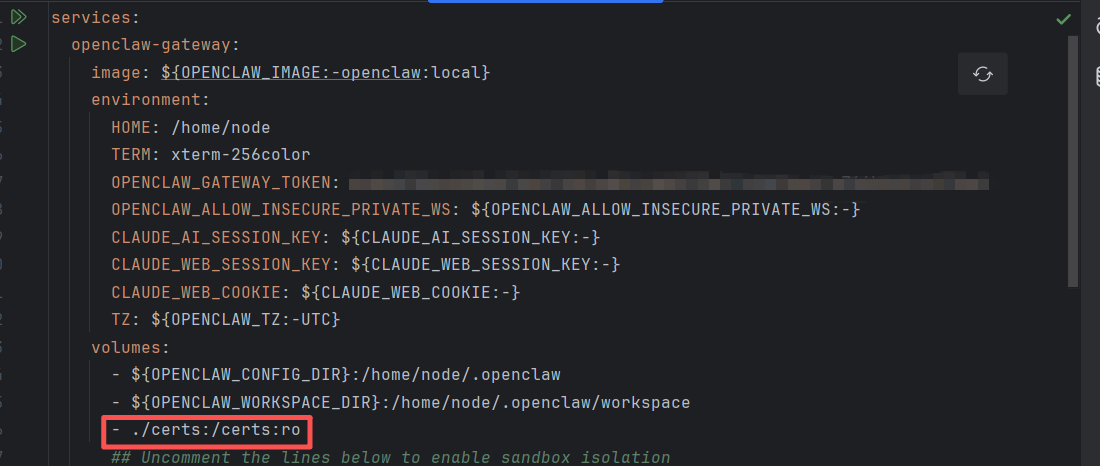
先建立密钥对存放在当前路径下的文件夹certs下,再在docker-compose.yml文件中添加挂在目录,添加完毕重启容器。
4. 访问UI出现pairing required
解决方法:
在容器内部执行以下代码进行配对
bash
openclaw devices list  # 列出待配对和已配对的设备
openclaw devices approve <设备标识>  #对可信设备进行配对授权
5. 聊天窗口对话出现:HTTP 401: Invalid Authentication
解决方法:
在容器内部执行以下代码
bash
openclaw setup