整体的思路
- 下载并编译libuuid-1.0.3 mosquitto openssl
- 将编译后的mosquitto相关文件拷贝到板子里
- 交叉编译C语言控制代码
- 执行运行指令
我是在公司的服务器上搭建的RV1126B编译环境,前期的环境配置很重要,要使用1126的编译器,mosquitto我选的版本是1.5.1,不是最新版本
创建一个自己的文件夹demo 把libuuid-1.0.3 mosquitto openssl放进去
c
在demo中配置
临时设置编译 指定交叉编译器
export PATH=$PATH:/home/deepano/share/dyf/kuwa0312/RV1126B/prebuilts/gcc/linux-x86/aarch64/gcc-arm-10.3-2021.07-x86_64-aarch64-none-linux-gnu/bin

export CC=aarch64-none-linux-gnu-gcc
export CXX=aarch64-none-linux-gnu-g++
export AR=aarch64-none-linux-gnu-ar
export RANLIB=aarch64-none-linux-gnu-ranlib
编译libuuid
c
#进入libuuid文件夹后
./Configure linux-armv4 no-asm shared --prefix=/home/deepano/share/zsf/mosquitto-arm/openssl

#prefix是指定安装的位置
然后执行make 和 make install
编译openssl
c
./Configure linux-armv4 no-asm shared --prefix=/home/deepano/share/zsf/mosquitto-arm/openssl

然后执行make 和 make install
如果出现
make编译出现arm-linux-gnueabihf-gcc: error: unrecognized command line option '-m64'

执行sed -i 's/-m64//g' Makefile
编译mosquitto
c
export CFLAGS="-I/home/deepano/share/zsf/mosquitto-arm/openssl/include -I/home/deepano/share/zsf/mosquitto-arm/libuuid-1.0.3/include"
export LDFLAGS="-L/home/deepano/share/zsf/mosquitto-arm/openssl/lib -L/home/deepano/share/zsf/mosquitto-arm/libuuid-1.0.3/lib -luuid -lssl -lcrypto"

上面两个步骤是指定编译后的openssl 和libuuid库文件 头文件
 安装到指定目录
make install DESTDIR=/home/deepano/share/zsf/mosquitto-arm/mosquitto

然后执行make 和 make install
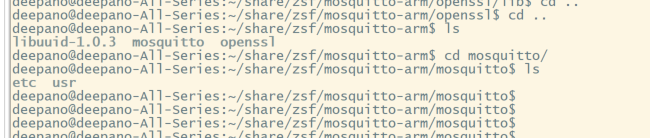
如何以上的操作步骤都没有问题你应该会得到以下文件
下面的操作步骤比较重要了
- 将mosquitto/etc/mosquitto/mosquitto.conf.example 文件拷贝到开发板/etc/下 命名为mosquitto.conf
- 将mosquitto/usr/local/bin下三个文件拷贝到 开发板/bin/下
- 将mosquitto/usr/local/lib 下文件拷贝到 开发板/lib下
- 将mosquitto/usr/local/sbin下文件拷贝到 开发板/bin/下
- 将libuuid-1.0.3/lib下文件拷贝到 开发板/lib下
- 将openssl/lib下文件拷贝到 开发板/lib下
开发板上运行 mosquitto_sub 看看是否运行正常,如果运行正常 那么说明环境没有问题了,下面开始编写C代码
c
/*
 * MQTT 发布者示例 - 适用于 RV1126B
 * 编译时需要链接 libmosquitto
 */

#include <mosquitto.h>
#include <stdio.h>
#include <stdlib.h>
#include <string.h>
#include <unistd.h>
#include <time.h>

/* 连接回调:当客户端收到 CONNACK 时调用 */
void on_connect(struct mosquitto *mosq, void *obj, int reason_code)
{
    printf("连接结果: %s\n", mosquitto_connack_string(reason_code));
    if (reason_code != 0) {
        mosquitto_disconnect(mosq);
    }
}

/* 发布回调:确认消息已发送 */
void on_publish(struct mosquitto *mosq, void *obj, int mid)
{
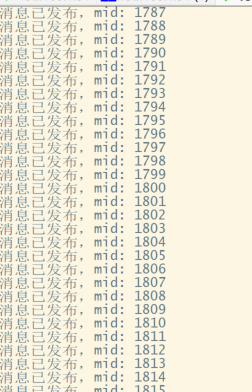
    printf("消息已发布,mid: %d\n", mid);
}

/* 模拟读取传感器数据 */
int get_temperature(void)
{
    sleep(1);  // 模拟传感器采样频率
    return rand() % 100;
}

/* 发布传感器数据 */
void publish_sensor_data(struct mosquitto *mosq)
{
    char payload[20];
    int temp;
    int rc;

    temp = get_temperature();
    snprintf(payload, sizeof(payload), "{\"temperature\":%d}", temp);

    rc = mosquitto_publish(mosq, NULL, "/example/temperature",
                           strlen(payload), payload, 1, false);
    if (rc != MOSQ_ERR_SUCCESS) {
        fprintf(stderr, "发布失败: %s\n", mosquitto_strerror(rc));
    }
}

int main(int argc, char *argv[])
{
    struct mosquitto *mosq;
    int rc;

    if (argc < 2) {
        fprintf(stderr, "用法: %s <broker_ip>\n", argv[0]);
        return 1;
    }

    char *broker = argv[1];

    /* 初始化 libmosquitto */
    mosquitto_lib_init();

    /* 创建客户端实例 */
    mosq = mosquitto_new(NULL, true, NULL);
    if (mosq == NULL) {
        fprintf(stderr, "创建客户端失败\n");
        return 1;
    }

    /* 设置回调函数 */
    mosquitto_connect_callback_set(mosq, on_connect);
    mosquitto_publish_callback_set(mosq, on_publish);

    /* 连接到 broker */
    rc = mosquitto_connect(mosq, broker, 1883, 60);
    if (rc != MOSQ_ERR_SUCCESS) {
        fprintf(stderr, "连接失败: %s\n", mosquitto_strerror(rc));
        mosquitto_destroy(mosq);
        return 1;
    }

    /* 启动网络循环(后台线程) */
    rc = mosquitto_loop_start(mosq);
    if (rc != MOSQ_ERR_SUCCESS) {
        fprintf(stderr, "启动循环失败: %s\n", mosquitto_strerror(rc));
        mosquitto_destroy(mosq);
        return 1;
    }

    /* 主循环:定期发布数据 */
    while (1) {
        publish_sensor_data(mosq);
    }

    mosquitto_lib_cleanup();
    return 0;
}
C代码的交叉编译要注意
在你的代码目录下配置好环境
c
export CFLAGS="-I/home/deepano/share/zsf/mosquitto-arm/mosquitto/usr/local/include"
export LDFLAGS="-L/home/deepano/share/zsf/mosquitto-arm/libuuid-1.0.3/lib -L/home/deepano/share/zsf/mosquitto-arm/mosquitto/usr/local/lib -L/home/deepano/share/zsf/mosquitto-arm/openssl/lib"

$CC -o mqtt_publisher mqtt_publisher.c $CFLAGS $LDFLAGS -lmosquitto -lssl -lcrypto -luuid
然后就放到开发板上运行了
附件是我编译好的文件 可以直接使用