文章目录
- [1. 前言](#1. 前言)
- [2. 底层 Tool API](#2. 底层 Tool API)
-
- [2.1 ToolCallback](#2.1 ToolCallback)
- [2.2 ToolDefinition](#2.2 ToolDefinition)
-
- [2.2.1 方法型工具定义](#2.2.1 方法型工具定义)
- [2.2.2 函数型工具定义](#2.2.2 函数型工具定义)
- [2.3 ToolMetadata](#2.3 ToolMetadata)
- [2.3. JSON Schema](#2.3. JSON Schema)
-
- [2.3.1 定义](#2.3.1 定义)
- [2.3.2 JsonSchemaGenerator](#2.3.2 JsonSchemaGenerator)
- [2.3.3 描述(Description)](#2.3.3 描述(Description))
- [2.3.4 参数必填 / 可选](#2.3.4 参数必填 / 可选)
- [2.4 ResultConversion](#2.4 ResultConversion)
- [2.5 ToolContext](#2.5 ToolContext)
- [2.6 ReturnDirect](#2.6 ReturnDirect)
1. 前言
在 Spring AI 中,工具通过 ToolCallback 接口进行建模。在前面的章节中,我们已经了解了如何借助 Spring AI 提供的内置支持,从方法和函数定义工具。
本章将深入讲解工具规范,以及如何对其进行自定义与扩展,以支持更多使用场景。
2. 底层 Tool API
2.1 ToolCallback
ToolCallback 接口提供了一种定义可被 AI 模型调用的工具的方式,同时包含工具定义与执行逻辑。如果你需要从零开始定义工具,这是需要实现的核心接口。
Spring AI 为方法型工具(MethodToolCallback)和函数型工具(FunctionToolCallback)提供了内置实现。
该接口提供以下方法:
java
public interface ToolCallback {

    /**
     * 供 AI 模型判断「何时、如何调用该工具」的定义信息。
     */
    ToolDefinition getToolDefinition();

    /**
     * 用于提供如何处理该工具的附加信息的元数据。
     */
    ToolMetadata getToolMetadata();

    /**
     * 使用给定入参执行工具,并返回要回传给 AI 模型的结果。
     */
    String call(String toolInput);

    /**
     * 使用给定入参和上下文执行工具,并返回要回传给 AI 模型的结果。
     */
    String call(String toolInput, ToolContext toolContext);

}
2.2 ToolDefinition
ToolDefinition 为 AI 模型提供「可调用工具的核心元信息」, 告诉模型这个工具叫什么、能做什么、需要传什么格式的参数。每个 ToolCallback 实现必须提供 ToolDefinition 实例来定义 tool。
接口定义:
java
package org.springframework.ai.tool.definition;

public interface ToolDefinition {
    String name();

    String description();

    String inputSchema();

    static DefaultToolDefinition.Builder builder() {
        return DefaultToolDefinition.builder();
    }
}
核心方法:
String name():工具的唯一名称。String description():工具的功能描述,强烈建议提供详细描述。String inputSchema():工具入参的JSON Schema字符串。未指定时将根据方法参数自动生成。可通过@ToolParam注解补充参数信息(如描述、是否必选),默认所有参数均为必选。
提供了默认实现类 DefaultToolDefinition ,可以通过 ToolDefinition.Builder 方法使用默认实现构建实例:
java
// 1. 调用接口的静态builder方法,获取默认实现的构建器
ToolDefinition weatherTool = ToolDefinition.builder()
    // 2. 设置工具名称(唯一)
    .name("getCurrentWeather")
    // 3. 设置工具描述(核心,让模型理解功能)
    .description("查询指定城市的实时天气,支持摄氏度(C)/华氏度(F)")
    // 4. 设置入参的JSON Schema(告诉模型参数规则)
    .inputSchema("""
        {
            "type": "object",
            "properties": {
                "location": {
                    "type": "string",
                    "description": "城市名称,比如北京、上海"
                },
                "unit": {
                    "type": "string",
                    "enum": ["C", "F"],
                    "description": "温度单位,可选C/F"
                }
            },
            "required": ["location"] // location必填,unit可选
        }
    """)
    // 5. 构建实例
    .build();
2.2.1 方法型工具定义
在方法型工具定义时,如果方法上标注了 @Tool,则名称和描述优先从注解中读取。
java
    @Tool(name = "get_current_date_time", description = "获取用户时区下的当前日期和时间,格式为 yyyy-MM-dd HH:mm:ss")
    public String getCurrentDateTime() {
        LocalDateTime now = LocalDateTime.now(LocaleContextHolder.getTimeZone().toZoneId());
        return now.format(DATETIME_FORMATTER);
    }
如果是自定义构建 MethodToolCallback 时,ToolDefinition 也会自动生成:
java
        Method method = ReflectionUtils.findMethod(OtherDateTimeTools.class, "getCurrentDateTime");
        ToolCallback toolCallback = MethodToolCallback.builder()
                .toolMethod(method)
                .build();
此时,从方法生成的 ToolDefinition 规则为:
- 工具名 = 方法名
- 工具描述 = 方法名
- 输入模式 = 方法参数自动生成的
JSON Schema
实际开发时,还是需要自定义 ToolDefinition ,生成更加规范的工具:
java
        Method method = ReflectionUtils.findMethod(DateTimeTools.class, "getCurrentDateTime");
        ToolDefinition toolDefinition = ToolDefinitions.builder(method)
                .name("currentDateTime")
                .description("Get the current date and time in the user's timezone")
                .inputSchema(JsonSchemaGenerator.generateForMethodInput(method))
                .build();
        ToolCallback toolCallback = MethodToolCallback.builder()
                .toolDefinition(toolDefinition)
                .toolMethod(method)
                .build();
2.2.2 函数型工具定义
从函数构建工具时,ToolDefinition 同样会自动生成。使用 FunctionToolCallback.Builder 时,你可以直接指定:
- 工具名称
- 工具描述
JSON Schema
2.3 ToolMetadata
ToolMetadata(工具元数据)是为「工具」提供的结果流向配置接口,核心作用是控制工具执行后的结果,是直接返回给客户端,还是先回传给 AI 模型再处理。
接口定义:
java
public interface ToolMetadata {
    default boolean returnDirect() {
        return false;
    }

    static DefaultToolMetadata.Builder builder() {
        return DefaultToolMetadata.builder();
    }

    static ToolMetadata from(Method method) {
        Assert.notNull(method, "method cannot be null");
        return DefaultToolMetadata.builder().returnDirect(ToolUtils.getToolReturnDirect(method)).build();
    }
}
可以通过 ToolMetadata.Builder 构建实例,定义工具的额外配置:
java
ToolMetadata metadata = ToolMetadata.builder()
    .returnDirect(true) // 手动设置结果直接返回
    .build();
MethodToolCallback 方法型工具时进行配置示例:
java
        Method method = ReflectionUtils.findMethod(OtherDateTimeTools.class, "getCurrentDateTime");
        ToolDefinition toolDefinition = ToolDefinitions.builder(method)
                .description("获取用户时区下的当前日期和时间")
                .build();
        ToolMetadata metadata = ToolMetadata.builder()
                .returnDirect(true) // 手动设置结果直接返回
                .build();
        ToolCallback toolCallback = MethodToolCallback.builder()
                .toolDefinition(toolDefinition)
                .toolMethod(method)
                .toolMetadata(metadata)
                .build();
函数型工具示例:
java
        ToolCallback toolCallback = FunctionToolCallback
                // 指定工具名称和函数实例
                .builder("currentWeather", new WeatherService())
                // 配置工具描述
                .description("查询指定地区的天气信息")
                // 指定输入参数类型
                .inputType(WeatherRequest.class)
                .toolMetadata(metadata)
                .build();
2.3. JSON Schema
2.3.1 定义
向 AI 模型提供工具时,模型需要知道调用该工具的入参格式,这个格式就是 JSON Schema,用于让模型理解:
- 如何调用工具
- 如何构造参数
简单来说,JSON Schema 就是给大模型看的「工具参数说明书」,描述一段 JSON 应该有哪些字段、字段类型、哪些必填、允许哪些值、字段是什么意思。
例如,天气查询工具入参 JSON Schema:
java
{
  "type": "object",
  "properties": {
    "location": {
      "type": "string",
      "description": "城市名称,例如:北京、上海"
    },
    "unit": {
      "type": "string",
      "description": "温度单位",
      "enum": ["C", "F"]
    }
  },
  "required": ["location"]
}
2.3.2 JsonSchemaGenerator
Spring AI 通过 JsonSchemaGenerator 类自动生成 Tool Calling 所需的 JSON Schema 字符串。只需给 Java 方法 / 参数加注解,就能自动生成符合 AI 模型要求的入参规则,大幅降低 Tool Calling 的开发成本。
源码如下:
java
public final class JsonSchemaGenerator {
    private static final boolean PROPERTY_REQUIRED_BY_DEFAULT = true;
    private static final SchemaGenerator TYPE_SCHEMA_GENERATOR;
    private static final SchemaGenerator SUBTYPE_SCHEMA_GENERATOR;

    private JsonSchemaGenerator() {
    }

    public static String generateForMethodInput(Method method, SchemaOption... schemaOptions) {
        ObjectNode schema = JsonParser.getObjectMapper().createObjectNode();
        schema.put("$schema", SchemaVersion.DRAFT_2020_12.getIdentifier());
        schema.put("type", "object");
        ObjectNode properties = schema.putObject("properties");
        List<String> required = new ArrayList();

        for(int i = 0; i < method.getParameterCount(); ++i) {
            String parameterName = method.getParameters()[i].getName();
            Type parameterType = method.getGenericParameterTypes()[i];
            if (parameterType instanceof Class<?> parameterClass) {
                if (ClassUtils.isAssignable(ToolContext.class, parameterClass)) {
                    continue;
                }
            }

            if (isMethodParameterRequired(method, i)) {
                required.add(parameterName);
            }

            ObjectNode parameterNode = SUBTYPE_SCHEMA_GENERATOR.generateSchema(parameterType, new Type[0]);
            parameterNode.remove("format");
            String parameterDescription = getMethodParameterDescription(method, i);
            if (StringUtils.hasText(parameterDescription)) {
                parameterNode.put("description", parameterDescription);
            }

            properties.set(parameterName, parameterNode);
        }

        ArrayNode requiredArray = schema.putArray("required");
        Objects.requireNonNull(requiredArray);
        required.forEach(requiredArray::add);
        processSchemaOptions(schemaOptions, schema);
        return schema.toPrettyString();
    }

    public static String generateForType(Type type, SchemaOption... schemaOptions) {
        Assert.notNull(type, "type cannot be null");
        ObjectNode schema = TYPE_SCHEMA_GENERATOR.generateSchema(type, new Type[0]);
        if (type == Void.class && !schema.has("properties")) {
            schema.putObject("properties");
        }

        processSchemaOptions(schemaOptions, schema);
        return schema.toPrettyString();
    }

    private static void processSchemaOptions(SchemaOption[] schemaOptions, ObjectNode schema) {
        if (Stream.of(schemaOptions).noneMatch((option) -> {
            return option == JsonSchemaGenerator.SchemaOption.ALLOW_ADDITIONAL_PROPERTIES_BY_DEFAULT;
        })) {
            schema.put("additionalProperties", false);
        }

        if (Stream.of(schemaOptions).anyMatch((option) -> {
            return option == JsonSchemaGenerator.SchemaOption.UPPER_CASE_TYPE_VALUES;
        })) {
            convertTypeValuesToUpperCase(schema);
        }

    }

    private static boolean isMethodParameterRequired(Method method, int index) {
        Parameter parameter = method.getParameters()[index];
        ToolParam toolParamAnnotation = (ToolParam)parameter.getAnnotation(ToolParam.class);
        if (toolParamAnnotation != null) {
            return toolParamAnnotation.required();
        } else {
            JsonProperty propertyAnnotation = (JsonProperty)parameter.getAnnotation(JsonProperty.class);
            if (propertyAnnotation != null) {
                return propertyAnnotation.required();
            } else {
                Schema schemaAnnotation = (Schema)parameter.getAnnotation(Schema.class);
                if (schemaAnnotation == null) {
                    Nullable nullableAnnotation = (Nullable)parameter.getAnnotation(Nullable.class);
                    return nullableAnnotation == null;
                } else {
                    return schemaAnnotation.requiredMode() == RequiredMode.REQUIRED || schemaAnnotation.requiredMode() == RequiredMode.AUTO || schemaAnnotation.required();
                }
            }
        }
    }

    @Nullable
    private static String getMethodParameterDescription(Method method, int index) {
        Parameter parameter = method.getParameters()[index];
        ToolParam toolParamAnnotation = (ToolParam)parameter.getAnnotation(ToolParam.class);
        if (toolParamAnnotation != null && StringUtils.hasText(toolParamAnnotation.description())) {
            return toolParamAnnotation.description();
        } else {
            JsonPropertyDescription jacksonAnnotation = (JsonPropertyDescription)parameter.getAnnotation(JsonPropertyDescription.class);
            if (jacksonAnnotation != null && StringUtils.hasText(jacksonAnnotation.value())) {
                return jacksonAnnotation.value();
            } else {
                Schema schemaAnnotation = (Schema)parameter.getAnnotation(Schema.class);
                return schemaAnnotation != null && StringUtils.hasText(schemaAnnotation.description()) ? schemaAnnotation.description() : null;
            }
        }
    }

    public static void convertTypeValuesToUpperCase(ObjectNode node) {
        if (node.isObject()) {
            node.fields().forEachRemaining((entry) -> {
                JsonNode value = (JsonNode)entry.getValue();
                if (value.isObject()) {
                    convertTypeValuesToUpperCase((ObjectNode)value);
                } else if (value.isArray()) {
                    value.elements().forEachRemaining((element) -> {
                        if (element.isObject() || element.isArray()) {
                            convertTypeValuesToUpperCase((ObjectNode)element);
                        }

                    });
                } else if (value.isTextual() && ((String)entry.getKey()).equals("type")) {
                    String oldValue = node.get("type").asText();
                    node.put("type", oldValue.toUpperCase());
                }

            });
        } else if (node.isArray()) {
            node.elements().forEachRemaining((element) -> {
                if (element.isObject() || element.isArray()) {
                    convertTypeValuesToUpperCase((ObjectNode)element);
                }

            });
        }

    }

    static {
        Module jacksonModule = new JacksonModule(new JacksonOption[]{JacksonOption.RESPECT_JSONPROPERTY_REQUIRED});
        Module openApiModule = new Swagger2Module();
        Module springAiSchemaModule = new SpringAiSchemaModule(new SpringAiSchemaModule.Option[0]);
        SchemaGeneratorConfigBuilder schemaGeneratorConfigBuilder = (new SchemaGeneratorConfigBuilder(SchemaVersion.DRAFT_2020_12, OptionPreset.PLAIN_JSON)).with(jacksonModule).with(openApiModule).with(springAiSchemaModule).with(Option.EXTRA_OPEN_API_FORMAT_VALUES, new Option[0]).with(Option.PLAIN_DEFINITION_KEYS, new Option[0]);
        SchemaGeneratorConfig typeSchemaGeneratorConfig = schemaGeneratorConfigBuilder.build();
        TYPE_SCHEMA_GENERATOR = new SchemaGenerator(typeSchemaGeneratorConfig);
        SchemaGeneratorConfig subtypeSchemaGeneratorConfig = schemaGeneratorConfigBuilder.without(Option.SCHEMA_VERSION_INDICATOR, new Option[0]).build();
        SUBTYPE_SCHEMA_GENERATOR = new SchemaGenerator(subtypeSchemaGeneratorConfig);
    }

    public static enum SchemaOption {
        ALLOW_ADDITIONAL_PROPERTIES_BY_DEFAULT,
        UPPER_CASE_TYPE_VALUES;

        private SchemaOption() {
        }
    }
}
核心静态方法:
generateForMethodInput:为Java方法入参生成JSON Schema。generateForType:为任意Java类型生成JSON Schema。isMethodParameterRequired:判断方法参数是否必填(注解优先级)。getMethodParameterDescription:提取参数描述(注解优先级)。
内部枚举类枚举 SchemaOption 定义了 Schema 生成规则:
java
public static enum SchemaOption {
    // 允许额外属性(默认禁止)
    ALLOW_ADDITIONAL_PROPERTIES_BY_DEFAULT,
    // 将 type 值转大写(比如 string → STRING)
    UPPER_CASE_TYPE_VALUES;
}
2.3.3 描述(Description)
JSON Schema 生成逻辑支持一系列注解,你可以用它们来自定义参数描述与必填性。
除给工具本身写描述外,还可以给每个入参写描述,帮助模型理解:
- 参数格式
- 允许的取值
- 含义与约束
Spring AI 支持以下注解(优先级不分先后):
Spring AI:@ToolParam(description = "...")Jackson:@JsonClassDescription(description = "...")Jackson:@JsonPropertyDescription(description = "...")Swagger:@Schema(description = "...")
该方式适用于方法、函数、嵌套对象。示例:
java
@Tool(description = "Set a user alarm for the given time")
void setAlarm(@ToolParam(description = "Time in ISO-8601 format") String time) {
    // ...
}
2.3.4 参数必填 / 可选
默认所有参数都是必填。你可以用以下注解将参数设为可选,优先级从高到低:
@ToolParam(required = false)(Spring AI)@JsonProperty(required = false)(Jackson)@Schema(required = false)(Swagger)@Nullable(Spring Framework)
示例:
java
@Tool(description = "Update customer information")
void updateCustomerInfo(
    Long id,
    String name,
    @ToolParam(required = false) String email
) {
    // ...
}
正确设置必填/可选非常关键,可以大幅减少模型幻觉:
- 必填参数:模型必须拿到有效值才会调用
- 可选参数:模型可以不传
- 该填却没值时,模型容易编造数据 → 幻觉
2.4 ResultConversion
工具调用的结果会通过 ToolCallResultConverter 序列化后,再发送给 AI 模型。该接口用于把工具返回的任意对象,转为字符串。
接口定义:
java
@FunctionalInterface
public interface ToolCallResultConverter {
    String convert(@Nullable Object result, @Nullable Type returnType);
}
注意事项:
- 结果必须是可序列化类型
- 默认使用
Jackson序列化为JSON(DefaultToolCallResultConverter) - 你可以提供自定义实现
声明式方法型工具结果转换:
java
@Tool(
    description = "Retrieve customer information",
    resultConverter = CustomToolCallResultConverter.class
)
Customer getCustomerInfo(Long id) { ... }
编程式方法型工具结果转换::
java
MethodToolCallback.builder()
    .resultConverter(yourConverter)
    .build()
函数型工具结果转换:
java
FunctionToolCallback.builder()
    .resultConverter(yourConverter)
    .build()
2.5 ToolContext
Spring AI 支持通过 ToolContext API,向工具传入额外的上下文数据。这些数据可以与 AI 模型传递的工具参数一起用于工具执行中,常用于:
- 租户
ID - 用户身份
- 请求级别的环境信息
执行流程图:
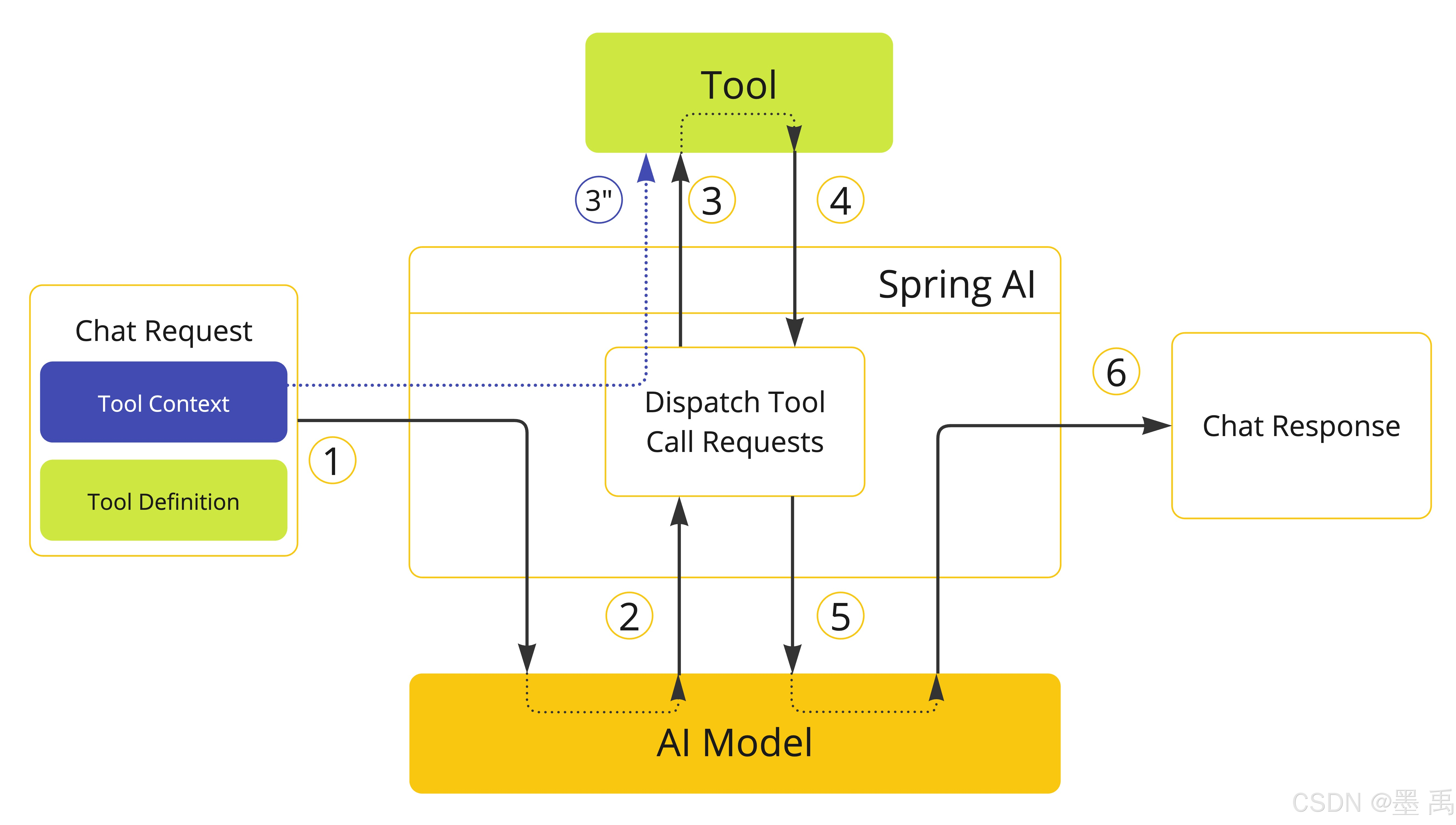
在工具中使用上下文:
java
@Tool(description = "Retrieve customer information")
Customer getCustomerInfo(Long id, ToolContext toolContext) {
    String tenantId = toolContext.getContext().get("tenantId");
    return customerRepository.findById(id, tenantId);
}
使用 ChatClient :
java
String response = ChatClient.create(chatModel)
        .prompt("Tell me more about the customer with ID 42")
        .tools(new CustomerTools())
        .toolContext(Map.of("tenantId", "acme"))
        .call()
        .content();
使用 ChatModel 直接调用 :
java
ChatOptions chatOptions = ToolCallingChatOptions.builder()
    .toolCallbacks(customerTools)
    .toolContext(Map.of("tenantId", "acme"))
    .build();
上下文合并规则:
- 如果默认配置和运行时配置都设置了
toolContext - 最终结果是两者合并
- 运行时优先级更高,会覆盖默认配置中同名的
key
2.6 ReturnDirect
默认情况下,工具执行完的结果 → 发送给 AI 大模型 → 模型用这个结果润色、生成自然语言回答 → 最终返回给用户。可以配置 returnDirect = true 可以将工具结果直接返回给「调用者」,完全不发给 AI 模型。
适用场景:
RAG检索工具:工具已经查到了精准的文档 / 数据,不需要模型再加工,直接返回结果即可,避免多余处理- 终止推理的工具:工具执行后就结束对话(比如完成任务、退出),不需要模型继续循环思考。
ToolCallingManager 是 Spring AI 专门管理工具执行全过程的组件,它负责读取 returnDirect 属性,并执行操作:
returnDirect = true→ 结果直返调用者returnDirect = false→ 结果返回模型
如果同时调用多个工具:
- 只有 所有工具的
returnDirect都设为true→ 全部结果直返调用者 - 只要有一个工具是
false→ 所有工具的结果都会返回给模型
直接在工具方法上用 @Tool 注解,设置 returnDirect = true :
java
class CustomerTools {
    // 描述:查询客户信息,开启返回直达
    @Tool(description = "Retrieve customer information", returnDirect = true)
    Customer getCustomerInfo(Long id) {
        return customerRepository.findById(id);
    }
}
使用 ToolMetadata 构建器手动设置属性,适用于函数式工具:
java
// 构建工具元数据,开启返回直达
ToolMetadata toolMetadata = ToolMetadata.builder()
    .returnDirect(true)
    .build();