修改demo,改成用数据库存储数据。先添加依赖:
libs.versions.toml文件内容如下:
Groovy
[versions]
agp = "9.0.1"
coreKtx = "1.18.0"
junit = "4.13.2"
junitVersion = "1.3.0"
espressoCore = "3.7.0"
lifecycleRuntimeKtx = "2.10.0"
activityCompose = "1.13.0"
kotlin = "2.0.21"
composeBom = "2024.09.00"
lifecycle = "2.8.3" #版本变量名,可随意命名,下面引用到
navigation-compose = "2.8.0"
work = "2.9.1"
datastore = "1.1.0"
room = "2.8.4"
ksp = "2.0.21-1.0.28"

[libraries]
androidx-core-ktx = { group = "androidx.core", name = "core-ktx", version.ref = "coreKtx" }
junit = { group = "junit", name = "junit", version.ref = "junit" }
androidx-junit = { group = "androidx.test.ext", name = "junit", version.ref = "junitVersion" }
androidx-espresso-core = { group = "androidx.test.espresso", name = "espresso-core", version.ref = "espressoCore" }
androidx-lifecycle-runtime-ktx = { group = "androidx.lifecycle", name = "lifecycle-runtime-ktx", version.ref = "lifecycleRuntimeKtx" }
androidx-activity-compose = { group = "androidx.activity", name = "activity-compose", version.ref = "activityCompose" }
androidx-compose-bom = { group = "androidx.compose", name = "compose-bom", version.ref = "composeBom" }
androidx-compose-ui = { group = "androidx.compose.ui", name = "ui" }
androidx-compose-ui-graphics = { group = "androidx.compose.ui", name = "ui-graphics" }
androidx-compose-ui-tooling = { group = "androidx.compose.ui", name = "ui-tooling" }
androidx-compose-ui-tooling-preview = { group = "androidx.compose.ui", name = "ui-tooling-preview" }
androidx-compose-ui-test-manifest = { group = "androidx.compose.ui", name = "ui-test-manifest" }
androidx-compose-ui-test-junit4 = { group = "androidx.compose.ui", name = "ui-test-junit4" }
androidx-compose-material3 = { group = "androidx.compose.material3", name = "material3" }
lifecycle-viewmodel-compose = { group = "androidx.lifecycle", name = "lifecycle-viewmodel-compose", version.ref = "lifecycle" }
androidx-navigation-compose = { group = "androidx.navigation", name = "navigation-compose", version.ref = "navigation-compose" }
androidx-work-runtime-ktx = { group = "androidx.work", name = "work-runtime-ktx", version.ref = "work" }
androidx-datastore-preferences = { group = "androidx.datastore", name = "datastore-preferences", version.ref = "datastore" }
androidx-room-runtime = { group = "androidx.room", name = "room-runtime", version.ref = "room" }
androidx-room-ktx = { group = "androidx.room", name = "room-ktx", version.ref = "room" }
androidx-room-compiler = { group = "androidx.room", name = "room-compiler", version.ref = "room" }

[plugins]
android-application = { id = "com.android.application", version.ref = "agp" }
kotlin-compose = { id = "org.jetbrains.kotlin.plugin.compose", version.ref = "kotlin" }
ksp = { id = "com.google.devtools.ksp", version.ref = "ksp" }
app/build.gradle.kts内容如下:
Groovy
plugins {
    alias(libs.plugins.android.application)
    alias(libs.plugins.kotlin.compose)
    alias(libs.plugins.ksp)
}

android {
    namespace = "com.example.testcompose1"
    compileSdk {
        version = release(36)
    }

    defaultConfig {
        applicationId = "com.example.testcompose1"
        minSdk = 29
        targetSdk = 36
        versionCode = 1
        versionName = "1.0"

        testInstrumentationRunner = "androidx.test.runner.AndroidJUnitRunner"
    }

    buildTypes {
        release {
            isMinifyEnabled = false
            proguardFiles(
                getDefaultProguardFile("proguard-android-optimize.txt"),
                "proguard-rules.pro"
            )
        }
    }
    compileOptions {
        sourceCompatibility = JavaVersion.VERSION_11
        targetCompatibility = JavaVersion.VERSION_11
    }
    buildFeatures {
        compose = true
    }
}

dependencies {
    implementation(libs.androidx.core.ktx)
    implementation(libs.androidx.lifecycle.runtime.ktx)
    implementation(libs.androidx.activity.compose)
    implementation(platform(libs.androidx.compose.bom))
    implementation(libs.androidx.compose.ui)
    implementation(libs.androidx.compose.ui.graphics)
    implementation(libs.androidx.compose.ui.tooling.preview)
    implementation(libs.androidx.compose.material3)
    testImplementation(libs.junit)
    androidTestImplementation(libs.androidx.junit)
    androidTestImplementation(libs.androidx.espresso.core)
    androidTestImplementation(platform(libs.androidx.compose.bom))
    androidTestImplementation(libs.androidx.compose.ui.test.junit4)
    debugImplementation(libs.androidx.compose.ui.tooling)
    debugImplementation(libs.androidx.compose.ui.test.manifest)

    implementation(libs.lifecycle.viewmodel.compose)

    // 包含pullRefresh功能
    implementation("androidx.compose.material:material")
    // 导航框架
    implementation(libs.androidx.navigation.compose)
    // 添加 WorkManager 依赖
    implementation(libs.androidx.work.runtime.ktx)

    implementation(libs.androidx.datastore.preferences)

    // Room(注解处理使用 KSP)
    implementation(libs.androidx.room.runtime)
    implementation(libs.androidx.room.ktx)
    ksp(libs.androidx.room.compiler)
}
build.gradle.kts内容如下:
Groovy
// Top-level build file where you can add configuration options common to all sub-projects/modules.
plugins {
    alias(libs.plugins.android.application) apply false
    alias(libs.plugins.kotlin.compose) apply false
    alias(libs.plugins.ksp) apply false
}
gradle.properties内容如下:
Groovy
# Project-wide Gradle settings.
# IDE (e.g. Android Studio) users:
# Gradle settings configured through the IDE *will override*
# any settings specified in this file.
# For more details on how to configure your build environment visit
# http://www.gradle.org/docs/current/userguide/build_environment.html
# Specifies the JVM arguments used for the daemon process.
# The setting is particularly useful for tweaking memory settings.
org.gradle.jvmargs=-Xmx2048m -Dfile.encoding=UTF-8
# When configured, Gradle will run in incubating parallel mode.
# This option should only be used with decoupled projects. For more details, visit
# https://developer.android.com/r/tools/gradle-multi-project-decoupled-projects
# org.gradle.parallel=true
# AndroidX package structure to make it clearer which packages are bundled with the
# Android operating system, and which are packaged with your app's APK
# https://developer.android.com/topic/libraries/support-library/androidx-rn
android.useAndroidX=true
# Kotlin code style for this project: "official" or "obsolete":
kotlin.code.style=official
# Enables namespacing of each library's R class so that its R class includes only the
# resources declared in the library itself and none from the library's dependencies,
# thereby reducing the size of the R class for that library
android.nonTransitiveRClass=true
# KSP ä¸ AGP 9 å
ç½® Kotlinï¼å
许éè¿ kotlin.sourceSets 注åçæä>>£ç ï¼è§æå>>ºé误æ示ï¼
android.disallowKotlinSourceSets=false新增数据类:
Kotlin
package com.example.testcompose1.data

import androidx.room.Entity
import androidx.room.PrimaryKey

// 待办事项数据实体类
@Entity(tableName = "todo_items")
data class TodoEntity(
    @PrimaryKey(autoGenerate = true)
    val id: Int = 0,
    val title: String,
    val isCompleted: Boolean = false, // 是否已完成
    val createdAt: Long = System.currentTimeMillis()
)
新增数据访问对象:
Kotlin
package com.example.testcompose1.data

import androidx.room.Dao
import androidx.room.Delete
import androidx.room.Insert
import androidx.room.Query
import androidx.room.Update
import kotlinx.coroutines.flow.Flow

// 数据访问对象
@Dao
interface TodoDao {
    @Query("SELECT * FROM todo_items ORDER BY createdAt DESC")
    fun getAllTodos(): Flow<List<TodoEntity>> // 返回数据流,需要持续监听数据,不加suspend关键字

    @Insert
    suspend fun insert(todo: TodoEntity)

    @Delete
    suspend fun delete(todo: TodoEntity)

    @Update
    suspend fun update(todo: TodoEntity)
}
新增数据库类:
Kotlin
package com.example.testcompose1.data

import android.content.Context
import androidx.room.Database
import androidx.room.Room
import androidx.room.RoomDatabase

// 数据库类
@Database(entities = [TodoEntity::class], version = 1, exportSchema = false)
abstract class TodoDatabase : RoomDatabase() { // 必须是抽象类
    abstract fun todoDao(): TodoDao // DAO方法必须是抽象的

    companion object {
        @Volatile
        private var INSTANCE: TodoDatabase? = null

        fun getInstance(context: Context): TodoDatabase {
            return INSTANCE ?: synchronized(this) {
                val instance = Room.databaseBuilder(
                    context.applicationContext,
                    TodoDatabase::class.java,
                    "todo_database"
                ).build()
                INSTANCE = instance
                instance
            }
        }
    }
}
数据仓库:
Kotlin
package com.example.testcompose1.data

import kotlinx.coroutines.flow.Flow

// 数据仓库
class TodoRepository(private val dao: TodoDao) {
    fun getAllTodos(): Flow<List<TodoEntity>> = dao.getAllTodos()

    suspend fun addTodo(title: String) {
        dao.insert(TodoEntity(title = title))
    }

    suspend fun deleteTodo(todo: TodoEntity) {
        dao.delete(todo)
    }

    suspend fun updateTodo(todo: TodoEntity) {
        dao.update(todo)
    }
}
修改TodoViewModel:
Kotlin
package com.example.testcompose1

import androidx.lifecycle.ViewModel
import androidx.lifecycle.viewModelScope
import com.example.testcompose1.data.TodoEntity
import com.example.testcompose1.data.TodoRepository
import kotlinx.coroutines.delay
import kotlinx.coroutines.flow.MutableStateFlow
import kotlinx.coroutines.flow.StateFlow
import kotlinx.coroutines.flow.asStateFlow
import kotlinx.coroutines.launch

class TodoViewModel(
    private val repository: TodoRepository // 数据仓库
) : ViewModel() {
//    // MutableStateFlow 为可修改的状态流
//    // 使用 StateFlow 持有待办列表,这样Compose可以观察
//    private val _todoItems = MutableStateFlow<List<String>>(emptyList())
//    // StateFlow 是MutableStateFlow的父接口, 只读。 即对外暴露这个只读的
//    val todoItems: StateFlow<List<String>> = _todoItems.asStateFlow()

    private val _todos = MutableStateFlow<List<TodoEntity>>(emptyList())
    val todos: StateFlow<List<TodoEntity>> = _todos.asStateFlow()

    init {
//        viewModelScope.launch {
//            // 模拟加载数据
//            delay(2000)
//            _todoItems.value = listOf("人中吕布,马中赤兔", "花无百日红", "人无再少年", "人生像客旅", "日光之下无新鲜事")
//        }
        loadTodos()
    }

    private fun loadTodos() {
        viewModelScope.launch {
            repository.getAllTodos().collect { list ->
                _todos.value = list
            }
        }
    }

//    fun addItem(item: String) {
//        if (item.isNotBlank()) {
//            _todoItems.value += item
//        }
//    }

//    fun removeItem(item: String) {
//        _todoItems.value -= item
//    }

    fun addTodo(title: String) {
        if (title.isNotBlank())
            viewModelScope.launch {
                repository.addTodo(title)
            }
    }

    fun deleteTodo(todo: TodoEntity) {
        viewModelScope.launch {
            repository.deleteTodo(todo)
        }
    }

    fun toggleComplete(todo: TodoEntity) {
        viewModelScope.launch {
            // TodoEntity是数据类,自带copy方法,拷贝一个对象,切换完成状态
            repository.updateTodo(todo.copy(isCompleted = !todo.isCompleted))
        }
    }
}
修改代办事项列表TodoListScreen:
Kotlin
package com.example.testcompose1

import androidx.compose.animation.AnimatedVisibility
import androidx.compose.animation.core.FastOutSlowInEasing
import androidx.compose.animation.core.tween
import androidx.compose.animation.fadeIn
import androidx.compose.animation.fadeOut
import androidx.compose.animation.scaleIn
import androidx.compose.animation.slideInHorizontally
import androidx.compose.animation.slideOutHorizontally
import androidx.compose.foundation.ExperimentalFoundationApi
import androidx.compose.foundation.background
import androidx.compose.foundation.clickable
import androidx.compose.foundation.layout.Arrangement
import androidx.compose.foundation.layout.Box
import androidx.compose.foundation.layout.Column
import androidx.compose.foundation.layout.Row
import androidx.compose.foundation.layout.Spacer
import androidx.compose.foundation.layout.fillMaxWidth
import androidx.compose.foundation.layout.height
import androidx.compose.foundation.layout.padding
import androidx.compose.foundation.lazy.LazyColumn
import androidx.compose.foundation.lazy.items
import androidx.compose.material.icons.Icons
import androidx.compose.material.icons.filled.ArrowBack
import androidx.compose.material.icons.filled.Delete
import androidx.compose.material3.Button
import androidx.compose.material3.ButtonDefaults
import androidx.compose.material3.Card
import androidx.compose.material3.CardDefaults
import androidx.compose.material3.Checkbox
import androidx.compose.material3.ExperimentalMaterial3Api
import androidx.compose.material3.Icon
import androidx.compose.material3.IconButton
import androidx.compose.material3.MaterialTheme
import androidx.compose.material3.Scaffold
import androidx.compose.material3.Switch
import androidx.compose.material3.Text
import androidx.compose.material3.TextField
import androidx.compose.material3.TextFieldDefaults
import androidx.compose.material3.TopAppBar
import androidx.compose.runtime.Composable
import androidx.compose.runtime.LaunchedEffect
import androidx.compose.runtime.SideEffect
import androidx.compose.runtime.collectAsState
import androidx.compose.runtime.getValue
import androidx.compose.runtime.mutableStateMapOf
import androidx.compose.runtime.mutableStateOf
import androidx.compose.runtime.remember
import androidx.compose.runtime.rememberCoroutineScope
import androidx.compose.runtime.setValue
import androidx.compose.ui.Alignment
import androidx.compose.ui.Modifier
import androidx.compose.ui.draw.clip
import androidx.compose.ui.platform.LocalConfiguration
import androidx.compose.ui.platform.LocalContext
import androidx.compose.ui.platform.LocalDensity
import androidx.compose.ui.text.style.TextDecoration
import androidx.compose.ui.tooling.preview.Preview
import androidx.compose.ui.unit.dp
import androidx.lifecycle.viewmodel.compose.viewModel
import com.example.testcompose1.data.TodoEntity
import kotlinx.coroutines.delay
import kotlinx.coroutines.launch
import java.util.Collections.rotate

@OptIn(ExperimentalMaterial3Api::class, ExperimentalFoundationApi::class)
@Composable
fun TodoListScreen(
    viewModel: TodoViewModel,  // 获取ViewModel实例。 在同一个activity作用域中是单例。
    settingsViewModel: SettingsViewModel,
    onNavigateToDetail: (Int) -> Unit = {}
) {
//    val screenWidth = LocalConfiguration.current.screenWidthDp.dp.value
    val configuration = LocalConfiguration.current
    val density = LocalDensity.current
    val screenWidthPx = with(density) { configuration.screenWidthDp.dp.toPx() }
    val offsetX = -(screenWidthPx * 3).toInt()  // 从屏幕左侧3倍宽度外滑入

    var showInfiniteList by remember { mutableStateOf(false) }
    if (showInfiniteList) {
        // 显示无限滚动列表,并提供一个返回按钮
        Scaffold(
            topBar = {
                TopAppBar(
                    title = { Text("无限滚动列表") },
                    navigationIcon = {
                        IconButton(onClick = { showInfiniteList = false }) {
                            Icon(Icons.Default.ArrowBack, contentDescription = "返回")
                        }
                    }
                )
            }
        ) { innerPadding ->
            // 给 InfiniteListPage 添加内边距
            Box(modifier = Modifier.padding(innerPadding)) {
                InfiniteListPage()
            }
        }
    } else { // 显示原待办事项列表
        // 使用 remember 和 mutableStateOf 保存输入框的文本
        var text by remember { mutableStateOf("") }
        // 使用 mutableStateListOf 保存待办项列表
//    val todoItems = remember { mutableStateListOf<String>() }
        // 将 StateFlow 转换为 Compose 可观察的 State
//        val todoItems by viewModel.todoItems.collectAsState()

        val todos by viewModel.todos.collectAsState()

        // 获取协程作用域,用于延迟删除
        val scope = rememberCoroutineScope()
        // 管理每个项的可见性,初始为 true,新添加的项先设为 false,然后立即设为 true
        val itemVisibility = remember { mutableStateMapOf<Int, Boolean>() } // key改为用id

        // 同步 itemVisibility 与 todoItems:为新增项添加初始 false,并在下一帧设为 true
        LaunchedEffect(todos) {
            todos.forEach { todo ->
                if (!itemVisibility.containsKey(todo.id)) {
                    // 新项:初始不可见
                    itemVisibility[todo.id] = false
                    // 等待一帧,然后设为可见,触发进入动画
                    launch {
                        delay(50) // 短暂延迟,确保重组
                        itemVisibility[todo.id] = true
                    }
                }
            }
            // 清理已删除的项
//            itemVisibility.keys.retainAll(todoItems.toSet())
            val currentIds = todos.map { it.id }.toSet()
            itemVisibility.keys.retainAll(currentIds)
        }

        Column(modifier = Modifier.padding(16.dp)) {
            ThemeSwitch(settingsViewModel)  // 添加开关
            Spacer(modifier = Modifier.height(8.dp))
            // 文本输入框
            TextField(
                value = text,
                onValueChange = { text = it }, // 反向绑定,视图变化--> 数据变化
                label = { Text("输入待办事项") },
                colors = TextFieldDefaults.colors(
                    focusedContainerColor = MaterialTheme.colorScheme.surface, // 获得焦点时的背景色
                    unfocusedContainerColor = MaterialTheme.colorScheme.surfaceVariant, // 失去焦点时,输入框背景色
                    focusedIndicatorColor = MaterialTheme.colorScheme.primary, // 输入框底部下划线的颜色。
                    unfocusedIndicatorColor = MaterialTheme.colorScheme.onSurface.copy(alpha = 0.5f)
                ),
                modifier = Modifier.fillMaxWidth()
            )
            // 添加按钮
            Button(
                onClick = {
                    viewModel.addTodo(text)
                    text = ""
                },
                shape = MaterialTheme.shapes.small,  // 使用主题形状
                colors = ButtonDefaults.buttonColors(
                    containerColor = MaterialTheme.colorScheme.primary, // 容器背景色,按钮底色
                    contentColor = MaterialTheme.colorScheme.onPrimary // 内容颜色,按钮上文字 / 图标的颜色
                ),
                modifier = Modifier.padding(top = 8.dp)
            ) {
                Text("添加")
            }

            // 显示待办列表
            Spacer(modifier = Modifier.height(16.dp))
            Text("待办列表", style = MaterialTheme.typography.titleMedium)
            LazyColumn {
                items(items = todos
                ,key = { it.id }) //  使用唯一 id 作为 key,确保动画正确识别
                { todo ->
                    val visible = itemVisibility[todo.id] ?: true
                    // 为每个项添加动画。 AnimatedVisibility没起作用
                    AnimatedVisibility(
                        visible = visible,
                        enter = fadeIn(animationSpec = tween(1500, easing = FastOutSlowInEasing)) +
                                slideInHorizontally(
                                    initialOffsetX = { -3000 },  // 固定大偏移量,从左侧 3000 像素外滑入
                                    animationSpec = tween(1500, easing = FastOutSlowInEasing)
                                ) +
                                scaleIn(
                                    initialScale = 0.1f,
                                    animationSpec = tween(1500, easing = FastOutSlowInEasing)
                                ),
                        exit = fadeOut(animationSpec = tween(500)) +
                                slideOutHorizontally(targetOffsetX = { 200 }
                                    , animationSpec = tween(500))
                    ) {
                        // SideEffect 是一个专门用于执行副作用的可组合函数。它的主要作用是在每次 重组(recomposition) 时,安全地执行那些不直接影响 UI、但需要与外部系统交互的操作(例如日志记录、埋点、更新非 Compose 管理的状态等)。
                        SideEffect {
                            println("Item ${todo.title} 显示动画执行")
                        }
                        TodoItemRow(todo = todo
                            , onDelete = {
                                // 触发删除动画
                                itemVisibility[todo.id] = false
                                scope.launch {
                                    delay(500)
//                                    viewModel.removeItem(item)
//                                    deletingItems = deletingItems - item
                                    viewModel.deleteTodo(todo)
                                    // 清理状态由 LaunchedEffect 的 retainAll 负责
                                }
                             }
                               ,onToggle = {
                                viewModel.toggleComplete(todo)  // 切换完成状态
                            }
                            , onClick = { onNavigateToDetail(todo.id) }// 点击跳转
                        )
                    }
                }
            }
        }
    }
}

@Composable
fun TodoItemRow(
                todo: TodoEntity
                , onDelete: () -> Unit  // 添加删除回调,删除逻辑放在上层。即把回调传给里面的按钮。
                ,onToggle: () -> Unit
    , onClick: () -> Unit
    , modifier: Modifier = Modifier
) {
    Card(
        modifier = modifier
            .fillMaxWidth()
            .padding(vertical = 4.dp)
            .clickable { onClick() }, // 现在 modifier 应该会叠加动画修饰符
        elevation = CardDefaults.cardElevation(
            defaultElevation = 2.dp // 这里传你要的默认高度
        ),
        shape = MaterialTheme.shapes.medium,  // 使用主题形状
        colors = CardDefaults.cardColors(
            containerColor = MaterialTheme.colorScheme.surface
        )
    ) {
        Row(
            verticalAlignment = Alignment.CenterVertically,
            modifier = Modifier
                .fillMaxWidth()
                .padding(vertical = 8.dp),
            horizontalArrangement = Arrangement.SpaceBetween // 横向布局子元素两端对齐,剩余空白空间平均分配到子元素之间
        ) {
            // 新增Checkbox,切换事项是否已完成的状态
            Checkbox(
                checked = todo.isCompleted,
                onCheckedChange = { onToggle() }
            )
            Text(text = todo.title
                ,style = MaterialTheme.typography.bodyLarge,
                color = MaterialTheme.colorScheme.onSurface
                ,textDecoration = if (todo.isCompleted) TextDecoration.LineThrough else null // LineThrough是中划线
            )
            IconButton(onClick = onDelete) {
                Icon(Icons.Default.Delete, contentDescription = "删除"
                    , tint = MaterialTheme.colorScheme.error)
            }
        }
    }
}

// 主题切换开关
@Composable
fun ThemeSwitch(settingsViewModel: SettingsViewModel) {
    val isDarkTheme by settingsViewModel.isDarkTheme.collectAsState()
    Row(
        modifier = Modifier
            .fillMaxWidth()
            .clip(MaterialTheme.shapes.medium)
            .background(MaterialTheme.colorScheme.surface)
            .padding(horizontal = 16.dp, vertical = 8.dp),
        horizontalArrangement = Arrangement.SpaceBetween,
        verticalAlignment = Alignment.CenterVertically
    ) {
        Text(
            text = "深色模式",
            style = MaterialTheme.typography.bodyLarge,
            color = MaterialTheme.colorScheme.onSurface
        )
        Switch(
            checked = isDarkTheme,
            onCheckedChange = { settingsViewModel.toggleDarkMode() }
        )
    }
}

// 为了允许手动切换深色/浅色模式,在应用中保存用户的选择,并在主题中读取. 后面改用DataStore保存
//object ThemeManager {
//    var isDarkTheme by mutableStateOf(false)
//        private set
//
//    fun toggleTheme() { // 切换是否为深色主题
//        isDarkTheme = !isDarkTheme
//    }
//}
修改MainActivity:
Kotlin
package com.example.testcompose1

import android.os.Bundle
import androidx.activity.ComponentActivity
import androidx.activity.compose.setContent
import androidx.compose.runtime.collectAsState
import androidx.compose.runtime.getValue

import com.example.testcompose1.ui.theme.MyAppTheme
import androidx.navigation.compose.rememberNavController
import androidx.navigation.compose.NavHost
import androidx.navigation.compose.composable
import com.example.testcompose1.data.PreferencesManager
import com.example.testcompose1.data.TodoDatabase
import com.example.testcompose1.data.TodoRepository

class MainActivity : ComponentActivity() {
    override fun onCreate(savedInstanceState: Bundle?) {
        super.onCreate(savedInstanceState)
        // 手动创建 PreferencesManager 和 SettingsViewModel
        val preferencesManager = PreferencesManager(applicationContext)
        val settingsViewModel = SettingsViewModel(preferencesManager)

        val db = TodoDatabase.getInstance(this)
        val dao = db.todoDao()
        val repository = TodoRepository(dao)
        val viewModel = TodoViewModel(repository)

        setContent {
            val isDarkTheme by settingsViewModel.isDarkTheme.collectAsState()
            MyAppTheme(
                darkTheme = isDarkTheme // 覆盖系统设置
                ,dynamicColor = false // 暂时禁用动态颜色。
            ) {
                // 导航控制器
                val navController = rememberNavController()
                NavHost(
                    navController = navController,
                    startDestination = "list"
                ) {
                    composable("list") {
                        TodoListScreen(
                            viewModel = viewModel,
                            settingsViewModel = settingsViewModel,
                            onNavigateToDetail = { id ->
                                navController.navigate("detail/$id")
                            }
                        )
                    }

                    // detail/{itemId} 是带参数的页面路径
                    composable("detail/{id}") { backStackEntry ->
                        val id = backStackEntry.arguments?.getString("id") ?: ""
                        TodoDetailScreen(
                            itemId = id,
                            onBack = { navController.popBackStack() }
                        )
                    }
                }
            }
        }
    }
}
测试下,刚开始是空的待办列表:
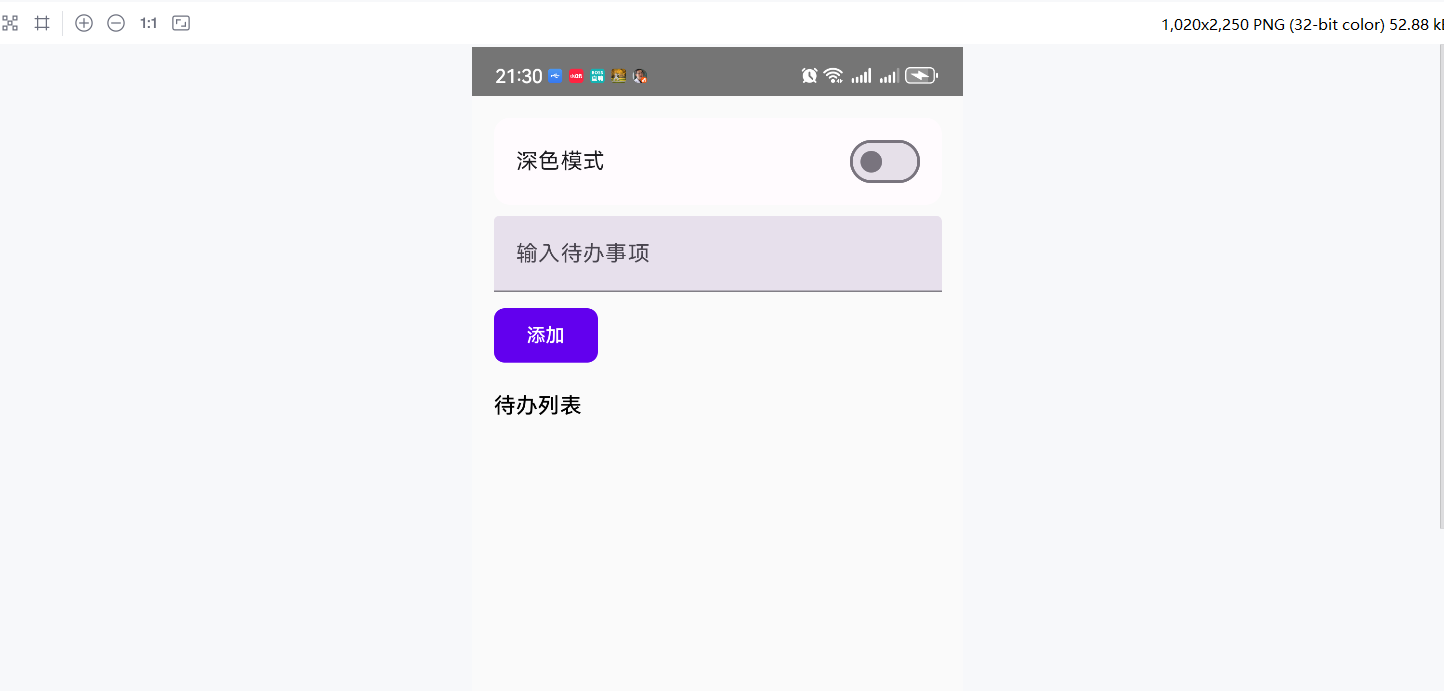
添加一些数据:
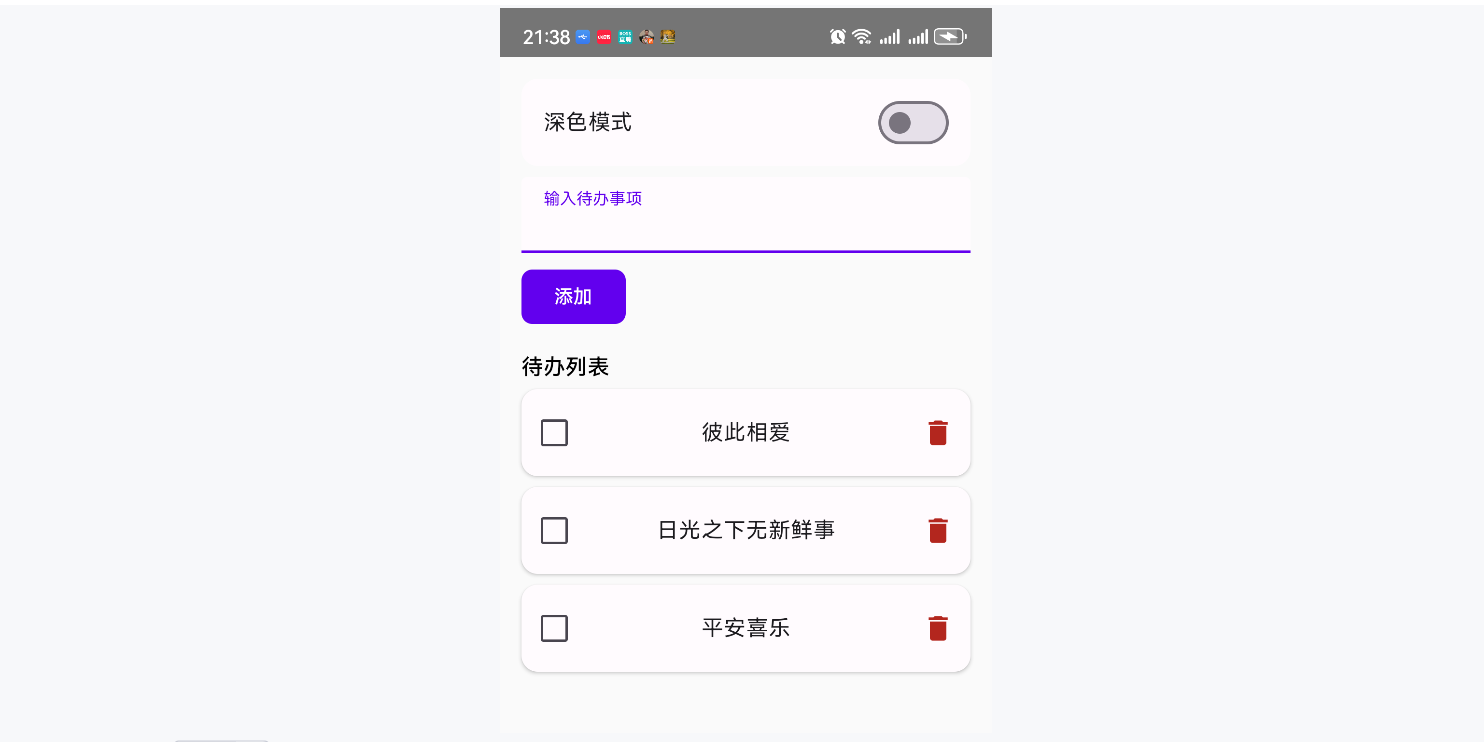
勾选:
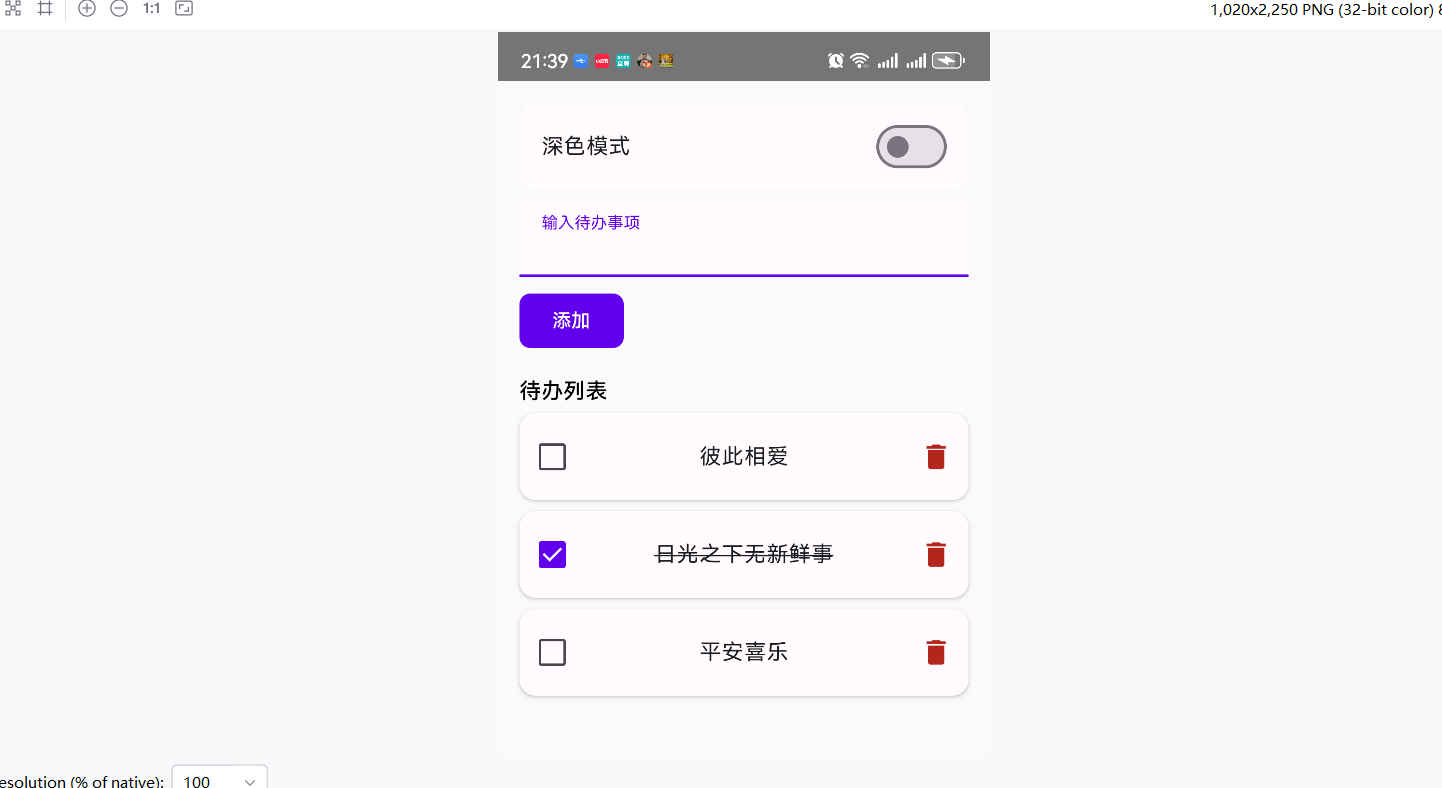
ok.