提示:文章写完后,目录可以自动生成,如何生成可参考右边的帮助文档
文章目录
- 前言
- 一、骆驼-HelloWord?
- 二、骆驼-组件
-
- [1.Choice Camel](#1.Choice Camel)
- [2.Dynamic Camel](#2.Dynamic Camel)
- 总结
前言
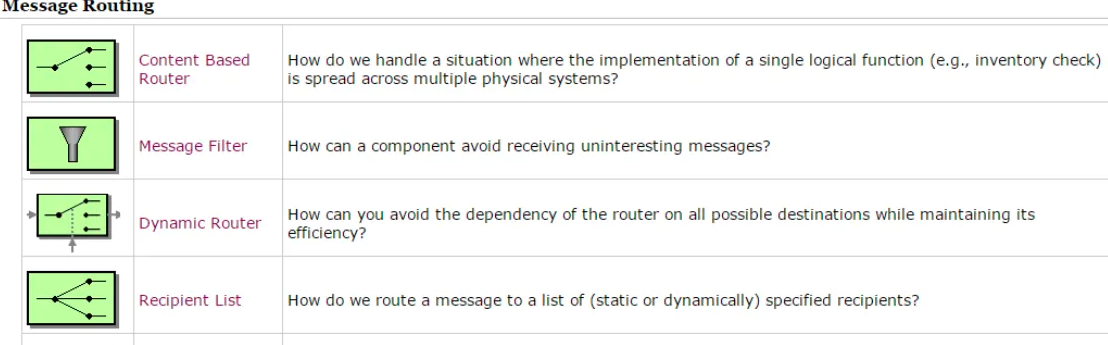
最近研究EIP,以前了解过Apache Camel,但是一直是不入门状态,闹不清楚其中的概念和用法,遂决定写一系列博客,记录下"""骆驼"的概念和使用API,一来熟悉使用,二来做个API留存,以后一旦有需要,直接查询博客,CTL+CV哈哈。
注:文中大部分代码样例来源:https://blog.csdn.net/column/details/19378.html,不过改博主已停止更新好多年,网页也打不开,但是吃水不忘挖井人,还是要申明下的,嘿嘿
一、骆驼-HelloWord?
按照惯例,首先还是上一段helloword代码
c
public class APPHelloWorld01 extends RouteBuilder {
 public static void main(String[] args) throws Exception {
        ModelCamelContext camelContext = new DefaultCamelContext();
        camelContext.start();
        camelContext.addRoutes(new APPHelloWorld01());
        synchronized (APPHelloWorld01.class) {
            APPHelloWorld01.class.wait();
        }
    }
    @Override
    public void configure() throws Exception {
        // 在本代码段之下随后的说明中,会详细说明这个构造的含义
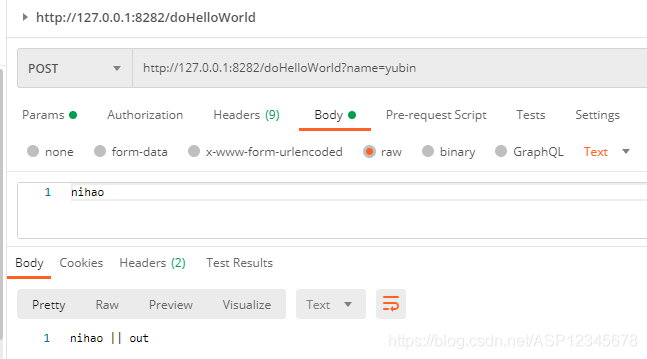
        from("jetty:http://127.0.0.1:8282/doHelloWorld").process(new HttpProcessor())
                .to("log:helloworld?showExchangeId=true");
    }
    public class HttpProcessor implements Processor {

        public void process(Exchange exchange) throws Exception {
            // 因为很明确消息格式是http的,所以才使用这个类
            // 否则还是建议使用org.apache.camel.Message这个抽象接口
            HttpMessage message = (HttpMessage) exchange.getIn();
            InputStream bodyStream = (InputStream) message.getBody();
            String inputContext = IOUtils.toString(bodyStream,"UTF-8");
            bodyStream.close();

            // 存入到exchange的out区域
            if (exchange.getPattern() == ExchangePattern.InOut) {
                Message outMessage = exchange.getOut();
                outMessage.setBody(inputContext + " || out");
            }
        }
    }
    }
测试
二、骆驼-组件
1.Choice Camel
代码如下(示例):
c
//Processor 样例
public class Process implements Processor {
    @Override
    public void process(Exchange exchange) throws Exception {
        InputStream body = exchange.getIn().getBody(InputStream.class);
        String inputContext = IOUtils.toString(body, "UTF-8");
        if (exchange.getPattern() == ExchangePattern.InOut) {
            Message outMessage = exchange.getOut();
            outMessage.setBody(inputContext + " || 被Process04处理");
        }
    }
}
//提取json数据样例
JsonPathExpression jsonPathExpression = new JsonPathExpression("$.data.orgId");
jsonPathExpression.setResultType(String.class);
//一、从header读取值判断
from("jetty:http://0.0.0.0:8282/choiceCamel").process(new Process01())
                // 将orgId属性的值存储 exchange in Message的header中,以便后续进行判断
                .setHeader("orgId", jsonPathExpression)
                .choice()
                .when(header("orgId").isEqualTo("yuanbao")).process(new Process02())
                .when(header("orgId").isEqualTo("yinwenjie")).process(new Process03())
                .otherwise().process(new Process04())
                .endChoice();
//二、从body读取字符串判断
from("jetty:http://0.0.0.0:8080/choiceCamel").process(new Process())
                .choice()
                .when(body().contains("xiao")).process(new Process())
                .when(body().contains("da")).process(new Process())
                .otherwise().process(new Process())
                .endChoice();
//三、读取Json文件,对文件内容进行转换,接着判断对应字段值。body是关键字
        from("file:./jsonfile?noop=true")
                .unmarshal().json(JsonLibrary.Jackson, User.class)
                .choice()
                .when().simple("${body.name} == 'xiao'").process(new Process())
                .when().simple("${body.name} == 'da'").process(new Process())
                .otherwise().process(new Process07())
                .endChoice();

//四、读取文件根据文件名称判断 (不过,这个也可以用file组件中的filter属性来做(效率比这个好))
from("file:./simple?noop=true")
                .unmarshal().json(JsonLibrary.Jackson, Order.class)
                .choice()
                .when(header("CamelFileName").isEqualTo("simple.json")).process(new Process05())
                .when(header("CamelFileName").isEqualTo("simple2.json")).process(new Process06())
                .otherwise().process(new Process07())
                .endChoice();
2.Dynamic Camel
代码如下(示例):
c
data = pd.read_csv(
    'https://labfile.oss.aliyuncs.com/courses/1283/adult.data.csv')
print(data.head())
该处使用的url网络请求的数据。
总结
提示:这里对文章进行总结:
例如:以上就是今天要讲的内容,本文仅仅简单介绍了pandas的使用,而pandas提供了大量能使我们快速便捷地处理数据的函数和方法。