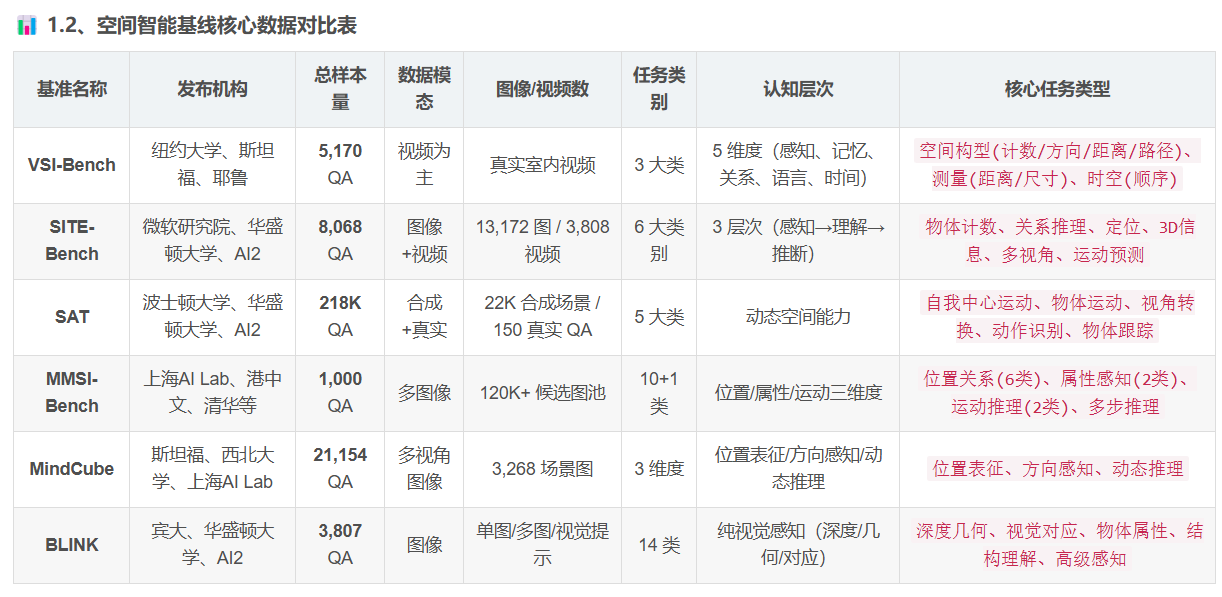
本文分析使用空间理解 SITI 数据集,进行VLM的Lora微调微调, 包括 数据格式转换、多图像VQA微调、视频VQA微调。
论文地址:SITE: towards Spatial Intelligence Thorough Evaluation
开源地址:https://github.com/wenqi-wang20/SITE-Bench
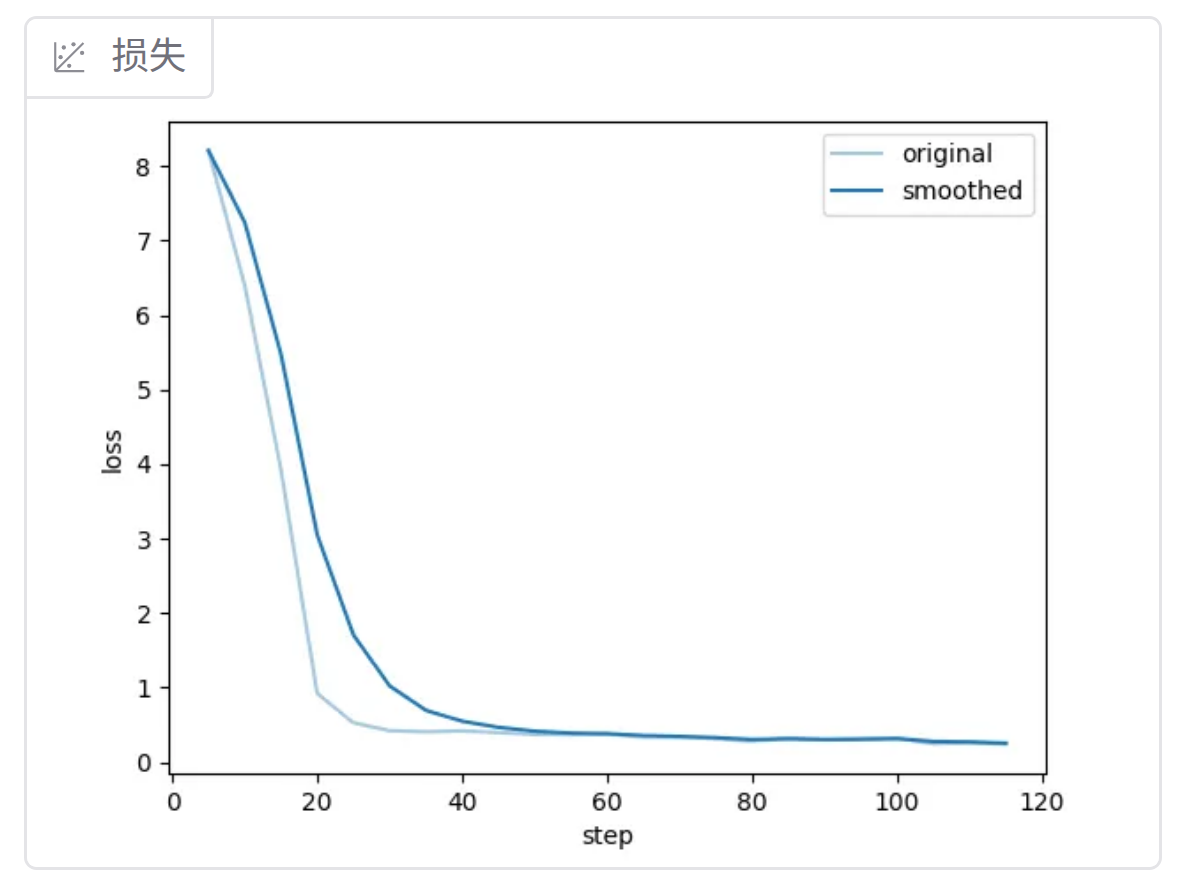
基于Qwen3-VL的微调损失变化:
一、SITI 数据集简介
1、核心信息总览
| 项目 | 详情 |
|---|---|
| 发布机构 | 微软研究院、华盛顿大学、AI2 |
| 数据总量 | 8,068 组问答(QA) |
| 媒体类型 | 图像+视频(13,172 张图 / 3,808 个视频) |
| 总存储大小 | 约 65 GB(下载解压后) |
| 核心任务类别 | 6大类别(物体计数、关系推理、定位、3D信息、多视角、运动预测) |
| 认知层次 | 感知 → 理解 → 推断(三级递进) |
| 数据筛选来源 | 从29个基线/基准数据集中精选原始数据构建 |
2、数据构成与筛选逻辑
-
媒体覆盖
- 图像:13,172 张,种类丰富,覆盖多场景、多物体类型
- 视频:3,808 个,覆盖广,包含动态场景与运动轨迹信息
-
筛选基准 从以下29个主流多模态基准数据集中精选高质量原始数据,最终整合为8,068组QA: ActivityNet、gqa、MME-RealWorld、MVBench、TGIF_Zero_Shot_QA、BLINK、IconQA、MMIU、openeqa、tvqa、CLEVR、LogicVista、MMTBench、SAT、VideoMME、coco、MLVU、MMVet、SEED-Bench、VSI-Bench、CVBench、MMBench、MMVP、SpatialEval、VStarBench、egoexo_bench、MME、MuirBench、SPEC
总样本量 8,068 条 QA 对 标准化多项选择视觉问答格式
├─ 图像测试集 4,260 条 (52.8%) image_test 子集
└─ 视频测试集 3,808 条 (47.2%) video_test 子集
问题选项分布
├─ 4 选项问题 5,019 条 (62.2%) 主流格式
├─ 2 选项问题 1,573 条 (19.5%) 是/否判断类
└─ 3/5/6 选项问题 1,476 条 (18.3%) 多样化选项
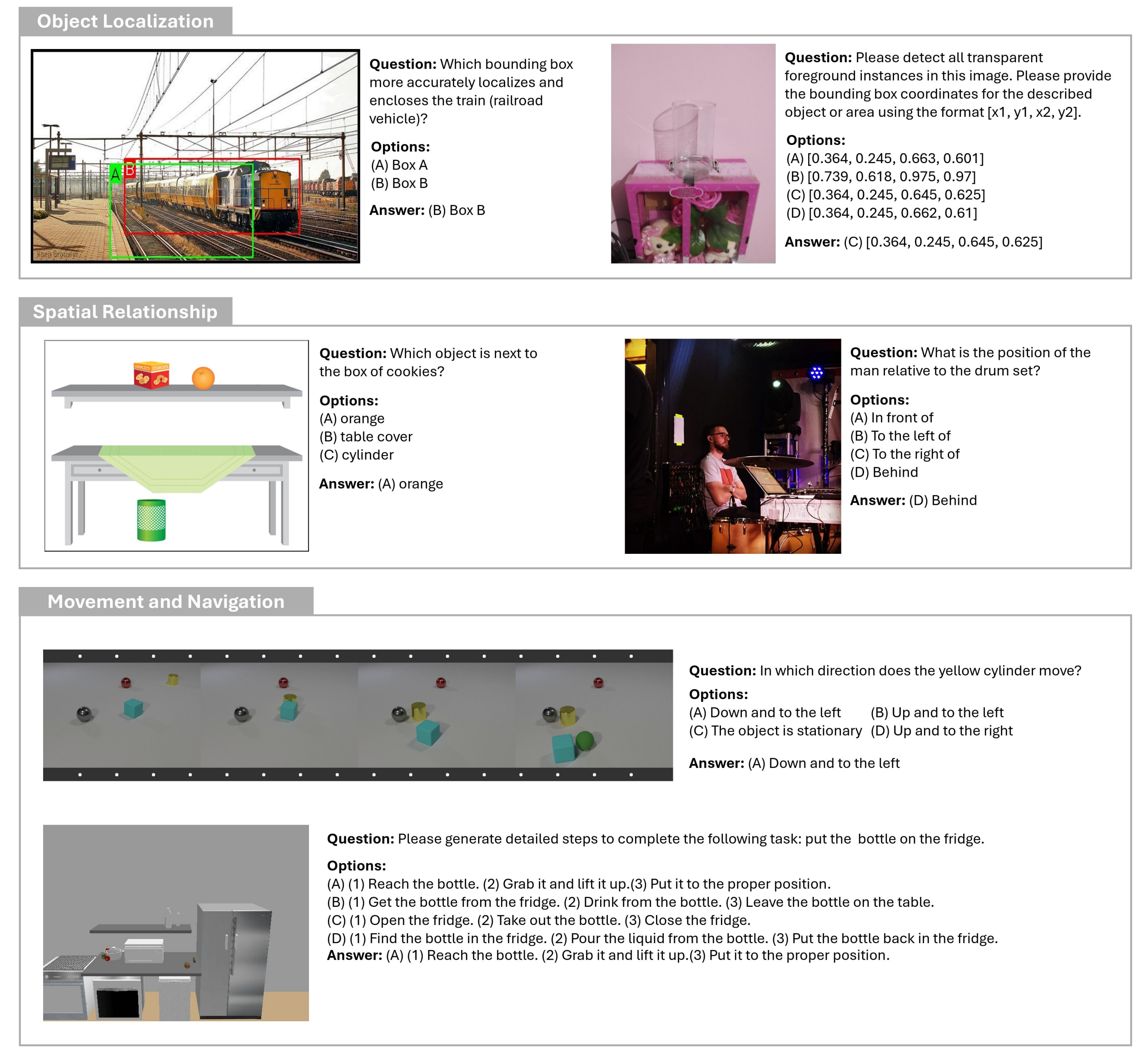
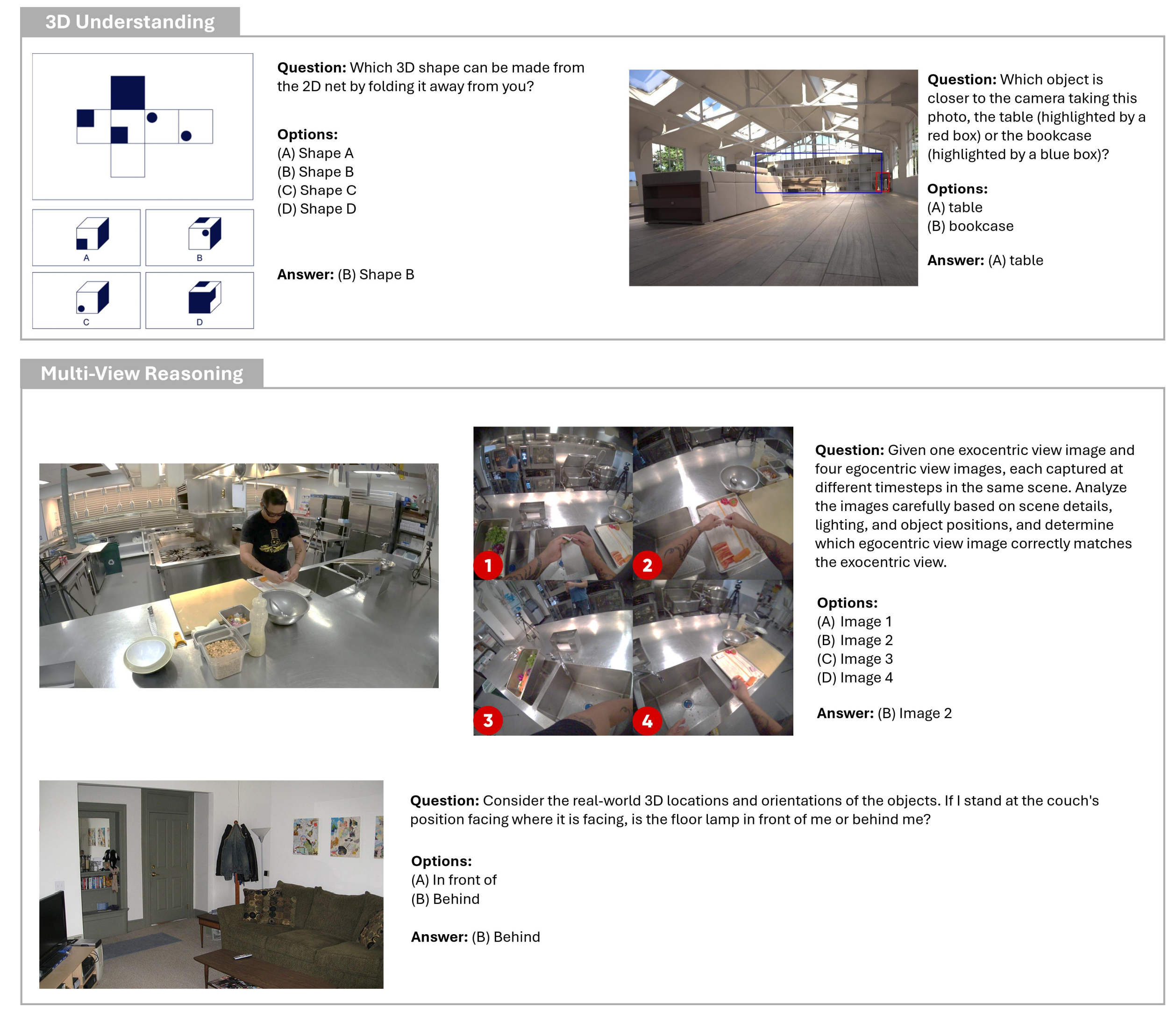
3、6大核心任务类别
| 任务类别 | 核心说明 |
|---|---|
| 物体计数 | 统计图像/视频中指定物体的数量,支持遮挡、重叠场景 |
| 关系推理 | 分析物体间空间、语义、交互关系,完成关联判断 |
| 定位 | 确定物体在图像/视频帧中的位置,支持2D/3D坐标定位 |
| 3D信息 | 提取场景三维结构、物体尺寸、相对空间位置等信息 |
| 多视角 | 跨视角场景理解,整合不同角度信息完成推理 |
| 运动预测 | 基于历史帧/片段,预测物体后续运动轨迹与状态 |
任务示例1,如下图所示:
任务示例2,如下图所示:
二、下载数据
SITI数据下载地址:https://huggingface.co/datasets/franky-veteran/SITE-Bench
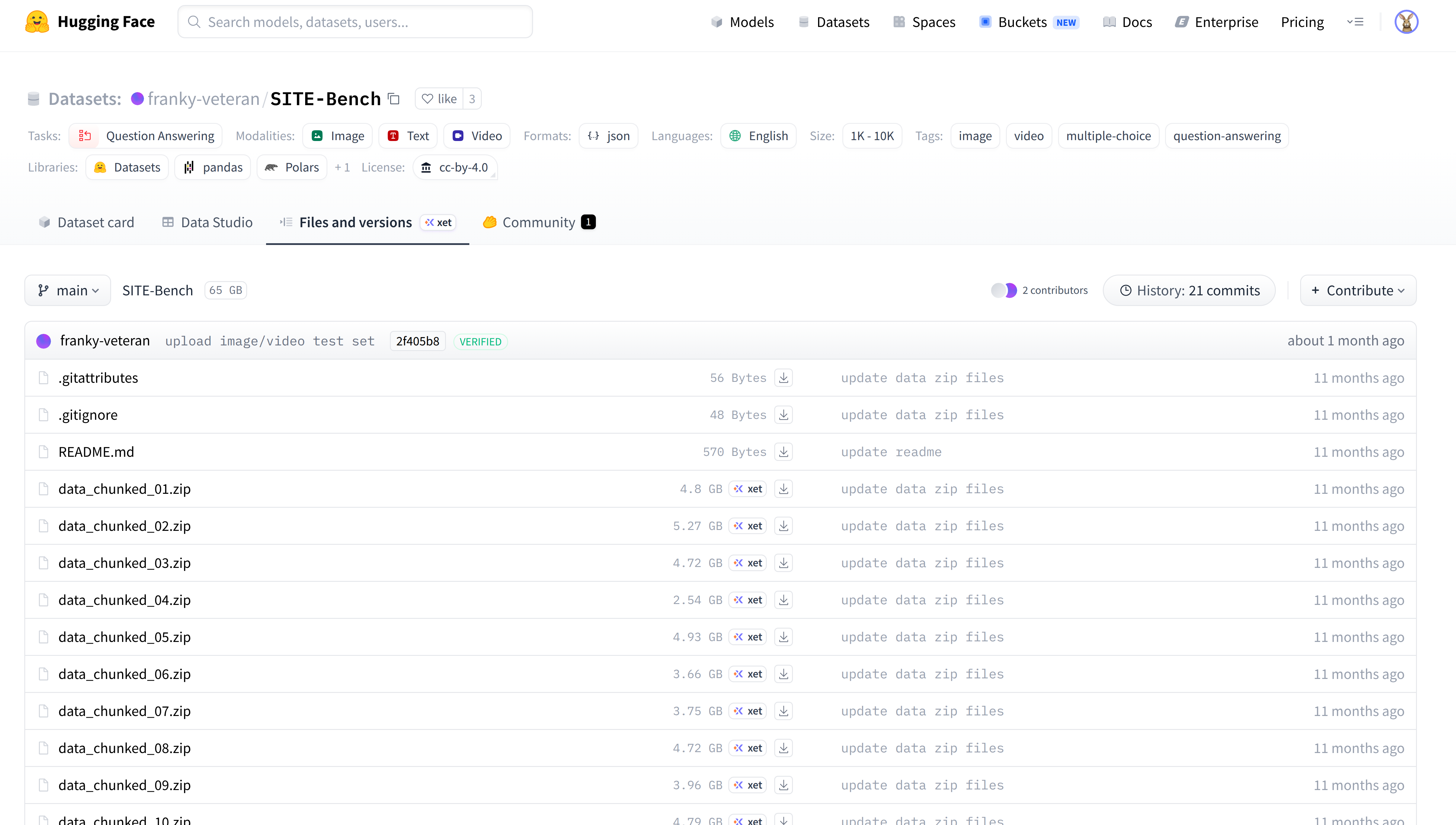
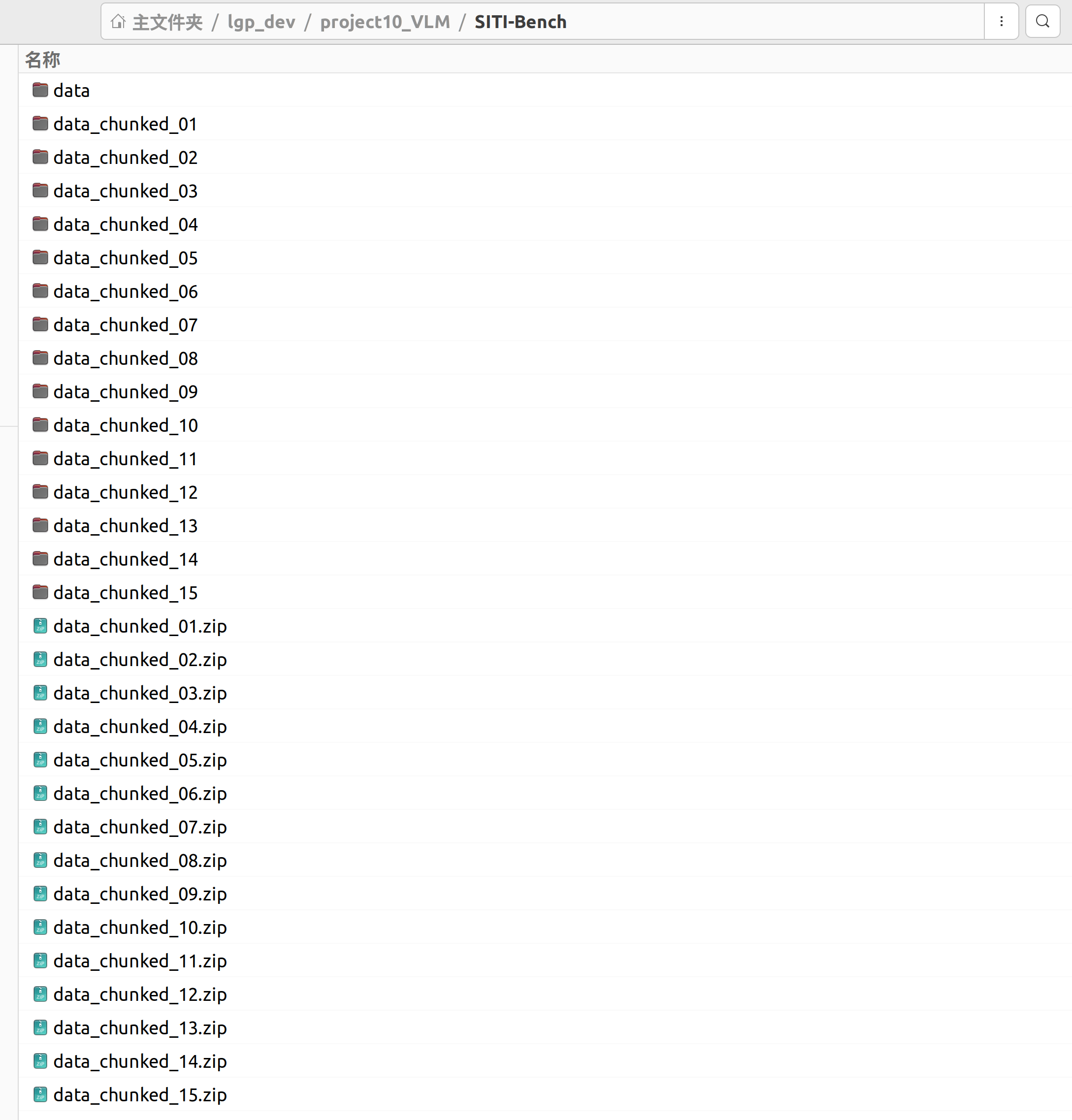
下载好后,解压到一个data目录下(汇总所有的数据)
三、图像数据转为SFT格式
下载的标签文件:image_test.json,存放了图片的VAQ问答对,数据示例:
有多图的VAQ问答对、单图的VAQ问答对
[
  {
    "question": "the mouse is bigger than the car in size. Please choose the best image that matches the description.",
    "options": [
      "<image>",
      "<image>",
      "<image>"
    ],
    "category": "3d information understanding",
    "answer": "C",
    "dataset": "SPEC",
    "visual": [
      "data/SPEC/relative_size/00001793/0.jpg",
      "data/SPEC/relative_size/00001793/1.jpg",
      "data/SPEC/relative_size/00001793/2.jpg"
    ]
  },

  {
    "question": "The figure represents a Maze, where the colored blocks have the following meanings:\n- Black blocks represent walls that are impassable barriers.\n- White blocks represent navigable paths within the maze, but not necessarily the correct path to the exit.\n- Green block denotes the starting point (S) of the maze.\n- Red block marks the endpoint or the exit (E) of the maze.\n- The objective is to navigate from S to E by following the path marked by Blue. Movement is allowed in any of the four cardinal directions (up, down, left, right) along the White blocks,\nbut to solve the maze, follow the path designated by Blue blocks.\n- A right turn is defined as a change in movement direction that is 90 degrees clockwise relative to the previous direction.\n- A left turn is defined as a change in movement direction that is 90 degrees anticlockwise relative to the previous direction.\nPlease answer the following question based on the provided information. How many right turns are there in the provided path (marked by Blue) from S to E?",
    "options": [
      "2",
      "5",
      "6",
      "0."
    ],
    "answer": "D",
    "category": "movement prediction & navigation",
    "dataset": "SpatialEval",
    "visual": [
      "data/SpatialEval/images/mazenav.vqa.444.0.png"
    ]
  },
....使用LLaMA Factory 进行Lora的监督微调,需要转换到对应的格式
开发环境的关键库:
llamafactory 0.9.4.dev0
torch 2.8.0
torchaudio 2.8.0
torchvision 0.23.0
transformers 4.57.1
转换要点:
| 维度 | 转换前(原始) | 转换后(SFT标准) |
|---|---|---|
| 结构 | 扁平字段(question, options, visual...) |
标准对话格式(messages + images) |
| 图片标记 | 可能混杂在文本中或缺失 | 统一前置 <image>\n,数量严格匹配实际图片数 |
| 图片路径 | 相对路径(如 "images/001.jpg") |
绝对路径(如 "/home/user/.../images/001.jpg") |
| 选项格式 | ["option A", "option B"] 列表 |
文本行 "图A、图B"(中文本地化标签) |
| 内容组织 | 字段分散 | 整合为单一 user.content: <br><image><br>Question Type: {category}<br>Question: {question}<br>Answer Choices: 图A、图B...<br> |
| 质量控制 | 无校验 | 强制剔除标记数与图片数不一致的样本 |
转换代码,如下所示:
import json
import os
import re

# -------------------------- 配置参数 --------------------------
INPUT_JSON_PATH = "image_test.json"   # 原始JSON
OUTPUT_JSON_PATH = "image_test_SITI.json" # 最终纯净输出JSON
BASE_ABS_PATH = "/home/user/xxxxxxxx/SITI-Bench/"
# -----------------------------------------------------------------------------

def convert_json_format():
    # 1. 读取原始数据
    try:
        with open(INPUT_JSON_PATH, "r", encoding="utf-8") as f:
            raw_data = json.load(f)
        total_samples = len(raw_data)
        print(f"✅ 成功读取原始数据:{total_samples} 个样本")
    except Exception as e:
        print(f"❌ 读取文件失败:{e}")
        return

    # 统计
    single_img_cnt = 0
    multi_img_cnt = 0
    sft_data = []       # 仅保存成功样本
    error_samples = []  # 错误样本详情

    # 2. 遍历处理
    for idx, sample in enumerate(raw_data, 1):
        try:
            # 提取字段
            question = sample["question"]
            options = sample["options"]
            category = sample["category"]
            answer = sample["answer"]
            visual_paths = sample["visual"]
            num_images = len(visual_paths)

            # 🔥 核心修复1:彻底清理 问题+选项 中所有自带的 <image>
            question = re.sub(r"<image>", "", question)
            options = [re.sub(r"<image>", "", opt) for opt in options]

            # 统计图片数量
            if num_images == 1:
                single_img_cnt += 1
            else:
                multi_img_cnt += 1

            # 转换绝对路径
            abs_image_paths = []
            for img_path in visual_paths:
                abs_path = os.path.abspath(os.path.join(BASE_ABS_PATH, img_path))
                abs_image_paths.append(abs_path)

            # 生成标准图片标记(数量=图片真实数量)
            image_tags = "<image>" * num_images

            # 生成选项标签:图A、图B、图C...
            option_labels = [f"图{chr(65+i)}" for i in range(len(options))]

            # 构造用户输入
            user_content = (
                f"{image_tags}\n"
                f"Question Type: {category}\n"
                f"Question: {question}\n"
                f"Answer Choices: {option_labels}"
            )

            # 🔥 核心修复2:强制校验(仅保留我们生成的标记)
            token_num = len(re.findall(r"<image>", user_content))
            if token_num != len(abs_image_paths):
                error_samples.append({
                    "样本索引": idx,
                    "图片路径": visual_paths,
                    "标记数量": token_num,
                    "图片数量": len(abs_image_paths)
                })
                continue

            # 构造标准SFT数据
            sft_item = {
                "messages": [
                    {"role": "user", "content": user_content},
                    {"role": "assistant", "content": answer}
                ],
                "images": abs_image_paths
            }
            sft_data.append(sft_item)

            # 进度
            if idx % 500 == 0:
                print(f"🔄 处理进度:{idx}/{total_samples}")

        except Exception as e:
            error_samples.append({
                "样本索引": idx,
                "错误信息": str(e),
                "图片路径": sample.get("visual", [])
            })

    # 3. 保存【仅成功样本】的纯净JSON
    with open(OUTPUT_JSON_PATH, "w", encoding="utf-8") as f:
        json.dump(sft_data, f, ensure_ascii=False, indent=2)

    # 4. 打印统计报告
    print("\n==================== 📊 最终转换报告 ====================")
    print(f"总样本数:{total_samples}")
    print(f"✅ 成功转换:{len(sft_data)}(仅保留此部分用于训练)")
    print(f"❌ 失败样本:{len(error_samples)}(已自动剔除)")
    print(f"单图样本:{single_img_cnt}")
    print(f"多图样本:{multi_img_cnt}")
    print(f"✅ 输出文件(纯净版):{os.path.abspath(OUTPUT_JSON_PATH)}")

    # 打印错误样本详情(含路径)
    if error_samples:
        print("\n❌ 错误样本详情(含图片路径):")
        for err in error_samples[:15]:  # 打印前15个
            print(err)
    print("=========================================================")

if __name__ == "__main__":
    convert_json_format()
转换的思路流程:
-
标准化:相对路径转绝对路径,按实际图片数动态生成占位符
-
格式对齐 :组装为标准 SFT 格式(
messages对话 +images路径列表) -
强制校验 :校验
<image>数量与图片路径数是否匹配,不匹配则自动剔除 -
纯净输出:仅保留校验通过的样本,隔离错误数据并生成统计报告
转换后,生成image_test_SITI.json文件,示例格式:
[
  {
    "messages": [
      {
        "role": "user",
        "content": "<image><image><image>\nQuestion Type: 3d information understanding\nQuestion: the mouse is bigger than the car in size. Please choose the best image that matches the description.\nAnswer Choices: ['图A', '图B', '图C']"
      },
      {
        "role": "assistant",
        "content": "C"
      }
    ],
    "images": [
      "/home/user/lgp_dev/project10_VLM/SITI-Bench/data/SPEC/relative_size/00001793/0.jpg",
      "/home/user/lgp_dev/project10_VLM/SITI-Bench/data/SPEC/relative_size/00001793/1.jpg",
      "/home/user/lgp_dev/project10_VLM/SITI-Bench/data/SPEC/relative_size/00001793/2.jpg"
    ]
  },
四、图像VQA监督微调
首先将image_test_SITI.json文件复制到 LLaMA-Factory/data/ 目录下
即:LLaMA-Factory/data/image_test_SITI.json
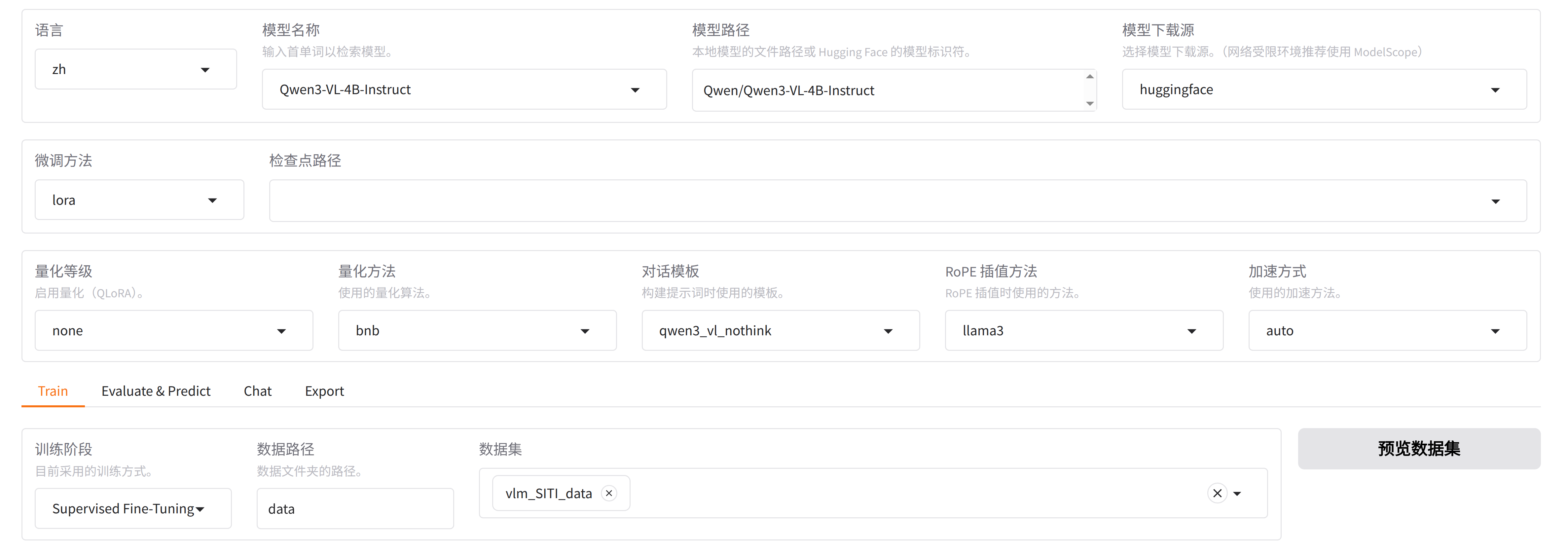
然后修改dataset_info.json文件,新增SITI的数据,
将下面代码添加到dataset_info.json中,数据名称为vlm_SITI_data,对应image_test_SITI.json文件,数据的类别是"images": "images
  "vlm_SITI_data": {
    "file_name": "image_test_SITI.json",
    "formatting": "sharegpt",
    "columns": {
      "messages": "messages",
      "images": "images"
    },
    "tags": {
      "role_tag": "role",
      "content_tag": "content",
      "user_tag": "user",
      "assistant_tag": "assistant",
      "system_tag": "system"
    }
  },
然后能在可视化界面中,选择vlm_SITI_data数据
点击"预览数据集",能看到:
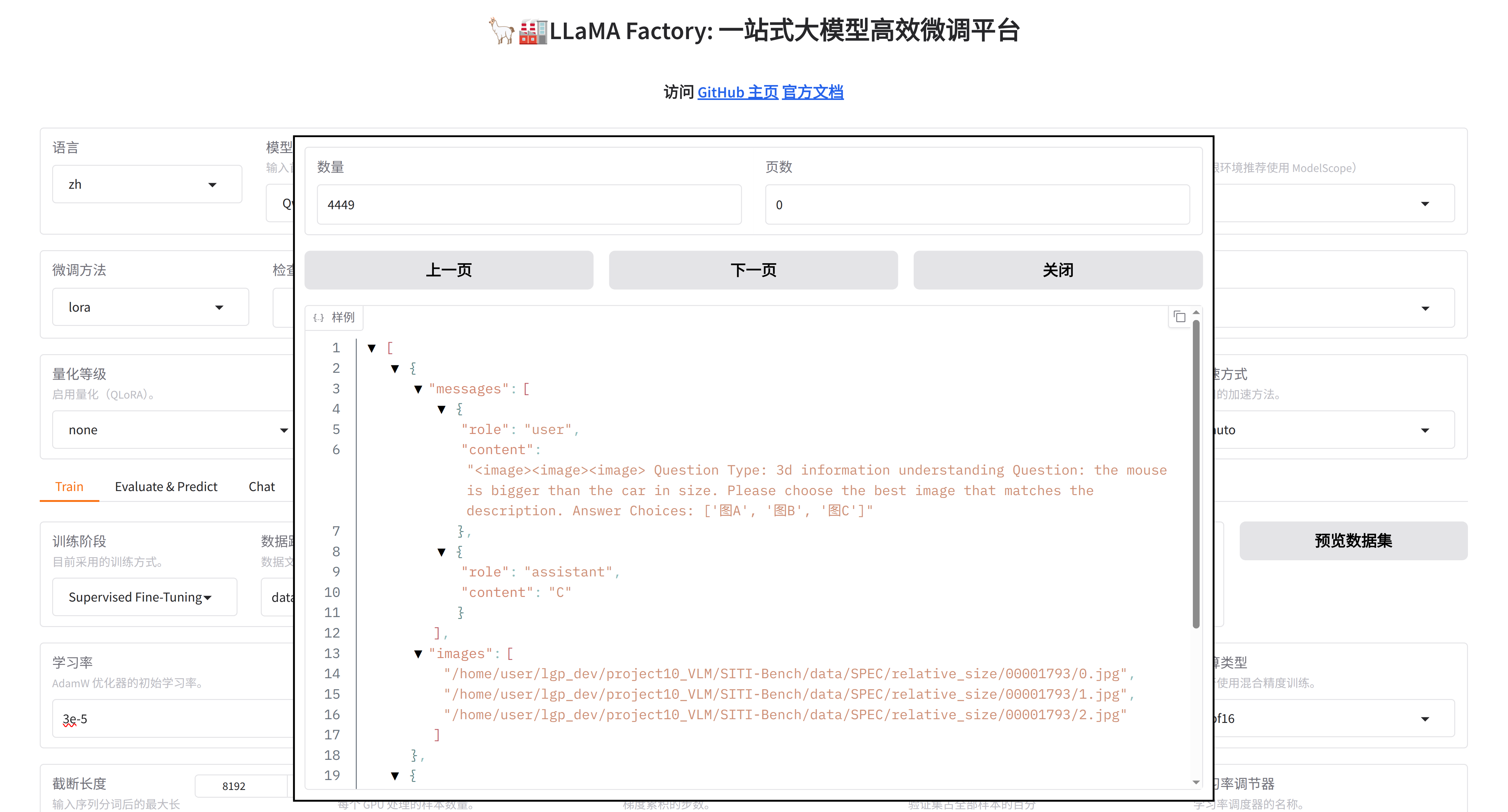
然后设置参数,就可以训练了
五、视频数据转为SFT格式
下载的标签文件:video_test.json,存放了视频的VAQ问答对,数据示例:
[
  {
    "answer": "A",
    "options": [
      "10",
      "8",
      "9",
      "7"
    ],
    "question": "how many meters is the platform in the video",
    "dataset": "ActivityNetQA",
    "visual": [
      "data/ActivityNet/videos/ORKAMBnsX64.mp4"
    ],
    "category": "3d information understanding"
  },
  {
    "answer": "C",
    "options": [
      "10",
      "7",
      "8",
      "9"
    ],
    "question": "how many meters are the boys running in blue clothes",
    "dataset": "ActivityNetQA",
    "visual": [
      "data/ActivityNet/videos/DW7Zm9DzEDk.mp4"
    ],
....使用LLaMA Factory 进行Lora的监督微调,需要转换到对应的格式
开发环境的关键库:
llamafactory 0.9.4.dev0
torch 2.8.0
torchaudio 2.8.0
torchvision 0.23.0
transformers 4.57.1
转换要点:
| 维度 | 转换前(原始 JSON) | 转换后(SFT 标准格式) |
|---|---|---|
| 媒体类型 | visual: 视频路径列表 |
独立字段 videos: 绝对路径列表 |
| 占位符 | 原始文本可能含 <video> 或 <image> |
统一前置 <video>(数量严格匹配视频数) |
| 字段名 | 扁平结构(question, options, answer...) |
标准对话格式 messages + videos |
| 选项处理 | 原始值(如 [10,8,9,7] 或文本数组) |
直接保留原样(未映射为图A/图B,保持原始数值/文本) |
| 视频路径 | 相对路径(如 "videos/001.mp4") |
绝对路径(基于 BASE_ABS_PATH) |
| 内容组织 | 字段分散 | 整合为 user.content: <br><video><br>Question Type: {category}<br>Question: {question}<br>Answer Choices: [10,8,9,7]<br> |
转换代码,如下所示:
import json
import os
import re

# -------------------------- 配置参数 --------------------------
INPUT_JSON_PATH = "video_test.json"   # 原始视频JSON
OUTPUT_JSON_PATH = "video_test_SITI.json" # 输出训练JSON
BASE_ABS_PATH = "/home/user/xxxxxxx/SITI-Bench/"
# -----------------------------------------------------------------------------

def convert_json_format():
    # 1. 读取原始数据
    try:
        with open(INPUT_JSON_PATH, "r", encoding="utf-8") as f:
            raw_data = json.load(f)
        total_samples = len(raw_data)
        print(f"✅ 成功读取原始数据:{total_samples} 个样本")
    except Exception as e:
        print(f"❌ 读取文件失败:{e}")
        return

    # 统计
    single_video_cnt = 0
    multi_video_cnt = 0
    sft_data = []       # 训练样本
    error_samples = []  # 错误样本

    # 2. 遍历处理
    for idx, sample in enumerate(raw_data, 1):
        try:
            # 提取原始字段
            question = sample["question"]
            options = sample["options"]  # 原始文本选项:[10,8,9,7] 直接保留
            category = sample["category"]
            answer = sample["answer"]
            visual_paths = sample["visual"]  # 视频路径
            num_videos = len(visual_paths)

            # 清理问题中冗余标记(无则不影响)
            question = re.sub(r"<image>|<video>", "", question)

            # 统计视频数量
            if num_videos == 1:
                single_video_cnt += 1
            else:
                multi_video_cnt += 1

            # 视频路径转绝对路径
            abs_video_paths = []
            for video_path in visual_paths:
                abs_path = os.path.abspath(os.path.join(BASE_ABS_PATH, video_path))
                abs_video_paths.append(abs_path)

            # 生成视频标记(数量=真实视频数)
            video_tags = "<video>" * num_videos

            # 构造用户输入(直接用原始选项)
            user_content = (
                f"{video_tags}\n"
                f"Question Type: {category}\n"
                f"Question: {question}\n"
                f"Answer Choices: {options}"
            )

            # 校验:标记数量 = 视频数量(必过,无重复)
            token_num = len(re.findall(r"<video>", user_content))
            if token_num != len(abs_video_paths):
                error_samples.append({
                    "样本索引": idx, "标记数量": token_num, "视频数量": len(abs_video_paths)
                })
                continue

            # 标准SFT格式:videos 替代 images
            sft_item = {
                "messages": [
                    {"role": "user", "content": user_content},
                    {"role": "assistant", "content": answer}
                ],
                "videos": abs_video_paths  # 视频专属字段
            }
            sft_data.append(sft_item)

            # 进度打印
            if idx % 500 == 0:
                print(f"🔄 处理进度:{idx}/{total_samples}")

        except Exception as e:
            error_samples.append({
                "样本索引": idx, "错误信息": str(e), "视频路径": sample.get("visual", [])
            })

    # 3. 保存训练文件
    with open(OUTPUT_JSON_PATH, "w", encoding="utf-8") as f:
        json.dump(sft_data, f, ensure_ascii=False, indent=2)

    # 4. 统计报告
    print("\n==================== 📊 视频转换报告 ====================")
    print(f"总样本数:{total_samples}")
    print(f"✅ 成功转换:{len(sft_data)}")
    print(f"❌ 失败样本:{len(error_samples)}")
    print(f"单视频样本:{single_video_cnt}")
    print(f"多视频样本:{multi_video_cnt}")
    print(f"✅ 输出文件:{os.path.abspath(OUTPUT_JSON_PATH)}")

    if error_samples:
        print("\n❌ 错误样本详情:")
        for err in error_samples[:10]:
            print(err)
    print("=========================================================")

if __name__ == "__main__":
    convert_json_format()
转换后,生成video_test_SITI.json文件,示例格式:
[
  {
    "messages": [
      {
        "role": "user",
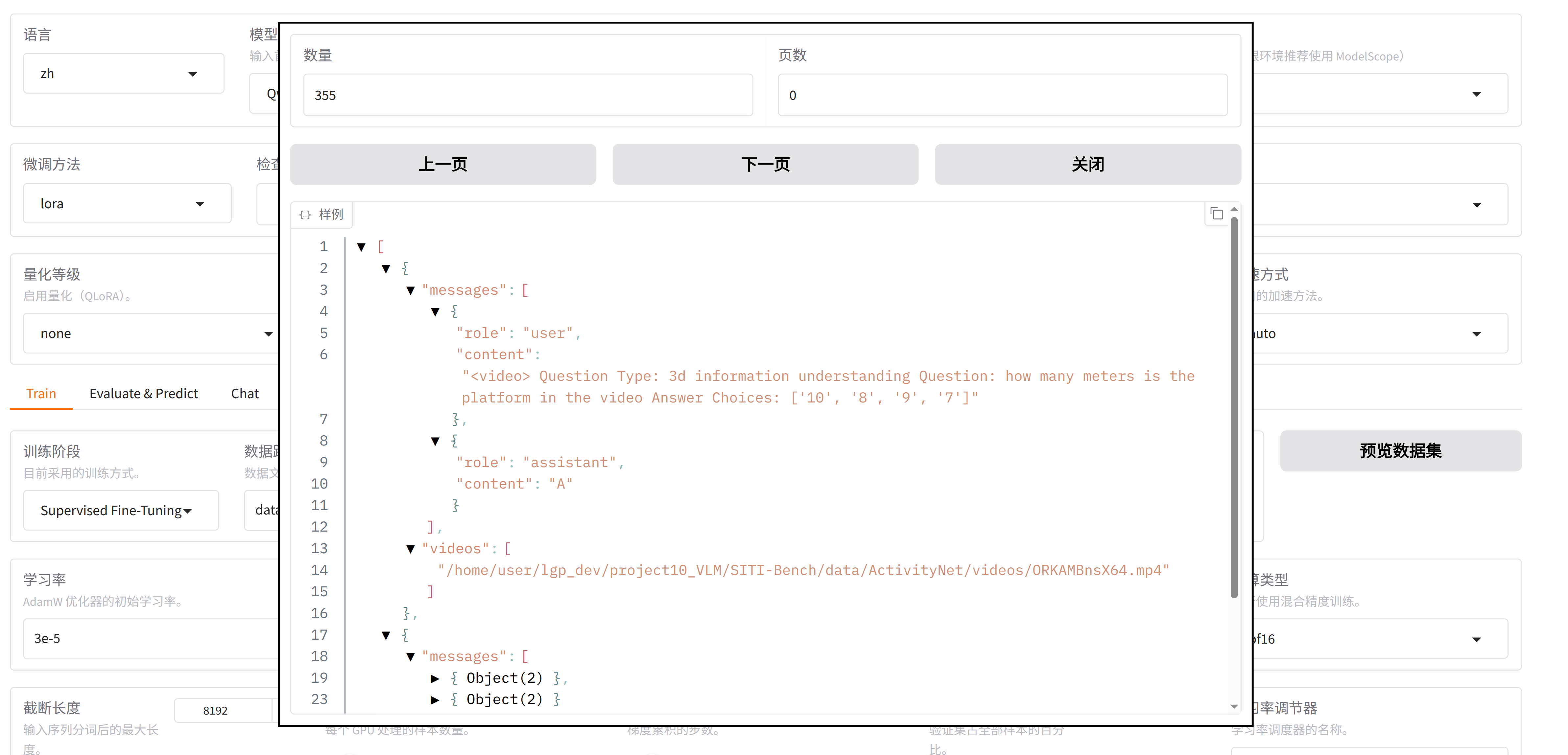
        "content": "<video>\nQuestion Type: 3d information understanding\nQuestion: how many meters is the platform in the video\nAnswer Choices: ['10', '8', '9', '7']"
      },
      {
        "role": "assistant",
        "content": "A"
      }
    ],
    "videos": [
      "/home/user/lgp_dev/project10_VLM/SITI-Bench/data/ActivityNet/videos/ORKAMBnsX64.mp4"
    ]
  },
运行信息:
==================== 📊 视频转换报告 ====================
总样本数:3619
✅ 成功转换:3619
❌ 失败样本:0
单视频样本:3619
多视频样本:0
✅ 输出文件:/home/user/xxxxx/SITI-Bench/video_test_SITI.json
=========================================================
六、视频VQA监督微调
首先将video_test_SITI.json文件复制到 LLaMA-Factory/data/ 目录下
即:LLaMA-Factory/data/video_test_SITI.json
然后修改dataset_info.json文件,新增SITI的数据,
将下面代码添加到dataset_info.json中,数据名称为vlm_SITI_Video_data,对应SITI_video_test.json文件,数据的类别是"videos": "videos"
  "vlm_SITI_Video_data": {
    "file_name": "SITI_video_test.json",
    "formatting": "sharegpt",
    "columns": {
      "messages": "messages",
      "videos": "videos"
    },
    "tags": {
      "role_tag": "role",
      "content_tag": "content",
      "user_tag": "user",
      "assistant_tag": "assistant",
      "system_tag": "system"
    }
  },
注意:训练视频,需要很大内存和显存!!!
如果训练资源不够大,建议减少训练VQA的数量,比如原来是3000多条,变为300条
然后能在可视化界面中,选择vlm_SITI_data数据
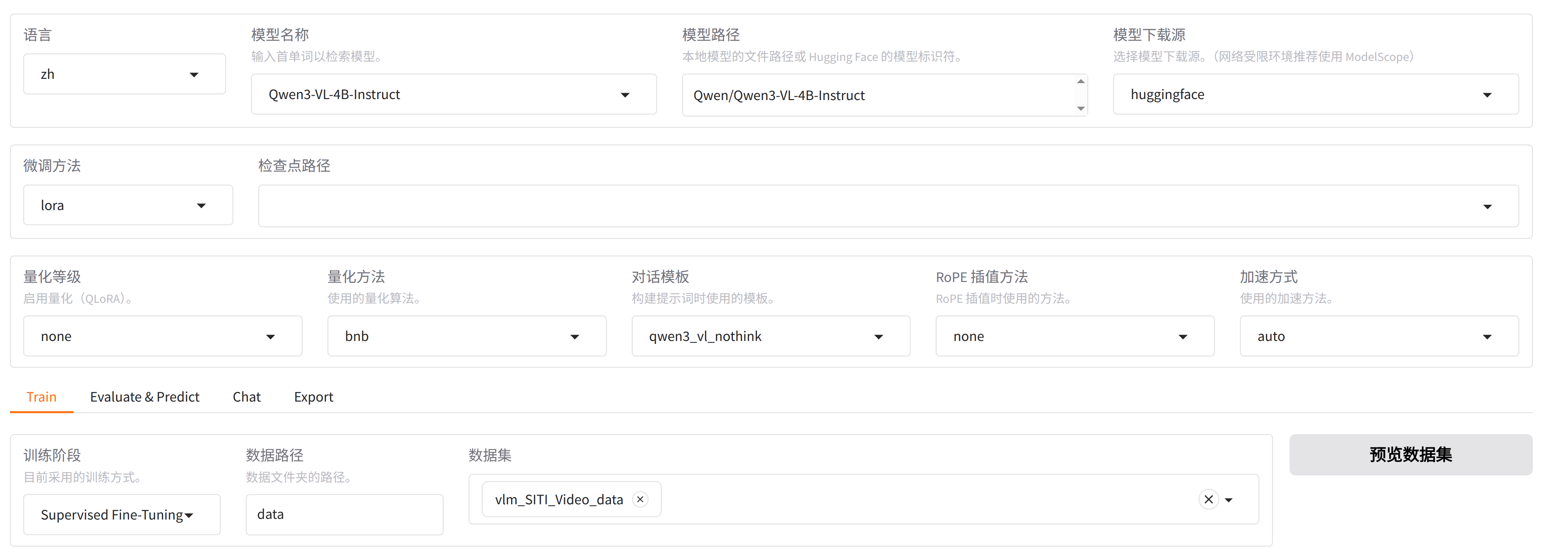
点击"预览数据集",能看到:
然后设置参数,就可以训练了
训练参数参考:
llamafactory-cli train \
    --stage sft \
    --do_train True \
    --model_name_or_path Qwen/Qwen3-VL-4B-Instruct \
    --preprocessing_num_workers 16 \
    --finetuning_type lora \
    --template qwen3_vl_nothink \
    --flash_attn auto \
    --dataset_dir data \
    --dataset vlm_SITI_Video_data \
    --cutoff_len 8192 \
    --learning_rate 3e-05 \
    --num_train_epochs 5.0 \
    --max_samples 100000 \
    --per_device_train_batch_size 2 \
    --gradient_accumulation_steps 2 \
    --lr_scheduler_type cosine \
    --max_grad_norm 1.0 \
    --logging_steps 5 \
    --save_steps 100 \
    --warmup_steps 0 \
    --packing False \
    --enable_thinking True \
    --report_to none \
    --output_dir saves/Qwen3-VL-4B-Instruct/lora/train_2026-03-26-15-07 \
    --bf16 True \
    --plot_loss True \
    --trust_remote_code True \
    --ddp_timeout 180000000 \
    --include_num_input_tokens_seen True \
    --optim adamw_torch \
    --lora_rank 8 \
    --lora_alpha 16 \
    --lora_dropout 0 \
    --lora_target all \
    --freeze_vision_tower True \
    --freeze_multi_modal_projector True \
    --image_max_pixels 589824 \
    --image_min_pixels 1024 \
    --video_max_pixels 65536 \
    --video_min_pixels 256
训练日志:
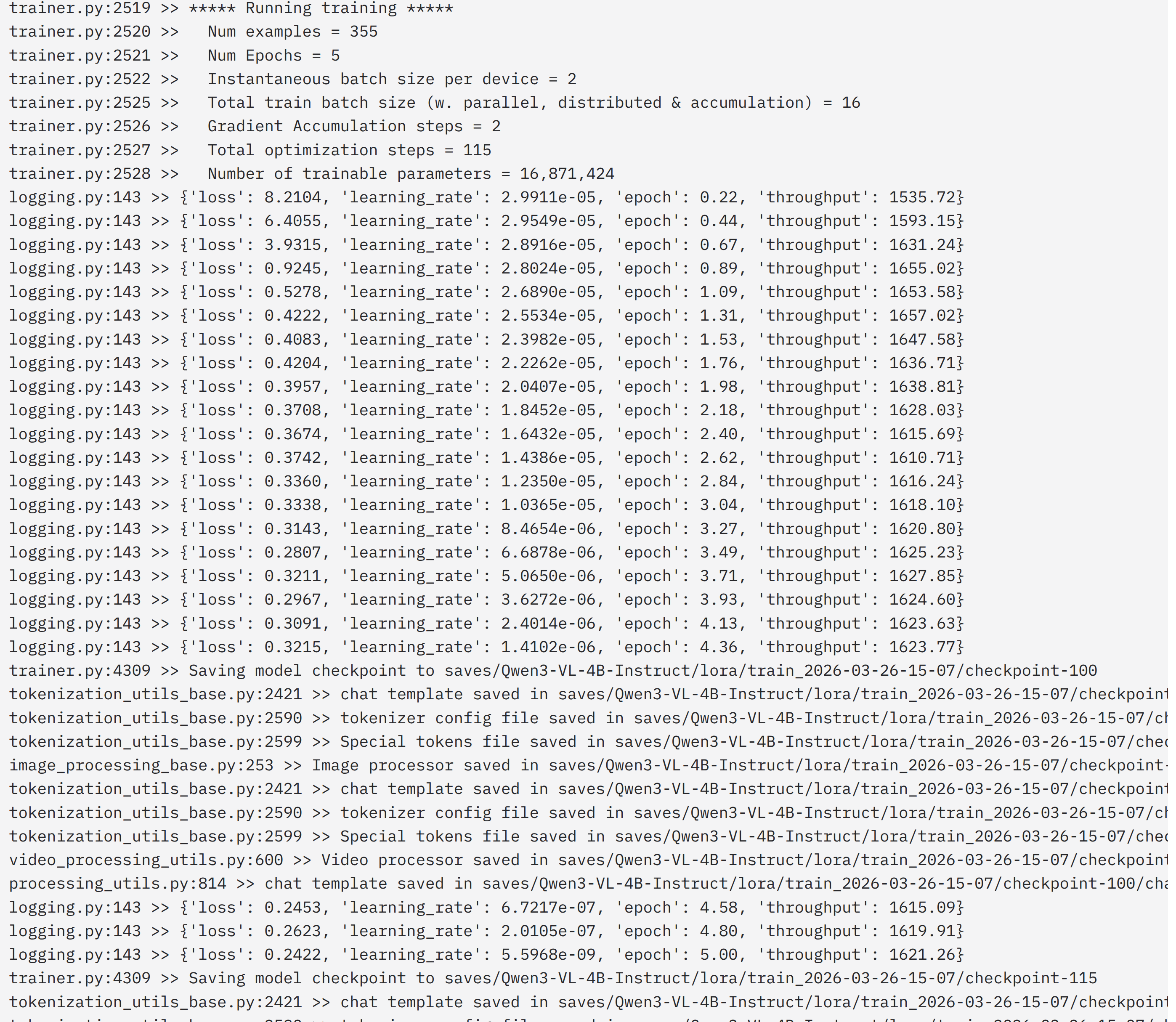
训练的Qwen3-VL-4B-Instruct,模型是收敛的
分享完成~
相关文章推荐: