2026 年初,YOLO 迎来了新变化,都非常亮眼 👍
一是 YOLO-Master:引入了 ES-MoE,让计算更智能。会依据输入自适应做计算,不再是静态的。
二是 YOLO26:更简化的设计,直接端到端出检测结果。不用再搞后处理了呢,利于边缘做部署。
既然 YOLO 上新了,那一起玩一玩吧 ☺️
- 体验 YOLO-Master: huggingface.co/spaces/gati...
- 体验 YOLO26: platform.ultralytics.com/ultralytics...
以下则是动手实践了呢。
YOLO-Master
环境
准备 Conda 环境,
bash
conda create -n yolom python=3.12
conda activate yolom

# Install PyTorch (CPU version)
pip install torch torchvision
# Install PyTorch with CUDA (version <= nvidia-smi shown)
#  https://pytorch.org/get-started/locally
pip install torch torchvision --index-url https://download.pytorch.org/whl/cu130
准备 YOLO-Master,
bash
# Clone the repository
git clone --depth 1 https://github.com/Tencent/YOLO-Master
cd YOLO-Master

# Install dependencies
pip install -r requirements.txt
pip install -e .

# Optional: Install FlashAttention for faster training (CUDA required)
#   https://github.com/Dao-AILab/flash-attention
pip install flash_attn
准备模型,
bash
# 获取模型,YOLO-Master-EsMoE-N
wget https://huggingface.co/gatilin/YOLO-Master-ckpts-v0/resolve/main/YOLO-Master-EsMoE-N/YOLO-Master-EsMoE-N.pt?download=true
ln -s YOLO-Master-EsMoE-N.pt yolo_master_n.pt
推理
python
from ultralytics import YOLO

# 加载模型,Nano 版
model = YOLO("yolo_master_n.pt")
# model = YOLO("runs/detect/train/weights/best.pt")

# 检测图像
results = model.predict("data/dog.jpg")
results[0].show()

# 保存结果
results[0].save("result/dog.jpg")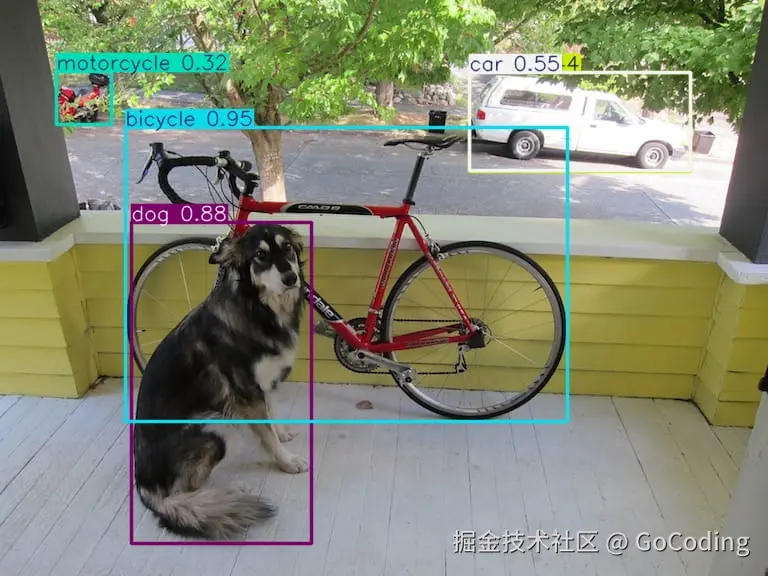
训练
python
from ultralytics import YOLO

# 加载模型,从 YAML 构建(从零开始)
# model = YOLO('cfg/models/master/v0/det/yolo-master-n.yaml')
# 加载模型,Nano 版(全量微调)
model = YOLO("yolo_master_n.pt")

# 训练模型,用 COCO8 数据集测试
#   结果在 runs/detect/train10/weights/best.pt
results = model.train(
    data='coco8.yaml',  # data='coco.yaml',
    epochs=100,         # epochs=600,
    batch=8,            # batch=256,
    imgsz=640,
    device="0",         # device="0,1,2,3",  # 如果使用多 GPU
    scale=0.5,
    mosaic=1.0,
    mixup=0.0,
    copy_paste=0.1
)
YOLO-Master 还可以 LoRA 微调 ☺️
YOLO26
环境
准备 Conda 环境,
bash
conda create -n yolo26 python=3.12
conda activate yolo26

# Install PyTorch (CPU version)
pip install torch torchvision
# Install PyTorch with CUDA (version <= nvidia-smi shown)
#  https://pytorch.org/get-started/locally
pip install torch torchvision --index-url https://download.pytorch.org/whl/cu130
准备 YOLO26,
bash
# Install ultralytics package
pip install -U ultralytics

# Install dependencies
pip install faster-coco-eval
推理
python
from ultralytics import YOLO

# 加载模型,Nano 版
model = YOLO("yolo26n.pt")
# model = YOLO("runs/detect/train/weights/best.pt")

# 检测图像
results = model.predict("data/dog.jpg")
results[0].show()

# 保存结果
results[0].save("result/dog.jpg")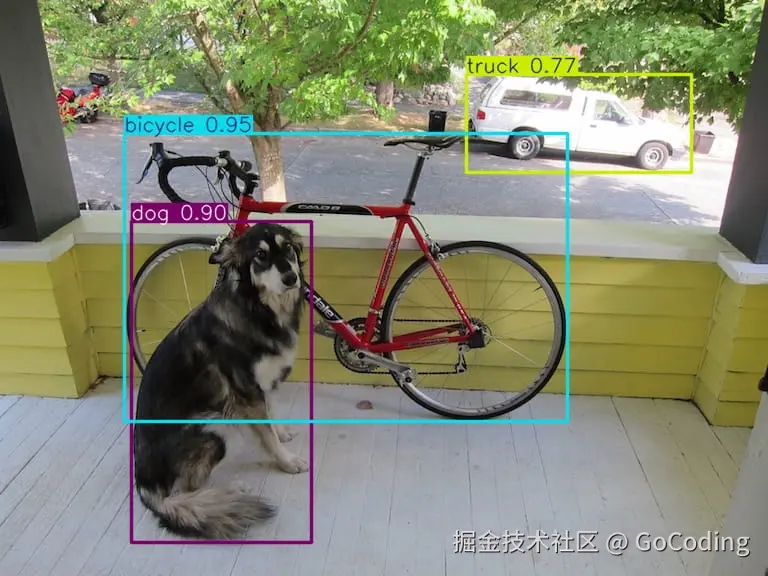
训练
python
from ultralytics import YOLO

# 加载模型,Nano 版
model = YOLO("yolo26n.pt")

# 训练模型,用 COCO8 数据集测试
#   结果在 runs/detect/train/weights/best.pt
results = model.train(data="coco8.yaml", epochs=100, imgsz=640)
结语
YOLO 训练越来越简便了呢,部署仍旧看平台咯。