在 TinyML 场景下(如 ESP32),将模型从 FP32 量化为 INT8 是部署的关键一步。量化不仅能将模型体积压缩约 4 倍,还能让推理速度大幅提升(得益于 ESP-NN 等优化库对 INT8 运算的硬件加速)。
以下是完整、可操作的量化实现步骤,以 TensorFlow 2.x 为例。
1. 量化原理简析
量化是将浮点值(如权重、激活)映射到整数范围(如 -128~127)的过程。
公式:
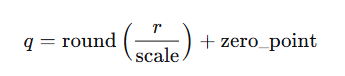
其中 r是原始浮点数,scale 和 zero_point 是根据数据分布计算出的参数。推理时,整数运算结果再反量化回浮点数。
TensorFlow Lite 支持两种常见量化方式:
-
训练后动态范围量化:仅权重量化为 INT8,激活仍为浮点。内存减少不多,速度提升有限。
-
训练后全整数量化(推荐) :权重和激活都量化为 INT8,需要代表性数据集校准激活范围。这是 ESP-NN 能够充分利用的格式。
2. 操作步骤
环境准备
-
Python 3.8+ 及 TensorFlow 2.x 安装:
bash
pip install tensorflow -
确保你已有一个训练好的 Keras 模型(或任何可转换为 TensorFlow Lite 的模型)。
步骤 1:准备代表性数据集(校准集)
全整数量化需要一个代表性数据集(约 100~500 张/样本),用于计算激活的量化参数。这些数据不需要标签,只需与模型输入形状一致即可。
假设你的模型输入是形状为 (1, 128, 128, 3) 的图像,可以创建一个生成器:
python
import numpy as np

def representative_dataset():
    # 假设你有一个包含 100 张图片的列表 images
    for img in images:
        # 图像预处理:归一化等,必须与训练时一致
        img = preprocess(img)  # 例如 img = img / 255.0
        img = np.expand_dims(img, axis=0).astype(np.float32)
        yield [img]
步骤 2:转换并量化模型
使用 TFLiteConverter 进行转换,开启优化并传入代表性数据集:
python
import tensorflow as tf

# 加载你训练好的 Keras 模型
model = tf.keras.models.load_model('my_model.h5')

# 转换器
converter = tf.lite.TFLiteConverter.from_keras_model(model)

# 启用优化
converter.optimizations = [tf.lite.Optimize.DEFAULT]

# 指定量化方案:全整数量化(int8)
converter.target_spec.supported_ops = [tf.lite.OpsSet.TFLITE_BUILTINS_INT8]
converter.representative_dataset = representative_dataset  # 校准激活范围

# 可选:强制输入输出也为 int8(有些模型可能需要保留 float32 输入输出)
converter.inference_input_type = tf.int8   # 或 tf.uint8
converter.inference_output_type = tf.int8

# 执行转换
tflite_quant_model = converter.convert()

# 保存为 .tflite 文件
with open('model_quantized.tflite', 'wb') as f:
f.write(tflite_quant_model)注意:
-
若你的输入数据已经是整数(如原始像素值 0-255),可将
inference_input_type设为tf.uint8,这样无需在 MCU 上再做归一化。 -
若模型包含不支持 INT8 的操作(如某些自定义算子),转换器可能会回退到浮点。此时可尝试添加
converter.target_spec.supported_ops = [tf.lite.OpsSet.TFLITE_BUILTINS_INT8]强制仅使用 INT8 算子,若有冲突会报错。
步骤 3:验证量化模型
在 PC 上测试量化模型,确保精度下降可接受:
python
import numpy as np
import tensorflow as tf

interpreter = tf.lite.Interpreter(model_path='model_quantized.tflite')
interpreter.allocate_tensors()

input_details = interpreter.get_input_details()
output_details = interpreter.get_output_details()

# 准备测试数据(注意输入类型与量化模型一致)
test_input = ...  # 需要根据 input_details['dtype'] 进行转换
interpreter.set_tensor(input_details[0]['index'], test_input)
interpreter.invoke()
output = interpreter.get_tensor(output_details[0]['index'])
步骤 4:将 .tflite 转换为 C 数组
在 ESP-IDF 项目中,通常将模型以 C 头文件的形式嵌入。使用 xxd 工具(Linux/macOS 或 Git Bash 自带的)生成:
bash
xxd -i model_quantized.tflite > model_data.cc或者用 Python 直接生成:
python
with open('model_quantized.tflite', 'rb') as f:
    model_data = f.read()

with open('model_data.h', 'w') as f:
    f.write('const unsigned char model_data[] = {\n')
    f.write(', '.join([f'0x{byte:02x}' for byte in model_data]))
    f.write('\n};\n')
    f.write(f'const unsigned int model_data_len = {len(model_data)};\n')
步骤 5:在 ESP-IDF 项目中使用
-
将生成的
model_data.h或.cc文件放入main/目录。 -
在代码中引用模型数组,并传递给 TFLite Micro 解释器:
#include "model_data.h" const tflite::Model* model = tflite::GetModel(model_data); -
确保
idf.py menuconfig中已启用ESP-NN → NN_OPTIMIZATIONS(默认即优化版本),这样 TFLite Micro 会自动调用 ESP-NN 的 INT8 加速内核。
3. 常见问题与建议
-
校准集数量:一般 100~200 个样本足够,应尽量覆盖实际推理时可能遇到的数据分布。
-
精度损失:通常全整数量化的精度下降在 1% 以内。若损失过大,可以尝试:
-
增加校准集数量或使其更具代表性。
-
改用 训练时量化感知训练(QAT),在训练时模拟量化误差,效果更好但步骤稍复杂。
-
-
输入输出类型 :如果希望 MCU 上直接处理传感器原始整数数据(如 ADC 读数),将输入类型设为
tf.uint8或tf.int8可省去归一化步骤。 -
内存占用:INT8 模型的大小约为 FP32 模型的 1/4,但 Tensor Arena 的大小仍需根据模型计算图手动调整(通常需要几 KB 到几百 KB)。
4. 完整示例脚本(Python)
python
import tensorflow as tf
import numpy as np

# 1. 加载模型
model = tf.keras.models.load_model('my_model.h5')

# 2. 定义代表性数据集生成器(假设有 100 张图片)
def representative_dataset():
    for i in range(100):
        img = np.random.rand(128, 128, 3).astype(np.float32)  # 替换为真实数据
        img = np.expand_dims(img, axis=0)
        yield [img]

# 3. 转换并量化
converter = tf.lite.TFLiteConverter.from_keras_model(model)
converter.optimizations = [tf.lite.Optimize.DEFAULT]
converter.representative_dataset = representative_dataset
converter.target_spec.supported_ops = [tf.lite.OpsSet.TFLITE_BUILTINS_INT8]
converter.inference_input_type = tf.int8
converter.inference_output_type = tf.int8

tflite_quant_model = converter.convert()

# 4. 保存
with open('model_quantized.tflite', 'wb') as f:
    f.write(tflite_quant_model)

print("量化模型已保存为 model_quantized.tflite")
将生成的 .tflite 转换为 C 数组后,即可在 ESP32 上编译运行。
通过以上步骤,你的模型就能以 INT8 格式运行在 ESP32 上,并充分利用 ESP-NN 的硬件加速,达到最佳性能。
如有不当之处,欢迎指证!