文章目录
- [1. 更新规则](#1. 更新规则)
- [2. 验证直接删除字段的影响](#2. 验证直接删除字段的影响)
-
- [2.1 新建 service 目录](#2.1 新建 service 目录)
- [2.2 新建 client 目录](#2.2 新建 client 目录)
- [2.3 添加联系人](#2.3 添加联系人)
- [2.4 更新 service 目录下的 .proto 文件](#2.4 更新 service 目录下的 .proto 文件)
- [3. 保留字段 reserved](#3. 保留字段 reserved)
- [4. 未知字段](#4. 未知字段)
-
- [4.1 什么是未知字段](#4.1 什么是未知字段)
- [4.2 未知字段从哪获取](#4.2 未知字段从哪获取)
-
- [MessageLite 类介绍(了解)](#MessageLite 类介绍(了解))
- [Message 类介绍(了解)](#Message 类介绍(了解))
- [Descriptor 类介绍(了解)](#Descriptor 类介绍(了解))
- [Reflection 类介绍(了解)](#Reflection 类介绍(了解))
- [UnknownFieldSet 类介绍(重要)](#UnknownFieldSet 类介绍(重要))
- [UnknownField 类介绍(重要)](#UnknownField 类介绍(重要))
- [4.3 验证未知字段(升级通讯录 3.1 版本)](#4.3 验证未知字段(升级通讯录 3.1 版本))
- [4.4 前后兼容性](#4.4 前后兼容性)
1. 更新规则
如果现有的消息类型已经不再满足我们的需求,例如需要扩展一个字段,在不破坏任何现有代码的情况下更新消息类型非常简单。
遵循如下规则即可:
- 禁止修改任何已有字段的字段编号。
- int32,uint32,int64,uint64 和 bool 是完全兼容的。可以从这些类型中的一个改为另一个,而不破坏前后兼容性。若解析出来的数值与相应的类型不匹配,会采用与 C++ 一致的处理方案(例如,若将 64 位整数当做 32 位进行读取,它将被截断为 32 位)。
- sint32 和 sint64 相互兼容但不与其他的整型兼容。
- string 和 bytes 在合法 UTF-8 字节前提下也是兼容的。
- bytes 包含消息编码版本的情况下,嵌套消息与 bytes 也是兼容的。
- fixed32 与 sfixed32 兼容,fixed64 与 sfixed64 兼容。
- enum 与 int32,uint32,int64 和 uint64 兼容(注意若值不匹配会被截断)。但要注意当反序列化消息时会根据语言采用不同的处理方案。
- 例如,未识别的 proto3 枚举类型会被保存在消息中,但是当消息反序列化时如何表示是依赖于编程语言的。整型字段总是会保持其的值。
- oneof:
- 将一个单独的值更改为新 oneof 类型成员之一是安全和二进制兼容的。
- 若确定没有代码一次性设置多个值那么将多个字段移入一个新 oneof 类型也是可行的。
- 将任何字段移入已存在的 oneof 类型是不安全的。
另外,还需要注意的是:
- 若是移除老字段,要保证不再使用移除字段的字段编号。正确的做法是保留字段编号(reserved),以确保该编号将不能被重复使用。
- 不建议直接删除或注释掉字段。
2. 验证直接删除字段的影响
模拟有两个服务,他们各自使用一份通讯录 .proto 文件,内容约定好了是一模一样的。
- 服务 1(service):负责序列化通讯录对象,并写入文件中。
- 服务 2(client):负责读取文件中的数据,解析并打印出来。
一段时间后,service 更新了自己的 .proto 文件,更新内容为:删除了某个字段,并新增了一个字段,新增的字段使用了被删除字段的字段编号。并将新的序列化对象写进了文件。
但 client 并没有更新自己的 .proto 文件。根据结论,可能会出现数据损坏的现象,接下来就让我们来验证下这个结论。
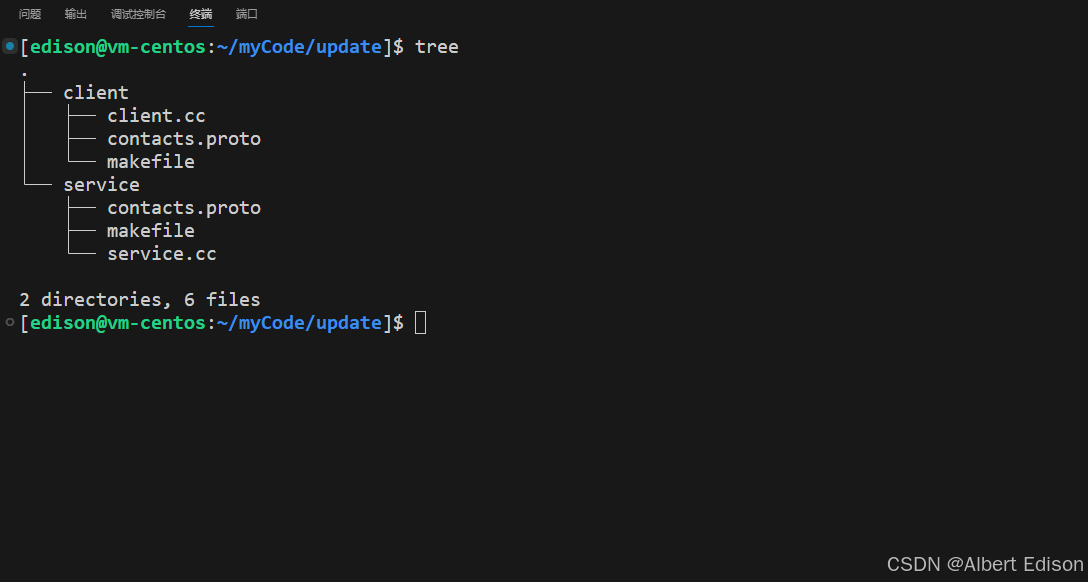
首先新建两个目录:service、client,分别存放两个服务的代码。项目结构如下所示:
2.1 新建 service 目录
在 service 目录下新增 contacts.proto(通讯录 3.0),代码如下:
cpp
syntax = "proto3";
package s_contacts;

// 联系⼈
message PeopleInfo {
  string name = 1; // 姓名
  int32 age = 2; // 年龄

  message Phone {
    string number = 1; // 电话号码
  }
  repeated Phone phone = 3; // 电话
}

// 通讯录
message Contacts {
  repeated PeopleInfo contacts = 1;
}
继续对 service 目录下新增 service.cc(通讯录 3.0),负责向文件中写通讯录消息,代码如下:
cpp
#include <iostream>
#include <fstream>
#include "contacts.pb.h"
using namespace std;
using namespace s_contacts;

/**
 * 新增联系⼈
 */
void AddPeopleInfo(PeopleInfo *people_info_ptr) {
    cout << "-------------新增联系⼈-------------" << endl;
    cout << "请输⼊联系⼈姓名: ";
    string name;
    getline(cin, name);
    people_info_ptr->set_name(name);

    cout << "请输⼊联系⼈年龄: ";
    int age;
    cin >> age;
    people_info_ptr->set_age(age);
    cin.ignore(256, '\n');

    for(int i = 1; ; i++) {
        cout << "请输⼊联系⼈电话" << i << "(只输⼊回⻋完成电话新增): ";
        string number;
        getline(cin, number);
        if (number.empty()) {
            break;
        }

        PeopleInfo_Phone* phone = people_info_ptr->add_phone();
        phone->set_number(number);
    }
    cout << "-----------添加联系⼈成功-----------" << endl;
}

int main() {

    Contacts contacts;
    // 先读取已存在的 contacts
    fstream input("../contacts.bin", ios::in | ios::binary);
    if (!input) {
        cout << "contacts.bin not found. Creating a new file." << endl;
    } else if (!contacts.ParseFromIstream(&input)) {
        cerr << "Failed to parse contacts." << endl;
        input.close();
        return -1;
    }

    // 新增⼀个联系⼈
    AddPeopleInfo(contacts.add_contacts());

    // 向磁盘⽂件写⼊新的 contacts
    fstream output("../contacts.bin", ios::out | ios::trunc | ios::binary);
    if (!contacts.SerializeToOstream(&output)) {
        cerr << "Failed to write contacts." << endl;
        input.close();
        output.close();
        return -1;
    }

    input.close();
    output.close();
    return 0;
}
service 目录下新增 makefile 文件,代码如下:
shell
service:service.cc contacts.pb.cc
	g++ -o $@ $^ -std=c++11 -lprotobuf
.PHONY:clean
clean:
	rm -f service
然后编译 .proto 文件,命令如下:
shell
protoc --cpp_out=. contacts.proto2.2 新建 client 目录
在 client 目录下新增 contacts.proto(通讯录 3.0),代码如下:
cpp
syntax = "proto3";
package c_contacts;

// 联系⼈
message PeopleInfo {
  string name = 1; // 姓名
  int32 age = 2; // 年龄

  message Phone {
  string number = 1; // 电话号码
  }
  repeated Phone phone = 3; // 电话
}

// 通讯录
message Contacts {
  repeated PeopleInfo contacts = 1;
}
继续对 client 目录下新增 client.cc(通讯录 3.0),负责读出文件中的通讯录消息,代码如下:
cpp
#include <iostream>
#include <fstream>
#include "contacts.pb.h"
using namespace std;
using namespace c_contacts;
using namespace google::protobuf;

/**
 * 打印联系⼈列表
 */
void PrintfContacts(const Contacts& contacts) {
    for (int i = 0; i < contacts.contacts_size(); ++i) {
        const PeopleInfo& people = contacts.contacts(i);
        cout << "------------联系⼈" << i+1 << "------------" << endl;
        cout << "联系⼈姓名:" << people.name() << endl;
        cout << "联系⼈年龄:" << people.age() << endl;
        int j = 1;
        for (const PeopleInfo_Phone& phone : people.phone()) {
            cout << "联系⼈电话" << j++ << ": " << phone.number() << endl;
        }
    }
}

int main() {
    Contacts contacts;
    // 先读取已存在的 contacts
    fstream input("../contacts.bin", ios::in | ios::binary);
    if (!contacts.ParseFromIstream(&input)) {
        cerr << "Failed to parse contacts." << endl;
        input.close();
        return -1;
    }

    // 打印 contacts
    PrintfContacts(contacts);
    input.close();
    return 0;
}
client 目录下新增 makefile 文件,代码如下:
shell
client:client.cc contacts.pb.cc
	g++ -o $@ $^ -std=c++11 -lprotobuf
.PHONY:clean
clean:
	rm -f client
然后编译 .proto 文件,命令如下:
shell
protoc --cpp_out=. contacts.proto2.3 添加联系人
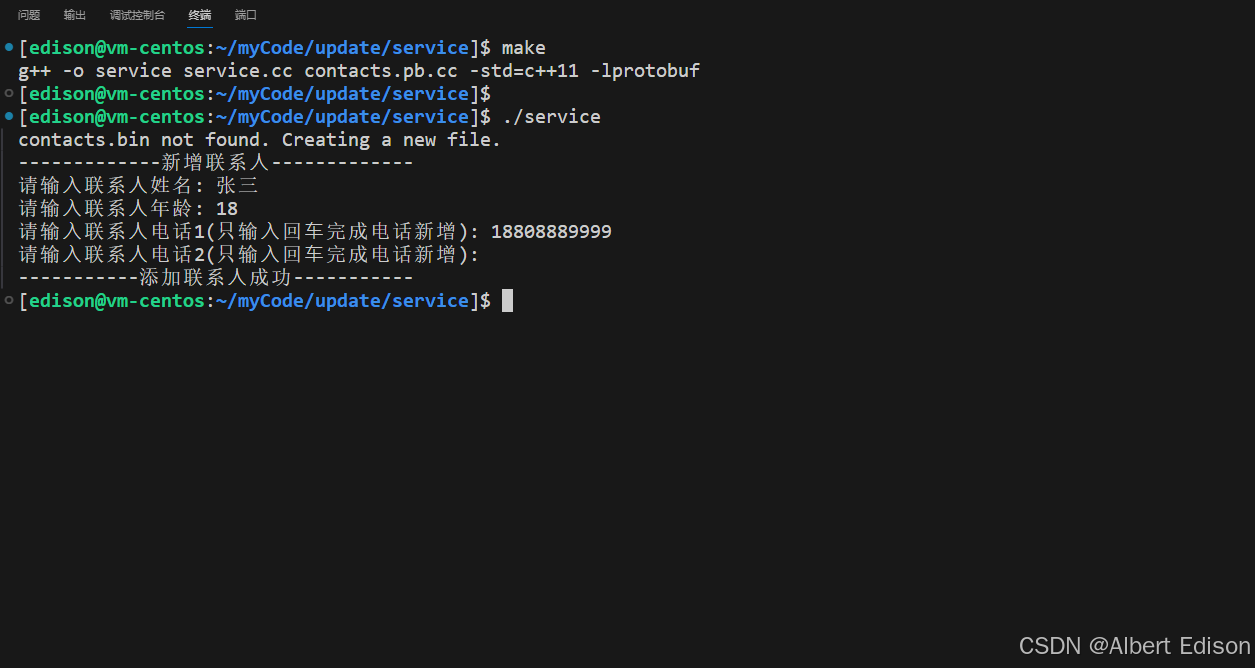
在 service 目录下运行可执行文件 ./server,并输入联系人信息:
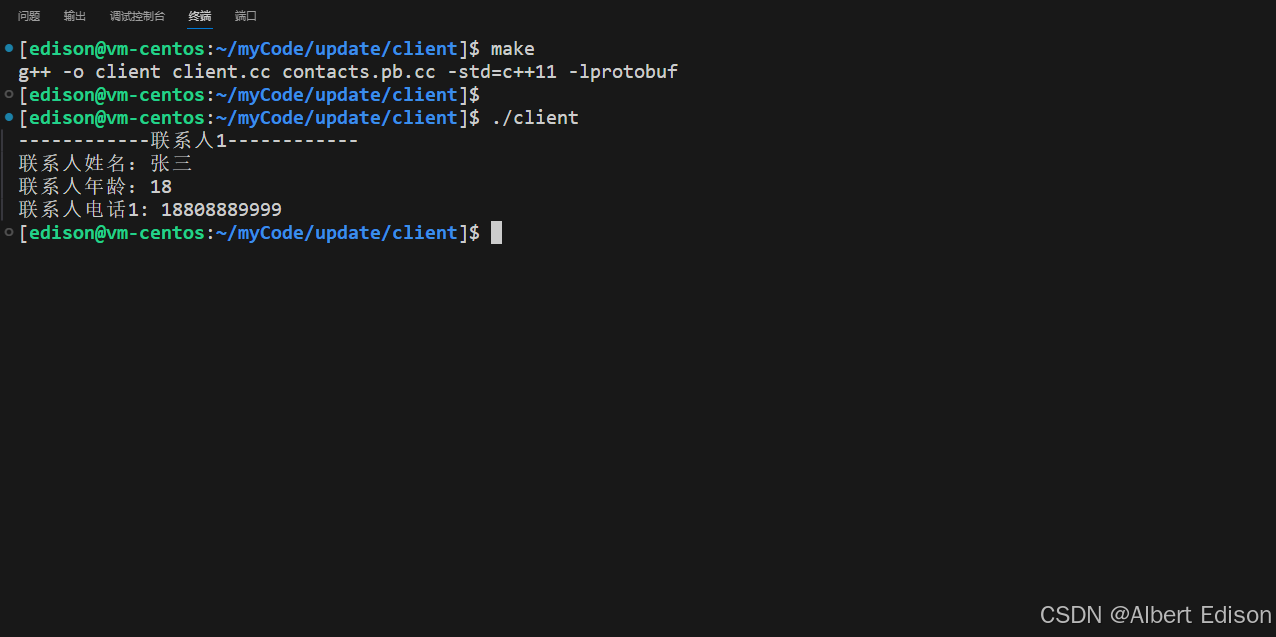
在 client 目录下运行可执行文件 ./client,打印联系人信息:
2.4 更新 service 目录下的 .proto 文件
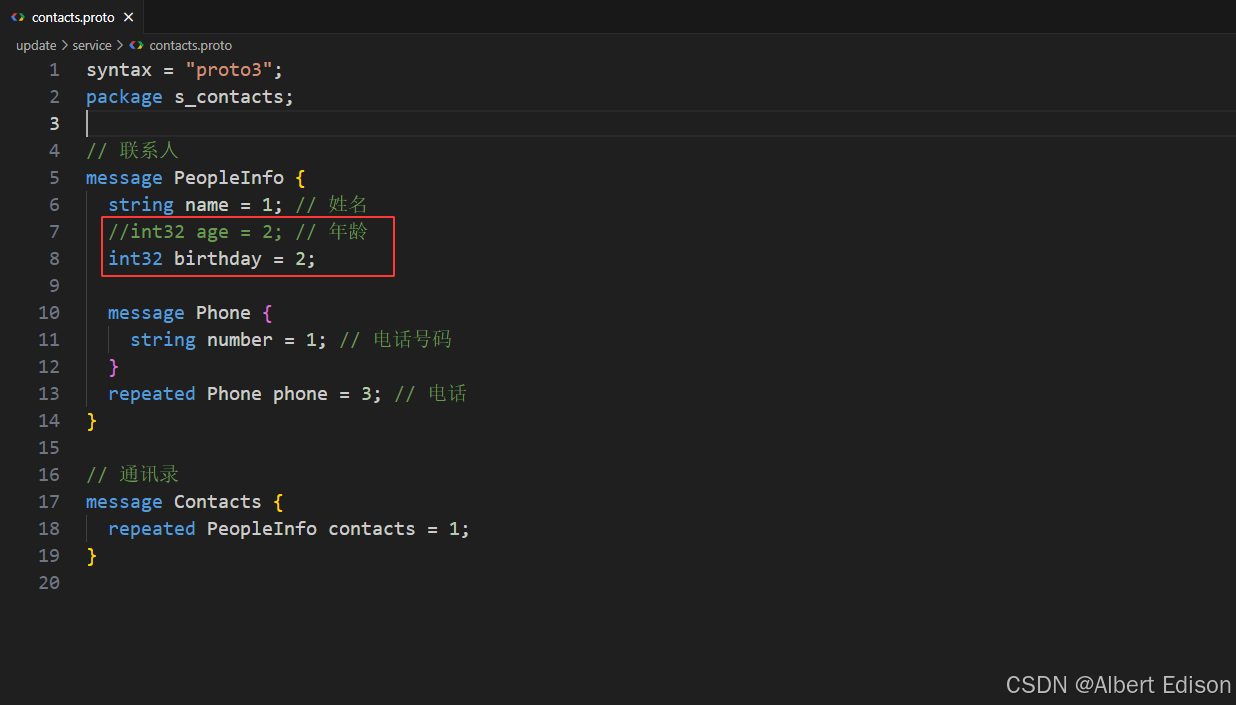
确认无误后,对 service 目录下的 contacts.proto 文件进行更新:删除 age 字段,新增 birthday 字段,新增的字段使用被删除字段的字段编号。
如下所示:
然后编译这份 .proto 文件:
shell
protoc --cpp_out=. contacts.proto另外还需要更新一下对应的 service.cc 文件:
cpp
#include <iostream>
#include <fstream>
#include "contacts.pb.h"
using namespace std;
using namespace s_contacts;

/**
 * 新增联系⼈
 */
void AddPeopleInfo(PeopleInfo *people_info_ptr) {
    cout << "-------------新增联系⼈-------------" << endl;
    cout << "请输⼊联系⼈姓名: ";
    string name;
    getline(cin, name);
    people_info_ptr->set_name(name);

    cout << "请输⼊联系⼈生日: ";
    int birthday;
    cin >> birthday;
    people_info_ptr->set_birthday(birthday);
    cin.ignore(256, '\n');

    for(int i = 1; ; i++) {
        cout << "请输⼊联系⼈电话" << i << "(只输⼊回⻋完成电话新增): ";
        string number;
        getline(cin, number);
        if (number.empty()) {
            break;
        }

        PeopleInfo_Phone* phone = people_info_ptr->add_phone();
        phone->set_number(number);
    }
    cout << "-----------添加联系⼈成功-----------" << endl;
}

int main() {

    Contacts contacts;
    // 先读取已存在的 contacts
    fstream input("../contacts.bin", ios::in | ios::binary);
    if (!input) {
        cout << "contacts.bin not found. Creating a new file." << endl;
    } else if (!contacts.ParseFromIstream(&input)) {
        cerr << "Failed to parse contacts." << endl;
        input.close();
        return -1;
    }

    // 新增⼀个联系⼈
    AddPeopleInfo(contacts.add_contacts());

    // 向磁盘⽂件写⼊新的 contacts
    fstream output("../contacts.bin", ios::out | ios::trunc | ios::binary);
    if (!contacts.SerializeToOstream(&output)) {
        cerr << "Failed to write contacts." << endl;
        input.close();
        output.close();
        return -1;
    }

    input.close();
    output.close();
    return 0;
}
然后运行代码并新增联系人信息:
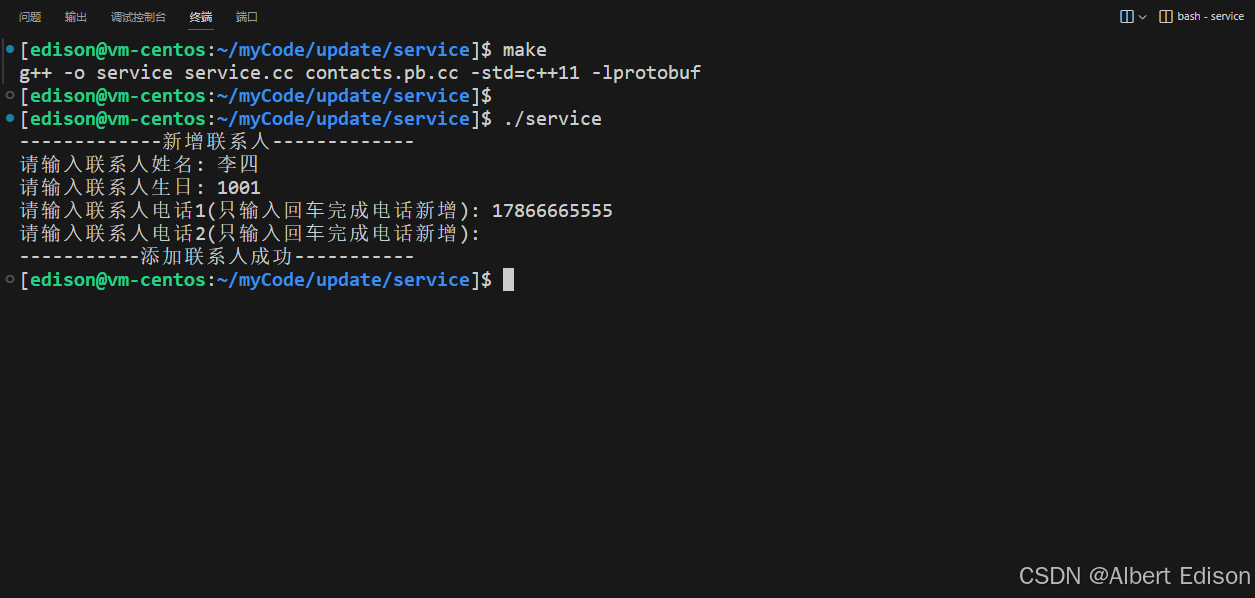
我们对 client 相关的代码保持原样,不进行更新。接着在 client 目录下打印联系人信息:
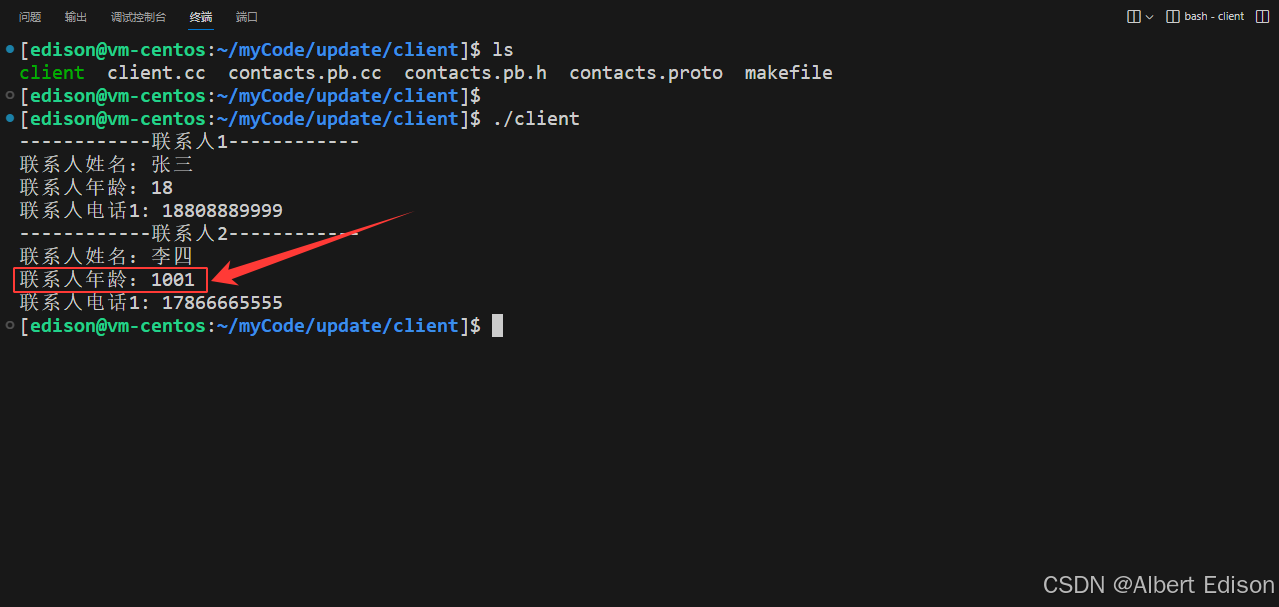
这时问题便出现了,我们发现输入的生日,在反序列化时,被设置到了使用了相同字段编号的年龄上!所以得出结论:若是移除老字段,要保证不再使用移除字段的字段编号,不建议直接删除或注释掉字段。
那么正确的做法是保留字段编号(reserved),以确保该编号将不能被重复使用。
举个例子(还是在 service 目录下的 .proto 文件)
cpp
syntax = "proto3";
package s_contacts;

// 联系⼈
message PeopleInfo {
  reserved 2;

  string name = 1; // 姓名
  //int32 age = 2; // 年龄
  int32 birthday = 2;

  message Phone {
    string number = 1; // 电话号码
  }
  repeated Phone phone = 3; // 电话
}

// 通讯录
message Contacts {
  repeated PeopleInfo contacts = 1;
}
更新内容如下:
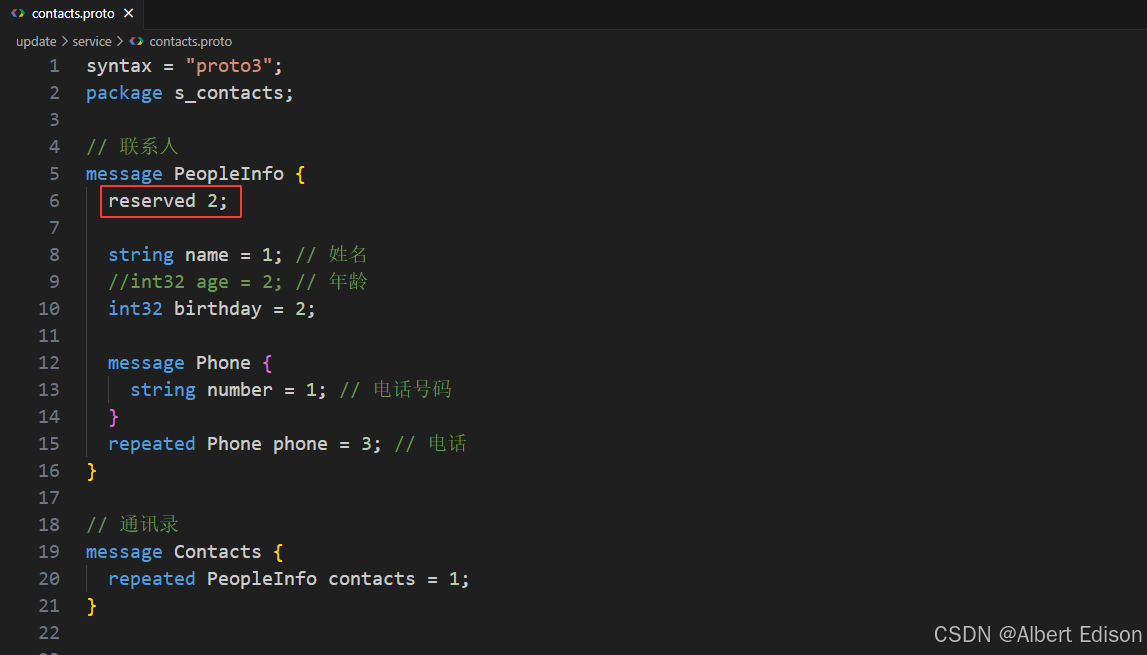
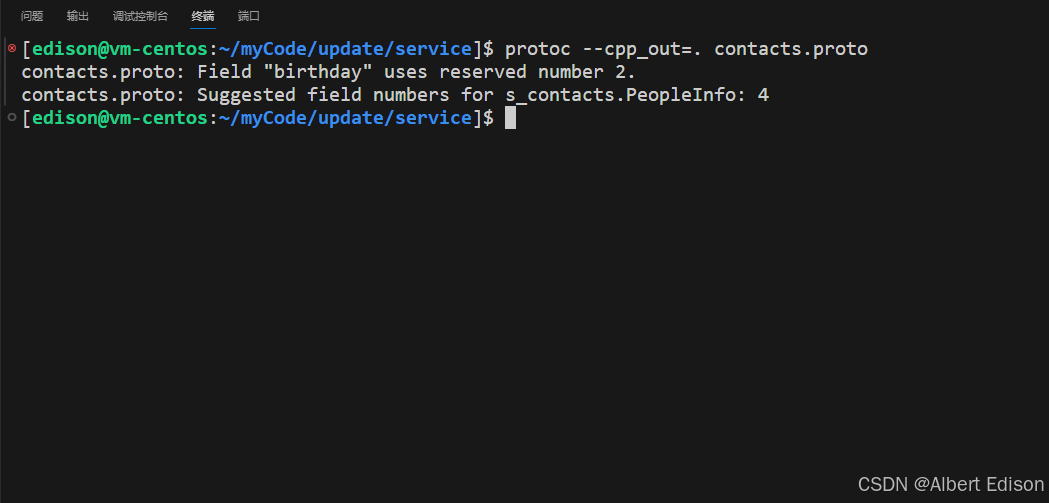
此时这份 .proto 文件是无法编译成功的,也就是说,在编译阶段是无法使用保留字段的。
3. 保留字段 reserved
如果通过删除或注释掉字段来更新消息类型,未来的用户在添加新字段时,有可能会使用以前已经存在,但已经被删除或注释掉的字段编号。将来使用该 .proto 的旧版本时的程序会引发很多问题:数据损坏、隐私错误等等。
确保不会发生这种情况的一种方法是:使用 reserved 将指定字段的编号或名称设置为保留项。当我们再使用这些编号或名称时,protocol buffer 的编译器将会警告这些编号或名称不可用。
正确 service 目录下的 contacts.proto 写法如下:
cpp
syntax = "proto3";
package s_contacts;

// 联系⼈
message PeopleInfo {
  reserved 2, 10, 11, 100 to 200; // 保留字段编号
  reserved "age"; // 保留字段名称

  string name = 1; // 姓名
  // int32 age = 2; // 年龄
  int32 birthday = 4;

  message Phone {
    string number = 1; // 电话号码
  }
  repeated Phone phone = 3; // 电话
}

// 通讯录
message Contacts {
  repeated PeopleInfo contacts = 1;
}
重新编译 .proto 文件
bash
protoc --cpp_out=. contacts.proto还需要更新下 service.cc,让 service 程序保持使用新生成的 pb C++文件。
cpp
#include <iostream>
#include <fstream>
#include "contacts.pb.h"
using namespace std;
using namespace s_contacts;

/**
 * 新增联系⼈
 */
void AddPeopleInfo(PeopleInfo *people_info_ptr) {
    cout << "-------------新增联系⼈-------------" << endl;
    cout << "请输⼊联系⼈姓名: ";
    string name;
    getline(cin, name);
    people_info_ptr->set_name(name);

    cout << "请输⼊联系⼈生日: ";
    int birthday;
    cin >> birthday;
    people_info_ptr->set_birthday(birthday);
    cin.ignore(256, '\n');

    for(int i = 1; ; i++) {
        cout << "请输⼊联系⼈电话" << i << "(只输⼊回⻋完成电话新增): ";
        string number;
        getline(cin, number);
        if (number.empty()) {
            break;
        }

        PeopleInfo_Phone* phone = people_info_ptr->add_phone();
        phone->set_number(number);
    }
    cout << "-----------添加联系⼈成功-----------" << endl;
}

int main() {

    Contacts contacts;
    // 先读取已存在的 contacts
    fstream input("../contacts.bin", ios::in | ios::binary);
    if (!input) {
        cout << "contacts.bin not found. Creating a new file." << endl;
    } else if (!contacts.ParseFromIstream(&input)) {
        cerr << "Failed to parse contacts." << endl;
        input.close();
        return -1;
    }

    // 新增⼀个联系⼈
    AddPeopleInfo(contacts.add_contacts());

    // 向磁盘⽂件写⼊新的 contacts
    fstream output("../contacts.bin", ios::out | ios::trunc | ios::binary);
    if (!contacts.SerializeToOstream(&output)) {
        cerr << "Failed to write contacts." << endl;
        input.close();
        output.close();
        return -1;
    }

    input.close();
    output.close();
    return 0;
}
接着新增一个联系人信息:
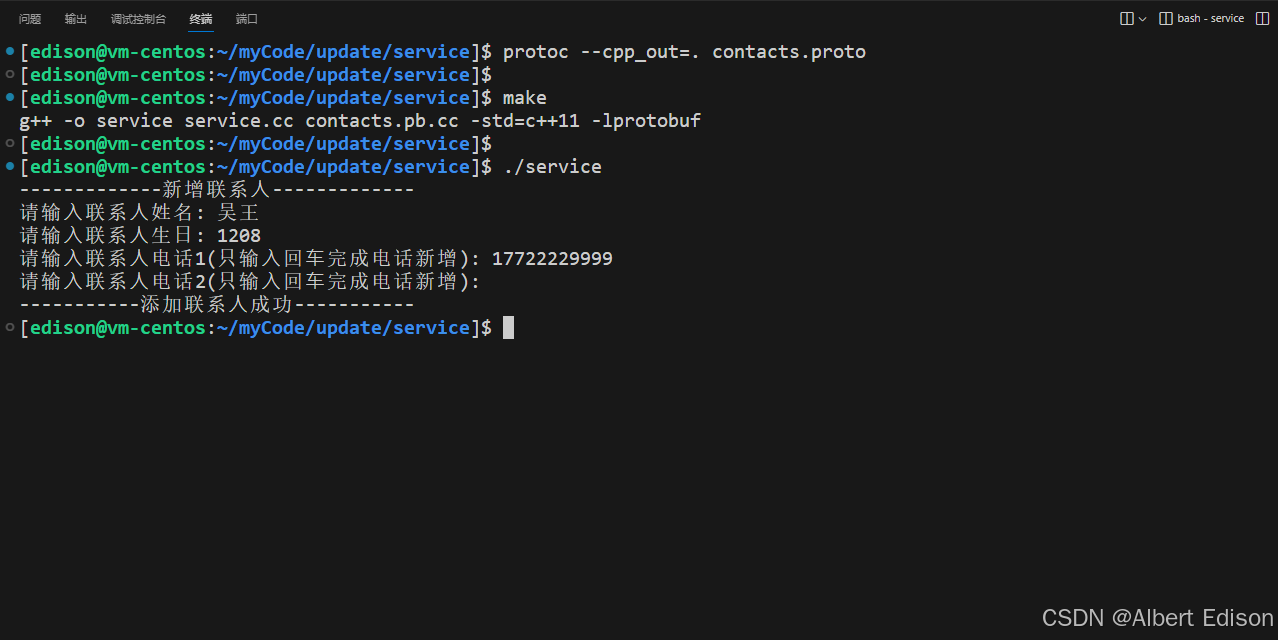
此时,我们再去 client 目录中进行打印联系人信息:根据实验结果,发现【吴王】的年龄为 0,这是由于新增时未设置年龄,通过 client 程序反序列化时,给年龄字段设置了默认值 0。这个结果显然是我们想看到的。
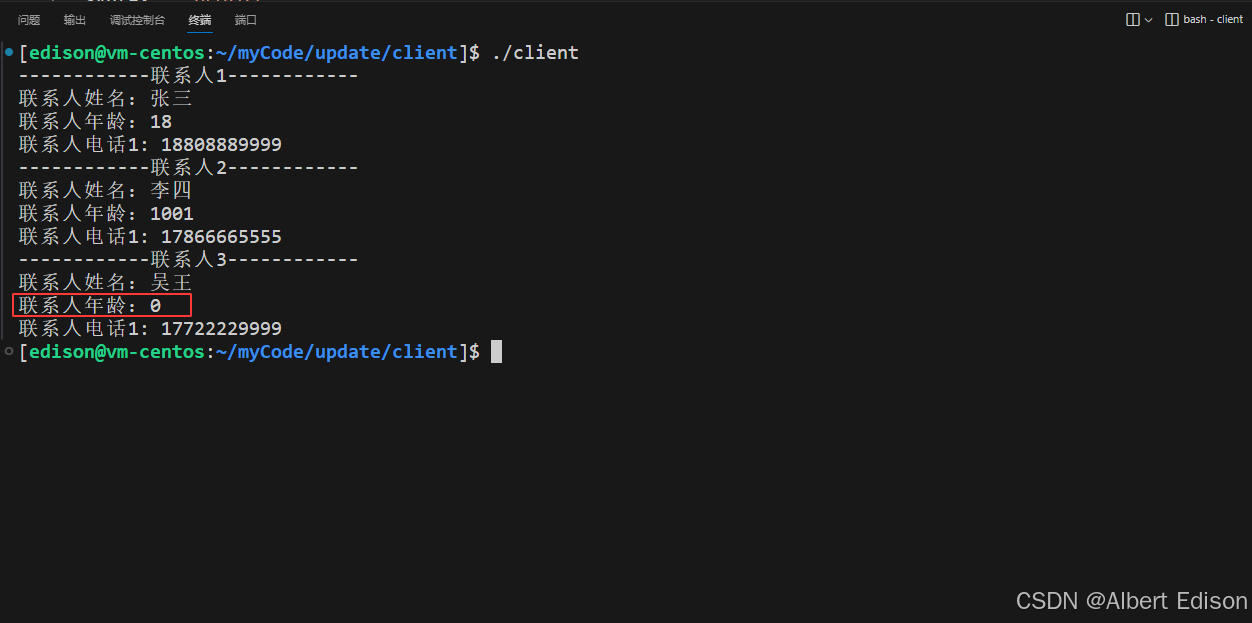
还要解释一下【李四】的年龄依旧使用了之前设置的生日字段 1001,这是因为在新增【李四】的时候,生日字段的字段编号依旧为 2,并且已经被序列化到文件中了。最后再读取的时候,字段编号依旧为 2。
还要再说一下的是:因为使用了 reserved 关键字,所以 ProtoBuf 在编译阶段就拒绝了我们使用已经保留的字段编号。到此实验结束,也印证了我们的结论。
根据以上的例子,可能还有一个疑问:如果使用了 reserved 2 了,那么 service 给【吴王】设置的生日 1001,client 就没法读到了吗?答案是可以的。(继续学习下面的未知字段即可揭晓答案)
4. 未知字段
4.1 什么是未知字段
在通讯录 3.0 版本中,我们向 service 目录下的 contacts.proto 新增了 birthday 字段,但对于 client 相关的代码并没有任何改动。验证后发现,新代码序列化的消息(service)也可以被旧代码(client)解析。
并且这里要说的是,新增的 birthday 字段在旧程序(client)中其实并没有丢失,而是会作为旧程序的未知字段。
含义如下:
- 未知字段:解析结构良好的 protocol buffer 已序列化数据中的未识别字段的表示方式。例如,当旧程序解析带有新字段的数据时,这些新字段就会成为旧程序的未知字段。
- 本来,proto3 在解析消息时总是会丢弃未知字段,但在 3.5 版本中重新引入了对未知字段的保留机制。所以在 3.5 或更高版本中,未知字段在反序列化时会被保留,同时也会包含在序列化的结果中。
4.2 未知字段从哪获取
了解相关类关系图:
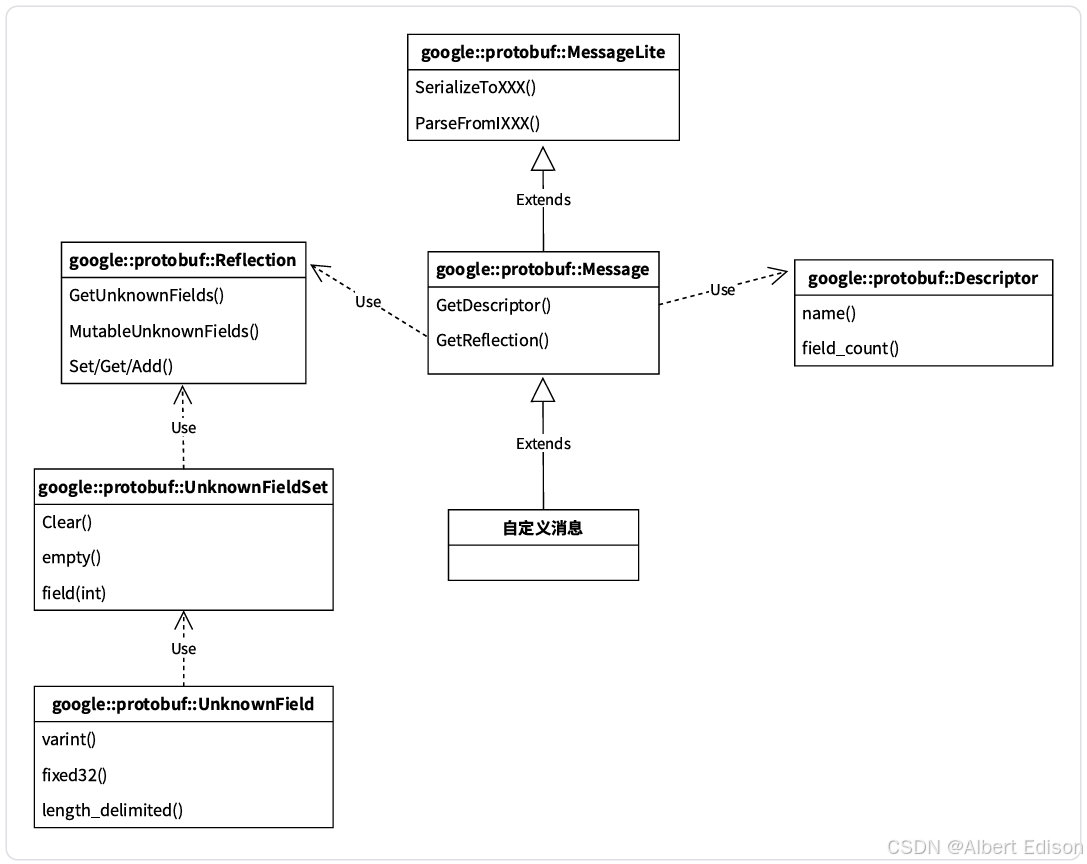
MessageLite 类介绍(了解)
- MessageLite 从名字看是轻量级的 message,仅仅提供序列化、反序列化功能。
- 类定义在 google 提供的 message_lite.h 中。
Message 类介绍(了解)
- 我们自定义的 message 类,都是继承自 Message。
- Message 最重要的两个接口 GetDescriptor/GetReflection,可以获取该类型对应的 Descriptor 对象指针和 Reflection 对象指针。
- 类定义在 google 提供的 message.h 中。
Descriptor 类介绍(了解)
- Descriptor:是对 message 类型定义的描述,包括 message 的名字、所有字段的描述、原始的 proto 文件内容等。
- 类定义在 google 提供的 descriptor.h 中。
Reflection 类介绍(了解)
- Reflection 接口类,主要提供了动态读写消息字段的接口,对消息对象的自动读写主要通过该类完成。
- 提供方法来动态访问/修改 message 中的字段,对每种类型,Reflection 都提供了一个单独的接口用于读写字段对应的值。
- 针对所有不同的 field 类型
FieldDescriptor::TYPE_*,需要使用不同的Get*()/Set*()/Add*()接口; - repeated 类型需要使用
GetRepeated*()/SetRepeated*()接口,不可以和非 repeated 类型接口混用; - message 对象只可以被由它自身的 reflection(
message.GetReflection())来操作; - 类中还包含了访问/修改未知字段的方法。
- 针对所有不同的 field 类型
- 类定义在 google 提供的 message.h 中。
UnknownFieldSet 类介绍(重要)
- UnknownFieldSet 包含在分析消息时遇到但未由其类型定义的所有字段。
- 若要将 UnknownFieldSet 附加到任何消息,请调用
Reflection::GetUnknownFields()。 - 类定义在 unknown_field_set.h 中。
UnknownField 类介绍(重要)
- 表示未知字段集中的一个字段。
- 类定义在 unknown_field_set.h 中。
4.3 验证未知字段(升级通讯录 3.1 版本)
更新 client.cc(通讯录 3.1),在这个版本中,需要打印出未知字段的内容。更新的代码如下:
cpp
#include <iostream>
#include <fstream>
#include "contacts.pb.h"
using namespace std;
using namespace c_contacts;
using namespace google::protobuf;

/**
 * 打印联系⼈列表
 */
void PrintfContacts(const Contacts& contacts) {
    for (int i = 0; i < contacts.contacts_size(); ++i) {
        const PeopleInfo& people = contacts.contacts(i);
        cout << "------------联系⼈" << i+1 << "------------" << endl;
        cout << "联系⼈姓名:" << people.name() << endl;
        cout << "联系⼈年龄:" << people.age() << endl;
        int j = 1;
        for (const PeopleInfo_Phone& phone : people.phone()) {
            cout << "联系⼈电话" << j++ << ": " << phone.number() << endl;
        }

        const Reflection* reflection = PeopleInfo::GetReflection();
        const UnknownFieldSet& set = reflection->GetUnknownFields(people);
        for (int j = 0; j < set.field_count(); j++) {
            const UnknownField& unknown_field = set.field(j);
            cout << "未知字段" << j+1 << ": "
                 << "编号 = " << unknown_field.number();
            switch(unknown_field.type()) {
                case UnknownField::Type::TYPE_VARINT:
                    cout << ", 值 = " << unknown_field.varint() << endl;
                    break;
                case UnknownField::Type::TYPE_LENGTH_DELIMITED:
                    cout << ", 值 = " << unknown_field.length_delimited() << endl;
                    break;
                // case ...
            }
        }
    }
}

int main() {
    Contacts contacts;
    // 先读取已存在的 contacts
    fstream input("../contacts.bin", ios::in | ios::binary);
    if (!contacts.ParseFromIstream(&input)) {
        cerr << "Failed to parse contacts." << endl;
        input.close();
        return -1;
    }

    // 打印 contacts
    PrintfContacts(contacts);
    input.close();
    return 0;
}
其他文件均不用做任何修改,重新编译 client.cc,进行一次操作可得如下结果:
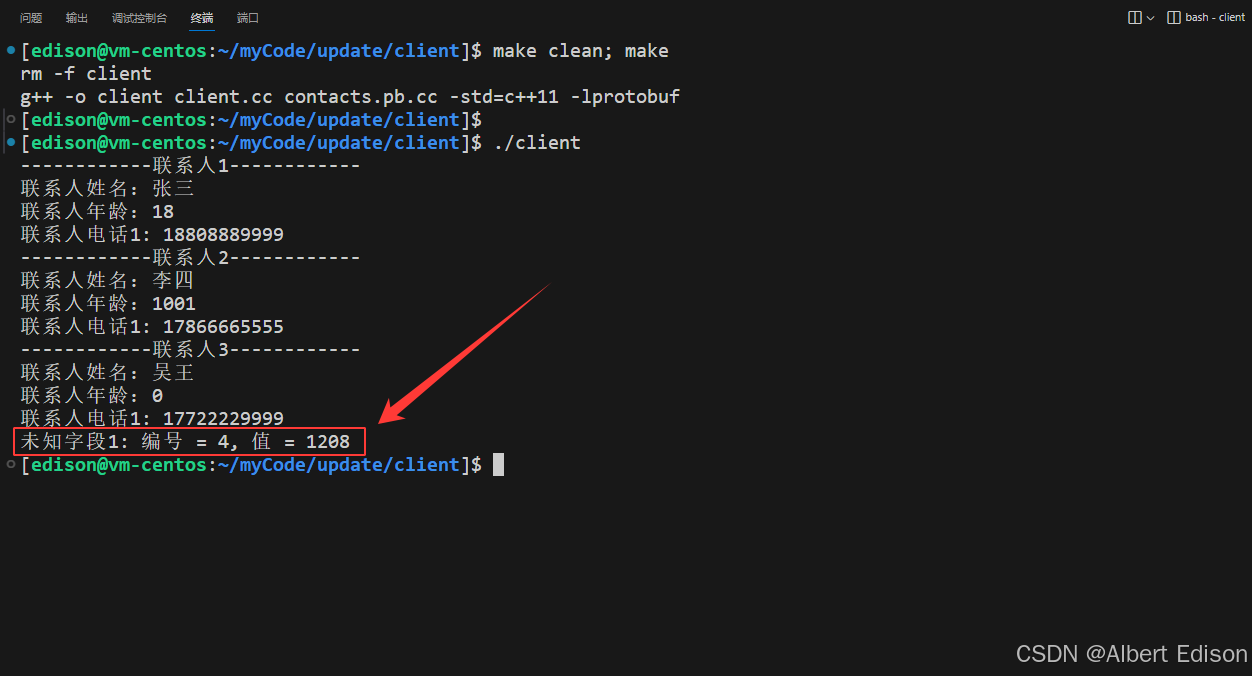
类型为何为 0 ?在介绍 UnknownField 类中讲到了类中包含了未知字段的几种类型:
cpp
enum Type {
    TYPE_VARINT,
    TYPE_FIXED32,
    TYPE_FIXED64,
    TYPE_LENGTH_DELIMITED,
    TYPE_GROUP
};
类型为 0,即为 TYPE_VARINT。
4.4 前后兼容性
根据上述的例子可以得出,protobuf 是具有向前兼容的。为了叙述方便,把增加了 birthday 属性的 service 称为【新模块】,对于未做变动的 client 称为【老模块】。
- 向前兼容:老模块能够正确识别新模块生成或发出的协议。这时新增加的 birthday 属性会被当作未知字段(protobuf 3.5 版本及之后)。
- 向后兼容:新模块也能够正确识别老模块生成或发出的协议。
前后兼容的作用:当我们维护一个很庞大的分布式系统时,由于你无法同时升级所有模块,为了保证在升级过程中,整个系统能够尽可能不受影响,就需要尽量保证通讯协议的【向后兼容】或【向前兼容】。