石榴智能通用文字识别接口可准确识别印刷体、手写体、艺术体识别,兼容中英文、繁体、日文,多种图片/PDF格式,自动方向矫正,接口稳定快速输出|支持定制化开发,免费测试!
一、功能说明
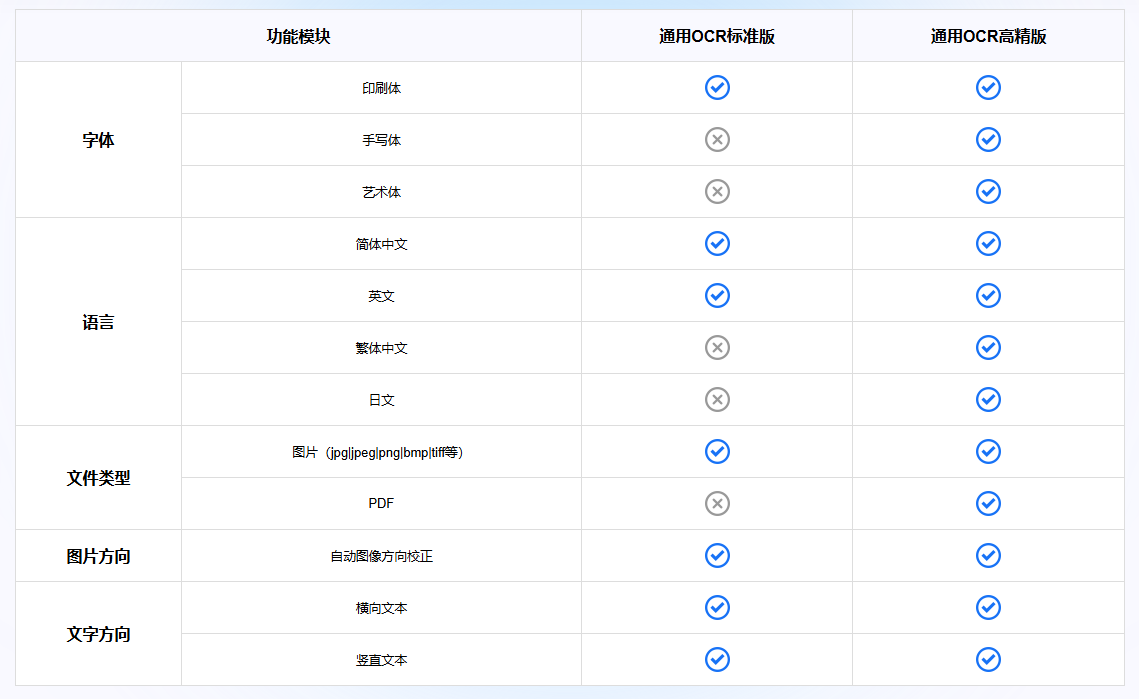
通用文字识别接口提供了两种接口类型:通用OCR标准版本接口\通用OCR高精版本接口,下图是两个接口的功能对比表
二、效果展示
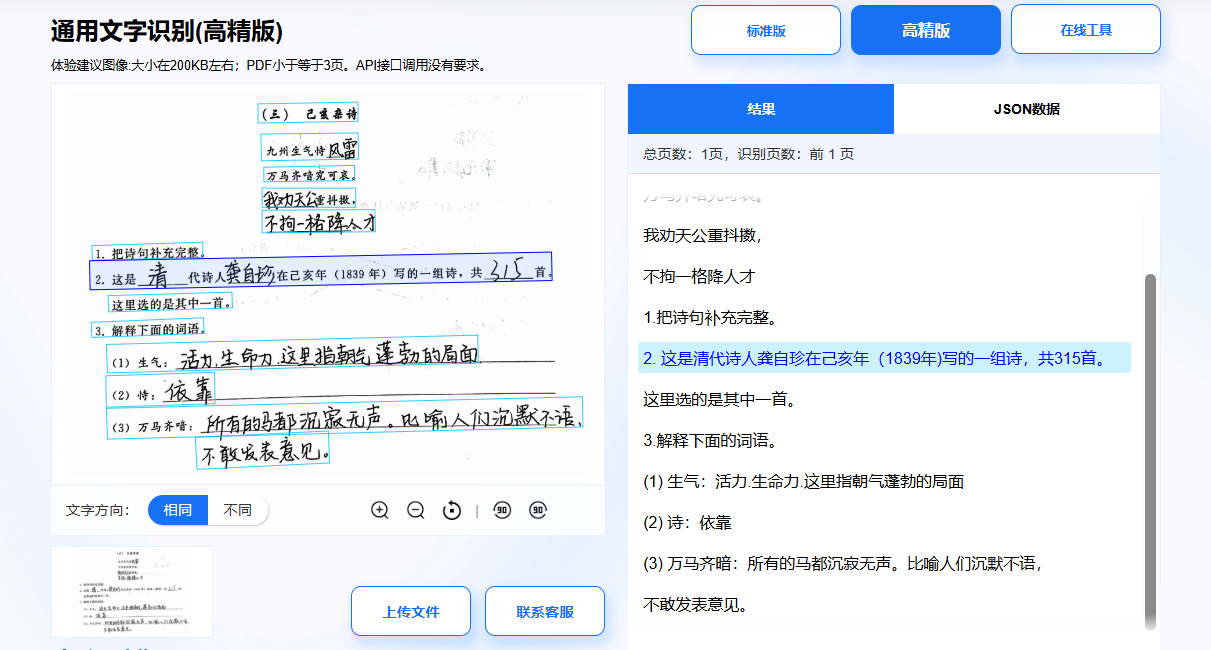
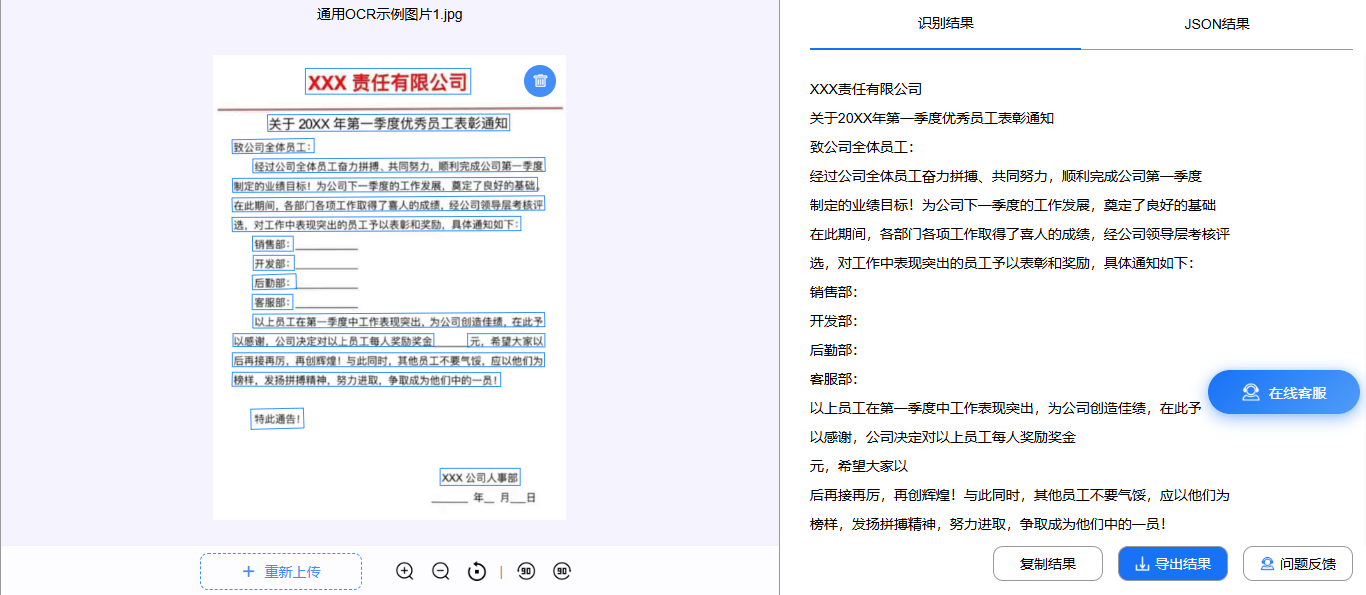
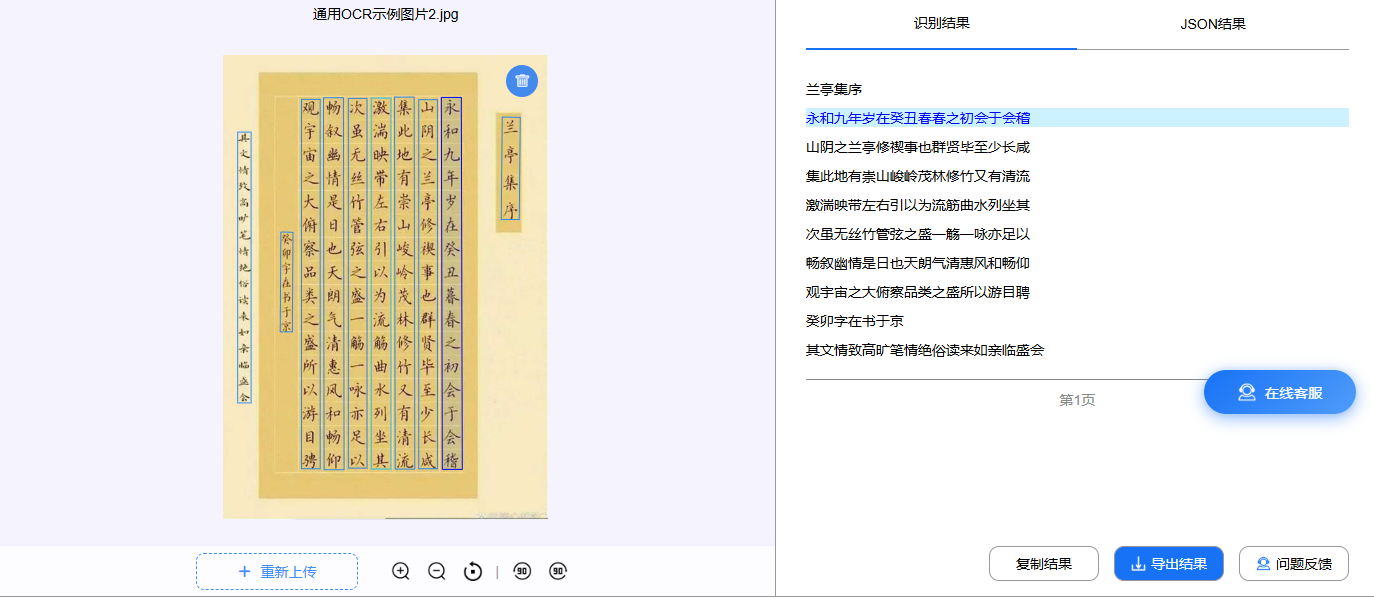
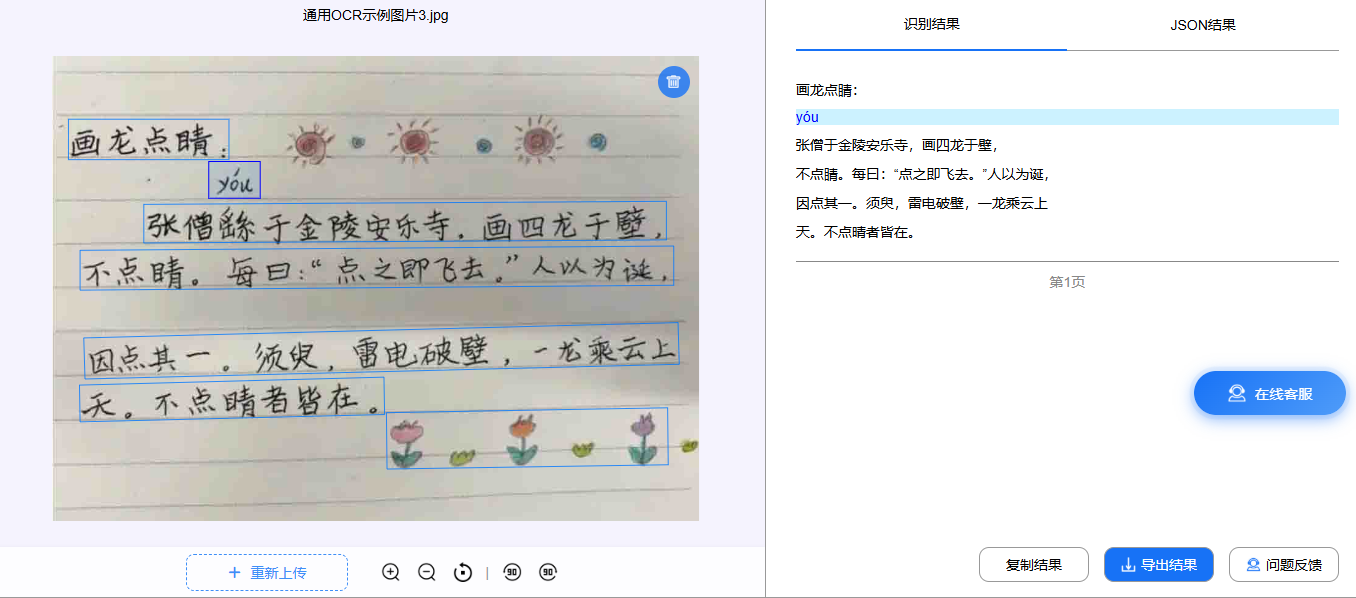
石榴智能通用文字识别接口,支持免费在线测试,可以直接在网页上传测试效果。以下是测试效果图:
三、调用说明
1.接口信息
请求URL:https://ocr-api.shiliuai.com/api/advanced_general_ocr/v1
请求方式:POST
返回类型:JSON
2.接口参数
2.1请求参数(Header)
方式一:简单认证
| 参数 | 类型 | 说明 |
|---|---|---|
| Authorization | string | 'APPCODE ' + 您的AppCode (注意英文空格) |
| Content-Type | string | application/json |
方式二:签名认证
| 参数 | 类型 | 说明 |
|---|---|---|
| Content-Type | string | application/json |
| x-ca-key | string | 您的AppKey |
| x-ca-timestamp | string | 时间戳(毫秒) |
| x-ca-signature | string | 签名sign |
str = app_key×tamp&app_secret
sign = md5(str)
2.2请求参数(Body)
| 参数 | 是否必填 | 类型 | 说明 |
|---|---|---|---|
| file_base64 | 选填 | string | base64编码的图片文件或pdf文件,file_base64与file_url必须传一个。像素范围:15,8192,小于20M |
| file_url | 选填 | string | 图片文件或pdf文件的url,file_base64与file_url必须传一个。像素范围:15,8192,小于20M |
| file_id | 必填 | string | 文件id,异步获取结果时,传此值 |
| mode | 选填 | string | 同步:"sync",异步:"async",默认为同步,同步时pdf文件最多10页 |
| doc_orient | 选填 | bool | 是否自动转正文档,默认为True |
| txt_orient | 选填 | bool | 是否自动转正每行文字,默认为False |
3.返回信息
3.1返回码 与返回信息
| 参数 | 参数类型 | 说明 |
|---|---|---|
| code | int | 错误码 |
| msg | string | 错误信息(英文) |
| msg_cn | string | 错误信息(中文) |
| success | bool | 识别是否成功 |
| file_id | string | 请求文件ID |
| request_id | string | 唯一请求ID |
| data | data | 具体看下面 |
data 成功示例:
data = {

       "page_count": 5, // int, 文件页面总数

       "process_pages": 3, // int, 处理页面数

       "status": 2, // int, 处理状态,0: 已加入队列, 1: 正在处理中, 2: 已完成,同步时此值为2

       "wait_time": 0.0 // float, 大概还需等待时间,同步时此值为0

       // 如果status==2:

           "pages": [

              {

                     "width": 2000, // int, 页面宽度

                     "height": 2500, // int, 页面高度

                     "prob_mean": 0.98, // float, [0, 1], 页面文字置信度平均值

                     "prob_std": 0.11, // float, 页面文字置信度标准差

                     "lines": [

                        {

                            "text": "你好", // string, 文字内容

                            "prob": 0.995, // float, [0, 1], 文字内容置信度

                             "keypoints": [[50, 20], [150, 20], [150, 60], [50, 60]] // list, [[xi, yi]], 文字区域角点位置,以左上角为起点,按顺时针排列

                        },

                        ......

                     ]

              },

              ......,

       ]

}
data 失败示例:
'code': error code,

'msg': error message,

'msg_cn': 中文错误信息,

'success': False,

'file_id': file id,

'request_id': request id,

'data': {}
3. 2错误 码
| 错误码 | 说明 |
|---|---|
| 200 | 成功 |
| 400 | 错误请求,比如参数错误 |
| 401 | 未经授权 |
| 500 | 内部错误 |
四、调用示例代码
1.python代码
python
# API 文档:https://market.shiliuai.com/doc/advanced-general-ocr

import requests
import base64
import json

# 请求接口
URL = "https://ocr-api.shiliuai.com/api/advanced_general_ocr/v1"

# 图片/pdf文件转base64
def get_base64(file_path):
    with open(file_path, "rb") as f:
        data = f.read()
    return base64.b64encode(data).decode("utf8")

def demo(appcode, file_path):
    # 请求头
    headers = {
        "Authorization": "APPCODE %s" % appcode,
        "Content-Type": "application/json"
    }

    # 请求体
    b64 = get_base64(file_path)
    data = {"file_base64": b64}

    # 请求
    response = requests.post(url=URL, headers=headers, json=data)
    content = json.loads(response.content)
    print(content)

if __name__ == "__main__":
    appcode = "你的APPCODE"
    file_path = "本地文件路径"
    demo(appcode, file_path)
2.java代码
java
//API文档:https://market.shiliuai.com/doc/advanced-general-ocr
import com.alibaba.fastjson2.JSON;
import com.alibaba.fastjson2.JSONObject;
import org.apache.http.HttpResponse;
import org.apache.http.client.methods.HttpPost;
import org.apache.http.entity.StringEntity;
import org.apache.http.impl.client.CloseableHttpClient;
import org.apache.http.impl.client.HttpClients;
import org.apache.http.util.EntityUtils;
import org.apache.commons.io.FileUtils;
import java.io.File;
import java.io.IOException;
import java.util.HashMap;
import java.util.Map;
import java.util.Base64;

public class Main {
    public static String get_base64(String path) {
        String b64 = "";
        try {
            // 使用Commons IO简化文件读取
            byte[] content = FileUtils.readFileToByteArray(new File(path));
            // 使用JDK自带的Base64
            b64 = Base64.getEncoder().encodeToString(content);
        } catch (IOException e) {
            e.printStackTrace();
        }
        return b64;
    }

    public static void main(String[] args) {
        String url = "https://ocr-api.shiliuai.com/api/advanced_general_ocr/v1";// 请求接口
        String appcode = "你的APPCODE";
        String imgFile = "本地文件路径";

        Map headers = new HashMap<>();
        headers.put("Authorization", "APPCODE " + appcode);
        headers.put("Content-Type", "application/json");

        // 请求体
        JSONObject requestObj = new JSONObject();
        requestObj.put("file_base64", get_base64(imgFile));
        String bodys = requestObj.toString();

        try (CloseableHttpClient httpClient = HttpClients.createDefault()) {
            // 创建POST请求
            HttpPost httpPost = new HttpPost(url);

            // 设置请求头
            for (Map.Entry entry : headers.entrySet()) {
                httpPost.addHeader(entry.getKey(), entry.getValue());
            }

            // 设置请求体
            StringEntity entity = new StringEntity(bodys, "UTF-8");
            httpPost.setEntity(entity);

            // 执行请求
            HttpResponse response = httpClient.execute(httpPost);
            int stat = response.getStatusLine().getStatusCode();
            if (stat != 200) {
                System.out.println("Http code: " + stat);
                return;
            }
            String res = EntityUtils.toString(response.getEntity());
            JSONObject res_obj = JSON.parseObject(res);

            System.out.println(res_obj.toJSONString());
        } catch (Exception e) {
            e.printStackTrace();
        }
    }
} 3.php代码
php
// API文档:https://market.shiliuai.com/doc/advanced-general-ocr
// 图片/pdf转base64
function get_base64($path){
    if($fp = fopen($path, "rb", 0)) {
        $binary = fread($fp, filesize($path));// 文件读取
        fclose($fp);
        $b64 = base64_encode($binary);// 转base64
    }else{
        $b64="";
        printf("%s 文件不存在", $path);
    }
    return $b64;
}

$url = "https://ocr-api.shiliuai.com/api/advanced_general_ocr/v1";
$appcode = "你的appcode";
$img_path = "图片路径";
$method = "POST";

//请求头
$headers = array();
array_push($headers, "Authorization:APPCODE " . $appcode);
array_push($headers, "Content-Type:application/json");

//请求体
$b64 = get_base64($img_path);
$data = array(
    "file_base64" => $b64
);
$post_data = json_encode($data);

// 请求
$curl = curl_init();
curl_setopt($curl, CURLOPT_CUSTOMREQUEST, $method);
curl_setopt($curl, CURLOPT_URL, $url);
curl_setopt($curl, CURLOPT_HTTPHEADER, $headers);
curl_setopt($curl, CURLOPT_FAILONERROR, false);
curl_setopt($curl, CURLOPT_RETURNTRANSFER, true);
curl_setopt($curl, CURLOPT_HEADER, true);
curl_setopt($curl, CURLOPT_SSL_VERIFYPEER, false);
curl_setopt($curl, CURLOPT_SSL_VERIFYHOST, false);
curl_setopt($curl, CURLOPT_POSTFIELDS, $post_data);

$result = curl_exec($curl);
var_dump($result);