
好久没有写技术了
手写时钟Windows工具
说明:
网页版"桌面时钟"(已为你构建完成)
"桌面时钟"Java 代码逻辑,为你构建了一个功能完全一致的 Web 版桌面时钟。它具备以下特点:
-
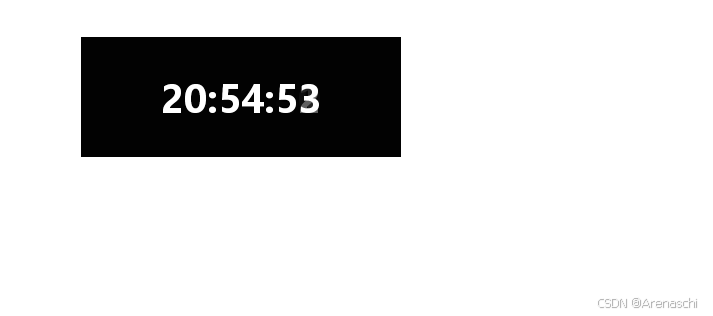
外观一致:320x120 大小,半透明黑底,白色微软雅黑字体。
-
实时更新:每秒更新时间。
-
可拖拽:你可以直接在预览窗口中用鼠标拖动它。
-
双击退出:双击时钟会模拟"退出"效果。
你可以直接在右侧的预览框中查看和使用它。
下面是代码和效果图:
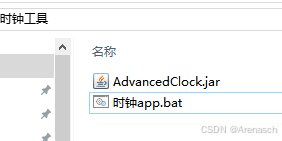
运行时钟app。bat启动。
java
import javax.swing.*;
import java.awt.*;
import java.awt.event.*;
import java.text.SimpleDateFormat;
import java.util.Date;

public class AdvancedClock extends JFrame {

    private JLabel timeLabel;

    private int mouseX;
    private int mouseY;

    public AdvancedClock() {

        // ===== 窗口设置 =====
        setTitle("Desktop Clock");
        setSize(320,120);
        setUndecorated(true);          // 无边框
        setAlwaysOnTop(true);          // 永远置顶
        setBackground(new Color(0,0,0,0)); // 透明背景
        setLayout(new BorderLayout());

        // ===== 时间文字 =====
        timeLabel = new JLabel();
        timeLabel.setHorizontalAlignment(SwingConstants.CENTER);
        timeLabel.setFont(new Font("微软雅黑", Font.BOLD, 38));
        timeLabel.setForeground(Color.WHITE);

        add(timeLabel, BorderLayout.CENTER);

        // ===== 半透明黑底 =====
        JPanel bg = new JPanel(new BorderLayout());
        bg.setBackground(new Color(0,0,0,160));
        bg.add(timeLabel);

        setContentPane(bg);

        // ===== 拖拽功能 =====
        addMouseListener(new MouseAdapter() {

            @Override
            public void mousePressed(MouseEvent e) {
                mouseX = e.getX();
                mouseY = e.getY();
            }

            // 双击退出
            @Override
            public void mouseClicked(MouseEvent e) {
                if(e.getClickCount()==2){
                    System.exit(0);
                }
            }
        });

        addMouseMotionListener(new MouseMotionAdapter() {
            @Override
            public void mouseDragged(MouseEvent e) {

                int x = e.getXOnScreen();
                int y = e.getYOnScreen();

                setLocation(x - mouseX, y - mouseY);
            }
        });

        // ===== 时间刷新 =====
        Timer timer = new Timer(1000, e -> updateTime());
        timer.start();

        updateTime();

        // 居中显示
        setLocationRelativeTo(null);

        setVisible(true);
        toFront();
    }

    private void updateTime() {
        SimpleDateFormat sdf =
                new SimpleDateFormat("HH:mm:ss");

        timeLabel.setText(sdf.format(new Date()));
    }

    public static void main(String[] args) {

        SwingUtilities.invokeLater(() -> {
            new AdvancedClock();
        });
    }
}
代码打包流程:
请严格按照以下 3 步重新操作:
第一步:重新编译(解决编码报错)
在你的 E:\tool\src\main\util> 目录下运行:
javac -encoding UTF-8 AdvancedClock.java检查: 运行完后,请看一眼文件夹里是否多出了 AdvancedClock.class 和 AdvancedClock$1.class 这两个文件。如果没有,说明编译还是失败了。
第二步:重新打包(确保主类被包含)
确保文件夹里有 .class 文件后,运行:
jar cvfe AdvancedClock.jar AdvancedClock AdvancedClock*.class注意: 这里的 AdvancedClock*.class 会把主类和内部类都打进去。
第三步:验证 Jar 包内容(可选但推荐)
如果你想确认里面到底有没有主类,可以运行:
jar tf AdvancedClock.jar如果输出列表里没有 AdvancedClock.class,那么运行 .bat 肯定会报错。
为什么会提示"找不到主类"?
当你运行 java -jar AdvancedClock.jar 时,Java 会去寻找 AdvancedClock.class。
-
如果你之前的 jar 命令里只写了 *.class,而当时文件夹里只有 PortMonitorServer.class,那打出来的包里就只有 PortMonitorServer。
-
Java 发现你指定的主类是 AdvancedClock,但在包里翻遍了也找不到它,就会报这个错。
重新编译并打包后,再双击你的 .bat 文件应该就能成功了!