1. 引言:理解全局光照
全局光照(Global Illumination,简称 GI)是计算机图形学中一项重要的光照技术,它模拟了光线在场景中 多次反弹 的效果,使渲染结果更加真实自然。在 Unity 的通用渲染管线(URP)中,GI 系统主要通过以下几种方式实现:
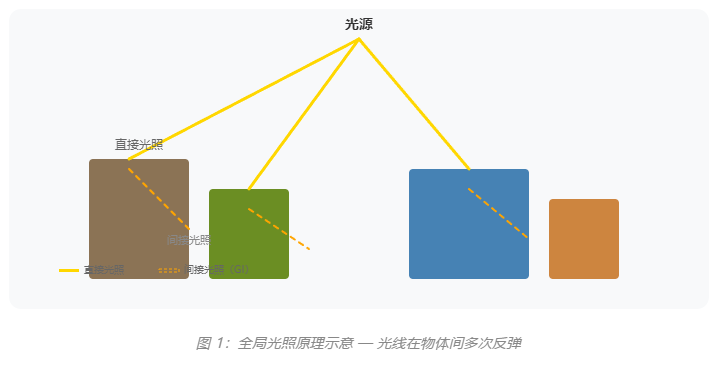
💡 URP 中的 GI 方案:
URP 12.0+ 版本引入了对 Enlighten 实时 GI 的支持,同时保留了传统的烘焙 GI(Lightmap)和实时探针方案。
本文将深入讲解三种主要的 GI 实现方式:
- Lightmap(光照贴图) --- 静态场景的预计算光照
- 光照探针(Light Probe) --- 动态物体的环境光采样
- 反射探针(Reflection Probe) --- 实时反射与环境映射
2. Lightmap 烘焙与采样
2.1 什么是 Lightmap?
Lightmap 是 Unity 中最传统的 GI 解决方案,它将场景的光照信息 预计算 并存储到贴图中。这种方式适合静态场景,能够以较低的性能开销实现高质量的光照效果。
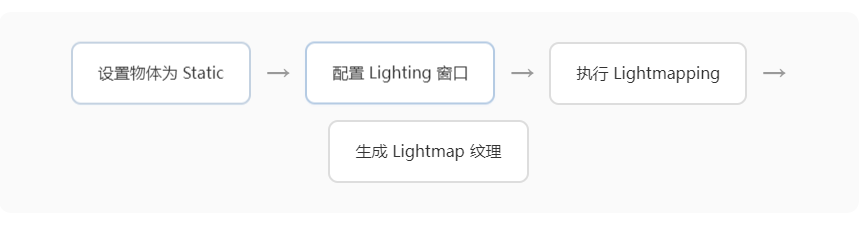
2.2 Lightmap 工作流程
2.3 URP Shader 中采样 Lightmap
在自定义 URP Shader 中,我们需要使用 Unity 提供的内置函数来采样 Lightmap。以下是完整的实现代码:
cs
1// ============================================================
 2// Unity URP Lightmap 采样示例
 3// 适用于 URP 12.0+
 4// ============================================================
 5
 6// 引入 URP 核心头文件
 7#include "Packages/com.unity.render-pipelines.universal/ShaderLibrary/Core.hlsl"
 8#include "Packages/com.unity.render-pipelines.universal/ShaderLibrary/Lighting.hlsl"
 9
10// ============================================================
11// 声明 Shader 属性
12// ============================================================
13
14struct Attributes {
15    float4 positionOS : POSITION;     // 对象空间顶点位置
16    float3 normalOS   : NORMAL;       // 对象空间法线
17    float2 uv         : TEXCOORD0;     // 主纹理坐标
18    float2 lightmapUV : TEXCOORD1;    // Lightmap UV
19};
20
21struct Varyings {
22    float4 positionHCS : SV_POSITION;   // 裁剪空间顶点位置
23    float2 uv         : TEXCOORD0;
24    float3 positionWS : TEXCOORD1;    // 世界空间位置
25    float3 normalWS   : TEXCOORD2;    // 世界空间法线
26    float2 lightmapUV : TEXCOORD3;    // Lightmap UV 传递到片元着色器
27};
28
29// ============================================================
30// 顶点着色器
31// ============================================================
32
33Varyings Vertex(Attributes input) {
34    Varyings output;
35
36    // 转换顶点位置到裁剪空间
37    output.positionHCS = TransformObjectToHClip(input.positionOS);
38
39    // 转换法线到世界空间
40    output.normalWS = TransformObjectToWorldNormal(input.normalOS);
41
42    // 获取世界空间位置
43    output.positionWS = TransformObjectToWorld(input.positionOS).xyz;
44
45    // 传递 UV 坐标
46    output.uv = input.uv;
47
48    // 传递 Lightmap UV(应用 Scale/Offset)
49    output.lightmapUV = input.lightmapUV * unity_LightmapST.xy + unity_LightmapST.zw;
50
51    return output;
52}
53
54// ============================================================
55// 片元着色器 --- Lightmap 采样核心逻辑
56// ============================================================
57
58float4 Fragment(Varyings input) : SV_Target {
59    // 基础颜色(从主纹理采样)
60    float4 baseColor = SAMPLE_TEXTURE2D(_MainTex, sampler_MainTex, input.uv);
61
62    // 初始化光照数据
63    Light mainLight = GetMainLight();
64
65    // ========== Lightmap 采样核心代码 ==========
66    float3 lightmapColor = float3(0.0);
67
68//  D:\Unity\2022\Editor\Data\Resources\PackageManager\ProjectTemplates\
69    // 使用 SAMPLE_TEXTURE2D 采样 Lightmap
70    // unity_Lightmap 是 Lightmap 纹理数组
71    #if defined(LIGHTMAP_ON)
72        // 烘焙光照模式:使用 Lightmap 纹理
73    lightmapColor = SAMPLE_TEXTURE2D(unity_Lightmap, samplerunity_Lightmap,
74                                 input.lightmapUV).rgb;
75        // 解码 HDR Lightmap(如果使用 HDR)
76    lightmapColor = DecodeLightmap(lightmapColor);
77    #else
78        // 如果没有 Lightmap,使用环境光
79    lightmapColor = float3(0.03, 0.03, 0.03);  // 默认环境光
80    #endif
81
82    // 计算 Lambert 漫反射
83    float NdotL = dot(input.normalWS, mainLight.direction);
84    float diffuse = saturate(NdotL);
85
86    // 组合光照:基础色 × (直接光照 + Lightmap)
87    float3 finalColor = baseColor.rgb *
88                      (mainLight.color * diffuse + lightmapColor);
89
90    return float4(finalColor, baseColor.a);
91}
⚠️ 注意事项:
Lightmap 采样需要物体标记为 Lightmap Static,并且在 Lighting Settings 中启用 Baked GI。
3. 光照探针 (Light Probe)
3.1 光照探针的作用
光照探针(Light Probe)用于为 动态物体 提供环境光照信息。静态物体使用 Lightmap,而动态角色、玩家角色等无法使用 Lightmap 的物体需要通过光照探针来获取环境光照。
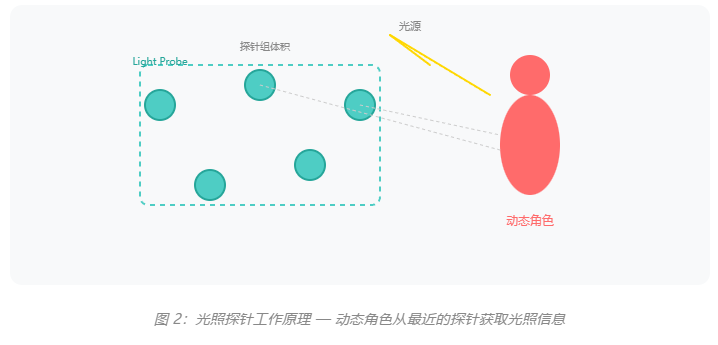
3.2 Shader 中采样光照探针
光照探针使用球谐函数(Spherical Harmonics)进行编码和采样,这在 URP 中可以通过内置函数自动处理:
cs
1// ============================================================
 2// 光照探针 (Light Probe) 采样示例
 3// 使用球谐函数 (Spherical Harmonics)
 4// ============================================================
 5
 6#include "Packages/com.unity.render-pipelines.universal/ShaderLibrary/Lighting.hlsl"
 7
 8// ============================================================
 9// 结构体定义
10// ============================================================
11
12struct Varyings {
13    float4 positionHCS : SV_POSITION;
14    float3 positionWS : TEXCOORD0;    // 世界空间位置
15    float3 normalWS   : TEXCOORD1;    // 世界空间法线
16    float2 uv         : TEXCOORD2;
17};
18
19// ============================================================
20// 片元着色器:光照探针采样
21// ============================================================
22
23float4 Fragment(Varyings input) : SV_Target {
24    float4 baseColor = SAMPLE_TEXTURE2D(_MainTex, sampler_MainTex, input.uv);
25
26    // 获取主光源信息
27    Light mainLight = GetMainLight();
28
29    // ========== 光照探针采样核心代码 ==========
30    float3 lightProbeColor = float3(0.0);
31
32    // 使用 SampleSH 在世界空间法线方向采样球谐
33    // Unity 会自动找到最近的光照探针组
34    // 这里的 Probe 存储为球谐系数
35    #if defined(LIGHTMAP_ON)
36        // 烘焙 GI 模式:使用球谐探针
37        // SampleSHVertex 是在顶点着色器中进行采样
38    lightProbeColor = SampleSH(input.normalWS);
39    #else
40        // 非烘焙模式:使用环境光
41    lightProbeColor = SampleAmbient(input.positionWS);
42    #endif
43
44    // ========== 获取额外光源 (Additional Lights) ==========
45    int pixelLightCount = GetAdditionalLightsCount();
46    float3 addLightContribution = float3(0);
47
48    // 遍历所有额外光源
49    for (int i = 0; i < pixelLightCount; ++i) {
50        Light light = GetAdditionalLight(i, input.positionWS);
51        float dist = distance(input.positionWS, light.position);
52        float attenuation = 1.0 / (1.0 + 0.1 * dist * dist);
53        float NdotL = max(0, dot(input.normalWS, light.direction));
54        addLightContribution += light.color * NdotL * attenuation;
55    }
56
57    // 计算最终颜色
58    float3 finalColor = baseColor.rgb * (
59        lightProbeColor +           // 光照探针(环境光)
60        mainLight.color *              // 主光源
61        max(0, dot(input.normalWS, mainLight.direction)) +
62        addLightContribution          // 额外光源
63    );
64
65    return float4(finalColor, baseColor.a);
66}
💡 球谐函数 (Spherical Harmonics) 优势:
相比直接存储颜色值,球谐系数只需要很少的内存(约 27 个浮点数)就能存储一个位置的环境光照信息,支持任意方向的快速采样。
4. 反射探针 (Reflection Probe)
4.1 反射探针类型
反射探针用于提供环境反射信息,在 URP 中有三种模式:
| 类型 | 模式 | 性能 | 适用场景 |
|---|---|---|---|
| Baked | 烘焙 | 最高 | 静态环境的反射 |
| Realtime | 实时 | 最低 | 动态场景的实时反射 |
| Mixed | 混合 | 中等 | 烘焙 + 实时物体混合 |
4.2 Shader 中采样反射探针
在 URP Shader 中,我们可以使用 GlossyEnvironmentReflection 或 SampleEnv 函数来采样反射探针:
cs
 1// ============================================================
 2// 反射探针 (Reflection Probe) 采样示例
 3// 支持 Baked + Realtime 混合模式
 4// ============================================================
 5
 6#include "Packages/com.unity.render-pipelines.universal/ShaderLibrary/Core.hlsl"
 7#include "Packages/com.unity.render-pipelines.universal/ShaderLibrary/Lighting.hlsl"
 8#include "Packages/com.unity.render-pipelines.universal/ShaderLibrary/UnityGlobalIllumination.hlsl"
 9
10// ============================================================
11// 属性声明
12// ============================================================
13
14TEXTURE2D(_MainTex);        SAMPLER(sampler_MainTex);
15TEXTURE2D(_MetallicGlossMap); SAMPLER(sampler_MetallicGlossMap);
16
17TEXTURECUBE(unity_SpecCube0); SAMPLER(samplerunity_SpecCube0);
18
19// Shader 属性
20float4 _MainTex_ST;
21float _Glossiness;      // 光滑度 (0-1)
22float _Metallic;       // 金属度 (0-1)
23
24// ============================================================
25// 片元着色器:反射探针采样
26// ============================================================
27
28float4 Fragment(Varyings input) : SV_Target {
29    // 采样基础纹理
30    float4 albedo = SAMPLE_TEXTURE2D(_MainTex, sampler_MainTex, input.uv);
31    float4 metallicGloss = SAMPLE_TEXTURE2D(_MetallicGlossMap, sampler_MetallicGlossMap, input.uv);
32
33    float metallic = metallicGloss.r;
34    float smoothness = metallicGloss.a;
35
36    // 计算反射向量 (View Direction 的反射)
37    float3 viewDir = normalize(_WorldSpaceCameraPos- input.positionWS);
38    float3 reflectVec = reflect(-viewDir, input.normalWS);
39
40    // ========== 反射探针采样核心代码 ==========
41    float3 reflectionColor = float3(0.0);
42
43    // 采样反射探针 (unity_SpecCube0)
44    // 使用 GlossyEnvironmentReflection 进行采样
45    // 参数: 反射向量, 盒体投影中心, 盒体投影大小, 粗糙度
46    #if defined(REFLECTION_PROBE_PRIMARY)
47            // 烘焙反射探针 + 天空盒
48        reflectionColor = GlossyEnvironmentReflection(
49            reflectVec,                    // 反射向量
50            float3(0,0,0),                 // 盒体中心 (世界坐标)
51            float3(10,10,10),             // 盒体大小
52            1.0 - smoothness                    // 粗糙度 (smoothness 反转)
53        );
54    #else
55            // 备选方案:直接采样天空盒
56        reflectionColor = SAMPLE_TEXTURECUBE(unity_SpecCube0, samplerunity_SpecCube0, reflectVec).rgb;
57    #endif
58
59    // 如果是 HDR 模式,需要解码
60    #if defined(USE_HDR)
61        reflectionColor = DecodeHDREnvironment(reflectionColor, unity_SpecCube0_HDR);
62    #endif
63
64    // ========== PBR 反射计算 (Fresnel-Schlick) ==========
65    float fresnel = saturate(1.0 - max(0, dot(input.normalWS, viewDir)));
66    fresnel = pow(fresnel, 5.0);  // Schlick 近似
67
68    // 混合反射与基础色 (金属度控制)
69    float3 diffuse = albedo.rgb * (1 - metallic);
70    float3 specular = lerp(float30.04, albedo.rgb, metallic);
71
72    // 菲涅尔反射效果
73    float3 finalColor = lerp(diffuse, reflectionColor, fresnel * smoothness);
74    finalColor += specular * reflectionColor * smoothness;
75
76    return float4(finalColor, albedo.a);
77}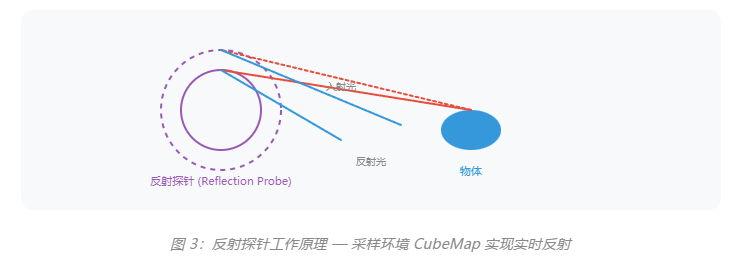
5. Shader 集成实战:完整示例
下面是一个完整的 URP 自定义 Shader 示例,整合了 Lightmap、光照探针和反射探针的所有功能:
cs
1// ============================================================
 2// Unity URP 完整 GI 集成 Shader
 3// 支持: Lightmap + Light Probe + Reflection Probe
 4// ============================================================
 5
 6Shader "Custom/CompleteGI" {
 7    // ============================================================
 8    // Shader 属性块
 9    // ============================================================
10    Properties {
11        [MainTexture] _MainTex ("Albedo", 2D) = "white" {}
12        [Color] _Color ("Color", Color) = (1,1,1,1)
13        [Range(0,1)] _Metallic ("Metallic", Float) = 0.0
14        [Range(0,1)] _Smoothness ("Smoothness", Float) = 0.5
15    }
16
17    // ============================================================
18    // SubShader 定义 (URP)
19    // ============================================================
20    SubShader {
21        Tags {
22            "RenderType" = "Opaque"
23            "RenderPipeline" = "UniversalPipeline"
24        }
25
26        // ============================================================
27        // Pass 定义
28        // ============================================================
29        Pass {
30            Name "ForwardLit"
31            Tags { "LightMode" = "UniversalForward" }
32
33            // ============================================================
34            // HLSL 代码块
35            // ============================================================
36            HLSLPROGRAM
37                // 声明顶点/片元函数
38                #pragma vertex Vertex
39                #pragma fragment Fragment
40
41                // 启用 GI 相关的 Shader 变体
42                #pragma multi_compile _ LIGHTMAP_ON
43                #pragma multi_compile _ DIRLIGHTMAP_ON
44                #pragma multi_compile _ _MAIN_LIGHT_SHADOWS
45                #pragma multi_compile _ _ADDITIONAL_LIGHTS
46                #pragma multi_compile _ _REFLECTION_PROBE
47
48                // 引入 URP 库
49                #include "Packages/com.unity.render-pipelines.universal/ShaderLibrary/Core.hlsl"
50                #include "Packages/com.unity.render-pipelines.universal/ShaderLibrary/Lighting.hlsl"
51                #include "Packages/com.unity.render-pipelines.universal/ShaderLibrary/GlobalIllumination.hlsl"
52
53                // ============================================================
54                // 变量声明
55                // ============================================================
56                TEXTURE2D(_MainTex); SAMPLER(sampler_MainTex);
57                float4 _MainTex_ST;
58                float4 _Color;
59                float _Metallic;
60                float _Smoothness;
61
62                // ============================================================
63                // 顶点/片元结构体 (同前)
64                // ============================================================
65                struct Attributes { float4 positionOS : POSITION; float3 normalOS : NORMAL; float2 uv : TEXCOORD0; float2 lightmapUV : TEXCOORD1; };
66                struct Varyings { float4 positionHCS : SV_POSITION; float2 uv : TEXCOORD0; float3 positionWS : TEXCOORD1; float3 normalWS : TEXCOORD2; float2 lightmapUV : TEXCOORD3; };
67
68                // ============================================================
69                // 顶点着色器
70                // ============================================================
71                Varyings Vertex(Attributes input) {
72                    Varyings output;
73                    output.positionHCS = TransformObjectToHClip(input.positionOS);
74                    output.normalWS = TransformObjectToWorldNormal);
75                    output.positionWS = TransformObjectToWorld(input.positionOS).xyz;
76                    output.uv = TRANSFORM_TEX(input.uv, _MainTex);
77                    output.lightmapUV = input.lightmapUV * unity_LightmapST.xy + unity_LightmapST.zw;
78                    return output;
79                }
80
81                // ============================================================
82                // 片元着色器 - 完整 GI 集成
83                // ============================================================
84                float4 Fragment(Varyings input) : SV_Target {
85                    // 1. 采样基础纹理
86                    float4 albedo = SAMPLE_TEXTURE2D(_MainTex, sampler_MainTex, input.uv) * _Color;
87
88                    // 2. 获取主光源
89                    Light mainLight = GetMainLight();
90
91                    // 3. Lightmap 采样 (静态物体)
92                    float3 lightmapColor = float3(0);
93                    #if defined(LIGHTMAP_ON)
94                        lightmapColor = SAMPLE_TEXTURE2D(unity_Lightmap, samplerunity_Lightmap,
95                                                    input.lightmapUV).rgb;
96                        lightmapColor = DecodeLightmap(lightmapColor);
97                    #endif
98
99                    // 4. Light Probe 采样 (动态物体)
100                    float3 lightProbeColor = SampleSH(input.normalWS);
101
102                    // 5. Reflection Probe 采样
103                    float3 viewDir = normalize(_WorldSpaceCameraPos - input.positionWS);
104                    float3 reflectVec = reflect(-viewDir, input.normalWS);
105                    float3 reflectionColor = GlossyEnvironmentReflection(reflectVec, float3(0), float3(10), 1-_Smoothness);
106
107                    // 6. 组合光照
108                    float NdotL = max(0, dot(input.normalWS, mainLight.direction));
109                    float3 directLight = mainLight.color * NdotL;
110                    float3 giLight = lightmapColor + lightProbeColor;  // GI = Lightmap + Light Probe
111
112                    // 7. PBR 计算
113                    float fresnel = pow(1-max(0,dot(input.normalWS,viewDir)),5);
114                    float3 diffuse = albedo.rgb * (directLight + giLight);
115                    float3 specular = lerp(float30.04, albedo.rgb, _Metallic);
116                    float3 finalColor = diffuse + specular * reflectionColor * _Smoothness;
117
118                    return float4(finalColor, albedo.a);
119                }
120            ENDHLSL
121        }
122    }
123}
6. 最佳实践与性能优化
6.1 GI 组件选择指南
| 场景类型 | 推荐方案 | 理由 |
|---|---|---|
| 静态环境(建筑、关卡) | Lightmap | 最高质量,最低运行时开销 |
| 动态角色/玩家 | Light Probe | 支持移动,GI 效果自然 |
| 金属/玻璃材质 | Reflection Probe | 实时反射,环境逼真 |
| 开放世界 | Baked + Realtime 混合 | 平衡质量与性能 |
6.2 性能优化建议
- 合理设置探针密度 --- 光照探针不要设置过密,通常在光照变化明显的区域放置即可
- 使用 Reflection Probe 盒体投影 --- 减少探针数量,提高采样效率
- Lightmap 分辨率控制 --- 根据物体重要性设置不同的分辨率
- 减少 Realtime 探针 --- Realtime 反射探针开销大,谨慎使用
- 使用 GPU Instancing --- 相同材质的物体可以批量渲染
💡 URP 12.0+ 新特性:
URP 12.0 引入了对 Enlighten Realtime GI 的官方支持,可以在运行时动态更新光照,适合需要实时改变光源的场景。
6.3 常见问题排查
⚠️ Lightmap 不工作?
检查清单:
-
物体是否标记为 Static
-
Lighting Settings 是否启用 Baked GI
-
Mesh Renderer 是否开启 Receive Baked GI
-
是否执行了 Lightmapping Bake
⚠️ Light Probe 无效果?
检查清单:
-
场景中是否有光照探针
-
动态物体是否在探针包围盒内
-
Light Probe Group 是否启用