操作MySQL数据库
1、Node.js中的mysql模块
要使用mysql模块,需要先进行安装,命令如下:
shell
npm install mysql安装mysql模块后,如果要使用它,需要用require()方法引入,代码如下:
js
const mysql=require('mysql')mysql模块中提供了createConnection(option)方法,该方法用来创建数据库连接对象,其option参数用来设置要连接的数据库的相关信息,该参数中可以指定的属性及说明如表所示。
| 属性 | 说明 |
|---|---|
host |
连接主机名称 |
post |
连接端口 |
user |
连接用户名 |
password |
连接密码 |
database |
连接数据库 |
debug |
是否开启debug模式 |
使用createConnection()方法创建的数据库连接对象主要有以下3个方法。
connect()方法:连接数据库。end()方法:关闭数据库。query()方法:执行SQL语句。
connect()方法和end()方法没有参数,使用比较简单,而query()方法使用时,需要提供相应的参数,其语法格式如下:
js
connection.query(sql,add,callback);
connection.query(sql,callback);sql:SQL语句,执行添加、修改、删除或者查询等操作。add:指定SQL语句中的占位符内容,如果SQL语句中没有占位符,则省略。callback:回调函数,操作完成后返回的数据,其中可以对可能产生的错误进行处理。
示例:连接MySQL数据库并查询数据。
本实例使用mysql模块的createConnection()方法创建数据库连接,并使用query()方法查询Library数据库的books数据表中的数据。在实现之前,首先需要准备数据库及数据表。创建Library数据库、在数据库中创建books数据表并向数据表中添加数据的SQL语句如下:
sql
create table books(
	id int not null auto_increment primary key,
	bookname varchar(50) not null,
	author varchar(15) not null,
	press varchar(30) not null
);

/*向数据表中添加数据*/
INSERT  INTO  books(bookname,author,press) VALUES
('《Java从入门到精通》','明日科技','清华大学出版社'),
('《Node.js从入门到精通》','王小科','吉林大学出版社'),
('《Python从入门到精通》','明日科技','清华大学出版社'),
('《C#从入门到精通》','明日科技','清华大学出版社'),
('《C#开发实例大全》','明日科技','清华大学出版社'),
('《C语言从入门到精通》','李磊','清华大学出版社');
准备完要操作的数据之后,在WebStorm中创建一个index.js文件,该文件中使用mysql模块的createConnection()方法生成数据库连接对象,然后使用数据库连接对象的query()方法查询books数据表中的所有信息,并输出。代码如下:
js
//引入模块
const mysql = require('mysql');
//连接数据库
let connection = mysql.createConnection({
     host: 'localhost',
     port:"3306",
     user: 'root',
     password: '123456',
     database: 'test'
});
//判断数据库是否连接成功
connection.connect((err)=>{
     if(err){
          console.log('[query] - :'+err);
          return;
     }
     console.log('[connection connect]  MySQL数据库连接成功!');
});
//使用SQL查询语句

connection.query('select * from books', (error, result, fields)=>{
     if(error) {
          console.log('查询语句有误!');
     } else {
          console.log(result);
     }
});
//关闭连接
connection.end((err)=>{
     if (err) {
          return;
     }
     console.log('[connection end] 关闭数据库连接!');
});
js
[connection connect]  MySQL数据库连接成功!
[
  RowDataPacket {
    id: 1,
    bookname: '《Java从入门到精通》',
    author: '明日科技',
    press: '清华大学出版社'
  },
  RowDataPacket {
    id: 2,
    bookname: '《Node.js从入门到精通》',
    author: '王小科',
    press: '吉林大学出版社'
  },
  RowDataPacket {
    id: 3,
    bookname: '《Python从入门到精通》',
    author: '明日科技',
    press: '清华大学出版社'
  },
  RowDataPacket {
    id: 4,
    bookname: '《C#从入门到精通》',
    author: '明日科技',
    press: '清华大学出版社'
  },
  RowDataPacket {
    id: 5,
    bookname: '《C#开发实例大全》',
    author: '明日科技',
    press: '清华大学出版社'
  },
  RowDataPacket {
    id: 6,
    bookname: '《C语言从入门到精通》',
    author: '李磊',
    press: '清华大学出版社'
  }
]
[connection end] 关闭数据库连接!
2、Node.js中对MySQL实现增删改查操作
在Node.js中使用mysql模块来操作MySQL数据库,以实现一个简单的小型图书管理系统,主要实现的功能有图书的查询、添加、修改和删除等操作,前端页面展示使用的是ejs模板。
2.1、显示图书馆列表
实现小型图书管理系统之前,首先需要准备该系统将用到的Node.js第三方模块,打开系统的"命令提示符"对话框,或者WebStorm的命令终端,使用下面命令安装所需的模块:
shell
npm install express@4
npm install ejs
npm install mysql
npm install body-parser
在WebStorm中创建一个index.js文件,在该文件中使用mysql模块的createConnection(option)方法创建数据库连接对象;然后使用express模块创建服务器并启动,在创建的服务器中使用数据库连接对象的query()方法执行SQL查询语句,获取所有的图书信息,并通过ejs.render()方法发送到客户端。index.js文件中的代码如下:
js
//引入模块
const fs = require('fs');
const ejs = require('ejs');
const mysql = require('mysql');
const express = require('express');
const bodyParser = require('body-parser');
//连接MySQL数据库
let client = mysql.createConnection({
     host: 'localhost',
     port:"3306",
     user: 'root',
     password: '123456',
     database: 'test'
});
//判断数据库是否连接成功
client.connect((err)=>{
     if(err){
          console.log('[query] - :'+err);
          return;
     }
     console.log('[connection connect]  MySQL数据库连接成功!');
});
//创建服务器
let app = express();
app.use(bodyParser.urlencoded({
     extended: false
}));
//启动服务器
app.listen(52273, ()=>{
     console.log('服务器运行在 http://127.0.0.1:52273');
});
//显示图书列表
app.get('/', (request, response)=>{
     //读取模板文件
     fs.readFile('book-list.html', 'utf8', (error, data)=>{
          //执行SQL语句
          client.query('select * from books', (error, results)=>{
               //响应信息
               response.send(ejs.render(data, {
                     data: results
               }));
          });
     });
});
显示所有图书信息是在book-list.html页面中实现的,该页面使用ejs渲染标识,并将index.js文件中获取到的图书数据分别放到指定的HTML标签中进行显示。代码如下:
html
<!DOCTYPE html>
<html>
<head>
     <meta charset="UTF-8">
     <title>图书列表</title>
     <style>
          table{
               padding: 0;
               position: relative;
               margin: 0 auto;
          }
          table tbody tr th {
               background: #044599 no-repeat;
               text-align: center;
               border-left: 1px solid #02397F;
               border-right: 1px solid #02397F;
               border-bottom: 1px solid #02397F;
               border-top: 1px solid #02397F;
               letter-spacing: 2px;
               text-transform: uppercase;
               font-size: 14px;
               color: #fff;
               height: 37px;
          }
          table tbody tr td {
               text-align: center;
               border-left: 1px solid #ECECEC;
               border-right: 1px solid #ECECEC;
               border-bottom: 1px solid #ECECEC;
               font-size: 15px;
               color: #909090;
               height: 37px;
          }
     </style>
</head>
<body>
     <h1 style="text-align: center">图书列表</h1>
     <a href="/insert">添加数据</a>
     <br/>
     <table width="100%">
          <tr>
               <th>ID</th>
               <th>书名</th>
               <th>作者</th>
               <th>出版社</th>
               <th>删除</th>
               <th>编辑</th>
          </tr>
          <%data.forEach(function (item, index) { %>
          <tr>
               <td><%= item.id %></td>
               <td><%= item.bookname %></td>
               <td><%= item.author %></td>
               <td><%= item.press %></td>
               <td><a href="/delete/<%= item.id %>">删除</a></td>
               <td><a href="/edit/<%= item.id %>">编辑</a></td>
          </tr>
          <% }); %>
     </table>
</body>
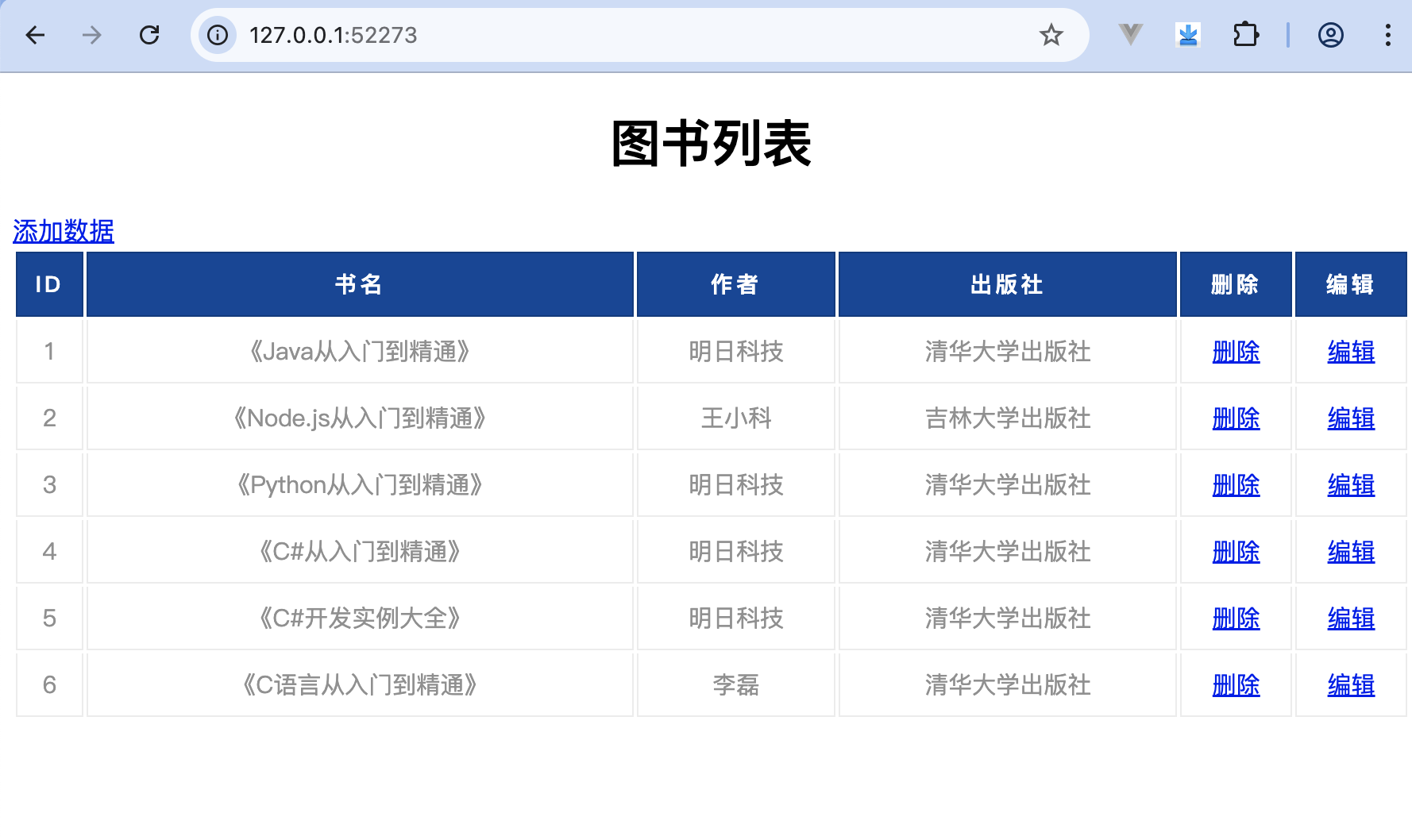
</html>运行程序,启动Node.js服务器,然后在浏览器中打开http://127.0.0.1:52273/,效果如图所示。
2.2、添加图书信息
添加图书信息是在book-insert.html页面中实现的,在该页面中,通过<form>标签,将输入的图书信息通过表单的方式提交。代码如下:
html
<!DOCTYPE html>
<html>
<head>
     <meta charset="UTF-8">
     <title>添加图书</title>
</head>
<body>
     <h3>添加图书</h3>
     <hr />
     <form method="post">
          <fieldset>
               <legend>添加数据</legend>
               <table>
                     <tr>
                          <td><label>图书名称</label></td>
                          <td><input type="text" name="bookname" /></td>
                     </tr>
                     <tr>
                          <td><label>作者</label></td>
                          <td><input type="text" name="author" /></td>
                     </tr>
                     <tr>
                          <td><label>出版社</label></td>
                          <td><input type="text" name="press" /></td>
                     </tr>
               </table>
               <input type="submit" />
          </fieldset>
     </form>
</body>
</html>
在index.js文件中,首先读取boot-insert.html模板文件,然后获取POST请求中提交的要添加的图书信息,使用数据库连接对象的query()方法执行SQL添加语句。代码如下:
js
app.get('/insert', (request, response)=>{
     //读取模板文件
     fs.readFile('book-insert.html', 'utf8', (error, data)=>{
          //响应信息
          response.send(data);
     });
});
app.post('/insert', (request, response)=>{
     //声明body
     var body = request.body;
     //执行SQL语句
     client.query('insert into books (bookname, author, press) VALUES (?, ?, ?)',
        [ body.bookname, body.author, body.press ],
        ()=>{
          //响应信息
          response.redirect('/');
     });
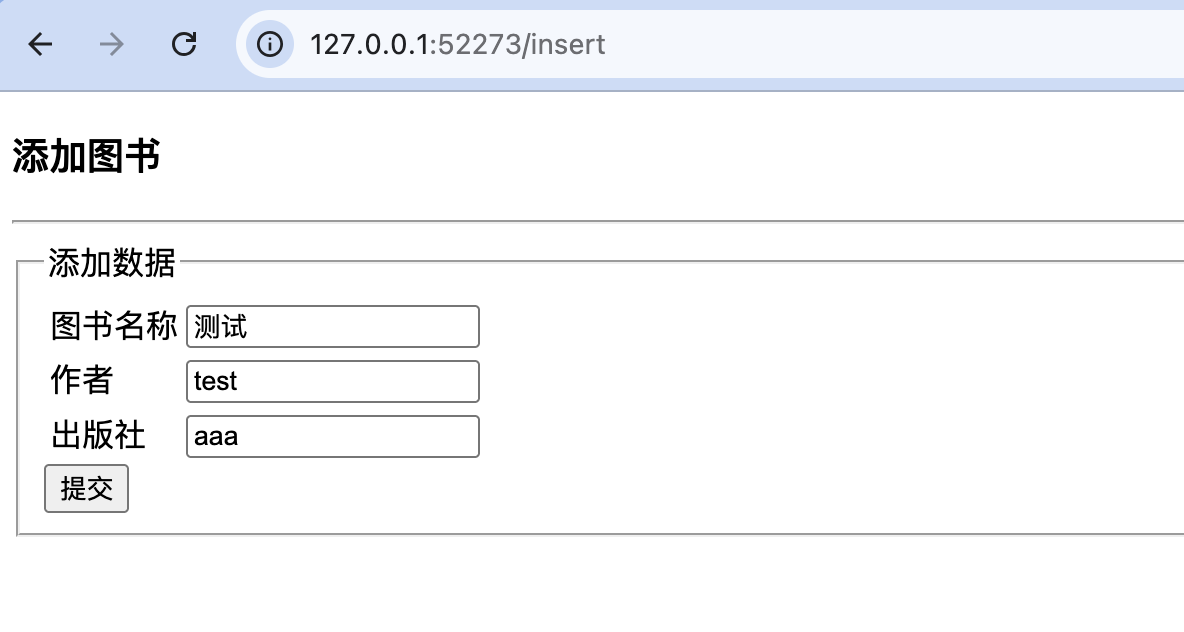
});运行程序,启动Node.js服务器,然后在浏览器中打开http://127.0.0.1:52273/,在图书列表页面单击"添加图书"超链接,打开book-insert.html页面,在该页面中输入要添加的图书信息后,单击"提交"按钮,即可完成图书的添加操作,如图所示。
2.3、修改图书信息
修改图书信息是在book-edit.html页面中实现的,在该页面中,通过<form>标签,将要修改的图书信息通过表单的方式提交。代码如下:
html
<!DOCTYPE html>
<html>
<head>
     <meta charset="UTF-8">
     <title>修改图书</title>
</head>
<body>
     <h1>修改图书信息</h1>
     <hr />
     <form method="post">
          <fieldset>
               <legend>修改图书信息</legend>
               <table>
                     <tr>
                          <td><label>Id</label></td>
                          <td><input type="text" name="id" value="<%= data.id %>" disabled /></td>
                     </tr>
                     <tr>
                          <td><label>书名</label></td>
                          <td><input type="text" name="bookname" value="<%= data.bookname %>" /></td>
                     </tr>
                     <tr>
                          <td><label>作者</label></td>
                          <td>
                               <input type="text" name="author" value="<%= data.author %>" />
                          </td>
                     </tr>
                     <tr>
                          <td><label>出版社</label></td>
                          <td><input type="text" name="press" value="<%= data.press %>" /></td>
                     </tr>
               </table>
               <input type="submit" />
          </fieldset>
     </form>
</body>
</html>
在index.js文件中,首先读取boot-edit.html模板文件,并根据id将要修改的图书的信息显示出来,然后获取POST请求中提交的要修改的图书信息,使用数据库连接对象的query()方法执行SQL修改语句,实现根据id修改图书信息的功能。代码如下:
js
app.get('/edit/:id', (request, response)=>{
     //读取模板文件
     fs.readFile('book-edit.html', 'utf8', (error, data)=>{
          //执行SQL语句
          client.query('select * from books where id = ?',
            [ request.params.id ],
            (error, result)=>{
               //响应信息
               response.send(ejs.render(data, {
                     data: result[0]
               }));
          });
     });
});
app.post('/edit/:id', (request, response)=>{
     //声明body
     const body = request.body;
     //执行SQL语句
     client.query('update books set bookname=?, author=?, press=? where id=?',
            [body.bookname, body.author, body.press, request.params.id],
            ()=>{
                //响应信息
                response.redirect('/');
            });
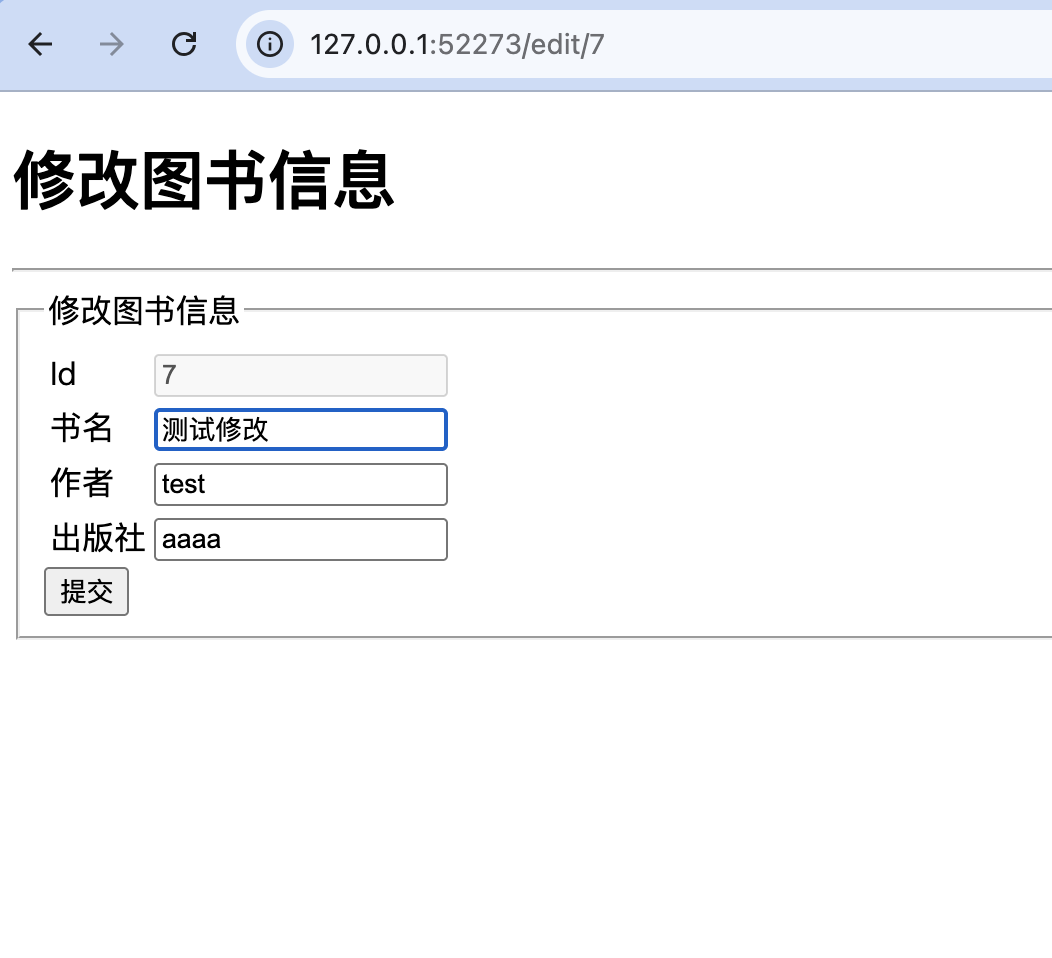
});运行程序,启动Node.js服务器,然后在浏览器中打开http://127.0.0.1:52273/,在图书列表页面单击指定图书后的"编辑"超链接,打开book-edit.html页面,在该页面中即可对指定图书的相关信息进行修改,修改完成后,单击"提交"按钮即可,如图所示。
2.4、删除图书信息
在index.js文件中,定义根据id删除图书信息的方法,代码如下:
js
app.get('/delete/:id', (request, response)=>{
     //执行SQL语句
     client.query('delete from books where id=?',
        [request.params.id],
        ()=>{
          //响应信息
          response.redirect('/');
     });
});运行程序,启动Node.js服务器,然后在浏览器中打开http://127.0.0.1:52273/,在图书列表页面单击指定图书后的"删除"超链接,即可删除指定的图书信息。