在 C++ 编程中,字符串处理是最常见的操作之一。很多从 C 语言转过来的同学习惯使用字符数组和 strcpy、strlen 等函数,但这种方式不仅繁琐,还容易出错。C++ 标准库提供了 string 类,让字符串操作变得简单、安全、高效。
本文将带你全面了解 string 类的使用,并深入探讨其底层实现原理。
一、为什么需要 string 类?
1.1 C语言字符串的痛点
C 语言中,字符串是以 \0 结尾的字符数组。虽然标准库提供了一系列 str 开头的函数,但它们存在明显的问题:
cpp
// C 语言的字符串操作
char str[20] = "hello";
char* str2 = (char*)malloc(strlen(str) + 1);
strcpy(str2, str);  // 容易忘记 +1
strcat(str, " world");  // 如果空间不够,越界访问
malloc(strlen(str) + 1)忘记+1的后果
cpp
char str[20] = "hello";
// 错误写法:malloc(strlen(str)) → 少分配1字节给\0
char* str2 = (char*)malloc(strlen(str) + 1); // 你写的是对的,但极易忘
strlen("hello") = 5,只分配 5 字节的话,strcpy 会把 h e l l o \0 共 6 个字节拷贝过去,内存越界,导致程序崩溃、数据污染;
✅ 正确公式:malloc(strlen(原字符串) + 1)。
strcat(str, " world")数组越界(致命错误)
cpp
char str[20] = "hello";
strcat(str, " world"); - 数组大小是 20,理论空间足够 ,但这是侥幸!
- 风险逻辑:
strcat不会检查目标数组的剩余空间,直接在原字符串末尾拼接; - 反例:如果是
char str[6] = "hello";,拼接后直接越界,程序直接崩溃
主要问题:
-
不符合面向对象思想:数据和操作分离
-
手动管理内存:容易内存泄漏或越界
-
不安全:没有边界检查
1.2 string 类的优势
cpp
#include <string>
#include <iostream>
using namespace std;

int main() {
    string s1 = "hello";
    string s2 = "world";

    // 自动管理内存,无需担心越界
    string s3 = s1 + " " + s2;

    // 支持迭代器和范围for
    for (char ch : s3) {
        cout << ch << " ";
    }

    return 0;
}
二、C++11 新语法速览
在深入学习 string 之前,先了解两个 C++11 的小特性,它们会让代码更简洁。
2.1 auto 关键字
一句话:auto 就是让编译器自动帮你推断变量类型,你不用手写类型了:
cpp
#include <iostream>
#include <string>
#include <map>
using namespace std;

int main() {
    // 基本使用
  auto a = 10;        // 右边是整数 → auto = int
auto b = 'c';       // 右边是字符 → auto = char
auto c = "hello";   // 右边是字符串常量 → auto = const char*

    // 指针和引用
    int x = 10;
    auto p1 = &x;       // int*
    auto* p2 = &x;      // int*,效果同上
    auto& ref = x;      // int&,引用必须加&

    // 实际应用场景:迭代器
    map<string, string> dict = {
        {"apple", "苹果"},
        {"orange", "橙子"}
    };

// 原来必须手写(超级长,容易写错)
//map<string, string>::iterator it = dict.begin();
    // 不用写一长串类型名
    auto it = dict.begin();
    while (it != dict.end()) {
        cout << it->first << ": " << it->second << endl;
        ++it;
    }

    return 0;
}
注意 :auto 不能用于函数参数,也不能用于数组声明。

auto 的 3 条黄金规则(背会就不会错):
规则 1:auto 会自动去掉 const
cpp
const int num = 100;
auto a = num;   // a → int(不是 const int)
规则 2:auto 会自动去掉引用
cpp
int x = 10;
int& ref = x;
auto b = ref;   // b → int(不是 int&)
规则 3:想保留引用 / 指针 ,必须手动写 & / *
cpp
auto& c = x;  // 保留引用 → int&
auto* d = &x; // 保留指针 → int*
最简单的记忆口诀
- 右边是什么,auto 就是什么
- 想指针加
*,想引用加& - 长类型用 auto,短类型随便写
2.2 范围 for 循环
范围 for 让遍历容器变得极其简洁:
cpp
#include <iostream>
#include <string>
using namespace std;

int main() {
    int arr[] = {1, 2, 3, 4, 5};

    // 传统遍历
    for (int i = 0; i < 5; ++i) {
        cout << arr[i] << " ";
    }

    // 范围 for - 只读
    for (int e : arr) {
        cout << e << " ";
    }

    // 范围 for - 修改元素(使用引用)
    for (int& e : arr) {
        e *= 2;  // 每个元素翻倍
    }

    // 遍历字符串
    string str = "hello world";
    for (char ch : str) {
        cout << ch << " ";
    }

    return 0;
}
三、string 类的常用接口
3.1 构造与初始化
cpp
#include <string>
#include <iostream>
using namespace std;

void testConstruction() {
    // 1. 默认构造:空字符串
    string s1;

    // 2. 用 C 字符串构造
    string s2("hello world");

    // 3. 拷贝构造
    string s3(s2);

    // 4. 用 n 个字符 c 构造
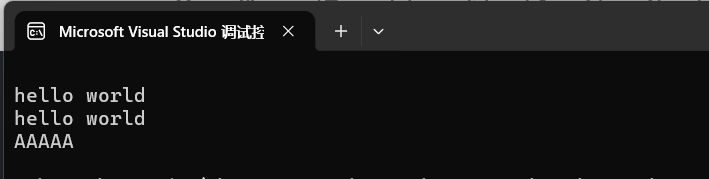
    string s4(5, 'A');  // "AAAAA"

    cout << s1 << endl;  // 空
    cout << s2 << endl;  // hello bit
    cout << s3 << endl;  // hello bit
    cout << s4 << endl;  // AAAAA
}
int main()
{
    testConstruction();
    return 0;
}
3.2 容量相关操作
cpp
#include <string>
#include <iostream>
using namespace std;

void testCapacity() {
    string s = "hello";

    // 获取长度
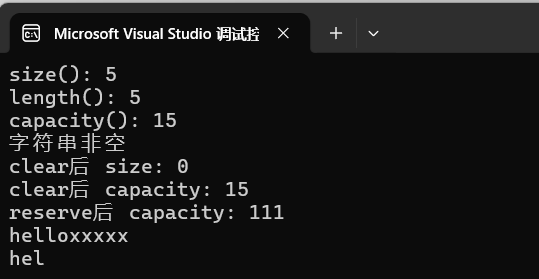
    cout << "size(): " << s.size() << endl;      // 5
    cout << "length(): " << s.length() << endl;  // 5(功能相同)
    cout << "capacity(): " << s.capacity() << endl;  // 空间大小

    // 判断是否为空
    if (!s.empty()) {
        cout << "字符串非空" << endl;
    }

    // 清空(不释放内存)
    s.clear();
    cout << "clear后 size: " << s.size() << endl;  // 0
    cout << "clear后 capacity: " << s.capacity() << endl;  // 不变

    // 预留空间(避免频繁扩容)
    s.reserve(100);
    cout << "reserve后 capacity: " << s.capacity() << endl;  // 至少100

    // 改变有效字符个数
    s = "hello";
    s.resize(10, 'x');  // 扩充到10个,多出的用'x'填充
    cout << s << endl;  // helloxxxxx

    s.resize(3);  // 缩减到3个
    cout << s << endl;  // hel
}
-
size () 和 length ()
cout << s.size();
cout << s.length();
两个完全一模一样! 都是返回有效字符个数。
hello → 5 个字符 → 都输出 5。
-
capacity()
cout << s.capacity();
string 底层实际分配的数组大小 。编译器一般会多给一点,比如给 15、23 等。
- size = 实际住了几个人
- capacity = 房子最多能住几个人
-
clear()
s.clear();
- size 变成 0
- capacity 保持不变!
= 把东西清空,但房子不退还、不销毁= 下次再放字符串,不用重新申请内存
-
reserve(100)
s.reserve(100);
强行把 capacity 变成 ≥100
作用:提前分配空间,避免频繁扩容,让程序更快!
- 只改空间
- 不改内容
- 不改 size
-
resize(10, 'x')
s.resize(10, 'x');
强行把 size 改成 10
- 不够 → 补
x - 多了 → 截断
- 会改变字符串内容
plaintext
hello → helloxxxxx再缩:
s.resize(3);plaintext
hel总结:
| 函数 | 作用 | 改 size | 改 capacity |
|---|---|---|---|
| size() | 看有多少字符 | ❌ | ❌ |
| capacity() | 看空间多大 | ❌ | ❌ |
| clear() | 清空内容 | ✅=0 | ❌ |
| resize(n) | 改字符个数 | ✅ | 可能变 |
| reserve(n) | 预分配空间 | ❌ | ✅ |
- size 是你用了多少
- capacity 是你总共有多少空间
- resize 改内容长度
- reserve 改底层空间
- clear 清空内容但不释放空间
3.3 访问与遍历
cpp
#include <string>
#include <iostream>
using namespace std;

void testTraversal() {
    string s = "hello";

    // 1. 下标访问 operator[]
    for (size_t i = 0; i < s.size(); ++i) {
        cout << s[i] << " ";
    }
    cout << endl;

    // 2. 迭代器
    string::iterator it = s.begin();
    while (it != s.end()) {
        cout << *it << " ";
        ++it;
    }
    cout << endl;

    // 3. 反向迭代器
    string::reverse_iterator rit = s.rbegin();
    while (rit != s.rend()) {
        cout << *rit << " ";
        ++rit;
    }
    cout << endl;

    // 4. 范围 for(最简洁)
    for (char ch : s) {
        cout << ch << " ";
    }
    cout << endl;
}
int main()
{
    testTraversal();
}
反向迭代器(倒着遍历)
重点:
rbegin()= 指向最后一个字符rend()= 指向第一个字符前面++rit= 往前挪
3.4 修改操作
cpp
#include <string>
#include <iostream>
using namespace std;

void testModify() {
    string s = "hello";

    // 追加字符
    s.push_back(' ');
    s += 'w';
    s.append("orld");
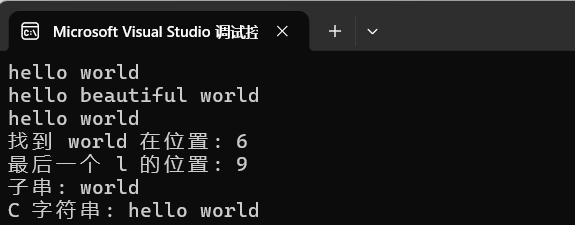
    cout << s << endl;  // hello world

    // 插入
    s.insert(5, " beautiful");
    cout << s << endl;  // hello beautiful world

    // 删除
    s.erase(5, 10);  // 从位置5删除10个字符
    cout << s << endl;  // hello world

    // 查找
    size_t pos = s.find("world");
    if (pos != string::npos) {
        cout << "找到 world 在位置: " << pos << endl;  // 6
    }

    // 从后往前查找
    size_t rpos = s.rfind('l');
    cout << "最后一个 l 的位置: " << rpos << endl;  // 3

    // 截取子串
    string sub = s.substr(6, 5);
    cout << "子串: " << sub << endl;  // world

    // 转换为 C 字符串
    const char* cstr = s.c_str();
    printf("C 字符串: %s\n", cstr);
}
-
初始化
string s = "hello";
字符串:hello
-
追加(往后加)
s.push_back(' '); // 加一个空格
s += 'w'; // 加字符 w
s.append("orld"); // 加字符串 orld
结果:hello world
push_back(c):加一个字符+= c:加一个字符append(str):加一整个字符串+= str:也可以加字符串(最常用)
-
插入(中间加)
s.insert(5, " beautiful");
在下标 5 的位置插入字符串。把hello后面的空格挤到后面去了,beautiful前面有个空格
原:hello world插入后:hello beautiful world
-
删除
s.erase(5, 10);
- 从位置 5 开始
- 删除 10 个字符
- 变回:hello world
-
查找(超级重要)
size_t pos = s.find("world");
从头找 "world",返回第一次出现的下标位置。
这里 world 从 6 开始,所以:pos = 6
✅ 特别注意:
pos != string::npos意思是:找到了!
string::npos= 没找到的标记- 找到就返回下标
- 没找到返回
npos
-
反向查找(从后往前找)
size_t rpos = s.rfind('l');
从最后往前找字符 'l'。
hello world 里最后一个 l 在位置 9。
-
截取子串
string sub = s.substr(6, 5);
- 从位置 6 开始
- 取 5 个字符
得到:world
-
转 C 语言字符串
const char* cstr = s.c_str();
把 C++ string 转成 C 语言的 char*。用于 C 语言函数,比如 printf。
3.5 非成员函数
cpp
#include <string>
#include <iostream>
using namespace std;

void testNonMember() {
    string s1 = "hello";
    string s2 = "world";

    // 字符串拼接(尽量少用,效率较低)
    string s3 = s1 + " " + s2;

    // 输入输出
    string input;
    cout << "请输入一行文字: ";
    getline(cin, input);  // 读取整行,包含空格
    cout << "你输入了: " << input << endl;

    // 比较
    if (s1 < s2) {
        cout << s1 << " < " << s2 << endl;
    }
}
int main() {
    testNonMember();
    return 0;
}-
字符串拼接
s1 + " " + s2string s3 = s1 + " " + s2;
- s1 = "hello"
- s2 = "world"
- 中间加一个空格
" "
结果:
plaintext
hello world✅ 优点:简单、直观❌ 缺点:频繁 + 会产生临时对象,大量拼接时效率低
大量拼接推荐用:
append或+=
-
getline (cin, input) ------ 最重要!
getline(cin, input);
它的作用:
读取一整行输入,包括空格!
和 cin >> 的区别:
-
cin >> str遇到空格、回车就停止,读不到带空格的句子。 -
getline(cin, str)读到回车才停止,能读完整一句话。
例子:你输入:我喜欢 C++
cin只能读到:我喜欢getline能读到:我喜欢 C++
-
字符串比较
s1 < s2if (s1 < s2)
C++ 的 string 可以直接比大小!
规则:按照字典序(字母顺序)
hello和world比h在字母表中比w靠前- 所以
hello < world成立 ✅
输出:
hello < world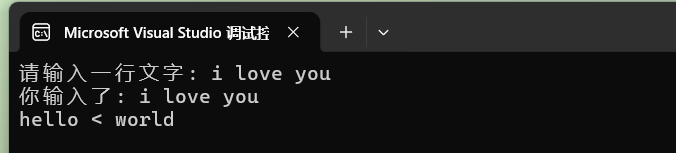
四、经典练习题
4.1 反转字符串中的字母
cpp
class Solution {
public:
    string reverseOnlyLetters(string s) {
        int left = 0;                    // ✅ left 指向开头
        int right = s.size() - 1;        // ✅ right 指向末尾

        while (left < right) {
            // 左指针如果不是字母,向右移动
            if (!isLetter(s[left])) {
                left++;
                continue;
            }
            // 右指针如果不是字母,向左移动
            if (!isLetter(s[right])) {
                right--;
                continue;
            }
            // 左右都是字母,交换
            swap(s[left], s[right]);
            left++;
            right--;
        }
        return s;
    }

    bool isLetter(char c) {
        return (c >= 'a' && c <= 'z') || (c >= 'A' && c <= 'Z');
    }
};
正确思路(双指针)
- left 从左往右走
- right 从右往左走
- 两个指针都找到字母才交换
- 不是字母就跳过
4.2 验证回文串
cpp
class Solution {
public:
    bool isLetterOrNumber(char ch) {
        return (ch >= '0' && ch <= '9') ||
               (ch >= 'a' && ch <= 'z') ||
               (ch >= 'A' && ch <= 'Z');
    }

    bool isPalindrome(string s) {
        // 统一转小写
        for (auto& ch : s) {
            if (ch >= 'A' && ch <= 'Z')
                ch += 32;
        }

        int begin = 0;
        int end = s.size() - 1;

        while (begin < end) {
            while (begin < end && !isLetterOrNumber(s[begin]))
                ++begin;
            while (begin < end && !isLetterOrNumber(s[end]))
                --end;

            if (s[begin] != s[end])
                return false;

            ++begin;
            --end;
        }
        return true;
    }
};
4.3 字符串相加
cpp
class Solution {
public:
    string addStrings(string num1, string num2) {
        int end1 = num1.size() - 1;
        int end2 = num2.size() - 1;
        int carry = 0;
        string result;

        while (end1 >= 0 || end2 >= 0) {
            int val1 = end1 >= 0 ? num1[end1--] - '0' : 0;
            int val2 = end2 >= 0 ? num2[end2--] - '0' : 0;

            int sum = val1 + val2 + carry;
            carry = sum / 10;
            result += (sum % 10 + '0');
        }

        if (carry) {
            result += '1';
        }

        // 反转得到正确顺序
        reverse(result.begin(), result.end());
        return result;
    }
};
五、string 的底层实现
- 一句话总结
**std::string 本质 = 一个管理字符数组的「智能包装类」**它不是魔法,它底层就是:
char 数组 + 长度 + 容量
-
string 内部长这样
class string {
private:
char* data; // 指向 char 数组(真正存字符的地方)
size_t length; // 当前字符串长度(你用 s.size() 拿到的值)
size_t capacity;// 总容量(能存多少字符)
};
你写:
string s = "hello";内存里真实存储:
data → [ h ] [ e ] [ l ] [ l ] [ o ]
length = 5
capacity ≥ 5- 关键结论
✅ string 底层没有 '\0'!
- 老式
char[]必须靠\0判断结束 - string 靠 length 变量知道长度
- 所以 不需要 \0
✅ s.size () 直接返回 length,不遍历!
s.size(); // O(1) 直接读变量,超快✅ s i 就是访问底层 char 数组
s[0] → data[0]
s[1] → data[1]- 为什么你看不到 char*?
因为 string 把它封装起来了你不用管内存分配、释放、越界它全部帮你处理好。
模拟string类实现:
cpp
#define _CRT_SECURE_NO_WARNINGS
#include<iostream>
#include<cstring>
#include<cstdlib>
#include<string.h>
using namespace std;
class string1
	{
	public:
		string1() : _str(new char[1] {'\0'}), _size(0), _capacity(1)
		{
			// 简洁明了
		}
		string1(const char* str)
		{
			_size=strlen(str);
			_capacity = _size;
			_str = new char[_capacity + 1];
			strcpy(_str, str);
		}
		~string1()
		{
			delete[]_str;
			_str = nullptr;
			_size = 0;
			_capacity = 0;
		}

		size_t size()const
		{
			return _size;
		}

		size_t capacity() const
		{
			return _capacity;
		}

		void print()const
		{
			cout << _str << endl;
		}

		char& operator[](size_t pos)
		{
			return _str[pos];
		}

		const char* c_str() const
		{
			return _str;
		};

		string1(const string1& other)
		{
			_size = other._size;
			_capacity = other._capacity;
			_str = new char[_capacity + 1];
			strcpy(_str, other._str);
			cout << "拷贝构造(深拷贝) → 安全不崩溃!\n";
		}

		string1& operator=(const string1& other)
		{
			if (this == &other)
			{
				return *this;
			}
			delete[]_str;
			_size = other.size();
			_capacity = other._capacity;
			_str = new char[_capacity + 1];
			strcpy(_str, other._str);
			cout << "赋值重载(深拷贝) → 安全!\n";
			return *this;
		}

		void reserve(size_t n)
		{
			if (n <= _capacity)
				return;
			char* newstr = new char[n + 1];
			strcpy(newstr, _str);
			delete[] _str;
			_str = newstr;
			_capacity = n;
		}

		void push_back(char c)
		{
			if (_size+1 > _capacity)
				reserve(_capacity == 0 ? 1 : _capacity * 2);
			_str[_size++] = c;
			_str[_size] = '\0';
		}

		//  find 查找
		size_t find(char ch) const
		{
			for (size_t i = 0; i < _size; i++)
			{
				if (_str[i] == ch)
					return i;
			}
			return -1; // 没找到
		}

		//  rfind 反向查找
		size_t rfind(char ch) const
		{
			for (int i = _size - 1; i >= 0; i--)
			{
				if (_str[i] == ch)
					return i;
			}
			return -1;
		}
		string1& operator+=(char c)
		{
			push_back(c);
			return *this;
		}
		string1& operator+=(const char* str)
		{
			while (*str)
			{
				push_back(*str);
				str++;
			}
			return *this;
		}

		// 1. resize 改变大小
		void resize(size_t n, char c = 'c')
		{
			if (n <= _size)
			{
				_size = n;
				_str[_size] = '\0';
			}
			else
			{
				reserve(n);
				for (size_t i = _size;i<n;i++)
				{
					_str[i] = 'c';
				}
				_size = n;
				_str[n] = '\0';
			}
		}
		string1& insert(size_t pos, char ch)
		{
			if (pos > _size)
				return *this;
			if (_size + 1 > _capacity)
			{
				reserve(_capacity == 0 ? 1 : _capacity * 2);
			}
			for (size_t i = _size; i > pos; i--)
			{
				_str[i]=_str[i-1];
			}
			_str[pos] = ch;
			_size++;
			_str[_size] = '\0';
			return *this;
		}

		string1& erase(size_t pos, size_t len = 1)
		{
			if (pos >= _size) return *this;
			if (pos + len > _size) len = _size - pos;

			for (size_t i = pos; i < _size - len; ++i)
				_str[i] = _str[i + len];

			_size -= len;
			_str[_size] = '\0';
			return *this;
		}


	    private:
		char* _str;
		size_t _size;
		size_t _capacity;

};
// 必须写在类外面
ostream& operator<<(ostream& out, const string1& s)
{
	out << s.c_str();
	return out;
}

istream& operator>>(istream& in, string1& s)
{
	char buf[1024] = { 0 };
	in >> buf;
	s = buf;
	return in;
}

void test1()
{
    string1 s;
	string1 s1("hello world");
	cout << "长度:" << s1.size() << endl;
	cout << s1[6] << endl;
	s.print();
	s1.print();

	//测试拷贝构造函数
	string1 s2 = s1;
	string1 s3(s1);
	s2.print();
	s3.print();

	//测试赋值重载
	s = s1;
	s1.print();

	//测试尾插
	cout << s1.capacity() << endl;
	s1.push_back('!');
	s1.print();
	cout << s1.capacity() << endl;

	//测试+=
	s1 += '!';
	s1.print();
	s1 += "xiaoming";
	s1.print();
	cout << s1.capacity() << endl;

	//测试查找
	cout << s1.find('l') << endl;
	cout << s1.rfind('l') << endl;

}
void test2()
{
	//测试resize
	string1 s("hello world");
	s.print();
	s.resize(20, 'c');
	s.print();

	string1 s1;
	s1.print();
	//s1.push_back('a');
	s1.insert(0, 'b');
	s1.print();

	string1 s2("hello world");
	s2.print();
	s2.insert(4, 'b');
	s2.print();
}
void test3()
{
	string1 s("hello world");
	cout << "原串:" << s << endl;

	// erase 删除
	s.erase(5, 1);
	cout << "erase(5,1):" << s << endl;

	// insert 插入
	s.insert(2, 'x');
	cout << "insert(2,'x'):" << s << endl;

	// cin 输入
	string1 s2;
	cout << "请输入字符串:";
	cin >> s2;
	cout << "你输入的是:" << s2 << endl;
}


int main()
{
	//test1();
	//test2();
	test3();

	return 0;
}
六、总结
-
优先使用 string 类:相比 C 字符串,更安全、更便捷
-
掌握常用接口:构造、容量、访问、修改、查找
-
注意性能 :使用
reserve()预分配空间,避免频繁扩容 -
理解深浅拷贝:这是面试常考点,也是编写正确代码的基础
-
多用范围 for:让代码更简洁易读