拓展知识
1 多层级事件过滤
事件过滤器不仅可以安装在目标对象上,也可以安装在父对象或更高层级的对象上。这样可以实现全局或局部的事件监控和处理。
为了方便,我们在MainWindow.h中定义一个ClickEventFilter类,实现eventFilter捕获KeyPress按键事件
cpp
class ClickEventFilter : public QObject
{
    Q_OBJECT
public:
    explicit ClickEventFilter(QObject *parent = nullptr) : QObject(parent) {}

protected:
    bool eventFilter(QObject *obj, QEvent *event) override {
        //如果是按键事件
        if (event->type() == QEvent::KeyPress) {
            //转化为按键事件
            QKeyEvent * key_event= static_cast<QKeyEvent*>(event);
            //获取对象名称
            QString objectName = obj->objectName();

            if (objectName.isEmpty()) {
                objectName = obj->metaObject()->className();
            }

            QMessageBox::information(nullptr, "Global Click Filter",
                                     QString("Pressed object: %1\n Key Text is %2\n")
                                     .arg(objectName)
                                     .arg(key_event->text()));
            // 返回 false 以允许事件继续传递
            return false;
        }
        return QObject::eventFilter(obj, event);
    }
};
我们在mainwindow中创建一个按钮
cpp
auto *pushBtn = new QPushButton("click me", this);
pushBtn->setGeometry(100,100,100,50);
接下来我们在main.cpp中为Application安装这个事件过滤器, 因为Application位于最顶层,所以事件过滤器安装在了最顶层,那么可以监控所有对象的事件
cpp
int main(int argc, char *argv[])
{
    QApplication a(argc, argv);
    MainWindow w;
    w.show();
    ClickEventFilter *filter = new ClickEventFilter(&a);
    a.installEventFilter(filter);

    return a.exec();
}
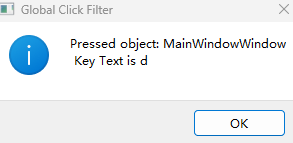
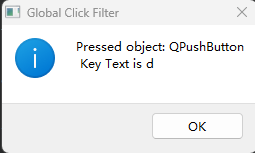
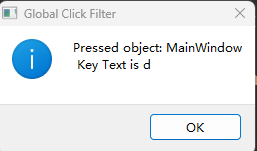
我们运行程序后,点击按键d,会发现依次弹出三个对话框,表明我们为最顶层app安装了过滤器达到了监听所有对象的效果。
先弹出最顶层窗口MainWindowWindow的按键消息
再弹出按钮的按键消息
最后弹出MainWindow的按键消息
2 多事件过滤器优先级
一个对象可以安装不同的事件过滤器,假设我们为按钮安装了两个事件过滤器,一个高优先级的事件过滤器内部返回true,就会阻止低优先级的事件过滤器处理。
我们先实现两个等级的事件过滤器
cpp
//高优先级过滤器
class HighPriorityFilter : public QObject
{
    Q_OBJECT
public:
 explicit HighPriorityFilter(QObject *parent = nullptr) : QObject(parent) {}
protected:
    bool eventFilter(QObject *obj, QEvent *event) override
    {
        //判断鼠标事件
        if (event->type() == QEvent::MouseButtonPress) {
            QMessageBox::information(nullptr, "High Priority Filter",
                                     "High priority filter intercepted the click!");
            // 阻止事件继续传递
            return true;
        }
        return QObject::eventFilter(obj, event);
    }
};

//低优先级事件过滤器
class LowPriorityFilter : public QObject
{
    Q_OBJECT
public:
 explicit LowPriorityFilter(QObject *parent = nullptr) : QObject(parent) {}
protected:
    bool eventFilter(QObject *obj, QEvent *event) override
    {
        //鼠标按下事件
        if (event->type() == QEvent::MouseButtonPress) {
            QMessageBox::information(nullptr, "Low Priority Filter",
                                     "Low priority filter intercepted the click!");
            // 允许事件继续传递
        }
        return QObject::eventFilter(obj, event);
    }
};
接下来我们在MainWindow的构造函数里创建按钮,并为它安装这两个过滤器,最后安装的最先触发
cpp
MainWindow::MainWindow(QWidget *parent) :
    QMainWindow(parent),
    ui(new Ui::MainWindow)
{
    ui->setupUi(this);
    auto *pushBtn = new QPushButton("click me", this);
    pushBtn->setGeometry(100,100,100,50);
    //注意安装顺序,最后安装的被认为是最先触发的
    auto * low_filter = new LowPriorityFilter(pushBtn);
    pushBtn->installEventFilter(low_filter);
    //最后安装的最先触发,被认为是高级事件过滤器
    auto * high_filter = new HighPriorityFilter(pushBtn);
    pushBtn->installEventFilter(high_filter);
}
运行程序,点击按钮,会发现只弹出高级事件过滤器的消息框
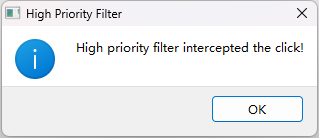
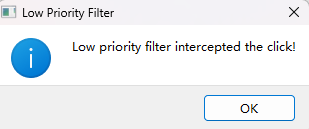
如果我们将HighPriorityFilter的eventFilter内部的逻辑改为返回false,就表示这个事件过滤器未完全处理好这个事件,可以继续交给其他事件过滤器处理
我们点击按钮后,会先弹出High priority filter,再弹出下面的消息框