RAG内存效率提高32倍
使用二进制量化技术,使RAG的内存效率提高32倍
工作流程
- 摄许文档并生成二进制嵌入向量
- 创建二进制向量索引,并将嵌入向量存储在向量数据库
- 检索与用户查询相似度最高的前K个文档
- 大模型基于补充上下文生成回复
加载数据
我们使用LlamaIndex的目录读取工具来导入文档。该工具能够读取多种数据格式
from llama_index.core import SimpleDirectoryReader

loader = SimpleDirectoryReader(
    input_dir=docs_dir,
    required_exts=[".pdf"],
    recursive=True
)

docs = loader.load_data()
documents = [doc.text for doc in docs]
生成二进制嵌入
接下来,我们生成浮点32位格式的文本嵌入向量,并将其转换为二进制向量,从而使内存占用与存储空间缩减至原来的32分之1
import numpy as np
from llama_index.embeddings.huggingface import HuggingFaceEmbedding

embed_model = HuggingFaceEmbedding(
    model_name="BAAI/bge-large-en-v1.5",
    trust_remote_code=True,
    cache_folder='./hf_cache'
)

for context in batch_iterate(documents, batch_size=512):
    # Generate float32 vector embeddings
    batch_embeds = embed_model.get_text_embedding_batch(context)
    # Convert float32 vectors to binary vectors
    embeds_array = np.array(batch_embeds)
    binary_embeds = np.where(embeds_array > 0, 1, 0).astype(np.uint8)
    # Convert to bytes array
    packed_embeds = np.packbits(binary_embeds, axis=1)
    byte_embeds = [vec.tobytes() for vec in packed_embeds]

    binary_embeddings.extend(byte_embeds)
这被称为二进制量化
向量索引
完成二进制量化后,我们将向量存储到向量数据库中,以便更高效的检索
from pymilvus import MilvusClient, DataType

# Initialize client and schema
client = MilvusClient("milvus_binary_quantized.db")
schema = client.create_schema(auto_id=True, enable_dynamic_fields=True)

# Add fields to schema
schema.add_field(field_name="context", datatype=DataType.VARCHAR)
schema.add_field(field_name="binary_vector", datatype=DataType.BINARY_VECTOR)

# Create index parameters for binary vectors
index_params = client.prepare_index_params()
index_params.add_index(
    field_name="binary_vector",
    index_name="binary_vector_index",
    index_type="BIN_FLAT",  # Exact search for binary vectors
    metric_type="HAMMING"   # Hamming distance for binary vectors
)

# Create collection with schema and index
client.create_collection(
    collection_name="fastest-rag",
    schema=schema,
    index_params=index_params
)

# Insert data to index
client.insert(
    collection_name="fastest-rag",
    data=[
        {"context": context, "binary_vector": binary_embedding}
        for context, binary_embedding in zip(batch_context, binary_embeddings)
    ]
)
检索
在检索阶段,我们执行以下操作
-
对用户查询进行嵌入处理,并将其转化为二进制量化
-
采用汉明间距作为向量度量指标来对比二进质量化
-
检索出相似度最高的前5个文本块
-
并将检索到的文本块添加至上下文信息中
Generate float32 query embedding
query_embedding = embed_model.get_query_embedding(query)
Apply binary quantization to query
binary_query = binary_quantize(query_embedding)
Perform similarity search using Milvus
search_results = client.search(
collection_name="fastest-rag",
data=[binary_query],
anns_field="binary_vector",
search_params={"metric_type": "HAMMING"},
output_fields=["context"],
limit=5 # Retrieve top 5 similar chunks
)Store retrieved context
full_context = []
for res in search_results:
context = res["payload"]["context"]
full_context.append(context)
生成
接下来,我们利用指令模型构建生成流程
我们将查询与检索到的上下文内容,一同写入提示词模板,再传给大语言模型
from llama_index.llms.groq import Groq
from llama_index.core.base.llms.types import (
    ChatMessage, MessageRole )

llm = Groq(
    model="moonshotai/kimi-k2-instruct",
    api_key=groq_api_key,
    temperature=0.5,
    max_tokens=1000
)

prompt_template = (
    "Context information is below.\n"
    "---------------------\n"
    "CONTEXT: {context}\n"
    "---------------------\n"
    "Given the context information above think step by step "
    "to answer the user's query in a crisp and concise manner. "
    "In case you don't know the answer say 'I don't know!'.\n"
    "QUERY: {query}\n"
    "ANSWER: "
)

query = "Provide concise breakdown of the document"

prompt = prompt_template.format(context=full_context, query=query)
user_msg = ChatMessage(role=MessageRole.USER, content=prompt)

# Stream response from LLM
streaming_response = llm.stream_complete(user_msg.content)- Kimi-K2 作为 LLM 在 Groq(托管)上托管
经过这一套流程,我们可以得到在30毫秒钟内完成3600万加向量检索,一秒内生成回复
我们构建了速度最快的RAG技术栈,借助二进制量化BQ实现高效检索
代码仓库:https://github.com/patchy631/ai-engineering-hub/tree/main/fastest-rag-milvus-groq
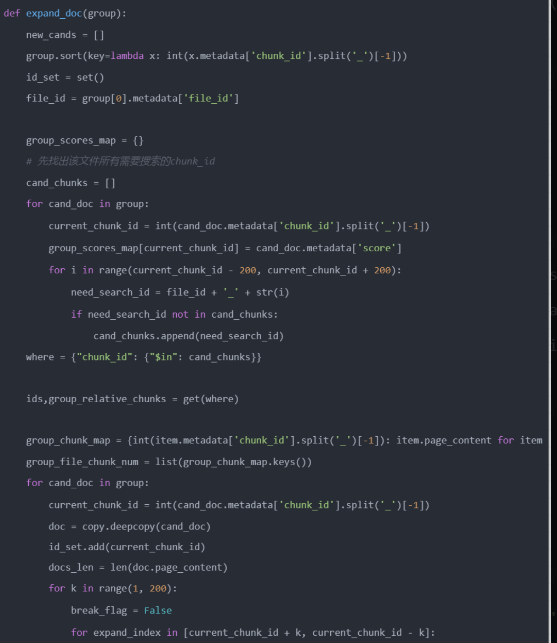
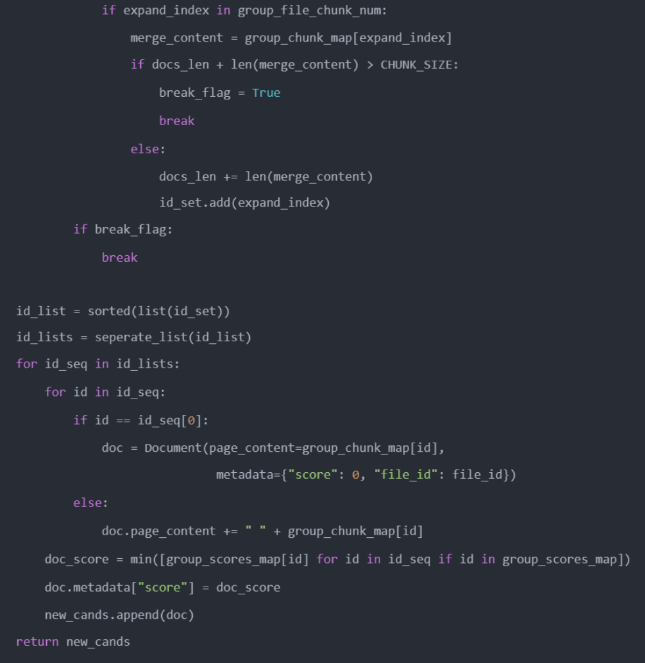
RAG高阶技巧如何实现窗口上下文检索?
基础RAG存在的问题及解决方案
RAG是一种结合了检索和生成的AI应用落地方案,它可以根据给定的问题生成回答,同时利用外部知识库来增强生成和质量的多样性。RA的核心思想是将问题和知识库中的文档进行匹配,然后将匹配到的文档作为生成模型的输入,从而生成更加相关和丰富的回答
RAG的检索流程
RAG的检索流程可以分为以下几个步骤
- 加载文档将各种格式的文档加载后转换为文档,例如PDF加载为文本数据,或者将表格转换为多个键值对
- 将文档拆分为适合存储的向量单元,以便于向量存储以及检索时文档的匹配
- 将文档用向量表示
- 将向量化后的分块数据存入数据库
- 根据问题和文档向量计算它们之间的相似度,然后根据相似度的高低,选择最相关的文档作为检索结果
- 将解索到的文档作为生成模型的输入,根据问题生成回答
问题:
- 如果我们分块拆的太大,同一块中非相关的内容就越多,对问题的检索匹配度影响越大,会导致检索的不准确
- 如果分块拆的最小,检索匹配度会提高。然而,在最后的查询环节给大语言提供的上下文信息支撑较少,导致回答不准确
解决方案窗口上下文检索
解决这个问题,一般采用的方案是在拆分时尽量将文本切分到最小的语义单元。这样在检索时不直接使用匹配到的文档,而是通过匹配到的文档扩展及上下文整合在一起,再投递给大语言使用。这样既可以提高检索精度,又可以保证上下文准确性,从而提高生成质量和多样性
具体步骤:
- 在拆分时,将文本拆分为最小的语义单元
- 在检索时,根据问题和文档向量计算它们之间的相似度,然后选择最相关的文档作为检索结果,同时记录下他们的编号
- 在查询时,根据检索结果的编号,从文本中获取他们的上下文信息,然后将它们拼接成一个完整的文档,作为生成模型的输入。根据问题生成答案
窗口上下文检索实践
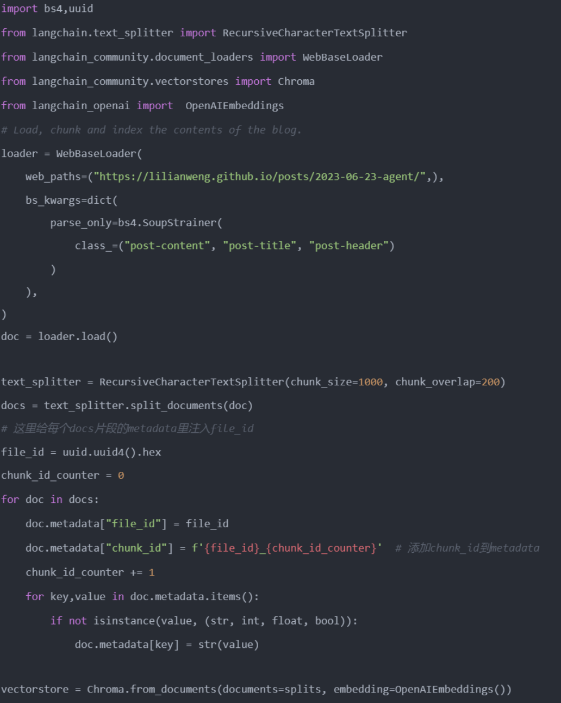
- 分块编码并写入原数据
- 检索时,通过元数据中的顺序分块编码来查找上下文