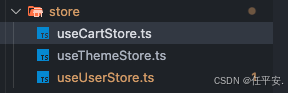
这是项目结构
user 模块
import { create } from "zustand";
interface User {
  id: string;
  name: string;
  email: string;
}
interface UserState {
  user: User | null;
  loading: boolean;
  error: string | null;
  fetchUser: (id: string) => Promise<void>;
  logout: () => void;
}

export const useUserstore = create<UserState>((set) => ({
  user: null,
  loading: false,
  error: null,
  fetchUser: async (id) => {
    set({ loading: true, error: null });
    try {
    } catch (err: any) {
      set({ error: err.message, loading: false });
    }
  },
  logout: () => {
    set({ user: null, loading: false, error: null });
  },
}));
购物车模块
// store/useCartStore.ts
import { create } from 'zustand';
import { persist } from 'zustand/middleware';

interface CartItem {
  id: string;
  name: string;
  price: number;
  quantity: number;
}

interface CartState {
  items: CartItem[];
  total: number;
  addItem: (item: CartItem) => void;
  removeItem: (id: string) => void;
}

export const useCartStore = create<CartState>()(
  persist(
    (set) => ({
      items: [],
      total: 0,
      addItem: (newItem) =>
        set((state) => {
          const existing = state.items.find((i) => i.id === newItem.id);
          let updatedItems;
          if (existing) {
            updatedItems = state.items.map((i) =>
              i.id === newItem.id ? { ...i, quantity: i.quantity + newItem.quantity } : i
            );
          } else {
            updatedItems = [...state.items, newItem];
          }
          const total = updatedItems.reduce((sum, i) => sum + i.price * i.quantity, 0);
          return { items: updatedItems, total };
        }),
      removeItem: (id) =>
        set((state) => {
          const items = state.items.filter((i) => i.id !== id);
          const total = items.reduce((sum, i) => sum + i.price * i.quantity, 0);
          return { items, total };
        }),
    }),
    { name: 'cart-storage' }
  )
);
主题模块
import { create } from "zustand";
type Theme = "light" | "dark";
interface ThemeState {
  theme: Theme;
  setTheme: (theme:Theme) => void;
  toggleTheme: () => void;
}

export const useThemeStore = create<ThemeState>((set) => ({
  theme: 'light',
  setTheme: (theme) => set({ theme }),
  toggleTheme: () => set((state) => ({ theme: state.theme === 'light' ? 'dark' : 'light' })),
}));
在组件内使用多个store
// pages/Profile.tsx
import { useThemeStore } from '../store/useThemeStore';
import { useUserStore } from '../store/useUserStore';
import { useCartStore } from '../store/useCartStore';

function Profile() {
  const { theme, toggleTheme } = useThemeStore();
  const { user, logout } = useUserStore();
  const { items, total } = useCartStore();

  return (
    <div className={theme}>
      <h1>{user?.name}</h1>
      <button onClick={toggleTheme}>切换主题</button>
      <button onClick={logout}>退出</button>
      <div>购物车商品数: {items.length},总价: {total}</div>
    </div>
  );
}
每个 store 独立订阅,互不干扰。你可以在一个组件中只订阅某个 store 的一部分状态。
有时一个 store 需要读取或更新另一个 store 的数据。Zustand 允许在 action 中使用 get 参数获取当前 store 的状态,也可以在 store 外部导入其他 store。
在 action 中读取其他 store(推荐)
// store/useOrderStore.ts
import { create } from 'zustand';
import { useCartStore } from './useCartStore';
import { useUserStore } from './useUserStore';

interface OrderState {
  createOrder: () => Promise<void>;
  loading: boolean;
}

export const useOrderStore = create<OrderState>((set, get) => ({
  loading: false,
  createOrder: async () => {
    // 读取其他 store 的当前值(直接调用 getState,不订阅)
    const { items, total } = useCartStore.getState();
    const { user } = useUserStore.getState();

    if (!user || items.length === 0) return;

    set({ loading: true });
    try {
      await fetch('/api/orders', {
        method: 'POST',
        body: JSON.stringify({ userId: user.id, items, total }),
      });
      // 下单后清空购物车
      useCartStore.getState().clearCart(); // 前提是 useCartStore 中有 clearCart 方法
      set({ loading: false });
    } catch (err) {
      set({ loading: false });
    }
  },
}));
注意:使用 useCartStore.getState() 是同步获取当前值,不会导致组件重新渲染。如果需要响应式订阅,请在组件中分别调用 hooks。
在 store 内部订阅另一个 store 的变化
// store/useLoggerStore.ts
import { create } from 'zustand';
import { useThemeStore } from './useThemeStore';

export const useLoggerStore = create(() => ({
  logThemeChange: () => {
    // 订阅主题变化
    const unsubscribe = useThemeStore.subscribe(
      (state) => state.theme,
      (theme) => {
        console.log('主题已切换为:', theme);
      }
    );
    return unsubscribe;
  },
}));
组合多个 store 成一个大的 store (不推荐,但可选)
如果不想在组件中导入很多个 hooks,也可以创建一个"根 store"整合所有子 store。
// store/useRootStore.ts
import { create } from 'zustand';
import { useThemeStore } from './useThemeStore';
import { useUserStore } from './useUserStore';
import { useCartStore } from './useCartStore';

export const useRootStore = create(() => ({
  theme: useThemeStore.getState(),
  user: useUserStore.getState(),
  cart: useCartStore.getState(),
}));

// 手动同步子 store 变化到根 store(复杂且容易遗漏,不推荐)
// 更好的做法:直接用多个 hooks,不要强行合并。