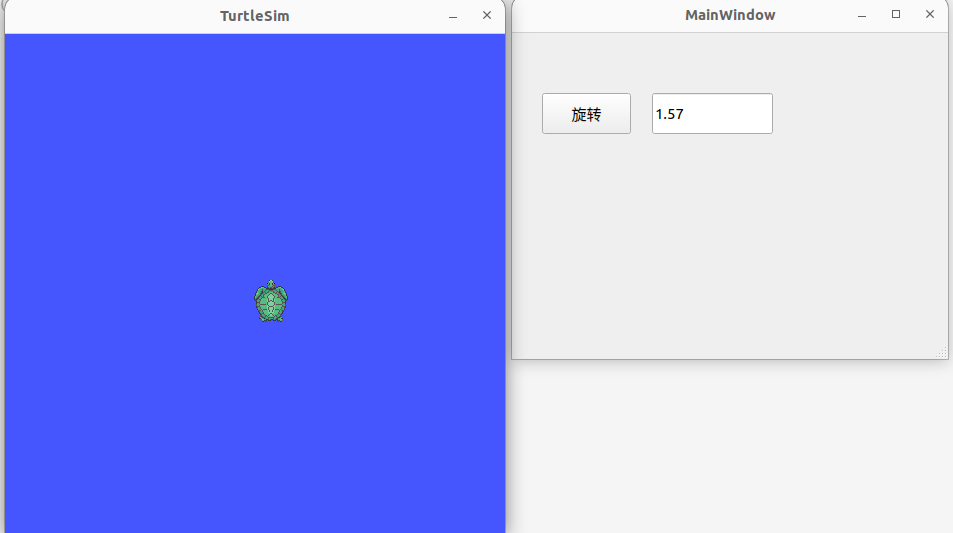
0. 示例:使用qt控制ros小海龟
0.1 安装qt creator
0.2 创建ROS包
依赖只需要ros2的依赖即可,qt的依赖单独添加。创建一个resource文件夹,待会qt的ui文件放到这里
bash
ros2 pkg create qt_test --build-type ament_cmake --dependencies rclcpp --dependencies rclcpp std_msgs geometry_msgs --node-name qt_test_node --license Apache-2.0

mkdir resource
0.3 使用Qt Designer创建UI界面
打开qt designer

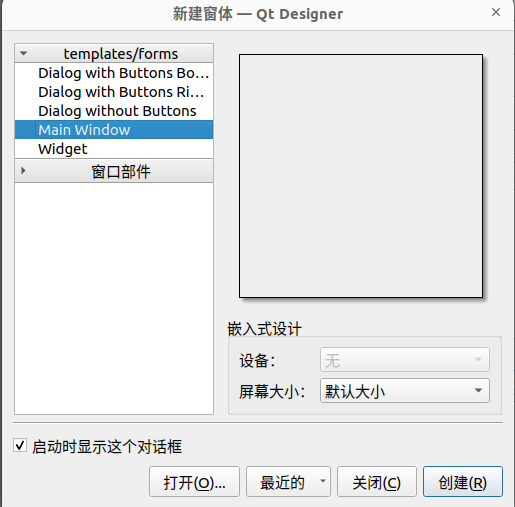
选择Main Window窗口
创建一个按钮(Push Botton),一个输入框(Line Edit)。
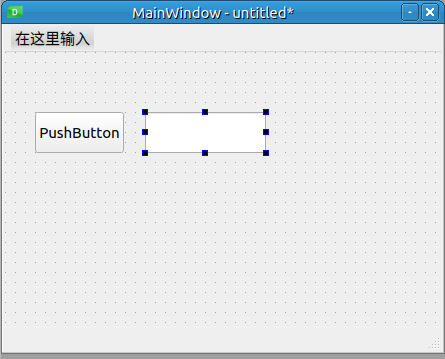
在右边属性栏修改:
将按钮的 objectName 改为 rotate,text 改为"开始旋转";
将文本框的 objectName 改为angle;
将工程保存到ros2包的resource目录下,这将保存一个.ui文件
关闭QT设计器。
0.4 编写程序
cpp
/* qt_test_node.hpp */
#pragma once

#include <QMainWindow>  //Qt头文件

#include <rclcpp/rclcpp.hpp>
#include <geometry_msgs/msg/twist.hpp> // 包含小乌龟的Twist消息类型
#include "ui_test.h"   //*添加生成的头文件 这个文件在编译后的build路径里

/* 前置声明 Ui::MainWindow 类。这样可以在头文件中使用 Ui::MainWindow *ui; 指针,而无需在头文件中完全包含 ui_main_window.h */
QT_BEGIN_NAMESPACE
namespace Ui { class MainWindow; }
QT_END_NAMESPACE

/* 创建自定义类MainWindow  继承自QT的类QMainWindow */
class MainWindow : public QMainWindow
{
    Q_OBJECT  /*QT模对象宏*/

public:
    /* 声明构造函数 explicit防止类型隐式转换   传递ros节点指针,便于在qt程序中调用ros通信函数   传递父母窗口指针 */
    explicit MainWindow(rclcpp::Node::SharedPtr node, QWidget *parent = nullptr);
    ~MainWindow();

private slots:
    void onRotateButtonClicked();/* 按钮点击事件函数 */

private:
    Ui::MainWindow *ui;/* ui窗口指针 */
    rclcpp::Node::SharedPtr ros_node_;/* ros节点指针 */
    rclcpp::Publisher<geometry_msgs::msg::Twist>::SharedPtr twist_publisher_;/* 角度发布者 */
};
cpp
//qt_test_node.cpp:
#include <QApplication> //Qt应用头文件
#include <QString> //Qt字符串类
#include <rclcpp/rclcpp.hpp>
#include <sstream>
#include "qt_test_node.hpp"


MainWindow::MainWindow(rclcpp::Node::SharedPtr node, QWidget *parent)
    : QMainWindow(parent), ui(new Ui::MainWindow), ros_node_(node)
{ /* 新建ui窗口;传递ros节点 */

    ui->setupUi(this);/*创建构建并显示界面*/

    // 创建一个发布者,向 "/turtle1/cmd_vel" 话题发布速度指令
    twist_publisher_ = ros_node_->create_publisher<geometry_msgs::msg::Twist>("/turtle1/cmd_vel", 10);

    // 连接按钮的点击信号到我们的自定义槽函数
    /* 连接rotate按钮的 "信号" 到 名为的onRotateButtonClicked自定义槽函数.    */
    connect(ui->rotate,
        &QPushButton::clicked,
        this,
        &MainWindow::onRotateButtonClicked
    );
}

MainWindow::~MainWindow()
{
    delete ui;/* 释放ui指针指向的内存区域 */
}

/* 自定义槽函数 点击按钮时调用 */
void MainWindow::onRotateButtonClicked()
{
    QString angle_text = ui->angle->text(); /*获取angle构建的文本*/
    bool ok;
    double angle = angle_text.toDouble(&ok);/*文本转换为浮点数 将结果输出到ok */


    if (ok)
    {
        geometry_msgs::msg::Twist twist_msg;
        twist_msg.angular.z = angle; // 设置旋转角速度

        twist_publisher_->publish(twist_msg);
        RCLCPP_INFO(ros_node_->get_logger(), "Published rotate command with angular velocity: %f", angle);
    }
    else
    {
        RCLCPP_WARN(ros_node_->get_logger(), "Invalid angle input: '%s'", angle_text.toStdString().c_str());
    }
}


int main(int argc, char *argv[])
{

    rclcpp::init(argc, argv);
    auto node = std::make_shared<rclcpp::Node>("qt_turtle_control_node");// 初始化 ROS2


    QApplication app(argc, argv);// 初始化 Qt 应用

    MainWindow window(node);//创建主窗口对象
    window.show();//显示对象

    // 在单独的线程中运行 ROS2 的 spin 函数,避免阻塞 Qt 的事件循环
    rclcpp::executors::SingleThreadedExecutor executor;
    executor.add_node(node);
    auto spin_thread = std::thread([&executor]() { executor.spin(); });

    // 进入 Qt 事件循环
    int result = app.exec();

    // 程序退出前的清理工作
    rclcpp::shutdown();
    spin_thread.join();

    return result;
}
CMakeLists.txt
cpp
cmake_minimum_required(VERSION 3.8)
project(qt_test)

if(CMAKE_COMPILER_IS_GNUCXX OR CMAKE_CXX_COMPILER_ID MATCHES "Clang")
  add_compile_options(-Wall -Wextra -Wpedantic)
endif()

# find dependencies
find_package(ament_cmake REQUIRED)
find_package(rclcpp REQUIRED)
find_package(std_msgs REQUIRED)
find_package(geometry_msgs REQUIRED)
find_package(Qt5 REQUIRED COMPONENTS Widgets) #新增加依赖
set(CMAKE_AUTOMOC ON) #启用Qt的MOC(元对象编译器)
qt5_wrap_ui(UI_HEADERS resource/test.ui)# 从 .ui 文件生成对应的C++头文件

add_executable(qt_test_node
  src/qt_test_node.cpp
  include/qt_test_node.hpp   # 必须添加
  ${UI_HEADERS}  # 必须添加
)

target_include_directories(qt_test_node PUBLIC
  $<BUILD_INTERFACE:${CMAKE_CURRENT_SOURCE_DIR}/include>
  $<INSTALL_INTERFACE:include>
  ${CMAKE_CURRENT_BINARY_DIR}  #添加 以寻找build路径下的ui_test.h
)
target_compile_features(qt_test_node PUBLIC c_std_99 cxx_std_17)  # Require C99 and C++17
ament_target_dependencies(
  qt_test_node
  "rclcpp"
  "std_msgs"
  "geometry_msgs"
)
target_link_libraries(qt_test_node Qt5::Widgets)#链接到QT库

install(TARGETS qt_test_node
  DESTINATION lib/${PROJECT_NAME})

if(BUILD_TESTING)
  find_package(ament_lint_auto REQUIRED)
  # the following line skips the linter which checks for copyrights
  # comment the line when a copyright and license is added to all source files
  set(ament_cmake_copyright_FOUND TRUE)
  # the following line skips cpplint (only works in a git repo)
  # comment the line when this package is in a git repo and when
  # a copyright and license is added to all source files
  set(ament_cmake_cpplint_FOUND TRUE)
  ament_lint_auto_find_test_dependencies()
endif()

ament_package()
0.5 测试
bash
colcon build
source install/setup.bash
终端1:
bash
source /opt/ros/humble/setup.bash
ros2 run turtlesim turtlesim_node
终端2:
bash
source install/setup.bash
ros2 run qt_test qt_test_node