欢迎加入开源鸿蒙跨平台社区:
https://openharmonycrossplatform.csdn.net
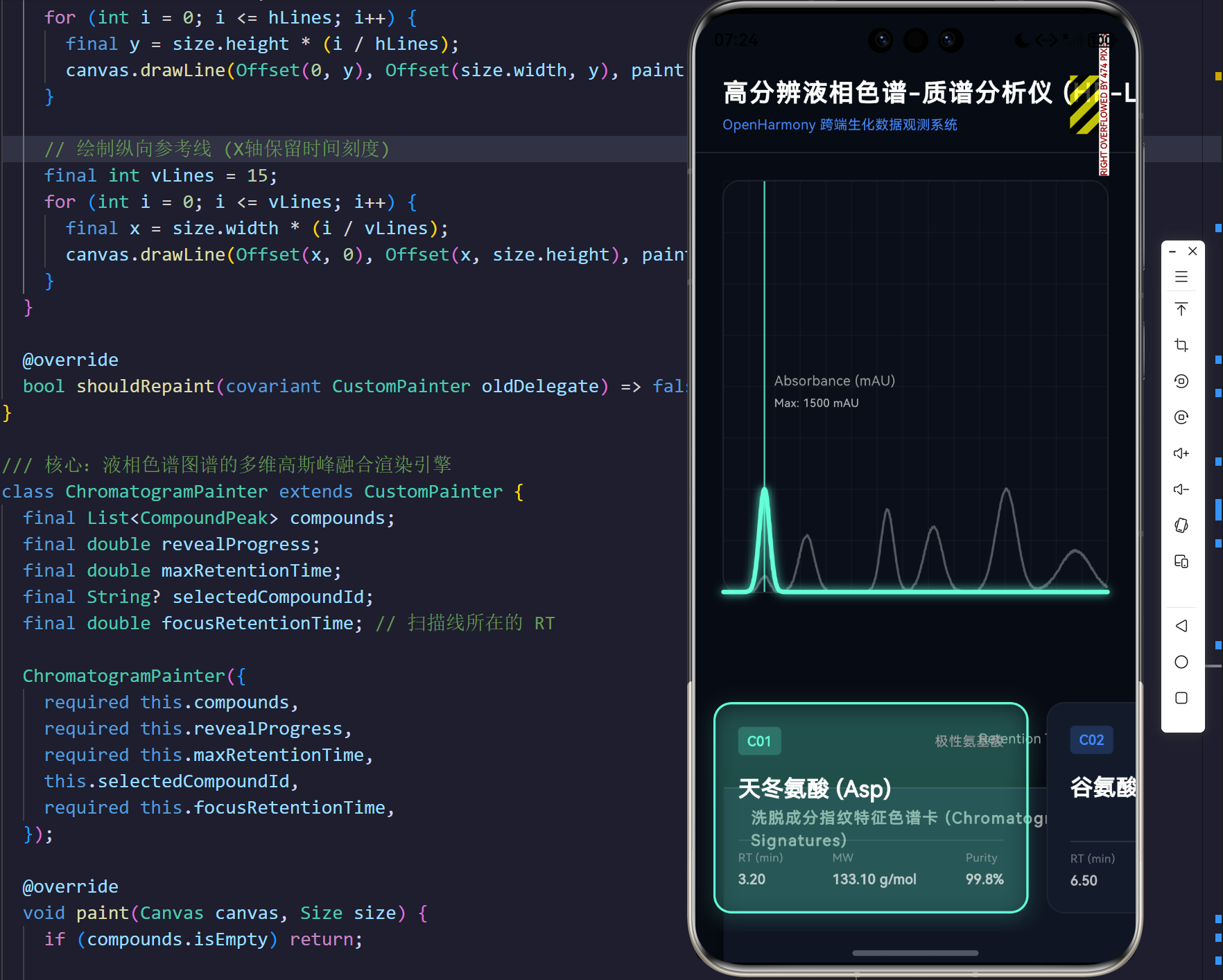
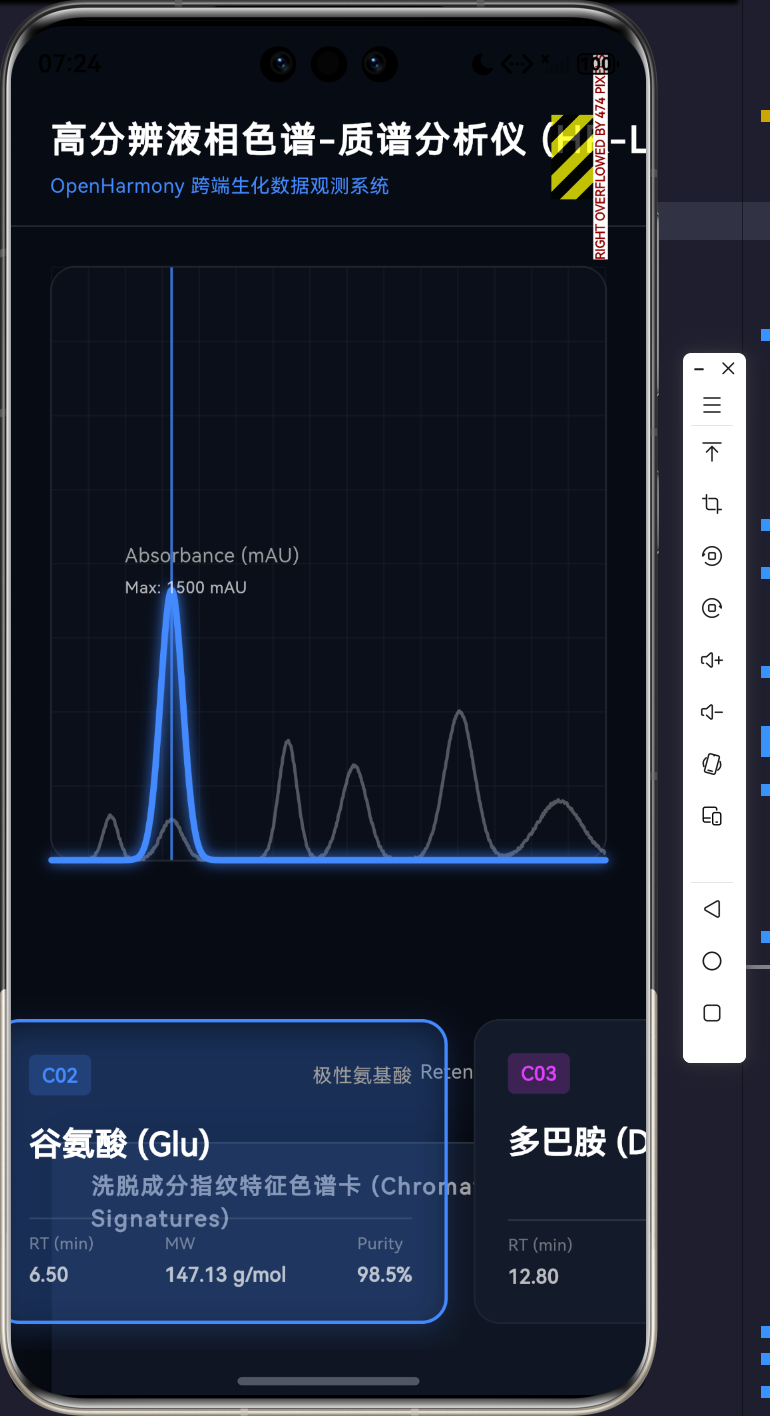
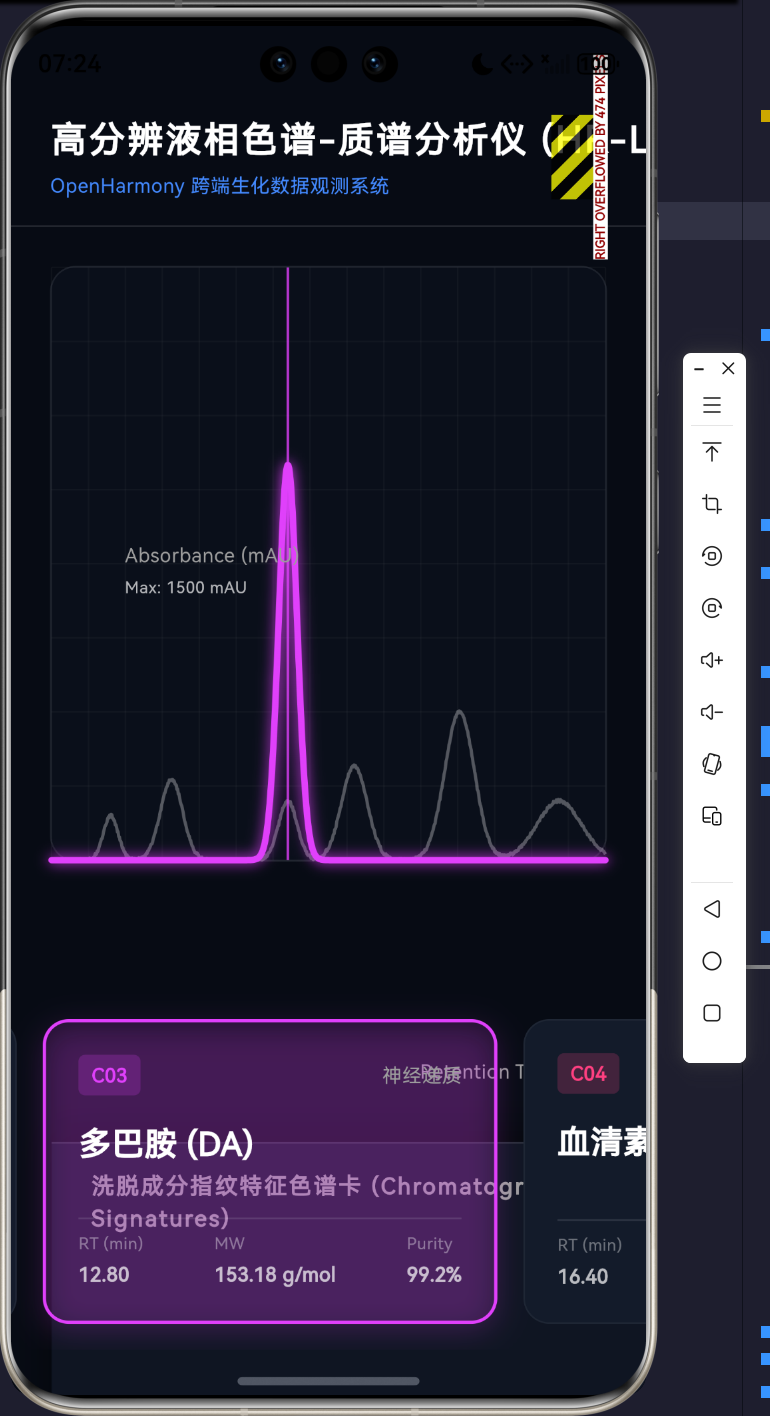
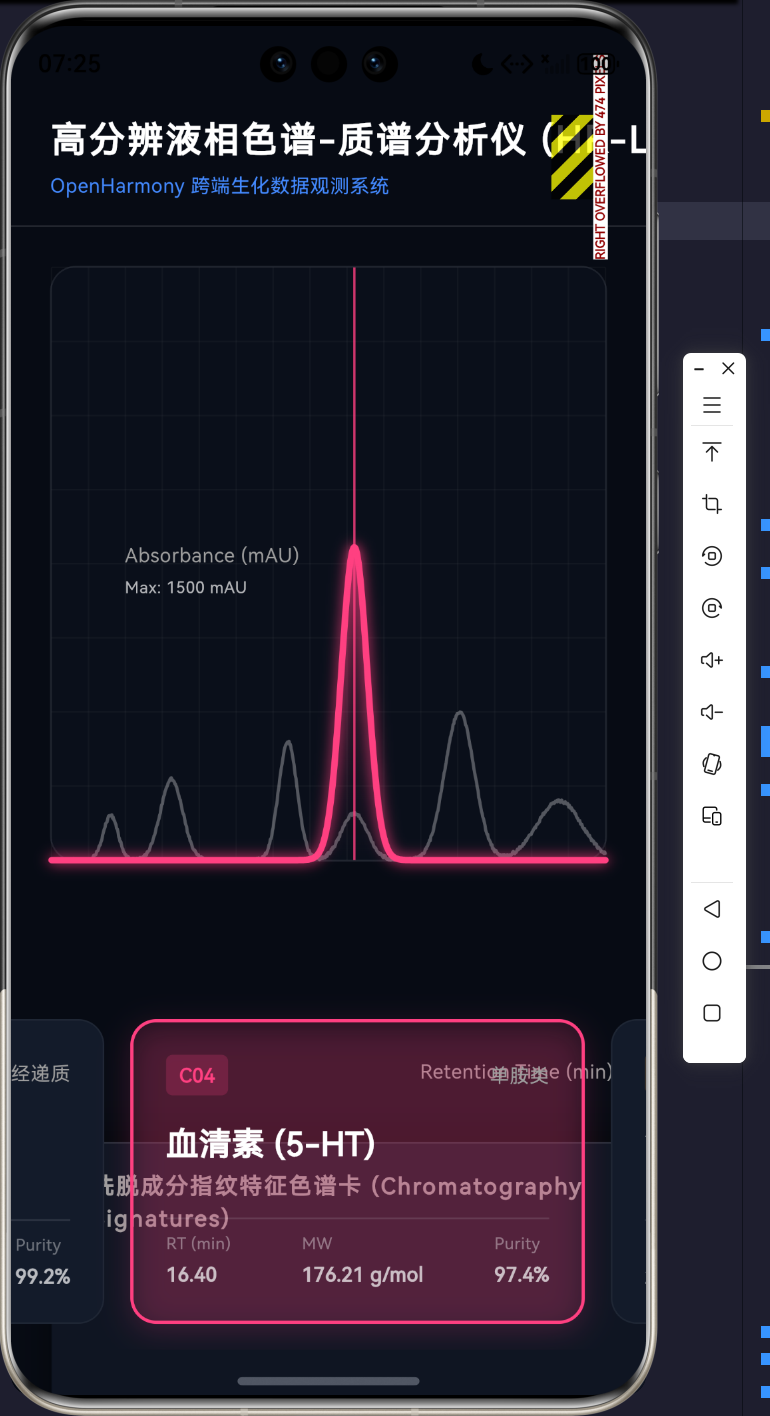
1. 生命科学进入数据洪流时代:从定性观测到高维数理重构
如果说显微镜让生物学进入了细胞与微生物的视界,那么高效液相色谱-质谱联用技术(HPLC-MS)则犹如一柄极致锋利的手术刀,将混合生命物质(如复杂的蛋白质裂解液、细胞内代谢产物)在分子量级层层剥离。然而,伴随着分析精度的指数级攀升,生命科学实验室产生的数据也呈现出"洪荒之势"。一针样品的进样,往往意味着数百万个质荷比(m/z)与保留时间(RT)交织的数据坐标。
在此背景下,纯后端的分析算法已不足以支撑现代科学研究的直觉洞察。我们需要一种能在科研人员的平板、大屏甚至是便携式终端上实时渲染、具备极高数学精度且能进行多维空间焦点下沉的微前端分析仪器。
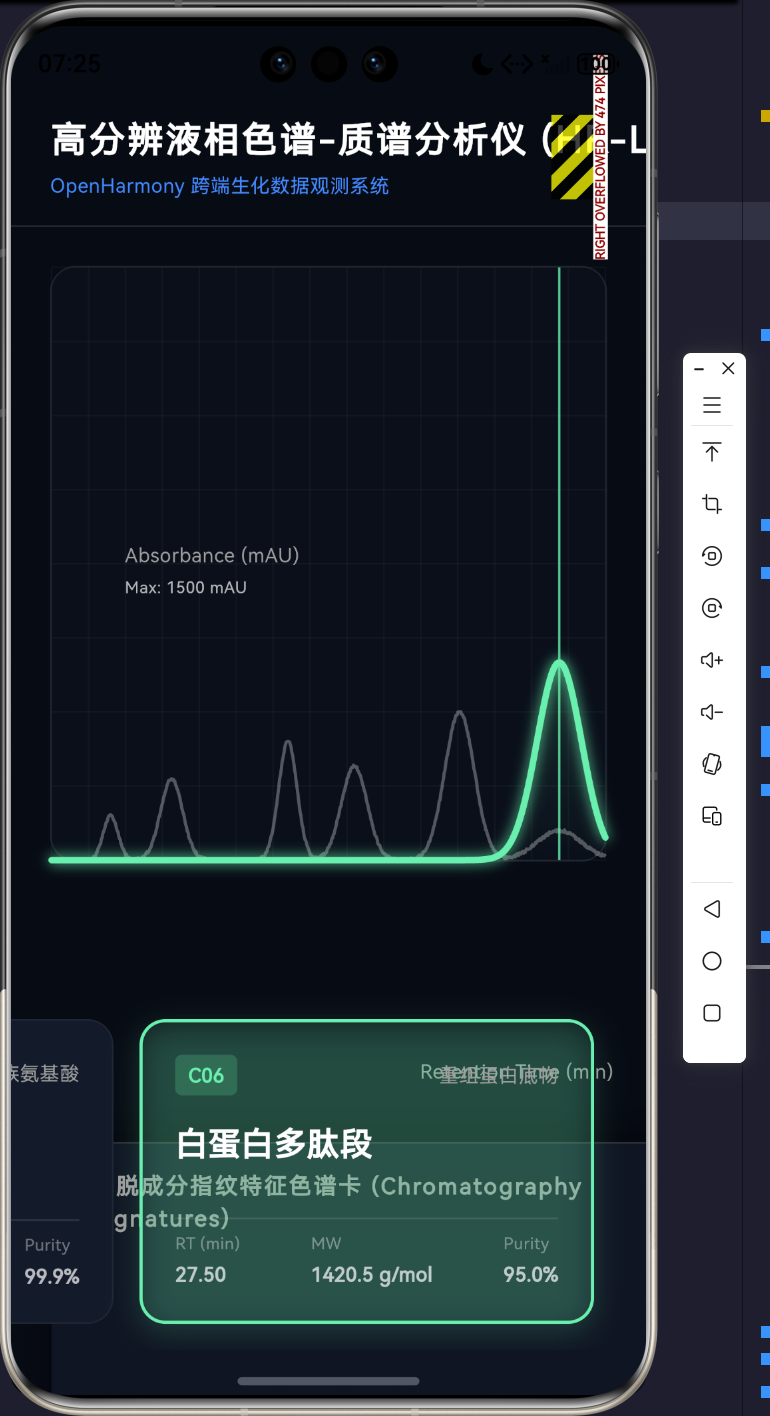
本文立足于 Flutter 跨端渲染引擎,以"物质洗脱时间与响应强度的二维平面"作为切入点,通过内存级的多维高斯函数融合算法 和极具科幻感的物质色谱卡(Chromatography Signature Cards)交互矩阵,深度还原了 LC-MS 色谱联用系统的数据流出观测台。这是一次关于跨端图形渲染与计算化学碰撞的壮丽试验!
2. 基于高斯分布的色谱波形重构理论与数学建模
区别于简单的折线图,色谱图中的"色谱峰(Chromatographic Peak)"实际上是分析物质分子在色谱柱固定相与流动相之间发生无数次吸附/解吸附过程的微观概率累积。在宏观尺度上,这一连续过程极度吻合于高斯分布(正态分布)。
因此,我们摒弃了硬编码的点阵,在 Flutter 内存态中建立了一个基于连续数学方程的信号发生器。
2.1 信号强度的基础方程
针对单一洗脱物质 i i i,其在时间 t t t 在检测器上的响应强度 I i ( t ) I_i(t) Ii(t),我们采用标准的高斯函数进行拟合:
I i ( t ) = A i ⋅ exp ( − ( t − μ i ) 2 2 σ i 2 ) I_i(t) = A_i \cdot \exp \left( -\frac{(t - \mu_i)^2}{2\sigma_i^2} \right) Ii(t)=Ai⋅exp(−2σi2(t−μi)2)
- μ i \mu_i μi:对应物质的保留时间(Retention Time, RT),决定了色谱峰在 X 轴的中心位置。
- A i A_i Ai:对应物质信号的振幅(Amplitude / Intensity),反映了物质的浓度。
- σ i \sigma_i σi:代表色谱峰的标准差(Peak Width/Sigma),决定了波峰的胖瘦,与塔板理论中的柱效能紧密相关。
2.2 全局多维信号累加模型
在一剂复杂的蛋白提纯液中,最终我们在大屏上观测到的色谱图基线,实际上是所有独立流出物信号强度的非线性叠加,同时掺杂了系统特有的布朗噪声(Baseline Noise ϵ \epsilon ϵ):
I t o t a l ( t ) = ( ∑ i = 1 N A i ⋅ exp ( − ( t − R T i ) 2 2 ⋅ W i d t h i 2 ) ) + ϵ ( t ) I_{total}(t) = \left( \sum_{i=1}^{N} A_i \cdot \exp \left( -\frac{(t - RT_i)^2}{2 \cdot Width_i^2} \right) \right) + \epsilon(t) Itotal(t)=(i=1∑NAi⋅exp(−2⋅Widthi2(t−RTi)2))+ϵ(t)
通过将这套方程植入 Dart 的实体类中,我们只需定义生物大分子的三个关键参数,即可在 Canvas 引擎中近乎无限精度地重构其流出曲线。
3. UI/UX 架构范式:系统 UML 与联动状态机
为处理大量多维数据点在每秒 60 帧下的刷新,同时保证用户在底部点击"色谱卡"时大屏幕图形焦点平滑过渡,我们采用了单向数据流与 AnimationController 高度内聚的组件结构。
Manages Memory Array
Inject States & Animations
CompoundPeak
+String id
+String name
+double retentionTime
+double amplitude
+double width
+Color themeColor
+getIntensityAt(t: double) : double
HPLCDashboard
+State createState()
HPLCDashboardState
-List<CompoundPeak> compounds
-CompoundPeak selectedCompound
-AnimationController revealController
-AnimationController focusController
+onCompoundSelected(CompoundPeak) : void
+build() : Widget
ChromatogramPainter
+List<CompoundPeak> compounds
+double revealProgress
+double focusRetentionTime
+paint(Canvas, Size) : void
交互流向(Flowchart):
Yes
No
用户在底部横向滑动并点击特定物质的色谱卡
触发 _onCompoundSelected
当前卡片是否已处于激活态?
丢弃操作, 保持原态
更新 selectedCompound 状态
基于 Tween 生成起始点到目标 RT 的空间平移动画
调用 focusController.forward
触发 CustomPainter 的 shouldRepaint
重新绘制全局色谱波形: 压暗非选中物质, 亮起选中物质, 扫描线滑入
4. 核心源码剖析:在虚空中构建分子宇宙
在深入了解理论后,代码的每一步执行都成为了数学与硬件管线的交响。以下分四点对核心工程层进行精解。
核心实现 1:基于高斯的领域数据实体
在脱离后端的独立前端测绘场中,面向对象的设计赋予了生化物质独立的响应能力。
dart
/// 生化物质特征与色谱峰模型
class CompoundPeak {
  final String id;
  final String name;           // 物质名称(如:色氨酸)
  final String category;       // 物质类别(如:氨基酸、肽段)
  final double retentionTime;  // 保留时间 RT (分) - 决定峰在X轴的位置
  final double amplitude;      // 响应强度 (mAU) - 决定峰的高度
  final double width;          // 峰宽 (sigma) - 决定峰的胖瘦
  final Color themeColor;      // 标注颜色

  CompoundPeak({
    required this.id, required this.name, required this.category,
    required this.retentionTime, required this.amplitude, required this.width,
    required this.themeColor,
  });

  /// 高斯函数:计算在特定时间 t 的洗脱信号强度
  /// 此函数在绘制路径的每一次循环中被数万次调用,需保证纯粹的数学运算性能
  double getIntensityAt(double t) {
    return amplitude * exp(-pow(t - retentionTime, 2) / (2 * pow(width, 2)));
  }
}
申论阐释 :这里的 getIntensityAt 方法是整个渲染引擎的数据源泉。使用标准 Math 库中的对数与幂指函数运算,将分子分离维度的物理空间映射至 UI 渲染强度的数字空间。
核心实现 2:宏大视阈下的高精度多项式累加波形渲染引擎
在 ChromatogramPainter 中,我们将理论公式中的 Σ \Sigma Σ 积分落地为高密度的循环分片(Resolution = 800)。
dart
    // X轴分段采样点数量 (控制曲线平滑度和性能)
    const int resolution = 800;
    final double stepX = size.width / resolution;
    final double timeStep = maxRetentionTime / resolution;

    for (int i = 0; i <= resolution; i++) {
      final double t = i * timeStep;
      // 控制开场动画:只绘制到当前的 revealProgress 进度
      if (t > maxRetentionTime * revealProgress) break;

      double totalBaseIntensity = 0.0;
      double highlightIntensity = 0.0;

      for (var comp in compounds) {
        final double iAtT = comp.getIntensityAt(t);
        // 如果有物质被选中,分离底层强度与高亮强度
        if (selectedCompoundId != null) {
          if (comp.id == selectedCompoundId) {
            highlightIntensity += iAtT;
            totalBaseIntensity += iAtT * 0.15; // 选中态底图削弱
          } else {
            totalBaseIntensity += iAtT * 0.3;  // 非选中物质压暗
          }
        } else {
          totalBaseIntensity += iAtT; // 默认全亮态
        }
      }

      // 引入基线布朗噪声增加生物学真实感
      final double noise = (Random().nextDouble() - 0.5) * (displayMaxIntensity * 0.005);
      totalBaseIntensity = max(0, totalBaseIntensity + noise);

      // ... 坐标反转与连线 ...
    }
申论阐释 :这段代码诠释了"渲染管线分离"的美学。针对复杂的混合物洗脱液,系统不但计算出了总体图谱(baseLinePath),还巧妙地从中抽提了当前选中目标的分图谱(highlightPath)。非激活波形的集体压暗机制,构建了出色的景深效果(Depth of Field),极大地增强了视觉专注力。
核心实现 3:具有极客生化感的多维特征"色谱卡"
下方的色谱卡不仅是信息的载体,更是操作意图的接收器。
dart
  Widget _buildChromatographyCard(CompoundPeak compound, bool isSelected) {
    return GestureDetector(
      onTap: () => _onCompoundSelected(compound),
      child: AnimatedContainer( // 提供选中时的柔和呼吸渐变
        duration: const Duration(milliseconds: 300),
        margin: const EdgeInsets.only(right: 16.0),
        width: 280,
        decoration: BoxDecoration(
          color: isSelected ? compound.themeColor.withOpacity(0.1) : const Color(0xFF131B2A),
          borderRadius: BorderRadius.circular(16),
          border: Border.all(
            color: isSelected ? compound.themeColor : Colors.white.withOpacity(0.05),
            width: isSelected ? 2 : 1,
          ),
          boxShadow: isSelected ? [
            BoxShadow(color: compound.themeColor.withOpacity(0.2), blurRadius: 15, offset: const Offset(0, 5))
          ] : [],
        ),
        child: Padding(
          padding: const EdgeInsets.all(20.0),
          child: Column(
            crossAxisAlignment: CrossAxisAlignment.start,
            children: [
              // 类别标签与 ID 标识
              // ... 核心名称省略
              const Divider(color: Colors.white12),
              Row(
                mainAxisAlignment: MainAxisAlignment.spaceBetween,
                children: [
                  _buildCardMetric("RT (min)", compound.retentionTime.toStringAsFixed(2)),
                  _buildCardMetric("MW", compound.molecularWeight),
                  _buildCardMetric("Purity", compound.purity),
                ],
              )
            ],
          ),
        ),
      ),
    );
  }
申论阐释 :AnimatedContainer 在此处发挥了巨大的微动效价值。当科研人员选中特定物质的卡片时,不仅卡片边框浮现特定主题色,其投射的霓虹阴影(boxShadow)也随之晕染开来。这种玻璃拟态(Glassmorphism)与生化暗黑元素的结合,提升了实验室冷峻环境下的交互温情。
核心实现 4:双动画域的空间焦点转移(RT Scanner定位系统)
如何让色谱大屏响应下方卡片的点击?答案是一条随时间驱动游走的"焦点扫描线"。
dart
  void _onCompoundSelected(CompoundPeak compound) {
    if (_selectedCompound?.id == compound.id) return;

    // 获取当前扫描线的物理位置起始点
    final double startRT = _selectedCompound?.retentionTime ?? _maxRetentionTime / 2;
    final double endRT = compound.retentionTime;

    setState(() {
      _selectedCompound = compound;
    });

    // 创建一个跨越当前物质RT空间到下一个物质RT空间的平滑补间动画
    _focusAnimation = Tween<double>(begin: startRT, end: endRT).animate(
      CurvedAnimation(parent: _focusController, curve: Curves.easeInOutCubic)
    );

    _focusController.reset();
    _focusController.forward();
  }
申论阐释 :这也许是整个交互系统中最具灵魂的十行代码。通过动态计算起点与终点,并依托 Curves.easeInOutCubic 曲线重构物理加速度,那条垂直的定位扫描仪像拥有了质量与惯性的机械臂般,精准滑过庞大的数据集波峰,最终稳稳锚定于目标物质的峰脊。
5. 跨界拓荒的终局:让计算隐于无形
从生物基因测序、到靶分子靶向药物结合力预测,再到如今的液相色谱流出曲线测绘,Flutter 与 OpenHarmony 的跨端渲染引擎一直在证明一个事实:极端的复杂数据在恰当的架构设计下,能够转化为极具秩序与美感的视觉乐章。
这套"色谱卡流转系统"抛弃了传统科研软件(如陈旧的分析仪器工作站)生硬且晦涩的 Windows 表格弹窗。我们在纯内存场构建起高斯物理方程,利用多重渲染管线进行光影合成,它向我们展示了科技应用工具的一种进化方向:我们不仅需要精确计算化学分子的纯度,更要以前所未有的直观去"触摸"大分子的生命节律。这场关于算法与画布的跨界狂想,无疑才刚刚吹响号角!
源码
bash
import 'dart:math';
import 'dart:ui' as ui;
import 'package:flutter/material.dart';

void main() {
  runApp(const MaterialApp(
    debugShowCheckedModeBanner: false,
    themeMode: ThemeMode.dark,
    home: HPLCDashboard(),
  ));
}

/// 生化物质特征与色谱峰模型
class CompoundPeak {
  final String id;
  final String name;           // 物质名称(如:色氨酸)
  final String category;       // 物质类别(如:氨基酸、肽段)
  final double retentionTime;  // 保留时间 RT (分) - 决定峰在X轴的位置
  final double amplitude;      // 响应强度 (mAU) - 决定峰的高度
  final double width;          // 峰宽 (sigma) - 决定峰的胖瘦
  final Color themeColor;      // 标注颜色
  final String molecularWeight;// 分子量
  final String purity;         // 纯度

  CompoundPeak({
    required this.id,
    required this.name,
    required this.category,
    required this.retentionTime,
    required this.amplitude,
    required this.width,
    required this.themeColor,
    required this.molecularWeight,
    required this.purity,
  });

  /// 高斯函数:计算在特定时间 t 的洗脱信号强度
  double getIntensityAt(double t) {
    return amplitude * exp(-pow(t - retentionTime, 2) / (2 * pow(width, 2)));
  }
}

class HPLCDashboard extends StatefulWidget {
  const HPLCDashboard({super.key});

  @override
  State<HPLCDashboard> createState() => _HPLCDashboardState();
}

class _HPLCDashboardState extends State<HPLCDashboard> with TickerProviderStateMixin {
  late AnimationController _revealController;
  late Animation<double> _revealAnimation;

  late AnimationController _focusController;
  late Animation<double> _focusAnimation;

  // 模拟 LC-MS 色谱图数据(总长设为 30 分钟)
  final double _maxRetentionTime = 30.0;

  final List<CompoundPeak> _compounds = [
    CompoundPeak(id: "C01", name: "天冬氨酸 (Asp)", category: "极性氨基酸", retentionTime: 3.2, amplitude: 450, width: 0.4, themeColor: Colors.tealAccent, molecularWeight: "133.10 g/mol", purity: "99.8%"),
    CompoundPeak(id: "C02", name: "谷氨酸 (Glu)", category: "极性氨基酸", retentionTime: 6.5, amplitude: 820, width: 0.6, themeColor: Colors.blueAccent, molecularWeight: "147.13 g/mol", purity: "98.5%"),
    CompoundPeak(id: "C03", name: "多巴胺 (DA)", category: "神经递质", retentionTime: 12.8, amplitude: 1200, width: 0.5, themeColor: Colors.purpleAccent, molecularWeight: "153.18 g/mol", purity: "99.2%"),
    CompoundPeak(id: "C04", name: "血清素 (5-HT)", category: "单胺类", retentionTime: 16.4, amplitude: 950, width: 0.7, themeColor: Colors.pinkAccent, molecularWeight: "176.21 g/mol", purity: "97.4%"),
    CompoundPeak(id: "C05", name: "色氨酸 (Trp)", category: "芳香族氨基酸", retentionTime: 22.1, amplitude: 1500, width: 0.8, themeColor: Colors.orangeAccent, molecularWeight: "204.23 g/mol", purity: "99.9%"),
    CompoundPeak(id: "C06", name: "白蛋白多肽段", category: "重组蛋白底物", retentionTime: 27.5, amplitude: 600, width: 1.2, themeColor: Colors.greenAccent, molecularWeight: "1420.5 g/mol", purity: "95.0%"),
  ];

  CompoundPeak? _selectedCompound;
  double _currentFocusTime = 0.0;

  @override
  void initState() {
    super.initState();

    // 初始化开场波形扫描动画
    _revealController = AnimationController(vsync: this, duration: const Duration(seconds: 3));
    _revealAnimation = CurvedAnimation(parent: _revealController, curve: Curves.easeOutQuart);

    // 初始化焦点切换扫描线动画
    _focusController = AnimationController(vsync: this, duration: const Duration(milliseconds: 800));

    _revealController.forward();
  }

  @override
  void dispose() {
    _revealController.dispose();
    _focusController.dispose();
    super.dispose();
  }

  void _onCompoundSelected(CompoundPeak compound) {
    if (_selectedCompound?.id == compound.id) return;

    final double startRT = _selectedCompound?.retentionTime ?? _maxRetentionTime / 2;
    final double endRT = compound.retentionTime;

    setState(() {
      _selectedCompound = compound;
    });

    _focusAnimation = Tween<double>(begin: startRT, end: endRT).animate(
      CurvedAnimation(parent: _focusController, curve: Curves.easeInOutCubic)
    );

    _focusController.reset();
    _focusController.forward();
  }

  @override
  Widget build(BuildContext context) {
    return Scaffold(
      backgroundColor: const Color(0xFF070B14), // 深海极客蓝,实验室生化感
      body: Stack(
        children: [
          // 鸿蒙跨平台底层水印
          Positioned.fill(
            child: Opacity(
              opacity: 0.04,
              child: Image.asset(
                'assets/images/explore_ohos.png',
                fit: BoxFit.cover,
                errorBuilder: (context, error, stackTrace) => const SizedBox(),
              ),
            ),
          ),
          SafeArea(
            child: Column(
              crossAxisAlignment: CrossAxisAlignment.stretch,
              children: [
                _buildHeaderBar(),
                const Divider(height: 1, color: Colors.white12),
                // 核心图谱区域
                Expanded(
                  flex: 6,
                  child: Padding(
                    padding: const EdgeInsets.all(24.0),
                    child: _buildChromatogramArea(),
                  ),
                ),
                // 底部色谱卡队列
                Expanded(
                  flex: 4,
                  child: Container(
                    decoration: BoxDecoration(
                      color: const Color(0xFF0F1522),
                      border: const Border(top: BorderSide(color: Colors.white12, width: 1)),
                      boxShadow: [
                        BoxShadow(color: Colors.black.withOpacity(0.5), blurRadius: 20, offset: const Offset(0, -5))
                      ]
                    ),
                    child: Column(
                      crossAxisAlignment: CrossAxisAlignment.start,
                      children: [
                        const Padding(
                          padding: EdgeInsets.fromLTRB(24, 16, 24, 0),
                          child: Text(
                            "洗脱成分指纹特征色谱卡 (Chromatography Signatures)",
                            style: TextStyle(color: Colors.grey, fontSize: 14, fontWeight: FontWeight.bold, letterSpacing: 1.2),
                          ),
                        ),
                        Expanded(
                          child: ListView.builder(
                            padding: const EdgeInsets.all(16.0),
                            scrollDirection: Axis.horizontal,
                            itemCount: _compounds.length,
                            itemBuilder: (context, index) {
                              final comp = _compounds[index];
                              final isSelected = _selectedCompound?.id == comp.id;
                              return _buildChromatographyCard(comp, isSelected);
                            },
                          ),
                        ),
                      ],
                    ),
                  ),
                )
              ],
            ),
          ),
        ],
      ),
    );
  }

  Widget _buildHeaderBar() {
    return Padding(
      padding: const EdgeInsets.symmetric(horizontal: 24.0, vertical: 16.0),
      child: Row(
        mainAxisAlignment: MainAxisAlignment.spaceBetween,
        children: [
          Column(
            crossAxisAlignment: CrossAxisAlignment.start,
            children: const [
              Text("高分辨液相色谱-质谱分析仪 (HR-LC/MS)", style: TextStyle(fontSize: 22, fontWeight: FontWeight.w900, color: Colors.white, letterSpacing: 1.5)),
              SizedBox(height: 4),
              Text("OpenHarmony 跨端生化数据观测系统", style: TextStyle(fontSize: 12, color: Colors.blueAccent)),
            ],
          ),
          Row(
            children: [
              _buildStatusPill("泵压", "124.5 Bar", Colors.greenAccent),
              const SizedBox(width: 12),
              _buildStatusPill("柱温", "40.0 °C", Colors.orangeAccent),
              const SizedBox(width: 12),
              _buildStatusPill("流速", "1.2 mL/min", Colors.blueAccent),
            ],
          )
        ],
      ),
    );
  }

  Widget _buildStatusPill(String label, String value, Color color) {
    return Container(
      padding: const EdgeInsets.symmetric(horizontal: 12, vertical: 8),
      decoration: BoxDecoration(
        color: color.withOpacity(0.1),
        border: Border.all(color: color.withOpacity(0.3)),
        borderRadius: BorderRadius.circular(20),
      ),
      child: Row(
        children: [
          Text("$label: ", style: const TextStyle(color: Colors.grey, fontSize: 12)),
          Text(value, style: TextStyle(color: color, fontSize: 14, fontWeight: FontWeight.bold)),
        ],
      ),
    );
  }

  Widget _buildChromatogramArea() {
    return Container(
      decoration: BoxDecoration(
        color: const Color(0xFF0A0F1A),
        borderRadius: BorderRadius.circular(16),
        border: Border.all(color: Colors.white.withOpacity(0.08)),
      ),
      child: Stack(
        children: [
          // 背景网格线与坐标系的装饰
          Positioned.fill(
            child: CustomPaint(painter: GridBackgroundPainter()),
          ),
          // 核心色谱曲线渲染
          Positioned.fill(
            child: AnimatedBuilder(
              animation: Listenable.merge([_revealController, _focusController]),
              builder: (context, child) {
                // 当前扫描线的RT值
                final focusTime = _selectedCompound != null ? _focusAnimation.value : -1.0;

                return CustomPaint(
                  painter: ChromatogramPainter(
                    compounds: _compounds,
                    revealProgress: _revealAnimation.value,
                    maxRetentionTime: _maxRetentionTime,
                    selectedCompoundId: _selectedCompound?.id,
                    focusRetentionTime: focusTime,
                  ),
                );
              },
            ),
          ),
          // 左上角指标图例
          Positioned(
            top: 20, left: 20,
            child: Column(
              crossAxisAlignment: CrossAxisAlignment.start,
              children: [
                const Text("Absorbance (mAU)", style: TextStyle(color: Colors.grey, fontSize: 12)),
                const SizedBox(height: 4),
                Text("Max: 1500 mAU", style: TextStyle(color: Colors.white.withOpacity(0.7), fontSize: 10)),
              ],
            ),
          ),
          // 右下角时间轴标识
          Positioned(
            bottom: 10, right: 20,
            child: const Text("Retention Time (min)", style: TextStyle(color: Colors.grey, fontSize: 12)),
          ),
        ],
      ),
    );
  }

  Widget _buildChromatographyCard(CompoundPeak compound, bool isSelected) {
    return GestureDetector(
      onTap: () => _onCompoundSelected(compound),
      child: AnimatedContainer(
        duration: const Duration(milliseconds: 300),
        margin: const EdgeInsets.only(right: 16.0),
        width: 280,
        decoration: BoxDecoration(
          color: isSelected ? compound.themeColor.withOpacity(0.1) : const Color(0xFF131B2A),
          borderRadius: BorderRadius.circular(16),
          border: Border.all(
            color: isSelected ? compound.themeColor : Colors.white.withOpacity(0.05),
            width: isSelected ? 2 : 1,
          ),
          boxShadow: isSelected ? [
            BoxShadow(color: compound.themeColor.withOpacity(0.2), blurRadius: 15, offset: const Offset(0, 5))
          ] : [],
        ),
        child: Padding(
          padding: const EdgeInsets.all(20.0),
          child: Column(
            crossAxisAlignment: CrossAxisAlignment.start,
            children: [
              Row(
                mainAxisAlignment: MainAxisAlignment.spaceBetween,
                children: [
                  Container(
                    padding: const EdgeInsets.symmetric(horizontal: 8, vertical: 4),
                    decoration: BoxDecoration(
                      color: compound.themeColor.withOpacity(0.2),
                      borderRadius: BorderRadius.circular(4),
                    ),
                    child: Text(
                      compound.id,
                      style: TextStyle(color: compound.themeColor, fontWeight: FontWeight.bold, fontSize: 12),
                    ),
                  ),
                  Text(
                    compound.category,
                    style: const TextStyle(color: Colors.grey, fontSize: 12),
                  )
                ],
              ),
              const SizedBox(height: 16),
              Text(
                compound.name,
                style: const TextStyle(color: Colors.white, fontSize: 20, fontWeight: FontWeight.bold),
                maxLines: 1, overflow: TextOverflow.ellipsis,
              ),
              const Spacer(),
              const Divider(color: Colors.white12),
              Row(
                mainAxisAlignment: MainAxisAlignment.spaceBetween,
                children: [
                  _buildCardMetric("RT (min)", compound.retentionTime.toStringAsFixed(2)),
                  _buildCardMetric("MW", compound.molecularWeight),
                  _buildCardMetric("Purity", compound.purity),
                ],
              )
            ],
          ),
        ),
      ),
    );
  }

  Widget _buildCardMetric(String label, String value) {
    return Column(
      crossAxisAlignment: CrossAxisAlignment.start,
      children: [
        Text(label, style: const TextStyle(color: Colors.white38, fontSize: 10)),
        const SizedBox(height: 4),
        Text(value, style: const TextStyle(color: Colors.white70, fontSize: 12, fontWeight: FontWeight.w600)),
      ],
    );
  }
}

/// 色谱大屏底层的网格坐标系渲染
class GridBackgroundPainter extends CustomPainter {
  @override
  void paint(Canvas canvas, Size size) {
    final paint = Paint()
      ..color = Colors.white.withOpacity(0.03)
      ..style = PaintingStyle.stroke
      ..strokeWidth = 1.0;

    // 绘制横向参考线 (Y轴响应强度刻度)
    final int hLines = 8;
    for (int i = 0; i <= hLines; i++) {
      final y = size.height * (i / hLines);
      canvas.drawLine(Offset(0, y), Offset(size.width, y), paint);
    }

    // 绘制纵向参考线 (X轴保留时间刻度)
    final int vLines = 15;
    for (int i = 0; i <= vLines; i++) {
      final x = size.width * (i / vLines);
      canvas.drawLine(Offset(x, 0), Offset(x, size.height), paint);
    }
  }

  @override
  bool shouldRepaint(covariant CustomPainter oldDelegate) => false;
}

/// 核心:液相色谱图谱的多维高斯峰融合渲染引擎
class ChromatogramPainter extends CustomPainter {
  final List<CompoundPeak> compounds;
  final double revealProgress;
  final double maxRetentionTime;
  final String? selectedCompoundId;
  final double focusRetentionTime; // 扫描线所在的 RT

  ChromatogramPainter({
    required this.compounds,
    required this.revealProgress,
    required this.maxRetentionTime,
    this.selectedCompoundId,
    required this.focusRetentionTime,
  });

  @override
  void paint(Canvas canvas, Size size) {
    if (compounds.isEmpty) return;

    // 寻找全局最高响应值,以确定 Y 轴比例
    double maxIntensity = 0;
    for (var comp in compounds) {
      if (comp.amplitude > maxIntensity) {
        maxIntensity = comp.amplitude;
      }
    }
    // 留出 20% 的顶部空间
    final double displayMaxIntensity = maxIntensity * 1.2;

    // X轴分段采样点数量 (控制曲线平滑度和性能)
    const int resolution = 800;
    final double stepX = size.width / resolution;
    final double timeStep = maxRetentionTime / resolution;

    // 基础底层线:所有未选中物质的混合色谱波形
    final Path baseLinePath = Path();
    baseLinePath.moveTo(0, size.height);

    // 焦点高亮线:当前选中的特定物质的波形
    final Path highlightPath = Path();
    highlightPath.moveTo(0, size.height);

    for (int i = 0; i <= resolution; i++) {
      final double t = i * timeStep;

      // 控制开场动画:只绘制到当前的 revealProgress 进度
      if (t > maxRetentionTime * revealProgress) break;

      double totalBaseIntensity = 0.0;
      double highlightIntensity = 0.0;

      for (var comp in compounds) {
        final double iAtT = comp.getIntensityAt(t);
        // 如果有物质被选中,分离底层强度与高亮强度
        if (selectedCompoundId != null) {
          if (comp.id == selectedCompoundId) {
            highlightIntensity += iAtT;
            totalBaseIntensity += iAtT * 0.15; // 被选中时,该物质在底图中仅保留极弱的阴影
          } else {
            totalBaseIntensity += iAtT * 0.3; // 非选中物质压暗
          }
        } else {
          // 默认全亮态
          totalBaseIntensity += iAtT;
        }
      }

      // 为了增加真实感,给基线加入极轻微的布朗噪声 (Baseline Noise)
      final double noise = (Random().nextDouble() - 0.5) * (displayMaxIntensity * 0.005);
      totalBaseIntensity = max(0, totalBaseIntensity + noise);

      final double baseX = i * stepX;
      final double baseY = size.height - (totalBaseIntensity / displayMaxIntensity * size.height);

      baseLinePath.lineTo(baseX, baseY);

      if (selectedCompoundId != null) {
        final double highlightY = size.height - (highlightIntensity / displayMaxIntensity * size.height);
        highlightPath.lineTo(baseX, highlightY);
      }
    }

    // 渲染底图基线
    final Paint baseLinePaint = Paint()
      ..color = selectedCompoundId == null ? const Color(0xFF00E5FF) : Colors.white30
      ..style = PaintingStyle.stroke
      ..strokeWidth = 2.0
      ..strokeJoin = StrokeJoin.round;

    // 如果没有选中目标,底图带光晕
    if (selectedCompoundId == null) {
      baseLinePaint.maskFilter = const MaskFilter.blur(BlurStyle.solid, 3.0);
    }
    canvas.drawPath(baseLinePath, baseLinePaint);

    // 渲染高亮特定物质波形
    if (selectedCompoundId != null) {
      final selectedComp = compounds.firstWhere((c) => c.id == selectedCompoundId);
      final Color focusColor = selectedComp.themeColor;

      // 高亮波形主体
      final Paint highlightLinePaint = Paint()
        ..color = focusColor
        ..style = PaintingStyle.stroke
        ..strokeWidth = 4.0
        ..strokeCap = StrokeCap.round
        ..strokeJoin = StrokeJoin.round
        ..maskFilter = const MaskFilter.blur(BlurStyle.solid, 4.0);
      canvas.drawPath(highlightPath, highlightLinePaint);

      // 高亮波形的渐变区域填充
      final Path fillPath = Path.from(highlightPath);
      fillPath.lineTo(size.width * (revealProgress), size.height); // 闭合到当前渲染进度点
      fillPath.lineTo(0, size.height);
      fillPath.close();

      final Paint fillPaint = Paint()
        ..shader = ui.Gradient.linear(
          Offset(0, 0),
          Offset(0, size.height),
          [focusColor.withOpacity(0.4), focusColor.withOpacity(0.0)],
        )
        ..style = PaintingStyle.fill;
      canvas.drawPath(fillPath, fillPaint);

      // === 绘制动态扫描定位线 (Scanner Line) ===
      if (focusRetentionTime >= 0) {
        final double scanX = (focusRetentionTime / maxRetentionTime) * size.width;

        final Paint scannerPaint = Paint()
          ..color = focusColor.withOpacity(0.8)
          ..style = PaintingStyle.stroke
          ..strokeWidth = 1.5;

        // 画垂直虚线或实线
        canvas.drawLine(Offset(scanX, 0), Offset(scanX, size.height), scannerPaint);

        // 扫描线光晕扩散效果
        final Paint scannerGlow = Paint()
          ..shader = ui.Gradient.linear(
            Offset(scanX - 20, 0),
            Offset(scanX + 20, 0),
            [focusColor.withOpacity(0.0), focusColor.withOpacity(0.3), focusColor.withOpacity(0.0)],
          );
        canvas.drawRect(Rect.fromLTRB(scanX - 20, 0, scanX + 20, size.height), scannerGlow);

        // 顶部小三角形指标
        final Path triPath = Path()
          ..moveTo(scanX, 0)
          ..lineTo(scanX - 6, -10)
          ..lineTo(scanX + 6, -10)
          ..close();
        final Paint triPaint = Paint()..color = focusColor..style = PaintingStyle.fill;
        canvas.drawPath(triPath, triPaint);

        // 在顶点绘制参数浮层 (RT Tag)
        final TextPainter textPainter = TextPainter(
          text: TextSpan(
            text: "RT: ${focusRetentionTime.toStringAsFixed(2)}",
            style: TextStyle(color: Colors.white, fontSize: 10, fontWeight: FontWeight.bold, backgroundColor: focusColor.withOpacity(0.5)),
          ),
          textDirection: TextDirection.ltr,
        );
        textPainter.layout();
        textPainter.paint(canvas, Offset(scanX + 8, 10));
      }
    }
  }

  @override
  bool shouldRepaint(covariant ChromatogramPainter oldDelegate) {
    return oldDelegate.revealProgress != revealProgress ||
           oldDelegate.selectedCompoundId != selectedCompoundId ||
           oldDelegate.focusRetentionTime != focusRetentionTime;
  }
}