MySQL数据库主从复制
文章目录
概述
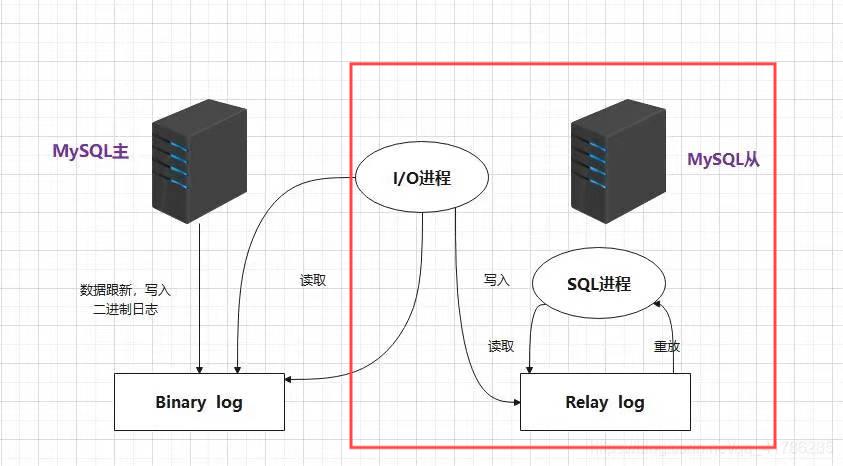
1、master开启二进制日志记录
2、slave开启IO进程,从master中读取二进制日志并写入slave的中继日志
3、slave开启SQL进程,从中继日志中读取二进制日志并进行重放
4、最终,达到slave与master中数据一致的状态,我们称作为主从复制的过程。
基础环境设置
网络对时
主与从主机都需要操作
shell
[root@localhost ~]# cat /etc/chrony.conf | grep -Ev '^$|#'

server ntp1.aliyun.com iburst  ####添加或者修改
driftfile /var/lib/chrony/drift
makestep 1.0 3
rtcsync
keyfile /etc/chrony.keys
leapsectz right/UTC
logdir /var/log/chrony
[root@slave1 ~]# timedatectl set-timezone Asia/Shanghai
[root@slave1 ~]# systemctl restart chronyd.service
防火墙与SELinux
主与从主机都需要操作
shell
[root@localhost ~]# systemctl disable --now firewalld
[root@localhost ~]# sed -i 's/SELIUNX=enforcing/SELINUX=disable/' /etc/selinux/config
[root@localhost ~]# setenforce 0
配置主从复制
主服务配置
shell
##修改配置文件
[root@localhost ~]# cat /etc/my.cnf

#
# This group is read both both by the client and the server
# use it for options that affect everything
#
[mysqld]
log-bin=mysql-bin
binlog_format="statement"
server-id=11
log-slave-updates=true
[client-server]

#
# include all files from the config directory
#
!includedir /etc/my.cnf.d

##启动服务
[root@localhost ~]# systemctl enable --now mysqld
#验证配置
[root@localhost ~]# cd /var/lib/mysql/
[root@localhost mysql]# ls
 auto.cnf        client-cert.pem      ibdata1            mysql-bin.000003   mysql_upgrade_info   server-key.pem
 binlog.000001   client-key.pem       ibtmp1             mysql-bin.000004   mysqlx.sock          sys
 binlog.000002   db1                 '#innodb_redo'      mysql-bin.000005   mysqlx.sock.lock     undo_001
 binlog.index    db2                 '#innodb_temp'      mysql-bin.index    performance_schema   undo_002
 c2407          '#ib_16384_0.dblwr'   mysql              mysql.ibd          private_key.pem
 ca-key.pem     '#ib_16384_1.dblwr'   mysql-bin.000001   mysql.sock         public_key.pem
 ca.pem          ib_buffer_pool       mysql-bin.000002   mysql.sock.lock    server-cert.pem


##创建从主机可以进行访问的用户
mysql> create user slave@'192.168.166.%' identified by '123.com';

mysql> grant all on *.* to 'slave'@'192.168.166.%';
###密码插件修改
ALTER USER 'slave'@'192.168.166.%' IDENTIFIED WITH mysql_native_password BY '123.com';
###或者更改配置文件指定的密码插件
authentication_policy=mysql_native_password
###查看master正在使用的日志文件及日志书写位置
[root@localhost mysql]# mysql
mysql> show master status;
+-------------------+----------+--------------+------------------+
| File              | Position | Binlog_Do_DB | Binlog_Ignore_DB |
+-------------------+----------+--------------+------------------+
| master-bin.000003 |      542 |              |                  |
+-------------------+----------+--------------+------------------+
1 row in set (0.00 sec)
#注意:查看位置完毕后,不要对master做insert、update、delete、create、drop等操作!!!
从服务器配置
shell
##修改配置文件
[root@localhost ~]# cat /etc/my.cnf
relay-log-index=slave-bin.index
server-id=22
##启动服务
[root@localhost ~]# systemctl enable --now mysqld

##配置验证,此时没有与主服务器进行连接,所以没有产生对应的relay log
[root@localhost mysql]# ls
aria_log.00000001  aria_log_control  ibdata1  ib_logfile0  ib_logfile1  mysql  mysql.sock  performance_schema  test
##配置从服务器的所属主服务器
[root@localhost mysql]# mysql
mysql> change master to master_host='192.168.158.4',master_user='slave',master_password='123.com',master_log_file='master-bin.000001',master_log_pos=619;

##启动slave角色,默认没有配置主从时,所有的mysql节点都是master
mysql> start slave;
##查看slave状态信息
mysql> show slave status\G;
*************************** 1. row ***************************
               Slave_IO_State: Waiting for source to send event
                  Master_Host: 192.168.166.230
                  Master_User: slave
                  Master_Port: 3306
                Connect_Retry: 60
              Master_Log_File: mysql-bin.000005
          Read_Master_Log_Pos: 2567
               Relay_Log_File: slave-bin.000004
                Relay_Log_Pos: 1679
        Relay_Master_Log_File: mysql-bin.000005
             Slave_IO_Running: Yes
            Slave_SQL_Running: Yes
              Replicate_Do_DB:
          Replicate_Ignore_DB:
           Replicate_Do_Table:
       Replicate_Ignore_Table:
      Replicate_Wild_Do_Table:
  Replicate_Wild_Ignore_Table:
                   Last_Errno: 0
                   Last_Error:
                 Skip_Counter: 0
          Exec_Master_Log_Pos: 2567
              Relay_Log_Space: 2416
              Until_Condition: None
               Until_Log_File:
                Until_Log_Pos: 0
           Master_SSL_Allowed: No
           Master_SSL_CA_File:
           Master_SSL_CA_Path:
              Master_SSL_Cert:
            Master_SSL_Cipher:
               Master_SSL_Key:
        Seconds_Behind_Master: 0
Master_SSL_Verify_Server_Cert: No
                Last_IO_Errno: 0
                Last_IO_Error:
               Last_SQL_Errno: 0
               Last_SQL_Error:
  Replicate_Ignore_Server_Ids:
             Master_Server_Id: 11
                  Master_UUID: 25105bd5-6fd8-11ef-9dae-000c299fb683
             Master_Info_File: mysql.slave_master_info
                    SQL_Delay: 0
          SQL_Remaining_Delay: NULL
      Slave_SQL_Running_State: Replica has read all relay log; waiting for more updates
           Master_Retry_Count: 86400
                  Master_Bind:
      Last_IO_Error_Timestamp:
     Last_SQL_Error_Timestamp:
               Master_SSL_Crl:
           Master_SSL_Crlpath:
           Retrieved_Gtid_Set:
            Executed_Gtid_Set:
                Auto_Position: 0
         Replicate_Rewrite_DB:
                 Channel_Name:
           Master_TLS_Version:
       Master_public_key_path:
        Get_master_public_key: 0
            Network_Namespace:
1 row in set, 1 warning (0.00 sec)


#查看数据目录
[root@localhost mysql]# ls
aria_log.00000001  ibdata1      ib_logfile1  mysql       performance_schema  slave-bin.000001  slave-bin.index
aria_log_control   ib_logfile0  master.info  mysql.sock  relay-log.info      slave-bin.000002  test
主从复制常见问题
异常:
shell
mysql> show slave status\G;
*************************** 1. row ***************************
               Slave_IO_State: Connecting to source
                  Master_Host: 192.168.166.230
                  Master_User: slave
                  Master_Port: 3306
                Connect_Retry: 60
              Master_Log_File: mysql-bin.000005
          Read_Master_Log_Pos: 2567
               Relay_Log_File: slave-bin.000004
                Relay_Log_Pos: 1679
        Relay_Master_Log_File: mysql-bin.000005
             Slave_IO_Running: Connecting
            Slave_SQL_Running: Yes
              Replicate_Do_DB:
          Replicate_Ignore_DB:
           Replicate_Do_Table:
       Replicate_Ignore_Table:
      Replicate_Wild_Do_Table:
  Replicate_Wild_Ignore_Table:
                   Last_Errno: 0
                   Last_Error:
                 Skip_Counter: 0
          Exec_Master_Log_Pos: 2567
              Relay_Log_Space: 2416
              Until_Condition: None
               Until_Log_File:
                Until_Log_Pos: 0
           Master_SSL_Allowed: No
           Master_SSL_CA_File:
           Master_SSL_CA_Path:
              Master_SSL_Cert:
            Master_SSL_Cipher:
               Master_SSL_Key:
        Seconds_Behind_Master: NULL
Master_SSL_Verify_Server_Cert: No
                Last_IO_Errno: 2003
                Last_IO_Error: Error connecting to source 'slave@192.168.166.230:3306'. This was attempt 1/86400, with a delay of 60 seconds between attempts. Message: Can't connect to MySQL server on '192.168.166.230:3306' (113)
               Last_SQL_Errno: 0
               Last_SQL_Error:
  Replicate_Ignore_Server_Ids:
             Master_Server_Id: 11
                  Master_UUID: 25105bd5-6fd8-11ef-9dae-000c299fb683
             Master_Info_File: mysql.slave_master_info
                    SQL_Delay: 0
          SQL_Remaining_Delay: NULL
      Slave_SQL_Running_State: Replica has read all relay log; waiting for more updates
           Master_Retry_Count: 86400
                  Master_Bind:
      Last_IO_Error_Timestamp: 240913 04:04:49
     Last_SQL_Error_Timestamp:
               Master_SSL_Crl:
           Master_SSL_Crlpath:
           Retrieved_Gtid_Set:
            Executed_Gtid_Set:
                Auto_Position: 0
         Replicate_Rewrite_DB:
                 Channel_Name:
           Master_TLS_Version:
       Master_public_key_path:
        Get_master_public_key: 0
            Network_Namespace:
1 row in set, 1 warning (0.00 sec)
一般情况下,都与网络通信异常有关系。排查防火墙、物理网络连接等。二进制日志文件名或位置错误也会引起IO线程异常。
apl
reset replica;
##用于重置SQL线程对relay log的重放记录!!
ersion:
Master_public_key_path:
Get_master_public_key: 0
Network_Namespace:
1 row in set, 1 warning (0.00 sec)
**一般情况下,都与网络通信异常有关系。排查防火墙、物理网络连接等。二进制日志文件名或位置错误也会引起IO线程异常。**

```apl
reset replica;
##用于重置SQL线程对relay log的重放记录!!