欢迎加入开源鸿蒙跨平台社区:
https://openharmonycrossplatform.csdn.net
1. 项目介绍
二十四节气是中国传统文化中的重要组成部分,它反映了自然界的变化规律,对农业生产和日常生活有着重要的指导意义。二十四节气物候现象速览卡片是一个基于 Flutter 开发的应用,它能够展示二十四节气的基本信息、物候现象和相关描述,帮助用户了解和传承中国传统文化。本文将详细介绍如何使用 Flutter 实现这个传统文化应用,包括数据模型设计、界面布局和交互逻辑等方面。
1.1 项目目标
- 实现一个展示二十四节气信息的应用
- 显示当前节气及其物候现象
- 以卡片形式展示所有二十四节气
- 点击卡片查看节气详细信息
- 每个节气都有独特的颜色和物候现象
- 采用美观的界面设计,提供良好的用户体验
1.2 技术栈
- Flutter:跨平台 UI 框架
- Dart:编程语言
- GridView.builder:用于实现节气卡片的网格布局
- AlertDialog:用于显示节气详情
- DateTime:用于获取当前日期,自动计算当前节气
- Container:用于实现卡片的视觉效果
- BoxDecoration:用于设置卡片的样式
2. 核心功能设计
2.1 节气数据模型
- 节气名称:如立春、雨水、惊蛰等
- 日期范围:每个节气的大致日期范围
- 物候现象:每个节气的三个物候现象
- 节气描述:对节气的详细描述
- 节气颜色:每个节气的独特颜色,用于卡片背景
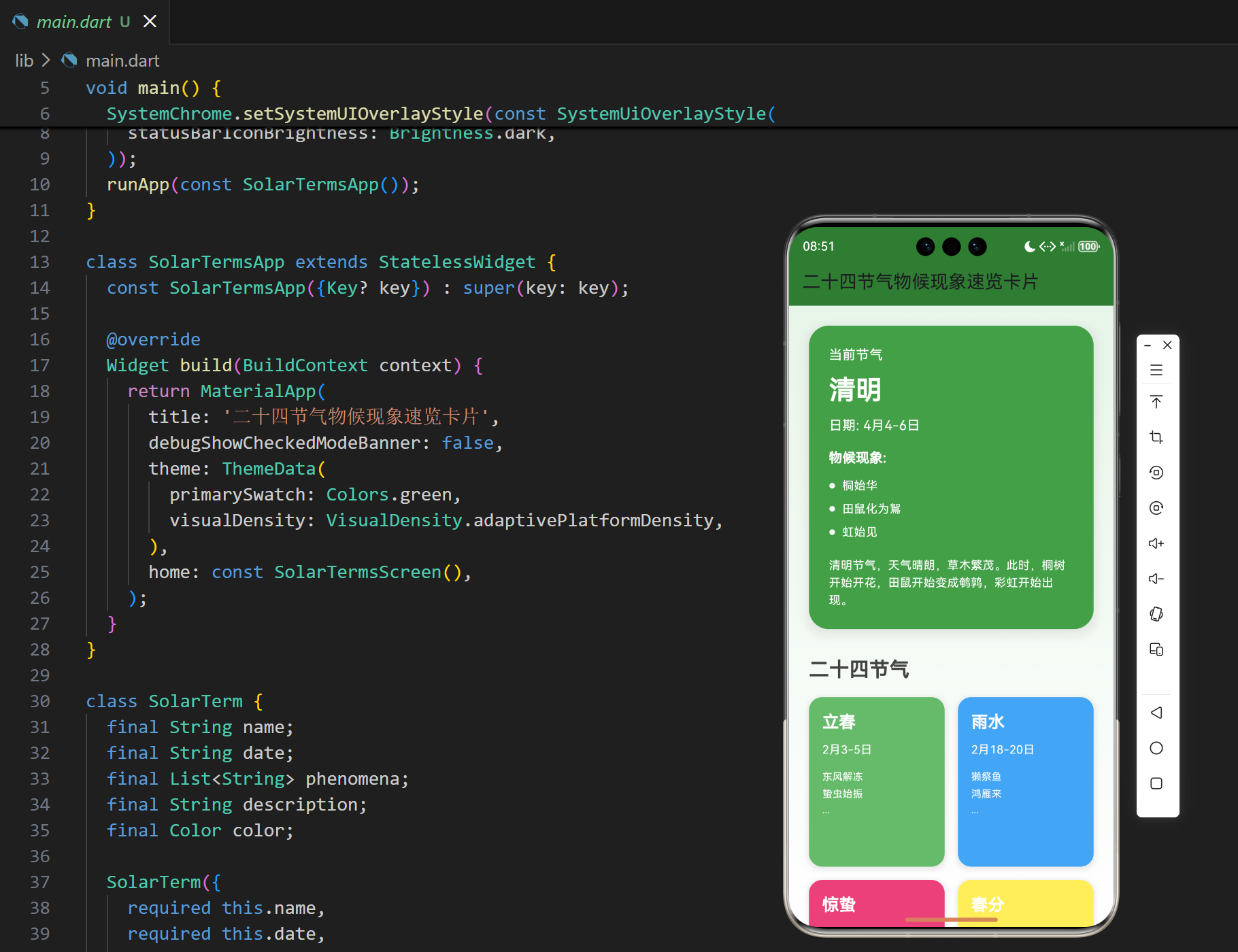
2.2 当前节气显示
- 自动计算:根据当前日期自动计算当前节气
- 突出显示:在应用顶部突出显示当前节气
- 详细信息:显示当前节气的日期、物候现象和描述
- 视觉效果:使用节气的独特颜色作为背景
2.3 节气卡片网格
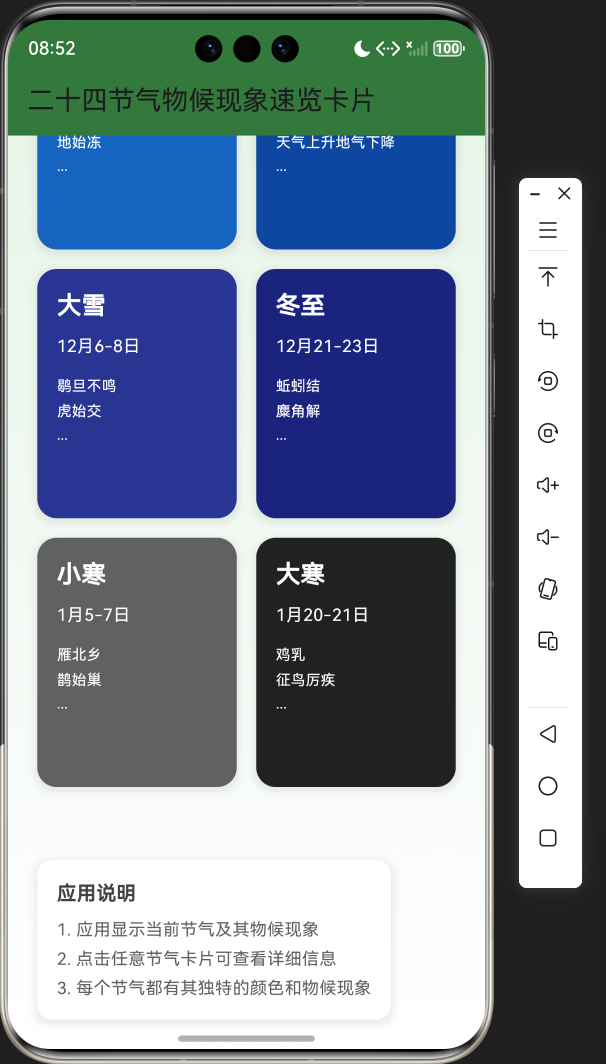
- 网格布局:使用网格布局展示所有二十四节气
- 卡片设计:每个卡片显示节气名称、日期和部分物候现象
- 颜色区分:每个卡片使用对应的节气颜色作为背景
- 交互功能:点击卡片查看节气详细信息
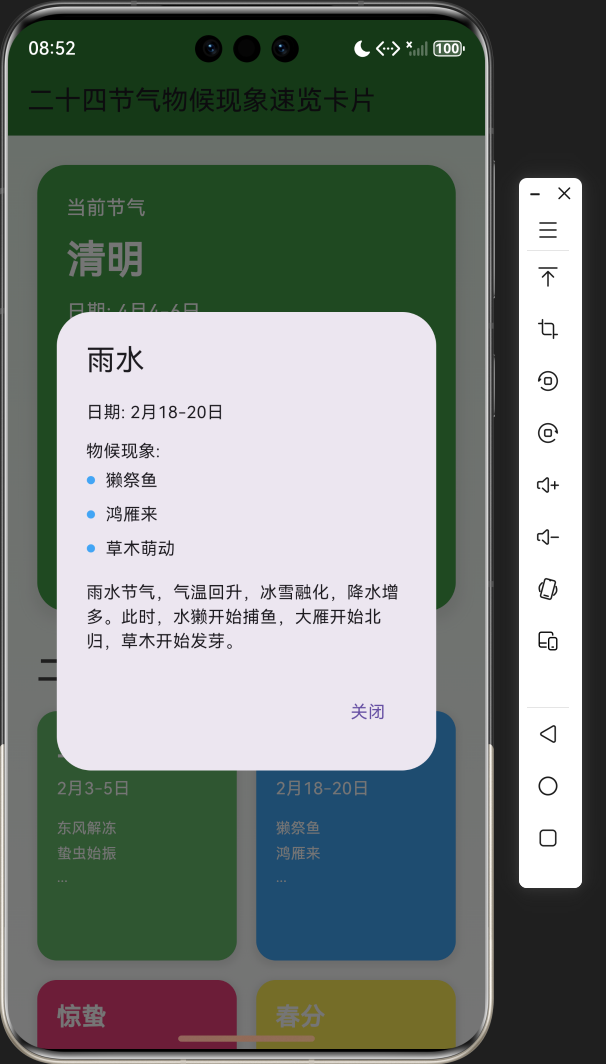
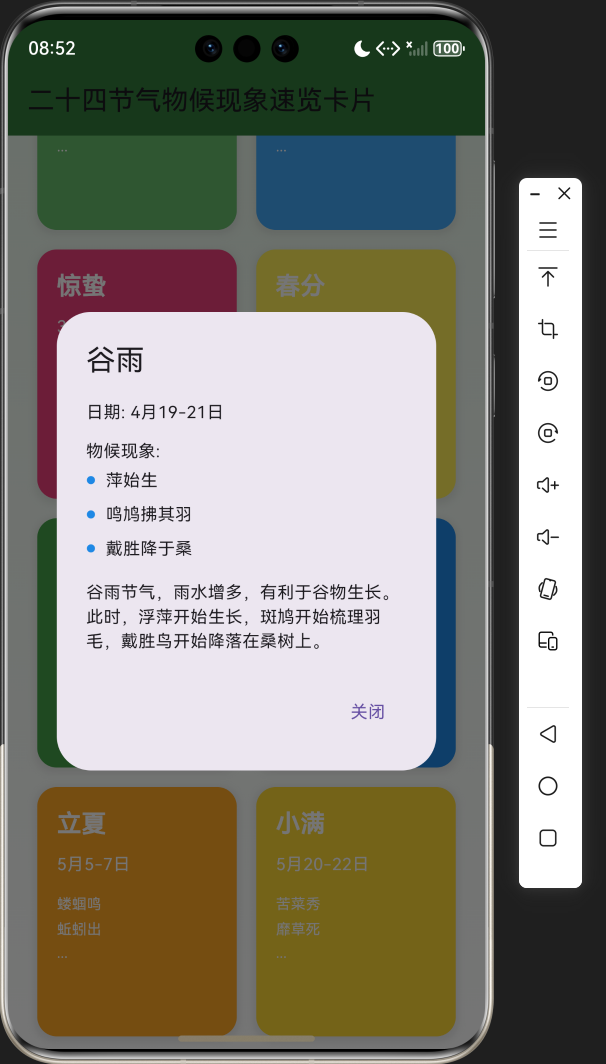
2.4 节气详情弹窗
- 详细信息:显示节气的完整信息,包括日期、物候现象和描述
- 视觉一致:使用节气的独特颜色作为弹窗的主题色
- 关闭功能:提供关闭按钮,返回主界面
2.5 界面设计
- 绿色主题:符合中国传统文化风格
- 渐变背景:使用绿色渐变背景,营造舒适的视觉效果
- 卡片式布局:层次分明,视觉效果良好
- 响应式设计:适应不同屏幕尺寸
- 视觉识别:每个节气都有独特的颜色,增强视觉识别度
3. 技术架构
3.1 项目结构
lib/
└── main.dart          # 主应用文件,包含所有代码
3.2 组件结构
SolarTermsApp
└── SolarTermsScreen
    ├── Data model (SolarTerm class)
    ├── State management (_solarTerms, _currentTerm)
    ├── Business logic (_initializeSolarTerms, _findCurrentTerm)
    ├── UI components
    │   ├── Current term display
    │   ├── Solar terms grid
    │   ├── Term detail dialog
    │   └── App instructions
    └── Helper methods
3.3 数据模型
- SolarTerm class:定义节气的数据结构,包括名称、日期、物候现象、描述和颜色
- _solarTerms:存储所有二十四节气的列表
- _currentTerm:存储当前节气的对象
4. 关键代码解析
4.1 节气数据模型
dart
class SolarTerm {
  final String name;
  final String date;
  final List<String> phenomena;
  final String description;
  final Color color;

  SolarTerm({
    required this.name,
    required this.date,
    required this.phenomena,
    required this.description,
    required this.color,
  });
}代码解析:
SolarTerm类:定义节气的数据结构name:节气名称date:节气的日期范围phenomena:节气的物候现象列表description:节气的详细描述color:节气的独特颜色
4.2 初始化节气数据
dart
void _initializeSolarTerms() {
  _solarTerms = [
    SolarTerm(
      name: '立春',
      date: '2月3-5日',
      phenomena: ['东风解冻', '蛰虫始振', '鱼陟负冰'],
      description: '立春是二十四节气中的第一个节气,标志着春季的开始。此时气温开始回升,大地开始解冻,冬眠的动物开始苏醒。',
      color: Colors.green.shade400,
    ),
    // 其他节气数据...
  ];
}代码解析:
_initializeSolarTerms方法:初始化所有二十四节气的数据- 为每个节气创建
SolarTerm对象,包含名称、日期、物候现象、描述和颜色 - 使用不同的颜色来区分不同的节气,增强视觉效果
4.3 计算当前节气
dart
void _findCurrentTerm() {
  // 简单的实现,根据当前月份和日期找到对应的节气
  // 实际应用中,应该使用更精确的计算方法
  final now = DateTime.now();
  final month = now.month;
  final day = now.day;

  // 这里使用简化的日期范围来确定当前节气
  // 实际应用中,应该使用更精确的计算方法
  if (month == 2 && day >= 3 && day <= 18) {
    _currentTerm = _solarTerms[0]; // 立春
  } else if (month == 2 && day > 18) {
    _currentTerm = _solarTerms[1]; // 雨水
  }
  // 其他节气的判断...
}代码解析:
_findCurrentTerm方法:根据当前日期计算当前节气DateTime.now():获取当前日期和时间- 根据月份和日期的范围,确定当前对应的节气
- 这里使用了简化的日期范围判断,实际应用中可以使用更精确的计算方法
4.4 主界面构建
dart
@override
Widget build(BuildContext context) {
  return Scaffold(
    appBar: AppBar(
      title: const Text('二十四节气物候现象速览卡片'),
      backgroundColor: Colors.green.shade800,
    ),
    body: Container(
      decoration: BoxDecoration(
        gradient: LinearGradient(
          begin: Alignment.topCenter,
          end: Alignment.bottomCenter,
          colors: [
            Colors.green.shade50,
            Colors.white,
          ],
        ),
      ),
      child: SingleChildScrollView(
        padding: const EdgeInsets.all(24),
        child: Column(
          crossAxisAlignment: CrossAxisAlignment.start,
          children: [
            // 当前节气
            if (_currentTerm != null)
              Container(
                margin: const EdgeInsets.only(bottom: 32),
                padding: const EdgeInsets.all(24),
                decoration: BoxDecoration(
                  color: _currentTerm!.color,
                  borderRadius: BorderRadius.circular(24),
                  boxShadow: [
                    BoxShadow(
                      color: Colors.grey.withOpacity(0.2),
                      spreadRadius: 4,
                      blurRadius: 8,
                      offset: const Offset(0, 4),
                    ),
                  ],
                ),
                child: Column(
                  crossAxisAlignment: CrossAxisAlignment.start,
                  children: [
                    Text(
                      '当前节气',
                      style: TextStyle(
                        fontSize: 16,
                        color: _currentTerm!.color == Colors.white ? Colors.black : Colors.white,
                      ),
                    ),
                    const SizedBox(height: 8),
                    Text(
                      _currentTerm!.name,
                      style: TextStyle(
                        fontSize: 32,
                        fontWeight: FontWeight.bold,
                        color: _currentTerm!.color == Colors.white ? Colors.black : Colors.white,
                      ),
                    ),
                    // 其他信息...
                  ],
                ),
              ),

            // 所有节气
            Text(
              '二十四节气',
              style: TextStyle(
                fontSize: 24,
                fontWeight: FontWeight.bold,
                color: Colors.grey.shade800,
              ),
            ),
            const SizedBox(height: 16),

            // 节气卡片网格
            GridView.builder(
              shrinkWrap: true,
              physics: const NeverScrollableScrollPhysics(),
              gridDelegate: const SliverGridDelegateWithFixedCrossAxisCount(
                crossAxisCount: 2,
                crossAxisSpacing: 16,
                mainAxisSpacing: 16,
                childAspectRatio: 0.8,
              ),
              itemCount: _solarTerms.length,
              itemBuilder: (context, index) {
                final term = _solarTerms[index];
                return GestureDetector(
                  onTap: () {
                    // 显示节气详情
                    showDialog(
                      context: context,
                      builder: (context) {
                        return AlertDialog(
                          title: Text(term.name),
                          content: Column(
                            mainAxisSize: MainAxisSize.min,
                            crossAxisAlignment: CrossAxisAlignment.start,
                            children: [
                              Text('日期: ${term.date}'),
                              const SizedBox(height: 12),
                              Text('物候现象:'),
                              ...term.phenomena.map((phenomenon) {
                                return Padding(
                                  padding: const EdgeInsets.symmetric(vertical: 4),
                                  child: Row(
                                    children: [
                                      Icon(
                                        Icons.circle,
                                        size: 8,
                                        color: term.color,
                                      ),
                                      const SizedBox(width: 8),
                                      Text(phenomenon),
                                    ],
                                  ),
                                );
                              }),
                              const SizedBox(height: 12),
                              Text(term.description),
                            ],
                          ),
                          actions: [
                            TextButton(
                              onPressed: () {
                                Navigator.of(context).pop();
                              },
                              child: const Text('关闭'),
                            ),
                          ],
                        );
                      },
                    );
                  },
                  child: Container(
                    padding: const EdgeInsets.all(16),
                    decoration: BoxDecoration(
                      color: term.color,
                      borderRadius: BorderRadius.circular(16),
                      boxShadow: [
                        BoxShadow(
                          color: Colors.grey.withOpacity(0.2),
                          spreadRadius: 2,
                          blurRadius: 4,
                          offset: const Offset(0, 2),
                        ),
                      ],
                    ),
                    child: Column(
                      crossAxisAlignment: CrossAxisAlignment.start,
                      children: [
                        Text(
                          term.name,
                          style: TextStyle(
                            fontSize: 20,
                            fontWeight: FontWeight.bold,
                            color: term.color == Colors.white ? Colors.black : Colors.white,
                          ),
                        ),
                        // 其他信息...
                      ],
                    ),
                  ),
                );
              },
            ),

            // 应用说明
            // ...
          ],
        ),
      ),
    ),
  );
}代码解析:
build方法:构建应用的主界面AppBar:应用标题栏,使用绿色主题Container:主容器,使用渐变背景SingleChildScrollView:支持滚动,适应不同屏幕尺寸Column:垂直布局,包含所有UI组件- 当前节气显示:显示当前节气的详细信息,使用节气的独特颜色作为背景
- 节气卡片网格:使用
GridView.builder实现网格布局,每个卡片显示节气的基本信息 - 节气详情弹窗:点击卡片时显示,包含节气的完整信息
- 应用说明:提供应用的使用说明
5. 技术亮点与创新
5.1 数据模型设计
- 结构化数据 :使用
SolarTerm类统一管理节气数据,结构清晰 - 完整信息:每个节气包含名称、日期、物候现象、描述和颜色,信息完整
- 易于扩展:数据模型设计合理,易于添加新的节气或修改现有数据
5.2 视觉设计
- 独特颜色:为每个节气分配独特的颜色,增强视觉识别度
- 渐变背景:使用绿色渐变背景,营造舒适的视觉效果
- 卡片式布局:层次分明,视觉效果良好
- 响应式设计:适应不同屏幕尺寸,在手机和桌面设备上都能良好显示
5.3 交互设计
- 卡片点击:点击卡片查看节气详细信息,交互直观
- 详情弹窗 :使用
AlertDialog显示节气详情,界面简洁明了 - 视觉反馈:卡片点击时有视觉反馈,提升用户体验
5.4 功能实现
- 自动计算:根据当前日期自动计算当前节气,无需用户手动选择
- 完整展示:展示所有二十四节气的信息,内容全面
- 信息详细:每个节气都有详细的物候现象和描述,信息丰富
5.5 代码结构
- 模块化设计:将功能分解为多个方法,提高代码的可读性和可维护性
- 数据与UI分离:数据模型与UI逻辑分离,结构清晰
- 易于维护:代码结构合理,易于维护和扩展
6. 应用场景与扩展
6.1 应用场景
- 教育目的:帮助学生了解二十四节气的知识,传承中国传统文化
- 日常生活:了解当前节气的物候现象,指导日常生活
- 农业生产:了解节气变化,指导农业生产活动
- 文化传播:传播中国传统文化,增强文化自信
- 旅游规划:根据节气变化,规划旅游活动
6.2 扩展方向
- 节气知识扩展:添加更多关于节气的知识,如节气的由来、传统习俗等
- 节气食物:添加每个节气的传统食物推荐
- 节气活动:添加每个节气适合的活动建议
- 节气诗词:添加与节气相关的诗词
- 节气提醒:添加节气到来的提醒功能
- 个性化设置:允许用户自定义界面主题和颜色
- 分享功能:支持将节气信息分享到社交媒体
- 多语言支持:添加英文等其他语言的支持
7. 代码优化建议
7.1 性能优化
- 使用 const 构造函数:对于不变的 Widget,使用 const 构造函数,减少不必要的重建
- 优化列表渲染 :对于节气卡片网格,考虑使用
ListView.builder或GridView.builder的缓存机制 - 减少重绘 :使用
RepaintBoundary包裹频繁更新的部分,减少不必要的重绘
7.2 代码结构优化
- 组件化:将 UI 组件拆分为更小的、可复用的组件,如节气卡片组件、详情弹窗组件等
- 逻辑分离:将业务逻辑与 UI 逻辑分离,提高代码的可维护性
- 参数化:将颜色、字体大小等参数提取为可配置的常量,便于统一管理
- 错误处理:添加适当的错误处理,提高应用的稳定性
7.3 用户体验优化
- 添加动画效果:为卡片点击、弹窗显示等操作添加动画效果,提升用户体验
- 触觉反馈:在支持的设备上,添加触觉反馈,增强交互体验
- 无障碍支持:添加无障碍支持,提高应用的可访问性
- 加载状态:添加加载状态指示,提升用户体验
7.4 功能优化
- 精确节气计算:使用更精确的算法计算当前节气,提高准确性
- 节气历史:添加节气的历史演变和文化背景
- 节气与健康:添加节气与健康的关系,提供健康建议
- 节气与农事:添加节气与农事活动的关系,提供农事指导
8. 测试与调试
8.1 测试策略
- 功能测试:测试当前节气计算、卡片显示、详情弹窗等核心功能
- 性能测试:测试应用在不同设备上的性能表现
- 兼容性测试:测试在不同平台、不同屏幕尺寸上的表现
- 用户体验测试:测试应用的易用性和用户体验
8.2 调试技巧
- 使用 Flutter DevTools:利用 Flutter DevTools 分析性能瓶颈和调试问题
- 添加日志:在关键位置添加日志,便于调试
- 使用模拟器:在不同尺寸的模拟器上测试,确保适配性
- 用户测试:邀请用户测试,收集反馈,不断改进
9. 总结与展望
9.1 项目总结
本项目成功实现了一个美观实用的二十四节气物候现象速览卡片应用,主要功能包括:
- 显示当前节气及其物候现象
- 以卡片形式展示所有二十四节气
- 点击卡片查看节气详细信息
- 每个节气都有独特的颜色和物候现象
- 采用美观的界面设计,提供良好的用户体验
9.2 技术价值
- 学习价值:展示了如何使用 Flutter 实现一个传统文化应用,包括数据模型设计、界面布局和交互逻辑
- 实用价值:提供了一个可直接使用的二十四节气查询工具
- 参考价值:为类似功能的开发提供了参考方案
- 教育价值:有助于了解和传承中国传统文化
9.3 未来展望
- 功能扩展:添加更多与节气相关的功能,如节气知识、传统习俗、食物推荐等
- 技术优化:进一步优化应用性能,提高用户体验
- 平台支持:确保在更多平台上的一致性表现
- 文化传播:通过应用传播中国传统文化,增强文化自信
- 社区贡献:将应用开源,鼓励社区贡献和改进
10. 附录
10.1 完整代码
dart
import 'package:flutter/material.dart';
import 'package:flutter/services.dart';
import 'dart:math';
void main() {
SystemChrome.setSystemUIOverlayStyle(const SystemUiOverlayStyle(
statusBarColor: Colors.transparent,
statusBarIconBrightness: Brightness.dark,
));
runApp(const SolarTermsApp());
}
class SolarTermsApp extends StatelessWidget {
const SolarTermsApp({Key? key}) : super(key: key);
@override
Widget build(BuildContext context) {
return MaterialApp(
title: '二十四节气物候现象速览卡片',
debugShowCheckedModeBanner: false,
theme: ThemeData(
primarySwatch: Colors.green,
visualDensity: VisualDensity.adaptivePlatformDensity,
),
home: const SolarTermsScreen(),
);
}
}
class SolarTerm {
final String name;
final String date;
final List<String> phenomena;
final String description;
final Color color;
SolarTerm({
required this.name,
required this.date,
required this.phenomena,
required this.description,
required this.color,
});
}
class SolarTermsScreen extends StatefulWidget {
const SolarTermsScreen({Key? key}) : super(key: key);
@override
State<SolarTermsScreen> createState() => _SolarTermsScreenState();
}
class _SolarTermsScreenState extends State<SolarTermsScreen> {
List<SolarTerm> _solarTerms = [];
SolarTerm? _currentTerm;
@override
void initState() {
super.initState();
_initializeSolarTerms();
_findCurrentTerm();
}
void _initializeSolarTerms() {
_solarTerms = [
SolarTerm(
name: '立春',
date: '2月3-5日',
phenomena: ['东风解冻', '蛰虫始振', '鱼陟负冰'],
description: '立春是二十四节气中的第一个节气,标志着春季的开始。此时气温开始回升,大地开始解冻,冬眠的动物开始苏醒。',
color: Colors.green.shade400,
),
SolarTerm(
name: '雨水',
date: '2月18-20日',
phenomena: ['獭祭鱼', '鸿雁来', '草木萌动'],
description: '雨水节气,气温回升,冰雪融化,降水增多。此时,水獭开始捕鱼,大雁开始北归,草木开始发芽。',
color: Colors.blue.shade400,
),
SolarTerm(
name: '惊蛰',
date: '3月5-7日',
phenomena: ['桃始华', '仓庚鸣', '鹰化为鸠'],
description: '惊蛰节气,春雷乍动,惊醒了蛰伏在土中冬眠的动物。此时,桃花开始开放,黄鹂开始鸣叫,鹰开始变成鸠。',
color: Colors.pink.shade400,
),
SolarTerm(
name: '春分',
date: '3月20-22日',
phenomena: ['玄鸟至', '雷乃发声', '始电'],
description: '春分节气,昼夜平分,太阳直射赤道。此时,燕子开始归来,春雷开始响起,闪电开始出现。',
color: Colors.yellow.shade400,
),
SolarTerm(
name: '清明',
date: '4月4-6日',
phenomena: ['桐始华', '田鼠化为鴽', '虹始见'],
description: '清明节气,天气晴朗,草木繁茂。此时,桐树开始开花,田鼠开始变成鹌鹑,彩虹开始出现。',
color: Colors.green.shade600,
),
SolarTerm(
name: '谷雨',
date: '4月19-21日',
phenomena: ['萍始生', '鸣鸠拂其羽', '戴胜降于桑'],
description: '谷雨节气,雨水增多,有利于谷物生长。此时,浮萍开始生长,斑鸠开始梳理羽毛,戴胜鸟开始降落在桑树上。',
color: Colors.blue.shade600,
),
SolarTerm(
name: '立夏',
date: '5月5-7日',
phenomena: ['蝼蝈鸣', '蚯蚓出', '王瓜生'],
description: '立夏节气,标志着夏季的开始。此时,蝼蛄开始鸣叫,蚯蚓开始出土,王瓜开始生长。',
color: Colors.orange.shade400,
),
SolarTerm(
name: '小满',
date: '5月20-22日',
phenomena: ['苦菜秀', '靡草死', '麦秋至'],
description: '小满节气,麦类等夏熟作物籽粒开始饱满,但尚未成熟。此时,苦菜开始开花,靡草开始死亡,麦子开始成熟。',
color: Colors.yellow.shade600,
),
SolarTerm(
name: '芒种',
date: '6月5-7日',
phenomena: ['螳螂生', '鵙始鸣', '反舌无声'],
description: '芒种节气,麦类等有芒作物开始成熟,需要及时收获。此时,螳螂开始出生,伯劳鸟开始鸣叫,反舌鸟开始停止鸣叫。',
color: Colors.orange.shade600,
),
SolarTerm(
name: '夏至',
date: '6月21-22日',
phenomena: ['鹿角解', '蝉始鸣', '半夏生'],
description: '夏至节气,太阳直射北回归线,是一年中白天最长的一天。此时,鹿角开始脱落,蝉开始鸣叫,半夏开始生长。',
color: Colors.red.shade400,
),
SolarTerm(
name: '小暑',
date: '7月6-8日',
phenomena: ['温风至', '蟋蟀居宇', '鹰始挚'],
description: '小暑节气,天气开始炎热,但还不是最热的时候。此时,温风开始吹来,蟋蟀开始移居到屋檐下,鹰开始搏击长空。',
color: Colors.red.shade600,
),
SolarTerm(
name: '大暑',
date: '7月22-24日',
phenomena: ['腐草为萤', '土润溽暑', '大雨时行'],
description: '大暑节气,是一年中最热的时候。此时,腐草开始变成萤火虫,土地开始湿润,大雨开始频繁。',
color: Colors.red.shade800,
),
SolarTerm(
name: '立秋',
date: '8月7-9日',
phenomena: ['凉风至', '白露生', '寒蝉鸣'],
description: '立秋节气,标志着秋季的开始。此时,凉风开始吹来,白露开始出现,寒蝉开始鸣叫。',
color: Colors.yellow.shade800,
),
SolarTerm(
name: '处暑',
date: '8月22-24日',
phenomena: ['鹰乃祭鸟', '天地始肃', '禾乃登'],
description: '处暑节气,炎热的夏天即将结束。此时,鹰开始祭祀鸟类,天地开始肃杀,谷物开始成熟。',
color: Colors.orange.shade800,
),
SolarTerm(
name: '白露',
date: '9月7-9日',
phenomena: ['鸿雁来', '玄鸟归', '群鸟养羞'],
description: '白露节气,天气开始转凉,早晨开始出现露水。此时,大雁开始南归,燕子开始归来,群鸟开始储存食物。',
color: Colors.white,
),
SolarTerm(
name: '秋分',
date: '9月22-24日',
phenomena: ['雷始收声', '蛰虫坯户', '水始涸'],
description: '秋分节气,昼夜平分,太阳直射赤道。此时,雷声开始停止,蛰虫开始封洞,水开始干涸。',
color: Colors.yellow.shade900,
),
SolarTerm(
name: '寒露',
date: '10月8-9日',
phenomena: ['鸿雁来宾', '雀入大水为蛤', '菊有黄华'],
description: '寒露节气,天气开始寒冷,露水开始变成霜。此时,大雁开始成为客人,麻雀开始变成蛤蜊,菊花开始开放。',
color: Colors.purple.shade400,
),
SolarTerm(
name: '霜降',
date: '10月23-24日',
phenomena: ['豺乃祭兽', '草木黄落', '蛰虫咸俯'],
description: '霜降节气,天气开始寒冷,开始出现霜冻。此时,豺开始祭祀野兽,草木开始变黄掉落,蛰虫开始俯伏。',
color: Colors.purple.shade600,
),
SolarTerm(
name: '立冬',
date: '11月7-8日',
phenomena: ['水始冰', '地始冻', '雉入大水为蜃'],
description: '立冬节气,标志着冬季的开始。此时,水开始结冰,土地开始冻结,野鸡开始变成蜃。',
color: Colors.blue.shade800,
),
SolarTerm(
name: '小雪',
date: '11月22-23日',
phenomena: ['虹藏不见', '天气上升地气下降', '闭塞而成冬'],
description: '小雪节气,天气开始寒冷,开始出现降雪。此时,彩虹开始隐藏,天气开始上升,地气开始下降,天地开始闭塞。',
color: Colors.blue.shade900,
),
SolarTerm(
name: '大雪',
date: '12月6-8日',
phenomena: ['鹖旦不鸣', '虎始交', '荔挺出'],
description: '大雪节气,天气更加寒冷,降雪更加频繁。此时,鹖旦开始不鸣叫,老虎开始交配,荔挺开始生长。',
color: Colors.indigo.shade800,
),
SolarTerm(
name: '冬至',
date: '12月21-23日',
phenomena: ['蚯蚓结', '麋角解', '水泉动'],
description: '冬至节气,太阳直射南回归线,是一年中白天最短的一天。此时,蚯蚓开始打结,麋角开始脱落,泉水开始流动。',
color: Colors.indigo.shade900,
),
SolarTerm(
name: '小寒',
date: '1月5-7日',
phenomena: ['雁北乡', '鹊始巢', '雉雊'],
description: '小寒节气,天气开始寒冷,但还不是最冷的时候。此时,大雁开始北归,喜鹊开始筑巢,野鸡开始鸣叫。',
color: Colors.grey.shade700,
),
SolarTerm(
name: '大寒',
date: '1月20-21日',
phenomena: ['鸡乳', '征鸟厉疾', '水泽腹坚'],
description: '大寒节气,是一年中最冷的时候。此时,母鸡开始孵蛋,征鸟开始变得凶猛,水泽开始冻结。',
color: Colors.grey.shade900,
),
];
}
void _findCurrentTerm() {
// 简单的实现,根据当前月份和日期找到对应的节气
// 实际应用中,应该使用更精确的计算方法
final now = DateTime.now();
final month = now.month;
final day = now.day;
// 这里使用简化的日期范围来确定当前节气
// 实际应用中,应该使用更精确的计算方法
if (month == 2 && day >= 3 && day <= 18) {
_currentTerm = _solarTerms[0]; // 立春
} else if (month == 2 && day > 18) {
_currentTerm = _solarTerms[1]; // 雨水
} else if (month == 3 && day < 20) {
_currentTerm = _solarTerms[2]; // 惊蛰
} else if (month == 3 && day >= 20) {
_currentTerm = _solarTerms[3]; // 春分
} else if (month == 4 && day < 20) {
_currentTerm = _solarTerms[4]; // 清明
} else if (month == 4 && day >= 20) {
_currentTerm = _solarTerms[5]; // 谷雨
} else if (month == 5 && day < 20) {
_currentTerm = _solarTerms[6]; // 立夏
} else if (month == 5 && day >= 20) {
_currentTerm = _solarTerms[7]; // 小满
} else if (month == 6 && day < 21) {
_currentTerm = _solarTerms[8]; // 芒种
} else if (month == 6 && day >= 21) {
_currentTerm = _solarTerms[9]; // 夏至
} else if (month == 7 && day < 22) {
_currentTerm = _solarTerms[10]; // 小暑
} else if (month == 7 && day >= 22) {
_currentTerm = _solarTerms[11]; // 大暑
} else if (month == 8 && day < 22) {
_currentTerm = _solarTerms[12]; // 立秋
} else if (month == 8 && day >= 22) {
_currentTerm = _solarTerms[13]; // 处暑
} else if (month == 9 && day < 22) {
_currentTerm = _solarTerms[14]; // 白露
} else if (month == 9 && day >= 22) {
_currentTerm = _solarTerms[15]; // 秋分
} else if (month == 10 && day < 23) {
_currentTerm = _solarTerms[16]; // 寒露
} else if (month == 10 && day >= 23) {
_currentTerm = _solarTerms[17]; // 霜降
} else if (month == 11 && day < 22) {
_currentTerm = _solarTerms[18]; // 立冬
} else if (month == 11 && day >= 22) {
_currentTerm = _solarTerms[19]; // 小雪
} else if (month == 12 && day < 21) {
_currentTerm = _solarTerms[20]; // 大雪
} else if (month == 12 && day >= 21) {
_currentTerm = _solarTerms[21]; // 冬至
} else if (month == 1 && day < 20) {
_currentTerm = _solarTerms[22]; // 小寒
} else if (month == 1 && day >= 20) {
_currentTerm = _solarTerms[23]; // 大寒
}
}
@override
Widget build(BuildContext context) {
return Scaffold(
appBar: AppBar(
title: const Text('二十四节气物候现象速览卡片'),
backgroundColor: Colors.green.shade800,
),
body: Container(
decoration: BoxDecoration(
gradient: LinearGradient(
begin: Alignment.topCenter,
end: Alignment.bottomCenter,
colors: [
Colors.green.shade50,
Colors.white,
],
),
),
child: SingleChildScrollView(
padding: const EdgeInsets.all(24),
child: Column(
crossAxisAlignment: CrossAxisAlignment.start,
children: [
// 当前节气
if (_currentTerm != null)
Container(
margin: const EdgeInsets.only(bottom: 32),
padding: const EdgeInsets.all(24),
decoration: BoxDecoration(
color: _currentTerm!.color,
borderRadius: BorderRadius.circular(24),
boxShadow: [
BoxShadow(
color: Colors.grey.withOpacity(0.2),
spreadRadius: 4,
blurRadius: 8,
offset: const Offset(0, 4),
),
],
),
child: Column(
crossAxisAlignment: CrossAxisAlignment.start,
children: [
Text(
'当前节气',
style: TextStyle(
fontSize: 16,
color: _currentTerm!.color == Colors.white ? Colors.black : Colors.white,
),
),
const SizedBox(height: 8),
Text(
_currentTerm!.name,
style: TextStyle(
fontSize: 32,
fontWeight: FontWeight.bold,
color: _currentTerm!.color == Colors.white ? Colors.black : Colors.white,
),
),
const SizedBox(height: 8),
Text(
'日期: ${_currentTerm!.date}',
style: TextStyle(
fontSize: 16,
color: _currentTerm!.color == Colors.white ? Colors.black : Colors.white,
),
),
const SizedBox(height: 16),
Text(
'物候现象:',
style: TextStyle(
fontSize: 16,
fontWeight: FontWeight.bold,
color: _currentTerm!.color == Colors.white ? Colors.black : Colors.white,
),
),
const SizedBox(height: 8),
..._currentTerm!.phenomena.map((phenomenon) {
return Padding(
padding: const EdgeInsets.symmetric(vertical: 4),
child: Row(
children: [
Icon(
Icons.circle,
size: 8,
color: _currentTerm!.color == Colors.white ? Colors.black : Colors.white,
),
const SizedBox(width: 8),
Text(
phenomenon,
style: TextStyle(
fontSize: 14,
color: _currentTerm!.color == Colors.white ? Colors.black : Colors.white,
),
),
],
),
);
}),
const SizedBox(height: 16),
Text(
_currentTerm!.description,
style: TextStyle(
fontSize: 14,
color: _currentTerm!.color == Colors.white ? Colors.black : Colors.white,
height: 1.5,
),
),
],
),
),
// 所有节气
Text(
'二十四节气',
style: TextStyle(
fontSize: 24,
fontWeight: FontWeight.bold,
color: Colors.grey.shade800,
),
),
const SizedBox(height: 16),
// 节气卡片网格
GridView.builder(
shrinkWrap: true,
physics: const NeverScrollableScrollPhysics(),
gridDelegate: const SliverGridDelegateWithFixedCrossAxisCount(
crossAxisCount: 2,
crossAxisSpacing: 16,
mainAxisSpacing: 16,
childAspectRatio: 0.8,
),
itemCount: _solarTerms.length,
itemBuilder: (context, index) {
final term = _solarTerms[index];
return GestureDetector(
onTap: () {
// 显示节气详情
showDialog(
context: context,
builder: (context) {
return AlertDialog(
title: Text(term.name),
content: Column(
mainAxisSize: MainAxisSize.min,
crossAxisAlignment: CrossAxisAlignment.start,
children: [
Text('日期: ${term.date}'),
const SizedBox(height: 12),
Text('物候现象:'),
...term.phenomena.map((phenomenon) {
return Padding(
padding: const EdgeInsets.symmetric(vertical: 4),
child: Row(
children: [
Icon(
Icons.circle,
size: 8,
color: term.color,
),
const SizedBox(width: 8),
Text(phenomenon),
],
),
);
}),
const SizedBox(height: 12),
Text(term.description),
],
),
actions: [
TextButton(
onPressed: () {
Navigator.of(context).pop();
},
child: const Text('关闭'),
),
],
);
},
);
},
child: Container(
padding: const EdgeInsets.all(16),
decoration: BoxDecoration(
color: term.color,
borderRadius: BorderRadius.circular(16),
boxShadow: [
BoxShadow(
color: Colors.grey.withOpacity(0.2),
spreadRadius: 2,
blurRadius: 4,
offset: const Offset(0, 2),
),
],
),
child: Column(
crossAxisAlignment: CrossAxisAlignment.start,
children: [
Text(
term.name,
style: TextStyle(
fontSize: 20,
fontWeight: FontWeight.bold,
color: term.color == Colors.white ? Colors.black : Colors.white,
),
),
const SizedBox(height: 8),
Text(
term.date,
style: TextStyle(
fontSize: 14,
color: term.color == Colors.white ? Colors.black : Colors.white,
),
),
const SizedBox(height: 12),
...term.phenomena.take(2).map((phenomenon) {
return Padding(
padding: const EdgeInsets.symmetric(vertical: 2),
child: Text(
phenomenon,
style: TextStyle(
fontSize: 12,
color: term.color == Colors.white ? Colors.black : Colors.white,
),
),
);
}),
if (term.phenomena.length > 2)
Text(
'...',
style: TextStyle(
fontSize: 12,
color: term.color == Colors.white ? Colors.black : Colors.white,
),
),
],
),
),
);
},
),
// 应用说明
Container(
margin: const EdgeInsets.only(top: 32),
padding: const EdgeInsets.all(16),
decoration: BoxDecoration(
color: Colors.white,
borderRadius: BorderRadius.circular(12),
boxShadow: [
BoxShadow(
color: Colors.grey.withOpacity(0.2),
spreadRadius: 2,
blurRadius: 4,
offset: const Offset(0, 2),
),
],
),
child: Column(
crossAxisAlignment: CrossAxisAlignment.start,
children: [
Text(
'应用说明',
style: TextStyle(
fontSize: 16,
fontWeight: FontWeight.bold,
color: Colors.grey.shade800,
),
),
const SizedBox(height: 8),
Text(
'1. 应用显示当前节气及其物候现象',
style: TextStyle(
fontSize: 14,
color: Colors.grey.shade700,
),
),
const SizedBox(height: 4),
Text(
'2. 点击任意节气卡片可查看详细信息',
style: TextStyle(
fontSize: 14,
color: Colors.grey.shade700,
),
),
const SizedBox(height: 4),
Text(
'3. 每个节气都有其独特的颜色和物候现象',
style: TextStyle(
fontSize: 14,
color: Colors.grey.shade700,
),
),
],
),
),
],
),
),
),
);
}
}10.2 依赖项
- flutter:Flutter 框架
- flutter/services.dart:提供 SystemChrome 类,用于设置系统 UI 样式
- dart:math:提供 Random 类(虽然在本应用中未使用,但保留作为代码结构参考)
10.3 运行环境
- Flutter SDK:3.0.0 或更高版本
- Dart SDK:2.17.0 或更高版本
- 支持的平台:Android、iOS、Web、Windows、macOS、Linux