OpenCV 答题卡识别:从图像预处理到自动评分
摘要:本文详细讲解如何用 Python + OpenCV 实现一套完整的答题卡(OMR)自动识别与评分系统,涵盖图像预处理、透视变换矫正、Otsu 自适应二值化、轮廓筛选、掩膜计数判答等核心技术,代码分片段讲解,全流程可复现。
一、效果预览
程序运行后同时展示三个窗口:
- Original:原始拍摄图像(含透视角)
- warpeding:透视矫正 + 每题选项标注(绿圈=答对,红圈=答错)
- Exam:最终评分结果,左上角显示得分百分比
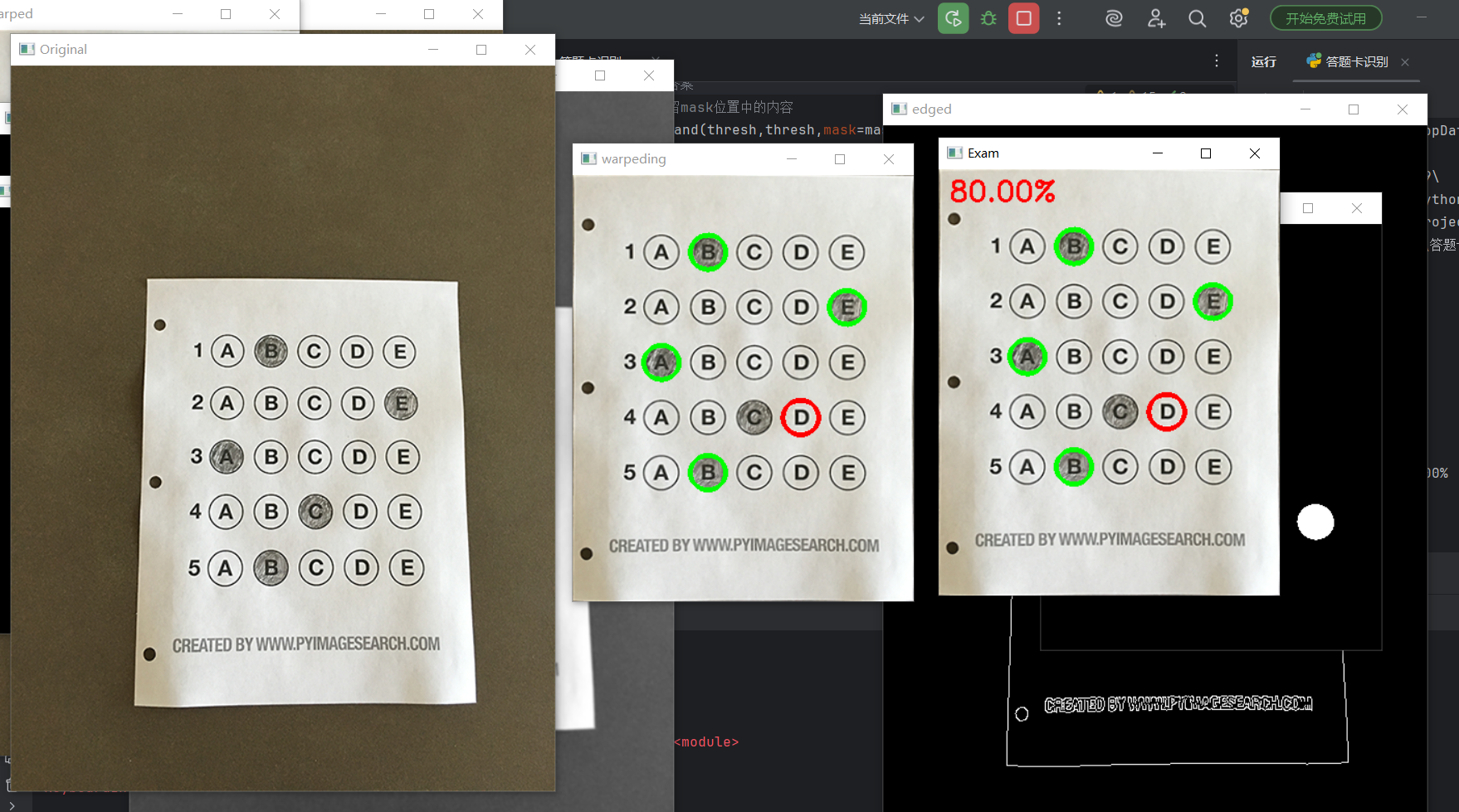
如图所示,程序自动识别 5 道单选题(每题 A-E 共 5 个选项),绿色圆圈标记正确答案,红色圆圈标记考生填错位置,右上方显示最终得分 80.00%(5 题对了 4 题)。
二、整体处理流程
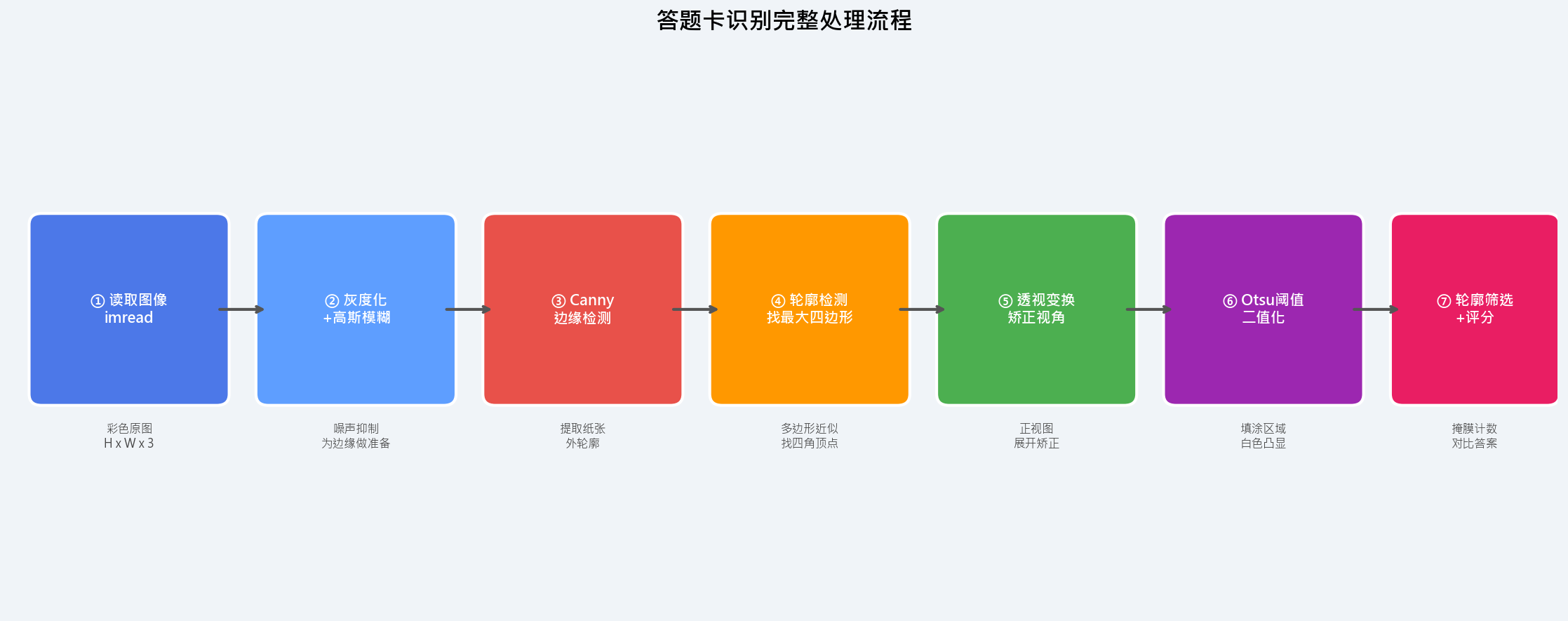
整个系统分为 7 个阶段,每个阶段环环相扣:
| 阶段 | 操作 | 目的 |
|---|---|---|
| ① 读取图像 | cv2.imread() |
加载原始答题卡照片 |
| ② 灰度化 + 模糊 | cvtColor + GaussianBlur |
消除彩色干扰,平滑噪声 |
| ③ 边缘检测 | Canny |
提取答题卡纸张边缘 |
| ④ 轮廓检测 | findContours + approxPolyDP |
找到纸张四角顶点 |
| ⑤ 透视变换 | getPerspectiveTransform |
将斜拍图矫正为正视图 |
| ⑥ Otsu 二值化 | THRESH_BINARY_INV + THRESH_OTSU |
填涂区域高亮为白色 |
| ⑦ 轮廓筛选 + 评分 | 掩膜计数 + 对比答案 | 判断每题选项,计算得分 |
三、代码分段详解
3.1 预处理:灰度化 + 高斯模糊 + Canny 边缘检测
python
image = cv2.imread(r"./images/test_01.png")
contours_img = image.copy()

# 灰度化
gray = cv2.cvtColor(contours_img, cv2.COLOR_BGR2GRAY)
# 高斯模糊:5x5卷积核,平滑噪声,避免噪点被Canny误识为边缘
blurred = cv2.GaussianBlur(gray, (5, 5), 0)
# Canny边缘检测:低阈值75,高阈值200
edged = cv2.Canny(blurred, 75, 200)
参数说明:
GaussianBlur(gray, (5,5), 0)--- 5×5 的高斯卷积核,sigmaX=0表示自动计算标准差;卷积核越大,平滑越强,但细节损失也越多Canny(blurred, 75, 200)--- 低阈值 75 / 高阈值 200;梯度 > 200 的像素直接判定为边缘,< 75 的丢弃,中间的按连通性判断
3.2 轮廓检测:找到答题卡四边形
python
cnts = cv2.findContours(edged.copy(), cv2.RETR_EXTERNAL,
                         cv2.CHAIN_APPROX_SIMPLE)[-2]

docCnt = None
for cnt in cnts:                                   # 遍历所有外轮廓
    area = cv2.arcLength(cnt, True)               # 周长
    approx = cv2.approxPolyDP(cnt, 0.02 * area, True)  # 多边形近似
    if len(approx) == 4:                           # 只要四边形
        docCnt = approx
        break
关键点:
cv2.RETR_EXTERNAL--- 只检测最外层轮廓,排除答题圆圈对纸张轮廓的干扰approxPolyDP(cnt, 0.02 * area, True)--- Douglas-Peucker 算法,将轮廓点简化为多边形;0.02 * area是近似精度,过大会过度简化,过小无法合并
3.3 透视变换:矫正拍摄角度
这是整个流程的核心模块,分为两个函数。
3.3.1 四点排序 order_points()
透视变换需要严格按照 左上 → 右上 → 右下 → 左下 的顺序提供顶点,否则会发生图像扭曲。
python
def order_points(pts):
    rect = np.zeros((4, 2), dtype="float32")
    s = pts.sum(axis=1)           # 各点 x+y 之和
    rect[0] = pts[np.argmin(s)]   # 左上:x+y 最小
    rect[2] = pts[np.argmax(s)]   # 右下:x+y 最大
    diff = np.diff(pts, axis=1)   # 各点 y-x 之差
    rect[1] = pts[np.argmin(diff)]  # 右上:y-x 最小
    rect[3] = pts[np.argmax(diff)]  # 左下:y-x 最大
    return rect
排序算法原理如下图:
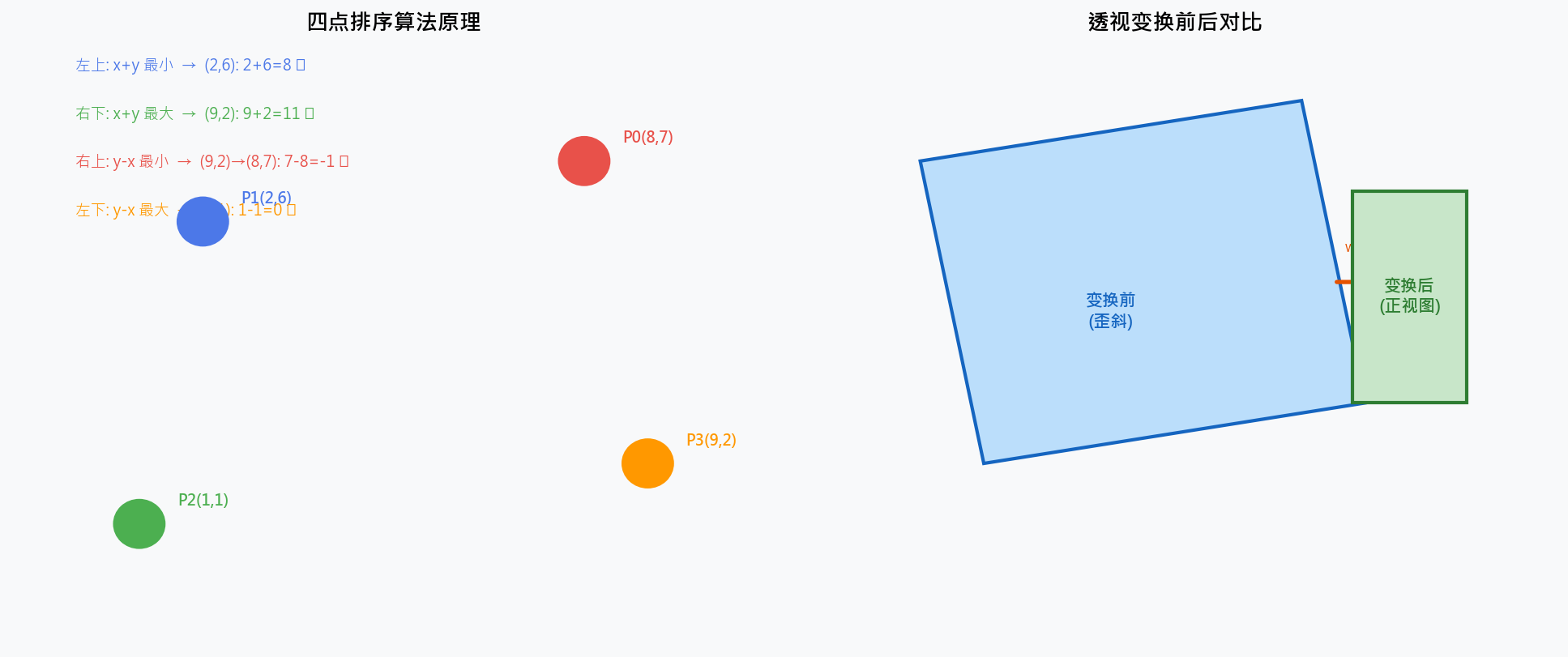
数学依据:
左上角坐标 (x小, y小) → x+y 值最小
右下角坐标 (x大, y大) → x+y 值最大
右上角坐标 (x大, y小) → y-x 值最小(y小x大)
左下角坐标 (x小, y大) → y-x 值最大(y大x小)
3.3.2 四点透视变换 four_point_transform()
python
def four_point_transform(img, pts):
    rect = order_points(pts)
    (tl, tr, br, bl) = rect

    # 计算目标矩形的宽高(取两侧的最大值,保证内容完整)
    widthA  = np.sqrt(((br[0]-bl[0])**2) + ((br[1]-bl[1])**2))
    widthB  = np.sqrt(((tr[0]-tl[0])**2) + ((tr[1]-tl[1])**2))
    maxWidth = max(int(widthA), int(widthB))

    heightA = np.sqrt(((tr[0]-br[0])**2) + ((tr[1]-br[1])**2))
    heightB = np.sqrt(((tl[0]-bl[0])**2) + ((tl[1]-bl[1])**2))
    maxHeight = max(int(heightA), int(heightB))

    # 目标坐标:标准正矩形
    dst = np.array([
        [0, 0],
        [maxWidth - 1, 0],
        [maxWidth - 1, maxHeight - 1],
        [0, maxHeight - 1]], dtype="float32")

    # 计算单应性矩阵,执行变换
    M = cv2.getPerspectiveTransform(rect, dst)
    warped = cv2.warpPerspective(img, M, (maxWidth, maxHeight))
    return warped
执行透视变换:
python
warped_t = four_point_transform(image, docCnt.reshape(4, 2))3.4 Otsu 自适应二值化
python
warped = cv2.cvtColor(warped_t, cv2.COLOR_BGR2GRAY)
thresh = cv2.threshold(warped, 0, 255,
                        cv2.THRESH_BINARY_INV | cv2.THRESH_OTSU)[1]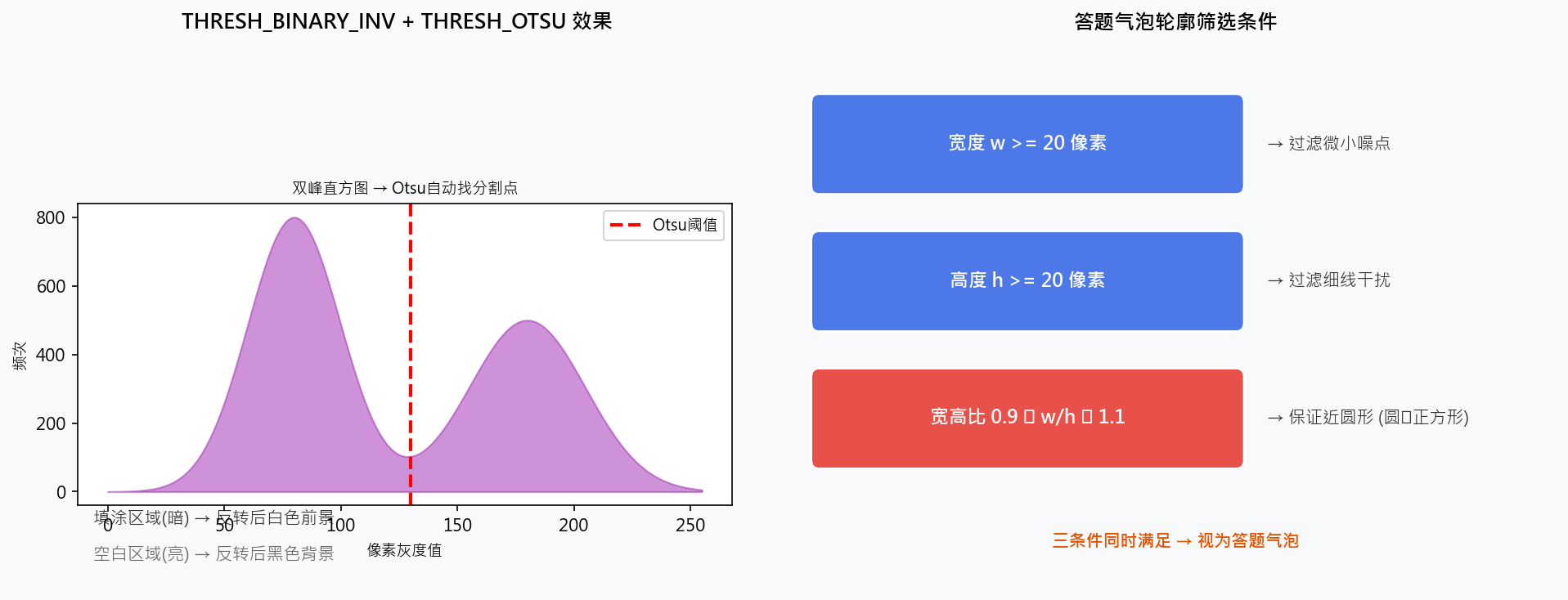
为什么用 THRESH_BINARY_INV + THRESH_OTSU?
THRESH_OTSU--- 自动计算最佳阈值(对双峰灰度直方图效果极好,答题卡纸张白色+铅笔填涂灰色恰好构成双峰)THRESH_BINARY_INV--- 将结果取反:原本暗 的填涂区域 → 变为白色 (便于后续countNonZero统计)
3.5 轮廓筛选:只保留答题气泡
python
cnts = cv2.findContours(thresh, cv2.RETR_EXTERNAL,
                         cv2.CHAIN_APPROX_SIMPLE)[-2]
questionCnts = []

for c in cnts:
    (x, y, w, h) = cv2.boundingRect(c)
    ar = w / float(h)                      # 宽高比
    if w >= 20 and h >= 20 and 0.9 <= ar <= 1.1:
        questionCnts.append(c)             # 保留近似圆形的轮廓
三个筛选条件缺一不可:
w >= 20           → 过滤噪点和细线(太小的不是气泡)
h >= 20           → 同上
0.9 <= w/h <= 1.1 → 宽高比接近 1(圆形的宽高比 = 1)
3.6 轮廓排序 sort_contours()
python
def sort_contours(cnts, method='left-to-right'):
    reverse = False
    i = 0
    if method == 'right-to-left' or method == 'bottom-to-top':
        reverse = True
    if method == 'top-to-bottom' or method == 'bottom-to-top':
        i = 1   # 按 y 坐标排序

    boundingBoxes = [cv2.boundingRect(c) for c in cnts]
    (cnts, boundingBoxes) = zip(*sorted(
        zip(cnts, boundingBoxes),
        key=lambda b: b[1][i],
        reverse=reverse))
    return cnts, boundingBoxes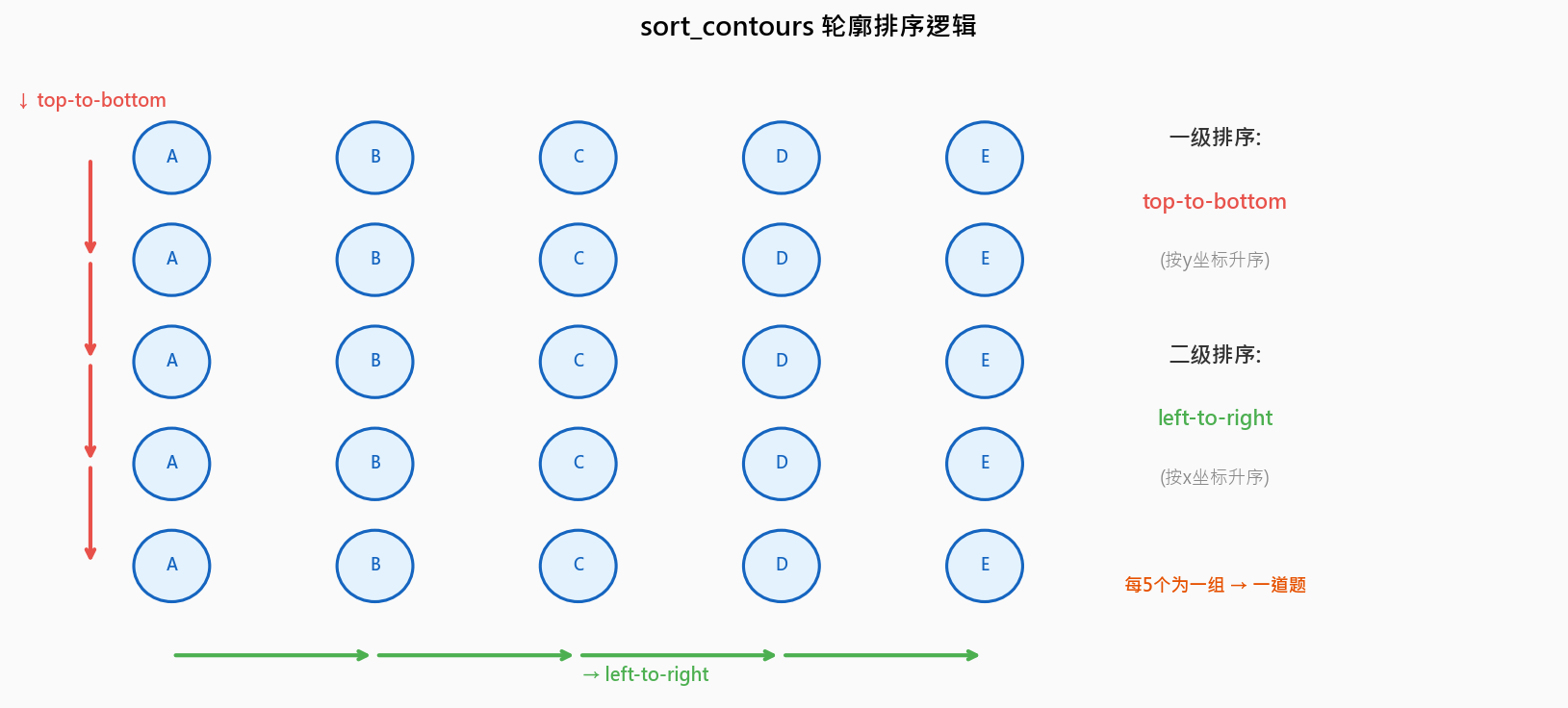
- 先用
top-to-bottom排序所有气泡(按 y 坐标),得到从上到下的行顺序 - 每 5 个气泡为一组(一道题),组内再用
left-to-right排序(按 x 坐标),确定 A/B/C/D/E 顺序
3.7 掩膜计数:判断哪个选项被填涂
这是识别的核心逻辑:
python
ANSWER_KEY = {0: 1, 1: 4, 2: 0, 3: 3, 4: 1}  # 第0题答案是B(索引1), 第1题是E(索引4)...

questionCnts, _ = sort_contours(questionCnts, method='top-to-bottom')
correct = 0

for (q, i) in enumerate(np.arange(0, len(questionCnts), 5)):  # 每题取5个
    cnts = sort_contours(questionCnts[i:i+5])[0]              # 5选项从左到右排序
    bubbled = None

    for (j, c) in enumerate(cnts):
        # 创建全零掩膜,在当前气泡位置填充白色
        mask = np.zeros(thresh.shape, dtype="uint8")
        cv2.drawContours(mask, [c], 0, 255, -1)

        # 与操作:只保留 mask 区域的 thresh 内容
        thresh_mask_and = cv2.bitwise_and(thresh, thresh, mask=mask)
        # 统计非零像素数(填涂越多 → 白色像素越多)
        total = cv2.countNonZero(thresh_mask_and)

        # 保留非零像素最多的选项
        if bubbled is None or total > bubbled[0]:
            bubbled = (total, j)

    # 对比答案,决定画绿圈还是红圈
    color = (0, 0, 255)          # 默认红色(答错)
    k = ANSWER_KEY[q]

    if k == bubbled[1]:          # 答对
        color = (0, 255, 0)
        correct += 1

    cv2.drawContours(warped_new, [cnts[k]], -1, color, 3)
掩膜计数判断逻辑图解:
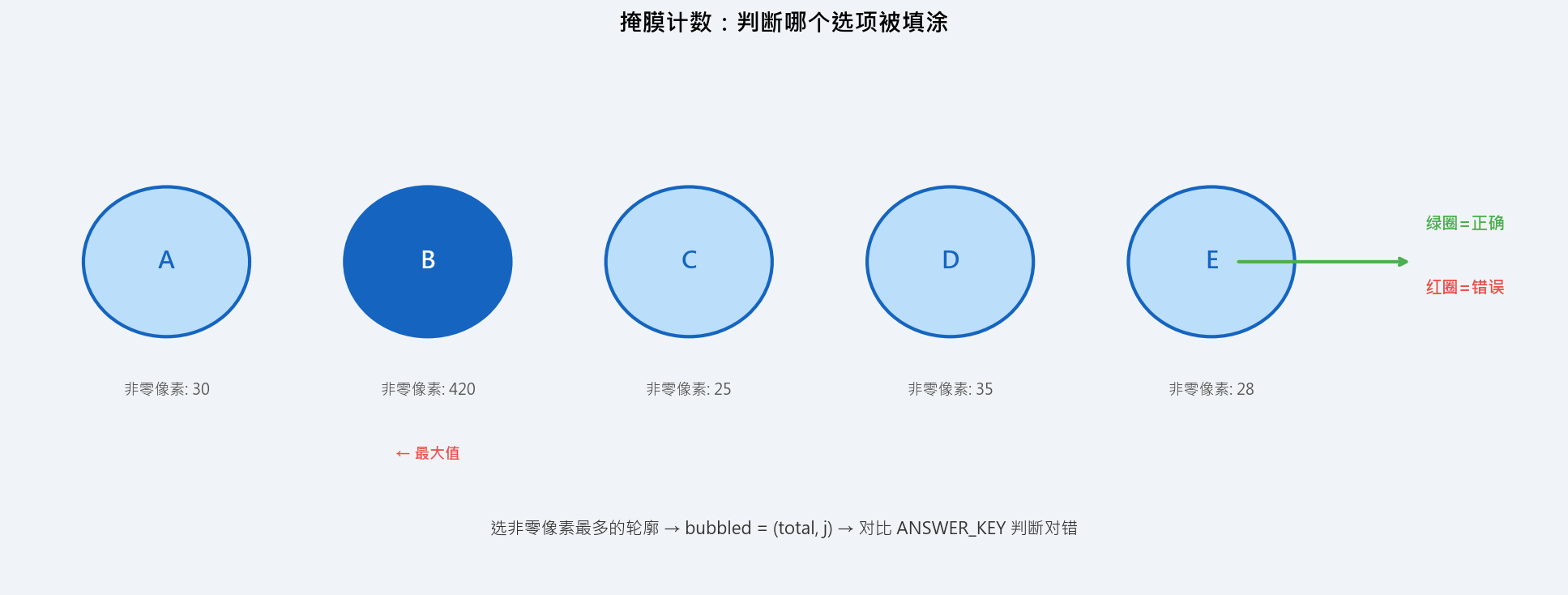
核心思想 :被铅笔填涂的气泡,经过 THRESH_BINARY_INV 后内部白色像素数量远多于未填涂的气泡,因此取非零像素最多的那个即为所填选项。
3.8 计算得分并显示
python
score = (correct / 5.0) * 100
print("[INFO] score: {:.2f}%".format(score))

cv2.putText(warped_new, '{:.2f}%'.format(score), (10, 30),
            cv2.FONT_HERSHEY_SIMPLEX, 0.9, (0, 0, 255), 2)

cv2.imshow('Original', image)
cv2.imshow('Exam', warped_new)
cv2.waitKey(0)
cv2.destroyAllWindows()
四、完整代码
python
import numpy as np
import cv2

ANSWER_KEY = {0: 1, 1: 4, 2: 0, 3: 3, 4: 1}  # 正确答案(索引对应 A=0, B=1, C=2, D=3, E=4)

def order_points(pts):
    """四边形顶点排序:固定输出 左上、右上、右下、左下"""
    rect = np.zeros((4, 2), dtype="float32")
    s = pts.sum(axis=1)
    rect[0] = pts[np.argmin(s)]   # 左上
    rect[2] = pts[np.argmax(s)]   # 右下
    diff = np.diff(pts, axis=1)
    rect[1] = pts[np.argmin(diff)]  # 右上
    rect[3] = pts[np.argmax(diff)]  # 左下
    return rect

def four_point_transform(img, pts):
    """四点透视变换核心实现"""
    rect = order_points(pts)
    (tl, tr, br, bl) = rect
    widthA  = np.sqrt(((br[0]-bl[0])**2) + ((br[1]-bl[1])**2))
    widthB  = np.sqrt(((tr[0]-tl[0])**2) + ((tr[1]-tl[1])**2))
    maxWidth = max(int(widthA), int(widthB))
    heightA = np.sqrt(((tr[0]-br[0])**2) + ((tr[1]-br[1])**2))
    heightB = np.sqrt(((tl[0]-bl[0])**2) + ((tl[1]-bl[1])**2))
    maxHeight = max(int(heightA), int(heightB))
    dst = np.array([
        [0, 0],
        [maxWidth - 1, 0],
        [maxWidth - 1, maxHeight - 1],
        [0, maxHeight - 1]], dtype="float32")
    M = cv2.getPerspectiveTransform(rect, dst)
    warped = cv2.warpPerspective(img, M, (maxWidth, maxHeight))
    return warped

def sort_contours(cnts, method='left-to-right'):
    """按指定方向对轮廓排序"""
    reverse = False
    i = 0
    if method in ('right-to-left', 'bottom-to-top'):
        reverse = True
    if method in ('top-to-bottom', 'bottom-to-top'):
        i = 1
    boundingBoxes = [cv2.boundingRect(c) for c in cnts]
    (cnts, boundingBoxes) = zip(*sorted(
        zip(cnts, boundingBoxes),
        key=lambda b: b[1][i], reverse=reverse))
    return cnts, boundingBoxes

# ===== 预处理 =====
image = cv2.imread(r"./images/test_01.png")
contours_img = image.copy()
gray    = cv2.cvtColor(contours_img, cv2.COLOR_BGR2GRAY)
blurred = cv2.GaussianBlur(gray, (5, 5), 0)
edged   = cv2.Canny(blurred, 75, 200)

# ===== 轮廓检测 + 透视变换 =====
cnts = cv2.findContours(edged.copy(), cv2.RETR_EXTERNAL, cv2.CHAIN_APPROX_SIMPLE)[-2]
docCnt = None
for cnt in cnts:
    area  = cv2.arcLength(cnt, True)
    approx = cv2.approxPolyDP(cnt, 0.02 * area, True)
    if len(approx) == 4:
        docCnt = approx
        break

warped_t   = four_point_transform(image, docCnt.reshape(4, 2))
warped_new = warped_t.copy()
warped     = cv2.cvtColor(warped_t, cv2.COLOR_BGR2GRAY)

# ===== Otsu 二值化 =====
thresh = cv2.threshold(warped, 0, 255,
                        cv2.THRESH_BINARY_INV | cv2.THRESH_OTSU)[1]

# ===== 轮廓筛选:只保留答题气泡 =====
cnts = cv2.findContours(thresh, cv2.RETR_EXTERNAL, cv2.CHAIN_APPROX_SIMPLE)[-2]
questionCnts = []
for c in cnts:
    (x, y, w, h) = cv2.boundingRect(c)
    ar = w / float(h)
    if w >= 20 and h >= 20 and 0.9 <= ar <= 1.1:
        questionCnts.append(c)

# ===== 排序 + 掩膜计数 + 评分 =====
questionCnts, _ = sort_contours(questionCnts, method='top-to-bottom')
correct = 0

for (q, i) in enumerate(np.arange(0, len(questionCnts), 5)):
    cnts    = sort_contours(questionCnts[i:i+5])[0]
    bubbled = None
    for (j, c) in enumerate(cnts):
        mask = np.zeros(thresh.shape, dtype="uint8")
        cv2.drawContours(mask, [c], 0, 255, -1)
        total = cv2.countNonZero(cv2.bitwise_and(thresh, thresh, mask=mask))
        if bubbled is None or total > bubbled[0]:
            bubbled = (total, j)
    color = (0, 0, 255)
    k = ANSWER_KEY[q]
    if k == bubbled[1]:
        color   = (0, 255, 0)
        correct += 1
    cv2.drawContours(warped_new, [cnts[k]], -1, color, 3)

# ===== 显示结果 =====
score = (correct / 5.0) * 100
print("[INFO] score: {:.2f}%".format(score))
cv2.putText(warped_new, '{:.2f}%'.format(score), (10, 30),
            cv2.FONT_HERSHEY_SIMPLEX, 0.9, (0, 0, 255), 2)
cv2.imshow('Original', image)
cv2.imshow('Exam', warped_new)
cv2.waitKey(0)
cv2.destroyAllWindows()
五、总结
| 技术点 | 关键 API | 作用 |
|---|---|---|
| 图像预处理 | GaussianBlur + Canny |
消噪 + 边缘提取 |
| 纸张定位 | findContours + approxPolyDP |
找四角顶点 |
| 透视矫正 | getPerspectiveTransform + warpPerspective |
消除拍摄角度 |
| 自适应二值化 | THRESH_BINARY_INV + THRESH_OTSU |
自动分割填涂区域 |
| 气泡筛选 | boundingRect + 宽高比 |
只保留答题圆圈 |
| 选项判定 | bitwise_and + countNonZero |
掩膜计数,找填涂最多的选项 |
| 评分输出 | drawContours + putText |
可视化标注 + 成绩显示 |
可扩展方向:
- 支持更多题目行数(当前固定 5 题):调整
np.arange(0, len(questionCnts), 5)中的步长 - 支持多答案题(多选题):将"非零像素 > 阈值"替换为按照固定比例判断
- 接入摄像头实时识别:将
imread替换为摄像头帧循环处理 - 部署为 Web 服务:结合 Flask/FastAPI 提供图片上传接口,返回 JSON 评分结果
参考资料:pyimagesearch - Bubble sheet multiple choice scanner and test grader using OMR, Python and OpenCV
更多题目行数(当前固定 5 题):调整
np.arange(0, len(questionCnts), 5)中的步长
- 支持多答案题(多选题):将"非零像素 > 阈值"替换为按照固定比例判断
- 接入摄像头实时识别:将
imread替换为摄像头帧循环处理 - 部署为 Web 服务:结合 Flask/FastAPI 提供图片上传接口,返回 JSON 评分结果
参考资料:pyimagesearch - Bubble sheet multiple choice scanner and test grader using OMR, Python and OpenCV