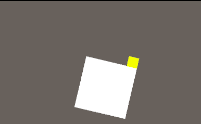
3d:摄像机俯视
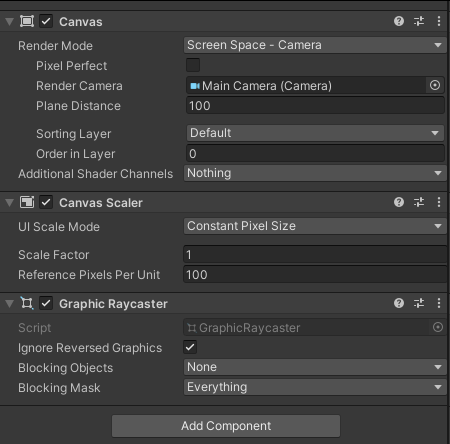
2d:Canvas 的Render Mode 修改为 Screen Space -Camera
cs
 /// <summary>
 /// palyer
 /// </summary>
 public GameObject palyer;
 /// <summary>
 /// 枪
 /// </summary>
 public GameObject gun;
 /// <summary>
 /// 子弹
 /// </summary>
 public GameObject bullet;
 /// <summary>
 /// 战场位置
 /// </summary>
 public GameObject pos;

 public RectTransform uGUICanvas;

 // Start is called before the first frame update
 void Start()
 {

 }

 // Update is called once per frame
 void Update()
 {
     //向鼠标点击位置旋转
     if (Input.GetMouseButton(0) && GameControl.instance.isGameStop == false)
     {
         //没有点击到ui上,3d物体旋转
         //if (EventSystem.current.IsPointerOverGameObject() == false)
         //{
         //    //获取鼠标的坐标,鼠标是屏幕坐标,Z轴为0,这里不做转换
         //    Vector3 mouse = Input.mousePosition;
         //    //获取物体坐标,物体坐标是世界坐标,将其转换成屏幕坐标,和鼠标一直
         //    Vector3 obj = Camera.main.WorldToScreenPoint(transform.position);
         //    //屏幕坐标向量相减,得到指向鼠标点的目标向量,即黄色线段
         //    Vector3 direction = mouse - obj;
         //    //将Z轴置0,保持在2D平面内
         //    direction.z = 0f;
         //    //将目标向量长度变成1,即单位向量,这里的目的是只使用向量的方向,不需要长度,所以变成1
         //    direction = direction.normalized;
         //    //当目标向量的Y轴大于等于0.4F时候,这里是用于限制角度,可以自己条件
         //    // 计算旋转角度
         //    float angle = Mathf.Atan2(direction.x, direction.y) * Mathf.Rad2Deg;
         //    // 使用Quaternion.Euler创建旋转
         //    palyer.transform.rotation = Quaternion.Euler(0, angle, 0);
         //    //gun.transform.rotation = Quaternion.Euler(0, angle, 0);

         //}

         //向鼠标点击位置旋转-2d
         if (Input.GetMouseButton(0) && GameControl.instance.isGameStop == false)
         {
             //没有点击到ui上,2d物体旋转
             if (EventSystem.current.IsPointerOverGameObject() == false)
             {
                 Vector3 mousePos;
                 //Canvas必须是摄像机模式
                 RectTransformUtility.ScreenPointToWorldPointInRectangle(uGUICanvas, new Vector2(Input.mousePosition.x, Input.mousePosition.y), Camera.main, out mousePos);
                 float z;

                 if (mousePos.x > palyer.transform.position.x)
                 {
                     z = -Vector3.Angle(Vector3.up, mousePos - transform.position);
                 }
                 else
                 {
                     z = Vector3.Angle(Vector3.up, mousePos - transform.position);
                 }
                 palyer.transform.localRotation = Quaternion.Euler(0, 0, z);

             }
         }

     }
     //鼠标点击发射子弹
     if (Input.GetMouseButtonDown(0) && GameControl.instance.isGameStop == false && GameControl.instance.isPower == true)
     {
         //没有点击到ui上
         if (EventSystem.current.IsPointerOverGameObject() == false)
         {
             GameObject go = Instantiate(bullet);
             go.name = "子弹";
             go.transform.GetComponent<RectTransform>().SetParent(pos.transform.GetComponent<RectTransform>(), false);
             go.transform.GetComponent<RectTransform>().position = gun.transform.position;
             go.transform.rotation = Quaternion.identity;
         }
     }


 }