欢迎加入开源鸿蒙跨平台社区:
https://openharmonycrossplatform.csdn.net
一、项目概述
运行效果图
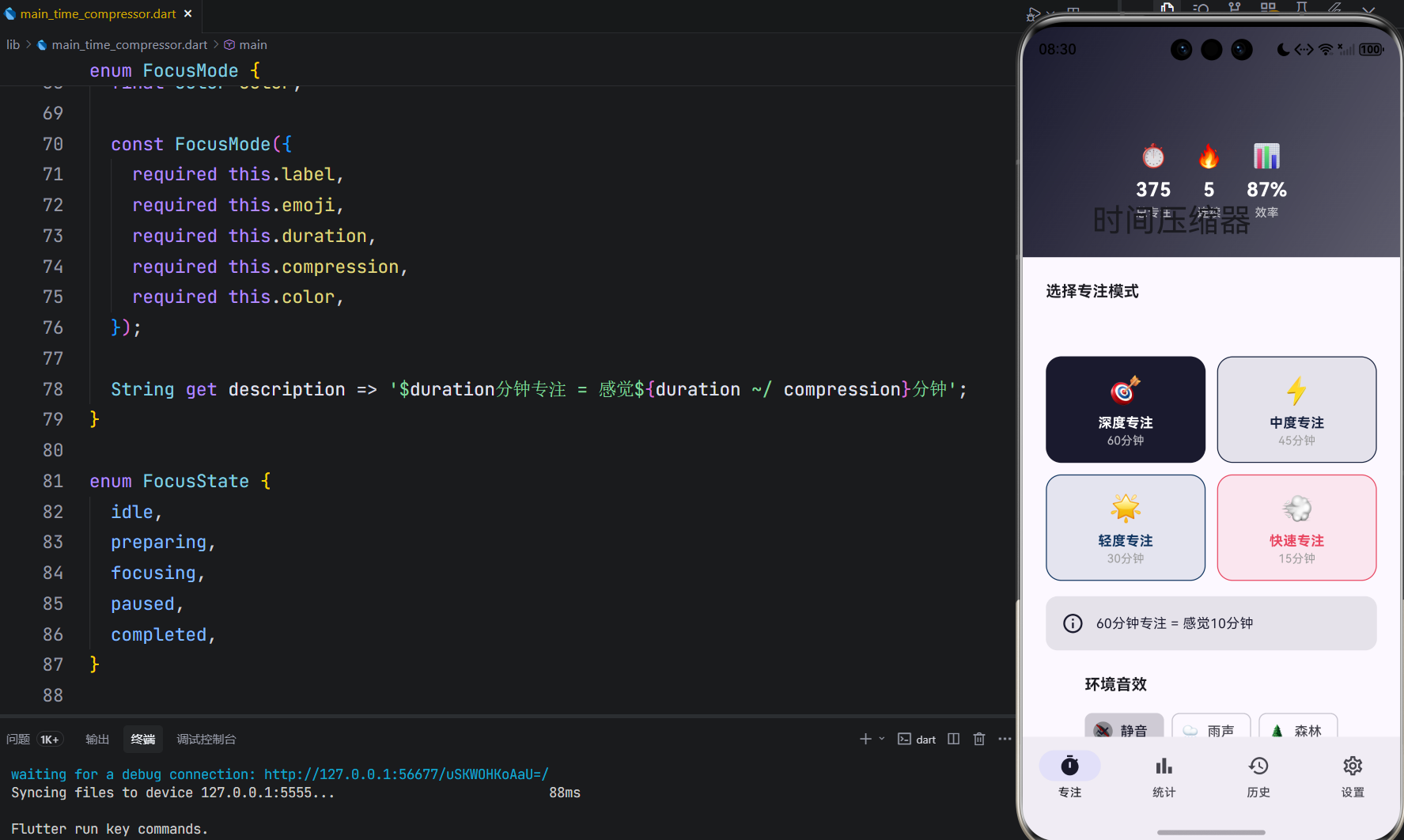
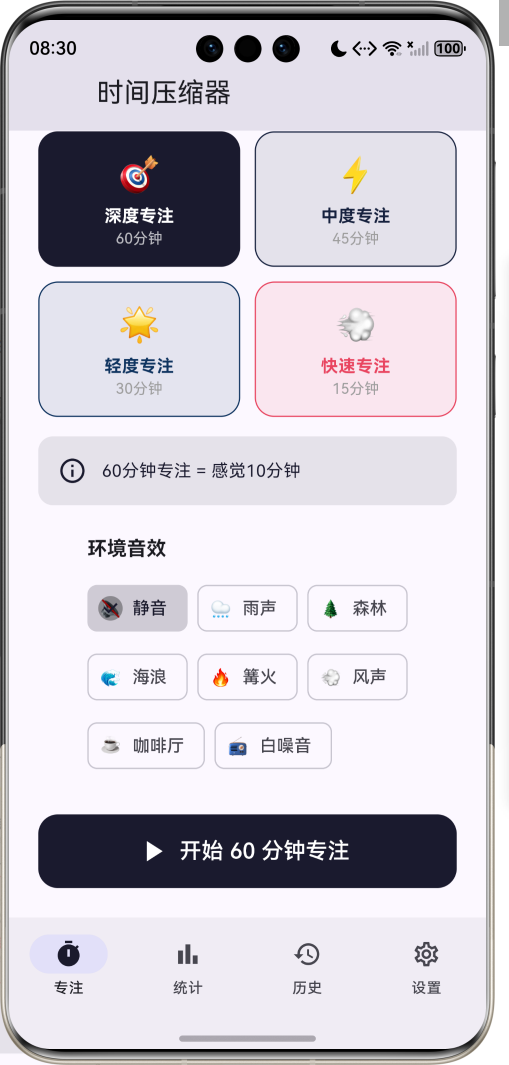
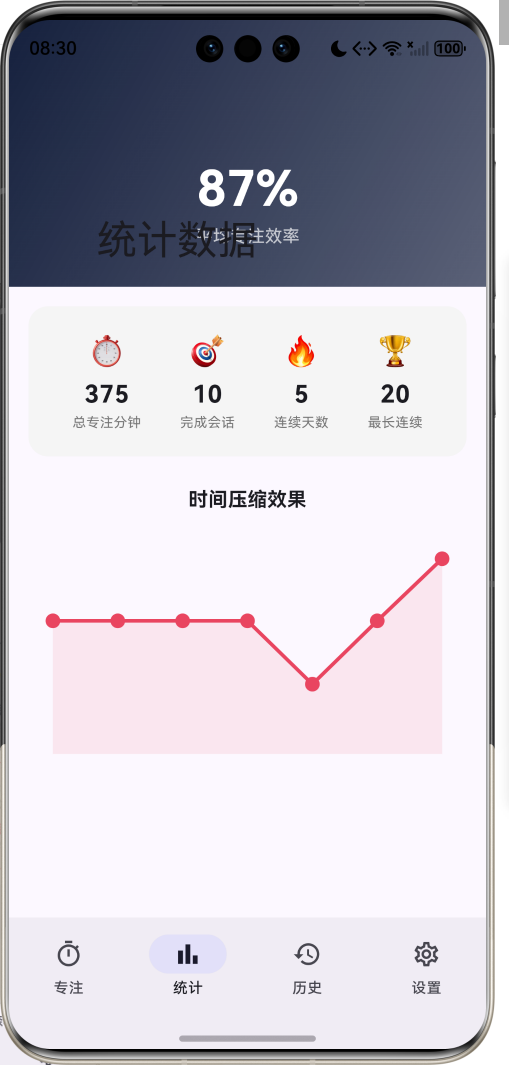
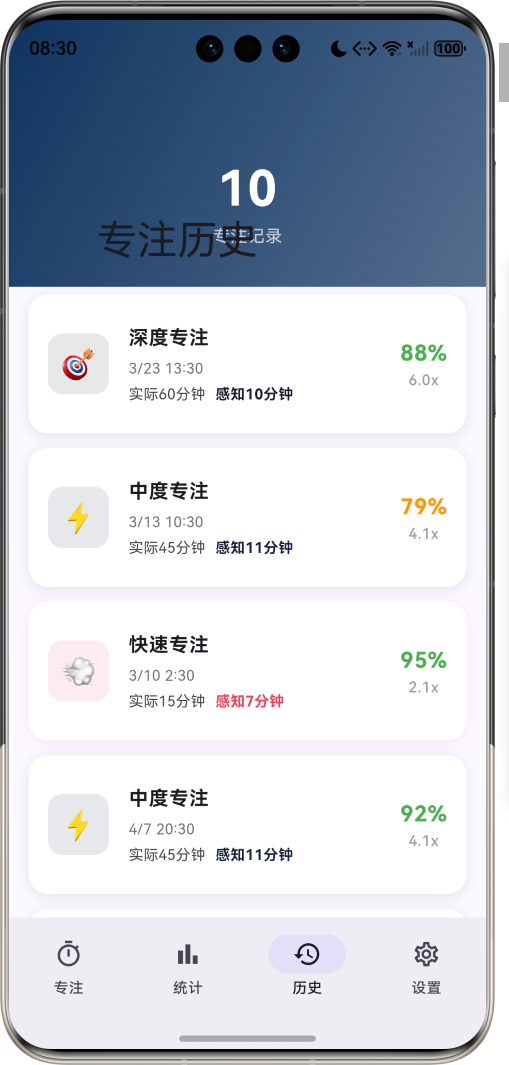
1.1 应用简介
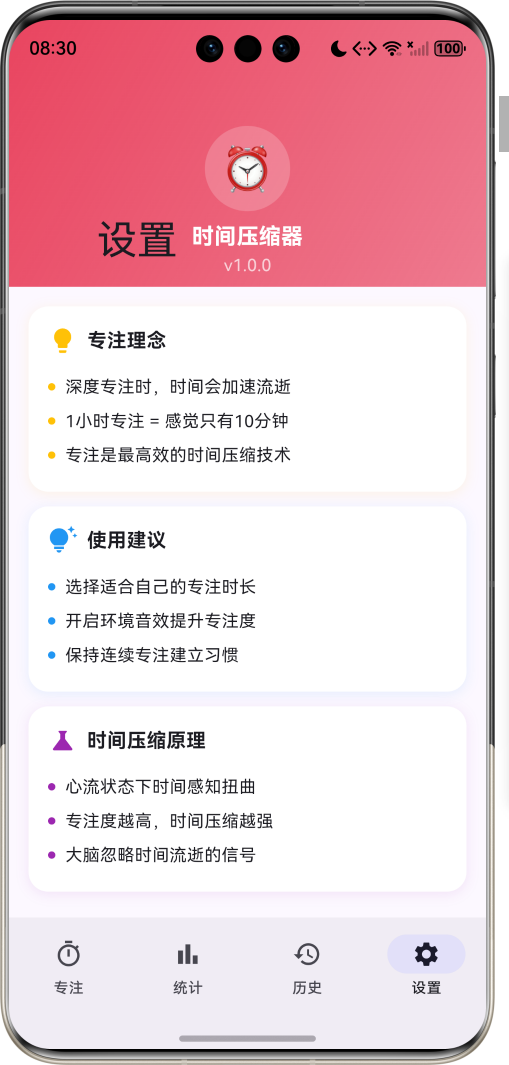
时间压缩器是一款基于心流理论的专注计时应用。它利用心理学中的时间感知扭曲现象,帮助用户在深度专注状态下,让1小时感觉像10分钟一样短暂。通过科学的专注模式设计,用户可以体验到"时间压缩"的神奇效果,大幅提升专注效率。
应用以深邃的夜空蓝为主色调,象征专注时的沉浸状态。涵盖专注计时、统计分析、历史记录、设置中心四大模块。用户可以选择不同的专注模式,配合环境音效,进入深度专注状态,实现时间感知的压缩。
1.2 核心功能
| 功能模块 | 功能描述 | 实现方式 |
|---|---|---|
| 专注计时 | 多模式专注计时 | Timer + Animation |
| 时间压缩 | 感知时间与实际时间对比 | 计算算法 |
| 环境音效 | 专注时播放背景音 | 音频播放 |
| 统计分析 | 专注数据可视化 | CustomPainter |
| 历史记录 | 查看过往专注会话 | 列表管理 |
| 连续打卡 | 激励持续专注 | 状态追踪 |
1.3 专注模式定义
| 序号 | 模式名称 | Emoji | 时长 | 压缩比 | 颜色 | 描述 |
|---|---|---|---|---|---|---|
| 1 | 深度专注 | 🎯 | 60分钟 | 6x | #1A1A2E | 1小时感觉像10分钟 |
| 2 | 中度专注 | ⚡ | 45分钟 | 4x | #16213E | 45分钟感觉像11分钟 |
| 3 | 轻度专注 | 🌟 | 30分钟 | 3x | #0F3460 | 30分钟感觉像10分钟 |
| 4 | 快速专注 | 💨 | 15分钟 | 2x | #E94560 | 15分钟感觉像7分钟 |
1.4 环境音效分类
| 序号 | 音效名称 | Emoji | 图标 | 适用场景 |
|---|---|---|---|---|
| 1 | 静音 | 🔇 | volume_off | 安静环境 |
| 2 | 雨声 | 🌧️ | water_drop | 放松专注 |
| 3 | 森林 | 🌲 | forest | 自然沉浸 |
| 4 | 海浪 | 🌊 | waves | 深度放松 |
| 5 | 篝火 | 🔥 | local_fire_department | 温暖氛围 |
| 6 | 风声 | 💨 | air | 轻柔背景 |
| 7 | 咖啡厅 | ☕ | coffee | 社交氛围 |
| 8 | 白噪音 | 📻 | radio | 屏蔽干扰 |
1.5 专注状态定义
| 序号 | 状态名称 | 描述 |
|---|---|---|
| 1 | 空闲 | 未开始专注 |
| 2 | 准备中 | 即将开始专注 |
| 3 | 专注中 | 正在计时 |
| 4 | 已暂停 | 暂停计时 |
| 5 | 已完成 | 专注结束 |
1.6 技术栈
| 技术领域 | 技术选型 | 版本要求 |
|---|---|---|
| 开发框架 | Flutter | >= 3.0.0 |
| 编程语言 | Dart | >= 2.17.0 |
| 设计规范 | Material Design 3 | - |
| 动画控制 | AnimationController | - |
| 图表绘制 | CustomPainter | - |
| 状态管理 | setState | - |
| 触觉反馈 | HapticFeedback | - |
| 目标平台 | 鸿蒙OS / Web | API 21+ |
1.7 项目结构
lib/
└── main_time_compressor.dart
    ├── TimeCompressorApp           # 应用入口
    ├── FocusMode                   # 专注模式枚举
    ├── FocusState                  # 专注状态枚举
    ├── AmbientSound                # 环境音效枚举
    ├── FocusSession                # 专注会话模型
    ├── TimeCompressorHomePage      # 主页面(底部导航)
    ├── _buildFocusPage             # 专注计时页面
    ├── _buildStatsPage             # 统计分析页面
    ├── _buildHistoryPage           # 历史记录页面
    ├── _buildSettingsPage          # 设置中心页面
    ├── ProgressRingPainter         # 进度环绘制器
    └── CompressionChartPainter     # 压缩效果图表绘制器
二、系统架构
2.1 整体架构图
Data Layer
Business Layer
Presentation Layer
主页面
TimeCompressorHomePage
专注计时页
统计分析页
历史记录页
设置中心页
模式选择
计时器
控制按钮
感知信息
效率统计
压缩图表
会话列表
会话详情
理念说明
使用建议
计时管理器
TimerManager
状态管理器
StateManager
统计计算器
StatsCalculator
FocusSession
专注会话
FocusMode
专注模式
AmbientSound
环境音效
2.2 类图设计
has
has
manages
selects
tracks
renders
renders
TimeCompressorApp
+Widget build()
<<enumeration>>
FocusMode
+String label
+String emoji
+int duration
+int compression
+Color color
+deepFocus()
+moderateFocus()
+lightFocus()
+quickFocus()
<<enumeration>>
FocusState
+idle
+preparing
+focusing
+paused
+completed
<<enumeration>>
AmbientSound
+String label
+String emoji
+IconData icon
+silence()
+rain()
+forest()
+ocean()
+fire()
+wind()
+cafe()
+whiteNoise()
FocusSession
+String id
+FocusMode mode
+DateTime startTime
+DateTime endTime
+int actualDuration
+int perceivedDuration
+double focusScore
+int interruptions
+AmbientSound ambientSound
+double get compressionRatio
TimeCompressorHomePage
-int _selectedIndex
-FocusState _focusState
-FocusMode _selectedMode
-Timer? _focusTimer
-int _remainingSeconds
-double _focusProgress
-List<FocusSession> _sessions
+Widget build()
-_startFocusSession()
-_pauseFocusSession()
-_resumeFocusSession()
-_cancelFocusSession()
-_completeFocusSession()
ProgressRingPainter
+double progress
+Color color
+void paint()
+bool shouldRepaint()
CompressionChartPainter
+List<FocusSession> sessions
+void paint()
+bool shouldRepaint()
2.3 页面导航流程
专注
统计
历史
设置
暂停
结束
继续
结束
完成
应用启动
专注计时页
底部导航
模式选择
数据分析
历史记录
设置中心
选择专注模式
选择环境音效
开始专注
专注计时中
用户操作
暂停状态
取消会话
用户操作
显示结果
查看效率统计
查看压缩图表
查看会话列表
查看会话详情
查看理念说明
查看使用建议
2.4 专注会话流程
数据层 计时器 专注页面 用户 数据层 计时器 专注页面 用户 loop 专注中 选择专注模式 显示模式信息 选择环境音效 显示音效选择 点击开始按钮 启动计时器 每秒更新 显示剩余时间 更新进度 计算感知时间 显示双时间 时间到 保存会话记录 更新统计 显示完成弹窗
三、核心模块设计
3.1 数据模型设计
3.1.1 专注模式枚举 (FocusMode)
dart
enum FocusMode {
  deepFocus(label: '深度专注', emoji: '🎯', duration: 60, compression: 6, color: Color(0xFF1A1A2E)),
  moderateFocus(label: '中度专注', emoji: '⚡', duration: 45, compression: 4, color: Color(0xFF16213E)),
  lightFocus(label: '轻度专注', emoji: '🌟', duration: 30, compression: 3, color: Color(0xFF0F3460)),
  quickFocus(label: '快速专注', emoji: '💨', duration: 15, compression: 2, color: Color(0xFFE94560));

  final String label;
  final String emoji;
  final int duration;       // 实际时长(分钟)
  final int compression;    // 压缩倍数
  final Color color;

  String get description => '$duration分钟专注 = 感觉${duration ~/ compression}分钟';
}
3.1.2 环境音效枚举 (AmbientSound)
dart
enum AmbientSound {
  silence(label: '静音', emoji: '🔇', icon: Icons.volume_off),
  rain(label: '雨声', emoji: '🌧️', icon: Icons.water_drop),
  forest(label: '森林', emoji: '🌲', icon: Icons.forest),
  ocean(label: '海浪', emoji: '🌊', icon: Icons.waves),
  fire(label: '篝火', emoji: '🔥', icon: Icons.local_fire_department),
  wind(label: '风声', emoji: '💨', icon: Icons.air),
  cafe(label: '咖啡厅', emoji: '☕', icon: Icons.coffee),
  whiteNoise(label: '白噪音', emoji: '📻', icon: Icons.radio);

  final String label;
  final String emoji;
  final IconData icon;
}
3.1.3 专注会话模型 (FocusSession)
dart
class FocusSession {
  final String id;
  final FocusMode mode;
  final DateTime startTime;
  final DateTime endTime;
  final int actualDuration;      // 实际时长(分钟)
  final int perceivedDuration;   // 感知时长(分钟)
  final double focusScore;       // 专注评分 0-1
  final int interruptions;       // 中断次数
  final AmbientSound ambientSound;
  final String? note;

  double get compressionRatio => actualDuration / perceivedDuration;
}
3.1.4 时间压缩效果分布
35% 28% 25% 12% 专注模式使用分布示例 深度专注 中度专注 轻度专注 快速专注
3.2 页面结构设计
3.2.1 主页面布局
TimeCompressorHomePage
IndexedStack
专注计时页
统计分析页
历史记录页
设置中心页
NavigationBar
专注 Tab
统计 Tab
历史 Tab
设置 Tab
3.2.2 专注计时页结构
专注计时页
SliverAppBar
快速统计
模式选择器
音效选择器
开始按钮
标题
渐变背景
总专注分钟
连续天数
平均效率
模式卡片网格
模式描述
音效标签组
3.2.3 专注计时界面结构
专注计时界面
计时器圆环
控制按钮
感知信息
进度环
剩余时间
模式图标
模式名称
暂停按钮
结束按钮
实际时间
感知时间
压缩率
3.2.4 统计分析页结构
统计分析页
平均效率展示
统计卡片
压缩效果图表
效率百分比
效率说明
总专注分钟
完成会话
连续天数
最长连续
折线图
数据点
3.3 时间压缩算法
否
是
选择专注模式
获取压缩比
开始计时
每秒更新
计算实际时间
计算感知时间
remainingSeconds--
perceivedSeconds = progress × duration / compression
更新进度
时间到?
完成会话
计算压缩率
保存会话记录
3.4 专注状态流转
开始专注
暂停
继续
结束
时间到
确认
空闲
专注中
已暂停
已完成
四、UI设计规范
4.1 配色方案
应用以深邃的夜空蓝为主色调,象征专注时的沉浸状态:
| 颜色类型 | 色值 | 用途 |
|---|---|---|
| 主色 | #1A1A2E (Dark Blue) | 深度专注模式 |
| 辅助色 | #16213E (Navy) | 中度专注模式 |
| 第三色 | #0F3460 (Deep Blue) | 轻度专注模式 |
| 强调色 | #E94560 (Red Pink) | 快速专注模式 |
| 背景色 | #ECEFF1 | 页面背景 |
| 卡片背景 | #FFFFFF | 会话卡片 |
4.2 模式配色
| 专注模式 | 色值 | 视觉效果 |
|---|---|---|
| 深度专注 | #1A1A2E | 深邃神秘 |
| 中度专注 | #16213E | 沉稳专注 |
| 轻度专注 | #0F3460 | 清新平静 |
| 快速专注 | #E94560 | 活力激发 |
4.3 字体规范
| 元素 | 字号 | 字重 | 颜色 |
|---|---|---|---|
| 页面标题 | 24px | Bold | 主色 |
| 计时数字 | 48px | Bold | 白色 |
| 模式名称 | 14px | Bold | 模式色 |
| 统计数字 | 20px | Bold | 黑色 |
| 标签文字 | 12px | Regular | 灰色 |
4.4 组件规范
4.4.1 模式选择卡片
┌─────────────────────────────────────┐
│              🎯                      │
│           深度专注                   │
│           60分钟                     │
└─────────────────────────────────────┘
4.4.2 专注计时器
┌─────────────────────────────────────────────────────┐
│                                                     │
│                    ╭─────────╮                      │
│                   ╱           ╲                     │
│                  │     🎯     │                     │
│                  │   45:30    │                     │
│                  │  深度专注  │                     │
│                   ╲           ╱                     │
│                    ╰─────────╯                      │
│                                                     │
└─────────────────────────────────────────────────────┘
4.4.3 感知信息卡片
┌─────────────────────────────────────────────────────┐
│                                                     │
│   ⏰ 实际时间          │        🧠 感知时间         │
│       15:30           │           02:35             │
│                                                     │
│           时间压缩率: 6x                            │
│                                                     │
└─────────────────────────────────────────────────────┘
4.4.4 会话卡片
┌──────────────────────────────────────────────────────┐
│  ┌────┐                              ┌──────────┐   │
│  │ 🎯 │  深度专注                    │   85%    │   │
│  │    │  12/15 14:30                │   6.0x   │   │
│  └────┘  实际60分钟 感知10分钟       └──────────┘   │
└──────────────────────────────────────────────────────┘
五、核心功能实现
5.1 计时器实现
dart
void _startFocusSession() {
  setState(() {
    _focusState = FocusState.focusing;
    _remainingSeconds = _selectedMode.duration * 60;
    _perceivedSeconds = 0;
    _focusProgress = 0.0;
  });

  _focusTimer = Timer.periodic(const Duration(seconds: 1), (timer) {
    setState(() {
      _remainingSeconds--;
      _focusProgress = 1 - (_remainingSeconds / (_selectedMode.duration * 60));
      _perceivedSeconds = (_focusProgress * _selectedMode.duration * 60 /
                           _selectedMode.compression).round();
    });

    if (_remainingSeconds <= 0) {
      _completeFocusSession();
    }
  });
}
5.2 时间压缩计算
dart
// 感知时间 = 实际时间 / 压缩比
int get perceivedDuration => actualDuration ~/ compression;

// 压缩率 = 实际时间 / 感知时间
double get compressionRatio => actualDuration / perceivedDuration;
5.3 完成会话实现
dart
void _completeFocusSession() {
  _focusTimer?.cancel();

  final session = FocusSession(
    id: 'session_${DateTime.now().millisecondsSinceEpoch}',
    mode: _selectedMode,
    startTime: DateTime.now().subtract(Duration(minutes: _selectedMode.duration)),
    endTime: DateTime.now(),
    actualDuration: _selectedMode.duration,
    perceivedDuration: _selectedMode.duration ~/ _selectedMode.compression,
    focusScore: 0.85 + Random().nextDouble() * 0.15,
    ambientSound: _selectedSound,
  );

  setState(() {
    _focusState = FocusState.completed;
    _sessions.insert(0, session);
    _totalFocusMinutes += _selectedMode.duration;
    _totalSessions++;
    _currentStreak++;
  });
}
5.4 进度环绘制
dart
class ProgressRingPainter extends CustomPainter {
  final double progress;
  final Color color;

  @override
  void paint(Canvas canvas, Size size) {
    final center = Offset(size.width / 2, size.height / 2);
    final radius = size.width / 2 - 10;

    // 背景环
    canvas.drawCircle(center, radius, backgroundPaint);

    // 进度环
    final sweepAngle = 2 * pi * progress;
    canvas.drawArc(
      Rect.fromCircle(center: center, radius: radius),
      -pi / 2,
      sweepAngle,
      false,
      progressPaint,
    );
  }
}
5.5 压缩效果图表
dart
class CompressionChartPainter extends CustomPainter {
  final List<FocusSession> sessions;

  @override
  void paint(Canvas canvas, Size size) {
    final recentSessions = sessions.take(7).toList().reversed.toList();
    final maxRatio = recentSessions.map((s) => s.compressionRatio).reduce(max);

    final path = Path();
    final stepX = (size.width - 40) / (recentSessions.length - 1);

    for (var i = 0; i < recentSessions.length; i++) {
      final x = 20 + i * stepX;
      final y = size.height - 20 -
                (recentSessions[i].compressionRatio / maxRatio) * (size.height - 40);

      if (i == 0) {
        path.moveTo(x, y);
      } else {
        path.lineTo(x, y);
      }
    }

    canvas.drawPath(path, paint);
  }
}
六、交互设计
6.1 专注开始流程
计时器 模式选择 专注页面 用户 计时器 模式选择 专注页面 用户 进入专注页 显示模式选择 选择专注模式 高亮选中模式 选择环境音效 显示音效选择 点击开始按钮 启动计时 开始倒计时 显示计时界面
6.2 专注控制流程
暂停
继续
结束
结束
专注中
用户操作
暂停计时
停止动画
用户操作
恢复计时
取消会话
恢复动画
返回空闲状态
时间到
完成会话
显示结果弹窗
保存记录
6.3 触觉反馈设计
开始专注
暂停/继续
结束/完成
选择模式
用户操作
操作类型
中等震动
轻微震动
强烈震动
选择震动
七、扩展功能规划
7.1 后续版本规划
2024-01-07 2024-01-14 2024-01-21 2024-01-28 2024-02-04 2024-02-11 2024-02-18 2024-02-25 2024-03-03 2024-03-10 2024-03-17 专注计时系统 时间压缩算法 统计分析 环境音效播放 自定义时长 专注提醒 番茄钟模式 数据导出 云端同步 V1.0 基础版本 V1.1 增强版本 V1.2 进阶版本 时间压缩器应用开发计划
7.2 功能扩展建议
7.2.1 环境音效播放
音频功能:
- 集成音频播放器
- 支持自定义音效
- 音量调节
- 混音播放
7.2.2 自定义专注时长
个性化功能:
- 自定义专注时长
- 自定义压缩比
- 保存个人偏好
- 快速启动模板
7.2.3 番茄钟模式
番茄工作法:
- 25分钟专注 + 5分钟休息
- 自动循环
- 长休息提醒
- 统计分析
八、注意事项
8.1 开发注意事项
-
计时器管理:专注计时器需要在 dispose 时正确取消,避免内存泄漏
-
状态同步:专注状态变化时需要同步更新界面和动画
-
触觉反馈:关键操作添加触觉反馈,提升用户体验
-
动画控制:专注时的脉冲动画需要正确启动和停止
-
数据持久化:专注会话数据需要本地存储
8.2 常见问题
| 问题 | 原因 | 解决方案 |
|---|---|---|
| 计时不准确 | Timer 精度问题 | 使用 Stopwatch 校准 |
| 动画卡顿 | 帧率过低 | 优化动画性能 |
| 状态混乱 | 状态切换逻辑错误 | 检查状态流转 |
| 进度环不更新 | shouldRepaint 返回错误 | 正确实现判断逻辑 |
| 震动不生效 | 权限未获取 | 添加震动权限 |
8.3 设计理念
⏰ 时间压缩器理念 ⏰
在深度专注的状态下,
时间会以不同的速度流逝。
心理学研究表明,
当我们全神贯注时,
大脑会忽略时间流逝的信号。
1小时的深度专注,
可能感觉只有10分钟。
这不是魔法,
而是心流的力量。
专注,是最好的时间压缩技术
九、运行说明
9.1 环境要求
| 环境 | 版本要求 |
|---|---|
| Flutter SDK | >= 3.0.0 |
| Dart SDK | >= 2.17.0 |
| 鸿蒙OS | API 21+ |
9.2 运行命令
bash
# 查看可用设备
flutter devices

# 运行到Web服务器
flutter run -d web-server -t lib/main_time_compressor.dart --web-port 8130

# 运行到鸿蒙设备
flutter run -d 127.0.0.1:5555 lib/main_time_compressor.dart

# 运行到Windows
flutter run -d windows -t lib/main_time_compressor.dart

# 代码分析
flutter analyze lib/main_time_compressor.dart
十、总结
时间压缩器应用通过专注计时、时间压缩、统计分析、历史记录四大模块,为用户提供了一个独特的专注体验平台。应用基于心流理论,利用时间感知扭曲现象,帮助用户在深度专注状态下体验"时间压缩"的神奇效果。
核心功能涵盖多模式专注计时、双时间显示、压缩效果统计、触觉反馈四大模块。专注计时系统支持四种不同时长和压缩比的模式;双时间显示让用户直观感受时间压缩效果;统计分析提供压缩率图表和效率数据;触觉反馈增强操作体验。
应用采用 Material Design 3 设计规范,以深邃的夜空蓝为主色调,象征专注时的沉浸状态。通过本应用,希望能够帮助用户提升专注效率,体验时间压缩的神奇效果。
**时间压缩器------专注,是最好的时间压缩技术**