在日常分享链接的场景中,长串的 URL 不仅不美观,还容易出现复制错误、平台字符限制等问题,短链接应运而生成为解决这些痛点的最优解。本文将从 "是什么、为什么、怎么办" 三个维度解析短链接,并手把手教你基于 Spring Boot + 前端技术搭建一个轻量级短链接服务。
一、短链接是什么?
短链接(Short URL)是将原始长 URL 通过特定算法映射生成的简短字符串链接,核心特征是:
- 长度短:通常仅包含数字、大小写字母,长度控制在 10-20 个字符;
- 可跳转:访问短链接时,服务器会将其重定向到原始长 URL;
- 唯一性:每个短链接对应唯一的原始 URL(也可支持一对多,但主流是一对一)。
比如将 https://www.example.com/article/2024/05/12/spring-boot-best-practices 转换为 http://localhost:8080/u/8a7b9,后者就是短链接。
二、为什么需要短链接?
- 场景适配:社交平台(如微博、短信)有字符数限制,长 URL 会占用大量空间,短链接能节省字符;
- 美观易记:短链接简洁易读,便于口头传播或印刷展示;
- 降低错误率:长 URL 包含大量特殊字符,复制 / 输入时易出错,短链接出错概率大幅降低;
- 统一管理:可基于短链接做访问统计、有效期控制、批量失效等扩展功能(本文基础版暂不实现);
- 隐私保护:隐藏原始 URL 中的敏感参数(如推广码、用户 ID),降低信息泄露风险。
三、短链接的核心实现逻辑(怎么办)
短链接的核心是 "映射关系"------ 将原始 URL 与短码(Short Code)绑定,核心流程分为两步:
3.1 生成流程
用户提交原始 URL → 服务器验证 URL 有效性 → 生成唯一短码 → 存储 "短码 - 原始 URL" 映射 → 返回短链接;
3.2 跳转流程
用户访问短链接 → 服务器解析短码 → 查询映射关系获取原始 URL → 302 重定向到原始 URL。
3.3 核心技术点
- 短码生成:常用 Base62(数字 + 大小写字母)算法,将自增 ID 转换为短字符串(避免纯数字易猜);
- 存储方案:基础版用内存 Map,生产环境可替换为 Redis/Mysql;
- URL 标准化 :自动补全协议头(如用户输入
example.com自动转为https://example.com); - 重定向:使用 HTTP 302 状态码实现跳转(支持统计访问量)。
四、实战开发:搭建短链接服务
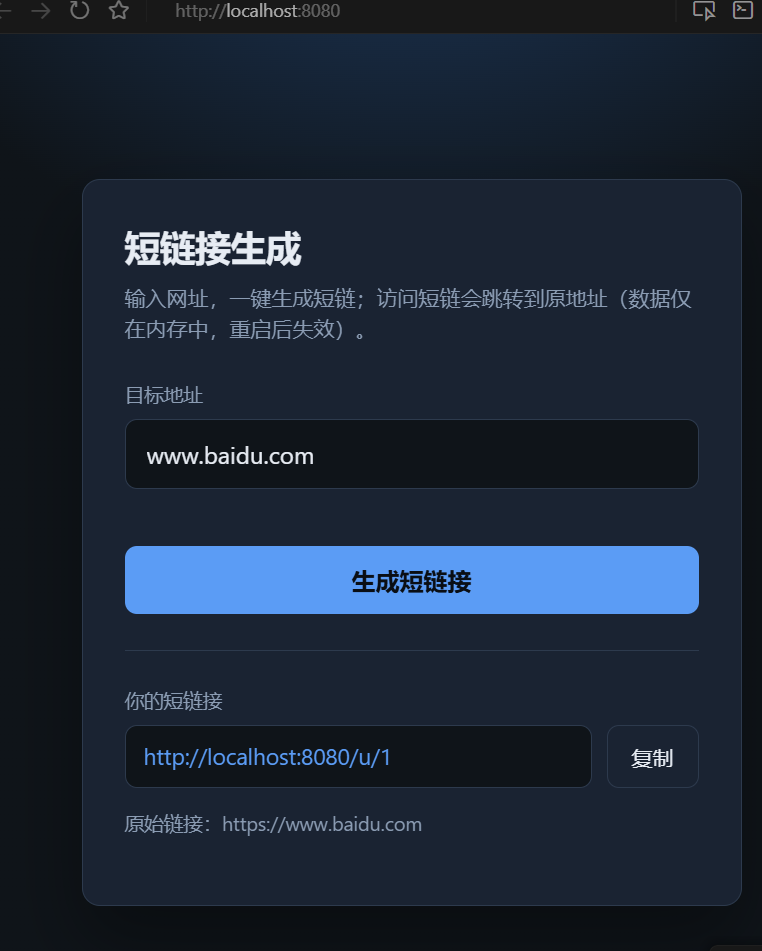
接下来基于 Spring Boot 3.2 + 原生 HTML/JS 实现一个完整的短链接服务,包含前端页面和后端接口。
4.1 技术栈
- 后端:Spring Boot 3.2、Spring Validation(参数校验);
- 前端:原生 HTML/CSS/JS(无框架);
- 构建工具:Maven;
- JDK 版本:17。
4.2 后端开发
application.properties
server.port=8080
# 生成短链时拼进响应里的前缀(可按部署域名修改)
app.short-url.base=http://localhost:8080
步骤 1:创建 Maven 项目,配置 pom.xml
<?xml version="1.0" encoding="UTF-8"?>
<project xmlns="http://maven.apache.org/POM/4.0.0"
         xmlns:xsi="http://www.w3.org/2001/XMLSchema-instance"
         xsi:schemaLocation="http://maven.apache.org/POM/4.0.0 https://maven.apache.org/xsd/maven-4.0.0.xsd">
    <modelVersion>4.0.0</modelVersion>

    <parent>
        <groupId>org.springframework.boot</groupId>
        <artifactId>spring-boot-starter-parent</artifactId>
        <version>3.2.5</version>
        <relativePath/>
    </parent>

    <groupId>com.example</groupId>
    <artifactId>short-url</artifactId>
    <version>0.0.1-SNAPSHOT</version>
    <name>short-url</name>
    <description>玩具短链接服务</description>

    <properties>
        <java.version>17</java.version>
    </properties>

    <dependencies>
        <!-- Web核心依赖 -->
        <dependency>
            <groupId>org.springframework.boot</groupId>
            <artifactId>spring-boot-starter-web</artifactId>
        </dependency>
        <!-- 参数校验 -->
        <dependency>
            <groupId>org.springframework.boot</groupId>
            <artifactId>spring-boot-starter-validation</artifactId>
        </dependency>
        <!-- 测试依赖 -->
        <dependency>
            <groupId>org.springframework.boot</groupId>
            <artifactId>spring-boot-starter-test</artifactId>
            <scope>test</scope>
        </dependency>
    </dependencies>

    <build>
        <plugins>
            <plugin>
                <groupId>org.springframework.boot</groupId>
                <artifactId>spring-boot-maven-plugin</artifactId>
            </plugin>
        </plugins>
    </build>
</project>
步骤 2:定义请求 / 响应 DTO
CreateLinkRequest.java(请求参数)
package com.example.shorturl.dto;

import jakarta.validation.constraints.NotBlank;
import jakarta.validation.constraints.Size;

// 记录类,简化POJO编写
public record CreateLinkRequest(
        @NotBlank(message = "url 不能为空")
        @Size(max = 2048, message = "url 过长")
        String url
) {}
CreateLinkResponse.java(响应结果)
package com.example.shorturl.dto;

public record CreateLinkResponse(String code, String shortUrl, String originalUrl) {}
步骤 3:核心服务层(ShortUrlService)
实现 URL 标准化、Base62 编码、映射存储核心逻辑:
package com.example.shorturl.service;

import org.springframework.beans.factory.annotation.Value;
import org.springframework.stereotype.Service;

import java.net.URI;
import java.util.Map;
import java.util.concurrent.ConcurrentHashMap;
import java.util.concurrent.atomic.AtomicLong;

@Service
public class ShortUrlService {

    // Base62字符集:数字+小写字母+大写字母,共62个字符
    private static final String BASE62 = "0123456789abcdefghijklmnopqrstuvwxyzABCDEFGHIJKLMNOPQRSTUVWXYZ";

    // 自增序列,用于生成唯一ID
    private final AtomicLong seq = new AtomicLong(0);
    // 内存存储短码-原始URL映射,生产环境替换为Redis/Mysql
    private final Map<String, String> codeToUrl = new ConcurrentHashMap<>();

    // 短链接基础地址,可通过配置文件覆盖
    @Value("${app.short-url.base:http://localhost:8080}")
    private String shortUrlBase;

    /**
     * 生成短链接
     * @param rawUrl 原始URL
     * @return 包含短码、短链接、原始URL的结果对象
     */
    public CreateLinkResult shorten(String rawUrl) {
        // 标准化URL(补全协议头、校验有效性)
        String normalized = normalizeUrl(rawUrl);
        // 生成短码(自增ID转Base62)
        String code = toBase62(seq.incrementAndGet());
        // 存储映射关系
        codeToUrl.put(code, normalized);
        // 拼接完整短链接(处理base地址末尾的/)
        String base = shortUrlBase.endsWith("/") ? shortUrlBase.substring(0, shortUrlBase.length() - 1) : shortUrlBase;
        return new CreateLinkResult(code, base + "/u/" + code, normalized);
    }

    /**
     * 解析短码,获取原始URL
     * @param code 短码
     * @return 原始URL(不存在返回null)
     */
    public String resolve(String code) {
        return codeToUrl.get(code);
    }

    /**
     * URL标准化:补全协议头、校验有效性
     */
    private static String normalizeUrl(String raw) {
        String t = raw.trim();
        // 自动补全https协议头
        if (!t.matches("(?i)^https?://.*")) {
            t = "https://" + t;
        }
        // 校验URL有效性
        URI uri = URI.create(t);
        if (uri.getScheme() == null || uri.getHost() == null) {
            throw new IllegalArgumentException("无效的 URL");
        }
        return uri.toString();
    }

    /**
     * 自增ID转Base62编码(核心算法)
     */
    private static String toBase62(long n) {
        if (n == 0) {
            return String.valueOf(BASE62.charAt(0));
        }
        StringBuilder sb = new StringBuilder();
        while (n > 0) {
            sb.append(BASE62.charAt((int) (n % 62)));
            n /= 62;
        }
        return sb.reverse().toString();
    }

    // 内部结果记录类
    public record CreateLinkResult(String code, String shortUrl, String originalUrl) {}
}
步骤 4:控制器(ShortUrlController)
提供生成短链接和跳转的接口:
package com.example.shorturl.web;

import com.example.shorturl.dto.CreateLinkRequest;
import com.example.shorturl.dto.CreateLinkResponse;
import com.example.shorturl.service.ShortUrlService;
import jakarta.validation.Valid;
import org.springframework.http.HttpStatus;
import org.springframework.http.ResponseEntity;
import org.springframework.web.bind.annotation.GetMapping;
import org.springframework.web.bind.annotation.PathVariable;
import org.springframework.web.bind.annotation.PostMapping;
import org.springframework.web.bind.annotation.RequestBody;
import org.springframework.web.bind.annotation.RestController;
import org.springframework.web.server.ResponseStatusException;

@RestController
public class ShortUrlController {

    private final ShortUrlService shortUrlService;

    // 构造器注入服务
    public ShortUrlController(ShortUrlService shortUrlService) {
        this.shortUrlService = shortUrlService;
    }

    /**
     * 生成短链接接口
     * @param req 包含原始URL的请求体
     * @return 短链接响应结果
     */
    @PostMapping("/api/shorten")
    public CreateLinkResponse shorten(@Valid @RequestBody CreateLinkRequest req) {
        try {
            var result = shortUrlService.shorten(req.url());
            return new CreateLinkResponse(result.code(), result.shortUrl(), result.originalUrl());
        } catch (IllegalArgumentException e) {
            // 抛出400异常,返回错误信息
            throw new ResponseStatusException(HttpStatus.BAD_REQUEST, e.getMessage());
        }
    }

    /**
     * 短链接跳转接口
     * @param code 短码
     * @return 302重定向到原始URL
     */
    @GetMapping("/u/{code}")
    public ResponseEntity<Void> redirect(@PathVariable String code) {
        String target = shortUrlService.resolve(code);
        if (target == null) {
            // 短码不存在,返回404
            throw new ResponseStatusException(HttpStatus.NOT_FOUND, "短链不存在");
        }
        // 302重定向(支持统计访问量)
        return ResponseEntity.status(HttpStatus.FOUND).location(java.net.URI.create(target)).build();
    }
}
步骤 5:启动类(ShortUrlApplication)
package com.example.shorturl;

import org.springframework.boot.SpringApplication;
import org.springframework.boot.autoconfigure.SpringBootApplication;

@SpringBootApplication
public class ShortUrlApplication {

    public static void main(String[] args) {
        SpringApplication.run(ShortUrlApplication.class, args);
    }
}
4.3 前端开发
创建src/main/resources/static/index.html(Spring Boot 默认静态资源目录),实现用户交互页面:
<!DOCTYPE html>
<html lang="zh-CN">
<head>
  <meta charset="UTF-8" />
  <meta name="viewport" content="width=device-width, initial-scale=1" />
  <title>短链接</title>
  <style>
    :root {
      --bg: #0f1419;
      --surface: #1a2332;
      --border: #2d3a4d;
      --text: #e7ecf3;
      --muted: #8b9cb3;
      --accent: #5b9cf5;
      --accent-hover: #7eb0f7;
      --danger: #f07178;
      --radius: 12px;
      --font: "Segoe UI", system-ui, sans-serif;
    }
    * { box-sizing: border-box; }
    body {
      margin: 0;
      min-height: 100vh;
      font-family: var(--font);
      background: radial-gradient(ellipse 120% 80% at 50% -20%, #1e3a5f 0%, var(--bg) 55%);
      color: var(--text);
      display: flex;
      align-items: center;
      justify-content: center;
      padding: 24px;
    }
    .card {
      width: 100%;
      max-width: 440px;
      background: var(--surface);
      border: 1px solid var(--border);
      border-radius: var(--radius);
      padding: 28px 28px 32px;
      box-shadow: 0 24px 48px rgba(0, 0, 0, 0.35);
    }
    h1 {
      margin: 0 0 8px;
      font-size: 1.5rem;
      font-weight: 600;
      letter-spacing: -0.02em;
    }
    .sub {
      margin: 0 0 24px;
      font-size: 0.875rem;
      color: var(--muted);
      line-height: 1.5;
    }
    label {
      display: block;
      font-size: 0.8125rem;
      color: var(--muted);
      margin-bottom: 8px;
    }
    input[type="url"] {
      width: 100%;
      padding: 12px 14px;
      font-size: 1rem;
      font-family: inherit;
      color: var(--text);
      background: var(--bg);
      border: 1px solid var(--border);
      border-radius: 8px;
      outline: none;
      transition: border-color 0.15s;
    }
    input[type="url"]:focus {
      border-color: var(--accent);
    }
    input[type="url"]::placeholder {
      color: var(--muted);
      opacity: 0.7;
    }
    .row {
      margin-top: 18px;
    }
    button[type="submit"] {
      width: 100%;
      margin-top: 20px;
      padding: 12px 16px;
      font-size: 1rem;
      font-weight: 600;
      font-family: inherit;
      color: #0a0e14;
      background: var(--accent);
      border: none;
      border-radius: 8px;
      cursor: pointer;
      transition: background 0.15s;
    }
    button[type="submit"]:hover:not(:disabled) {
      background: var(--accent-hover);
    }
    button[type="submit"]:disabled {
      opacity: 0.55;
      cursor: not-allowed;
    }
    .result {
      margin-top: 24px;
      padding-top: 24px;
      border-top: 1px solid var(--border);
      display: none;
    }
    .result.visible { display: block; }
    .result-label {
      font-size: 0.8125rem;
      color: var(--muted);
      margin-bottom: 8px;
    }
    .short-row {
      display: flex;
      gap: 10px;
      align-items: stretch;
    }
    .short-row a {
      flex: 1;
      min-width: 0;
      padding: 10px 12px;
      font-size: 0.9375rem;
      color: var(--accent);
      background: var(--bg);
      border: 1px solid var(--border);
      border-radius: 8px;
      text-decoration: none;
      word-break: break-all;
      line-height: 1.4;
    }
    .short-row a:hover {
      text-decoration: underline;
    }
    .btn-copy {
      flex-shrink: 0;
      padding: 10px 16px;
      font-size: 0.875rem;
      font-family: inherit;
      font-weight: 500;
      color: var(--text);
      background: transparent;
      border: 1px solid var(--border);
      border-radius: 8px;
      cursor: pointer;
      transition: border-color 0.15s, background 0.15s;
    }
    .btn-copy:hover {
      border-color: var(--muted);
      background: rgba(255, 255, 255, 0.04);
    }
    .btn-copy.copied {
      border-color: #3dad6b;
      color: #7fd9a0;
    }
    .err {
      margin-top: 16px;
      padding: 10px 12px;
      font-size: 0.875rem;
      color: var(--danger);
      background: rgba(240, 113, 120, 0.08);
      border: 1px solid rgba(240, 113, 120, 0.25);
      border-radius: 8px;
      display: none;
    }
    .err.visible { display: block; }
    .orig {
      margin-top: 14px;
      font-size: 0.8125rem;
      color: var(--muted);
      word-break: break-all;
      line-height: 1.45;
    }
  </style>
</head>
<body>
  <main class="card">
    <h1>短链接生成</h1>
    <p class="sub">输入网址,一键生成短链;访问短链会跳转到原地址(数据仅在内存中,重启后失效)。</p>
    <form id="form" novalidate>
      <label for="url">目标地址</label>
      <input
        id="url"
        name="url"
        type="url"
        inputmode="url"
        autocomplete="url"
        placeholder="https://example.com 或 example.com"
        required
      />
      <div class="row">
        <button type="submit" id="submit">生成短链接</button>
      </div>
    </form>
    <div id="err" class="err" role="alert"></div>
    <section id="result" class="result" aria-live="polite">
      <div class="result-label">你的短链接</div>
      <div class="short-row">
        <a id="shortLink" href="#" target="_blank" rel="noopener noreferrer"></a>
        <button type="button" class="btn-copy" id="copy">复制</button>
      </div>
      <p class="orig"><span id="origLabel"></span></p>
    </section>
  </main>
  <script>
    (function () {
      const form = document.getElementById("form");
      const urlInput = document.getElementById("url");
      const submitBtn = document.getElementById("submit");
      const errEl = document.getElementById("err");
      const resultEl = document.getElementById("result");
      const shortLinkEl = document.getElementById("shortLink");
      const copyBtn = document.getElementById("copy");
      const origLabel = document.getElementById("origLabel");

      // 隐藏错误提示
      function hideErr() {
        errEl.classList.remove("visible");
        errEl.textContent = "";
      }

      // 显示错误提示
      function showErr(msg) {
        errEl.textContent = msg;
        errEl.classList.add("visible");
      }

      // 隐藏结果区域
      function hideResult() {
        resultEl.classList.remove("visible");
      }

      // 解析接口错误信息
      async function parseError(res) {
        const text = await res.text();
        try {
          const j = JSON.parse(text);
          if (j.message) return j.message;
          if (Array.isArray(j.errors) && j.errors[0]?.defaultMessage) {
            return j.errors[0].defaultMessage;
          }
        } catch (_) {}
        return text || res.statusText || "请求失败";
      }

      // 表单提交事件
      form.addEventListener("submit", async function (e) {
        e.preventDefault();
        hideErr();
        hideResult();
        copyBtn.classList.remove("copied");
        copyBtn.textContent = "复制";

        const url = urlInput.value.trim();
        if (!url) {
          showErr("请输入网址");
          return;
        }

        submitBtn.disabled = true;
        try {
          // 调用后端生成短链接接口
          const res = await fetch("/api/shorten", {
            method: "POST",
            headers: { "Content-Type": "application/json" },
            body: JSON.stringify({ url }),
          });
          if (!res.ok) {
            showErr(await parseError(res));
            return;
          }
          const data = await res.json();
          // 渲染短链接结果
          shortLinkEl.href = data.shortUrl;
          shortLinkEl.textContent = data.shortUrl;
          origLabel.textContent = "原始链接:" + data.originalUrl;
          resultEl.classList.add("visible");
        } catch (err) {
          showErr("网络异常,请稍后重试");
        } finally {
          submitBtn.disabled = false;
        }
      });

      // 复制短链接功能
      copyBtn.addEventListener("click", async function () {
        const text = shortLinkEl.textContent;
        if (!text) return;
        try {
          await navigator.clipboard.writeText(text);
          copyBtn.textContent = "已复制";
          copyBtn.classList.add("copied");
          // 2秒后恢复按钮状态
          setTimeout(function () {
            copyBtn.textContent = "复制";
            copyBtn.classList.remove("copied");
          }, 2000);
        } catch (_) {
          // 兼容旧浏览器
          shortLinkEl.select?.();
          document.execCommand("copy");
        }
      });
    })();
  </script>
</body>
</html>
4.4 运行与测试
- 启动 Spring Boot 应用(运行
ShortUrlApplication的 main 方法); - 访问
http://localhost:8080,进入前端页面; - 输入任意合法 URL(如
www.baidu.com),点击 "生成短链接"; - 页面会显示生成的短链接(如
http://localhost:8080/u/1),点击可跳转至原始 URL; - 点击 "复制" 按钮可复制短链接到剪贴板。
五、扩展与优化(生产环境建议)
本文实现的是基础版短链接服务,生产环境需做以下优化:
- 存储层:将内存 Map 替换为 Redis(支持过期时间、分布式部署)或 Mysql(持久化);
- 短码生成:增加随机数 / 哈希算法,避免自增 ID 易被遍历;
- 防重复:对相同原始 URL 返回相同短链接(增加 URL→短码的反向映射);
- 访问统计:在跳转接口中记录访问量、IP、时间等信息;
- 限流防刷:增加接口限流(如 Spring Cloud Gateway + Sentinel);
- HTTPS:配置 HTTPS 证书,保证传输安全;
- 自定义短码:支持用户自定义短码(需校验唯一性);
- 异常监控:接入日志框架(如 Logback)、监控平台(如 Prometheus)。
六、总结
短链接的核心是 "映射关系 + 重定向",通过 Base62 算法将自增 ID 转换为短码,结合 HTTP 302 实现跳转。本文从原理到实战,完整实现了一个轻量级短链接服务,涵盖前端交互、后端接口、参数校验、URL 标准化等核心环节。在此基础上,你可以根据业务需求扩展更多功能,打造符合生产标准的短链接系统。