前面我们已经了解过同步/异步日志系统的模块划分。本期我们就来动手编写代码
相关代码已经上传至作者个人gitee:同步_异步日志: 本项⽬主要实现⼀个⽇志系统, 其主要⽀持以下功能: 1、⽀持多级别⽇志消息 2、⽀持同步⽇志和异步⽇志 3、⽀持可靠写⼊⽇志到控制台、⽂件以及滚动⽂件中 4、⽀持多线程程序并发写⽇志 5、⽀持扩展不同的⽇志落地⽬标地
目录
工具类实现
提前完成一些零碎的功能接口,以便于项目中会用到。
• 获取系统时间
• 判断文件是否存在
• 获取文件的所在目录路径
• 创建目录
util.hpp
cpp
/*
    工具类相关的代码:
    • 获取系统时间
    • 判断⽂件是否存在
    • 获取⽂件的所在⽬录路径
    • 创建目录
*/
#pragma once
#include <chrono>
#include <string>
#include <ctime>

namespace Logger
{
    namespace util
    {
        class Date
        {
            public:
                // 获取当前时间点(高精度)
                static std::chrono::system_clock::time_point Now();

                // 获取当前时间的 time_t 表示(秒级)
                static std::time_t NowAsTimeT();

                // 获取格式化的当前时间字符串(默认格式:YYYY-MM-DD HH:MM:SS)
                static std::string NowAsString(const std::string& format = "%Y-%m-%d %H:%M:%S");
        };
        class File
        {
            public:
                // 判断文件是否存在
                static bool IsExist(const std::string& path);
                // 获取文件所在目录路径
                static std::string GetPath(const std::string& path);
                // 创建目录(如果目录已存在则返回 false)
                static bool CreateDirectory(const std::string& path);
        };
    } // namespace util

} // namespace Loggerclass Date
util.cpp
cpp
#include "util.hpp"
#include <ctime>
#include <iomanip>
#include <sstream>
#include <filesystem>

namespace Logger
{
    namespace util
    {

        std::chrono::system_clock::time_point Date::Now()
        {
            return std::chrono::system_clock::now();
        }

        std::time_t Date::NowAsTimeT()
        {
            auto now = std::chrono::system_clock::now();
            return std::chrono::system_clock::to_time_t(now);
        }

        std::string Date::NowAsString(const std::string& format)
        {
            auto now = std::chrono::system_clock::now();
            std::time_t tt = std::chrono::system_clock::to_time_t(now);
            std::tm tm = *std::localtime(&tt); // 注意线程安全性,可用 localtime_s 替代

            std::ostringstream oss;
            oss << std::put_time(&tm, format.c_str());
            return oss.str();
        }
        bool File::IsExist(const std::string& path)
        {
            return std::filesystem::exists(path);
        }
        std::string File::GetPath(const std::string& path)
        {
            return std::filesystem::path(path).parent_path().string();
        }
        bool File::CreateDirectory(const std::string& path)
        {
            return std::filesystem::create_directories(path);
        }
    } // namespace util
} // namespace Logger
日志等级模块
⽇志等级总共分为7个等级,分别为:
• OFF 关闭所有⽇志输出
• DEBUG 进⾏debug时候打印⽇志的等级
• INFO 打印⼀些⽤⼾提⽰信息
• WARN 打印警告信息
• ERROR 打印错误信息
• FATAL 打印致命信息- 导致程序崩溃的信息
• UNKOWN 未知信息
Level.hpp
cpp
/*
    日志等级
    • OFF:关闭日志记录,不输出任何日志信息。
    • DEBUG:调试信息,开发阶段使用,记录详细的程序运行信息。
    • INFO:普通信息,记录程序运行中的普通信息。
    • WARNING:警告信息,记录程序运行中的警告信息。
    • ERROR:错误信息,记录程序运行中的错误信息。
    • FATAL:致命错误信息,记录程序运行中的致命错误信息。
    • UNKNOWN:未知日志等级,表示未定义或无法识别的日志等级。
    每一个项目中都会设置一个默认的日志输出等级,只有输出的日志等级大于等于默认限制等级的时候才可以进行输出
    提供接口,将枚举转化为字符串表示。
*/
#pragma once
#include <string>
namespace Logger
{
    class LogLevel
    {
        public:
            enum class Value
            {
                UNKNOWN = 0,
                OFF,
                DEBUG,
                INFO,
                WARNING,
                ERROR,
                FATAL
            };
            static std::string ToString(Value value);

    };
} // namespace Logger
Level.cpp
cpp
#include "Level.hpp"
namespace Logger
{
    std::string LogLevel::ToString(LogLevel::Value value)
    {
        switch (value)
        {
            case LogLevel::Value::OFF: return "OFF";
            case LogLevel::Value::DEBUG: return "DEBUG";
            case LogLevel::Value::INFO: return "INFO";
            case LogLevel::Value::WARNING: return "WARNING";
            case LogLevel::Value::ERROR: return "ERROR";
            case LogLevel::Value::FATAL: return "FATAL";
            default: return "UNKNOWN";
        }
    }
} // namespace Logger
日志消息模块
日志消息类主要是封装⼀条完整的日志消息所需的内容,其主要包括以下内容:
-
日志的输出时间 用于过滤日志输出时间
-
日志等级 用于进行日志过滤分析
-
源文件名称
-
源代码行号 用于定位出现错误的代码位置
-
线程ID 用于过滤出错的线程
-
日志主体消息
-
日志器名称 (当前支持多日志器的同时使用)
例如:
2003-08-16 12:38:26root12345678main.c:99FATAL: 创建套接字失败...
cpp
/*
    日志消息类:
        1. 日志的输出时间    用于过滤日志输出时间
        2. 日志等级    用于进行日志过滤分析
        3. 源文件名称
        4. 源代码行号    用于定位出现错误的代码位置
        5. 线程ID    用于过滤出错的线程
        6. 日志主体消息
        7. 日志器名称    (当前支持多日志器的同时使用)
*/
#pragma once
#include "util.hpp"
#include "Level.hpp"
#include <string>
#include<ctime>
#include<thread>
namespace Logger
{
    class Message
    {
        private:
            size_t time_;                // 日志时间戳
            LogLevel::Value level_;      // 日志等级
            std::string file_;           // 源文件名称
            size_t line_;                // 源代码行号
            std::thread::id thread_id_;  // 线程ID
            std::string message_;        // 日志主体消息
            std::string logger_name_;    // 日志器名称
        public:
            Message(LogLevel::Value level,
                size_t line,
                const std::string& file,
                const std::string& message,
                const std::string& logger_name)
                : level_(level),
                time_(util::Date::NowAsTimeT()),
                line_(line),
                thread_id_(std::this_thread::get_id()),
                file_(file),
                message_(message), logger_name_(logger_name)
                {}
    };
}
格式化子项模块
格式化子项的作用:从日志消息中取出指定的元素,追加到一块内存空间中
设计思想:
-
抽象一个格式化子项基类
-
基于基类,派生出不同的格式化子项子类
主体消息、日志等级、时间子项、文件名、行号、日志器名称、线程ID、制表符、换行、其他这样就可以在父类中定义父类指针的数组,指向不同的格式化子项子类对象
cpp
/*
    日志消息类:
        1. 日志的输出时间    用于过滤日志输出时间
        2. 日志等级    用于进行日志过滤分析
        3. 源文件名称
        4. 源代码行号    用于定位出现错误的代码位置
        5. 线程ID    用于过滤出错的线程
        6. 日志主体消息
        7. 日志器名称    (当前支持多日志器的同时使用)
*/
#pragma once
#include "util.hpp"
#include "Level.hpp"
#include <string>
#include<ctime>
#include<thread>
namespace Logger
{
    struct Message
    {
            std::time_t time_;                // 日志时间戳
            LogLevel::Value level_;      // 日志等级
            std::string file_;           // 源文件名称
            size_t line_;                // 源代码行号
            std::thread::id thread_id_;  // 线程ID
            std::string message_;        // 日志主体消息
            std::string logger_name_;    // 日志器名称
            Message(LogLevel::Value level,
                size_t line,
                const std::string& file,
                const std::string& message,
                const std::string& logger_name)
                : level_(level),
                time_(util::Date::NowAsTimeT()),
                line_(line),
                thread_id_(std::this_thread::get_id()),
                file_(file),
                message_(message), logger_name_(logger_name)
                {}
    };
}
日志输出格式化
格式化日志
format.hpp
cpp
namespace Logger
{
    //抽象接口基类
    class FormatItem
    {
        public:
            using ptr = std::shared_ptr<FormatItem>;
            virtual ~FormatItem() = default;
            virtual void Format(std::ostream& os, const Message& msg) = 0;
    };
    // 派生格式化子项子类--消息、等级、时间、文件名、行号、线程ID、日志器名、制表符、换行、其他
    class MessageFormatItem : public FormatItem
    {
        public:
            void Format(std::ostream& os, const Message& msg) override;
    };
    class LevelFormatItem : public FormatItem
    {
        public:
            void Format(std::ostream& os, const Message& msg) override;
    };
    class DateTimeFormatItem : public FormatItem
    {
        public:
            DateTimeFormatItem(const std::string& format = "%Y-%m-%d %H:%M:%S");
            void Format(std::ostream& os, const Message& msg) override;
        private:
            std::string time_fmt_;//%H:%M:%S
    };
    class FileNameFormatItem : public FormatItem
    {
        public:
            void Format(std::ostream& os, const Message& msg) override;
    };
    class LineFormatItem : public FormatItem
    {
        public:
            void Format(std::ostream& os, const Message& msg) override;
    };
    class ThreadIdFormatItem : public FormatItem
    {
        public:
            void Format(std::ostream& os, const Message& msg) override;
    };
    class LoggerNameFormatItem : public FormatItem
    {
        public:
            void Format(std::ostream& os, const Message& msg) override;
    };
    class TabFormatItem : public FormatItem
    {
        public:
            void Format(std::ostream& os, const Message& msg) override;
    };
    class NewLineFormatItem : public FormatItem
    {
        public:
            void Format(std::ostream& os, const Message& msg) override;
    };
    class OtherFormatItem : public FormatItem
    {
        public:
            OtherFormatItem(const std::string& str);
            void Format(std::ostream& os, const Message& msg) override;
        private:
            std::string str_;
    };
}
format.cpp
cpp
#include"format.hpp"
namespace Logger
{
    void MessageFormatItem::Format(std::ostream& os, const Message& msg)
    {
        os << msg.message_;
    }
    void LevelFormatItem::Format(std::ostream& os, const Message& msg)
    {
        os << LogLevel::ToString(msg.level_);
    }
    DateTimeFormatItem::DateTimeFormatItem(const std::string& format = "%H:%M:%S")
        : time_fmt_(format)
    {}
    void DateTimeFormatItem::Format(std::ostream& os, const Message& msg)
    {
        struct tm tm_time;
        localtime_r((time_t*)&msg.time_, &tm_time);
        char time_str[64];
        strftime(time_str, sizeof(time_str), time_fmt_.c_str(), &tm_time);
        os << time_str;
    }
    void FileNameFormatItem::Format(std::ostream& os, const Message& msg)
    {
        os << msg.file_;
    }
    void LineFormatItem::Format(std::ostream& os, const Message& msg)
    {
        os << msg.line_;
    }
    void ThreadIdFormatItem::Format(std::ostream& os, const Message& msg)
    {
        os << msg.thread_id_;
    }
    void LoggerNameFormatItem::Format(std::ostream& os, const Message& msg)
    {
        os<< msg.logger_name_;
    }
    void TabFormatItem::Format(std::ostream& os, const Message& msg)
    {
        os << "\t";
    }
    void NewLineFormatItem::Format(std::ostream& os, const Message& msg)
    {
        os << std::endl;
    }
    OtherFormatItem::OtherFormatItem(const std::string& str)
        : str_(str)
    {}
    void OtherFormatItem::Format(std::ostream& os, const Message& msg)
    {
        os << str_;
    }
}
日志格式化器
格式转化器需要对不同形式格式化的进行解析处理。
%d 表示日期 ,包含子格式 {%H: %M: %S}
%t 表示线程ID
%c 表示日志器名称
%f 表示源码文件名
%l 表示源码行号
%p 表示日志级别
%T 表示制表符缩进
%m 表示主体消息
%n 表示换行
声明如下:
cpp
// 日志格式化器类
    class Formatter
    {
        /*
            %d 表示日期 ,包含子格式 {%H: %M: %S}
            %t 表示线程ID
            %c 表示日志器名称
            %f 表示源码文件名
            %l 表示源码行号
            %p 表示日志级别
            %T 表示制表符缩进
            %m 表示主体消息
            %n 表示换行
        */
        public:
            Formatter(const std::string& pattern="[]");
            // 格式化日志消息
            void Format(std::ostream& os, const Message& msg);
            std::string Format(const Message& msg);
            // 解析格式化模式字符串
            bool ParsePattern(const std::string& pattern);
        private:
            // 根据不同的格式化项类型创建不同的格式化子项
            FormatItem::ptr CreateFormatItem(const std::string& key,const std::string& val);
            std::string pattern_; // 格式化模式字符串
            std::vector<FormatItem::ptr> items_; // 格式化子项列表
    };
格式化日志信息
cpp
#include"format.hpp"
namespace Logger
{
    void Formatter::Format(std::ostream& os, const Message& msg)
    {
        for (auto& item : items_)
        {
            item->Format(os, msg);
        }
    }
    std::string Formatter::Format(const Message& msg)
    {
        std::ostringstream oss;
        Format(oss, msg);
        return oss.str();
    }
}
创建格式化子项
cpp
FormatItem::ptr Formatter::CreateFormatItem(const std::string& key,const std::string& val)
    {
        if(key=="d")//日期格式化字符,包含子格式 {%H: %M: %S}
        {
            return std::make_shared<DateTimeFormatItem>(val);
        }
        if(key=="t")//线程ID格式化字符
        {
            return std::make_shared<ThreadIdFormatItem>();
        }
        if(key=="c")//日志器名称格式化字符
        {
            return std::make_shared<LoggerNameFormatItem>();
        }
        if(key=="f")//源码文件名格式化字符
        {
            return std::make_shared<FileNameFormatItem>();
        }
        if(key=="l")//源码行号格式化字符
        {
            return std::make_shared<LineFormatItem>();
        }
        if(key=="p")//日志级别格式化字符
        {
            return std::make_shared<LevelFormatItem>();
        }
        if(key=="T")//制表符缩进格式化字符
        {
            return std::make_shared<TabFormatItem>();
        }
        if(key=="m")//主体消息格式化字符
        {
            return std::make_shared<MessageFormatItem>();
        }
        if(key=="n")//换行格式化字符
        {
            return std::make_shared<NewLineFormatItem>();
        }

        // 如果key不是支持的格式字符,创建OtherFormatItem
        if(key.empty()) std::make_shared<OtherFormatItem>(key);
        std::cerr<<"没有对应的格式化字符:%"<<key<<std::endl;
        abort();
        return FormatItem::ptr();
    }
格式化解析
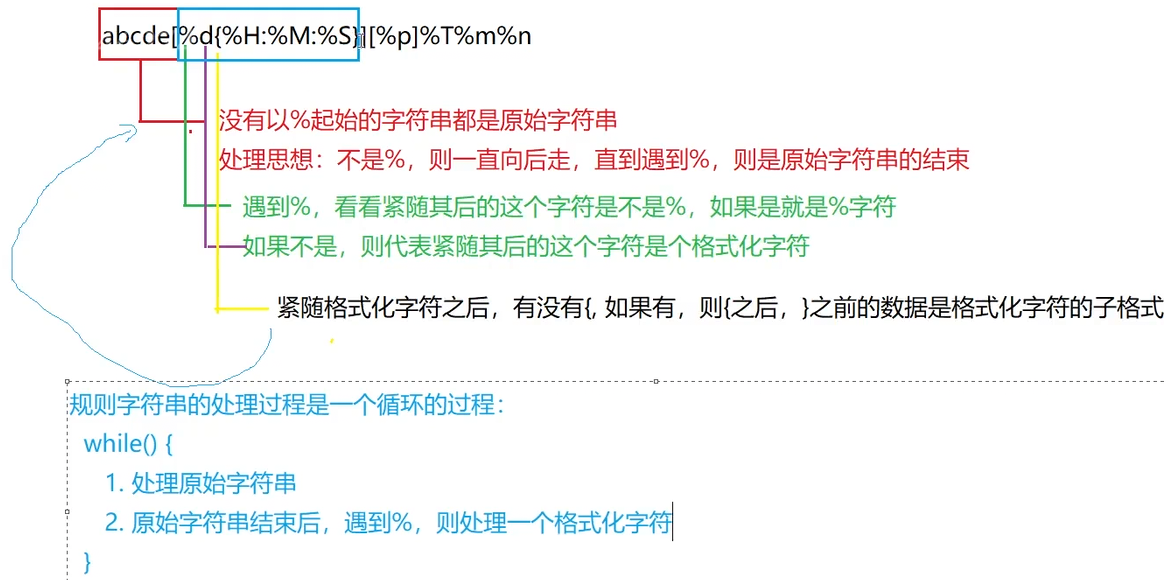
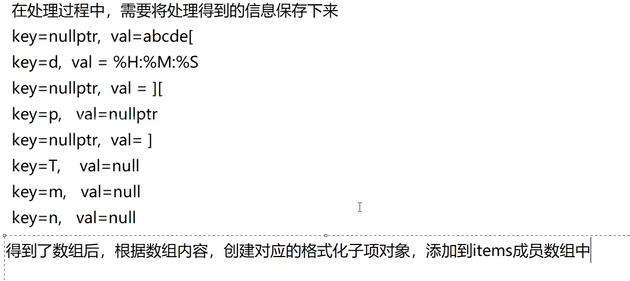
cpp
#include"format.hpp"
#include<iostream>
namespace Logger
{
    bool Formatter::ParsePattern(const std::string& pattern)
    {
        //1、解析格式化模式字符串
        std::vector<std::pair<std::string, std::string>> format_items; // 存储解析后的格式化项,包含key和val
        size_t pos=0;
        std::string key, val;
        bool error_flag = false;
        while(pos < pattern.size())
        {
            // 1. 处理原始字符串 - 判断是否是%,不是就是原始字符

            if (pattern[pos] != '%')
            {
                val.push_back(pattern[pos++]); continue;
            }
            // 能走下来就代表pos位置就是%字符,%%处理称为一个原始%字符
            if (pos + 1 < pattern.size() && pattern[pos + 1] == '%')
            {
                val.push_back('%'); pos += 2; continue;
            }
            // 能走下来,代表%后边是个格式化字符,代表原始字符串处理完毕
            if(!val.empty())
            {
                format_items.push_back(std::make_pair("", val));
                val.clear();
            }
            pos += 1;
            if(pos==pattern.size())//pos指向了字符串的末尾,代表格式化模式字符串处理完毕
            {
                std::cout<<"%后没有对应的格式化字符"<<std::endl;
                return false;
            }
            key = pattern[pos];
            // 这时候pos指向格式化字符后的位置

            pos += 1;

            if (pattern[pos] == '{')
            {
                error_flag = true;
                pos += 1; // 这时候pos指向子规则的起始位置
                while(pos < pattern.size() && pattern[pos] != '}')
                {
                    val.push_back(pattern[pos++]);
                }
                if(pos==pattern.size())//没找到"}",格式时错误的
                {
                    std::cerr<<"子规则"<<val<<"格式错误"<<std::endl;
                    return false;
                }
                pos+=1;//这时候pos指向子规则的结束位置的下一个位置,下一个指向新位置
            }
            format_items.push_back(std::make_pair(key, val));
            key.clear(); val.clear();

        }

        //2、根据不同的格式化项类型创建不同的格式化子项
        for (auto& it : format_items)
        {
            items_.emplace_back(CreateFormatItem(it.first, it.second));
        }
        return true;
    }

}
本期内容先到这里了,喜欢请点个赞谢谢
封面图自取:
