FFT【Fast Fourier Transform】
FFT【Fast Fourier Transform】快速傅里叶变换,快速傅里叶变换(FFT)是计算离散傅里叶变换(DFT)的一种高效算法,它通过分治策略将DFT的计算复杂度从O(N^2)大幅降低到O(NlogN),从而彻底改变了数字信号处理、科学计算等多个领域,被誉为"我们一生中最重要的数值算法"之一。DFT和FFT都是音频 处理、图像分析、振动分析、无线通信等许多领域中数字信号处理的关键技术。
DFT:离散傅里叶变换Discrete Fourier Transform
DFT是一种将复数序列(通常为实数信号的离散样本)转换为另一个复数序列的数学运算。给定一个长度为 N 的复数序列 xn,其离散傅里叶变换 Xk 为:
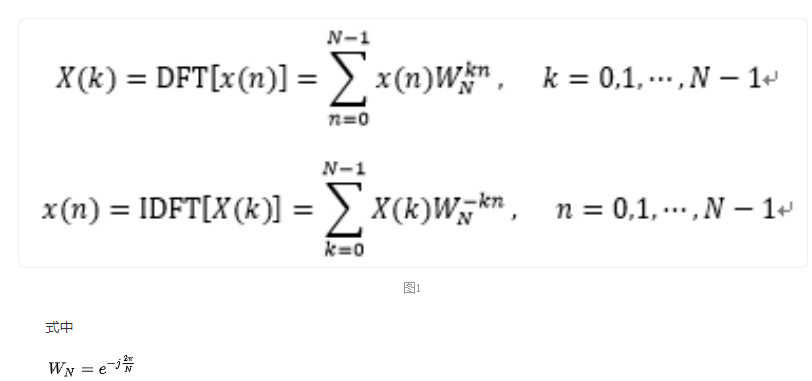
其中,Xk是一个复数序列,表示原始信号在频域的表示,每个Xk对应于信号在第k(取值范围0到N-1)个频率分量上的复数幅度和相位;N为序列的长度,每个xn表示信号在时间域的第n个样本;j为虚数单位,满足j的平方等于-1;为复数指数权重,表示第n个样本在第k个频率分量上的权重,其模为1,相位为。
DFT公式计算了每个频率分量 k 上的复数和,这个和是所有时间域样本 xn 乘以相应的复数指数权重的结果。通过这种方式,DFT将时间域信号转换为频域信号,使得我们可以分析信号的频率成分。
FFT:快速傅里叶变换
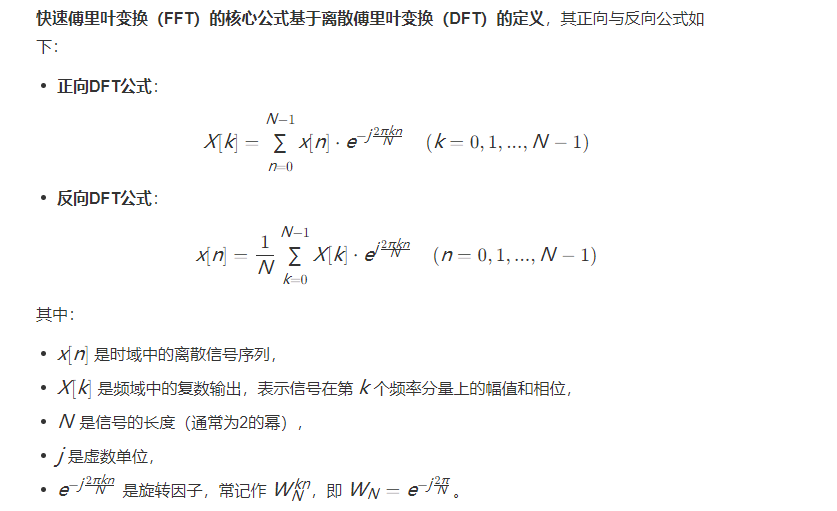
FFT是DFT的快速算法,它利用了DFT的对称性、周期性和冗余性,将DFT的计算复杂度从 O(N²) 降低到 O(NlogN)。FFT的实现有多种算法,其中最常用的是Cooley-Tukey算法。Cooley-Tukey算法基于分而治之的思想,将DFT分解为更小的DFT问题:
分解:将长度为 N 的序列 xn分解为偶数索引部分 xn(n 为偶数)和奇数索引部分 xn(n 为奇数)。
递归:对偶数索引部分和奇数索引部分分别进行DFT,得到和。
合并:利用DFT的性质,将和合并为原始序列的Xk。
新建窗体应用程序FastFourierTransformDemo,将默认的Form1重命名为FormFFT
右键项目FastFourierTransformDemo:管理NuGet程序包,输入 MathNet.Numerics
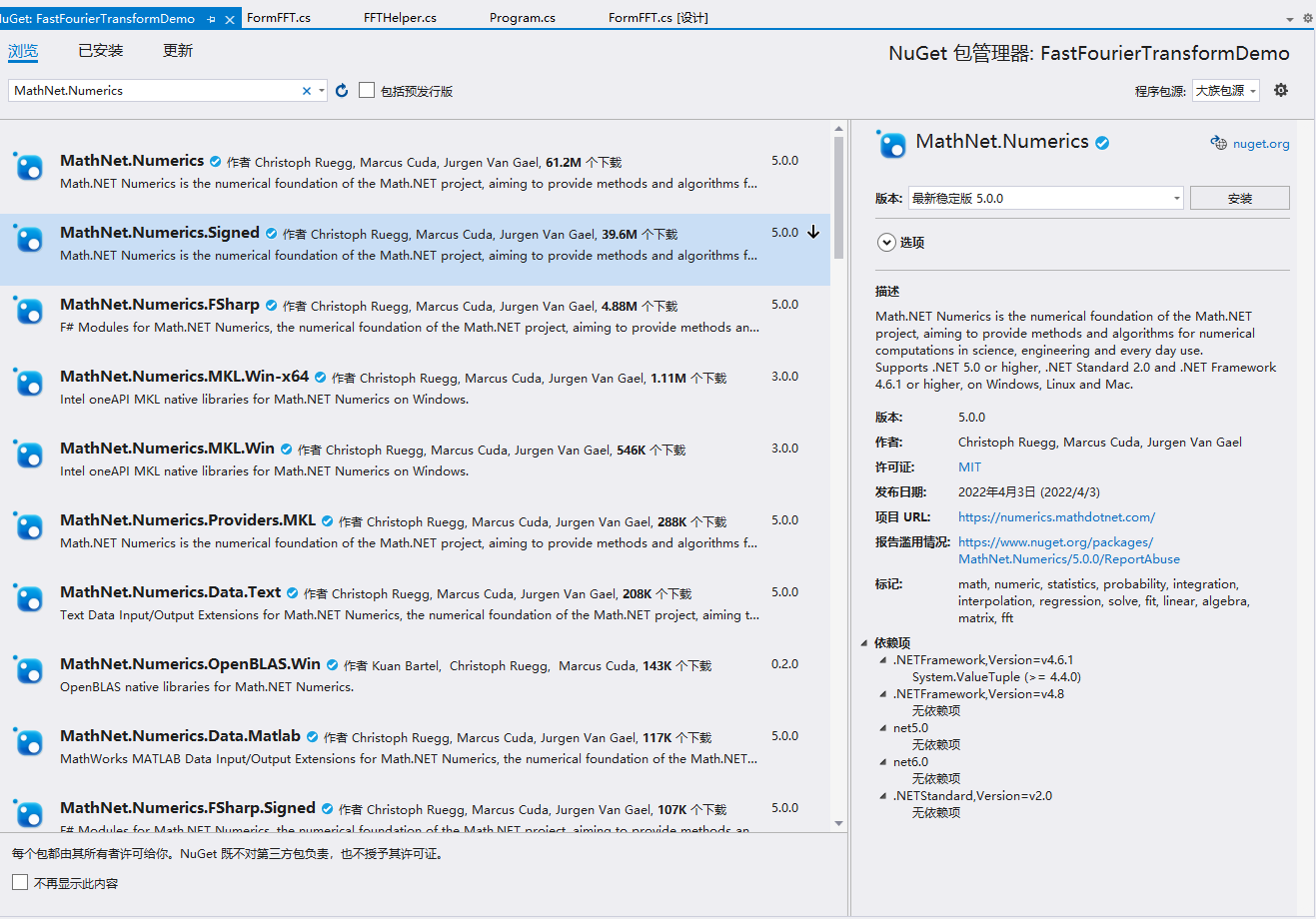
点击 安装,等待MathNet.Numerics安装完毕
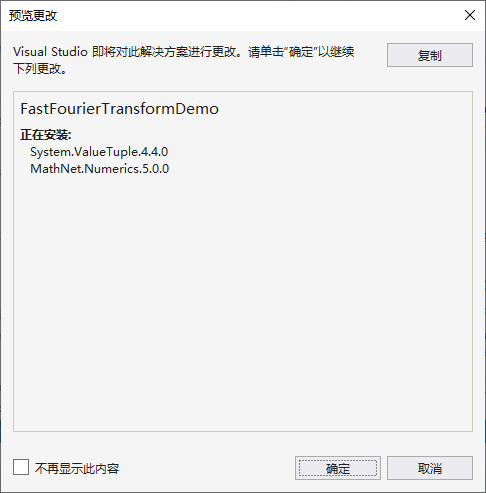
同时添加对System.Numerics的引用【主要使用复数结构体System.Numerics.Complex】。
新建辅助类FFTHelper用于FFT转换和逆变换
文件FFTHelper.cs源程序如下:
cs
using System;
using System.Collections.Generic;
using System.Drawing;
using System.Drawing.Drawing2D;
using System.Linq;
using System.Text;

namespace FastFourierTransformDemo
{
    /// <summary>
    /// 离散傅氏变换的快速算法,处理的信号,适合单周期信号数为2的N次方个,支持变换及逆变换
    /// </summary>
    public class FFTHelper
    {
        /// <summary>
        ///
        /// </summary>
        /// <param name="xreal"></param>
        /// <param name="ximag"></param>
        /// <param name="n"></param>
        private static void bitrp( double[] xreal, double[] ximag, int n )
        {
            // 位反转置换 Bit-reversal Permutation
            int i, j, a, b, p;

            for (i = 1, p = 0; i < n; i *= 2)
            {
                p++;
            }
            for (i = 0; i < n; i++)
            {
                a = i;
                b = 0;
                for (j = 0; j < p; j++)
                {
                    b = b * 2 + a % 2;
                    a = a / 2;
                }
                if (b > i)
                {
                    double t = xreal[i];
                    xreal[i] = xreal[b];
                    xreal[b] = t;

                    t = ximag[i];
                    ximag[i] = ximag[b];
                    ximag[b] = t;
                }
            }
        }

        /// <summary>
        /// 快速傅立叶变换
        /// </summary>
        /// <param name="xreal">实数部分</param>
        /// <returns>变换后的数组值</returns>
        public static double[] FFT( double[] xreal )
        {
            return FFT( xreal, new double[xreal.Length] );
        }

        /// <summary>
        /// 获取FFT变换后的显示图形,需要指定图形的相关参数
        /// </summary>
        /// <param name="xreal">实数部分的值</param>
        /// <param name="width">图形的宽度</param>
        /// <param name="heigh">图形的高度</param>
        /// <param name="lineColor">线条颜色</param>
        /// <returns>等待呈现的图形</returns>
        public static Bitmap GetFFTImage( double[] xreal,int width,int heigh ,Color lineColor)
        {
            double[] ximag = new double[xreal.Length];                // 构造虚对象
            double[] array = FFT( xreal, ximag );                     // 傅立叶变换

            Bitmap bitmap = new Bitmap( width, heigh );               // 构造图形
            Graphics g = Graphics.FromImage( bitmap );
            g.SmoothingMode = SmoothingMode.HighQuality;
            g.TextRenderingHint = System.Drawing.Text.TextRenderingHint.ClearTypeGridFit;
            g.Clear( Color.White );

            Pen pen_Line = new Pen( Color.DimGray, 1 );               // 定义画笔资源
            Pen pen_Dash = new Pen( Color.LightGray, 1 );
            Pen pen_Fourier = new Pen( lineColor, 1 );
            pen_Dash.DashPattern = new float[2] { 5, 5 };
            pen_Dash.DashStyle = DashStyle.Custom;

            Font Font_Normal = SystemFonts.DefaultFont;               // 定义字体资源

            StringFormat sf_right = new StringFormat( );
            sf_right.Alignment = StringAlignment.Far;
            sf_right.LineAlignment = StringAlignment.Center;

            StringFormat sf_center = new StringFormat( );
            sf_center.LineAlignment = StringAlignment.Center;
            sf_center.Alignment = StringAlignment.Center;

            int padding_top = 20;
            int padding_left = 49;
            int padding_right = 49;
            int padding_down = 30;
            int sections = 9;

            // g.DrawLine( pen_Line, new Point( padding_left, padding_top ), new Point( padding_left, heigh - padding_down ) );

            float paint_height = heigh - padding_top - padding_down;
            float paint_width = width - padding_left - padding_right;

            if (array.Length > 1)
            {
                double Max = array.Max( );
                double Min = array.Min( );

                Max = Max - Min > 1 ? Max : Min + 1;
                double Length = Max - Min;

                //提取峰值
                List<float> Peaks = new List<float>( );
                if (array.Length >= 2)
                {
                    if (array[0] > array[1])
                    {
                        Peaks.Add( 0 );
                    }

                    for (int i = 1; i < array.Length - 2; i++)
                    {
                        if (array[i - 1] < array[i] && array[i] > array[i + 1])
                        {
                            Peaks.Add( i );
                        }
                    }

                    if (array[array.Length - 1] > array[array.Length - 2])
                    {
                        Peaks.Add( array.Length - 1 );
                    }
                }


                //高400
                for (int i = 0; i < sections; i++)
                {
                    RectangleF rec = new RectangleF( -10f, (float)i / (sections - 1) * paint_height, padding_left + 8f, 20f );
                    double n = (sections - 1 - i) * Length / (sections - 1) + Min;
                    g.DrawString( n.ToString( "F1" ), Font_Normal, Brushes.Black, rec, sf_right );
                    g.DrawLine(
                        pen_Dash, padding_left - 3, paint_height * i / (sections - 1) + padding_top,
                        width - padding_right, paint_height * i / (sections - 1) + padding_top );
                }

                float intervalX = paint_width / array.Length;                        // 横向间隔

                for (int i = 0; i < Peaks.Count; i++)
                {
                    if (array[(int)Peaks[i]] * 200 / Max > 1)
                    {
                        g.DrawLine( pen_Dash, Peaks[i] * intervalX + padding_left + 1, padding_top, Peaks[i] * intervalX + padding_left + 1, heigh - padding_down );
                        RectangleF rec = new RectangleF( Peaks[i] * intervalX + padding_left + 1 - 40, heigh - padding_down + 1, 80f, 20f );

                        g.DrawString( Peaks[i].ToString( ), Font_Normal, Brushes.DeepPink, rec, sf_center );
                    }
                }

                for (int i = 0; i < array.Length; i++)
                {
                    PointF point = new PointF( );
                    point.X = i * intervalX + padding_left + 1;
                    point.Y = (float)(paint_height - (array[i] - Min) * paint_height / Length + padding_top);

                    PointF point2 = new PointF( );
                    point2.X = i * intervalX + padding_left + 1;
                    point2.Y = (float)(paint_height - (Min - Min) * paint_height / Length + padding_top);


                    g.DrawLine( Pens.Tomato, point, point2 );
                }
            }
            else
            {
                double Max = 100;
                double Min = 0;
                double Length = Max - Min;
                //高400
                for (int i = 0; i < sections; i++)
                {
                    RectangleF rec = new RectangleF( -10f, (float)i / (sections - 1) * paint_height, padding_left + 8f, 20f );
                    double n = (sections - 1 - i) * Length / (sections - 1) + Min;
                    g.DrawString( n.ToString( "F1" ), Font_Normal, Brushes.Black, rec, sf_right );
                    g.DrawLine(
                        pen_Dash, padding_left - 3, paint_height * i / (sections - 1) + padding_top,
                        width - padding_right, paint_height * i / (sections - 1) + padding_top );
                }
            }


            pen_Dash.Dispose( );
            pen_Line.Dispose( );
            pen_Fourier.Dispose( );
            Font_Normal.Dispose( );
            sf_right.Dispose( );
            sf_center.Dispose( );
            g.Dispose( );
            return bitmap;
        }

        /// <summary>
        /// 快速傅立叶变换
        /// </summary>
        /// <param name="xreal">实数部分,数组长度最好为2的n次方</param>
        /// <param name="ximag">虚数部分,数组长度最好为2的n次方</param>
        /// <returns>变换后的数组值</returns>
        public static double[] FFT( double[] xreal, double[] ximag )
        {
            //n值为2的N次方
            int n = 2;
            while (n <= xreal.Length)
            {
                n *= 2;
            }
            n /= 2;

            // 快速傅立叶变换,将复数 x 变换后仍保存在 x 中,xreal, ximag 分别是 x 的实部和虚部
            double[] wreal = new double[n / 2];
            double[] wimag = new double[n / 2];
            double treal, timag, ureal, uimag, arg;
            int m, k, j, t, index1, index2;

            bitrp( xreal, ximag, n );

            // 计算 1 的前 n / 2 个 n 次方根的共轭复数 W'j = wreal [j] + i * wimag [j] , j = 0, 1, ... , n / 2 - 1
            arg = (-2 * Math.PI / n);
            treal = Math.Cos( arg );
            timag = Math.Sin( arg );
            wreal[0] = 1.0f;
            wimag[0] = 0.0f;
            for (j = 1; j < n / 2; j++)
            {
                wreal[j] = wreal[j - 1] * treal - wimag[j - 1] * timag;
                wimag[j] = wreal[j - 1] * timag + wimag[j - 1] * treal;
            }

            for (m = 2; m <= n; m *= 2)
            {
                for (k = 0; k < n; k += m)
                {
                    for (j = 0; j < m / 2; j++)
                    {
                        index1 = k + j;
                        index2 = index1 + m / 2;
                        t = n * j / m;    // 旋转因子 w 的实部在 wreal [] 中的下标为 t
                        treal = wreal[t] * xreal[index2] - wimag[t] * ximag[index2];
                        timag = wreal[t] * ximag[index2] + wimag[t] * xreal[index2];
                        ureal = xreal[index1];
                        uimag = ximag[index1];
                        xreal[index1] = ureal + treal;
                        ximag[index1] = uimag + timag;
                        xreal[index2] = ureal - treal;
                        ximag[index2] = uimag - timag;
                    }
                }
            }

            double[] result = new double[n];
            for (int i = 0; i < result.Length; i++)
            {
                result[i] = Math.Sqrt( Math.Pow( xreal[i], 2 ) + Math.Pow( ximag[i], 2 ) );
            }

            return result;
        }


        /// <summary>
        /// 快速傅立叶变换的逆变换
        /// </summary>
        /// <param name="xreal">实数部分,数组长度最好为2的n次方</param>
        /// <param name="ximag">虚数部分,数组长度最好为2的n次方</param>
        /// <returns>2的多少次方</returns>
        public static int IFFT( double[] xreal, double[] ximag )
        {
            //n值为2的N次方
            int n = 2;
            while (n <= xreal.Length)
            {
                n *= 2;
            }
            n /= 2;

            // 快速傅立叶逆变换
            double[] wreal = new double[n / 2];
            double[] wimag = new double[n / 2];
            double treal, timag, ureal, uimag, arg;
            int m, k, j, t, index1, index2;

            bitrp( xreal, ximag, n );

            // 计算 1 的前 n / 2 个 n 次方根 Wj = wreal [j] + i * wimag [j] , j = 0, 1, ... , n / 2 - 1
            arg = (2 * Math.PI / n);
            treal = (Math.Cos( arg ));
            timag = (Math.Sin( arg ));
            wreal[0] = 1.0f;
            wimag[0] = 0.0f;
            for (j = 1; j < n / 2; j++)
            {
                wreal[j] = wreal[j - 1] * treal - wimag[j - 1] * timag;
                wimag[j] = wreal[j - 1] * timag + wimag[j - 1] * treal;
            }

            for (m = 2; m <= n; m *= 2)
            {
                for (k = 0; k < n; k += m)
                {
                    for (j = 0; j < m / 2; j++)
                    {
                        index1 = k + j;
                        index2 = index1 + m / 2;
                        t = n * j / m;    // 旋转因子 w 的实部在 wreal [] 中的下标为 t
                        treal = wreal[t] * xreal[index2] - wimag[t] * ximag[index2];
                        timag = wreal[t] * ximag[index2] + wimag[t] * xreal[index2];
                        ureal = xreal[index1];
                        uimag = ximag[index1];
                        xreal[index1] = ureal + treal;
                        ximag[index1] = uimag + timag;
                        xreal[index2] = ureal - treal;
                        ximag[index2] = uimag - timag;
                    }
                }
            }

            for (j = 0; j < n; j++)
            {
                xreal[j] /= n;
                ximag[j] /= n;
            }

            return n;
        }
    }
}
窗体FormFFT设计器如下:
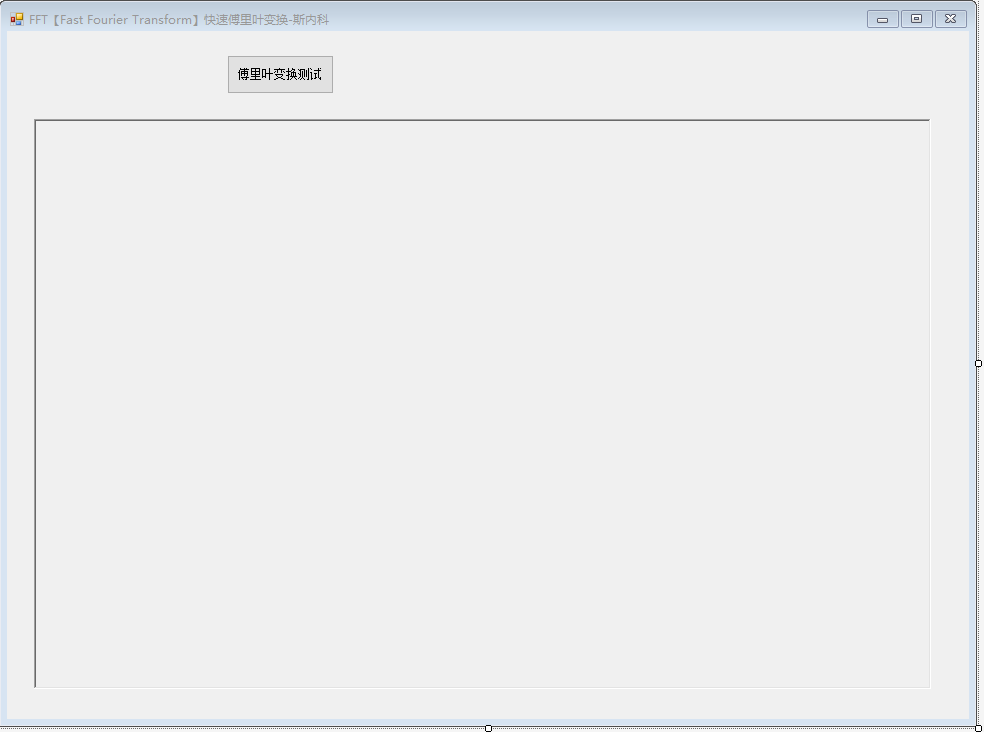
窗体FormFFT设计器程序如下:
FormFFT.Designer.cs文件
cs
namespace FastFourierTransformDemo
{
    partial class FormFFT
    {
        /// <summary>
        /// 必需的设计器变量。
        /// </summary>
        private System.ComponentModel.IContainer components = null;

        /// <summary>
        /// 清理所有正在使用的资源。
        /// </summary>
        /// <param name="disposing">如果应释放托管资源,为 true;否则为 false。</param>
        protected override void Dispose(bool disposing)
        {
            if (disposing && (components != null))
            {
                components.Dispose();
            }
            base.Dispose(disposing);
        }

        #region Windows 窗体设计器生成的代码

        /// <summary>
        /// 设计器支持所需的方法 - 不要修改
        /// 使用代码编辑器修改此方法的内容。
        /// </summary>
        private void InitializeComponent()
        {
            this.btnTest = new System.Windows.Forms.Button();
            this.rtxtDisplay = new System.Windows.Forms.RichTextBox();
            this.SuspendLayout();
            //
            // btnTest
            //
            this.btnTest.Location = new System.Drawing.Point(220, 24);
            this.btnTest.Name = "btnTest";
            this.btnTest.Size = new System.Drawing.Size(107, 39);
            this.btnTest.TabIndex = 0;
            this.btnTest.Text = "傅里叶变换测试";
            this.btnTest.UseVisualStyleBackColor = true;
            this.btnTest.Click += new System.EventHandler(this.btnTest_Click);
            //
            // rtxtDisplay
            //
            this.rtxtDisplay.Location = new System.Drawing.Point(27, 88);
            this.rtxtDisplay.Name = "rtxtDisplay";
            this.rtxtDisplay.ReadOnly = true;
            this.rtxtDisplay.Size = new System.Drawing.Size(897, 570);
            this.rtxtDisplay.TabIndex = 1;
            this.rtxtDisplay.Text = "";
            //
            // FormFFT
            //
            this.AutoScaleDimensions = new System.Drawing.SizeF(6F, 12F);
            this.AutoScaleMode = System.Windows.Forms.AutoScaleMode.Font;
            this.ClientSize = new System.Drawing.Size(962, 688);
            this.Controls.Add(this.rtxtDisplay);
            this.Controls.Add(this.btnTest);
            this.Name = "FormFFT";
            this.Text = "FFT【Fast Fourier Transform】快速傅里叶变换-斯内科";
            this.ResumeLayout(false);

        }

        #endregion

        private System.Windows.Forms.Button btnTest;
        private System.Windows.Forms.RichTextBox rtxtDisplay;
    }
}
窗体FormFFT测试程序如下
文件FormFFT.cs
cs
using System;
using System.Collections.Generic;
using System.ComponentModel;
using System.Data;
using System.Drawing;
using System.Linq;
using System.Text;
using System.Threading.Tasks;
using System.Windows.Forms;

namespace FastFourierTransformDemo
{
    public partial class FormFFT : Form
    {
        public FormFFT()
        {
            InitializeComponent();
        }

        /// <summary>
		/// 显示消息
		/// </summary>
		/// <param name="addContent"></param>
		private void DisplayContent(string addContent)
        {
            if (!IsHandleCreated)
            {
                return;
            }
            this.BeginInvoke(new MethodInvoker(delegate ()
            {
                if (this.rtxtDisplay.TextLength >= 10240)
                {
                    this.rtxtDisplay.Clear();
                }
                this.rtxtDisplay.AppendText($"{DateTime.Now.ToString("yyyy-MM-dd HH:mm:ss.fff")}->{addContent}\n");
                this.rtxtDisplay.ScrollToCaret();
            }));
        }

        private void btnTest_Click(object sender, EventArgs e)
        {
            DisplayContent($"------演示使用FFTHelper类进行FFT转换,复数数组的长度最好是2的N次方------");
            double[] realData = new double[] { 1, 2, 3, 4, 5, 6, 7, 8 };//实数部分
            double[] imagData = new double[realData.Length]; // 虚数部分通常初始化为0或根据需要设置。
            double[] fftData = FFTHelper.FFT(realData, imagData);
            DisplayContent($"长度:【{fftData.Length}】.\n快速傅里叶变换后的数据为【{string.Join(",\n", fftData)}】.");
            int number = FFTHelper.IFFT(fftData, new double[fftData.Length]);
            DisplayContent($"快速傅里叶的逆变换长度:【{number}】.\n逆变换后的数据为【{string.Join(",\n", fftData)}】");
            DisplayContent($"------演示复数数组的FFT转换,复数数组的长度最好是2的N次方------");
            //定义一个复数数组,数组的长度最好是2的N次方
            System.Numerics.Complex[] samples = new System.Numerics.Complex[8]
            {
                new System.Numerics.Complex(1, 0),
                new System.Numerics.Complex(2, 0),
                new System.Numerics.Complex(3, 0),
                new System.Numerics.Complex(4, 0),
                new System.Numerics.Complex(5, 0),
                new System.Numerics.Complex(6, 0),
                new System.Numerics.Complex(7, 0),
                new System.Numerics.Complex(8, 0),
            };

            // 正向傅里叶变换 FFT(原地变换,结果覆盖原数组)
            MathNet.Numerics.IntegralTransforms.Fourier.Forward(samples, MathNet.Numerics.IntegralTransforms.FourierOptions.Default);
            DisplayContent($"长度:【{samples.Length}】.\n正向傅里叶变换后的数据为【{string.Join(",\n", samples)}】.");
            // 逆变换
            MathNet.Numerics.IntegralTransforms.Fourier.Inverse(samples, MathNet.Numerics.IntegralTransforms.FourierOptions.Default);
            DisplayContent($"长度:【{samples.Length}】.\n逆傅里叶变换后的数据为【{string.Join(",\n", samples)}】.");

            DisplayContent($"------演示实数信号的 FFT(推荐用于音频、传感器等)注意padded数组的长度为初始数组长度+2------");
            //实数信号的 FFT(推荐用于音频、传感器等)
            double[] realSamples = { 1.0, 2.0, 3.0, 4.0, 5, 6, 7, 8 };

            // 调整长度以满足 ForwardReal 要求(假设长度为偶数)
            int n = realSamples.Length;
            double[] padded = new double[n + 2];
            Array.Copy(realSamples, padded, n);

            // 直接处理实数数组,内部自动优化
            MathNet.Numerics.IntegralTransforms.Fourier.ForwardReal(padded, realSamples.Length);

            // 提取结果(前 n/2 + 1 个有效频点)
            for (int i = 0; i <= n / 2; i++)
            {
                System.Numerics.Complex c = new System.Numerics.Complex(padded[2 * i], padded[2 * i + 1]);
                DisplayContent($"    提取结果-Frequency bin {i}: {c}");
            }
            DisplayContent($"ForwardReal长度:【{padded.Length}】.\n正向傅里叶变换后的数据为【{string.Join(",\n", padded)}】.");

            // 逆变换
            MathNet.Numerics.IntegralTransforms.Fourier.InverseReal(padded, realSamples.Length);
            DisplayContent($"InverseReal长度:【{padded.Length}】.\n逆傅里叶变换后的数据为【{string.Join(",\n", padded)}】.");
        }
    }
}
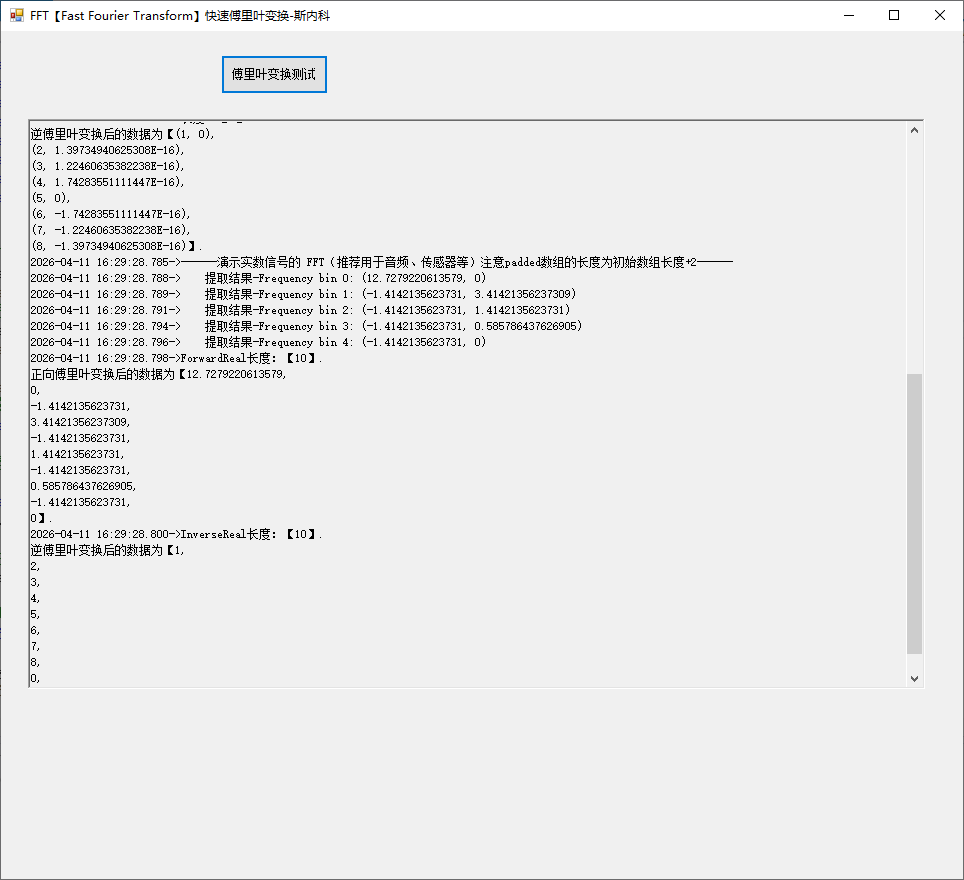
运行如图: