Langchain入门到实战开发智能体教程(LLM+RAG+OpenAI+Agent)下
9 对话提示词工程
上节课我们通过示例选择器,将案例直接嵌入到单一提示词中实现小样本学习。而当前主流大模型均支持多轮对话,能够依据历史聊天记录学习问答模式与回答风格。基于这一特性,我们可以将示例案例直接嵌入多轮对话历史中,让模型参考历史对话形式生成回复,这便是对话式提示词工程。
本节课将重点学习如何在多轮对话中嵌入案例,同时结合相似案例检索能力,将匹配的示例加入历史对话作为参考,引导模型按照预设范式输出结果。整体仍基于小样本提示模板实现,只是将传统提示结构替换为对话消息格式来完成。
9.1 固定示例
最基本(也是常见)的小样本提示技术是使用固定提示示例。这样您就可以选择一条链条,对其进行评估,并避免担心生产中的额外移动部件。
模板的基本组件是:
- examples :要包含在最终提示中的字典示例列表。
- example_prompt :通过其 format_messages 方法将每个示例转换为 1 条或多条消息。一个常见的示例是将每个示例转换为一条人工消息和一条人工智能消息响应,或者一条人工消息后跟一条函数调用消息。
python
from langchain_core.prompts import (
    ChatPromptTemplate,
    FewShotChatMessagePromptTemplate,
)

examples = [
    {"input": "2+2", "output": "4"},
    {"input": "2+3", "output": "5"},
]组装成少示例的提示模板。
python
# This is a prompt template used to format each individual example.
example_prompt = ChatPromptTemplate.from_messages(
    [
        ("human", "{input}"),
        ("ai", "{output}"),
    ]
)
few_shot_prompt = FewShotChatMessagePromptTemplate(
    example_prompt=example_prompt,
    examples=examples,
)

print(few_shot_prompt.format())
输出
python
Human: 2+2
AI: 4
Human: 2+3
AI: 5
python
#最后,组装最终的提示并将其与模型一起使用。

final_prompt = ChatPromptTemplate.from_messages(
    [
        ("system", "你是一位非常厉害的数学天才。"),
        few_shot_prompt,
        ("human", "{input}"),
    ]
)
python
from langchain_core.output_parsers import StrOutputParser
from langchain_core.prompts import ChatPromptTemplate
from langchain_community.chat_models import ChatZhipuAI
import os
zhipuai_api_key = os.getenv("ZHIPU_API_KEY")

chat = ChatZhipuAI(
    api_key=zhipuai_api_key,
    model="glm-4-flash"
)

output_parser = StrOutputParser()

chain = final_prompt | chat | output_parser

chain.invoke({"input":"3的平方是多少?"})
输出
python
'3的平方是9。这意味着3乘以3等于9。用数学表达式表示就是:3^2 = 9。'没有提示词的提问
python
chat.invoke(input="3的平方是多少?")输出
python
AIMessage(content='3的平方是9。平方意味着一个数乘以它自己,所以3乘以3等于9。', additional_kwargs={}, response_metadata={'token_usage': {'completion_tokens': 25, 'prompt_tokens': 10, 'total_tokens': 35}, 'model_name': 'glm-4-flash', 'finish_reason': 'stop'}, id='lc_run--019d8065-e6f8-78f0-abb8-ebdb1dd31ea7-0', tool_calls=[], invalid_tool_calls=[])9.2 动态几次提示
有时您可能希望根据输入来限制显示哪些示例。为此,您可以将 examples 替换为 example_selector 。其他组件与上面相同!回顾一下,动态几次提示模板将如下所示:
-
example_selector :负责为给定输入选择少数样本(以及它们返回的顺序)。它们实现了 BaseExampleSelector 接口。一个常见的例子是向量存储支持的 SemanticSimilarityExampleSelector
-
example_prompt :通过其 format_messages 方法将每个示例转换为 1 条或多条消息。一个常见的示例是将每个示例转换为一条人工消息和一条人工智能消息响应,或者一条人工消息后跟一条函数调用消息。
这些可以再次与其他消息和聊天模板组合以组合您的最终提示。
python
from langchain_huggingface import HuggingFaceEmbeddings

embeddings_path = "H:\\AI\\Agent\\models\\bge-large-zh-v1.5"
embeddings = HuggingFaceEmbeddings(model_name=embeddings_path)


from langchain_core.example_selectors import SemanticSimilarityExampleSelector
from langchain_community.vectorstores import Chroma
examples = [
    {"input": "2+2", "output": "4"},
    {"input": "2+3", "output": "5"},
    {"input": "2+4", "output": "6"},
    {"input": "牛对月亮说了什么?", "output": "什么都没有"},
    {
        "input": "给我写一首关于月亮的五言诗",
        "output": "月儿挂枝头,清辉洒人间。 银盘如明镜,照亮夜归人。 思绪随风舞,共赏中秋圆。",
    },
]

to_vectorize = [" ".join(example.values()) for example in examples]
vectorstore = Chroma.from_texts(to_vectorize, embeddings, metadatas=examples)

vectorstore = Chroma.from_texts(to_vectorize, embeddings, metadatas=examples)

example_selector = SemanticSimilarityExampleSelector(
    vectorstore=vectorstore,
    k=2,
)

# The prompt template will load examples by passing the input do the `select_examples` method
example_selector.select_examples({"input": "对牛弹琴"})
输出
python
[{'output': '什么都没有', 'input': '牛对月亮说了什么?'}, {'output': '4', 'input': '2+2'}]
python
from langchain_core.prompts import (
    ChatPromptTemplate,
    FewShotChatMessagePromptTemplate,
)

# Define the few-shot prompt.
few_shot_prompt = FewShotChatMessagePromptTemplate(
    # The input variables select the values to pass to the example_selector
    input_variables=["input"],
    example_selector=example_selector,
    # Define how each example will be formatted.
    # In this case, each example will become 2 messages:
    # 1 human, and 1 AI
    example_prompt=ChatPromptTemplate.from_messages(
        [("human", "{input}"), ("ai", "{output}")]
    ),
)


few_shot_prompt.format(input="What's 3+3?")
输出
python
'Human: 2+3\nAI: 5\nHuman: 2+4\nAI: 6'为什么输出没有 What's 3+3?
原因:few_shot_prompt 里面根本没有 {input} 这个占位符!它的结构只有:Human: {input} AI: {output},这是给示例用的,不是给你的问题用的
总结:few_shot_prompt 只管打印例子,不管你的问题。
你传不传 input=,它都只输出所有例子。(所以说这句few_shot_prompt.format(input="What's 3+3?")就是多余)
python
final_prompt = ChatPromptTemplate.from_messages(
    [
        ("system", "你是一位非常厉害的数学天才。"),
        few_shot_prompt,
        ("human", "{input}"),
    ]
)

print(final_prompt.format(input="3+5是多少?"))
输出
python
System: 你是一位非常厉害的数学天才。
Human: 2+3
AI: 5
Human: 2+4
AI: 6
Human: 3+5是多少?
python
from langchain_core.output_parsers import StrOutputParser
from langchain_core.prompts import ChatPromptTemplate
from langchain_community.chat_models import ChatZhipuAI
import os
ZHIPU_API_KEY  = os.getenv("ZHIPU_API_KEY")
chat = ChatZhipuAI(
    api_key=os.getenv("ZHIPU_API_KEY"),
    model="glm-4-flash"
)

output_parser = StrOutputParser()

chain = final_prompt | chat | output_parser

chain.invoke({"input":"3+5是多少?"})
输出
python
'3+5等于8。'10 提示词里模板中的模板
LangChain提供了不同类型的 MessagePromptTemplate 。最常用的是 AIMessagePromptTemplate 、 SystemMessagePromptTemplate 和 HumanMessagePromptTemplate ,它们分别创建 AI 消息、系统消息和人工消息。
但是,如果聊天模型支持使用任意角色获取聊天消息,则可以使用 ChatMessagePromptTemplate ,它允许用户指定角色名称。
python
from langchain_core.prompts import ChatMessagePromptTemplate

prompt = "愿{subject}与你同在"

chat_message_prompt = ChatMessagePromptTemplate.from_template(
    role="Jedi", template=prompt
)
chat_message_prompt.format(subject="上帝")
输出
python
from langchain_core.prompts import ChatMessagePromptTemplate

prompt = "愿{subject}与你同在"

chat_message_prompt = ChatMessagePromptTemplate.from_template(
    role="Jedi", template=prompt
)
chat_message_prompt.format(subject="上帝")
10.1 多重模板(模板中的模板)
LangChain 还提供了 MessagesPlaceholder ,它使您可以完全控制格式化期间要呈现的消息。当您不确定消息提示模板应使用什么角色或希望在格式化期间插入消息列表时,这会很有用。
python
from langchain_core.prompts import (
    ChatPromptTemplate,
    HumanMessagePromptTemplate,
    MessagesPlaceholder,
)

human_prompt = "用 {word_count} 字总结我们迄今为止的对话。"
human_message_template = HumanMessagePromptTemplate.from_template(human_prompt)

chat_prompt = ChatPromptTemplate.from_messages(
    [MessagesPlaceholder(variable_name="conversation"), human_message_template]
)


from langchain_core.messages import AIMessage, HumanMessage

# 作为对话的模板,给大模型来做总结
human_message = HumanMessage(content="学习编程最好的方法是什么?")
ai_message = AIMessage(
    content="""\
1. 选择编程语言:决定您想要学习的编程语言。

2. 从基础开始:熟悉变量、数据类型和控制结构等基本编程概念。

3. 练习、练习、再练习:学习编程的最好方法是通过实践经验\
"""
)

chat_prompt.format_prompt(
    conversation=[human_message, ai_message], word_count="10"
).to_messages()
输出
python
[HumanMessage(content='学习编程最好的方法是什么?'),
 AIMessage(content='1. 选择编程语言:决定您想要学习的编程语言。\n\n2. 从基础开始:熟悉变量、数据类型和控制结构等基本编程概念。\n\n3. 练习、练习、再练习:学习编程的最好方法是通过实践经验'),
 HumanMessage(content='用 10 字总结我们迄今为止的对话。')]
python
from langchain_core.output_parsers import StrOutputParser
from langchain_core.prompts import ChatPromptTemplate
from langchain_community.chat_models import ChatZhipuAI
import os
ZHIPU_API_KEY = os.getenv("ZHIPU_API_KEY")

chat = ChatZhipuAI(
    model='glm-4-flash',
    api_key=ZHIPU_API_KEY,
)

output_parser = StrOutputParser()

chain = chat_prompt | chat | output_parser

chain.invoke({"word_count":"10","conversation":[human_message, ai_message]})
输出
(效果一般)
python
'人工智能交流学习经验。'
'编程学习交流探讨'
补充:对话模板参数传递
一句话:模板定义变量名 → format_prompt 传同名参数 → 自动匹配填充 → 生成最终消息列表
分步拆解 + 参数传递明细
- 定义总结话术模板
python
human_prompt = "用 {word_count} 字总结我们迄今为止的对话。"
human_message_template = HumanMessagePromptTemplate.from_template(human_prompt)- 声明变量:
word_count - 作用:等待外部传入数字
- 定义整体对话模板
python
chat_prompt = ChatPromptTemplate.from_messages(
    [
        MessagesPlaceholder(variable_name="conversation"),
        human_message_template
    ]
)这里明确声明了两个需要传入的参数名:
conversation:历史消息列表word_count:总结字数
- 准备历史对话数据
python
human_message = HumanMessage(content="学习编程最好的方法是什么?")
ai_message = AIMessage(content="1. 选择编程语言...")这两段消息,待会儿要传给 conversation
- 关键:参数传递入口
python
chat_prompt.format_prompt(
    conversation = [human_message, ai_message],
    word_count    = "10"
).to_messages()
参数匹配规则(核心)
- 参数名 必须和模板里的名字完全一致
- 顺序无所谓,LangChain 按名字自动匹配
| 你传入的参数 | 匹配模板中的位置 |
|---|---|
conversation |
MessagesPlaceholder(variable_name="conversation") |
word_count |
{word_count} |
最终生成的内容(真实结构)
python
[
    HumanMessage(content="学习编程最好的方法是什么?"),
    AIMessage(content="1. 选择编程语言:决定您想要学习的编程语言..."),
    HumanMessage(content="用 10 字总结我们迄今为止的对话。")
]
LangChain 对话模板参数传递规则
- 模板通过
{变量名}或variable_name="变量名"声明需要的参数 - 在
format_prompt(变量名=值)中传入同名参数 - 系统自动按名称匹配,与参数顺序无关
- 最终将历史消息、用户指令拼接成完整对话结构
10.2 部分提示模板
与其他方法一样,"部分"提示模板是有意义的 - 例如传入所需值的子集,以创建一个仅需要剩余值子集的新提示模板。
LangChain 通过两种方式支持这一点:
- 使用字符串值进行部分格式化。
- 使用返回字符串值的函数进行部分格式化。
这两种不同的方式支持不同的用例。在下面的示例中,我们将回顾这两个用例的动机以及如何在 LangChain 中实现这一点。
部分带字符串
想要部分提示模板的一个常见用例是,如果您先于其他变量获取某些变量。例如,假设您有一个提示模板需要两个变量 foo 和 baz 。如果您在链的早期获得 foo 值,但稍后获得 baz 值,那么等到两个变量都位于同一位置才能将它们传递给提示模板。相反,您可以使用 foo 值部分化提示模板,然后传递部分化的提示模板并直接使用它。下面是执行此操作的示例:
python
from langchain_core.prompts import PromptTemplate

prompt = PromptTemplate.from_template("{foo}{bar}")
# 部分模板参数传入
partial_prompt = prompt.partial(foo="foo")
print(partial_prompt.format(bar="baz"))
输出
python
foobazpartial_variables 作用:局部变量(预填充变量),用于提前给模板中的某些变量固定赋值。
python
#您还可以仅使用部分变量初始化提示。
#
prompt = PromptTemplate(
    template="{foo}{bar}", input_variables=["bar"], partial_variables={"foo": "foo"}
)
print(prompt.format(bar="baz"))
输出
python
foobaz部分函数
另一个常见用途是对函数进行部分处理。这样做的用例是当您有一个变量时,您知道您总是希望以通用方式获取该变量。一个典型的例子是日期或时间。想象一下,您有一个提示,您总是希望获得当前日期。您无法在提示中对其进行硬编码,并且将其与其他输入变量一起传递有点烦人。在这种情况下,能够使用始终返回当前日期的函数来部分提示是非常方便的。
python
from datetime import datetime


def _get_datetime():
    now = datetime.now()
    return now.strftime("%m/%d/%Y")
python
prompt = PromptTemplate(
    template="给我讲一个关于 {date} 天的 {adjective} 故事",
    input_variables=["adjective", "date"],
)
partial_prompt = prompt.partial(date=_get_datetime)
print(partial_prompt.format(adjective="有趣"))
输出
python
给我讲一个关于 03/08/2024 天的 有趣 故事
python
prompt = PromptTemplate(
    template="给我讲一个关于 {date} 天的 {adjective} 故事",
    input_variables=["adjective"],
    partial_variables={"date": _get_datetime},
)
print(prompt.format(adjective="funny"))
输出
python
给我讲一个关于 04/12/2026 天的 funny 故事11 管道提示词模板
管道提示词可以将多个提示组合在一起。当您想要重复使用部分提示时,这会很有用。这可以通过 PipelinePrompt 来完成。
PipelinePrompt 由两个主要部分组成:
- 最终提示:返回的最终提示
- 管道提示:元组列表,由字符串名称和提示模板组成。每个提示模板将被格式化,然后作为具有相同名称的变量传递到未来的提示模板。
插播:
- LangChain 已经把 PipelinePromptTemplate 移除了!
- 现在官方推荐用 LCEL 管道链式调用 代替 PipelinePromptTemplate
python
from langchain_core.prompts import PromptTemplate

full_template = """{introduction}

{example}

{start}"""
full_prompt = PromptTemplate.from_template(full_template)
print(full_prompt)

introduction_template = """你正在冒充{person}。"""
introduction_prompt = PromptTemplate.from_template(introduction_template)

example_template = """
下面是一个交互示例:

Q:{example_q}
A:{example_a}"""
example_prompt = PromptTemplate.from_template(example_template)

start_template = """现在正式开始!

Q:{input}
A:"""
start_prompt = PromptTemplate.from_template(start_template)
python
from langchain_core.runnables import RunnableParallel,RunnableLambda

# ======================
# 2. LCEL 并行组装所有子提示
# ======================
composed = RunnableParallel(
    introduction=introduction_prompt,
    example=example_prompt,
    start=start_prompt
)

print(composed)
# ======================
# 3. 核心修复:用 RunnableLambda 提取 .text 并拼接
def format_and_strip_text(inputs):
    # 关键:inputs['introduction'] 是对象,用 .text 拿纯内容
    intro_str = inputs['introduction'].text
    example_str = inputs['example'].text
    start_str = inputs['start'].text

    # 拼接成纯字符串
    return f"""
{intro_str}

{example_str}

{start_str}
""".strip()

full_prompt = RunnableLambda(format_and_strip_text)
# ======================
# 4. LCEL 管道链
# ======================
pipeline_chain = composed | full_prompt
python
# ======================
# 测试
# ======================
result = pipeline_chain.invoke({
    "person": "Elon Musk",
    "example_q": "你最喜欢什么车?",
    "example_a": "Tesla",
    "input": "您最喜欢的社交媒体网站是什么?",
})

print(result)
输出
python
你正在冒充Elon Musk。


下面是一个交互示例:

Q:你最喜欢什么车?
A:Tesla


现在正式开始!

Q:您最喜欢的社交媒体网站是什么?
A:
python
from langchain_core.output_parsers import StrOutputParser
from langchain_community.chat_models import ChatZhipuAI
import os
ZHIPU_API_KEY = os.getenv("ZHIPU_API_KEY")

chat = ChatZhipuAI(
    model='glm-4-flash',
    api_key=ZHIPU_API_KEY,
    temperature=0.7
)

output_parser = StrOutputParser()

chain = composed | full_prompt  | chat | output_parser

chain.invoke({
    "input":"您最喜欢的社交媒体网站是什么",
    "person":"Elon Musk",
    "example_q":"你最喜欢什么车?",
    "example_a":"Tesla",
})
输出
python
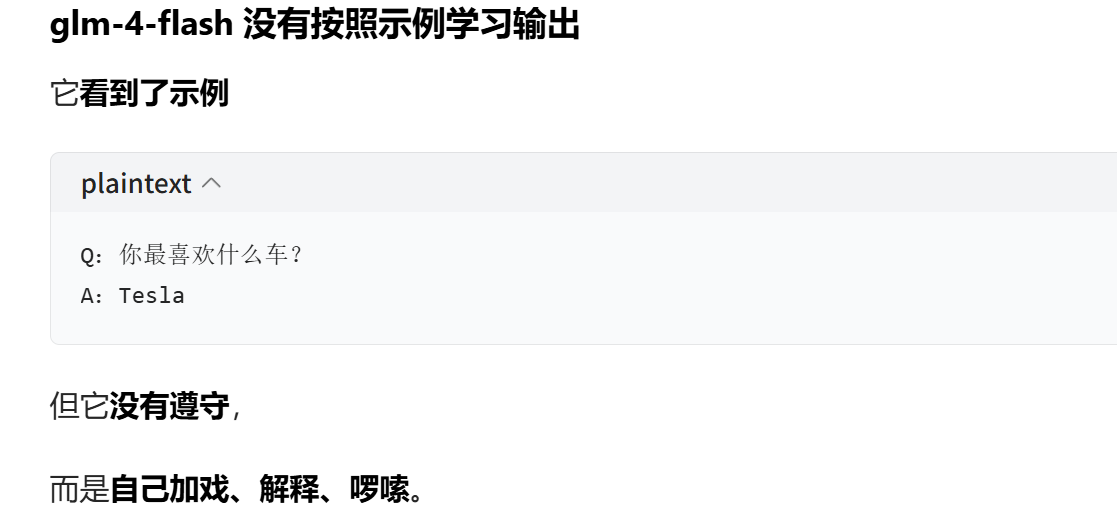
'作为一个虚拟助手,我没有个人喜好,但我可以告诉你,Elon Musk本人似乎对Twitter有着特别的兴趣,因为他经常在Twitter上与公众互动,并使用它来发布新闻和更新。所以,如果我是Elon Musk,我可能会说:\n\nA:Twitter。'至于为什么大模型输出与教程不一致,豆包这样说的。由于手头没有其他大模型的api key,就默认事实如此吧。
12 Caching 缓存
LangChain为LLMs提供了可选的缓存层。这很有用,原因有两个:
- 节省成本:如果您经常多次请求相同的完成,它可以通过减少您对 LLM 提供程序进行的 API 调用次数来节省资金。
- 提高响应速度:它可以通过减少您对 LLM 提供程序进行的 API 调用次数来加速您的应用程序。
内存缓存
python
from langchain_community.chat_models import ChatZhipuAI
import os
ZHIPU_API_KEY = os.getenv("ZHIPU_API_KEY")

chat = ChatZhipuAI(
    model='glm-4-flash',
    api_key=ZHIPU_API_KEY,
    temperature=0.7
)

chat.invoke("请问2只兔子有多少条腿?")
设置缓存:内存缓存(占用内存空间)
python
%%time

from langchain_core.globals import set_llm_cache
from langchain_core.caches import InMemoryCache

set_llm_cache(InMemoryCache())
首次提问
python
%%time
from langchain_core.output_parsers import StrOutputParser
from langchain_core.prompts import ChatPromptTemplate
prompt = ChatPromptTemplate.from_template("请根据下面的主题写一篇小红书营销的短文: {topic}")
output_parser = StrOutputParser()

chain = prompt | chat | output_parser

chain.invoke({"topic": "康师傅绿茶"})
输出
python
CPU times: total: 406 ms
Wall time: 8.64 s

'【#康师傅绿茶#夏日清新必备,一杯在手,清凉一夏!】\n\n🍃🌿炎炎夏日,是不是觉得整个人都"热"了起来?别担心,康师傅绿茶来拯救你的夏日小确幸啦!🍵\n\n🌟【清新口感】选用优质绿茶,搭配天然植物提取,每一口都是满满的清新,仿佛置身于绿意盎然的森林中。\n\n🌟【提神醒脑】长时间工作学习后,来一杯康师傅绿茶,瞬间提神醒脑,让你精神百倍,迎接挑战!\n\n🌟【健康生活】无糖、低热量,康师傅绿茶是你健康生活的最佳伴侣,让你在享受美味的同时,也能保持身材。\n\n🌟【随时随地】小巧的包装设计,让你随时随地都能享受到清凉,无论是办公室、户外运动还是旅行,康师傅绿茶都是你的贴心小助手!\n\n🎉快来抢购吧!#康师傅绿茶#夏日清凉大作战,让我们一起清爽一夏!🎉🍃🍵💦\n\n#绿茶控# #夏日必备# #康师傅# #清凉饮品#'
再次提问
python
%%time
chain.invoke({"topic": "康师傅绿茶"})
输出
python
CPU times: total: 0 ns
Wall time: 2 ms

'【#康师傅绿茶#夏日清新必备,一杯在手,清凉一夏!】\n\n🍃🌿炎炎夏日,是不是觉得整个人都"热"了起来?别担心,康师傅绿茶来拯救你的夏日小确幸啦!🍵\n\n🌟【清新口感】选用优质绿茶,搭配天然植物提取,每一口都是满满的清新,仿佛置身于绿意盎然的森林中。\n\n🌟【提神醒脑】长时间工作学习后,来一杯康师傅绿茶,瞬间提神醒脑,让你精神百倍,迎接挑战!\n\n🌟【健康生活】无糖、低热量,康师傅绿茶是你健康生活的最佳伴侣,让你在享受美味的同时,也能保持身材。\n\n🌟【随时随地】小巧的包装设计,让你随时随地都能享受到清凉,无论是办公室、户外运动还是旅行,康师傅绿茶都是你的贴心小助手!\n\n🎉快来抢购吧!#康师傅绿茶#夏日清凉大作战,让我们一起清爽一夏!🎉🍃🍵💦\n\n#绿茶控# #夏日必备# #康师傅# #清凉饮品#'
8.64s到2ms
SQLite 缓存
SQLite 缓存 = 磁盘缓存(持久化缓存),和 InMemoryCache(内存缓存) 是完全相反的:
| 缓存类型 | 存在哪里 | 重启程序后还在吗 | 适合场景 |
|---|---|---|---|
| InMemoryCache | 内存 | ❌ 重启就消失 | 调试、临时运行 |
| SQLiteCache | 磁盘文件 | ✅ 永久保存 | 正式使用、反复运行 |
- 内存缓存:程序关了,缓存就没了
- SQLite 缓存 :存在你电脑的一个
.db文件里,关机重启都还在
这就是磁盘缓存 = 持久化缓存。
优点超级明显
- 一次调用,永久生效
同样的问题,永远不会重复扣 token - 速度极快
比重新调用 LLM 快 10~100 倍 - 不占内存
存在硬盘里,安全持久 - 适合开发 + 生产环境
总结
SQLite 缓存 = 磁盘缓存 = 持久化缓存
InMemoryCache = 内存缓存 = 临时缓存
demo
python
# We can do the same thing with a SQLite cache
from langchain_community.cache import SQLiteCache

set_llm_cache(SQLiteCache(database_path=".langchain.db"))
python
%%time
chain.invoke({"topic": "旺仔小馒头"})
输出
python
CPU times: total: 312 ms
Wall time: 7.65 s

'标题:【#美味早餐新选择#】🍞 旺仔小馒头,一口咬下幸福感爆棚!\n\n正文:\n🌞 亲爱的小伙伴们,早上好!🌞\n新的一天,从一份美味的早餐开始!🥞\n今天要给大家安利的,就是这款超级可爱的旺仔小馒头!\n\n🍞 首先,它的外观就让人爱不释手,一个个圆润的小馒头,就像小旺仔的笑脸,超级治愈!\n🍞 其次,口感更是让人惊喜,软糯Q弹,一口咬下,幸福感爆棚!\n🍞 最重要的是,它营养均衡,富含碳水化合物、蛋白质和多种维生素,是早餐的不二之选!\n\n🍞 无论搭配牛奶、豆浆还是粥,都能让你的一天充满活力!\n🍞 快来试试这款旺仔小馒头,让你的早餐不再单调,开启元气满满的一天吧!\n\n#旺仔小馒头 #早餐新选择 #美味分享 #元气满满 #小红书美食\n\n📸 美食打卡时间!快来晒出你与旺仔小馒头的美好时光吧!📸'
python
%%time
chain.invoke({"topic": "旺仔小馒头"})
输出
python
CPU times: total: 0 ns
Wall time: 3 ms

'标题:【#美味早餐新选择#】🍞 旺仔小馒头,一口咬下幸福感爆棚!\n\n正文:\n🌞 亲爱的小伙伴们,早上好!🌞\n新的一天,从一份美味的早餐开始!🥞\n今天要给大家安利的,就是这款超级可爱的旺仔小馒头!\n\n🍞 首先,它的外观就让人爱不释手,一个个圆润的小馒头,就像小旺仔的笑脸,超级治愈!\n🍞 其次,口感更是让人惊喜,软糯Q弹,一口咬下,幸福感爆棚!\n🍞 最重要的是,它营养均衡,富含碳水化合物、蛋白质和多种维生素,是早餐的不二之选!\n\n🍞 无论搭配牛奶、豆浆还是粥,都能让你的一天充满活力!\n🍞 快来试试这款旺仔小馒头,让你的早餐不再单调,开启元气满满的一天吧!\n\n#旺仔小馒头 #早餐新选择 #美味分享 #元气满满 #小红书美食\n\n📸 美食打卡时间!快来晒出你与旺仔小馒头的美好时光吧!📸'
生成的db文件 H:\AI\Agent\Langchain-study.langchain.db
13 解析器
之前讲的都是字符串解析器,实际可能需要输出列表,格式为csv格式。
CSV解析器
当您想要返回以逗号分隔的项目列表时,可以使用此输出解析器。
python
from langchain_community.chat_models import ChatZhipuAI
import os
ZHIPU_API_KEY = os.getenv("ZHIPU_API_KEY")

chat = ChatZhipuAI(
    model='glm-4-flash',
    api_key=ZHIPU_API_KEY,
    temperature=0.7
)

chat.invoke("请问2只兔子有多少条腿?")
python
from langchain_core.output_parsers import CommaSeparatedListOutputParser
from langchain_core.prompts import PromptTemplate

output_parser = CommaSeparatedListOutputParser()

# format_instructions = output_parser.get_format_instructions()
format_instructions = "您的响应应该是csv格式的逗号分隔值的列表,例如:`内容1, 内容2, 内容3`"
prompt = PromptTemplate(
    template="{format_instructions}\n请列出五个 {subject}.",
    input_variables=["subject"],
    partial_variables={"format_instructions": format_instructions},
)

chain = prompt | chat | output_parser
python
format_instructions = output_parser.get_format_instructions()
format_instructions
输出
输出解析器的语言是英文的。借鉴format_instructions 的格式手动写一个中文的解析器。
python
'Your response should be a list of comma separated values, eg: `foo, bar, baz` or `foo,bar,baz`'
python
chain.invoke({"subject": "冰淇淋口味"})输出
python
['香草', '巧克力', '草莓', '奶油,抹茶']
python
prompt.invoke({"subject": "冰淇淋口味"})输出
python
StringPromptValue(text='您的响应应该是csv格式的逗号分隔值的列表,例如:`内容1, 内容2, 内容3`\n请列出五个 冰淇淋口味.')日期时间解析器
此 OutputParser 可用于将 LLM 输出解析为日期时间格式。
以下内容from langchain_core.output_parsers import DatetimeOutputParser不对,不过未找到 DatetimeOutputParser 解析器正确的导入模块。
python
from langchain_core.output_parsers import DatetimeOutputParser

# 初始化解析器
output_parser = DatetimeOutputParser()
template = """回答用户的问题:

{question}

{format_instructions}"""


format_instructions=output_parser.get_format_instructions()

format_instructions='''响应的格式用日期时间字符串:"%Y-%m-%dT%H:%M:%S.%fZ"。

示例: 1898-05-31T06:59:40.248940Z, 1808- 10-20T01:56:09.167633Z、0226-10-17T06:18:24.192024Z

仅返回此字符串,没有其他单词!'''
prompt = PromptTemplate.from_template(
    template,
    partial_variables={"format_instructions":format_instructions },
)
python
format_instructions输出
python
"Write a datetime string that matches the following pattern: '%Y-%m-%dT%H:%M:%S.%fZ'.\n\nExamples: 1898-05-31T06:59:40.248940Z, 1808-10-20T01:56:09.167633Z, 0226-10-17T06:18:24.192024Z\n\nReturn ONLY this string, no other words!"
python
chain = prompt | chat | output_parser

output = chain.invoke({"question": "比特币是什么时候创立的?"})
output
输出
python
datetime.datetime(2009, 1, 3, 18, 15)Enum parser 枚举解析器
以下内容from langchain_core.output_parsers import EnumOutputParser不对,不过未找到 EnumOutputParser 解析器正确的导入模块。
python
from enum import Enum

class Colors(Enum):
    RED = "红色"
    BROWN = "棕色"
    BLACK = "黑色"
    WHITE = "白色"
    YELLOW = "黄色"
python
parser = EnumOutputParser(enum=Colors)
python
from langchain_core.prompts import PromptTemplate
from langchain_community.chat_models import ChatZhipuAI
import os
ZHIPU_API_KEY = os.getenv("ZHIPU_API_KEY")

chat = ChatZhipuAI(
    model='glm-4-flash',
    api_key=ZHIPU_API_KEY,
    temperature=0.7
)


promptTemplate = PromptTemplate.from_template(
    """{person}的皮肤主要是什么颜色?

{instructions}"""
)

# instructions=parser.get_format_instructions()
instructions = "响应的结果请选择以下选项之一:红色、棕色、黑色、白色、黄色。不要有其他的内容"
prompt = promptTemplate.partial(instructions=instructions)
chain = prompt | chat | parser
python
instructions=parser.get_format_instructions()
instructions
输出
python
'Select one of the following options: 红色, 棕色, 黑色, 白色, 黄色'
python
chain.invoke({"person": "亚洲人"})输出
python
<Colors.YELLOW: '黄色'>14 JSON解析器
JSON输出解析器允许用户指定任意 JSON 架构并查询 LLMs 以获得符合该架构的输出。
请记住,大型语言模型是有漏洞的抽象!您必须使用具有足够容量的 LLM 来生成格式正确的 JSON。在OpenAI家族中,达芬奇可以可靠地完成任务,但居里的能力已经急剧下降。
您可以选择使用 Pydantic 来声明您的数据模型。
JSON解析器
python
from typing import List

from langchain_core.prompts import PromptTemplate
from langchain_core.output_parsers import JsonOutputParser
from pydantic import BaseModel, Field  # 这行是对的
from langchain_community.chat_models import ChatZhipuAI
import os
ZHIPU_API_KEY = os.getenv("ZHIPU_API_KEY")

chat = ChatZhipuAI(
    model='glm-4-flash',
    api_key=ZHIPU_API_KEY,
    temperature=0.7
)
python
# 定义您想要的数据结构。
class Book(BaseModel):
    title: str = Field(description="书名")
    author: str = Field(description="作者")
    description: str = Field(description="书的简介")
python
# 以及旨在提示语言模型填充数据结构的查询。
query = "请给我介绍学习中国历史的经典书籍"

# Set up a parser + inject instructions into the prompt template.
parser = JsonOutputParser(pydantic_object=Book)


format_instructions = parser.get_format_instructions()

format_instructions = '''输出应格式化为符合以下 JSON 结构的 JSON 实例。
JSON结构
{
'title': '书的标题',
'author': '作者',
'description': '书的简介'
}
'''
prompt = PromptTemplate(
    template="{format_instructions}\n{query}\n",
    input_variables=["query"],
    partial_variables={"format_instructions": format_instructions },
)

chain = prompt | chat | parser

chain.invoke({"query": query})
输出
python
{'title': '中国通史',
 'author': '郭沫若',
 'description': '本书是一部全面介绍中国历史的著作,从远古时代一直叙述到中华人民共和国成立,内容丰富,历史脉络清晰,是研究中国历史的经典之作。'}
python
format_instructions = parser.get_format_instructions()
format_instructions
输出
python
'STRICT OUTPUT FORMAT:\n- Return only the JSON value that conforms to the schema. Do not include any additional text, explanations, headings, or separators.\n- Do not wrap the JSON in Markdown or code fences (no ```or ```json).\n- Do not prepend or append any text (e.g., do not write "Here is the JSON:").\n- The response must be a single top-level JSON value exactly as required by the schema (object/array/etc.), with no trailing commas or comments.\n\nThe output should be formatted as a JSON instance that conforms to the JSON schema below.\n\nAs an example, for the schema {"properties": {"foo": {"title": "Foo", "description": "a list of strings", "type": "array", "items": {"type": "string"}}}, "required": ["foo"]} the object {"foo": ["bar", "baz"]} is a well-formatted instance of the schema. The object {"properties": {"foo": ["bar", "baz"]}} is not well-formatted.\n\nHere is the output schema (shown in a code block for readability only --- do not include any backticks or Markdown in your output):\n```\n{"properties": {"title": {"description": "书名", "title": "Title", "type": "string"}, "author": {"description": "作者", "title": "Author", "type": "string"}, "description": {"description": "书的简介", "title": "Description", "type": "string"}}, "required": ["title", "author", "description"]}\n```'流式输出
python
for s in chain.stream({"query": query}):
    print(s)
输出
python
{}
{'title': ''}
{'title': '中国'}
{'title': '中国通'}
{'title': '中国通史'}
{'title': '中国通史', 'author': ''}
{'title': '中国通史', 'author': '吕'}
{'title': '中国通史', 'author': '吕思'}
{'title': '中国通史', 'author': '吕思勉'}
{'title': '中国通史', 'author': '吕思勉', 'description': ''}
{'title': '中国通史', 'author': '吕思勉', 'description': '吕'}
{'title': '中国通史', 'author': '吕思勉', 'description': '吕思'}
{'title': '中国通史', 'author': '吕思勉', 'description': '吕思勉'}
{'title': '中国通史', 'author': '吕思勉', 'description': '吕思勉先生的'}
{'title': '中国通史', 'author': '吕思勉', 'description': '吕思勉先生的《'}
{'title': '中国通史', 'author': '吕思勉', 'description': '吕思勉先生的《中国'}
{'title': '中国通史', 'author': '吕思勉', 'description': '吕思勉先生的《中国通'}
{'title': '中国通史', 'author': '吕思勉', 'description': '吕思勉先生的《中国通史'}
{'title': '中国通史', 'author': '吕思勉', 'description': '吕思勉先生的《中国通史》'}
{'title': '中国通史', 'author': '吕思勉', 'description': '吕思勉先生的《中国通史》是一本'}
{'title': '中国通史', 'author': '吕思勉', 'description': '吕思勉先生的《中国通史》是一本系统'}
{'title': '中国通史', 'author': '吕思勉', 'description': '吕思勉先生的《中国通史》是一本系统介绍'}
{'title': '中国通史', 'author': '吕思勉', 'description': '吕思勉先生的《中国通史》是一本系统介绍中国'}
{'title': '中国通史', 'author': '吕思勉', 'description': '吕思勉先生的《中国通史》是一本系统介绍中国历史的'}
{'title': '中国通史', 'author': '吕思勉', 'description': '吕思勉先生的《中国通史》是一本系统介绍中国历史的经典'}
{'title': '中国通史', 'author': '吕思勉', 'description': '吕思勉先生的《中国通史》是一本系统介绍中国历史的经典著作'}
{'title': '中国通史', 'author': '吕思勉', 'description': '吕思勉先生的《中国通史》是一本系统介绍中国历史的经典著作,'}
{'title': '中国通史', 'author': '吕思勉', 'description': '吕思勉先生的《中国通史》是一本系统介绍中国历史的经典著作,从'}
{'title': '中国通史', 'author': '吕思勉', 'description': '吕思勉先生的《中国通史》是一本系统介绍中国历史的经典著作,从远古'}
{'title': '中国通史', 'author': '吕思勉', 'description': '吕思勉先生的《中国通史》是一本系统介绍中国历史的经典著作,从远古时代'}
{'title': '中国通史', 'author': '吕思勉', 'description': '吕思勉先生的《中国通史》是一本系统介绍中国历史的经典著作,从远古时代到'}
{'title': '中国通史', 'author': '吕思勉', 'description': '吕思勉先生的《中国通史》是一本系统介绍中国历史的经典著作,从远古时代到近'}
{'title': '中国通史', 'author': '吕思勉', 'description': '吕思勉先生的《中国通史》是一本系统介绍中国历史的经典著作,从远古时代到近现代'}
{'title': '中国通史', 'author': '吕思勉', 'description': '吕思勉先生的《中国通史》是一本系统介绍中国历史的经典著作,从远古时代到近现代,'}
{'title': '中国通史', 'author': '吕思勉', 'description': '吕思勉先生的《中国通史》是一本系统介绍中国历史的经典著作,从远古时代到近现代,全面'}
{'title': '中国通史', 'author': '吕思勉', 'description': '吕思勉先生的《中国通史》是一本系统介绍中国历史的经典著作,从远古时代到近现代,全面梳理'}
{'title': '中国通史', 'author': '吕思勉', 'description': '吕思勉先生的《中国通史》是一本系统介绍中国历史的经典著作,从远古时代到近现代,全面梳理了中国'}
{'title': '中国通史', 'author': '吕思勉', 'description': '吕思勉先生的《中国通史》是一本系统介绍中国历史的经典著作,从远古时代到近现代,全面梳理了中国历史'}
{'title': '中国通史', 'author': '吕思勉', 'description': '吕思勉先生的《中国通史》是一本系统介绍中国历史的经典著作,从远古时代到近现代,全面梳理了中国历史的发展'}
{'title': '中国通史', 'author': '吕思勉', 'description': '吕思勉先生的《中国通史》是一本系统介绍中国历史的经典著作,从远古时代到近现代,全面梳理了中国历史的发展脉络'}
{'title': '中国通史', 'author': '吕思勉', 'description': '吕思勉先生的《中国通史》是一本系统介绍中国历史的经典著作,从远古时代到近现代,全面梳理了中国历史的发展脉络,'}
{'title': '中国通史', 'author': '吕思勉', 'description': '吕思勉先生的《中国通史》是一本系统介绍中国历史的经典著作,从远古时代到近现代,全面梳理了中国历史的发展脉络,内容'}
{'title': '中国通史', 'author': '吕思勉', 'description': '吕思勉先生的《中国通史》是一本系统介绍中国历史的经典著作,从远古时代到近现代,全面梳理了中国历史的发展脉络,内容丰富'}
{'title': '中国通史', 'author': '吕思勉', 'description': '吕思勉先生的《中国通史》是一本系统介绍中国历史的经典著作,从远古时代到近现代,全面梳理了中国历史的发展脉络,内容丰富,'}
{'title': '中国通史', 'author': '吕思勉', 'description': '吕思勉先生的《中国通史》是一本系统介绍中国历史的经典著作,从远古时代到近现代,全面梳理了中国历史的发展脉络,内容丰富,观点'}
{'title': '中国通史', 'author': '吕思勉', 'description': '吕思勉先生的《中国通史》是一本系统介绍中国历史的经典著作,从远古时代到近现代,全面梳理了中国历史的发展脉络,内容丰富,观点独'}
{'title': '中国通史', 'author': '吕思勉', 'description': '吕思勉先生的《中国通史》是一本系统介绍中国历史的经典著作,从远古时代到近现代,全面梳理了中国历史的发展脉络,内容丰富,观点独到'}
{'title': '中国通史', 'author': '吕思勉', 'description': '吕思勉先生的《中国通史》是一本系统介绍中国历史的经典著作,从远古时代到近现代,全面梳理了中国历史的发展脉络,内容丰富,观点独到,'}
{'title': '中国通史', 'author': '吕思勉', 'description': '吕思勉先生的《中国通史》是一本系统介绍中国历史的经典著作,从远古时代到近现代,全面梳理了中国历史的发展脉络,内容丰富,观点独到,是'}
{'title': '中国通史', 'author': '吕思勉', 'description': '吕思勉先生的《中国通史》是一本系统介绍中国历史的经典著作,从远古时代到近现代,全面梳理了中国历史的发展脉络,内容丰富,观点独到,是学习'}
{'title': '中国通史', 'author': '吕思勉', 'description': '吕思勉先生的《中国通史》是一本系统介绍中国历史的经典著作,从远古时代到近现代,全面梳理了中国历史的发展脉络,内容丰富,观点独到,是学习中国'}
{'title': '中国通史', 'author': '吕思勉', 'description': '吕思勉先生的《中国通史》是一本系统介绍中国历史的经典著作,从远古时代到近现代,全面梳理了中国历史的发展脉络,内容丰富,观点独到,是学习中国历史'}
{'title': '中国通史', 'author': '吕思勉', 'description': '吕思勉先生的《中国通史》是一本系统介绍中国历史的经典著作,从远古时代到近现代,全面梳理了中国历史的发展脉络,内容丰富,观点独到,是学习中国历史的重要'}
{'title': '中国通史', 'author': '吕思勉', 'description': '吕思勉先生的《中国通史》是一本系统介绍中国历史的经典著作,从远古时代到近现代,全面梳理了中国历史的发展脉络,内容丰富,观点独到,是学习中国历史的重要参考'}
{'title': '中国通史', 'author': '吕思勉', 'description': '吕思勉先生的《中国通史》是一本系统介绍中国历史的经典著作,从远古时代到近现代,全面梳理了中国历史的发展脉络,内容丰富,观点独到,是学习中国历史的重要参考书'}
{'title': '中国通史', 'author': '吕思勉', 'description': '吕思勉先生的《中国通史》是一本系统介绍中国历史的经典著作,从远古时代到近现代,全面梳理了中国历史的发展脉络,内容丰富,观点独到,是学习中国历史的重要参考书。'}
修复输出解析器
此输出解析器包装另一个输出解析器,如果第一个输出解析器失败,它会调用另一个 LLM 来修复任何错误。
但除了抛出错误之外,我们还可以做其他事情。具体来说,我们可以将格式错误的输出以及格式化的指令传递给模型并要求其修复。
对于这个例子,我们将使用上面的 Pydantic 输出解析器。如果我们传递一个不符合模式的结果,会发生以下情况:
python
class Actor(BaseModel):
    name: str = Field(description="演员的名字")
    film_names: List[str] = Field(description="他们主演的电影名称列表")
python
from langchain_core.output_parsers import PydanticOutputParser
actor_query = "生成随机演员的电影作品表。"

parser = PydanticOutputParser(pydantic_object=Actor)
python
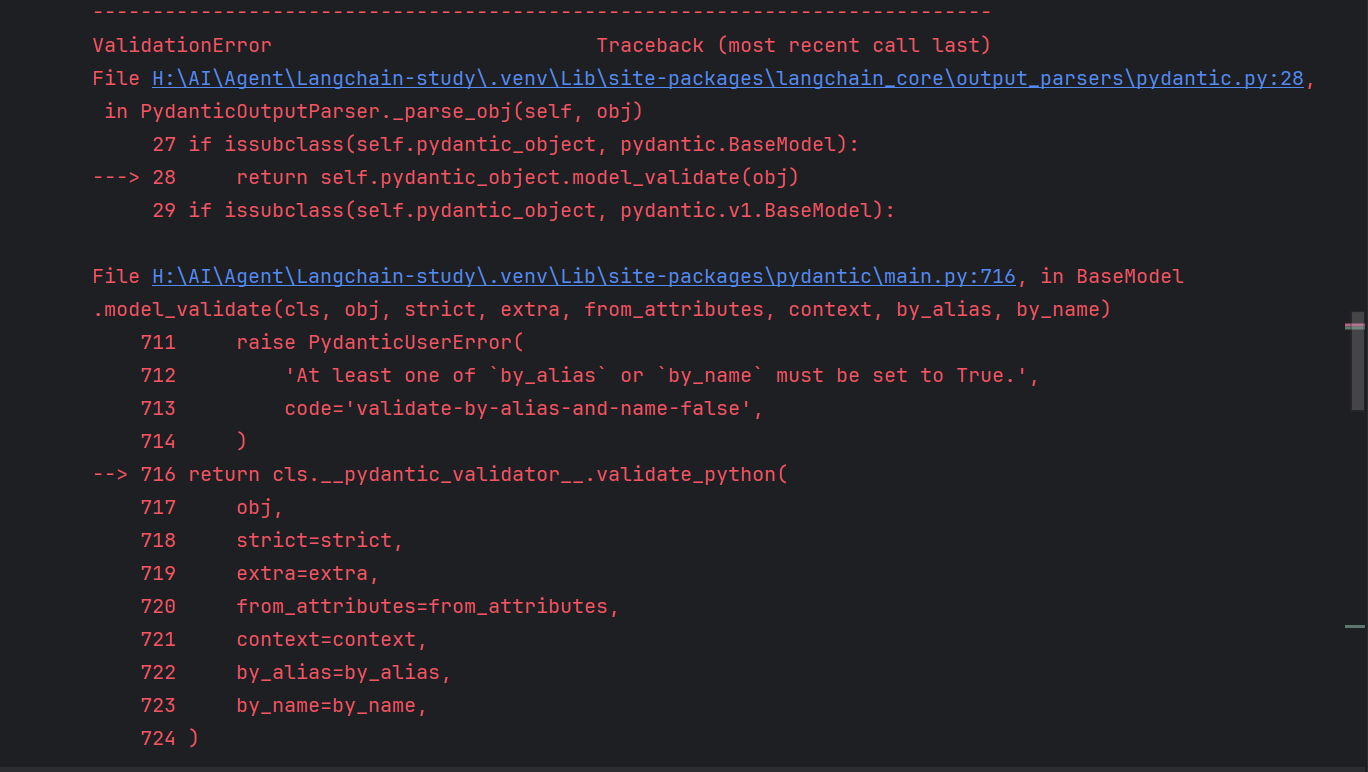
misformatted = "{'name': 'Tom Hanks', 'film_names': ['Forrest Gump']"
parser.parse(misformatted)
输出:由于json格式不对导致输出失败。
以下内容from langchain_core.output_parsers import OutputFixingParser不对,不过未找到 OutputFixingParser 解析器正确的导入模块。
python
from langchain_core.output_parsers import OutputFixingParser

new_parser = OutputFixingParser.from_llm(parser=parser, llm=chat)
python
new_parser.parse(misformatted)15 xml解析器
xml输出解析器允许用户以流行的 XML 格式从 LLM 获取结果。
请记住,大型语言模型是有漏洞的抽象!您必须使用具有足够容量的 LLM 来生成格式正确的 XML。
python
from langchain_core.output_parsers import XMLOutputParser
from langchain_core.prompts import PromptTemplate
from langchain_community.chat_models import ChatZhipuAI
import os
ZHIPU_API_KEY = os.getenv("ZHIPU_API_KEY")

chat = ChatZhipuAI(
    model='glm-4-flash',
    api_key=ZHIPU_API_KEY,
    temperature=0.7
)
python
actor_query = "生成汤姆·汉克斯的电影目录。"
output = chat.invoke(
    f"""{actor_query}

响应以xml的结构返回,使用如下xml结构
电影1 电影2 ``` """ ) print(output.content) ``` 输出
xml
<xml>
    <movie>Aaron Rapoport</movie>
    <movie>Big</movie>
    <movie>Boss Level</movie>
    <movie>Charlie Wilson's War</movie>
    <movie>Cloud Atlas</movie>
    <movie>Collateral</movie>
    <movie>Cold War</movie>
    <movie>Commander in Chief</movie>
    <movie>Confessions of a Dangerous Mind</movie>
    <movie>Crooked Line</movie>
    <movie>Cast Away</movie>
    <movie>That Thing You Do!</movie>
    <movie>The Green Mile</movie>
    <movie>The Fugitive</movie>
    <movie>The Interpreter</movie>
    <movie>The Ladykillers</movie>
    <movie>The Last Shot</movie>
    <movie>The Nutty Professor</movie>
    <movie>The Terminal</movie>
    <movie>Toy Story 2</movie>
    <movie>True Lies</movie>
    <movie>Toy Story</movie>
    <movie>Of Mice and Men</movie>
</xml>
python
parser = XMLOutputParser()
parser.invoke(output)
输出
python
{'xml': [{'movie': 'Aaron Rapoport'},
  {'movie': 'Big'},
  {'movie': 'Boss Level'},
  {'movie': "Charlie Wilson's War"},
  {'movie': 'Cloud Atlas'},
  {'movie': 'Collateral'},
  {'movie': 'Cold War'},
  {'movie': 'Commander in Chief'},
  {'movie': 'Confessions of a Dangerous Mind'},
  {'movie': 'Crooked Line'},
  {'movie': 'Cast Away'},
  {'movie': 'That Thing You Do!'},
  {'movie': 'The Green Mile'},
  {'movie': 'The Fugitive'},
  {'movie': 'The Interpreter'},
  {'movie': 'The Ladykillers'},
  {'movie': 'The Last Shot'},
  {'movie': 'The Nutty Professor'},
  {'movie': 'The Terminal'},
  {'movie': 'Toy Story 2'},
  {'movie': 'True Lies'},
  {'movie': 'Toy Story'},
  {'movie': 'Of Mice and Men'}]}
解析器不是等模型输出完才去解析,而是在 Prompt 阶段就告诉模型该怎么输出。
python
parser = XMLOutputParser()
# format_instructions = parser.get_format_instructions()
format_instructions = """响应以xml的结构返回,使用如下xml结构
<xml>
<movie>电影1</movie>
<movie>电影2</movie>
<xml>
注意:电影名称中如果出现 & 符号,必须替换为 &
"""
prompt = PromptTemplate(
template="""{query}\n{format_instructions}""",
input_variables=["query"],
partial_variables={"format_instructions":format_instructions},
)
chain = prompt | chat | parser
output = chain.invoke({"query": actor_query})
print(output)输出
python
{'xml': [{'movie': 'Big'}, {'movie': 'A League of Their Own'}, {'movie': 'Philadelphia'}, {'movie': 'The Green Mile'}, {'movie': 'Forrest Gump'}, {'movie': 'Cast Away'}, {'movie': 'The Polar Express'}, {'movie': 'Charlie and the Chocolate Factory'}, {'movie': 'Cloud Atlas'}, {'movie': 'Saving Mr. Banks'}, {'movie': 'A Hologram for the King'}, {'movie': 'The Post'}, {'movie': 'Sicario: Day of the Soldado'}, {'movie': 'News of the World'}]}
python
parser = XMLOutputParser()
format_instructions =  parser.get_format_instructions()
format_instructions
输出
python
'The output should be formatted as a XML file.\n1. Output should conform to the tags below.\n2. If tags are not given, make them on your own.\n3. Remember to always open and close all the tags.\n\nAs an example, for the tags ["foo", "bar", "baz"]:\n1. String "<foo>\n <bar>\n <baz></baz>\n </bar>\n</foo>" is a well-formatted instance of the schema.\n2. String "<foo>\n <bar>\n </foo>" is a badly-formatted instance.\n3. String "<foo>\n <tag>\n </tag>\n</foo>" is a badly-formatted instance.\n\nHere are the output tags:\n```\nNone\n```'16 自定义大模型输出解析器
自定义输出解析器
在某些情况下,您可能希望实现自定义解析器以将模型输出构造为自定义格式。
有两种方法可以实现自定义解析器:
- 在 LCEL 中使用 RunnableLambda 或 RunnableGenerator -- 我们强烈建议大多数用例使用此方法
- 通过从基类之一继承进行解析------这是困难方法
这两种方法之间的差异大多是表面的,主要在于触发哪些回调(例如, on_chain_start 与 on_parser_start )
可运行的 Lambda 和生成器
推荐的解析方法是使用可运行的 lambda 和可运行的生成器!
在这里,我们将进行一个简单的解析,反转模型输出的大小写。
例如,如果模型输出:"Meow",解析器将生成"mEOW"。
python
from typing import Iterable
from langchain_core.messages import AIMessage, AIMessageChunk
from langchain_community.chat_models import ChatZhipuAI
import os
ZHIPU_API_KEY = os.getenv("ZHIPU_API_KEY")

chat = ChatZhipuAI(
    model='glm-4-flash',
    api_key=ZHIPU_API_KEY,
    temperature=0.7
)


def parse(ai_message: AIMessage) -> str:
    """Parse the AI message."""
    return ai_message.content.swapcase()


chain = chat | parse
chain.invoke("Hello")
输出
bass
"hELLO 👋! i'M cHATglm, THE ARTIFICIAL INTELLIGENCE ASSISTANT, NICE TO MEET YOU. fEEL FREE TO ASK ME ANY QUESTIONS."流式输出
python
for chunk in chain.stream("tell me a story"):
    print(chunk, end="")
输出
python
oNCE UPON A TIME, IN A QUAINT VILLAGE NESTLED BETWEEN ROLLING HILLS AND WHISPERING FORESTS, THERE LIVED A YOUNG GIRL NAMED eLARA. eLARA WAS KNOWN THROUGHOUT THE VILLAGE FOR HER BOUNDLESS CURIOSITY AND HER LOVE FOR EXPLORING THE WORLD AROUND HER. sHE SPENT HER DAYS CHASING BUTTERFLIES, CLIMBING THE TALLEST TREES, AND FOLLOWING THE WINDING PATHS THAT SNAKED THROUGH THE DENSE WOODS.

tHE HEART OF THE VILLAGE WAS A BUSTLING MARKETPLACE, WHERE MERCHANTS FROM FAR AND WIDE WOULD SET UP THEIR STALLS TO TRADE THEIR WARES. iT WAS HERE THAT eLARA FIRST HEARD TALES OF THE MYSTERIOUS, ANCIENT RUINS THAT LAY HIDDEN IN THE HEART OF THE gREAT fOREST. tHESE RUINS WERE SAID TO BE THE REMNANTS OF A LONG-LOST CIVILIZATION, FILLED WITH UNTOLD SECRETS AND WONDERS.

oNE SUNNY AFTERNOON, AS eLARA WAS PLAYING WITH HER FRIENDS BY THE VILLAGE POND, AN ELDERLY MAN WITH A LONG WHITE BEARD APPROACHED HER. "eLARA," HE SAID, "i HAVE BEEN WATCHING YOU FOR MANY YEARS. yOU HAVE A SPIRIT LIKE NO OTHER, AND i BELIEVE YOU ARE DESTINED FOR GREAT THINGS. i HAVE A MAP THAT LEADS TO THE RUINS OF THE LOST CIVILIZATION. wILL YOU ACCEPT THIS CHALLENGE AND VENTURE INTO THE FOREST TO UNCOVER ITS SECRETS?"

wITH A SPARK OF ADVENTURE IN HER EYE, eLARA EAGERLY TOOK THE MAP FROM THE OLD MAN'S HAND. sHE PROMISED HIM THAT SHE WOULD RETURN WITH THE KNOWLEDGE HIDDEN WITHIN THE RUINS. tHAT NIGHT, AS THE STARS TWINKLED ABOVE, eLARA TUCKED THE MAP UNDER HER PILLOW AND DREAMED OF THE WONDERS SHE WOULD FIND.

tHE NEXT MORNING, eLARA SET OFF ON HER JOURNEY. sHE FOLLOWED THE WINDING PATH THAT LED DEEPER INTO THE FOREST, HER HEART POUNDING WITH EXCITEMENT. aS THE DAY WORE ON, THE PATH GREW INCREASINGLY TREACHEROUS, AND THE FOREST AROUND HER SEEMED TO GROW DARKER AND MORE MYSTERIOUS.

eLARA PRESSED ON, DETERMINED NOT TO LET FEAR HOLD HER BACK. sHE SOON FOUND HERSELF AT THE ENTRANCE OF A CAVE. tHE CAVE WAS DARK, AND THE AIR WAS THICK WITH THE SCENT OF DAMP EARTH AND ANCIENT STONE. eLARA TOOK A DEEP BREATH AND STEPPED INSIDE, HER LANTERN CASTING FLICKERING SHADOWS ON THE WALLS.

tHE CAVE STRETCHED ON FOR WHAT FELT LIKE MILES, BUT EVENTUALLY, eLARA STUMBLED UPON A ROOM BATHED IN GOLDEN LIGHT. iN THE CENTER OF THE ROOM STOOD A PEDESTAL, UPON WHICH RESTED AN ORNATE BOOK. eLARA APPROACHED THE BOOK, HER FINGERS TREMBLING WITH ANTICIPATION. aS SHE OPENED THE COVER, A SOFT, MELODIC VOICE BEGAN TO SPEAK, NARRATING TALES OF THE LOST CIVILIZATION, THEIR ACHIEVEMENTS, AND THEIR DOWNFALL.

eLARA LISTENED INTENTLY, HER EYES WIDE WITH WONDER. wHEN SHE FINALLY CLOSED THE BOOK, THE ROOM SEEMED TO SHRINK AROUND HER, AND SHE WAS BACK IN THE CAVE, THE GOLDEN LIGHT GONE. eLARA KNEW SHE HAD FOUND WHAT SHE WAS SEARCHING FOR, BUT SHE ALSO REALIZED THAT HER JOURNEY WAS FAR FROM OVER.

sHE MADE HER WAY BACK TO THE VILLAGE, HER HEART FULL OF NEW KNOWLEDGE AND HER SPIRIT SOARING WITH TRIUMPH. wHEN SHE RETURNED, THE VILLAGE WAS ABUZZ WITH EXCITEMENT, AND EVERYONE GATHERED TO HEAR HER TALE. eLARA SHARED HER EXPERIENCES, AND THE VILLAGERS WERE AMAZED AT THE WONDERS SHE HAD UNCOVERED.

fROM THAT DAY ON, eLARA BECAME A BEACON OF HOPE AND KNOWLEDGE FOR HER VILLAGE. sHE USED HER DISCOVERIES TO INSPIRE THE PEOPLE TO LEARN, TO INNOVATE, AND TO DREAM. aND AS THE YEARS PASSED, THE VILLAGE FLOURISHED, BECOMING A PLACE OF WONDER AND PROSPERITY, ALL THANKS TO THE YOUNG GIRL WITH A CURIOUS HEART AND A SPIRIT UNBOUND BY THE ORDINARY.
RunnableGenerator 封装
python
from langchain_core.runnables import RunnableGenerator


def streaming_parse(chunks: Iterable[AIMessageChunk]) -> Iterable[str]:
    for chunk in chunks:
        yield chunk.content.swapcase()


streaming_parse = RunnableGenerator(streaming_parse)
python
chain = chat | streaming_parse
for chunk in chain.stream("tell me a story"):
    print(chunk, end="")
输出
python
oNCE UPON A TIME IN THE LUSH, GREEN VALLEY OF eLDORIA, NESTLED BETWEEN ROLLING HILLS AND A SPARKLING RIVER, THERE LIVED A CURIOUS YOUNG GIRL NAMED eLARA. sHE HAD CHESTNUT HAIR THAT CASCADED DOWN HER BACK, AND EYES THAT SPARKLED LIKE THE DIAMONDS IN HER GRANDMOTHER'S ATTIC BOX. eLARA LOVED EXPLORING THE VALLEY, AND SHE WAS NEVER HAPPIER THAN WHEN SHE WAS LOST IN THE WOODS, DISCOVERING SOMETHING NEW.

oNE CRISP AUTUMN MORNING, AS THE LEAVES TURNED A FIERY RED AND GOLD, eLARA'S CURIOSITY LED HER ON A JOURNEY THAT WOULD CHANGE HER LIFE FOREVER. sHE HAD HEARD TALES FROM HER GRANDMOTHER OF A HIDDEN TREASURE IN THE VALLEY, BURIED DEEP WITHIN THE wHISPERING wOODS, BUT NO ONE HAD FOUND IT YET. aRMED WITH HER TRUSTY WALKING STICK AND A SMALL BACKPACK FILLED WITH SNACKS, eLARA SET OFF ON HER QUEST.

aS eLARA VENTURED DEEPER INTO THE WOODS, THE TREES SEEMED TO WHISPER SECRETS OF THE PAST, AND THE AIR WAS FILLED WITH THE SCENT OF PINE AND EARTH. sHE FOLLOWED THE WINDING PATH, WHICH SEEMED TO HAVE BEEN MADE JUST FOR HER, UNTIL SHE REACHED A CLEARING WHERE AN ANCIENT OAK TREE STOOD. iTS GNARLED BRANCHES FORMED A NATURAL ARCH, AND BENEATH IT, THERE WAS A PECULIAR STONE TABLET WITH STRANGE RUNES CARVED INTO IT.

eLARA, WHO WAS NO STRANGER TO READING RUNES, RECOGNIZED THE LANGUAGE AND READ THE INSCRIPTION ALOUD. iT SPOKE OF A TREASURE GUARDED BY THE SPIRIT OF A WISE OLD OWL NAMED oRIN. tHE RUNES DIRECTED HER TO A HIDDEN GROVE WHERE THE TREASURE WAS HIDDEN, BUT WARNED HER THAT THE PATH WAS FRAUGHT WITH DANGER.

dETERMINED, eLARA PRESSED ON. tHE GROVE WAS FILLED WITH MAGICAL CREATURES, FROM MISCHIEVOUS PIXIES TO WISE OLD SAGES, ALL EAGER TO ASSIST HER IN HER QUEST. aMONG THEM WAS A WISE OLD OWL NAMED oRIN, WHO GREETED HER WARMLY AND LED HER TO THE HEART OF THE GROVE, WHERE A SPARKLING POOL OF WATER LAY.

aS eLARA APPROACHED THE POOL, SHE SAW A REFLECTION OF HERSELF, BUT AS SHE REACHED OUT TO TOUCH THE WATER, THE IMAGE SHIFTED, REVEALING A HIDDEN CHEST AT THE BOTTOM. oRIN GUIDED HER TO A SPECIAL ROCK, WHICH, WHEN TOUCHED, REVEALED A LEVER. eLARA PULLED THE LEVER, AND THE CHEST BEGAN TO RISE TO THE SURFACE.

wITH TREMBLING HANDS, SHE OPENED THE CHEST, AND HER EYES WIDENED IN AMAZEMENT. iNSIDE WAS NOT GOLD OR JEWELS, BUT A COLLECTION OF ANCIENT SCROLLS AND ARTIFACTS THAT SPOKE OF THE HISTORY AND MAGIC OF eLDORIA. aMONG THEM WAS A BOOK THAT DETAILED THE SECRETS OF THE VALLEY, INCLUDING THE STORY OF THE FOUNDERS WHO HAD CREATED IT.

aS eLARA READ THE BOOK, SHE LEARNED THAT THE VALLEY WAS A SACRED PLACE, MEANT TO BE PRESERVED AND PROTECTED. sHE REALIZED THAT THE TRUE TREASURE WAS THE KNOWLEDGE AND WISDOM OF HER ANCESTORS, AND THE RESPONSIBILITY OF PRESERVING THE VALLEY'S MAGIC FOR FUTURE GENERATIONS.

eLARA RETURNED HOME, HER HEART FULL OF GRATITUDE AND NEWFOUND PURPOSE. sHE SHARED HER STORY WITH THE VILLAGERS, AND TOGETHER THEY WORKED TO PROTECT THE VALLEY AND ITS MAGIC. aND FROM THAT DAY ON, eLDORIA THRIVED, AND eLARA'S NAME WAS KNOWN THROUGHOUT THE LAND AS THE GUARDIAN OF THE VALLEY'S SECRETS AND THE KEEPER OF ITS MAGIC.

aND SO, THE LEGEND OF eLARA, THE YOUNG GIRL WITH THE CHESTNUT HAIR AND THE SPARKLING EYES, LIVED ON, REMINDING ALL WHO HEARD IT THAT THE GREATEST TREASURES IN LIFE ARE NOT FOUND IN GOLD, BUT IN THE JOURNEY AND THE WISDOM GAINED ALONG THE WAY.