4.Nginx日志Log模块

官方文档 :http://nginx.org/en/docs/http/ngx_http_log_module.html
日志模块名称 :ngx_http_log_module
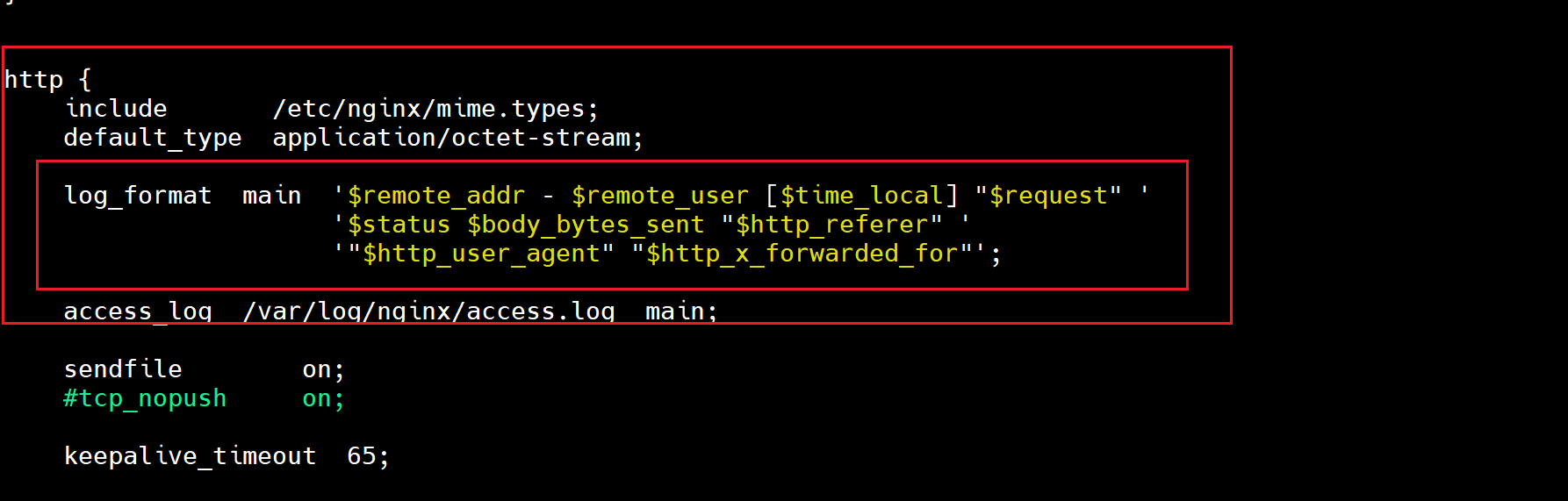
4.1 日志格式:log_format
bash
[root@Nginx ~]# grep -A3 "log_format" /etc/nginx/nginx.conf
    log_format  main  '$remote_addr - $remote_user [$time_local] "$request"'
                      '$status $body_bytes_sent "$http_referer" '
                      '"$http_user_agent" "$http_x_forwarded_for"';
bash
# 另开终端去查看访问日志
[root@Nginx ~]# curl 172.25.254.44
@@@---@TTT@---@@@ @@@---@TTT@---@@@ @@@---@TTT@---@@@

[root@Nginx ~]# tail -f /var/log/nginx/access.log
172.25.254.44 - - [11/Apr/2026:14:15:22 +0800] "GET / HTTP/1.1" 200 54 "-" "curl/7.76.1" "-"

# 浏览器访问
http://172.25.254.44

172.25.254.1 - - [11/Apr/2026:14:16:59 +0800] "GET / HTTP/1.1" 200 54 "-" "Mozilla/5.0 (Windows NT 10.0; Win64; x64) AppleWebKit/537.36 (KHTML, like Gecko) Chrome/146.0.0.0 Safari/537.36" "-"
172.25.254.1 - - [11/Apr/2026:14:16:59 +0800] "GET /favicon.ico HTTP/1.1" 404 555 "http://172.25.254.44/" "Mozilla/5.0 (Windows NT 10.0; Win64; x64) AppleWebKit/537.36 (KHTML, like Gecko) Chrome/146.0.0.0 Safari/537.36" "-"
4.1.1 $remote_addr记录远程访问地址
bash
log_format  main  '$remote_addr - $remote_user [$time_local] "$request" '
                  '$status $body_bytes_sent "$http_referer" '
                  '"$http_user_agent" "$http_x_forwarded_for"';

[root@Nginx ~]# tail -f /var/log/nginx/access.log
172.25.254.44 - - [11/Apr/2026:14:15:22 +0800] "GET / HTTP/1.1" 200 54 "-" "curl/7.76.1" "-"
172.25.254.1 - - [11/Apr/2026:14:16:59 +0800] "GET / HTTP/1.1" 200 54 "-" "Mozilla/5.0 (Windows NT 10.0; Win64; x64) AppleWebKit/537.36 (KHTML, like Gecko) Chrome/146.0.0.0 Safari/537.36" "-"


# 远程访问地址--记录客户端IP地址
172.25.254.44	虚拟主机地址
172.25.254.1	物理机地址
4.1.2 $remote_user记录远程访问用户名称
bash
log_format  main  '$remote_addr - $remote_user [$time_local] "$request" '
                  '$status $body_bytes_sent "$http_referer" '
                  '"$http_user_agent" "$http_x_forwarded_for"';

[root@Nginx ~]# tail -f /var/log/nginx/access.log
172.25.254.44 - - [11/Apr/2026:14:15:22 +0800] "GET / HTTP/1.1" 200 54 "-" "curl/7.76.1" "-"
172.25.254.1 - - [11/Apr/2026:14:16:59 +0800] "GET / HTTP/1.1" 200 54 "-" "Mozilla/5.0 (Windows NT 10.0; Win64; x64) AppleWebKit/537.36 (KHTML, like Gecko) Chrome/146.0.0.0 Safari/537.36" "-"

# 远程访问用户名称--记录客户端用户名称
-
-

# 默认都是`-`,除非打开相关参数
4.1.3 [$time_local]记录本地时间(服务器自身时间)
bash
log_format  main  '$remote_addr - $remote_user [$time_local] "$request" '
                  '$status $body_bytes_sent "$http_referer" '
                  '"$http_user_agent" "$http_x_forwarded_for"';

[root@Nginx ~]# tail -f /var/log/nginx/access.log
172.25.254.44 - - [11/Apr/2026:14:15:22 +0800] "GET / HTTP/1.1" 200 54 "-" "curl/7.76.1" "-"
172.25.254.1 - - [11/Apr/2026:14:16:59 +0800] "GET / HTTP/1.1" 200 54 "-" "Mozilla/5.0 (Windows NT 10.0; Win64; x64) AppleWebKit/537.36 (KHTML, like Gecko) Chrome/146.0.0.0 Safari/537.36" "-"

# 本地时间-服务自身时间
[11/Apr/2026:14:15:22 +0800]
[11/Apr/2026:14:16:59 +0800]
4.1.4 $request记录请求的URL与HTTP协议
bash
log_format  main  '$remote_addr - $remote_user [$time_local] "$request" '
                  '$status $body_bytes_sent "$http_referer" '
                  '"$http_user_agent" "$http_x_forwarded_for"';

[root@Nginx ~]# curl 172.25.254.44
@@@---@TTT@---@@@ @@@---@TTT@---@@@ @@@---@TTT@---@@@
[root@Nginx ~]# curl 172.25.254.44/index.html
@@@---@TTT@---@@@ @@@---@TTT@---@@@ @@@---@TTT@---@@@

[root@Nginx ~]# tail -f /var/log/nginx/access.log
172.25.254.44 - - [11/Apr/2026:14:37:32 +0800] "GET / HTTP/1.1" 200 54 "-" "curl/7.76.1" "-"
172.25.254.44 - - [11/Apr/2026:14:37:36 +0800] "GET /index.html HTTP/1.1" 200 54 "-" "curl/7.76.1" "-"

# 记录请求的URL及HTTP协议
GET / 			HTTP/1.1
GET /index.html HTTP/1.1
4.1.5 $status记录请求状态码
bash
log_format  main  '$remote_addr - $remote_user [$time_local] "$request" '
                  '$status $body_bytes_sent "$http_referer" '
                  '"$http_user_agent" "$http_x_forwarded_for"';

[root@Nginx ~]# tail -f /var/log/nginx/access.log
172.25.254.44 - - [11/Apr/2026:14:37:32 +0800] "GET / HTTP/1.1" 200 54 "-" "curl/7.76.1" "-"
172.25.254.1 - - [11/Apr/2026:14:41:38 +0800] "GET / HTTP/1.1" 304 0 "-" "Mozilla/5.0 (Windows NT 10.0; Win64; x64) AppleWebKit/537.36 (KHTML, like Gecko) Chrome/146.0.0.0 Safari/537.36" "-"


# 记录请求状态码
200		# 请求成功
304		# 资源未修改,使用缓存(协商缓存)
状态码范围
bash
1xx		信息响应
2xx		成功
3xx		重定向
4xx		客户端错误
5xx		服务器错误
附加:最常用的 HTTP 状态码
| 状态码 | 类别 | 原因短语 | 常见场景 | Nginx 排查方向 |
|---|---|---|---|---|
| 200 | ✅ 成功 | OK | 请求正常返回 | 正常状态,无需处理 |
| 204 | ✅ 成功 | No Content | DELETE/PUT 操作成功 | 检查是否需要返回内容 |
| 206 | ✅ 成功 | Partial Content | 视频拖拽、断点续传 | 检查 Range 请求头 |
| 301 | 🔀 重定向 | Moved Permanently | 域名迁移、HTTP→HTTPS | 检查 return 301 配置 |
| 302 | 🔀 重定向 | Found | 临时跳转、登录后跳转 | 检查 return 302 配置 |
| 304 | 🔀 重定向 | Not Modified | 静态资源缓存命中 | 检查 Last-Modified/ETag |
| 307 | 🔀 重定向 | Temporary Redirect | 临时跳转(保持请求方法) | 检查 return 307 配置 |
| 308 | 🔀 重定向 | Permanent Redirect | 永久跳转(保持请求方法) | 检查 return 308 配置 |
| 400 | ❌ 客户端错误 | Bad Request | 请求参数错误、请求头过大 | 检查 client_header_buffer_size |
| 401 | ❌ 客户端错误 | Unauthorized | 需要登录认证 | 检查 auth_basic/auth_request |
| 403 | ❌ 客户端错误 | Forbidden | 目录索引关闭、IP 被拒绝 | 检查 autoindex、allow/deny、文件权限 |
| 404 | ❌ 客户端错误 | Not Found | 文件或路径不存在 | 检查 root/alias 路径、try_files |
| 405 | ❌ 客户端错误 | Method Not Allowed | POST 请求静态文件 | 检查 limit_except 配置 |
| 413 | ❌ 客户端错误 | Payload Too Large | 上传文件过大 | 检查 client_max_body_size |
| 414 | ❌ 客户端错误 | URI Too Long | 请求 URL 过长 | 检查 large_client_header_buffers |
| 429 | ❌ 客户端错误 | Too Many Requests | 触发限流 | 检查 limit_req 配置 |
| 444 | ❌ 客户端错误 | No Response | Nginx 主动关闭连接 | 检查 return 444 配置(非标准) |
| 499 | ❌ 客户端错误 | Client Closed Request | 客户端主动断开 | 检查客户端超时设置 |
| 500 | 💥 服务器错误 | Internal Server Error | 后端代码异常、权限问题 | 检查后端日志(PHP-FPM/Java/Node.js) |
| 501 | 💥 服务器错误 | Not Implemented | 请求方法不支持 | 检查后端服务能力 |
| 502 | 💥 服务器错误 | Bad Gateway | 后端服务挂了或崩溃 | 检查 PHP-FPM/uWSGI/Tomcat 进程状态 |
| 503 | 💥 服务器错误 | Service Unavailable | 服务维护、过载、限流 | 检查 max_conns、limit_conn、后端健康状态 |
| 504 | 💥 服务器错误 | Gateway Timeout | 后端响应超时 | 检查 proxy_read_timeout、慢查询、慢接口 |
| 505 | 💥 服务器错误 | HTTP Version Not Supported | 不支持的 HTTP 版本 | 检查 upstream 配置 |
| 排名 | 状态码 | 典型告警阈值 |
|---|---|---|
| 1 | 200 | 正常,无需告警(正常状态) |
| 2 | 304 | 缓存相关,正常(静态资源缓存命中) |
| 3 | 404 | >5% 需检查爬虫或链接(文件路径不存在) |
| 4 | 403 | >2% 检查权限配置(目录索引关闭、IP 被拒绝) |
| 5 | 502 | >0.5% 后端服务不稳定(后端服务挂了或崩溃) |
| 6 | 503 | >0.5% 服务过载(服务维护、过载、限流) |
| 7 | 504 | >0.5% 后端响应慢(后端响应超时) |
| 8 | 500 | >0.5% 后端代码异常(后端代码异常、权限问题) |
| 9 | 301/302 | 取决于业务需求(域名迁移、HTTP→HTTPS;临时跳转、登录后跳转) |
| 10 | 429 | >0.1% 限流过于严格(触发限流) |
4.1.6 $body_bytes_sent记录发送给客户端的字节数,不包括响应头大小
bash
log_format  main  '$remote_addr - $remote_user [$time_local] "$request" '
                  '$status $body_bytes_sent "$http_referer" '
                  '"$http_user_agent" "$http_x_forwarded_for"';

[root@Nginx ~]# tail -f /var/log/nginx/access.log
172.25.254.44 - - [11/Apr/2026:14:37:32 +0800] "GET / HTTP/1.1" 200 54 "-" "curl/7.76.1" "-"
172.25.254.1 - - [11/Apr/2026:14:41:38 +0800] "GET / HTTP/1.1" 304 0 "-" "Mozilla/5.0 (Windows NT 10.0; Win64; x64) AppleWebKit/537.36 (KHTML, like Gecko) Chrome/146.0.0.0 Safari/537.36" "-"

[root@Nginx ~]# ll /Page_Home/index.html
-rw-r--r-- 1 root root 54 Apr 11 13:53 /Page_Home/index.html

# 记录发送给客户端的字节数,不包括响应头大小
54
0
4.1.7 $http_referer记录页面跳转链接(超链接)
bash
log_format  main  '$remote_addr - $remote_user [$time_local] "$request" '
                  '$status $body_bytes_sent "$http_referer" '
                  '"$http_user_agent" "$http_x_forwarded_for"';

[root@Nginx ~]# tail -f /var/log/nginx/access.log
172.25.254.44 - - [11/Apr/2026:14:37:32 +0800] "GET / HTTP/1.1" 200 54 "-" "curl/7.76.1" "-"
172.25.254.1 - - [11/Apr/2026:14:41:38 +0800] "GET / HTTP/1.1" 304 0 "-" "Mozilla/5.0 (Windows NT 10.0; Win64; x64) AppleWebKit/537.36 (KHTML, like Gecko) Chrome/146.0.0.0 Safari/537.36" "-"

# 记录页面跳转的链接
-
-
4.1.8 $http_user_agent记录客户端浏览器相关信息
bash
log_format  main  '$remote_addr - $remote_user [$time_local] "$request" '
                  '$status $body_bytes_sent "$http_referer" '
                  '"$http_user_agent" "$http_x_forwarded_for"';

[root@Nginx ~]# tail -f /var/log/nginx/access.log
172.25.254.44 - - [11/Apr/2026:14:37:32 +0800] "GET / HTTP/1.1" 200 54 "-" "curl/7.76.1" "-"
172.25.254.1 - - [11/Apr/2026:14:41:38 +0800] "GET / HTTP/1.1" 304 0 "-" "Mozilla/5.0 (Windows NT 10.0; Win64; x64) AppleWebKit/537.36 (KHTML, like Gecko) Chrome/146.0.0.0 Safari/537.36" "-"

# 记录客户端浏览器相关信息
终端curl访问	curl/7.76.1
浏览器访问		Mozilla/5.0 (Windows NT 10.0; Win64; x64) AppleWebKit/537.36 (KHTML, like Gecko) Chrome/146.0.0.0 Safari/537.36
4.1.9 $http_x_forwarded_for记录代理IP
bash
log_format  main  '$remote_addr - $remote_user [$time_local] "$request" '
                  '$status $body_bytes_sent "$http_referer" '
                  '"$http_user_agent" "$http_x_forwarded_for"';

[root@Nginx ~]# tail -f /var/log/nginx/access.log
172.25.254.44 - - [11/Apr/2026:14:37:32 +0800] "GET / HTTP/1.1" 200 54 "-" "curl/7.76.1" "-"
172.25.254.1 - - [11/Apr/2026:14:41:38 +0800] "GET / HTTP/1.1" 304 0 "-" "Mozilla/5.0 (Windows NT 10.0; Win64; x64) AppleWebKit/537.36 (KHTML, like Gecko) Chrome/146.0.0.0 Safari/537.36" "-"

# 记录代理IP
-
-
4.1.10 注意事项
4.1.10.1 现象陈述及缺点
bash
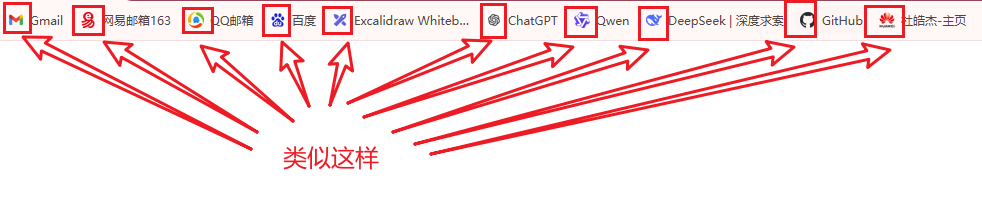
# favicon.ico 文件是浏览器收藏网址时显示的图标
# 当第一次访问页面时,浏览器会自动发起请求获取页面的 favicon.ico 文件;
# 当/favicon.ico文件不存在时,服务器会记录404日志。

172.25.254.1 - - [11/Apr/2026:14:01:17 +0800] "GET / HTTP/1.1" 200 54 "-" "Mozilla/5.0 (Windows NT 10.0; Win64; x64) AppleWebKit/537.36 (KHTML, like Gecko) Chrome/146.0.0.0 Safari/537.36" "-"
172.25.254.1 - - [11/Apr/2026:14:01:17 +0800] "GET /favicon.ico HTTP/1.1" 404 555 "http://172.25.254.44/" "Mozilla/5.0 (Windows NT 10.0; Win64; x64) AppleWebKit/537.36 (KHTML, like Gecko) Chrome/146.0.0.0 Safari/537.36" "-"
当一个站点没有设置favicon.ico时,access.log会记录了大量favicon.ico 404信息。
这样有两个缺点:
- 使access.log文件变大,记录很多没有用的数据。
- 因为大部分是favicon.ico 404信息,当要查看信息时,会影响搜寻效率。
4.1.10.2 解决办法
bash
# Nginx 配置中加入

location = /favicon.ico {
  log_not_found off;
  access_log off;
}


# 以上配置说明:
location = /favicon.ico 表示当访问/favicon.ico时,
log_not_found off 关闭日志
access_log off 不记录在access.log
4.1.11 附加参数
4.2 acces_log访问日志和error_log错误日志
4.2.1 具体展示
bash
[root@Nginx ~]# grep "access" /etc/nginx/nginx.conf
access_log  /var/log/nginx/access.log  main;


# main 就是这个定义的格式
log_format  main  '$remote_addr - $remote_user [$time_local] "$request" '
                  '$status $body_bytes_sent "$http_referer" '
                  '"$http_user_agent" "$http_x_forwarded_for"';


[root@Nginx ~]# grep "error" /etc/nginx/nginx.conf
error_log  /var/log/nginx/error.log notice;
bash
# 浏览器测试
- http://172.25.254.44
- http://172.25.254.44/333.html


[root@Nginx ~]# tail -f /var/log/nginx/access.log
172.25.254.1 - - [11/Apr/2026:16:07:32 +0800] "GET / HTTP/1.1" 304 0 "-" "Mozilla/5.0 (Windows NT 10.0; Win64; x64) AppleWebKit/537.36 (KHTML, like Gecko) Chrome/146.0.0.0 Safari/537.36" "-"


[root@Nginx ~]# tail -f /var/log/nginx/error.log
2026/04/11 16:08:06 [error] 1058#1058: *16 open() "/Page_Home/333.html" failed (2: No such file or directory), client: 172.25.254.1, server: 172.25.254.44, request: "GET /333.html HTTP/1.1", host: "172.25.254.44"
4.2.2 error_page自定义错误页面
bash
[root@Nginx ~]# vim /etc/nginx/conf.d/Page_Home.conf
server {
        listen  80;
        server_name   172.25.254.44;

        erroe_page 404 /404.html;

        location / {
                root    /Page_Home;
                index   index.html;
        }

        location = /404.html {
                root    /Page_Home;
                index   /404.html;
        }

}

[root@Nginx ~]# echo '!&&& Error_404_Error &&&!' > /Page_Home/404.html

[root@Nginx ~]# systemctl restart nginx

# 浏览器访问:http://172.25.254.44/3333

[root@Nginx nginx]# tail -f /var/log/nginx/access.log
2026/04/11 16:22:37 [error] 2497#2497: *3 open() "/Page_Home/3333" failed (2: No such file or directory), client: 172.25.254.1, server: 172.25.254.44, request: "GET /3333 HTTP/1.1", host: "172.25.254.44"
4.3 日志缓存open_log_file_cache(默认关闭)
大量访问到来时,对于每一条日志记录,都将是先打开文件,再写入日志,然后关闭.占用了系统的IO,与业务无关。
bash
# open_log_file_cache max=1000 inactive=20s min_uses=3 valid=1m ;

max=1000		日志文件的FD,最大的缓存数量为1000;
inactive=20s	文件在 20 秒内未被访问则淘汰;
min_uses=3		在 20 秒内至少被使用 3 次才会被缓存;
valid=1m		检查周期为1分钟;
默认!是关闭的。
存入内存比存入存储,更不值得,因为内存更贵!!!
bash
open_log_file_cache off; 4.4 Nginx日志轮转(切割)/etc/logrotate.d/nginx
bash
# 默认开启
# 用于控制系统日志的轮转(切割)行为的主配置文件
/etc/logrotate.conf以下为Nginx专用轮转文件配置
bash
[root@Nginx ~]# ls /etc/logrotate.d/nginx
/etc/logrotate.d/nginx

[root@Nginx ~]# cat /etc/logrotate.d/nginx
# 待轮转的日志
/var/log/nginx/*.log {
        daily		# 每天轮转一次(覆盖全局的weekly)
        missingok	# 日志不存在时,忽略错误,
        rotate 52	# 保留52个历史文件
        compress	# 轮转后压缩日志(变为.gz)
        delaycompress	# 延迟压缩:当前轮转的文件暂不压缩,下次轮转时才压缩
        notifempty	# 日志文件为空时不轮转
        create 640 nginx adm	# 轮转后新建日志文件,权限640,属主nginx,属组 adm
        sharedscripts
        postrotate	# 通知 Nginx 重新打开日志文件,开始写入新文件
                if [ -f /var/run/nginx.pid ]; then
                        kill -USR1 `cat /var/run/nginx.pid`
                fi
        endscript
}
bash
# 示例(带有日期格式的log文件)
[root@Nginx ~]# ll /var/log/nginx/
total 32
-rw-r----- 1 nginx adm  4152 Apr 11 16:23 access.log
-rw-r----- 1 nginx adm  1250 Apr 10 20:23 access.log-20260411
-rw-r----- 1 nginx adm  4521 Apr 11 16:23 error.log
-rw-r----- 1 nginx adm 10546 Apr 10 20:17 error.log-20260411
4.5 日志分析
4.5.1 分析常用awk $字段
bash
log_format  main  '$remote_addr - $remote_user [$time_local] "$request" '
                  '$status $body_bytes_sent "$http_referer" '
                  '"$http_user_agent" "$http_x_forwarded_for"';

# 常用字段(awk	默认使用空格来分割字段,除非-F指定)
$1		$remote_addr	 远程客户端地址
$4		$time_local		 本机时间
$7		$request		 请求URL路径
$9		$status			 状态码
$10		$body_bytes_sent 请求体积(字节数)
bash# 分析常用字段 [root@Nginx ~]# tail -2 /var/log/nginx/access.log 172.25.254.1 - - [11/Apr/2026:16:23:39 +0800] "GET /3333 HTTP/1.1" 404 26 "-" "Mozilla/5.0 (Windows NT 10.0; Win64; x64) AppleWebKit/537.36 (KHTML, like Gecko) Chrome/146.0.0.0 Safari/537.36" "-" 172.25.254.1 - - [11/Apr/2026:16:23:39 +0800] "GET /favicon.ico HTTP/1.1" 404 26 "http://172.25.254.44/3333" "Mozilla/5.0 (Windows NT 10.0; Win64; x64) AppleWebKit/537.36 (KHTML, like Gecko) Chrome/146.0.0.0 Safari/537.36" "-"
4.5.2 准备练习日志文件
bash
[root@Nginx ~]# cat > log_fenxi.log <<EOF
192.168.1.101 - - [10/Apr/2026:13:25:10 +0800] "GET /index.html HTTP/1.1" 200 3452 "-" "Mozilla/5.0 (Windows NT 10.0; Win64; x64) AppleWebKit/537.36"
192.168.1.102 - - [10/Apr/2026:13:25:15 +0800] "GET /images/logo.png HTTP/1.1" 200 12893 "http://example.com/index.html" "Mozilla/5.0 (Macintosh; Intel Mac OS X 10_15_7) AppleWebKit/537.36"
192.168.1.103 - - [10/Apr/2026:13:25:22 +0800] "POST /login.php HTTP/1.1" 302 568 "http://example.com/login" "Mozilla/5.0 (Windows NT 10.0; Win64; x64) AppleWebKit/537.36"
192.168.1.101 - - [10/Apr/2026:13:25:35 +0800] "GET /products.html HTTP/1.1" 200 7821 "http://example.com/index.html" "Mozilla/5.0 (iPhone; CPU iPhone OS 15_0 like Mac OS X) AppleWebKit/605.1.15"
192.168.1.104 - - [10/Apr/2026:13:25:47 +0800] "GET /css/style.css HTTP/1.1" 200 2047 "http://example.com/index.html" "Mozilla/5.0 (Windows NT 10.0; Win64; x64) AppleWebKit/537.36"
192.168.1.105 - - [10/Apr/2026:13:25:59 +0800] "GET /admin/config.php HTTP/1.1" 404 162 "-" "Mozilla/5.0 (Windows NT 10.0; Win64; x64) AppleWebKit/537.36"
192.168.1.102 - - [10/Apr/2026:13:26:12 +0800] "GET /api/users HTTP/1.1" 401 87 "http://example.com/api" "PostmanRuntime/7.26.8"
192.168.1.106 - - [10/Apr/2026:13:26:30 +0800] "GET /download/setup.exe HTTP/1.1" 206 10485760 "http://example.com/download" "Mozilla/5.0 (Windows NT 10.0; Win64; x64) AppleWebKit/537.36"
192.168.1.107 - - [10/Apr/2026:13:26:45 +0800] "GET /search?q=nginx+log+analysis HTTP/1.1" 200 5312 "http://example.com/search" "Mozilla/5.0 (X11; Linux x86_64) AppleWebKit/537.36"
192.168.1.101 - - [10/Apr/2026:13:27:01 +0800] "GET /favicon.ico HTTP/1.1" 404 162 "http://example.com/index.html" "Mozilla/5.0 (Windows NT 10.0; Win64; x64) AppleWebKit/537.36"
192.168.1.108 - - [10/Apr/2026:13:27:18 +0800] "HEAD / HTTP/1.1" 200 0 "-" "curl/7.68.0"
192.168.1.109 - - [10/Apr/2026:13:27:30 +0800] "GET /images/banner.jpg HTTP/1.1" 304 0 "http://example.com/index.html" "Mozilla/5.0 (Windows NT 10.0; Win64; x64) AppleWebKit/537.36"
192.168.1.103 - - [10/Apr/2026:13:27:44 +0800] "POST /api/upload HTTP/1.1" 413 189 "http://example.com/upload" "Mozilla/5.0 (Windows NT 10.0; Win64; x64) AppleWebKit/537.36"
192.168.1.110 - - [10/Apr/2026:13:28:00 +0800] "GET /private/data.csv HTTP/1.1" 403 98 "http://example.com/admin" "Mozilla/5.0 (Windows NT 10.0; Win64; x64) AppleWebKit/537.36"
192.168.1.101 - - [10/Apr/2026:13:28:15 +0800] "GET /index.html HTTP/1.1" 200 3452 "-" "Mozilla/5.0 (compatible; Googlebot/2.1; +http://www.google.com/bot.html)"
192.168.1.111 - - [10/Apr/2026:13:28:33 +0800] "GET / HTTP/1.1" 200 3521 "-" "Mozilla/5.0 (Windows NT 10.0; Win64; x64) AppleWebKit/537.36"
192.168.1.112 - - [10/Apr/2026:13:28:50 +0800] "GET /robots.txt HTTP/1.1" 200 123 "-" "Mozilla/5.0 (compatible; SemrushBot/7~bl; +http://www.semrush.com/bot.html)"
192.168.1.113 - - [10/Apr/2026:13:29:05 +0800] "GET /wp-admin/install.php HTTP/1.1" 404 162 "-" "python-requests/2.25.1"
192.168.1.114 - - [10/Apr/2026:13:29:22 +0800] "GET /assets/js/main.js HTTP/1.1" 200 8742 "http://example.com/index.html" "Mozilla/5.0 (Macintosh; Intel Mac OS X 10_15_7) AppleWebKit/537.36"
192.168.1.115 - - [10/Apr/2026:13:29:40 +0800] "GET /slow-api/process?id=123 HTTP/1.1" 200 456 "http://example.com/dashboard" "Mozilla/5.0 (Windows NT 10.0; Win64; x64) AppleWebKit/537.36" 4.523
EOF
4.5.3 练习条目
bash
# 常用字段(awk	默认使用空格来分割字段,除非-F指定)
$1		$remote_addr	 远程客户端地址
$4		$time_local		 本机时间
$7		$request		 请求URL路径
$9		$status			 状态码
$10		$body_bytes_sent 请求体积(字节数)

sort	(-n 数值排序 -r 反向排序 -k 指定列排序)	# 负责排序
uniq -c	(-c 统计次数)	# 负责统计
sort -rn # 找出最频繁
bash
# 统计独立IP数量
[root@Nginx ~]# awk '{print $1}' log_fenxi.log | sort | uniq -c | wc -l
15

# 找出访问最多的10个IP
[root@Nginx ~]# awk '{print $1}' log_fenxi.log | sort | uniq -c | sort -rn | head -10
      4 192.168.1.101
      2 192.168.1.103
      2 192.168.1.102
      1 192.168.1.115
      1 192.168.1.114
      1 192.168.1.113
      1 192.168.1.112
      1 192.168.1.111
      1 192.168.1.110
      1 192.168.1.109

# 统计各个 HTTP 状态码的数量
[root@Nginx ~]# awk '{print $9}' log_fenxi.log | sort | uniq -c | sort -rn
     11 200
      3 404
      1 413
      1 403
      1 401
      1 304
      1 302
      1 206

# 找出所有 404 错误的请求路径
[root@Nginx ~]# awk '$9 == 404 {print $7}' log_fenxi.log
/admin/config.php
/favicon.ico
/wp-admin/install.php

# 统计前五热门 URL
[root@Nginx ~]# awk '{print $7}' log_fenxi.log | sort | uniq -c | sort -rn | head -5
      2 /index.html
      2 /
      1 /wp-admin/install.php
      1 /slow-api/process?id=123
      1 /search?q=nginx+log+analysis

# 统计热门 URL(排除静态资源)
[root@Nginx ~]# awk '{print $7}' log_fenxi.log | grep -vE '\.(css|js|png|jpg|ico|gif)$' | sort | uniq -c | sort -rn | head -5
      2 /index.html
      2 /
      1 /wp-admin/install.php
      1 /slow-api/process?id=123
      1 /search?q=nginx+log+analysis

# 找出可疑扫描行为 (连续多个不同路径来自同一IP)
[root@Nginx ~]# awk '{print $1,$7}' log_fenxi.log | sort | uniq -c | awk '$1 > 1 {print $2,$3}'
192.168.1.101 /index.html