1. Linux文件IO的基础函数
在Linux中,一切皆文件,所以学习文件IO是执行其他操作的基础。常用的函数有open、write、close、 lseek。
1.1 open 打开文件
#include <sys/types.h>
#include <sys/stat.h>
#include <fcntl.h>
int open(const char *pathname, int flags);
int open(const char *pathname, int flags, mode_t mode);
1.2 write 写文件
#include <unistd.h>
ssize_t write(int fd, const void *buf, size_t count);
1.3 read 读文件
#include <unistd.h>
ssize_t read(int fd, void *buf, size_t count)
1.4 close 关闭文件
#include <unistd.h>
int close(int fd)
1.5 lseek计算偏移量
对于每个打开的文件,系统都会记录它的读写位置偏移量,我们也把这个读写位置偏移量称为读写偏移
量,记录了文件当前的读写位置,当调用read()或write()函数对文件进行读写操作时,就会从当前读写位置
偏移量开始进行数据读写。
#include <sys/types.h>
#include <unistd.h>
off_t lseek(int fd, off_t offset, int whence);
2.程序实例
通过一个程序示例,熟悉这个四个函数的用法,首先打开一个文件,然后对其进行读写操作,随后显示读写的内容,并关闭该文件。
cpp
#include <sys/types.h>
#include <sys/stat.h>
#include <fcntl.h>
#include <unistd.h>
#include <stdio.h>


//open file

int main(void)
{
char buff[1024];
char buff_w[20]={"9876543210"};
ssize_t fr,fw;
int fd1;
int ret;
int fc;
int i;

fd1 = open("./a.txt", O_RDWR);
if (-1 == fd1){
 	perror("open");
	return fd1;

}


fr =  read( fd1, buff, 15);
if (-1==fr)
	printf("read error!\n");
else
	printf("read data sucessfully!\n");


printf("The data is:\n");

for(i=0;i<15;i++)
{
putchar(buff[i]);

}

printf("\n");


// lseek function
off_t off = lseek(fd1, 0, SEEK_END);
if (-1 == off)
	{

	printf("lseek error\n!");
	}


fw = write(fd1, buff_w,10);
if (-1 == off)
	{

	printf("write error\n!");
	}


fc = close(fd1);

if (-1==fc)
        printf("close error!\n");
else
        printf("close  sucessfully!\n");


}
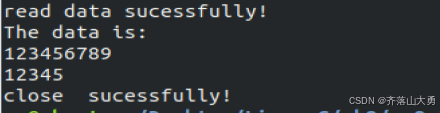
程序运行的结果: