一、需求背景
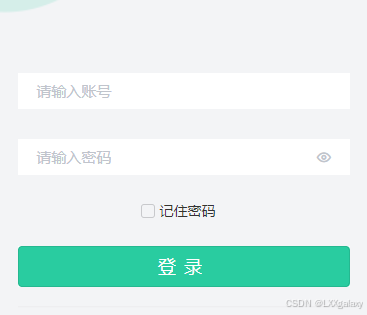
在程序登录场景里,用户经常反复输入账号密码。
"记住密码"功能可以减少重复输入,提升登录效率和体验。
本次改造目标:
- 在登录页新增"记住密码"勾选项;
- 登录成功时按勾选状态保存/清理账号密码;
- 页面再次进入时自动回填账号密码;
- 保持现有 Vue3 + TypeScript + uni-app 代码结构不破坏。
二、实现思路总览
整体分为 4 个步骤:
- UI 层 :在密码输入框下增加一个
u-checkbox; - 状态层 :新增
rememberMe响应式状态; - 持久化层 :通过
cache保存remember_me / username / password; - 生命周期和登录流程 :
onLoad时读取缓存并回填;loginHandle成功后根据勾选状态保存或清理缓存。
三、关键代码落地(Vue3 + TS)
1)模板层:增加复选框
在 packages/core/src/pages/login/login.vue 的密码输入框下插入:
u-checkbox绑定v-model="rememberMe";- 监听
@change="onRememberMeChange"; - 文案展示"记住密码"。
这样就完成了用户交互入口。
2)脚本层:定义缓存 key 与状态
新增常量与状态:
REMEMBER_ME_KEY = "remember_me"REMEMBERED_USERNAME_KEY = "remembered_username"REMEMBERED_PASSWORD_KEY = "remembered_password"rememberMe = ref(false)
并增加变更处理函数:
onRememberMeChange(val):将组件回调值统一转为布尔值。
3)onLoad 回填逻辑
页面进入时先读取缓存:
- 读取
remember_me; - 若为 true,则回填
formData.username和formData.password; - 若为 false,则保持空值。
注意:本项目登录页有 userStore.logout() 流程,回填逻辑应在不受登出影响的位置执行,确保记住密码数据可用。
4)登录成功后的保存/清理
在 loginHandle 中处理:
- 勾选时:
- 保存
remember_me = true - 保存账号和密码;
- 保存
- 未勾选时:
- 清理
remember_me、账号、密码缓存。
- 清理
同时增加 access_token 判空保护,避免异常情况下误进入后续流程。
四、边界与注意事项
1)安全风险说明(必须关注)
当前方案是"便捷优先"实现:直接缓存密码。
对高安全场景建议升级为:
- 仅记住账号,不记住明文密码;
- 或保存加密凭证(如短期 token),由服务端二次校验;
- 配合设备级安全能力(如系统密钥链/安全存储)。
2)多端兼容
uni-app 多端下,cache 会适配不同存储实现。
只要统一通过项目封装的 cache 工具进行读写,可保持行为一致。
3)登录失败策略
当前实现中,如果用户未勾选"记住密码",登录失败也会清理历史缓存,保证状态一致性,避免"勾选状态与缓存内容不一致"。
五、测试用例清单(建议)
建议至少覆盖以下用例:
- 首次进入登录页:默认不回填;
- 勾选记住密码并登录成功:重进页面应回填;
- 取消勾选并登录成功:重进页面不回填;
- 勾选状态切换后立即登录:结果与勾选一致;
- 登录失败场景:未勾选时缓存被清理;
- 小程序真机(Android/iOS)与开发者工具行为一致。
六、可复用实现清单
如果要在其他项目快速复用,至少同步以下内容:
- 模板中的复选框片段;
remember三个缓存 key;rememberMe状态与onRememberMeChange;onLoad回填逻辑;loginHandle保存/清理逻辑;- 对应样式
.remember-me-container与.remember-me .u-form-item。
七、总结
"记住密码"看似简单,本质上是一个UI、状态、存储、登录流程 联动功能。
在 Vue3 + TypeScript + uni-app 中,推荐按"组件交互 → 状态管理 → 生命周期回填 → 登录后持久化"这条链路实现,既清晰又可维护。
本次改造已在 packages/core/src/pages/login/login.vue 完成落地,可直接供 apps/bdss-ui-hapm 登录页使用。
贴一个完整的页面在这里吧
html
<template>

    <view class="login-content">
        <div class="goBack" @click="goBack()">
            <image :src="'/static/images/icon/icon_back.png'"></image>
        </div>
        <u-form ref="uFormRef">
            <view class="login-title">
                <image :src="'/static/images/login/title.png'" />
            </view>

            <u-form-item prop="username" class="userinput" :borderBottom="false">
                <u-input placeholder="请输入账号" v-model="formData.username" clearable style="width:100%"></u-input>
            </u-form-item>
            <u-form-item prop="password" class="userinput" :borderBottom="false">
                <u-input placeholder="请输入密码" v-model="formData.password" type='password' clearable style="width:100%"></u-input>
            </u-form-item>

            <div prop="rememberMe" class="remember-me" :borderBottom="false">
                <view class="remember-me-container">
                    <u-checkbox v-model="rememberMe" size="28" active-color="#647bf9" :icon-size="28" @change="onRememberMeChange">
                        <text style="font-size: 28rpx; color: #333;">记住密码</text>
                    </u-checkbox>
                </view>
            </div>

            <u-form-item labelWidth="0" class="login-btn agree-content">
                <button class="login-button text-white" :style="{'backgroundColor':themeColorsRef.ThemePrimaryColor}" @click="handleLogin(formData.scene)">
                    登录
                </button>
            </u-form-item>
        </u-form>

        <view class="xieyi-box">
            <u-checkbox v-model="isCheckAgreement" size="28" style="margin-right:0">
            </u-checkbox>
            <text style="font-size:14px">
                我已阅读并同意
                <text :style="{'color':themeColorsRef.ThemeBorderOrLineColor}" @click="toYsxyPage">《隐私协议》</text>
                。
            </text>
        </view>
    </view>
</template>

<script setup lang="ts">
import {
    mobileLogin,
    accountLogin,
    mnpLogin,
    OALogin,
    getTenantListByUsername,
} from "@/api/account";
import { smsSend, queryTenantList } from "@/api/app";
import { getUserCenter, userEdit } from "@/api/user";
import { BACK_URL } from "@/enums/cacheEnums";
import { useLockFn } from "@/hooks/useLockFn";
import { useAppStore } from "@/stores/app";
import { useUserStore } from "@/stores/user";
import cache from "@/utils/cache";
import wechatOa from "@/utils/wechat";
import { isWeixinClient } from "@/utils/client";
import { onLoad, onShow } from "@dcloudio/uni-app";
import { computed, reactive, ref, shallowRef } from "vue";
import { navigateTo } from "@/utils/util";
import { mosModulelogin } from "@/utils/mosSdk";
import themeColors from "@/utils/theme"
import { TENANT_ID_KEY} from '@/enums/cacheEnums'
import { setLoggingIn } from "@/utils/request"

const themeColorsRef=computed(()=>{
    return themeColors
})

const appName = import.meta.env.VITE_APP_NAME;
// 判断是否为「京能 App」
const isJnApp =
    // #ifdef APP
    true &&
    // #endif
    // #ifndef APP
    false &&
    // #endif
    appName === "jn";
enum LoginTypeEnum {
    MOBILE = "mobile",
    ACCOUNT = "account",
}

enum LoginWayEnum {
    ACCOUNT = 1,
    MOBILE = 2,
}

const isWeixin = ref(true);
const showLoginPopup = ref(false);
// #ifdef H5
isWeixin.value = isWeixinClient();
// #endif

const userStore = useUserStore();
const appStore = useAppStore();

const websiteConfig = computed(() => appStore.getWebsiteConfig || {});
const uCodeRef = shallowRef();
const loginWay = ref<LoginWayEnum>(LoginWayEnum.ACCOUNT);
const codeTips = ref("");
const isCheckAgreement = ref(false);
const loginData = ref<any>({});
const showTenantList = ref(false);
const REMEMBER_ME_KEY = "remember_me";
const REMEMBERED_USERNAME_KEY = "remembered_username";
const REMEMBERED_PASSWORD_KEY = "remembered_password";
const rememberMe = ref(false);
const formData = reactive({
    scene: "",
    username: "",
    password: "",
    code: "",
    mobile: "",
});

const onRememberMeChange = (val: boolean | any) => {
    rememberMe.value = Boolean(val);
};

const tenantList = ref([]);

const getTenantList = async () => {
    const { data } = await queryTenantList();

    const currentDomain = getCurrentDomain();

    tenantList.value = data.map((item: any) => {
        if (item.tenantDomain === currentDomain) {
            cache.set(TENANT_ID_KEY, item.id);
        }
        return {
            text: item.name,
            id: item.id,
            subText: cache.getTenant() === item.id ? "当前" : "",
        };
    });
};

// 根据域名获取租户ID
const getCurrentDomain = () => {
    // #ifdef H5
    return window.location.hostname;
    // #endif
    // #ifndef H5
    return ""; // 非H5环境根据实际情况处理
    // #endif
};

// 修改/忘记密码
const handleClick = (index: number) => {
    const tenant = tenantList.value[index];
    cache.set(TENANT_ID_KEY, tenant.id);
};

const codeChange = (text: string) => {
    codeTips.value = text;
};

const sendSms = async () => {
    if (!formData.mobile || formData.mobile.length !== 11) {
        uni.$u.toast("手机号不合法");
        return;
    }
    if (uCodeRef.value?.canGetCode) {
        await smsSend(formData.mobile);
        uni.$u.toast("发送成功");
        uCodeRef.value?.start();
    }
};

const changeLoginWay = (type: LoginTypeEnum, way: LoginWayEnum) => {
    formData.scene = type;
    loginWay.value = way;
};

const checkAgreement = async () => {
    if (!isCheckAgreement.value)
        return Promise.reject(
            "请勾选底部已阅读并同意《服务协议》和《隐私协议》"
        );
};

const loginHandle = async (data: any) => {
    const { access_token, tenant_id } = data;
    if (!access_token) {
        uni.$u.toast("登录失败:缺少访问令牌");
        return;
    }
    // 标记登录流程开始,防止旧页面飞行中的 424 请求误触发跳转登录页
    setLoggingIn(true);
    if (rememberMe.value) {
        cache.set(REMEMBER_ME_KEY, true);
        cache.set(REMEMBERED_USERNAME_KEY, formData.username);
        cache.set(REMEMBERED_PASSWORD_KEY, formData.password);
    } else {
        cache.remove(REMEMBER_ME_KEY);
        cache.remove(REMEMBERED_USERNAME_KEY);
        cache.remove(REMEMBERED_PASSWORD_KEY);
    }
    userStore.login(access_token,tenant_id);
    await userStore.getUser();
    uni.$u.toast("登录成功");
    uni.hideLoading();
    uni.reLaunch({
        url: "/pages/index/index",
        complete: () => {
            // reLaunch 完成后清除标志,恢复正常的 424 处理
            setTimeout(() => setLoggingIn(false), 1000);
        }
    });
};
const loginFun = async (scene: LoginTypeEnum) => {
    try {
        if (!isCheckAgreement.value) {
            return uni.$u.toast("请勾选底部已阅读并同意《隐私协议》");
        }
        if (scene == LoginTypeEnum.ACCOUNT) {
            if (!formData.username) return uni.$u.toast("请输入账号/手机号码");
            if (!formData.password) return uni.$u.toast("请输入密码");
        }
        if (scene == LoginTypeEnum.MOBILE) {
            if (!formData.mobile) return uni.$u.toast("请输入手机号码");
            if (!formData.code) return uni.$u.toast("请输入验证码");
        }
        uni.showLoading({
            title: "请稍后...",
        });

        let data;
        if (isJnApp) {
            switch (scene) {
                case LoginTypeEnum.MOBILE:
                    data = await mobileLogin(formData);
                    break;
                default:
                    const mosCode = await mosModulelogin(formData.username);
                    // const mosCode = await mosModulelogin("appadmin");
                    if (mosCode) {
                        const tenantList = await getTenantListByUsername(
                            formData.username
                        )
                        userStore.setTenantId(tenantList.data[0] || "1");
                        appStore.setCode(tenantList.data[0] || "1");
                        data = await accountLogin(formData)
                        await userStore.setUserLoginInfo(formData);
                    }
                    break;
            }
        } else {
            switch (scene) {
                case LoginTypeEnum.MOBILE:
                    data = await mobileLogin(formData);
                    break;
                default:

                    const tenantList = await getTenantListByUsername(
                        formData.username
                    );
                    userStore.setTenantId(tenantList.data[0] || "1");
                    appStore.setCode(tenantList.data[0] || "1");
                    data = await accountLogin(formData);
                    await userStore.setUserLoginInfo(formData);
                    break;
            }
        }
        if (data) {
            loginHandle(data);
        }
    } catch (error: any) {
        uni.hideLoading();
        if (!rememberMe.value) {
            cache.remove(REMEMBER_ME_KEY);
            cache.remove(REMEMBERED_USERNAME_KEY);
            cache.remove(REMEMBERED_PASSWORD_KEY);
        }
        uni.$u.toast(error?.kMosCallbackError || error?.message || "登录失败");
    }
};

const { lockFn: handleLogin } = useLockFn(loginFun);

const { lockFn: wxLogin } = useLockFn(async () => {
    try {
        await checkAgreement();
        // #ifdef MP-WEIXIN
        uni.showLoading({
            title: "请稍后...",
        });
        const { code }: any = await uni.login({
            provider: "weixin",
        });
        const data = await mnpLogin(code);
        loginData.value = data;
        const { access_token,tenant_id } = data;

        // 临时用户没有昵称
        userStore.login(access_token,tenant_id);
        const res = await getUserCenter();
        if (!res.data.appUser.nickname) {
            uni.hideLoading();
            userStore.temToken = access_token;
            showLoginPopup.value = true;
            return;
        }
        loginHandle(data);
        // #endif
        // #ifdef H5
        if (isWeixin.value) {
            wechatOa.getUrl();
        }
        // #endif
    } catch (error) {
        uni.$u.toast(error);
    }
});

const handleUpdateUser = async (value: any) => {
    await userEdit(value);
    showLoginPopup.value = false;
    loginHandle(loginData.value);
};

onShow(async () => {
    // 使用 reLaunch 跳转到登录页时页面栈已清空,不需要在此处自动返回
    // 避免旧 token 残留时调用 getUser 触发 424 再次跳转,形成死循环
});
onLoad(async (options) => {
    // 进入登录页时立即屏蔽飞行中的旧请求 424 跳转,防止与登录流程竞争
    setLoggingIn(true);
    const savedRememberMe = cache.get(REMEMBER_ME_KEY);
    rememberMe.value = Boolean(savedRememberMe);
    if (rememberMe.value) {
        formData.username = cache.get(REMEMBERED_USERNAME_KEY) || "";
        formData.password = cache.get(REMEMBERED_PASSWORD_KEY) || "";
    }
    // 清空用户信息
    userStore.logout();
    // 获取租户列表
    await getTenantList();

    if (userStore.isLogin) {
        // 已经登录 => 首页
        uni.reLaunch({
            url: "/pages/index/index",
        });
        return;
    }

    // #ifdef H5
    const { code, state } = options;
    if (!isWeixin.value) return;
    if (code) {
        const data = await OALogin(code);

        if (data) {
            loginHandle(data);
        }
    }
    // #endif
});
const goBack = () => {
    uni.navigateBack({
        delta: 1, // 返回上一页(delta为1表示返回上一页)
    });
};

const toYsxyPage = () => {
    uni.navigateTo({
        url: "/pages_login/agreement/yinsi",
    });
};
</script>

<style lang="scss">
page {
    height: 100%;
}

.login-content {
    background: url("@/static/images/login/bg.png") no-repeat;
    height: 100vh;
    width: 100%;
    background-size: 100% 100%;

    .u-form-item {
        position: relative;
        // background-color: #fff;
        width: 85%;
        margin: 0 auto;
        padding-bottom: 40rpx !important;
    }

    .u-form-item__body {
        background-color: #fff;
    }

    .u-form-item--right {
        color: #333333;
        opacity: 1;
    }

    .userinput {
        .u-form-item {
            .u-form-item__body {
                padding-left: 20rpx !important;
                padding-right: 20rpx !important;
            }
        }
    }
}

.login-content .agree-content .u-form-item {
    background-color: transparent !important;
}

.xieyi-box {
    position: fixed;
    width: 100vw;
    bottom: 70rpx;
    left: 0;
    display: flex;
    justify-content: center;
    align-items: center;
    z-index: 1111;

    .u-checkbox {
        .u-checkbox__label {
            margin-right: 0rpx !important;
            display: flex !important;
            align-items: center !important;
        }
    }
    .u-checkbox__icon-wrap--checked{
        background-color: v-bind('themeColorsRef.ThemePrimaryColor') !important;
        border-color:v-bind('themeColorsRef.ThemePrimaryColor') !important;

    }
}

.remember-me-container {
    display: flex;
    justify-content: center;
    margin-bottom: 20rpx;
    padding: 0 75rpx;
    min-height: 60rpx;
    align-items: center;
    cursor: pointer;
}

.remember-me .u-form-item {
    background-color: transparent !important;
    padding: 0 !important;
    margin: 0 auto !important;
    width: auto !important;
}

.login-title {
    font-family: FZCHSJW--GB1-0;
    font-size: 68rpx;
    font-weight: normal;
    font-stretch: normal;
    line-height: 36rpx;
    letter-spacing: 4rpx;
    color: #647bf9;
    height: 65rpx;
    margin: 240rpx 0 160rpx 55rpx;
    display: inline-block;

    image {
        height: 100%;
        width: 303rpx;
    }
}

.login-button {
    font-family: SourceHanSansCN-Medium;
    font-size: 36rpx;
    font-weight: normal;
    font-stretch: normal;
    letter-spacing: 16rpx;
    color: #ffffff;
    text-align: center;
    line-height: 80rpx;
    border-radius: 8rpx;
    width: 100%;
}

.login-content .login-btn .u-form-item--right {
    padding-left: 0 !important;
}

.weixin-login {
    font-family: PingFang-SC-Bold;
    font-size: 30rpx;
    font-weight: normal;
    font-stretch: normal;
    letter-spacing: 2rpx;
    color: #647bf9;
    width: 100%;
    text-align: center;
    margin-top: 45rpx;
}

.goBack {
    width: 20rpx;
    height: 32rpx;
    position: absolute;
    top: 90rpx;
    left: 40rpx;
    cursor: pointer;

    image {
        width: 100%;
        height: 100%;
    }
}
</style>